
python openstacksdk
调用方法
参考地址
https://github.com/openstack/openstacksdk
注意事项
1、需要安装openstacksdk。我这里装的好像是1.5版本的。opentask接口是v3版本的
2、clouds.yaml配置
2.1、openstack region list 获取yaml配置的域信息 ragion_name ,
2.2、也可以通过配置less /etc/neutron/neutron.conf 获取 region_name
2.3、mordred 应该对应的参数这里。
openstack.connect(cloud='mordred')
2.4、用户密码用控制台页面登录时使用的用户密码就可以
2.5、项目名称,这个admin,比如
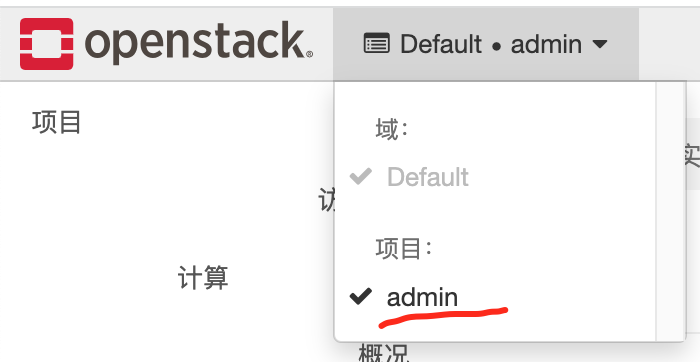
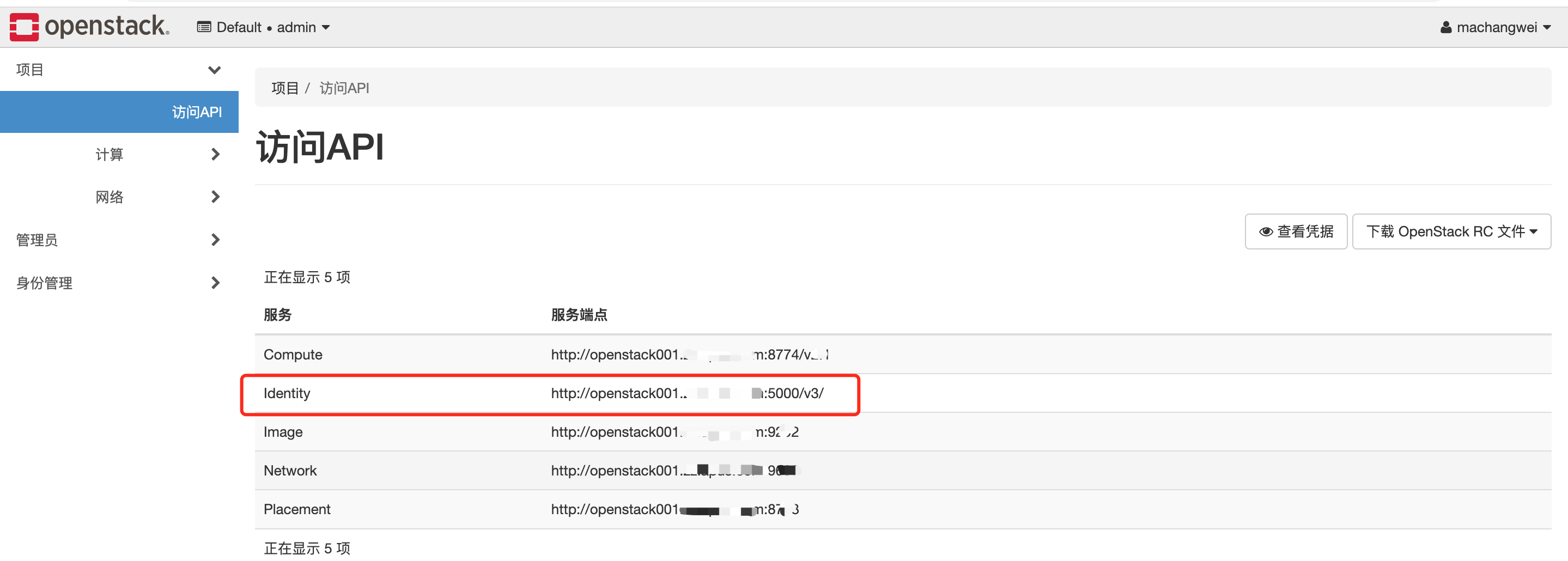
2.6、auth_url用admin-openrc环境变量中的OS_AUTH_URL就可以。不过注意,内网和外网解析的域名可能不一致,要保证代码调用时解析是对的,也可以直接用IP代替,如果网络通的话。
# cat admin-openrc
export OS_PROJECT_DOMAIN_NAME=Default
export OS_USER_DOMAIN_NAME=Default
export OS_PROJECT_NAME=admin
export OS_USERNAME=admin
export OS_PASSWORD=xxx
export OS_AUTH_URL=http://openstack.xx.xx:5000/v3
export OS_IDENTITY_API_VERSION=3
export OS_IMAGE_API_VERSION=2
2.7、yaml配置在程序同级目录就可以。会从同级目录下找到配置
2.8、之前保存找域在项目中,所以我加了两个参数,并且值是默认。我登录open stack时,填的的就是default域
      user_domain_name: 'default'

      project_domain_name: 'default'
参考示例
openstacksdk 旨在与任何 OpenStack 云对话。为此,需要一个 配置文件。 openstacksdk 支持 clouds.yaml 文件,但也可以 使用环境变量。 clouds.yaml 文件应由您的 云提供商或部署工具。一个例子:
clouds:

  mordred:

    region_name: Dallas

    auth:

      username: 'mordred'

      password: XXXXXXX

      project_name: 'demo'

      auth_url: 'https://identity.example.com'
openstacksdk 将在以下位置查找clouds.yaml 文件:
.(当前目录)$HOME/.config/openstack/etc/openstack
openstacksdk 由三层组成。大多数用户会使用代理 层。使用上面的clouds.yaml,考虑列出服务器:
import openstack

# Initialize and turn on debug logging

openstack.enable_logging(debug=True)

# Initialize connection

conn = openstack.connect(cloud='mordred')

# List the servers

for server in conn.compute.servers():

    print(server.to_dict())
实际使用案例
可以结合pandas,将获取的信息写入表格中
pandas: https://www.cnblogs.com/machangwei-8/p/16747912.html
实际案例如下:clouds.yaml
clouds:

  mordred:

    region_name: 'A*_zz'

    auth:

      username: 'machangwei2'

      password: '***'

      project_name: 'admin'

      auth_url: 'http://10.*.*.*:5000/v3'

      user_domain_name: 'default'

      project_domain_name: 'default'
import openstack

openstack.enable_logging(debug=True)

# Initialize connection

conn = openstack.connect(cloud='mordred')

for server in conn.compute.servers():

    print(server.to_dict())
也可以一个配置文件连接多个openstack集群,下面就是指定了测试和生产两个环境的配置,如下
clouds:

  mordred:

    region_name: 'A**'

    auth:

      username: 'machangwei2'

      password: '1xx'

      project_name: 'admin'

      auth_url: 'http://10.*.*.*:5000/v3'

      user_domain_name: 'default'

      project_domain_name: 'default'

  machangwei:

    region_name: 'A**-prod'

    auth:

      username: 'machangwei2'

      password: '1**'

      project_name: 'admin'

      auth_url: 'http://10.*.*.*::35987/v3'

      user_domain_name: 'default'

      project_domain_name: 'default'
在实例化的时候,指定连接的配置名就可以
conn = openstack.connect(cloud='machangwei')
import openstack

openstack.enable_logging(debug=True)

# Initialize connection

conn = openstack.connect(cloud='mordred')

i=0

myli=[]

for server in conn.compute.servers():

    dic={}

    i+=1

    # if i==2:

    #     break

    myserver=server.to_dict()

    for netname in myserver.get('addresses'):

        ipaddr=myserver.get('addresses').get(netname)[0].get('addr')

    compute_host=myserver.get('compute_host')

    insid=myserver.get('id')

    status=myserver.get('status')

    vm_state=myserver.get('vm_state')

    name=myserver.get('name')

    owner=myserver.get('metadata').get('owner')

    app=myserver.get('metadata').get('app')

    myenv=myserver.get('metadata').get('env')

    team=myserver.get('metadata').get('team')

    flavorname=myserver.get('flavor').get('name')

    dic['name']=name

    dic["ipaddr"]=ipaddr

    dic["flavorname"]=flavorname

    dic['owner']=owner

    dic['app']=app

    dic['myenv']=myenv

    dic['team']=team

    dic["compute_host"]=compute_host

    dic["netname"]=netname

    dic['insid']=insid

    dic['status']=status

    dic['vm_state']=vm_state

    myli.append(dic)

print(myli)

import pandas as pd

df = pd.DataFrame(myli)

df.to_excel("output-test.xlsx", index=False)
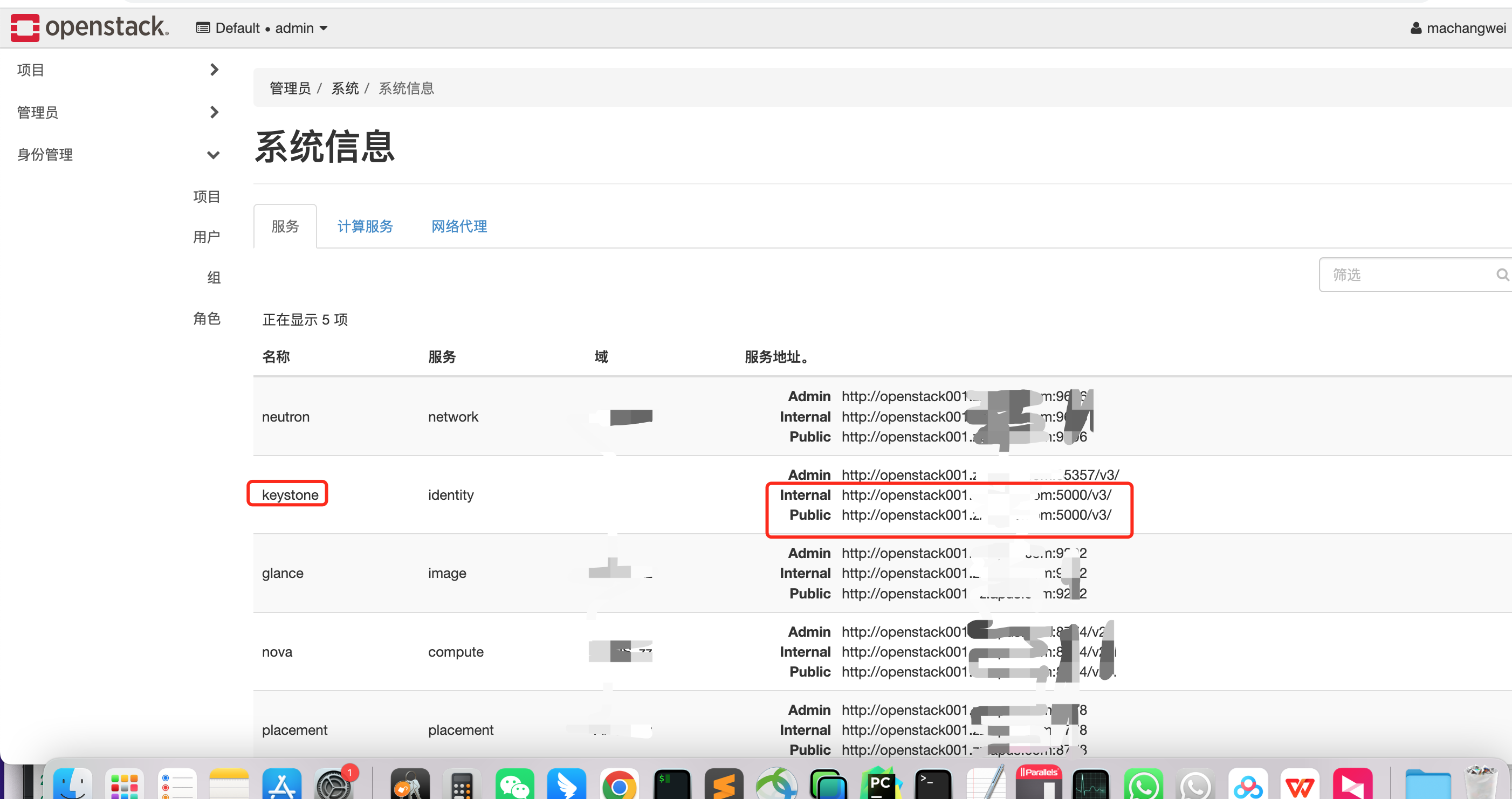
当有域名报错的时候:将该域名添加本地解析。因为openstack的域名,有两个解析地址,这里用的是内网的解析地址
vim /etc/hosts
上面的请求地址,应该是keystone的地址
打印所有宿主机情况
import openstack

openstack.enable_logging(debug=True)

# Initialize connection

conn = openstack.connect(cloud='mordred')

# 获取所有宿主机列表

hypervisors = conn.list_hypervisors()

# 遍历宿主机列表并输出信息

for hypervisor in hypervisors:

    print(hypervisor)
打印的结果之一:
{'host': 'openstack008.x.ax.com', 'disabled_reason': None, 'id': 'd1c7sssxx2cff3220d'},

vcpus_used=52,

hypervisor_type=QEMU,

local_gb_used=3300,

vcpus=32,

hypervisor_hostname=openstack008.xx.xx.com,

memory_mb_used=102916,

memory_mb=128802,

current_workload=0,

state=up,

host_ip=10.x.x.8,

cpu_info={'arch': 'x86_64', 'model': 'Haswell-noTSX-IBRS', 'vendor': 'Intel', 'features': ['pge', 'avx', 'xsaveopt', 'clflush', 'sep', 'syscall', 'tsc_adjust', 'tsc-deadline', 'dtes64', 'stibp', 'invpcid', 'tsc', 'fsgsbase', 'xsave', 'vmx', 'erms', 'xtpr', 'cmov', 'smep', 'ssse3', 'est', 'pat', 'monitor', 'smx', 'pbe', 'lm', 'msr', 'nx', 'fxsr', 'tm', 'sse4.1', 'pae', 'sse4.2', 'pclmuldq', 'cx16', 'pcid', 'fma', 'vme', 'popcnt', 'mmx', 'osxsave', 'cx8', 'mce', 'de', 'rdtscp', 'ht', 'dca', 'lahf_lm', 'abm', 'md-clear', 'pdcm', 'mca', 'pdpe1gb', 'apic', 'sse', 'f16c', 'pse', 'ds', 'invtsc', 'pni', 'tm2', 'avx2', 'aes', 'sse2', 'ss', 'ds_cpl', 'arat', 'bmi1', 'bmi2', 'acpi', 'spec-ctrl', 'fpu', 'ssbd', 'pse36', 'mtrr', 'movbe', 'rdrand', 'x2apic'], 'topology': {'cores': 8, 'cells': 2, 'threads': 2, 'sockets': 1}},

running_vms=20,

free_disk_gb=18963,

hypervisor_version=2010000,

disk_available_least=17835,

local_gb=22263,

free_ram_mb=25886,

id=51adee0d-e0ce-xxxcbada678,

location=Munch({'cloud': 'mordred', 'region_name': 'APUS_zz', 'zone': None, 'project': Munch({'id': 'ac552675cxxxxf83xx67', 'name': 'admin', 'domain_id': None, 'domain_name': 'default'})})
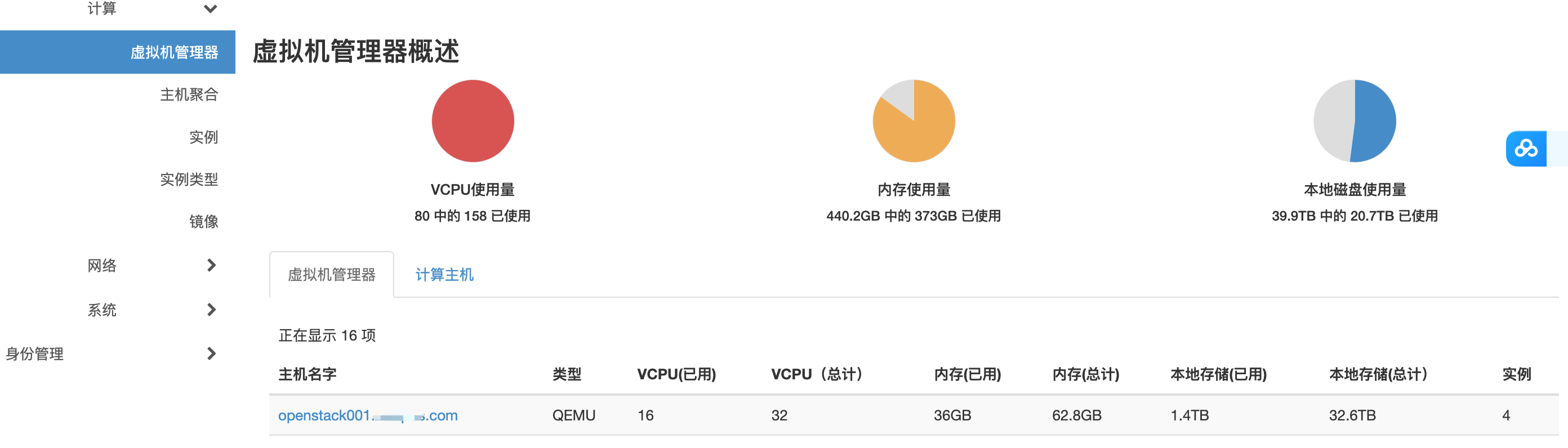
openstack.compute.v2.hypervisor.Hypervisor(status=disabled, service={'host': 'openstack001xxom', 'disabled_reason': None, 'id': '05d2029xxx-a8fdd4afc929'}, vcpus_used=16, hypervisor_type=QEMU, local_gb_used=1384, vcpus=32, hypervisor_hostname=openstxxxxxxs.com, memory_mb_used=36864, memory_mb=64326, current_workload=0, state=up, host_ip=10.11.4.1, cpu_info={'arch': 'x86_64', 'model': 'Haswell-noTSX', 'vendor': 'Intel', 'features': ['pge', 'avx', 'xsaveopt', 'clflush', 'sep', 'syscall', 'tsc_adjust', 'tsc-deadline', 'dtes64', 'invpcid', 'tsc', 'fsgsbase', 'xsave', 'vmx', 'erms', 'xtpr', 'cmov', 'smep', 'pcid', 'est', 'pat', 'monitor', 'smx', 'pbe', 'lm', 'msr', 'nx', 'fxsr', 'tm', 'sse4.1', 'pae', 'sse4.2', 'pclmuldq', 'acpi', 'fma', 'vme', 'popcnt', 'mmx', 'osxsave', 'cx8', 'mce', 'de', 'rdtscp', 'ht', 'dca', 'lahf_lm', 'abm', 'pdcm', 'mca', 'pdpe1gb', 'apic', 'sse', 'f16c', 'pse', 'ds', 'invtsc', 'pni', 'tm2', 'avx2', 'aes', 'sse2', 'ss', 'ds_cpl', 'arat', 'bmi1', 'bmi2', 'ssse3', 'fpu', 'cx16', 'pse36', 'mtrr', 'movbe', 'rdrand', 'cmt', 'x2apic'], 'topology': {'cores': 8, 'cells': 2, 'threads': 2, 'sockets': 1}}, running_vms=4, free_disk_gb=32011, hypervisor_version=2010000, disk_available_least=28205, local_gb=33395, free_ram_mb=27462, id=9bdb28a8-xxxd919d55ac, location=Munch({'cloud': 'mordred', 'region_name': 'APxxx_zz', 'zone': None, 'project': Munch({'id': 'ac552675cexx69e0867', 'name': 'admin', 'domain_id': None, 'domain_name': 'default'})}))
可以点取值。也可以get取值
import openstack

openstack.enable_logging(debug=True)

# Initialize connection

conn = openstack.connect(cloud='mordred')

# 获取所有宿主机列表

hypervisors = conn.list_hypervisors()

# 遍历宿主机列表并输出信息

i=1

for hypervisor in hypervisors:

    i+=1

    if i==3:

        break

    hostname=hypervisor.get('id')

    mytype=hypervisor.hypervisor_type

    print(hostname,mytype)
9bdb28axxxxx85c-42bd919d55ac QEMU
上面不对,从这里找
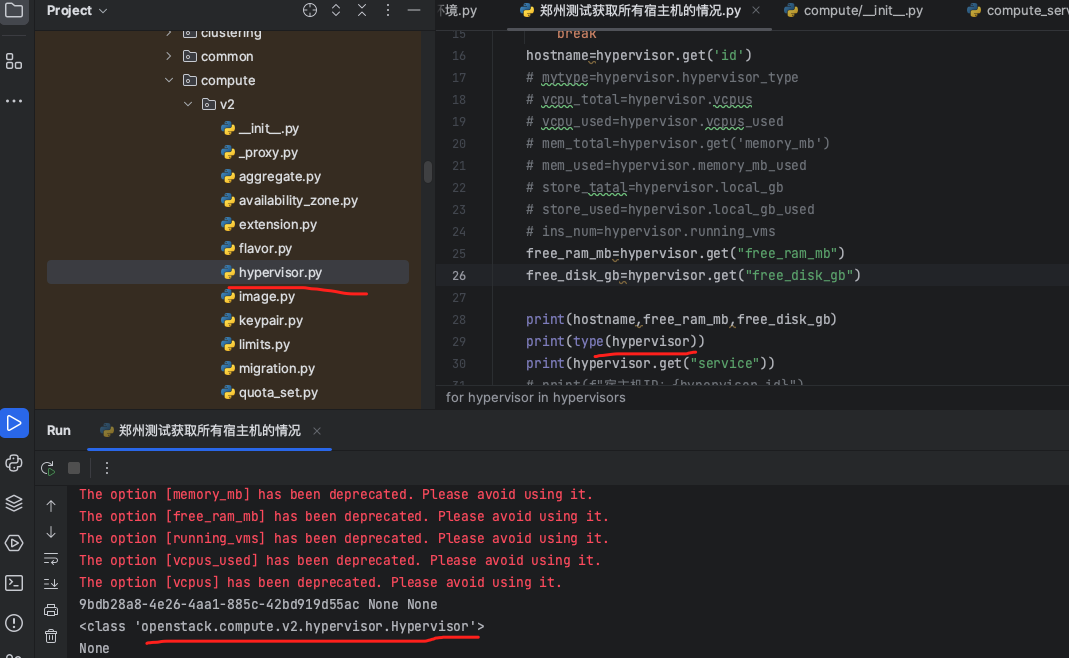

class Hypervisor(resource.Resource):

    resource_key = 'hypervisor'

    resources_key = 'hypervisors'

    base_path = '/os-hypervisors'

    # capabilities

    allow_fetch = True

    allow_list = True

    _query_mapping = resource.QueryParameters(

        'hypervisor_hostname_pattern', 'with_servers'

    )

    # Lot of attributes are dropped in 2.88

    _max_microversion = '2.88'

    # Properties

    #: Information about the hypervisor's CPU. Up to 2.28 it was string.

    cpu_info = resource.Body('cpu_info')

    #: IP address of the host

    host_ip = resource.Body('host_ip')

    #: The type of hypervisor

    hypervisor_type = resource.Body('hypervisor_type')

    #: Version of the hypervisor

    hypervisor_version = resource.Body('hypervisor_version')

    #: Name of hypervisor

    name = resource.Body('hypervisor_hostname')

    #: Service details

    service_details = resource.Body('service', type=dict)

    #: List of Servers

    servers = resource.Body('servers', type=list, list_type=dict)

    #: State of hypervisor

    state = resource.Body('state')

    #: Status of hypervisor

    status = resource.Body('status')

    #: The total uptime of the hypervisor and information about average load.

    #: This attribute is set only when querying uptime explicitly.

    uptime = resource.Body('uptime')

    # Attributes deprecated with 2.88

    #: Measurement of the hypervisor's current workload

    current_workload = resource.Body('current_workload', deprecated=True)

    #: Disk space available to the scheduler

    disk_available = resource.Body("disk_available_least", deprecated=True)

    #: The amount, in gigabytes, of local storage used

    local_disk_used = resource.Body('local_gb_used', deprecated=True)

    #: The amount, in gigabytes, of the local storage device

    local_disk_size = resource.Body('local_gb', deprecated=True)

    #: The amount, in gigabytes, of free space on the local storage device

    local_disk_free = resource.Body('free_disk_gb', deprecated=True)

    #: The amount, in megabytes, of memory

    memory_used = resource.Body('memory_mb_used', deprecated=True)

    #: The amount, in megabytes, of total memory

    memory_size = resource.Body('memory_mb', deprecated=True)

    #: The amount, in megabytes, of available memory

    memory_free = resource.Body('free_ram_mb', deprecated=True)

    #: Count of the running virtual machines

    running_vms = resource.Body('running_vms', deprecated=True)

    #: Count of the VCPUs in use

    vcpus_used = resource.Body('vcpus_used', deprecated=True)

    #: Count of all VCPUs

    vcpus = resource.Body('vcpus', deprecated=True)
import openstack

openstack.enable_logging(debug=True)

# Initialize connection

conn = openstack.connect(cloud='mordred')

# 获取所有宿主机列表

hypervisors = conn.list_hypervisors()

# 遍历宿主机列表并输出信息

i=1

for hypervisor in hypervisors:

    i+=1

    if i==3:

        break

    hostname=hypervisor.name

    mytype=hypervisor.hypervisor_type

    vcpu_total=hypervisor.vcpus

    vcpu_used=hypervisor.vcpus_used

    mem_total=hypervisor.memory_size

    mem_used=hypervisor.memory_used

    store_tatal=hypervisor.local_disk_size

    store_used=hypervisor.local_disk_used

    ins_num=hypervisor.running_vms

    free_ram_mb=hypervisor.memory_free/1024

    free_disk_gb=hypervisor.local_disk_free/1024

    print("主机名","剩余内存(G)","剩余存储(T)")

    print(hostname,free_ram_mb,free_disk_gb)
主机名 剩余内存(G) 剩余存储(T)

openstack001.xx.xx.com 26.818359375 31.2607421875
获取虚拟机信息
列出所有的虚拟机主机名
import openstack

openstack.enable_logging(debug=True)

cloud='mordred'

# Initialize connection

conn = openstack.connect(cloud)

if cloud == 'machangwei':

    print('生产')

elif cloud == 'mordred':

    print('测试')

servers = conn.compute.servers()

i=0

for server in servers:

    i+=1

    if i==4:

        break

    print(server.name)

print(i)
xxx
vm-qa-xxx-spider002
vm-qa-mcwtest005
4
不清楚遍历后的虚拟机对象有什么方法或属性,dir打印一下
import openstack

openstack.enable_logging(debug=True)

cloud='mordred'

# Initialize connection

conn = openstack.connect(cloud)

if cloud == 'machangwei':

    print('生产')

elif cloud == 'mordred':

    print('测试')

servers = conn.compute.servers()

i=0

for server in servers:

    i+=1

    if i==4:

        break

    if server.name=='vm-qa-mcwtest005':

        print(server.name)

        print(dir(server))

print(i)
vm-qa-mcwtest005
['__class__', '__class_getitem__', '__contains__', '__delattr__', '__delitem__', '__dict__', '__dir__', '__doc__', '__eq__', '__format__', '__ge__', '__getattribute__', '__getitem__', '__gt__', '__hash__', '__init__', '__init_subclass__', '__ior__', '__iter__', '__le__', '__len__', '__lt__', '__module__', '__ne__', '__new__', '__or__', '__reduce__', '__reduce_ex__', '__repr__', '__reversed__', '__ror__', '__setattr__', '__setitem__', '__sizeof__', '__str__', '__subclasshook__', '__weakref__', '_action', '_allow_unknown_attrs_in_body', '_alternate_id', '_assert_microversion_for', '_attr_aliases', '_attr_to_dict', '_attributes', '_attributes_iterator', '_body', '_body_mapping', '_clean_body_attrs', '_collect_attrs', '_commit', '_compute_attributes', '_computed', '_computed_mapping', '_connection', '_consume_attrs', '_consume_body_attrs', '_consume_header_attrs', '_consume_mapped_attrs', '_consume_uri_attrs', '_convert_patch', '_from_munch', '_get_id', '_get_mapping', '_get_microversion', '_get_next_link', '_get_one_match', '_get_session', '_header', '_header_mapping', '_live_migrate', '_live_migrate_25', '_live_migrate_30', '_max_microversion', '_original_body', '_pack_attrs_under_properties', '_prepare_request', '_prepare_request_body', '_query_mapping', '_raw_delete', '_store_unknown_attrs_as_properties', '_tag_query_parameters', '_to_munch', '_translate_response', '_unknown_attrs_in_body', '_unpack_properties_to_resource_root', '_update', '_update_from_body_attrs', '_update_from_header_attrs', '_update_location', '_update_uri_from_attrs', '_uri', '_uri_mapping', 'access_ipv4', 'access_ipv6', 'add_fixed_ip', 'add_floating_ip', 'add_security_group', 'add_tag', 'addresses', 'admin_password', 'allow_commit', 'allow_create', 'allow_delete', 'allow_empty_commit', 'allow_fetch', 'allow_head', 'allow_list', 'allow_patch', 'attached_volumes', 'availability_zone', 'backup', 'base_path', 'block_device_mapping', 'bulk_create', 'change_password', 'check_tag', 'clear', 'commit', 'commit_jsonpatch', 'commit_method', 'compute_host', 'config_drive', 'confirm_resize', 'copy', 'create', 'create_exclude_id_from_body', 'create_image', 'create_method', 'create_requires_id', 'create_returns_body', 'created_at', 'delete', 'delete_metadata', 'delete_metadata_item', 'description', 'disk_config', 'evacuate', 'existing', 'fault', 'fetch', 'fetch_metadata', 'fetch_security_groups', 'fetch_tags', 'fetch_topology', 'find', 'flavor', 'flavor_id', 'force_delete', 'fromkeys', 'get', 'get_console_output', 'get_console_url', 'get_metadata_item', 'get_password', 'has_body', 'has_config_drive', 'head', 'host_id', 'host_status', 'hostname', 'hypervisor_hostname', 'id', 'image', 'image_id', 'instance_name', 'interface_ip', 'is_locked', 'items', 'kernel_id', 'key_name', 'keys', 'launch_index', 'launched_at', 'links', 'list', 'live_migrate', 'location', 'lock', 'max_count', 'metadata', 'microversion', 'migrate', 'min_count', 'name', 'networks', 'new', 'pagination_key', 'patch', 'pause', 'pop', 'popitem', 'power_state', 'private_v4', 'private_v6', 'progress', 'project_id', 'public_v4', 'public_v6', 'ramdisk_id', 'reboot', 'rebuild', 'remove_all_tags', 'remove_fixed_ip', 'remove_floating_ip', 'remove_security_group', 'remove_tag', 'replace_metadata', 'requires_commit', 'requires_id', 'rescue', 'reservation_id', 'reset_state', 'resize', 'resource_key', 'resources_key', 'resume', 'revert_resize', 'root_device_name', 'scheduler_hints', 'security_groups', 'server_groups', 'service', 'set_metadata', 'set_metadata_item', 'set_tags', 'setdefault', 'shelve', 'start', 'status', 'stop', 'suspend', 'tags', 'task_state', 'terminated_at', 'toDict', 'to_dict', 'trigger_crash_dump', 'trusted_image_certificates', 'unlock', 'unpause', 'unrescue', 'unshelve', 'update', 'updated_at', 'user_data', 'user_id', 'values', 'vm_state']
4
python openstacksdk的更多相关文章
- python开发云主机类型管理脚本
python开发云主机类型管理脚本 开发flavor_manager.py程序,来完成云主机类型管理的相关操作. 该文件拥有以下功能: 根据命令行参数,创建一个云主机类型,返回response. 查询 ...
- openstacksdk快速上手
hello,大家好,这里是费冰,今天是大年初六,唉,这么早就被迫营业了. 那么今天来解读一波openstacksdk. Openstacksdk是什么 其实我很难说明一个是什么的问题.如果你使用过py ...
- Python中的多进程与多线程(一)
一.背景 最近在Azkaban的测试工作中,需要在测试环境下模拟线上的调度场景进行稳定性测试.故而重操python旧业,通过python编写脚本来构造类似线上的调度场景.在脚本编写过程中,碰到这样一个 ...
- Python高手之路【六】python基础之字符串格式化
Python的字符串格式化有两种方式: 百分号方式.format方式 百分号的方式相对来说比较老,而format方式则是比较先进的方式,企图替换古老的方式,目前两者并存.[PEP-3101] This ...
- Python 小而美的函数
python提供了一些有趣且实用的函数,如any all zip,这些函数能够大幅简化我们得代码,可以更优雅的处理可迭代的对象,同时使用的时候也得注意一些情况 any any(iterable) ...
- JavaScript之父Brendan Eich,Clojure 创建者Rich Hickey,Python创建者Van Rossum等编程大牛对程序员的职业建议
软件开发是现时很火的职业.据美国劳动局发布的一项统计数据显示,从2014年至2024年,美国就业市场对开发人员的需求量将增长17%,而这个增长率比起所有职业的平均需求量高出了7%.很多人年轻人会选择编 ...
- 可爱的豆子——使用Beans思想让Python代码更易维护
title: 可爱的豆子--使用Beans思想让Python代码更易维护 toc: false comments: true date: 2016-06-19 21:43:33 tags: [Pyth ...
- 使用Python保存屏幕截图(不使用PIL)
起因 在极客学院讲授<使用Python编写远程控制程序>的课程中,涉及到查看被控制电脑屏幕截图的功能. 如果使用PIL,这个需求只需要三行代码: from PIL import Image ...
- Python编码记录
字节流和字符串 当使用Python定义一个字符串时,实际会存储一个字节串: "abc"--[97][98][99] python2.x默认会把所有的字符串当做ASCII码来对待,但 ...
- Apache执行Python脚本
由于经常需要到服务器上执行些命令,有些命令懒得敲,就准备写点脚本直接浏览器调用就好了,比如这样: 因为线上有现成的Apache,就直接放它里面了,当然访问安全要设置,我似乎别的随笔里写了安全问题,这里 ...
随机推荐
- 一文读懂java中的Reference和引用类型
目录 简介 强引用Strong Reference 软引用Soft Reference 弱引用weak Reference 虚引用PhantomReference Reference和Referenc ...
- Chrome浏览器前端开发调试时强制更新js、css静态资源文件缓存的方法
以Chrome浏览器为例,国产浏览器未做全面测试.前端开发静态文件时,浏览器访问会缓存样式.图片.js等,怎么快速更新缓存. 以下方法特别适合只想清除某个网页的缓存,而不想清除全部浏览器缓存可以采用以 ...
- 怎么查看摄像头的硬件ID
1.打开设备管理器:电脑桌面左下角Windows图标点击鼠标右键,点击[设备管理器] 2.展开[照相机] 3.双击摄像头,弹出属性框 4.点击[详细信息],属性点击[硬件ID]
- 兼容模式下导致数值类型发生隐式转换,SQL在生产上无法正常使用案例
兼容模式下导致数值类型发生隐式转换,SQL 在生产上无法正常使用案例 本文出处:https://www.modb.pro/db/403148 基于 MogDB 版本 V2.0.1 问题现象 厂商研发描 ...
- git合并某分支上的单次提交(cherry-pick)
1. 查找提交对应的hash值 git log 查看 d 查看下一页,q退出 vscode通过gitlens插件查看 2.合并提交 git cherry-pick hahs值
- 【pytorch学习】之线性代数
3 线性代数 3.1 标量 如果你曾经在餐厅支付餐费,那么应该已经知道一些基本的线性代数,比如在数字间相加或相乘.例如,北京的温度为52◦F(华氏度,除摄氏度外的另一种温度计量单位).严格来说,仅包含 ...
- 阿里云EMAS移动测试,帮您快速掌握移动端兼容性测试技巧
简介: 兼容性测试用于验证应用在不同设备上进行安装/启动/登录/不同版本覆盖安装/卸载等操作时,是否存在兼容性问题:如界面适配问题.应用性能等,现阿里云EMAS套餐免费试用,帮您快速掌握移动端兼容性测 ...
- 阿里云混合云Apsara Stack 2.0发布 加速政企数智创新
简介: 2021年10月21日,杭州 – 今日,阿里云于云栖大会正式发布Apsara Stack 2.0,从面向单一私有云场景,升级为服务大型集团云&行业云场景.新一代Apsara Stac ...
- SmartNews:基于 Flink 加速 Hive 日表生产的实践
简介: 将 Flink 无缝地集成到以 Airflow 和 Hive 为主的批处理系统的技术挑战和应对方案. 本文介绍了 SmartNews 利用 Flink 加速 Hive 日表的生产,将 Flin ...
- [FAQ] panic: listen tcp :xxxx: bind: Only one usage of each socket address (protocol/network address/port) is normally permitted.
在 Go 中运行服务之前的绑定端口这一步,如果端口号被占用了,那么会提示它只能使用一次. 换个端口号或者检查端口号的占用程序. Link:https://www.cnblogs.com/farwish ...