
net start sshd 发生系统错误1069--cygwin安装过程
net start sshd
发生系统错误1069
解决方法:
services.msc调出服务,然后CYGWIN sshd服务->属性,修改账户的名字和密码(win7的登录名和密码)
可能还遇到其他一些问题,从网上转载了一些如下所示:
在安装cygwin的时候,执行ssh-host-config后显示如下:

木有后面要求输入的内容:
*** Warning: The following functions require administrator privileges!
*** Query: Do you want to install sshd as a service?
*** Query: (Say "no" if it is already installed as a service) (yes/no) yes
*** Query: Enter the value of CYGWIN for the daemon: []
ntsec tty
*** Info: On Windows Server 2003, Windows Vista, and above, the
*** Info: SYSTEM account cannot setuid to other users -- a capability
*** Info: sshd requires. You need to have or to create a privileged
*** Info: account. This script will help you do so.
*** Info: You appear to be running Windows XP 64bit, Windows 2003 Server,
*** Info: or later. On these systems, it's not possible to use the LocalSystem
*** Info: account for services that can change the user id without an
*** Info: explicit password (such as passwordless logins [e.g. public key
*** Info: authentication] via sshd).
*** Info: If you want to enable that functionality, it's required to create
*** Info: a new account with special privileges (unless a similar account
*** Info: already exists). This account is then used to run these special
*** Info: servers.
以上内容均未出现,在执行net start sshd的时候出现以下问题:
发生系统错误 1069。
由于登录失败而无法启动服务。
-- 这是由于用户密码输入错误导致的,以后更改用户后sshd也可能发生这个问题,在 services.msc 里的登录标签里更改用户设置即可!
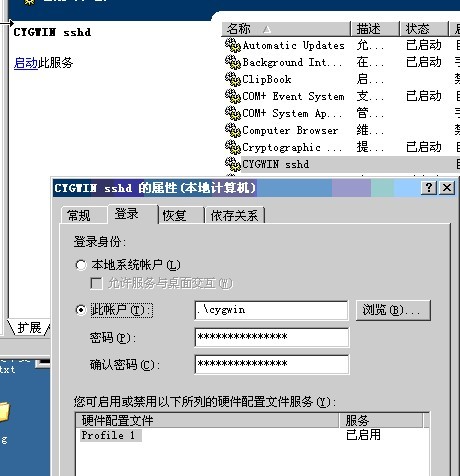
输入账号和密码,启动过程中报如下错误:
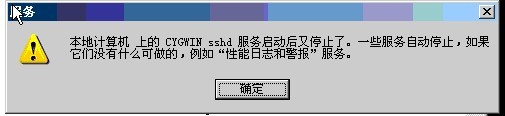
(一)在cygwin上面启动老是报错,说cygwin无法启动,也木有报具体什么原因,那么只有改成administrator登录,再次尝试就ok了~
如果administrator起不了,请看一下是不是22端口已经启动了,查看有木有安装过sshd服务~
很有可能是因为之前的警告信息:

还有一种情况:
换成administrator登录后,还是报错无法启动,那么去/var/log/里面查看一下sshd.log,报错信息如下:
/var/empty must be owned by root and not group or world-writable.
那么只需要执行:
chown administrator:Administrators /var/empty
再次重启sshd服务就可以正常启动~
另外还有一种情况:
如果虚拟机是部署的,就会出现以下,刚开始启动不了,再次输入cygwin的密码启动,可以启动了,但老是报以下错误:
$ ssh localhost
Administrator@localhost's password:
Last login: Thu Oct 18 18:20:00 2012 from 127.0.0.1
/bin/bash: Operation not permitted
Connection to localhost closed.
如果问题排查都没有问题,最后只能用administrator启动,再修改一下log的权限就ok了~
(二)假如说启动换成administrator后还是无法启动,那么查看一下cygwin sshd服务,看路径对不读,启动报错:
执行net start sshd【或者也可以执行cygrunsrv -S sshd(启动sshd服务)】 后会报:
发生系统错误3
这个时候真的木有招了,网上也找不到答案,但是知道思路了,就是之前安装的已经删除,注册表中保存的还是之前的信息,所以就想着删除服务:
Administrator@localhost~
$ sc delete sshd
[SC] DeleteService 成功
或者:
cygrunsrv -R sshd (删除sshd服务)
重新安装配置:
Administrator@localhost~
$ssh-host-config
这个时候就会正常显示,总共要输入的内容都在下面:
######################################################
chmod +r /etc/passwd
chmod +r /etc/group
rm -rf /var/
ssh-host-config
yes
yes
yes
ntsec tty
yes
cygwin
cygwin
yes
$password
$password
net start sshd
mkpasswd -l >/etc/passwd
mkgroup -l > /etc/group
ssh localhost
yes
$hostpassword
######################################################
注意:
若非ntsec tty格式,后面通过远程登录,可能会提示以下错误:
[Administrator@NXY-2 .ssh]$ ssh 192.168.30.204
Last login: Mon Aug 13 18:17:54 2012 from 192.168.30.172
"tty" option detected in CYGWIN environment variable.
CYGWIN=tty is no longer supported. Please remove it from your
CYGWIN environment variable and use a terminal emulator like mintty,
xterm, or rxvt.
Administrator@icbc-host-204 ~
#######################################################
########## 如何解决启动过程中乱码问题,不支持中文 ###########
#######################################################
使用ls可以正常查看中文格式的文件名,但是在执行net start sshd的时候就出现以下情况:
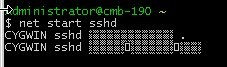
查看系统编码:
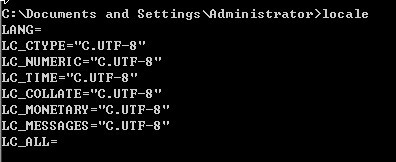
查看cygwin的编码:
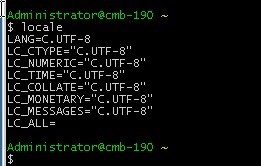
更改一下cygwin的编码格式就ok了~

再次启动就可以正常显示了:
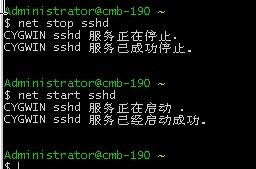
(三)如果通过上诉方法删除sshd服务,但是你去查看服务的时候,还是标注原来的路径,且服务被禁用,这个时候我们就可以修改注册表:
打开HKEY_LOCAL_MACHINE\SYSTEM\CurrentControlSet\Services\sshd\ImagePath,编辑修改字符串的值【修改成你现在cygwin的执行程序的路径】
在服务中看到的结果如下:
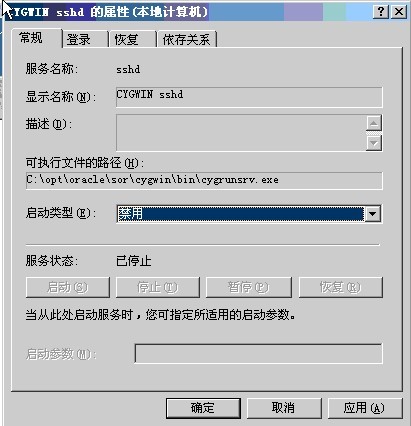
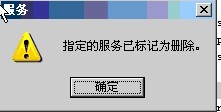
诺,路径已经正确了,可以修改启动类型为自动,然后保存,但是还是报以下错误:
注意:
那个CYGWIN的变量值就是在HKEY_LOCAL_MACHINE\SYSTEM\CurrentControlSet\Services\sshd\Parameters\Environment\CYGWIN
里面,若要修改直接打开修改值就ok了~
若出现以下问题,可以选择将netsec tty改成提示的mintty试试~
[Administrator@zy ~]$ ssh 172.16.1.137
Administrator@1172.16.1.137's password:
Last login: Wed Oct 17 17:25:40 2012 from 172.16.1.136
"tty" option detected in CYGWIN environment variable.
CYGWIN=tty is no longer supported. Please remove it from your
CYGWIN environment variable and use a terminal emulator like mintty,
xterm, or rxvt.
Administrator@zy ~
PS:
可以安装一个syslog软件包,然后远程登录的时候很炫的,哈哈~

net start sshd 发生系统错误1069--cygwin安装过程的更多相关文章
- cygwin安装sshd服务并实现无密码登录
http://blog.csdn.net/cybercode/article/details/7080743 这篇文章主要是为我在win7(64位)下搭建hadoop环境所准备的.首先参照在cygwi ...
- cygwin安装sshd服务(win7)Error installing a service: OpenSCManager: Win32 error 5:
Error installing a service: OpenSCManager: Win32 error 5: 出现这个问题的解决办法:win7系统管理员运行Cygwin软件 ...
- MySQL 无法启动,出现 “发生系统错误 1067。”
出现场景 使用 net start mysql 时无法启动,并出现:发生系统错误 1067. 解决过程 很多情况都可以导致该错误提示,可以先查找 "Windows 日志" : 打开 ...
- window 安装Mysql 5.6 发生系统错误 1067
问题: #安装MySQL服务:mysqld -install MySQL5 D:\Program Files\mysql_5.6.24_winx64\bin>mysqld -install My ...
- mysql安装常见问题(系统找不到指定的文件、发生系统错误 1067 进程意外终止)
在安装mysql时总是会遇到这样那样的问题,每次重新安装都会花很多时间来排查.在网上其实有很多相关的文章,但很多都只讲了方法,但没讲具体细节问题,导致无法解决问题.其实有时候知道问题的原因,但总是因为 ...
- 安装MongoDB启动时报错‘发生系统错误2’的解决办法
安装数据库mongodb启动时报"发生系统错误2". 这个问题是如果你之前已经装过一次,并且两次安装目录不同,就绝对会碰到的,因为你之前安装的路径已经在注册表中生成了,并没有随着你 ...
- 通过cygwin安装openSSH
openSSH的安装是学习hadoop必不可少的一步,如果ssh装不好,hadoop的安装会进行不下去.本人初学hadoop时发现以前安装ssh走了一些弯路,现在又有了一些认识,所以重写了这篇日志,供 ...
- mysql 发生系统错误1067的解决方法
解决方法如下: 1.先删除mysql服务 控制面板->管理工具->服务,先停止mysql服务 开始->运行->输入cmd->sc delete mysql 服务删除 2. ...
- MySQL启动错误---发生系统错误/系统找不到指定的文件。
今天启动mysql时,突然报错发生系统错误,系统找不到指定的文件.当时有点懵,安装mysql 之后,一直就没有修改过,怎么会报错呢?上网搜索了一下,重新安装一下mysql服务就可以了,现在也不知道什么 ...
随机推荐
- 用springmvc的@RequestBody和@ResponseBody 接收和响应json格式数据
1.controller @Controller @RequestMapping("/rest/v1") public class WelcomeController { @Req ...
- Oracle中exit,return,continue
记录exit和return的用法 exit用来跳出循环 loop IF V_KBP IS NULL THEN EXIT; END IF; end loop; return跳出 ...
- Mac系统下VirtualBox装Centos7设置静态IP并连网
用Virtualbox装了三台Centos7,现在需要设置成三台之间可以相互通信,并且三台都可以连外网. 需求如下: 1. 三台内部相互通信 2. 可以上外网 3. 主机可以虚拟机可以相互通信(she ...
- Java学习之跳转语句
Java语言中提供3中跳转语句,分别是break语句.continue语句和return语句. break语句 可以用在switch语句中.在switch语句中,break语句用于中止下面的case语 ...
- div添加滚动条
- Codeforces Round #321 (Div. 2)-A. Kefa and First Steps,暴力水过~~
A. Kefa and First Steps time limit per test 2 seconds memory limit per test 256 megabytes input stan ...
- hdu 4539
#include<stdio.h> #include<string.h> ]; int s]; int main() { int i,j,n,m; int ch; while( ...
- fedora安装后,yum命令不能使用,Cannot retrieve metalink for repository: fedora. Please verify its path and try again 解决方法
fedora安装后,yum命令不能使用,Cannot retrieve metalink for repository: fedora. Please verify its path and try ...
- 只有代码不会撒谎,如何通过Spring boot源码查看其对于各个框架的默认配置
我发现很多开发对于看源码都有种恐惧心理,其实不必这样,大部分优秀的源码写的都挺直观的,很多时候,你在搜索引擎上搜到的一些东西并不一定是对的,但源码肯定造不了假,毕竟不管你怎么想,它就在那里,该是什么意 ...
- C++动态特性和C++对象模型——《高质量程序设计12章》
1.动态特性 静态特性和动态特性,编译时和运行时 虚函数 (1)虚函数的叫覆盖,虚函数不是实现多态的唯一手段(其他语言也可能采用别的方法). 抽象基类: (1)如果将基类的虚函数声明为纯虚函数,则基类 ...