
Nginx配置try_files实践一
参考资料:
http://linuxplayer.org/2013/06/nginx-try-files-on-multiple-named-location-or-server
http://stackoverflow.com/questions/20426812/nginx-try-files-alias-directives
1. 环境:
OS:Ubuntu 15.10
nginx:nginx/1.9.3 (Ubuntu)
假设有两台虚拟机db1(IP:10.0.1.62)/db2(IP:10.0.1.63),通过try_files配置,使两台机器的/data/www/upload合集组成网络资源,设计思路如下:
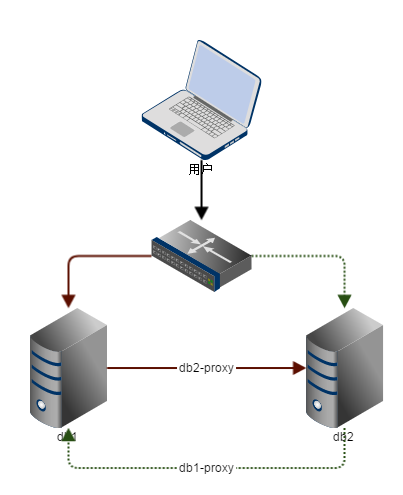
若请求到db1:
- 检索db1是否存在目标资源,若存在则返回,否则请求通过db2-proxy重定向到db2
- 检索db2是否存在目标资源,若存在则返回,否则返回404
- 请求结束
若请求到db2同理。
2. 配置两台机器的nginx.conf
...

http {

    log_format  main  '[$content_type]--[$remote_addr] - $remote_user [$time_local] "[$request]" '

    '[$status] $body_bytes_sent [$request_body] "$http_referer" '

    '"$http_user_agent" $http_x_forwarded_for';

        ...

        include /etc/nginx/conf.d/*.conf;

        include /etc/nginx/sites-enabled/*;

}
3. 为db1添加/etc/nginx/conf.d/db1.conf
 server{

      listen ;

      server_name 10.0.1.62;

      error_page  /.html;

    access_log  /var/log/nginx/db1_access.log  main;

    error_log   /var/log/nginx/db1_error.log;

    location  /upload

    {

     root /data/www;

     try_files $uri @db2;

    }

    location  /proxy/upload

    {

     alias /data/www/upload;

    }

    location @db2{

     proxy_pass http://10.0.1.63/proxy$uri;

    }

 }
4. 为db2添加/etc/nginx/conf.d/db2.conf
 server{

      listen ;

      server_name 10.0.1.63;

      error_page  /.html;

    access_log  /var/log/nginx/db2_access.log  main;

    error_log   /var/log/nginx/db2_error.log;

    location  /upload

    {

     root /data/www;

     try_files $uri @db1;

    }

    location  /proxy/upload

    {

     alias /data/www/upload;

    }

    location @db1{

     proxy_pass http://10.0.1.62/proxy$uri;

    }

 }
5. 重新加载nginx配置
`service nginx reload`
6. 在db1创建测试文件
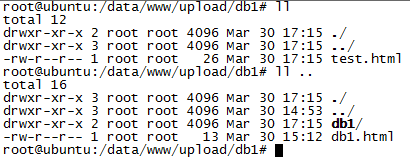
7. 在db2创建测试文件

8. 访问结果
| http://10.0.1.62/upload/db1.html | 
|
| http://10.0.1.62/upload/db2.html | 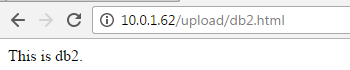
|
| http://10.0.1.63/upload/db1.html?a=1 | 
|
| http://10.0.1.63/upload/db2.html?bfdsfads^*()^& | 
|
| http://10.0.1.63/upload/db3.html | 
|
| http://10.0.1.62/upload/db1/test.html | 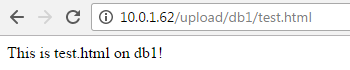
|
| http://10.0.1.62/upload/db2/test.html | 
|
| http://10.0.1.63/upload/db1/test.html | 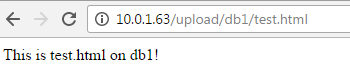
|
| http://10.0.1.63/upload/db2/test.html | 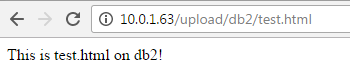
|
| http://10.0.1.63/upload/db3/test.html | 
|
9. 引申
由于生产环境的特殊原因,用户的请求可能是HTTP/HTTPS协议,那么本文的配置有很大的缺陷,解决方案见《Nginx配置try_files实践二》
Nginx配置try_files实践一的更多相关文章
- Nginx配置try_files实践二
本文内容承接<Nginx配置try_files实践一> 1. 环境: OS:Ubuntu 15.10 nginx:nginx/1.9.3 (Ubuntu) 假设有三台虚拟机db1(IP:1 ...
- 前后端分离项目 nginx配置实践
新项目采用前后端分离的方式开发,前后端代码打算分开部署(同机器且同域名),但打算支持后端依然可访问静态资源. 搜索nginx配置大部分都通过url前缀进行转发来做前后端分离,不适用目前项目. 说明 前 ...
- Nginx配置支持https协议-应用实践
Nginx配置支持https协议-应用实践 https简介 HTTPS 是运行在 TLS/SSL 之上的 HTTP,与普通的 HTTP 相比,在数据传输的安全性上有很大的提升. TLS是传输层安全协议 ...
- Nginx中的Rewrite的重定向配置与实践
阅读目录 一:理解地址重写 与 地址转发的含义. 二:理解 Rewrite指令 使用 三:理解if指令 四:理解防盗链及nginx配置 简介:Rewrite是Nginx服务器提供的一个重要的功能, ...
- 使用nginx配置域名及禁止直接通过IP访问网站
前段时间刚搭建好个人网站,一直没有关注一个问题,那就是IP地址也可以访问我的网站,今天就专门研究了一下nginx配置问题,争取把这个问题研究透彻. 1. nginx配置域名及禁止直接通过IP访问 先来 ...
- Nginx 配置简述
不论是本地开发,还是远程到 Server 开发,还是给提供 demo 给人看效果,我们时常需要对 Nginx 做配置,Nginx 的配置项相当多,如果考虑性能配置起来会比较麻烦.不过,我们往往只是需要 ...
- rewrite规则写法及nginx配置location总结
rewrite只能放在server{},location{},if{}中,并且只能对域名后边的除去传递的参数外的字符串起作用. 例如http://seanlook.com/a/we/index.php ...
- thinkphp nginx配置
安装和配置: http://www.cnblogs.com/Bonker/p/4252588.html spawn-fcgi 要先安装和启动:(已过时) sudo spawn-fcgi -a -u ...
- nginx配置入门
谢谢作者的分享精神,原文地址:http://www.nginx.cn/591.html nginx配置入门 之前的nginx配置是对nginx配置文件的具体含义进行讲解,不过对于nginx的新手可能一 ...
随机推荐
- IP_MULTICAST_LOOP
WINDOWS 中 该选项仅控制接收部分.即设置为0 则控制套接字无法接收自身消息.设置为1 则控制套接字使能接收自身消息. LINUX 中 该先项仅控制发送部分.即设置为0 则控制套 ...
- i2c精简总结
基本的i2c的编程包括:读数据,写命令,写数据 有关i2c的时序需要的话查看这里http://blog.csdn.net/qqliyunpeng/article/details/41511347 1. ...
- 使用C++调用pytorch模型(Linux)
前言 模型转换思路通常为: Pytorch -> ONNX -> TensorRT Pytorch -> ONNX -> TVM Pytorch -> 转换工具 -> ...
- NYOJ-476谁是英雄,分解质因子求约数个数!
谁是英雄 时间限制:1000 ms | 内存限制:65535 KB 难度:3 描述 十个数学家(编号0-9)乘气球飞行在太平洋上空.当横越赤道时,他们决定庆祝一下这一壮举.于是他们开了一瓶香槟.不 ...
- CookiesReader
CookiesReader "use strict"; /** * * @author xgqfrms * @license MIT * @copyright xgqfrms * ...
- msp430入门学习12
msp430的定时器--Timer_A(定时器A) msp430入门学习
- Builder设计模式
Builder模式,又称生成器或构建者模式,属于对象创建型模式,侧重于一步一步的构建复杂对象,只有在构建完成后才会返回生成的对象.Builder模式将一个复杂对象的构建与它的表示分离,使得同样的构建过 ...
- Java线程:Callable和Future
接着上一篇继续并发包的学习,本篇说明的是Callable和Future,它俩很有意思的,一个产生结果,一个拿到结果. Callable接口类似于Runnable,从名字就可以看出来了,但 ...
- Mesos, Marathon, Docker 平台部署记录
Mesos, Marathon, Docker 平台部署记录 所有组件部署基于Ubuntu 14.04 x64 主机 IP 角色 master 192.168.1.3 Mesos Master, Ma ...
- EXISTS 执行顺序 CLR-2-2-引用类型和值类型
EXISTS 执行顺序 select * from a where a.s_status=1 and exists (select orderid from b on a.orderid=b.or ...