
jstree中json data 的生成
jstree中json data 的生成
jstree官网上给出的json数据格式是这样的:
- <span style="font-size:14px;">// Alternative format of the node (id & parent are required)
- {
- id : "string" // required
- parent : "string" // required
- text : "string" // node text
- icon : "string" // string for custom
- state : {
- opened : boolean // is the node open
- checked: boolean // is the node checked
- disabled : boolean // is the node disabled
- selected : boolean // is the node selected
- },
- li_attr : {} // attributes for the generated LI node
- a_attr : {} // attributes for the generated A node
- }</span>
如果我想要把一个文件夹及它里面的文件用jstree显示,怎么办呢?总不能自己再按上边的格式一个一个写吧。好了,这里就涉及到一个问题,怎么样把一个路径转化成json data.
举个例子:我在E盘下有一个test文件夹,我想要把test文件夹下的所有文件用jstree目录树显示。这时候jstree的数据源就应该是test文件夹的 json数据。
test文件夹下的目录结构如下图:
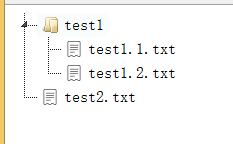
test文件目录它的json格式应该是这样的:
- [{"attributes":{"id":"0"},"parent":"0","state":{"opened":false},"text":"test1" ,"children":[{"attributes":{"id":"1"},"parent":"0","state":{"opened":true},"text":"test1.1.txt" , "type":"leaf" },{"attributes":{"id":"2"},"parent":"0","state":{"opened":true},"text":"test1.2.txt" , "type":"leaf" }] },{"attributes":{"id":"3"},"parent":"0","state":{"opened":true},"text":"test2.txt" , "type":"leaf" }]
上面的json格式中:
attributes:{id: }是每个节点的id.
parent:是这个节点的父节点的id
state:{opened:false} 表示的是这个节点的状态是不打开
children[]:表示的是这个节点的子节点。
如何把一个目录的路径,转化为上面的json格式呢?我们要用无限递归遍历这个目录,把相应信息提取出来,转化为json格式的字符串。
下面给出实现的代码:用Java写的:
- /**
- * 给定任意的路径 ,无限递归获得该路径下的所有节点,并转化为json串 ,把该json串存到root.json文件中, 用作jstree的数据源
- * @param f parent
- * 路径名 父节点ID
- * @return str,然后将str写入文件中。
- * @author YanniZhang
- * @date 2015.4.17
- */
- package test;
- import java.io.File;
- import java.io.FileWriter;
- import java.io.BufferedWriter;
- import java.io.IOException;
- public class test {
- public static int parentId=0;
- public static String str="";
- public static void main(String[] args) {
- File f =new File("E:/test1");//给定的路径是E盘下的test文件夹。这里换成你想要转换成json串的任意路径
- String str="[";
- // 从根开始 ,调用ToJson()方法,把路径转化成json串。结果是str
- str+=ToJson(f,0);
- str += "]";
- /**
- * 把json串写入文件root.json中
- *
- */
- try {
- File file = new File("E:/root.json");
- // if file doesn't exists, then create it
- if (!file.exists()) {
- file.createNewFile();
- }
- FileWriter fw = new FileWriter(file.getAbsoluteFile());
- BufferedWriter bw = new BufferedWriter(fw);
- bw.write(str);
- bw.close();
- } catch (IOException e) {
- e.printStackTrace();
- }
- }
- /*ToJson()方法,实现把指定路径转化为json串。采用无限递归遍历路径下的所有节点的方法实现*/
- private static String ToJson(File f,int parent) {
- //杳出顶层的子节点
- File[] files = f.listFiles();
- //遍历它的子节点
- for(int i=0; i<files.length; i++)
- {
- //有子节点
- if(files[i].isDirectory())
- {
- str+= "{\"attributes\":{\"id\":\"" +parentId
- + "\"},\"parent\":\"" + parent
- + "\",\"state\":{\"opened\":false},\"text\":\"" + files[i].getName() + "\" ,";
- str += "\"children\":[";
- parent=parentId;
- parentId++;
- //遍历它的子节点
- File[] list=files[i].listFiles();
- for(int j=0;j<list.length;j++)
- {
- if(list[j].isDirectory())
- {
- //还有子节点(递归调用)
- str+= "{\"attributes\":{\"id\":\"" +parentId
- + "\"},\"parent\":\"" + parent
- + "\",\"state\":{\"opened\":false},\"text\":\"" + list[j].getName() + "\" ,";
- str += "\"children\":[";
- parent=parentId;
- parentId++;
- ToJson(list[j],parent);
- str+="]";
- str+=" }";
- if(j<list.length-1)
- {
- str+=",";
- }
- }
- else
- {
- str += "{\"attributes\":{\"id\":\"" + parentId
- + "\"},\"parent\":\"" + parent
- + "\",\"state\":{\"opened\":true},\"text\":\"" + list[j].getName()
- + "\" " + ", \"type\":\"leaf\" }";
- parentId++;
- if (j < list.length - 1)
- {
- str += ",";
- }
- }
- }
- str+="]";
- str+=" }";
- if(i<files.length-1)
- {
- str+=",";
- }
- }
- else
- {
- str += "{\"attributes\":{\"id\":\"" + parentId
- + "\"},\"parent\":\"" + parent
- + "\",\"state\":{\"opened\":true},\"text\":\"" + files[i].getName()
- + "\" " + ", \"type\":\"leaf\" }";
- parentId++;
- if (i < files.length - 1)
- {
- str += ",";
- }
- }
- }
- return str;
- }
- }
得到的json数据存在E:/root.json
得到了任意一个路径的json 数据后。我们就要用这个json数据 生成目录树了。
如何利用上面生成的json数据请看下一篇博文:“jstree获得节点的相对路径”。
jstree中json data 的生成的更多相关文章
- java中json数据生成和解析(复杂对象演示)
1.json简单介绍 1.1 json是最流行和广泛通用的数据传输格式,简称JavaScript Object Notation,最早在JavaScript中使用. 1.2 举个例子,下面是一个jso ...
- Swift开发中 JSON对象/JSON字符串/Data的互转
本文将介绍Swift开发中常用的转换(JSON对象/JSON字符串/Data之间的互相转换) #pragma mark - JSON(对象)----->JSON字符串 1.原生方法 //JSON ...
- AJAX 中JSON 和JSONP 的区别 以及请求原理
AJAX 跨域请求 - JSONP获取JSON数据 博客分类: Javascript /Jquery / Bootstrap / Web Asynchronous JavaScript and X ...
- jQuery解析JSON出现SyntaxError: JSON.parse: unexpected character at line 1 column 2 of the JSON data
SyntaxError: JSON.parse: unexpected character at line 1 column 2 of the JSON data 我在使用$.parseJSON解析后 ...
- jstree -- 使用JSON 数据组装成树
概述: 前面主要是html数据,这里主要是json数组 1.格式 jsTree需要一个具体格式JSON数据,在标准的语法没有那个字段是必须的-而是那些是你需要的.请记住你可以获取任何你请求的其他属性, ...
- action中json的应用
这篇文章重点介绍action中json数据的返回处理:假设须要看前端代码的一些特效或ajax的json接收,请看上一篇博客:http://blog.csdn.net/yangkai_hudong/ar ...
- Python中json的简单读写操作
Python中json的简单读写操作 JSON(JavaScript Object Notation) 是一种轻量级的数据交换格式.它基于ECMAScript的一个子集. JSON采用完全独立于语言的 ...
- android中Json的一些应用
JSON(JavaScript Object Notation) :一种轻量级的数据交换格式,基于JavaScript的一个子集. JSON采用完全独立于语言的文本格式,使JSON成为理想的数据交换语 ...
- 谈谈WCF中的Data Contract(3):WCF Data Contract对Collection & Dictionary的支持
谈谈WCF中的Data Contract(3):WCF Data Contract对Collection & Dictionary的支持 在本篇文章上一部分Order Processing的例 ...
随机推荐
- DES加密算法的C++实现
<信息安全技术>这门课又在讲 DES 加密算法了,以前用纯C写过一次,这次我用 C++ 重新写了一个,写篇文章以备后用.本文介绍了 DES 算法加密的大致步骤和整体流程. 一.DES算法原 ...
- LVS 负载均衡 (VS/DR模式 与 VS/TUN 模式)
一.VS/DR模式 ①.客户端将请求发往前端的负载均衡器,请求报文源地址是CIP,目标地址为VIP. ②.负载均衡器收到报文后,发现请求的是在规则里面存在的地址,那么它将目标MAC改为了RIP的MAC ...
- Mariadb galera 集群
部署galera 多主架构 (galera集群多用于关键性业务,因为galera集群为了数据的一致性,采用的是同步的机制,这就使galera牺牲了一部分性能来换取数据一致性.) 环境准备:三台服务器 ...
- 【web开发学习笔记】Structs2 Result学习笔记(二)动态结果集
Result学习笔记(二) - 动态结果集 动态结果 一定不要忘了为动态结果的保存值设置set get方法 第一部分:代码 //前端 <% String context = reques ...
- 鸟哥的Linux私房菜-----9、vi文本处理器
watermark/2/text/aHR0cDovL2Jsb2cuY3Nkbi5uZXQvaGVrZXdhbmd6aQ==/font/5a6L5L2T/fontsize/400/fill/I0JBQk ...
- iOS平台加入Google Admob -1/2(Unity3D开发之七)
猴子原创,欢迎转载.转载请注明: 转载自Cocos2D开发网–Cocos2Dev.com.谢谢! 原文地址: http://www.cocos2dev.com/?p=567 Unity调用iOS还是非 ...
- 在ARM-linux上实现4G模块PPP拨号上网【转】
本文转载自:http://blog.csdn.net/zqixiao_09/article/details/52540887 在ARM平台上实现4G模块的PPP拨号上网,参考网上的资料和自己的理解,从 ...
- html使用css让文字超出部分用省略号三个点显示的方法案例
html使用css让文字超出部分用省略号三个点显示的方法: 我正确使用的就是下面的代码,li里面是a标记.在IE和google中使用是正常的,火狐不知道,我也不在意,等你来测 li{ display: ...
- zoj 3023 Light Bulb
题目大意: 求L的最大值 思路: 可以想象出是一个关于人到灯泡距离x的单峰上凸函数 当光线在墙角左边的时候影子在不断增长 然后通过相似可以推出人在墙上影子的长度为:H+D*(h-H)/x 再加上地上的 ...
- go语言--time.After
go语言--time.After https://blog.csdn.net/cyk2396/article/details/78873396 1.源码分析: // After waits for t ...