
weex 引导页(guide)页面
slider 和 indicator 都是 weex 的内置组件,且 indicator 是 slider 的子组件。
1.报错处理
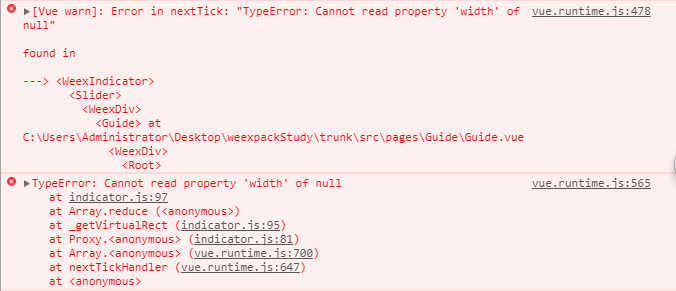
原因解析:indicator 样式页面渲染慢
解决方案:indicator 的样式写为 内联样式
2.Guide.vue
<!-- 引导页 -->

<template>

  <div class="wrap">

    <!-- 轮播图 -->

    <slider class="slider" auto-play="true" interval="5000" >

      <div class="slider-pages" v-for="item in itemList">

        <image class="thumb" :src="item.pictureUrl" resize="stretch"></image>

      </div>

      <!-- 指示器 style="width:720px;height:30px;" -->

      <indicator class="indicator"></indicator>

    </slider>

    <!-- 开始体验 -->

    <text class='btn' @click="goStart">{{txt}}</text>

  </div>

</template>

<style scoped>

 .wrap{

    align-items: center;

    justify-content: center;

    flex-direction: column;

    background-color: #2B2D2F;

  }

  /*轮播图*/

  .slider {

    width: 750px;

    height: 1000px;

    background-color: transparent;

    align-items: center;

    justify-content: center;

    margin-top: 0px;

    margin-bottom: 0px;

    margin-left: auto;

    margin-right: auto;

  }

  /*轮播图 图片*/

  .slider-pages {

    flex-direction: row;

    width: 720px;

    height: 1000px;

    align-items: center;

    justify-content: center;

    margin-top: 0px;

    margin-bottom: 0px;

    margin-left: auto;

    margin-right: auto;

  }

  .thumb {

    width: 720px;

    height: 1280px;

    align-items: center;

    justify-content: center;

    margin-top: 0px;

    margin-bottom: 0px;

    margin-left: auto;

    margin-right: auto;

  }

  /*轮播图 指示器*/

  .indicator {

    position: absolute;

    top: 970px;

    width: 720px;

    height: 30px;

    item-color: #dddddd;

    item-selected-color: rgb(40, 96, 144);

  }

  /*开始体验 按钮*/

  .btn{

    width: 300px;

    height: 60px;

    margin-top: 20px;

    background-color:#0096FF;

    font-size:25px;

    height:60px;

    font-weight: bold;

    align-items: center;

    justify-content: center;

    border-radius: 50;

    color:#FFFFFF;

  }

</style>

<script>

  export default {

    data() {

      return {

        txt:"开始体验",

        itemList: [

          {title: 'A', pictureUrl: 'https://duqian291902259.github.io/dusan/oair/bg1.png'},

          {title: 'B', pictureUrl: 'https://duqian291902259.github.io/dusan/oair/bg2.png'},

          {title: 'C', pictureUrl: 'https://duqian291902259.github.io/dusan/oair/bg1.png'}

        ]

      }

    },

    methods: {

      goStart() {

        // 页面跳转

        this.$router.push({path:'/splash'});

      }

    }

  }

</script>
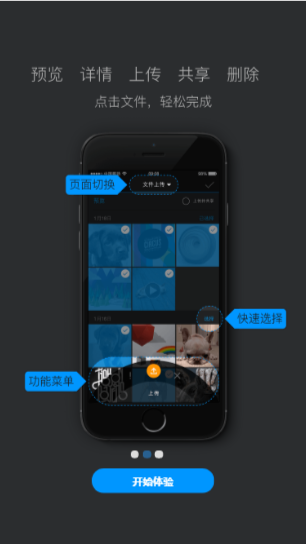
3.效果图
weex 引导页(guide)页面的更多相关文章
- Page Visibility(网页可见性) API与登录同步引导页实例页面
页面1 HTML代码: <p id="loginInfo"></p> JS代码: (function() { if (typeof pageVis ...
- app引导页(背景图片切换加各个页面动画效果)
前言:不知不觉中又加班到了10点半,整个启动页面做了一天多的时间,一共有三个页面,每个页面都有动画效果,动画效果调试起来麻烦,既要跟ios统一,又要匹配各种不同的手机,然后产品经理还有可能在中途改需求 ...
- ViewPager打造轮播图(Banner)\引导页(Guide)
今年7月时,在Github发布了一个开源的Banner库,虽然Star不多,但还是有少部分人使用. Banner效果: 昨天,有使用此库的同学提出需求,想在引导页的时候用这个库并且最后一页有进入按钮 ...
- 网页引导:jQuery插件实现的页面功能介绍引导页效果
现在很多网站不仅是介绍,更多的是有一些功能,怎么样让客户快速的知道网站有哪些功能呢?这里pagewalkthrough.js插件能帮我们实现,它是一个轻量级的jQuery插件,它可以帮助我们创建一个遮 ...
- IOS引导页拨动4张图片最后一张停三秒进入主页,页面推送
// // ViewController.m // // // Created by 张艳锋 on 15/8/26. // Copyright (c) 2015年 张艳锋. All rights ...
- [Android实例] app引导页(背景图片切换加各个页面动画效果)(申明:来源于网络)
[Android实例] app引导页(背景图片切换加各个页面动画效果)(申明:来源于网络) 地址: http://www.eoeandroid.com/thread-918356-1-1.html h ...
- jQuery插件实现的页面功能介绍引导页效果
新产品上线或是改版升级,我们会在用户第一次使用产品时建立一个使用向导,引导用户如何使用产品,如使用演示的方式逐一介绍界面上的功能模块,从而提升了用户体验和产品的亲和力. Helloweba.com之前 ...
- ViewPager实现引导页
1. 要使用ViewPager,必须要创建 PagerAdapter. 这里创建一个 ViewPagerAdapter来继承PagerAdapter public class ViewPagerAda ...
- 网站引导页插件intro.js 的用法
intro.js是一个用于制作网页引导效果的js插件,用法很简单,intro.js.v2.0.rar 1.在需要的页面添加引用 intro.js introjs.css 这两个文件已经足够,但是文件夹 ...
随机推荐
- 对uboot中CFG_和CONFIG_的理解
CONFIG_用于选择CPU SOC 板子的类型,系统时钟,设备驱动driver驱动等 CFG_用于设置malloc缓冲池的大小,偏移地址部分的定义,uboot的提示符,uboot的加载地址,fl ...
- Verilog学习笔记基本语法篇(五)········ 条件语句
条件语句可以分为if_else语句和case语句两张部分. A)if_else语句 三种表达形式 1) if(表达式) 2)if(表达式) 3)if(表达 ...
- adb 常用命令详解
1.把电脑上文件或目录copy到手机中:adb push <local> <remote> - copy file/dir to device 此处的<local& ...
- appium之android_uiautomator定位进阶版
前言 上一篇介绍uiautomator的定位方式都是类似这种'new UiSelector().xxx("xxx")',看起非常长,我也记不住,这很不python.于是本篇优化了定 ...
- mysql无法启动,报错 Can't start server: can't create PID file: No space left on device
然后看mysql日志文件 出现Can't start server: can't create PID file: No space left on device 这个错误. 提示磁盘空间不足 后用d ...
- 去掉WordPress顶部工具条
WordPress为了方便管理员,或者登陆用户快速的从前台进入后台来管理网站,在WordPress网站顶部强制加入了一个工具条(admin bar),而且默认是对所有登陆用户都显示的,有时候看着挺烦心 ...
- [uiautomator篇] 找父亲节点和其他兄弟节点
https://testerhome.com/topics/1250 Appium [已解决] UiSelector 如何根据节点定位到父节点 / 兄弟节点? liqing380 · 发布于 2014 ...
- 九度oj 题目1131:合唱队形
题目描述: N位同学站成一排,音乐老师要请其中的(N-K)位同学出列,使得剩下的K位同学不交换位置就能排成合唱队形. 合唱队形是指这样的一种队形:设K位同学从左到右依次编号为1, 2, …, K,他们 ...
- iOS第三方地图-高德地图(导航sdk路径规划)
@import url(http://i.cnblogs.com/Load.ashx?type=style&file=SyntaxHighlighter.css);@import url(/c ...
- POJ——2449Remmarguts' Date(A*+SPFA)
Remmarguts' Date Time Limit: 4000MS Memory Limit: 65536K Total Submissions: 26504 Accepted: 7203 ...