
PowerShell和Bash的介绍
PowerShell是运行在windows平台的脚本,而Bash是运行在linux平台的脚本
现在bash能做的事情,PowerShell也能做,PowerShell的强大之处是它可以管理windows服务器(特别是域domain),现在的开源PowerShell 也可以管理Linux和Mac(通过PSRP)。
下载最新的PS程序
https://msdn.microsoft.com/en-us/Mt173057.aspx
安装后它会有powershell和它的开发IDE工具,ISE,非常不错!
一、进行powershell的程序
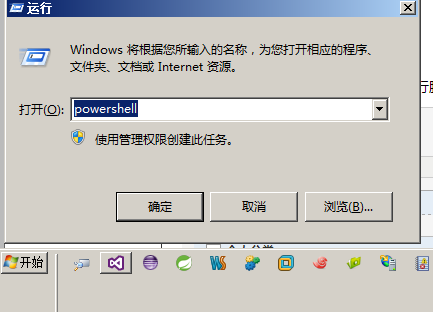
二、创建脚本,简单的Helloworld.ps1
任务的自动化是以程序文件或者可执行脚本文件为基础的,PowerShell也支持将命令列表做成脚本文件来执行。以下是Helloworld.ps1脚本文件的内容:
$a = "Hello World!"

$a

echo $a > a.txt

dir a.txt
Helloworld.ps1脚本文件的执行情况结果如下:
PS E:\>.\Helloworld.ps1 --注意在执行它时要加.\,表示当前上当下的文章,类似于centos里的文件执行方法
Hello world!Directory: E:\Mode LastWriteTime Length Name ---- ------------- ------ ---- -a--- 5/30/2017 4:56 PM 16 a.txt
下面是在eShopOnContainers上的一个例子,分别用ps和bash实现了程序的部署
#!/bin/bash

declare -a projectList=(

    '../src/Services/Catalog/Catalog.API'

    '../src/Services/Basket/Basket.API'

    '../src/Services/Ordering/Ordering.API'

    '../src/Services/Identity/Identity.API'

    '../src/Web/WebMVC'

    '../src/Web/WebSPA'

    '../src/Web/WebStatus'

)

# Build SPA app

# pushd $(pwd)../src/Web/WebSPA

# npm run build:prod

for project in "${projectList[@]}"

do

    echo -e "\e[33mWorking on $(pwd)/$project"

    echo -e "\e[33m\tRemoving old publish output"

    pushd $(pwd)/$project

    rm -rf obj/Docker/publish

    echo -e "\e[33m\tRestoring project"

    dotnet restore

    echo -e "\e[33m\tBuilding and publishing projects"

    dotnet publish -o obj/Docker/publish

    popd

done

# remove old docker images:

images=$(docker images --filter=reference="eshop/*" -q)

if [ -n "$images" ]; then

    docker rm $(docker ps -a -q) -f

    echo "Deleting eShop images in local Docker repo"

    echo $images

    docker rmi $(docker images --filter=reference="eshop/*" -q) -f

fi

# No need to build the images, docker build or docker compose will

# do that using the images and containers defined in the docker-compose.yml file.
powershell代码如下
Param([string] $rootPath)

$scriptPath = Split-Path $script:MyInvocation.MyCommand.Path

Write-Host "Current script directory is $scriptPath" -ForegroundColor Yellow

if ([string]::IsNullOrEmpty($rootPath)) {

    $rootPath = "$scriptPath\.."

}

Write-Host "Root path used is $rootPath" -ForegroundColor Yellow

$projectPaths =

    @{Path="$rootPath\src\Web\WebMVC";Prj="WebMVC.csproj"},

    @{Path="$rootPath\src\Web\WebSPA";Prj="WebSPA.csproj"},

    @{Path="$rootPath\src\Services\Identity\Identity.API";Prj="Identity.API.csproj"},

    @{Path="$rootPath\src\Services\Catalog\Catalog.API";Prj="Catalog.API.csproj"},

    @{Path="$rootPath\src\Services\Ordering\Ordering.API";Prj="Ordering.API.csproj"},

    @{Path="$rootPath\src\Services\Basket\Basket.API";Prj="Basket.API.csproj"}

    @{Path="$rootPath\src\Web\WebStatus";Prj="WebStatus.csproj"}

$projectPaths | foreach {

    $projectPath = $_.Path

    $projectFile = $_.Prj

    $outPath = $_.Path + "\obj\Docker\publish"

    $projectPathAndFile = "$projectPath\$projectFile"

    Write-Host "Deleting old publish files in $outPath" -ForegroundColor Yellow

    remove-item -path $outPath -Force -Recurse -ErrorAction SilentlyContinue

    Write-Host "Publishing $projectPathAndFile to $outPath" -ForegroundColor Yellow

    dotnet restore $projectPathAndFile

    dotnet build $projectPathAndFile

    dotnet publish $projectPathAndFile -o $outPath

}

########################################################################################

# Delete old eShop Docker images

########################################################################################

$imagesToDelete = docker images --filter=reference="eshop/*" -q

If (-Not $imagesToDelete) {Write-Host "Not deleting eShop images as there are no eShop images in the current local Docker repo."}

Else

{

    # Delete all containers

    Write-Host "Deleting all containers in local Docker Host"

    docker rm $(docker ps -a -q) -f

    # Delete all eshop images

    Write-Host "Deleting eShop images in local Docker repo"

    Write-Host $imagesToDelete

    docker rmi $(docker images --filter=reference="eshop/*" -q) -f

}

# WE DON'T NEED DOCKER BUILD AS WE CAN RUN "DOCKER-COMPOSE BUILD" OR "DOCKER-COMPOSE UP" AND IT WILL BUILD ALL THE IMAGES IN THE .YML FOR US
自己感觉,这两个东西在以后的程序部署上都会发挥各自强大的力量!
PowerShell和Bash的介绍的更多相关文章
- linux下一键安装 powershell,的bash脚本
说明 目前,linux下的powershell约等于pash.希望大家专注mono,关注pash. 一键安装脚本包括for centos6,centos7,ubuntu 14.04 ubuntu 1 ...
- 干货~powershell与bash和docker在项目中怎么用
回到目录 这个标题够直接了吧,够坦诚了吧,也许你在项目里这三个东西都没有用到,但这三个东西在未来的两年里将成为最HOT的技术,它们不是什么框架,也不是什么设计模式,而是做为程序和环境快速部署而设计出来 ...
- Linux基础之bash shell介绍及基本特性
今天继续讲Linux基础知识,内容是关于bash shell的.分享以下bash shell的相关知识,例如基本特性等. 1.8)bash shell的介绍 1.8.1)什么是bash shell ...
- 1.bash总体介绍
1.总体介绍1.1 什么是Bash?Bash(Borune-Again SHell)是一个用于Linux操作系统的shell,即命令解释器Bash与sh兼容,并从ksh和csh引进了一些有用的功能,在 ...
- Bash简单介绍
Bash不不过一个命令解析程序. 它本身拥有一种程序设计语言,使用这样的语言,能够编写shell脚本来完毕各种各样的工作.而这些工作是使用现成的命令所无法完毕的.Bash脚本能够使用if-then-e ...
- PowerShell~执行策略的介绍
首先看一下无法加载ps1脚本的解决方法 事实上也是由于策略导致的 解决方法主是开启对应的策略 set-ExecutionPolicy RemoteSigned 执行策略更改 执行策略可以防止您执行不 ...
- Typora + Powershell/bash + Git搭建自己的笔记
网上都说什么onenote,evernote,ant等笔记.个人感觉这些都不算太好,还是自己用简易东西搭建一个笔记. 个人推荐使用typora写笔记. 上面既有文件目录,还能通过模糊搜索. 然后需要p ...
- GITHUB中GIT BASH基础命令行
PS:转自https://www.cnblogs.com/WangXinPeng/p/8016293.html 1.常用命令行工具: ①cmd ②powershell ③git ba ...
- Cmder介绍和配置
一.命令行神器cmder介绍 windows上做开发,不管是cmd还是powershell,似乎都不够美观,不够强大.今天就来介绍一款可以替代cmd的神器"Cmder",话不多说, ...
随机推荐
- [a,s]=[22,3]
[a,s]=[22,3] Object.assign() - JavaScript | MDN https://developer.mozilla.org/en-US/docs/Web/JavaScr ...
- DOM操作三
1.以一个对象的x和y属性的方式返回滚动条的偏移量 function getScrollOffsets(w){ //使用指定的窗口,如果不带参数则使用当前窗口 w= w || window; //除了 ...
- Codeforces Beta Round #25 (Div. 2 Only)E. Test
E. Test time limit per test 2 seconds memory limit per test 256 megabytes input standard input outpu ...
- YTU 1055: 输入字符串以及输出
1055: 输入字符串以及输出 时间限制: 1 Sec 内存限制: 128 MB 提交: 694 解决: 476 题目描述 编写一函数,由实参传来一个字符串,统计此字符串中字母.数字.空格和其它字 ...
- [Selenium] 测试机器上安装了多个Firefox,如何指定运行哪一个?
可通过FirefoxBinary 来指定运行某个路径下的Firefox, 示例代码如下: public class testFirefoxBinary{ public static void main ...
- [USACO2007 Demo] Cow Acrobats
[题目链接] https://www.lydsy.com/JudgeOnline/problem.php?id=1629 [算法] 贪心 考虑两头相邻的牛 , 它们的高度值和力量值分别为ax , ay ...
- Github--开源代码仓库式系统(转)
要了解Github,我们首先要知道Git,Git是管理代码的工具,写代码不是件轻松的事儿,一个人写的时候已经不轻松了,一群人写就更不轻松了,但这世界上很多事都是怎么不轻松怎么来的,大部分人都会和别人一 ...
- JAVA编程思想中总结的与C++的区别
Java和C++都是面向对象语言.也就是说,它们都能够实现面向对象思想(封装,继乘,多态).而由于c++为了照顾大量的C语言使用者,而兼容了C,使得自身仅仅成为了带类的C语言,多多少少影响了其面向对象 ...
- bzoj3653
主席树+dfs序 b在a上方时可以O(1)算出来,子树中就用主席树查询区间和,权值线段树的下标是深度,值是子树size-1,每次查询就行了...线段树合并挂了 #include<bits/std ...
- B. Vanya and Books
time limit per test 1 second memory limit per test 256 megabytes input standard input output standar ...