
jQuery Validate插件实现表单强大的验证功能
转自:http://www.jb51.net/article/76595.htm
jQuery Validate插件捆绑了一套有用的验证方法,包括 URL 和电子邮件验证,同时提供了一个用来编写用户自定义方法的 API。所有的捆绑方法默认使用英语作为错误信息,且已翻译成其他 37 种语言。
第一节:jQuery Validation让验证变得如此容易
一、官网下载jquery,和jquery validation plugin
二、引入文件
<script src="js/jquery-1.8.0.min.js" type="text/javascript"></script> <script src="js/jquery.validate.js" type="text/javascript"></script><form action="" id="jvForm"> 姓名:<input type="text" name="username" id="username" class="required" /></br> 密码:<input type="password" name="password" id="password" class="required"/></br> <input type="submit" value="提交" /> </form> 他的作用就是在这个inpute标签为空时会提示用户出错。
<script type="text/javascript"> $(function() { $("#jvForm").validate(); }) </script> 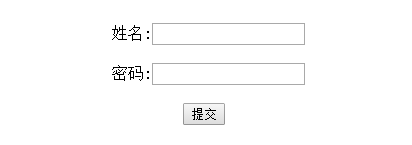
第二节:jQuery Validation让验证变得如此容易
上一个例子我们是统一引用jquery.validate.js这样所有必填字段的提示信息都将是This field is required.
现在要改成动态提示,比如姓名如果为空则提示姓名不能为空,密码如果为空则提示密码不能为空。
这次我们将校验规则写在代码里
首先还是先引入文件
<script src="js/jquery-1.8.0.min.js" type="text/javascript"></script> <script src="js/jquery.validate.js" type="text/javascript"></script> <form action="" id="jvForm"> 姓名:<input type="text" name="username" id="username" /></br> 密码:<input type="password" name="password" id="password" /></br> <input type="submit" value="提交" /> </form> 最后 校验规则如下:
$(function() { $("#jvForm").validate({ rules: { username: { required: true }, password: { required: true } }, messages: { username: { required: "姓名不能为空!" }, password: { required: "密码不能为空!" } } }); }) 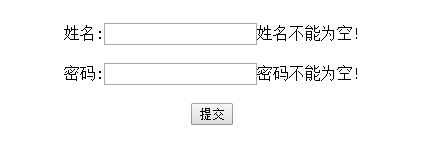
第三节:jQuery Validation让验证变得如此容易
以下代码进行对jQuery Validation的简单演示包括必填项、字符长度,格式验证
一、引入文件
<script src="js/jquery-1.8.0.min.js" type="text/javascript"></script> <script src="js/jquery.validate.js" type="text/javascript"></script><form action="" id="jvForm"> 用 户 名:<input type="text" name="username"/></br> 密 码:<input type="password" name="password" id="password"/></br> 确认密码:<input type="password" name="confirm_password"/></br> 出 生 地:<select name="address"><option value="">--</option><option value="1">北京</option> <option value="1">上海</option><option value="1">深圳</option></select></br> 手 机:<input type="text" name="mobile" /></br> 邮 箱:<input type="text" name="email" /></br> <input type="submit" value="提交" /> </form> <style type="text/css"> label.error{font-size:12px;font-weight: normal;color:#ff0511;margin-left:10px;} </style><script type = "text/javascript"> $(function() { $("#jvForm").validate({ rules: { username: { //用户名必填 至少3位 required: true, minlength: 3 }, password: { //密码必填 至少6位 required: true, minlength: 6 }, confirm_password: { //密码确认 required: true, equalTo: "#password" }, address: { //出生地必填 required: true }, mobile: { //手机必填 验证格式 required: true, mobile: true }, email: { //email必填 验证格式 required: true, email: true }, }, messages: { username: { required: "用户名不能为空!", minlength: "用户名至少三位!" }, password: { required: "密码不能为空!", minlength: "密码至少六位!" }, confirm_password: { required: "密码确认不能为空!", equalTo: "两次输入密码不一致 !" }, address: { required: "请选择出生地!", }, mobile: { required: "手机不能为空!", mobile: "手机格式不正确", }, email: { required: "邮箱不能为空!", email: "邮箱格式不正确", }, } }); }) </script>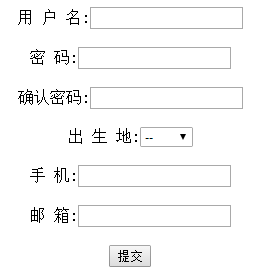
jQuery Validate插件实现表单强大的验证功能的更多相关文章
- jQuery Validate 插件为表单提供了强大的验证功能
之前项目开发中,表单校验用的jQuery Validate 插件,这个插件为表单提供了强大的验证功能,让客户端表单验证变得更简单,同时提供了大量的定制选项,满足应用程序各种需求.该插件捆绑了一套有用的 ...
- validate插件实现表单效验(二)
一款优秀的表单验证插件——validation插件 特点: l 内置验证规则:拥有必填.数字.email.url和信用卡号码等19类内置验证规则 l 自定义验证规则:可以很方便的自定义验证规则 l ...
- jquery validate 一个注册表单的应用
先看页面 前端表单代码 register.html <form class="mui-input-group" id="regForm"> < ...
- 表单提交学习笔记(二)—使用jquery.validate.js进行表单验证
一.官网下载地址:http://plugins.jquery.com/validate/ 二.用法 1.在页面上进行引用 <script src="~/scripts/jquery-1 ...
- jquery.validate.js自定义表单验证
$(document).ready(function() { //在下列位置输入页面加载的逻辑代码 $("#inputForm").validate({ rules: { seq: ...
- validate插件实现表单效验(一)
<!DOCTYPE html> <html> <head> <meta charset="UTF-8"> <title> ...
- [转]jQuery.validate插件在失去焦点时执行验证代码
转:http://my.oschina.net/enyo/blog/311566 关于 jquery.validate.js 表单验证插件如何在失去焦点时做验证.看手册后发现默认是在表单提交时执行验证 ...
- jQuery html5Validate基于HTML5表单 异步服务器端验证
1. HTML5 自带的Validate 很漂亮,很好用, 但是一定要在form里用submit按钮,才生效 <form id="frmInfo" action=" ...
- jquery.form插件 提交表单 type="hidden"取不到值的问题记录
1.外国文献:说可以改成其他的(非hidden),再加style="display:none"隐藏. <INPUT type="password" sty ...
随机推荐
- node 实现Token状态登录 及数据库增删改查
1.项目目录结构 2.启动入口文件代码index.js const express = require('express') const bodyParser = require('body-pars ...
- JS数组——冒泡、插入、快速排序
前言:因为要对后端返回来的数据进行处理,之前之后冒泡,不够用,去看了插入跟快速,写下这篇笔记. 使用背景: 1.冒泡排序 数据比较少,小于1000 2.插入排序 数据比较少,大于1000不推荐 3.快 ...
- linux vim 常用操作
vim 字符级 上k下j左h右i,键盘的方向键也可以移动 单词级 b上个单词首字母 w下个单词首字母 e下个单词的尾字母 行级 0行首 $行尾 删除 dd 删除光标所在行 文档级 gg 文档首行,首个 ...
- 截取命令cut命令、awk命令、sed命令
cut命令 截取以制表符tab为分隔符的第一列 cut -f 1test.txt 截取以":"为分隔符的第一列,如果比较规律的文件,可以自己设定分隔符 cut -f 1 -d ': ...
- 洛谷 1501 [国家集训队]Tree II BZOJ 2631 Tree
[题解] 维护乘法标记和加法标记的LCT #include<cstdio> #include<algorithm> #define Mod (51061) #define N ...
- [bzoj4591][Shoi2015][超能粒子炮·改] (lucas定理+组合计数)
Description 曾经发明了脑洞治疗仪&超能粒子炮的发明家SHTSC又公开了他的新发明:超能粒子炮·改--一种可以发射威力更加 强大的粒子流的神秘装置.超能粒子炮·改相比超能粒子炮,在威 ...
- RNN and Language modeling in TensorFlow
RNNs and Language modeling in TensorFlow From feed-forward to Recurrent Neural Networks (RNNs) In th ...
- Linux下汇编语言学习笔记77 ---
这是17年暑假学习Linux汇编语言的笔记记录,参考书目为清华大学出版社 Jeff Duntemann著 梁晓辉译<汇编语言基于Linux环境>的书,喜欢看原版书的同学可以看<Ass ...
- SQL SERVE BASE
http://www.cnblogs.com/chillsrc/category/49632.html
- RAC fail over 测试
oracle rac 11gr2中提供了多种 failover方式,这里只测试 server side TAF. 也就是说在server端配置的failover.这种配置方式的好处就是,如果有什么改动 ...