
jQuery Validate插件实现表单强大的验证功能
转自:http://www.jb51.net/article/76595.htm
jQuery Validate插件捆绑了一套有用的验证方法,包括 URL 和电子邮件验证,同时提供了一个用来编写用户自定义方法的 API。所有的捆绑方法默认使用英语作为错误信息,且已翻译成其他 37 种语言。
第一节:jQuery Validation让验证变得如此容易
一、官网下载jquery,和jquery validation plugin
二、引入文件
<script src="js/jquery-1.8.0.min.js" type="text/javascript"></script> <script src="js/jquery.validate.js" type="text/javascript"></script><form action="" id="jvForm"> 姓名:<input type="text" name="username" id="username" class="required" /></br> 密码:<input type="password" name="password" id="password" class="required"/></br> <input type="submit" value="提交" /> </form> 他的作用就是在这个inpute标签为空时会提示用户出错。
<script type="text/javascript"> $(function() { $("#jvForm").validate(); }) </script> 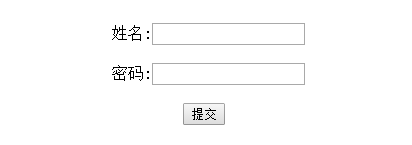
第二节:jQuery Validation让验证变得如此容易
上一个例子我们是统一引用jquery.validate.js这样所有必填字段的提示信息都将是This field is required.
现在要改成动态提示,比如姓名如果为空则提示姓名不能为空,密码如果为空则提示密码不能为空。
这次我们将校验规则写在代码里
首先还是先引入文件
<script src="js/jquery-1.8.0.min.js" type="text/javascript"></script> <script src="js/jquery.validate.js" type="text/javascript"></script> <form action="" id="jvForm"> 姓名:<input type="text" name="username" id="username" /></br> 密码:<input type="password" name="password" id="password" /></br> <input type="submit" value="提交" /> </form> 最后 校验规则如下:
$(function() { $("#jvForm").validate({ rules: { username: { required: true }, password: { required: true } }, messages: { username: { required: "姓名不能为空!" }, password: { required: "密码不能为空!" } } }); }) 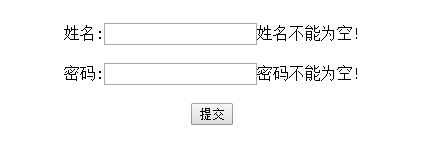
第三节:jQuery Validation让验证变得如此容易
以下代码进行对jQuery Validation的简单演示包括必填项、字符长度,格式验证
一、引入文件
<script src="js/jquery-1.8.0.min.js" type="text/javascript"></script> <script src="js/jquery.validate.js" type="text/javascript"></script><form action="" id="jvForm"> 用 户 名:<input type="text" name="username"/></br> 密 码:<input type="password" name="password" id="password"/></br> 确认密码:<input type="password" name="confirm_password"/></br> 出 生 地:<select name="address"><option value="">--</option><option value="1">北京</option> <option value="1">上海</option><option value="1">深圳</option></select></br> 手 机:<input type="text" name="mobile" /></br> 邮 箱:<input type="text" name="email" /></br> <input type="submit" value="提交" /> </form> <style type="text/css"> label.error{font-size:12px;font-weight: normal;color:#ff0511;margin-left:10px;} </style><script type = "text/javascript"> $(function() { $("#jvForm").validate({ rules: { username: { //用户名必填 至少3位 required: true, minlength: 3 }, password: { //密码必填 至少6位 required: true, minlength: 6 }, confirm_password: { //密码确认 required: true, equalTo: "#password" }, address: { //出生地必填 required: true }, mobile: { //手机必填 验证格式 required: true, mobile: true }, email: { //email必填 验证格式 required: true, email: true }, }, messages: { username: { required: "用户名不能为空!", minlength: "用户名至少三位!" }, password: { required: "密码不能为空!", minlength: "密码至少六位!" }, confirm_password: { required: "密码确认不能为空!", equalTo: "两次输入密码不一致 !" }, address: { required: "请选择出生地!", }, mobile: { required: "手机不能为空!", mobile: "手机格式不正确", }, email: { required: "邮箱不能为空!", email: "邮箱格式不正确", }, } }); }) </script>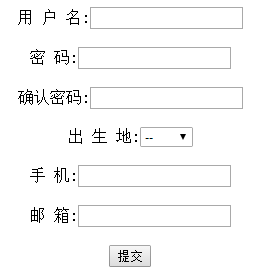
jQuery Validate插件实现表单强大的验证功能的更多相关文章
- jQuery Validate 插件为表单提供了强大的验证功能
之前项目开发中,表单校验用的jQuery Validate 插件,这个插件为表单提供了强大的验证功能,让客户端表单验证变得更简单,同时提供了大量的定制选项,满足应用程序各种需求.该插件捆绑了一套有用的 ...
- validate插件实现表单效验(二)
一款优秀的表单验证插件——validation插件 特点: l 内置验证规则:拥有必填.数字.email.url和信用卡号码等19类内置验证规则 l 自定义验证规则:可以很方便的自定义验证规则 l ...
- jquery validate 一个注册表单的应用
先看页面 前端表单代码 register.html <form class="mui-input-group" id="regForm"> < ...
- 表单提交学习笔记(二)—使用jquery.validate.js进行表单验证
一.官网下载地址:http://plugins.jquery.com/validate/ 二.用法 1.在页面上进行引用 <script src="~/scripts/jquery-1 ...
- jquery.validate.js自定义表单验证
$(document).ready(function() { //在下列位置输入页面加载的逻辑代码 $("#inputForm").validate({ rules: { seq: ...
- validate插件实现表单效验(一)
<!DOCTYPE html> <html> <head> <meta charset="UTF-8"> <title> ...
- [转]jQuery.validate插件在失去焦点时执行验证代码
转:http://my.oschina.net/enyo/blog/311566 关于 jquery.validate.js 表单验证插件如何在失去焦点时做验证.看手册后发现默认是在表单提交时执行验证 ...
- jQuery html5Validate基于HTML5表单 异步服务器端验证
1. HTML5 自带的Validate 很漂亮,很好用, 但是一定要在form里用submit按钮,才生效 <form id="frmInfo" action=" ...
- jquery.form插件 提交表单 type="hidden"取不到值的问题记录
1.外国文献:说可以改成其他的(非hidden),再加style="display:none"隐藏. <INPUT type="password" sty ...
随机推荐
- 洛谷——P2171 Hz吐泡泡
P2171 Hz吐泡泡 题目描述 这天,Hz大大心血来潮,吐了n个不同的泡泡玩(保证没有重复的泡泡).因为他还要写作业,所以他请你帮他把这些泡泡排序成树(左子树<=根<右子树).输出它的后 ...
- (C/C++学习)18.C语言双向链表
说明:数组提供了连续内存空间的访问和使用,而链表是对内存零碎空间的有效组织和使用.链表又分为单向链表和双向链表,单向链表仅提供了链表的单方向访问,相比之下,双向链表则显得十分方便. 一.单向链表的节点 ...
- Python使用Flask框架,结合Highchart处理xml数据
1.html代码 <!DOCTYPE html><html lang="en"><head> <meta charset=" ...
- PHP+Python,轻量维护超轻松
window下安装Python 直接去Python官网下载msi安装程序安装即可(选择自定义安装才能修改程序安装路径哦) widows下Python的数据库访问模块PyMysql的安装 1.open ...
- 关于vuex自己理解的三幅图
- 【Codeforces 382C】Arithmetic Progression
[链接] 我是链接,点我呀:) [题意] 让你在n个数字中再加入一个数字 使得这n+1个数字排序之后 相邻两个数字的差都相同 [题解] 注意相邻为0的情况 这种情况 只有全都相同才行 只有一种情况 然 ...
- 【Codeforces 484A】Bits
[链接] 我是链接,点我呀:) [题意] 让你求出l~r当中二进制表示1的个数最多的数x [题解] 最多有64位 我们可以从l开始一直增大到r 怎么增大? 找到l的二进制表示当中0所在的位置 假设i这 ...
- openstack windows2012r2 glance镜像制作
镜像实现: 密码注入 修改密码 根分区扩展 1.下载windows iso镜像 下载地址:http://imsdn.com/MSDN-1.html 例如:cn_windows_server_2012_ ...
- noip模拟赛 游
[问题背景]zhx 和他的妹子出去玩.[问题描述]zhx 和他的妹子去一个国家旅游,共有 N 个旅游景点, N-1 条双向连接的道路将它们联通起来, 每一条道路有固定长度. 一开始 zhx 位于 1 ...
- Spring——ClassPathXmlApplicationContext(配置文件路径解析 1)
ClassPathXmlApplicationContext 在我的 BeanFactory 容器文章中主要提及了 BeanFactory 容器初始化(Spring 配置文件加载(还没解析)) ...