
10 逻辑完善以及bug修复
进行到这里,我们应用开发已经接近尾声,我这里基本就是应用开发的记录过程,讲解的东西很少,有问题可以在评论区讨论呦。下面进入最后调整的阶段。
预览我们的应用,会发现首页的职位列表,也会显示收藏的星星图标,这里我们不需要它:

我们先来进行调整职位列表的组件模块:
positionlist.html:
<span ng-click="$event.stopPropagation();select(item)" ng-if="isFavorite" class="p-a icon {{item.select?'star-active':'star'}}"></span>
这里把是否显示小星星的条件由是否登录改成由其父控制器来控制,打开positionlist.js文件:
'use strict';

angular.module('app').directive('appPositionList',['$http', function($http){

    return {

        restrict:'A',

        replace:true,

        templateUrl:'view/template/positionlist.html',

        scope:{

            data:'=',

            filterObj:'=',

            isFavorite:'='

        },

        link:function($scope){

            $scope.select = function(item){

                $http.post('data/favorite.json',{

                    id:item.id,

                    select: !item.select

                }).success(function(resp){

                    item.select = !item.select;

                });

            };

        }

    };

}]);
这时,首页的职位列表的收藏图标已经消失了,但是我的收藏的小星星也不见了,而我们在收藏列表里是需要它的:
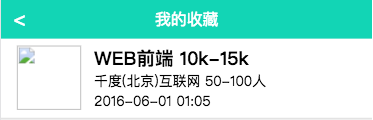
打开favorite.html文件:
<div app-position-list data="list" is-favorite="true"></div>
现在我们的收藏图标就出现了:

还有首页的头部有一个去登录的按钮和定位的提示语,这是不合逻辑的,当我们是登录状态的时候,应显示用户名称,而在非登录状态显示这两部分,打开head组件部分,head.html:
<div class="head">

    <span class="text" ng-hide="name">10秒定制职位</span>

    <button class="custom f-r" ng-hide="name" ui-sref="login">去登录</button>

    <span class="f-r text" ng-bind="'您好,'+name"></span>

</div>
修改对应的head.js文件:
'use strict';

angular.module('app').directive('appHead',['cache', function(cache){

    return{

        restrict:'A',

        replace:true,

        templateUrl:'view/template/head.html',

        link:function($scope){

            $scope.name = cache.get('name') || '';

        }

    }

}]);
修改后的效果:

现在进入职位详情页看一下:

我们现在是登录状态,底部显示去登录这不科学,打开positionCtrl.js文件:
'use strict';

angular.module('app')

    .controller('positionCtrl', ['$q', '$http', '$state', '$scope','cache', function($q, $http, $state, $scope, cache) {

        $scope.isLogin = !!cache.get('name');
此时页面效果如下:
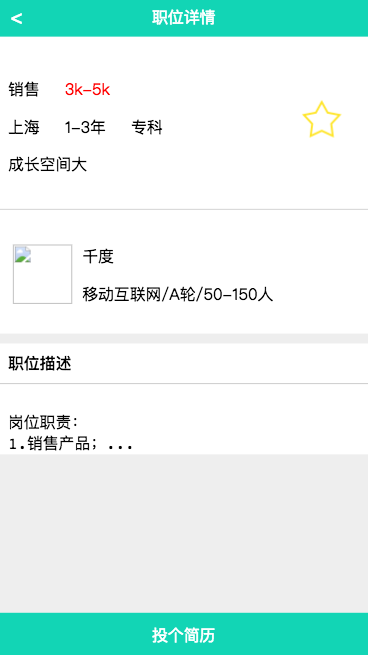
我们想要的页面效果是出来了,但是收藏图标现在还不好使,来处理一下小星星,打开positioninfo.html,给小星星添加一个点击事件:
<img ng-show="isLogin" ng-src="{{imagePath}}" class="p-a" ng-click="favorite();">
然后打开它对应的指令文件positioninfo.js文件:
'use stict';

angular.module('app').directive('appPositionInfo', ['$http', function($http) {

    return {

        restrict: 'A',

        replace: true,

        templateUrl: 'view/template/positioninfo.html',

        scope: {

            isActive: '=',

            isLogin: '=',

            pos: '='

        },

        link: function($scope) {

            $scope.$watch('pos', function(newValue) {

                if(newValue){

                    $scope.pos.select = $scope.pos.select || false;

                    $scope.imagePath = $scope.pos.select ? 'image/star-active.png' : 'image/star.png';

                }

            });

            $scope.favorite = function() {

                $http.post('data/favorite.json', {

                    id: $scope.pos.id,

                    select: !$scope.pos.select

                }).success(function(resp){

                    $scope.pos.select = !$scope.pos.select;

                    $scope.imagePath = $scope.pos.select ? 'image/star-active.png' : 'image/star.png';

                });

            };

        }

    }

}]);
现在我们来完成「投个简历」部分的操作:
打开position.html文件,给底部按钮添加一个点击事件:
<button class="bottom-btn c-w" ng-bind="message" ng-click="go();"></button>
然后打开positionCtrl.js文件来完善逻辑:
'use strict';

angular.module('app')

    .controller('positionCtrl', ['$log', '$q', '$http', '$state', '$scope', 'cache', function($log, $q, $http, $state, $scope, cache) {

        $scope.isLogin = !!cache.get('name');

        $scope.message = $scope.isLogin ? '投个简历' : '去登录';

        function getPosition() {

            var def = $q.defer();

            $http.get('/data/position.json?id=' + $state.params.id).success(function(resp) {

                $scope.position = resp;

                if (resp.posted) {

                    $scope.message = '已投递';

                }

                def.resolve(resp);

            }).error(function(err) {

                def.reject(err);

            });

            return def.promise;

        };

        function getCompany(id) {

            $http.get('/data/company.json?id=' + id).success(function(resp) {

                $scope.company = resp;

            })

        }

        getPosition().then(function(obj) {

            getCompany(obj.companyId);

        });

        $scope.go = function() {

            if ($scope.message != '已投递') {

                if ($scope.isLogin) {

                    $http.post('data/handle.json', {

                        id: $scope.position.id

                    }).success(function(resp) {

                        $log.info(resp);

                        $scope.message = '已投递';

                    })

                } else {

                    state.go('login');

                }

            }

        };

    }]);
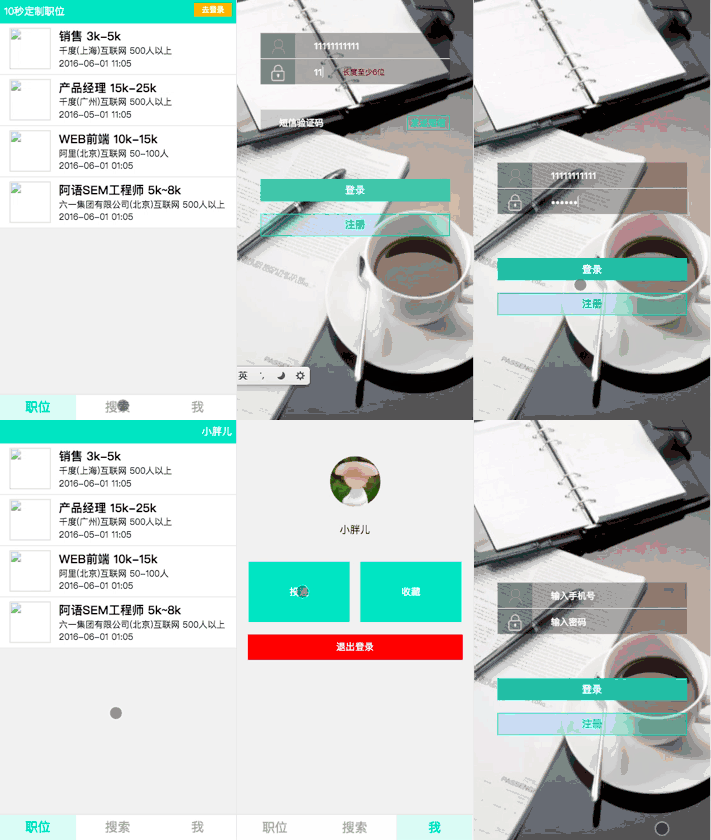
现在,应用已经修改完毕啦,我们来快速预览一下吧~
10 逻辑完善以及bug修复的更多相关文章
- OJ2.0userInfo页面Modify逻辑bug修复,search功能逻辑实现
这周的主要任务:userInfo页面Modify逻辑bug修复,search功能逻辑实现. (一)Modify逻辑bug修复: 这里存在的bug就是在我们不重置password的时候依照前面的逻辑是不 ...
- Flutter实战视频-移动电商-27.列表页_现有Bug修复和完善
27.列表页_现有Bug修复和完善 小解决小bug 默认右侧的小类没有被加载 数据加载完成后,就list的第一个子对象传递给provide进行赋值,这样右侧的小类就刷新了数据 默认加载了第一个类别 调 ...
- 10个JavaScript常见BUG及修复方法
译者按: JavaScript语言设计太灵活,用起来不免要多加小心掉进坑里面. 原文: Top 10 bugs and their bug fixing 译者: Fundebug 为了保证可读性,本文 ...
- 仿酷狗音乐播放器开发日志十九——CTreeNodeUI的bug修复二(附源码)
转载请说明原出处,谢谢 今天本来打算把仿酷狗播放列表的子控件拖动插入功能做一下,但是仔细使用播放列表控件时发现了几个逻辑错误,由于我的播放 列表控件是基于CTreeViewUI和CTreeNodeUI ...
- 微信小程序(有始有终,全部代码)开发---跑步App+音乐播放器 Bug修复
开篇语 昨晚发了一篇: <简年15: 微信小程序(有始有终,全部代码)开发---跑步App+音乐播放器 > 然后上午起来吃完午饭之后,我就准备继续开工的,但是突然的,想要看B站.然后在一股 ...
- Saiku Table展示数据合并bug修复(二十五)
Saiku Table展示数据合并bug修复 Saiku以table的形式展示数据,如果点击了 非空的字段 按钮,则会自动进行数据合并,为空的数据行以及数据列都会自动隐藏掉. 首先我们应该定位问题: ...
- 批量打回未报bug修复
半天写完了代码,从此开始了三天的bug修复... 问题背景:从合同系统那边获取数据. 1.开发完后,利用mock模拟合同数据,获取(mock中的合同)数据成功,但是在解析合同数据时出错,原因,mock ...
- duilib CDateTimeUI 在Xp下的bug修复
转自:http://my.oschina.net/u/343244/blog/370131 CDateTimeUI 的bug修复.修改CDateTimeWnd的HandleMessage方法 ? 1 ...
- windows 10 change default program bug
windows 10 change default program bug https://www.isumsoft.com/windows-10/how-to-change-or-set-defau ...
随机推荐
- Python_编程题集_003_递归算法解析
3.递归算法: 3)传入一个Json串,返回一个字典,字典只取出Json最底层的数据, 中间如果有字符串也要进行处理,请以下面的数据为例,请用递归方法实现 Json:{"a":&q ...
- Django框架基础知识03-模板变量及模板过滤器
模板变量及模板过滤器. 1.模板路径的查找 -查找顺序 1.尝试,在app目录下存放模板. -两种方案 1.app项目文件夹下存放. 2.templates文件夹下分类存放. 首先查找项目settin ...
- (十八)python 3 回调函数
回调函数:把函数的指针(地址)作为参数传递给另一个函数,当这个指针被用来调用其所指向的函数时,我们就说这是回调函数.回调函数不是由该函数的实现方直接调用,而是在特定的事件或条件发生时由另外的一方调用的 ...
- AnjularJs-Select添加数据并设置默认值
html中 <select name="book_classify" class="all_list_btn" ng-model="select ...
- centos的那些小事儿!
操作系统:centos7 1.[root@chaoge ~]# ifconfig-bash: ifconfig: 未找到命令 安装net-tools即可: [root@chaoge ~]# yum i ...
- reactNative 介绍
React Native (简称RN)是Facebook于2015年4月开源的跨平台移动应用开发框架,是Facebook早先开源的UI框架 React 在原生移动应用平台的衍生产物,目前支持iOS和安 ...
- 『NYIST』第八届河南省ACM竞赛训练赛[正式赛一]-CodeForces 236A,虽然很水,但有一个很简单的函数用起来方便
A. Boy or Girl time limit per test 1 second memory limit per test 256 megabytes input standard input ...
- HDU-1210Eddy's 洗牌问题
Eddy's 洗牌问题 Time Limit: 2000/1000 MS (Java/Others) Memory Limit: 65536/32768 K (Java/Others) Prob ...
- [POJ2443]Set Operation(bitset)
传送门 题意:给出n个集合(n<=1000),每个集合中最多有10000个数,每个数的范围为1~10000,给出q次询问(q<=200000),每次给出两个数u,v判断是否有一个集合中同时 ...
- BZOJ 1509[NOI 2003]逃学的小孩 树形dp
1509: [NOI2003]逃学的小孩 Time Limit: 5 Sec Memory Limit: 64 MBSubmit: 995 Solved: 505[Submit][Status][ ...