
基于Bootstrap的Asp.net Mvc 分页
基于Bootstrap的Asp.net Mvc 分页的实现
最近写了一个mvc 的 分页,样式是基于 bootstrap 的 ,提供查询条件,不过可以自己写样式根据个人的喜好,以此分享一下。首先新建一个Mvc 项目,既然是分页就需要一些数据,我这边是模拟了一些假的数据,实际的项目中都是在数据库中去取得的,很简单的数据:

1  public class User

2     {

3         public string Name { get; set; }

4

5         public int Age { get; set; }

6     }
取数据我这边是加了120个数据:
 1   public List<User> GetData()

 2         {

 3             List<User> list = new List<User>();

 4             string[] array = new string[] { "Tom", "Joy", "James", "Kobe", "Jodan", "LiLei", "Hanmeimei", "xiaoming", "Danneil", "Forest", "Newbee", "Azure" };

 5             for (int i = 0; i < 120; i++)

 6             {

 7                 User user = new User();

 8                 user.Age = i;

 9                 user.Name = array[i / 10];

10                 list.Add(user);

11             }

12

13

14             return list;

15         }
然后新建一个 PageModel类
 1 /// <summary>

 2     /// 有些属性我写成了虚的, 这样可以根据不同的需要去重写便于扩展

 3     /// </summary>

 4     public class BasePageModel

 5     {

 6         public string SearchKeyWord { get; set; }

 7

 8         /// <summary>

 9         ///点击分页是指向 Action 的名字 根据具体需要而定

10         /// </summary>

11         public virtual string ActionName

12         {

13             get

14             {

15                 return "Index";

16             }

17         }

18

19         public int TotalCount { get; set; }

20

21         public int CurrentIndex { get; set; }

22

23         public int TotalPages

24         {

25             get

26             {

27                 return (int)Math.Ceiling((double)TotalCount / (double)PageSize);

28             }

29         }

30

31         /// <summary>

32         /// 根据需要具体而定PageSize

33         /// </summary>

34         public virtual int PageSize

35         {

36             get { return 10; }

37         }

38

39         /// <summary>

40         ///根据需要具体而定 分页显示最大的页数

41         /// </summary>

42         public virtual int DisplayMaxPages

43         {

44             get

45             {

46                 return 10;

47             }

48         }

49

50         public bool IsHasPrePage

51         {

52             get

53             {

54                 return CurrentIndex != 1;

55             }

56         }

57

58         public bool IsHasNextPage

59         {

60             get

61             {

62                 return CurrentIndex != TotalPages;

63             }

64         }

65     }
再新建一个分布式图 建在Shared 文件夹里,代码如下:
1 @using MvcTest.Models
2 @model MvcTest.Models.BasePageModel
3
4 @{if (Model != null && Model.TotalPages != 0)
5 {
6 <ul class="pagination">
7 @{
8
9 @Url.CreatPageLiTag(Model, Model.CurrentIndex - 1, false, Model.IsHasPrePage, "«")
10
11 if (Model.TotalPages <= Model.DisplayMaxPages)
12 {
13 for (int i = 1; i < Model.TotalPages; i++)
14 {
15 @Url.CreatPageLiTag(Model, i, i == Model.CurrentIndex);
16 }
17 }
18 else
19 {
20 if (Model.CurrentIndex - 1 < 5)
21 {
22 for (int i = 1; i <= Model.DisplayMaxPages - 1; i++)
23 {
24 @Url.CreatPageLiTag(Model, i, i == Model.CurrentIndex);
25 }
26
27 @Url.CreatPageLiTag(Model, Model.CurrentIndex, false, false, "...");
28 }
29 else
30 {
31 @Url.CreatPageLiTag(Model, 1);
32
33
34 if (Model.CurrentIndex + (Model.DisplayMaxPages - 2) / 2 >= Model.TotalPages)
35 {
36 int page = Model.CurrentIndex - (Model.DisplayMaxPages - Model.TotalPages + Model.CurrentIndex - 1);
37
38 if (page > 1)
39 {
40 @Url.CreatPageLiTag(Model, Model.CurrentIndex, false, false, "...");
41 }
42
43 for (int i = page + 1; i < Model.TotalPages; i++)
44 {
45 @Url.CreatPageLiTag(Model, i, i == Model.CurrentIndex);
46 }
47 }
48 else
49 {
50 int page = Model.CurrentIndex - (Model.DisplayMaxPages - 2) / 2;
51
52 if (page > 2)
53 {
54 @Url.CreatPageLiTag(Model, Model.CurrentIndex, false, false, "...");
55 }
56
57 for (int i = page; i < Model.CurrentIndex + (Model.DisplayMaxPages - 2) / 2; i++)
58 {
59 @Url.CreatPageLiTag(Model, i, i == Model.CurrentIndex);
60 }
61 @Url.CreatPageLiTag(Model, Model.CurrentIndex, false, false, "...");
62 }
63
64 }
65 }
66
67 @Url.CreatPageLiTag(Model, Model.TotalPages, Model.TotalPages == Model.CurrentIndex)
68 @Url.CreatPageLiTag(Model, Model.CurrentIndex + 1, false, Model.IsHasNextPage, "»")
69
70 }
71 </ul>
72
73 }}
以上就是分页的核心代码,包括了一些判断逻辑,其中的 @Url.CreatPageLiTag 我是写了一个扩展
 1 public static class HtmlHelperExtensions

 2     {

 3         public static MvcHtmlString CreatPageLiTag(this UrlHelper urlHelper,

 4                                                    BasePageModel pageModel,

 5                                                    int index,

 6                                                    bool isCurrentIndex = false,

 7                                                    bool isDisable = true,

 8                                                    string content = "")

 9         {

10

11             string url = urlHelper.Action(pageModel.ActionName, new { searchkey = pageModel.SearchKeyWord, index = index });

12             string activeClass = !isCurrentIndex ? string.Empty : "class='active'";

13             string disableClass = isDisable ? string.Empty : "class='disabled'";

14             url = isDisable ? "href='" + url + "'" : string.Empty;

15             string contentString = string.IsNullOrEmpty(content) ? index.ToString() : content;

16

17             return new MvcHtmlString("<li " + activeClass + disableClass + "><a " + url + ">" + contentString + "</a></li>");

18         }

19     }
在这里面里面 是生成<a/>标签的,样式可以自己定。无非就是一些css 的定义。
然后就在action 的方法里取数据
 1   public ActionResult Index(string searchkey, string index)

 2         {

 3             if (string.IsNullOrEmpty(index))

 4                 index = "1";

 5             if (string.IsNullOrEmpty(searchkey))

 6                 searchkey = string.Empty;

 7

 8             List<User> totalList = GetData().Where(p=>p.Name.ToLower().Contains(searchkey.ToLower())).ToList();

 9             BasePageModel page = new BasePageModel() { SearchKeyWord = searchkey, CurrentIndex = Int32.Parse(index), TotalCount = totalList.Count };

10

11             List<User> pageList = totalList.Skip((page.CurrentIndex - 1) * page.PageSize).Take(page.PageSize).ToList();

12             ViewData["pagemodel"] = page;

13             return View(pageList);

14         }
前台代码:
 1 @model List<MvcTest.Controllers.User>

 2 @{

 3     ViewBag.Title = "Index";

 4 }

 5

 6 <h2>Data List</h2>

 7 <form class="navbar-form navbar-right" name="searchform" action="@Url.Action("Index", new {index="1" }) method="post">

 8     <div class="input-group">

 9         <input type="text" id="searchkey" name="searchkey" class="form-control" placeholder="Search..." />

10         <span class="btn input-group-addon" onclick="document.searchform.submit();">

11             <span class="glyphicon  glyphicon-search"></span>

12         </span>

13     </div>

14 </form>

15 <table class="table  table-hover table-bordered  table-condensed">

16     <thead>

17         <tr>

18             <th>Name</th>

19             <th>Age</th>

20         </tr>

21     </thead>

22     <tbody>

23         @foreach (var item in Model)

24         {

25             <tr>

26                 <td>@item.Name</td>

27                 <td>@item.Age</td>

28             </tr>

29         }

30

31     </tbody>

32 </table>

33 @Html.Partial("MvcPagerView", ViewData["pagemodel"])
Ok 搞定。效果如下:
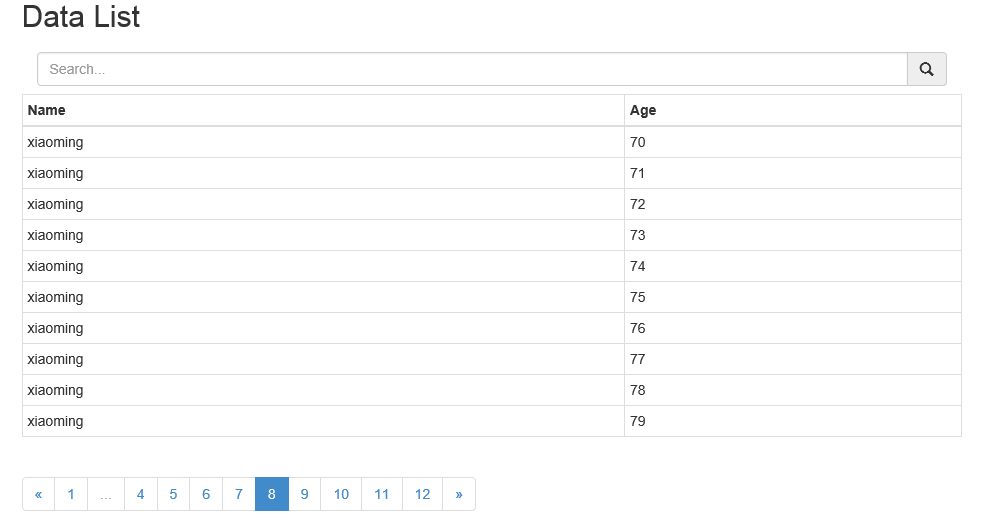
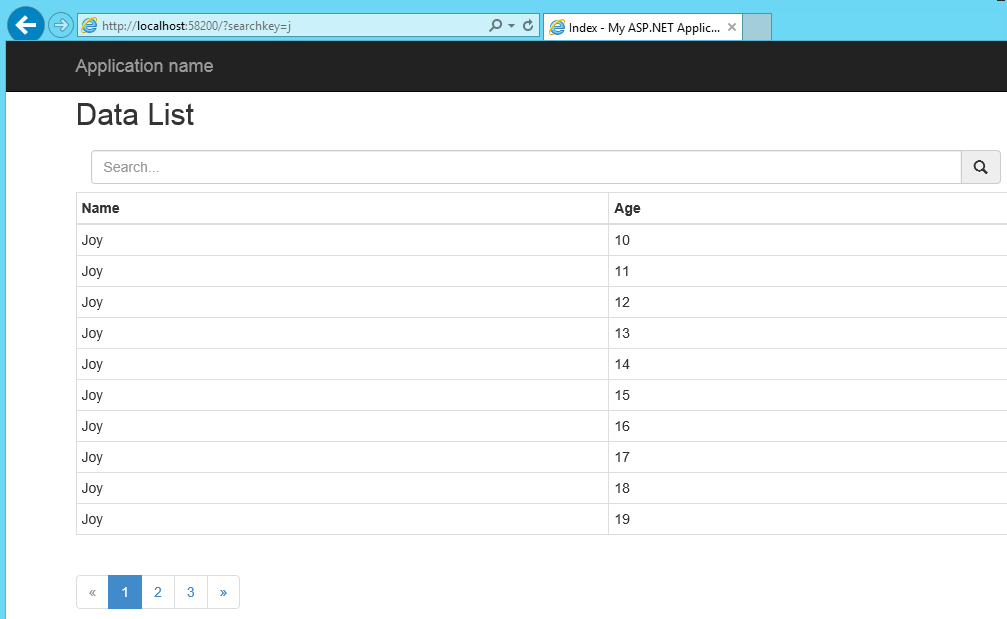
分页的样式我还是比较喜欢的,当然可以自己扩展。
基于Bootstrap的Asp.net Mvc 分页的更多相关文章
- 基于Bootstrap的Asp.net Mvc 分页的实现
最近写了一个mvc 的 分页,样式是基于 bootstrap 的 ,提供查询条件,不过可以自己写样式根据个人的喜好,以此分享一下.首先新建一个Mvc 项目,既然是分页就需要一些数据,我这边是模拟了一些 ...
- 基于Bootstrap的Asp.net Mvc 分页的实现(转)
最近写了一个mvc 的 分页,样式是基于 bootstrap 的 ,提供查询条件,不过可以自己写样式根据个人的喜好,以此分享一下.首先新建一个Mvc 项目,既然是分页就需要一些数据,我这 边是模拟了一 ...
- ASP.NET MVC分页组件MvcPager 2.0版发布暨网站全新改版
MvcPager分页控件是在ASP.NET MVC Web应用程序中实现分页功能的一系列扩展方法,该分页控件的最初的实现方法借鉴了网上流行的部分源代码, 尤其是ScottGu的PagedList< ...
- ASP.NET MVC分页实现之改进版-增加同一个视图可设置多个分页
我之前就已经实现了ASP.NET MVC分页(查看该博文),但它有局限性,必须确保在同一个视图中只能有一处分页,若需要在同一个视图中设置多个分页,却无能为力,为此,我重新对原先的代码进行了优化,增加了 ...
- 基于C#和Asp.NET MVC开发GPS部标视频监控平台
基于C#和Asp.NET MVC开发GPS部标监控平台 目前整理了基于.NET技术的部标平台开发文章,可以参考: 1.部标Jt808协议模拟终端的设计和开发 2.C#版的808GPS服务器开发-> ...
- ASP.NET MVC分页实现
ASP.NET MVC中不能使用分页控件,所以我就自己写了一个分页局部视图,配合PageInfo类,即可实现在任何页面任意位置呈现分页,由于采用的是基于POST分页方式,所以唯一的限制就是必须放在FO ...
- 基于C#和Asp.NET MVC开发GPS部标监控平台
基于交通部796标准开发部标监控平台,选择开发语言和技术也是团队要思考的因素,其实这由团队自己擅长的技术来决定,如果擅长C#和Asp.NET, 当然开发效率就高很多.当然了技术选型一定要选用当前主流的 ...
- Bootstrap 与 ASP.NET MVC 4 不使用 NuGet Package 笔记
转自 http://www.mytecbits.com/microsoft/dot-net/bootstrap-with-asp-net-mvc-4-step-by-step 单位最近做了一个Boot ...
- Asp.net MVC分页实例
分页是网页基本功能,这里主要讨论在Asp.net MVC环境下分页的前端实现,不涉及后台分页.实现效果如下图显示: Step 1.建立分页信息类 public class PagingInfo { p ...
随机推荐
- 【Android小应用】强迫症头像生成器
近期一段时间在微信朋友圈,在头像的右上角添加一个红底白字的数字,让非常多有强迫症的同学点个不停,深深佩服发明这样的头像的姑娘,太机智了.但它不能自己定义,这是硬伤.... 这是朋友圈里的效果图: 这个 ...
- 关于查看文件size
public static long getTotalSize(String device) { StatFs sf = new StatFs (device); //long totalblocks ...
- Android Activity之间通信
package com.example.myapp; import android.app.Activity; import android.content.DialogInterface; impo ...
- 渲染优化 之fixed与返回顶部 以及开启GPU Hack
fixed元素,常见网站右侧出现一个返回顶部的按钮,滚动的时候,会发现返回顶部这个区域在不停的进行重绘,而返回顶部是position:fixed定位的.这也解释了为什么fixed定位是最耗性能的属性之 ...
- js在方法Ajax请求数据来推断,验证无效(OnClientClick="return Method();"),或者直接运行的代码隐藏
function CheckAdd() { var flag = true; $.ajax({ cache: false, async: false, url: "/ajaxpage/get ...
- Android Studio中导入Android项目StepbyStep
想把在eclipse的项目导入Android studio,有两种方法,但是我喜欢的是不改变项目文件结构的方法,因为这样可以兼容eclipse. 第一步: 导入的项目不能运行,需要配置运行环境.And ...
- USACO dualpal
/* ID:kevin_s1 PROG:dualpal LANG:C++ */ #include <iostream> #include <cstdio> #include & ...
- ZOJ-3652-Maze(BFS)
Celica is a brave person and believer of a God in the bright side. He always fights against the mons ...
- 【ORACLE】使用数据泵的生产环境impd,expdp数据迁移
********************************************** ** 原文: blog.csdn.net/clark_xu 徐长亮专栏 **************** ...
- PHP从零单排(十八)图像处理
1.打开现有的图像 <?php header("Content-type:image/jpeg"); $img=imagecreatefromjpeg("cc.jp ...