
JavaScript插件——模态框
Bootstrap3.0学习第十七轮(JavaScript插件——模态框)
前言
阅读之前您也可以到Bootstrap3.0入门学习系列导航中进行查看http://www.cnblogs.com/aehyok/p/3404867.html
本文主要来学习一下JavaScipt插件模态框。在学习模态框之前,我们先来了解一下JavaScript插件吧。
JavaScript插件概览
插件可以单个引入(使用Bootstrap提供的单个*.js文件),或一次性全部引入(使用bootstrap.js或压缩版的bootstrap.min.js)。
不要将两份文件全部引入
bootstrap.js和bootstrap.min.js同样是包含了所有插件。区别是:一个没有压缩,一个进行了压缩。插件之间的依赖
某些插件和CSS组件依赖于其它插件。如果你是单个引入每个插件的,请确保在文档中检查插件之间的依赖关系。注意,所有插件都依赖jQuery(也就是说,jQuery必须在所有插件之前引入页面)。
bower.json文件中列出了所支持的jQuery版本。
Data属性
你可以仅仅通过data属性API就能使用所有的Bootstrap插件,无需写一行JavaScript代码。这是Bootstrap中的一等API,也应该是你的首选方式。
话又说回来,在某些情况下可能需要将此功能关闭。因此,我们还提供了关闭data属性API的方式,即解除绑定到文档命名空间上的所有事件data-api。就像下面这样:
$(document).off('.data-api')
另外,如果是针对某个特定的插件,只需在data-api前面添加那个插件的名称作为命名空间,如下:
$(document).off('.alert.data-api')
编程式API
我们还提供了所有Bootstrap插件的纯JavaScript API。所有公开的API都是支持单独或链式调用的,并且返回其所操作的元素集合(注:和jQuery的调用形式一致)。
$(".btn.danger").button("toggle").addClass("fat")
所有方法都可以接受一个可选的option对象作为参数,或者一个代表特定方法的字符串,或者什么也不提供(在这种情况下,插件将会以默认值初始化):
$("#myModal").modal()                      // 使用默认值初始化

$("#myModal").modal({ keyboard: false })

$("#myModal").modal('show')
每个插件还通过Constructor属性暴露了其自身的构造器函数:$.fn.popover.Constructor。如果你想获取某个插件的实例,可以直接从页面元素内获取:$('[rel=popover]').data('popover')。
避免冲突
某些时候可能需要将Bootstrap插件与其他UI框架共同使用。在这种情况下,命名空间冲突随时可能发生。如果不行发生了这种情况,你可以通过调用插件的.noConflict方法恢复原始值。
var bootstrapButton = $.fn.button.noConflict()
$.fn.bootstrapBtn = bootstrapButton
事件
Bootstrap为大部分插件所具有的动作提供了自定义事件。一般来说,这些事件都有不定式和过去式两种动词形式,例如,不定式形式的动词表示其在事件开始时被触发;而过去式动词表示其在动作直接完毕之后被触发。
从3.0.0开始,所有的Bootstrap事件都采用了命名空间。
所有以不定式形式的动词命名的事件都提供了preventDefault功能。这就赋予你在动作开始执行前将其停止的能力。
$('#myModal').on('show.bs.modal', function (e) {

  if (!data) return e.preventDefault()

})
第三方工具库
Bootstrap官方不提供对第三方JavaScript工具库的支持,例如Prototype或jQuery UI。除了
.noConflict和采用命名空间的事件,还可能会有兼容性方面的问题,这就需要你自己来处理了
模态框
案例
模态框经过了优化,更加灵活,以弹出对话框的形式出现,具有最小和最实用的功能集。
不支持模态框重叠
千万不要在一个模态框上重叠另一个模态框。要想同时支持多个模态框,需要自己写额外的代码来实现。
静态案例
以下模态框包含了模态框的头、体和一组在放置于底部的按钮。

<div class="modal fade">
<div class="modal-dialog">
<div class="modal-content">
<div class="modal-header">
<button type="button" class="close" data-dismiss="modal" aria-hidden="true">×</button>
<h4 class="modal-title">Modal title</h4>
</div>
<div class="modal-body">
<p>One fine body…</p>
</div>
<div class="modal-footer">
<button type="button" class="btn btn-default" data-dismiss="modal">Close</button>
<button type="button" class="btn btn-primary">Save changes</button>
</div>
</div>
</div>
</div>
首先最外层的是model,然后里面嵌套了一个model-dialog,model-dialog里面又嵌套model-content,当中包含“header”、“title”、"footer"。不过运行程序后,模态框没有显示出来,暂时还没找到原因。
动态演示
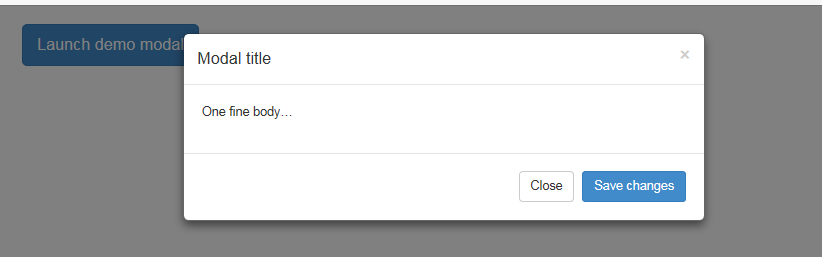
点击下面的按钮即可通过JavaScript启动一个模态框。此模态框将从上到下、逐渐浮现到页面前。
<button class="btn btn-primary btn-lg" data-toggle="modal" data-target="#myModal">

  Launch demo modal

</button>
<div class="modal fade" id="myModal" tabindex="-1" role="dialog" aria-labelledby="myModalLabel" aria-hidden="true">
<div class="modal-dialog">
<div class="modal-content">
<div class="modal-header">
<button type="button" class="close" data-dismiss="modal" aria-hidden="true">×</button>
<h4 class="modal-title" id="myModalLabel">Modal title</h4>
</div>
<div class="modal-body">
One fine body…
</div>
<div class="modal-footer">
<button type="button" class="btn btn-default" data-dismiss="modal">Close</button>
<button type="button" class="btn btn-primary">Save changes</button>
</div>
</div>
</div>
</div>
同样的,不过首先是一个按钮,按钮中添加了两个data属性,要设置data-toggle="modal" data-target="#myModal"。
然后下面最大的是一个modal,并且给与属性id赋值为上面button中的data-target ,进行交互。
增强模态框的可访问性
请确保为
.modal添加了role="dialog";aria-labelledby="myModalLabel"属性指向模态框标题;aria-hidden="true"告诉辅助性工具略过模态框的DOM元素。另外,你还应该为模态框添加描述性信息。为
.modal添加aria-describedby属性用以指向描述信息。
用法--通过data属性
不需写JavaScript代码也可激活模态框。通过在一个起控制器作用的页面元素(例如,按钮)上设置data-toggle="modal",并使用data-target="#foo"或href="#foo"指向特定的模态框即可。就像本例中的
<button class="btn btn-primary btn-lg" data-toggle="modal" data-target="#myModal">
Launch demo modal
</button>
用法--通过JavaScript调用
只需一行JavaScript代码,即可通过id myModal调用模态框:
$('#myModal').modal(options)
选项
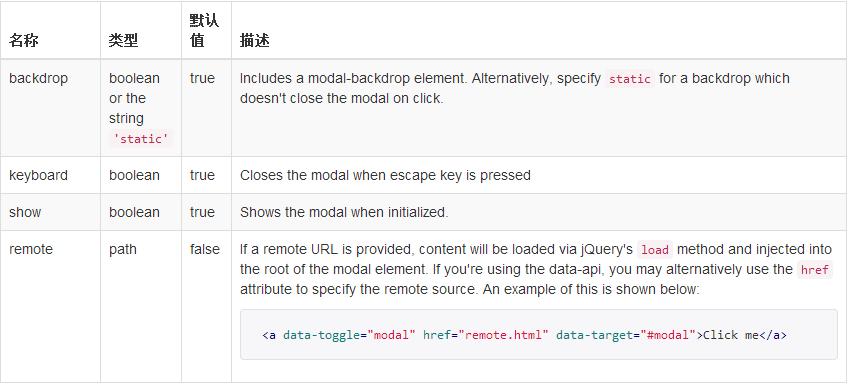
可以将选项通过data属性或JavaScript传递。对于data属性,需要将选项名称放到data-之后,例如data-backdrop=""。
方法
.modal(options)
将你指定的内容作为模态框启动。其接受一个可选的object类型的参数。
$('#myModal').modal({

  keyboard: false

})
.modal('toggle')
手动启动或隐藏模态框。
$('#myModal').modal('toggle')
手动打开一个模态框。
$('#myModal').modal('show')
手动隐藏一个模态框。
$('#myModal').modal('hide')
将上面的示例代码进行修改,其主要变化在于按钮上
<script type="text/javascript">
function test()
{
$('#myModal').modal('show');
alert(1);
}
</script>
<button onClick="test()" class="btn btn-primary btn-lg">
Launch demo modal
</button>
<div class="modal fade" id="myModal" tabindex="-1" role="dialog" aria-labelledby="myModalLabel" aria-hidden="true">
<div class="modal-dialog">
<div class="modal-content">
<div class="modal-header">
<button type="button" class="close" data-dismiss="modal" aria-hidden="true">×</button>
<h4 class="modal-title" id="myModalLabel">Modal title</h4>
</div>
<div class="modal-body">
One fine body…
</div>
<div class="modal-footer">
<button type="button" class="btn btn-default" data-dismiss="modal">Close</button>
<button type="button" class="btn btn-primary">Save changes</button>
</div>
</div>
</div>
</div>
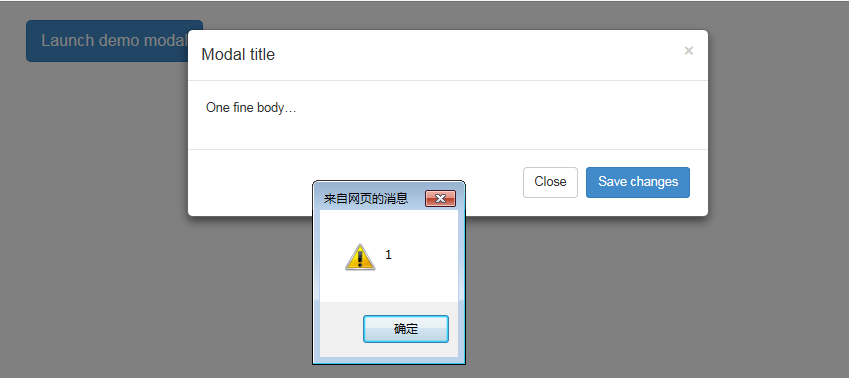
并且为按钮添加了onclick事件,也就是通过点击按钮触发事件来进行模态框的弹出。
通过定义的函数和运行效果来看,的确是通过JavaScript函数进行的弹框。
事件
Bootstrap的模态框类暴露了一些事件用于截获并执行自己的代码。

 <script type="text/javascript">

    $('#myModal').on('hide.bs.modal', function () {

        alert(11);

    });

 </script>
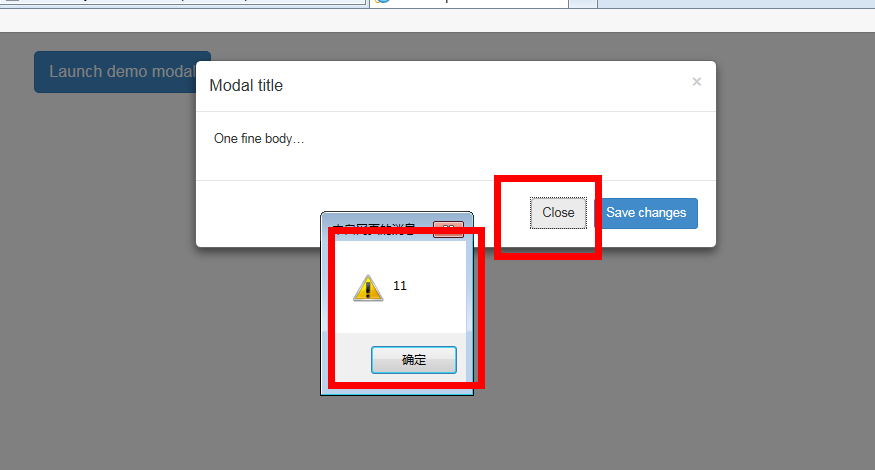
然后执行关闭的时候就会发现
最后把所有代码代码贴出来
<!DOCTYPE html>
<html lang="zh-CN">
<head>
<title>Bootstrap</title>
<meta charset="UTF-8">
<meta name="viewport" content="width=device-width, initial-scale=1.0">
<!-- Bootstrap -->
<link href="css/bootstrap.min.css" rel="stylesheet" media="screen">
<style type="text/css">
.btn-group:hover>.dropdown-menu{display:block;}
</style>
<!--[if lt IE 9]>
<script src="https://oss.maxcdn.com/libs/html5shiv/3.7.0/html5shiv.js"></script>
<script src="https://oss.maxcdn.com/libs/respond.js/1.3.0/respond.min.js"></script>
<![endif]-->
</head>
<body>
<div class="container">
<!DOCTYPE html>
<html lang="zh-CN">
<head>
<title>Bootstrap</title>
<meta charset="UTF-8">
<meta name="viewport" content="width=device-width, initial-scale=1.0">
<!-- Bootstrap -->
<link href="css/bootstrap.min.css" rel="stylesheet" media="screen">
<style type="text/css">
.btn-group:hover>.dropdown-menu{display:block;}
</style>
<!--[if lt IE 9]>
<script src="https://oss.maxcdn.com/libs/html5shiv/3.7.0/html5shiv.js"></script>
<script src="https://oss.maxcdn.com/libs/respond.js/1.3.0/respond.min.js"></script>
<![endif]-->
</head>
<body>
<h1></h1>
<script type="text/javascript">
function test()
{
$('#myModal').modal('show');
alert(1);
}
</script>
<button onClick="test()" class="btn btn-primary btn-lg">
Launch demo modal
</button>
<div class="modal fade" id="myModal" tabindex="-1" role="dialog" aria-labelledby="myModalLabel" aria-hidden="true">
<div class="modal-dialog">
<div class="modal-content">
<div class="modal-header">
<button type="button" class="close" data-dismiss="modal" aria-hidden="true">×</button>
<h4 class="modal-title" id="myModalLabel">Modal title</h4>
</div>
<div class="modal-body">
One fine body…
</div>
<div class="modal-footer">
<button type="button" class="btn btn-default" data-dismiss="modal">Close</button>
<button type="button" class="btn btn-primary">Save changes</button>
</div>
</div>
</div>
</div>
<script src="js/jquery-2.0.3.min.js"></script>
<script src="js/bootstrap.min.js"></script>
<script type="text/javascript">
$('#myModal').on('hide.bs.modal', function () {
alert(11);
});
</script>
</body>
</html>
<!DOCTYPE html>
<html lang="zh-CN">
<head>
<title>Bootstrap</title>
<meta charset="UTF-8">
<meta name="viewport" content="width=device-width, initial-scale=1.0">
<!-- Bootstrap -->
<link href="css/bootstrap.min.css" rel="stylesheet" media="screen">
<style type="text/css">
.btn-group:hover>.dropdown-menu{display:block;}
</style>
<!--[if lt IE 9]>
<script src="https://oss.maxcdn.com/libs/html5shiv/3.7.0/html5shiv.js"></script>
<script src="https://oss.maxcdn.com/libs/respond.js/1.3.0/respond.min.js"></script>
<![endif]-->
</head>
<body>
<div class="container">
<!DOCTYPE html>
<html lang="zh-CN">
<head>
<title>Bootstrap</title>
<meta charset="UTF-8">
<meta name="viewport" content="width=device-width, initial-scale=1.0">
<!-- Bootstrap -->
<link href="css/bootstrap.min.css" rel="stylesheet" media="screen">
<style type="text/css">
.btn-group:hover>.dropdown-menu{display:block;}
</style>
<!--[if lt IE 9]>
<script src="https://oss.maxcdn.com/libs/html5shiv/3.7.0/html5shiv.js"></script>
<script src="https://oss.maxcdn.com/libs/respond.js/1.3.0/respond.min.js"></script>
<![endif]-->
</head>
<body>
<h1></h1>
<script type="text/javascript">
function test()
{
$('#myModal').modal('show');
alert(1);
}
</script>
<button onClick="test()" class="btn btn-primary btn-lg">
Launch demo modal
</button>
<div class="modal fade" id="myModal" tabindex="-1" role="dialog" aria-labelledby="myModalLabel" aria-hidden="true">
<div class="modal-dialog">
<div class="modal-content">
<div class="modal-header">
<button type="button" class="close" data-dismiss="modal" aria-hidden="true">×</button>
<h4 class="modal-title" id="myModalLabel">Modal title</h4>
</div>
<div class="modal-body">
One fine body…
</div>
<div class="modal-footer">
<button type="button" class="btn btn-default" data-dismiss="modal">Close</button>
<button type="button" class="btn btn-primary">Save changes</button>
</div>
</div>
</div>
</div>
<script src="js/jquery-2.0.3.min.js"></script>
<script src="js/bootstrap.min.js"></script>
<script type="text/javascript">
$('#myModal').on('hide.bs.modal', function () {
alert(11);
});
</script>
</body>
</html>
总结
关于模态框的学习,感觉过程中遇到了好多问题,到现在还没有解决,不过大体上已经了解了,还需要慢慢深入。关于JavaScript插件看来没那么容易勒。
本文已更新至Bootstrap3.0入门学习系列导航http://www.cnblogs.com/aehyok/p/3404867.html
JavaScript插件——模态框的更多相关文章
- Bootstrap3.0学习教程十七:JavaScript插件模态框
这篇文章中我们主要来学习一下JavaScipt插件模态框.在学习模态框之前,我们先来了解一下JavaScript插件吧. JavaScript插件概览 插件可以单个引入(使用Bootstrap提供的单 ...
- Bootstrap3.0学习第十七轮(JavaScript插件——模态框)
详情请查看http://aehyok.com/Blog/Detail/24.html 个人网站地址:aehyok.com QQ 技术群号:206058845,验证码为:aehyok 本文文章链接:ht ...
- Bootstrap -- 插件: 模态框、滚动监听、标签页
Bootstrap -- 插件: 模态框.滚动监听.标签页 1. 模态框(Modal): 覆盖在父窗体上的子窗体. 使用模态框: <!DOCTYPE html> <html> ...
- Bootstrap3.0学习第二十三轮(JavaScript插件——警告框)
详情请查看http://aehyok.com/Blog/Detail/29.html 个人网站地址:aehyok.com QQ 技术群号:206058845,验证码为:aehyok 本文文章链接:ht ...
- Bootstrap 模态框(Modal)插件
原文链接:http://www.runoob.com/bootstrap/bootstrap-modal-plugin.html Bootstrap 模态框(Modal)插件 模态框(Modal)是覆 ...
- Bootstrap-Plugin:模态框(Modal)插件
ylbtech-Bootstrap-Plugin:模态框(Modal)插件 1.返回顶部 1. Bootstrap 模态框(Modal)插件 模态框(Modal)是覆盖在父窗体上的子窗体.通常,目的是 ...
- Bootstrap使用模态框modal实现表单提交弹出框
Bootstrap 模态框(Modal)插件 模态框(Modal)是覆盖在父窗体上的子窗体.通常,目的是显示来自一个单独的源的内容,可以在不离开父窗体的情况下有一些互动.子窗体可提供信息.交互等.如果 ...
- 前端之bootstrap模态框
简介:模态框(Modal)是覆盖在父窗体上的子窗体.通常,目的是显示来自一个单独的源的内容,可以在不离开父窗体的情况下有一些互动.子窗体可提供信息.交互等. Modal简介 Modal实现弹出表单 M ...
- 玩转Bootstrap(JS插件篇)-第1章 模态弹出框 :1-1导入JavaScript插件
导入JavaScript插件 Bootstrap除了包含丰富的Web组件之外,如前面介绍的下拉菜单.按钮组.导航.分页等.他还包括一些JavaScript的插件. Bootstrap的JavaScri ...
随机推荐
- 2014辛星完全解读html第五节
员,那么肯定会知道什么叫表单,这里我们就介绍一下前台怎样使用表单.表单的使用也是我们编写网页的必须经历的一关.并且,表单也往往是我们站点的漏洞和弱点出现的地方. *************表单**** ...
- Cocos发育Visual Studio下一个HttpClient开发环境设置
Cocos2d-x 3.x相关类集成到网络通信libNetwork图书馆project于.这其中包括:HttpClient分类. 我们需要在Visual Studio溶液中加入libNetwork图书 ...
- Java 实现装饰(Decorator)模式
在Java在.io反映非常多类包下是典型的装饰格局,例如: new BufferedOutputStream(OutputStream out) new BufferedInputStream(Inp ...
- 做ACM该伤不起啊!!
開始搞ACM啊!! ! .! ! ! ..! 从此踏上了尼玛不归路啊! !! !!! !!.!!! 谁特么跟劳资讲算法是程序设计的核心啊..! ! ! . 尼玛除了面试题就没见过用算法的地方啊!!! ...
- 【百度地图API】暑假放假回老家——城市切换功能
原文:[百度地图API]暑假放假回老家--城市切换功能 任务描述: 酸奶小妹放寒假啦,要从北京呼啦一下飞回重庆呢.现在百度地图API上不能直接切换城市,怎么办呢? 如何实现: 利用API先搜索到要去城 ...
- HTML的标签canvas
定义和使用方法 <canvas> 标签定义图形,比方图表和其它图像. <canvas> 标签仅仅是图形容器,您必须使用脚本来绘制图形. 实例 怎样通过 canvas 元素来显示 ...
- uboot中raise:Signal #8 caught的根本原因
在移植uboot时编译一切正常,但uboot启动中载入自己写的网卡驱动出现故障,一直在打印raise:Signal #8 caught google 百度了一番,也有非常多人遇到了这个问题,大家都说 ...
- Windows Phone 8.1 多媒体(1):相片
原文:Windows Phone 8.1 多媒体(1):相片 Windows Phone 8.1 多媒体(1):相片 Windows Phone 8.1 多媒体(2):视频 Windows Phone ...
- [ACM] hdu 1671 Phone List (特里)
Phone List Problem Description Given a list of phone numbers, determine if it is consistent in the s ...
- openwrt_git_pull命令提示merger冲突时如何解决?
直接贴代码 tf@ubuntu:~/projects/openwrt1407$ git pull Updating 331ecb0..d12dc6e error: Your local changes ...