
Spring之junit测试集成
简介
Spring提供spring-test-5.2.1.RELEASE.jar 可以整合junit。
优势:可以简化测试代码(不需要手动创建上下文,即手动创建spring容器)
使用spring和junit集成的步骤
1.导入jar包
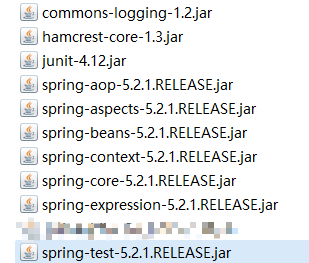
2.创建包com.igeek.test,创建类SpringTest
通过@RunWith注解,使用junit整合spring
通过@ContextConfiguration注解,指定spring容器的位置
3.通过@Autowired注解,注入需要测试的对象
在这里注意两点:
将测试对象注入到测试用例中
测试用例不需要配置<context:component-scan base-package="com.igeek"/></context:component-scan>,因为使用测试类运行的时候,会自动启动注解的支持(仅对该测试类启用)
举例说明一下
1.第一种:在applicationContext.xml中不开启注解扫描
配置文件:
<?xml version="1.0" encoding="UTF-8"?><beans xmlns="http://www.springframework.org/schema/beans"       xmlns:xsi="http://www.w3.org/2001/XMLSchema-instance"

xmlns:context="http://www.springframework.org/schema/context"       xmlns:aop="http://www.springframework.org/schema/aop"

xsi:schemaLocation="http://www.springframework.org/schema/beans

https://www.springframework.org/schema/beans/spring-beans.xsd http://www.springframework.org/schema/context

https://www.springframework.org/schema/context/spring-context.xsd http://www.springframework.org/schema/aop

https://www.springframework.org/schema/aop/spring-aop.xsd">

    <bean id="userService" class="com.igeek.service.impl.UserServiceImpl"></bean>

</beans>
service层:
public class UserServiceImpl implements IUserService {

    @Override

    public void save() {

        System.out.println("save...");

    }

}
测试类:
@RunWith(SpringJUnit4ClassRunner.class)

@ContextConfiguration(locations = "classpath:applicationContext.xml")

public class Test01 {

    @Autowired

    private IUserService userService;

    @Test

    public void test01(){

        userService.save();

    }

}
2.第二种:在applicationContext.xml中开启注解扫描
配置文件:
<?xml version="1.0" encoding="UTF-8"?>

<beans xmlns="http://www.springframework.org/schema/beans"       xmlns:xsi="http://www.w3.org/2001/XMLSchema-instance"

xmlns:context="http://www.springframework.org/schema/context"       xmlns:aop="http://www.springframework.org/schema/aop"

xsi:schemaLocation="http://www.springframework.org/schema/beans

https://www.springframework.org/schema/beans/spring-beans.xsd http://www.springframework.org/schema/context

https://www.springframework.org/schema/context/spring-context.xsd http://www.springframework.org/schema/aop

https://www.springframework.org/schema/aop/spring-aop.xsd">

<!--开启注解扫描-->

<context:component-scan base-package="com.igeek"></context:component-scan>

</beans>
service层:
@Service("userService")

public class UserServiceImpl implements IUserService {

    @Override

    public void save() {

        System.out.println("save...");

    }

}
测试类:
@RunWith(SpringJUnit4ClassRunner.class)

@ContextConfiguration(locations = "classpath:applicationContext.xml")

public class Test01 {

    @Autowired

    private IUserService userService;

    @Test

    public void test01(){

        userService.save();

    }

}
Spring之junit测试集成的更多相关文章
- Struts2+Spring+Mybatis+Junit 测试
Struts2+Spring+Mybatis+Junit 测试 博客分类: HtmlUnit Junit Spring 测试 Mybatis package com.action.kioskmoni ...
- Spring整合junit测试
本节内容: Spring整合junit测试的意义 Spring整合junit测试 一.Spring与整合junit测试的意义 在没整合junit之前,我们在写测试方法时,需要在每个方法中手动创建容器, ...
- 原创:Spring整合junit测试框架(简易教程 基于myeclipse,不需要麻烦的导包)
我用的是myeclipse 10,之前一直想要用junit来测试含有spring注解或动态注入的类方法,可是由于在网上找的相关的jar文件进行测试,老是报这样那样的错误,今天无意中发现myeclips ...
- Spring与Junit测试整合
一.引入spring测试包:text包 二.@RunWith:指定spring对junit提供的一个运行器 @ContextConfiguration: locations指定spring配置文件位 ...
- Spring项目JUnit测试报错ClassNotFoundException解决
Eclipse项目上有红色感叹号,各包显示正常.用JUnit测试部分能运行,部分报错,报错如下: Class not found UserTestjava.lang.ClassNotFoundExce ...
- spring使用JUnit测试,@Autowired无法注入原因
在测试类上加入配置文件 代码如下 @RunWith(SpringJUnit4ClassRunner.class)// SpringJUnit支持,由此引入Spring-Test框架支持! @Cont ...
- 08Spring_Spring和junit测试集成
第一步: 在项目导入 spring-test-3.2.0.RELEASE.jar 第二步: 编写测试类
- Spring集成JUnit测试
1.程序中有Junit环境2.导入一个jar包.spring与junit整合jar包 spring-test-3.2.0.RELEASE.jar3.测试代码 @RunWith(SpringJUnit4 ...
- springboot集成junit测试与javamail测试遇到的问题
1.springboot如何集成junit测试? 导入junit的jar包 使用下面注解: @RunWith()关于这个的解释看下这两篇文章: http://www.imooc.com/qadetai ...
随机推荐
- 使用Typescript重构axios(二)——项目起手,跑通流程
0.系列文章 1.使用Typescript重构axios(一)--写在最前面 2.使用Typescript重构axios(二)--项目起手,跑通流程 3.使用Typescript重构axios(三)- ...
- 使用Typescript重构axios(十九)——请求取消功能:实现第二种使用方式
0. 系列文章 1.使用Typescript重构axios(一)--写在最前面 2.使用Typescript重构axios(二)--项目起手,跑通流程 3.使用Typescript重构axios(三) ...
- React第一次渲染为何容易出现TypeError: Cannot read property 'XX' of undefined
此题可能大家会不屑一顾,哎,错误都给你怼脸上了你还不会嘛,其实大家有没有认真思考过这其中的原因.先上一张错误图,剩余的全靠编.没兴趣看图的老铁们可以拉到最底下直接看结论 错误: 代码: 其次,我再把 ...
- 【algo&ds】【吐血整理】4.树和二叉树、完全二叉树、满二叉树、二叉查找树、平衡二叉树、堆、哈夫曼树、B树、字典树、红黑树、跳表、散列表
本博客内容耗时4天整理,如果需要转载,请注明出处,谢谢. 1.树 1.1树的定义 在计算机科学中,树(英语:tree)是一种抽象数据类型(ADT)或是实作这种抽象数据类型的数据结构,用来模拟具有树状结 ...
- 网站搭建-虚拟机的使用-Linux (包括输入法和QQ下载使用)
之前已经联网了,基本的软件系统会自己下载,先不用管. 1. 先下载一个中文输入法吧: 先改一下Firefox的搜索引擎吧,因为大陆不支持google 下载,安装,就完事了,还好这个没变,几年不用这个系 ...
- diff算法
diff算法的作用计算出Virtual DOM中真正变化的部分,并只针对该部分进行原生DOM操作,而非重新渲染整个页面. 传统diff算法 通过循环递归对节点进行依次对比,算法复杂度达到 O(n^3) ...
- Extjs导入Excel文件之后grid自动刷新显示刚插入的数据
var winUpload = new Ext.Window({ title: '导入excel文件', width: 400, height:200, listeners: { close: fun ...
- Code Runner for VS Code 突破 1000 万下载量!支持运行超过 40 种语言
记得三年多前,韩老师那时还在写 PHP(是的,没错!在微软写 PHP),同时需要写 Python 和 Node.js .所以在那时,支持多种语言的 VS Code 已经是笔者的主力编辑器了.唯一不足的 ...
- JavaWeb04-JSP及会话跟踪技术
JSP入门 1 JSP概述 1.1 什么是JSP JSP(Java Server Pages)是JavaWeb服务器端的动态资源.它与html页面的作用是相同的,显示数据和获取数据. 1.2 JSP的 ...
- electron——dialog(实现导出excel)
背景 前端点击导出excel按钮后,请求完需要导出的数据后发送给主进程electron,由主进程保存到本地 dialog 显示用于打开和保存文件.警报等的本机系统对话框. dialog 模块提供了ap ...