
win7搭建本地SonarQube环境进行c#代码分析
1、SonarQube需要正常运行,首先需要安装Java环境,我这里安装的是jdk-8u181版本,可以在下面网站找适的版本去下载安装
https://www.oracle.com/technetwork/java/javase/downloads/index.html
安装运行JDK以后,还需要做下面的几项配置:
计算机属性》高级系统设置》高级》环境变量》系统变量
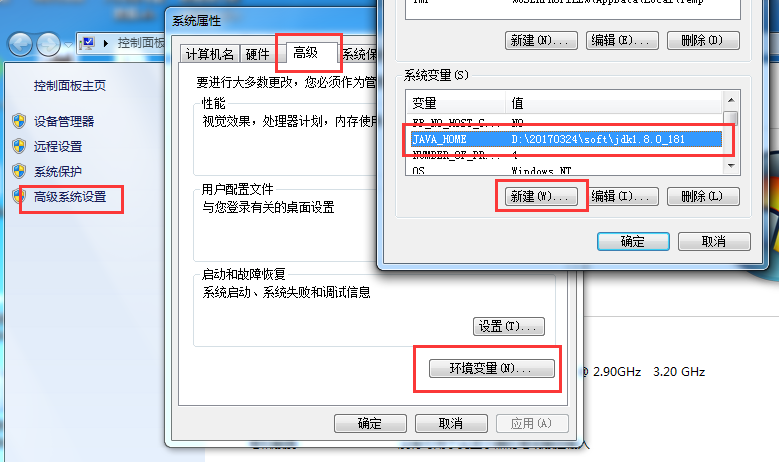
系统变量添加JAVA_HOME, 内容为jdk的安装目录。例如我的安装目录为D:\20170324\soft\jdk1.8.0_181
在系统变量Path中添加jdk安装目录下的bin目录,例如D:\20170324\soft\jdk1.8.0_181\bin
2、在这里根据需要下载适合的版本,我下载的是sonarqube-7.6,下载成功后解压,如图所示:
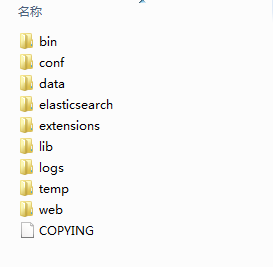
bin目录下放的是不同环境下的启动脚本
conf目录下放的是配置文件
extensions目录下放的是安装的扩展
logs目录下放的是日志文件,在启动和运行时遇到问题可以通过该目录下生成的日志进行纠错
3、sonarqube配置,我这边使用的是sonarqube内嵌数据库,所以没有配置数据库,如果需要配置,根据自己选择的数据库进行配置,配置文件为:
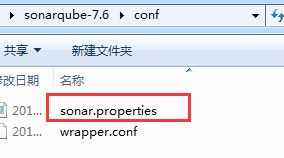
该文件DATABASE配置代码如下,可以参考:
#--------------------------------------------------------------------------------------------------

# DATABASE

#

# IMPORTANT:

# - The embedded H2 database is used by default. It is recommended for tests but not for

#   production use. Supported databases are MySQL, Oracle, PostgreSQL and Microsoft SQLServer.

# - Changes to database connection URL (sonar.jdbc.url) can affect SonarSource licensed products.

# User credentials.

# Permissions to create tables, indices and triggers must be granted to JDBC user.

# The schema must be created first.

#sonar.jdbc.username=

#sonar.jdbc.password=

#----- Embedded Database (default)

# H2 embedded database server listening port, defaults to

#sonar.embeddedDatabase.port=

#----- DEPRECATED

#----- MySQL >=5.6 && <8.0

# Support of MySQL is dropped in Data Center Editions and deprecated in all other editions

# Only InnoDB storage engine is supported (not myISAM).

# Only the bundled driver is supported. It can not be changed.

#sonar.jdbc.url=jdbc:mysql://localhost:3306/sonar?useUnicode=true&characterEncoding=utf8&rewriteBatchedStatements=true&useConfigs=maxPerformance&useSSL=false

#----- Oracle 11g/12c

# The Oracle JDBC driver must be copied into the directory extensions/jdbc-driver/oracle/.

# Only the thin client is supported, and only the versions 11.2.x or 12.2.x must be used. See

# https://jira.sonarsource.com/browse/SONAR-9758 for more details.

# If you need to set the schema, please refer to http://jira.sonarsource.com/browse/SONAR-5000

#sonar.jdbc.url=jdbc:oracle:thin:@localhost:/XE

#----- PostgreSQL 9.3 or greater

# By default the schema named "public" is used. It can be overridden with the parameter "currentSchema".

#sonar.jdbc.url=jdbc:postgresql://localhost/sonarqube?currentSchema=my_schema

#----- Microsoft SQLServer / and SQL Azure

# A database named sonar must exist and its collation must be case-sensitive (CS) and accent-sensitive (AS)

# Use the following connection string if you want to use integrated security with Microsoft Sql Server

# Do not set sonar.jdbc.username or sonar.jdbc.password property if you are using Integrated Security

# For Integrated Security to work, you have to download the Microsoft SQL JDBC driver package from

# https://www.microsoft.com/en-us/download/details.aspx?id=55539

# and copy sqljdbc_auth.dll to your path. You have to copy the  bit or  bit version of the dll

# depending upon the architecture of your server machine.

#sonar.jdbc.url=jdbc:sqlserver://localhost;databaseName=sonar;integratedSecurity=true

# Use the following connection string if you want to use SQL Auth while connecting to MS Sql Server.

# Set the sonar.jdbc.username and sonar.jdbc.password appropriately.

#sonar.jdbc.url=jdbc:sqlserver://localhost;databaseName=sonar

#----- Connection pool settings

# The maximum number of active connections that can be allocated

# at the same time, or negative for no limit.

# The recommended value is 1.2 * max sizes of HTTP pools. For example if HTTP ports are

# enabled with default sizes (, see property sonar.web.http.maxThreads)

# then sonar.jdbc.maxActive should be 1.2 *  = .

#sonar.jdbc.maxActive=

# The maximum number of connections that can remain idle in the

# pool, without extra ones being released, or negative for no limit.

#sonar.jdbc.maxIdle=

# The minimum number of connections that can remain idle in the pool,

# without extra ones being created, or zero to create none.

#sonar.jdbc.minIdle=

# The maximum number of milliseconds that the pool will wait (when there

# are no available connections) for a connection to be returned before

# throwing an exception, or <=  to wait indefinitely.

#sonar.jdbc.maxWait=

#sonar.jdbc.minEvictableIdleTimeMillis=

#sonar.jdbc.timeBetweenEvictionRunsMillis=
主要是配置这三部分内容
sonar.jdbc.username=

sonar.jdbc.password=

sonar.jdbc.url=
4、启动 sonarqube,在bin文件下根据系统选择合适的启动脚本。
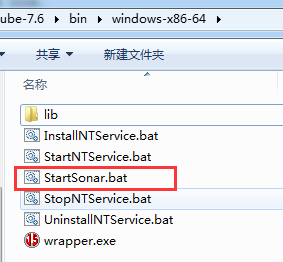
运行StartSonar.bat,等执行完成,看到结果都是类似的is up
,那就证明启动成功了,浏览器访问http://localhost:9000,可以正常访问证明SonarQube搭建成功了,默认的是英文。
5、登录SonarQube就可以进行配置,默认登录名和密码都是admin,进去之后自己可以修改。英文看着不舒服,安装中文包,如下图所示:
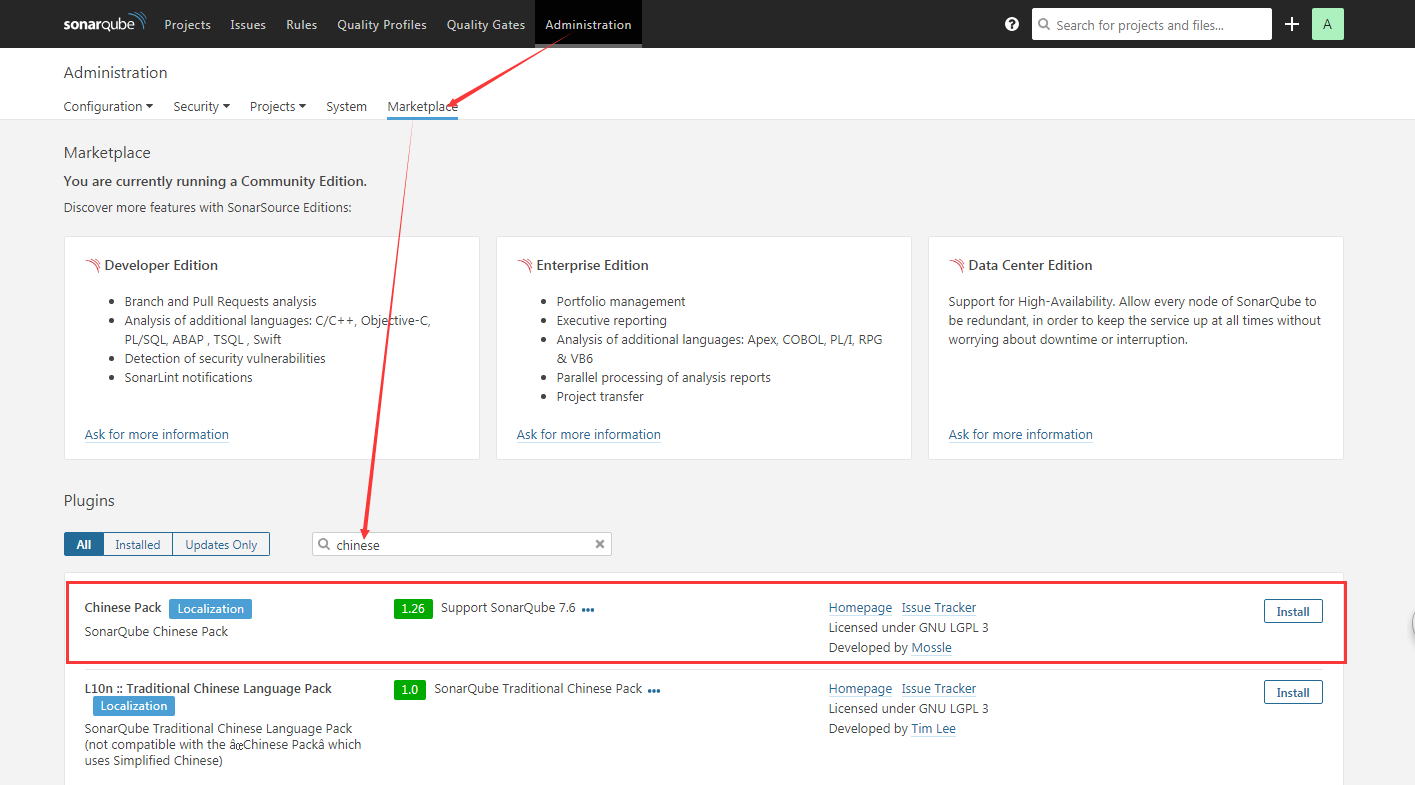
一般搜索都会匹配到适合该版本的中文包,如果没有匹配到合适的中文包,自己可以去这里下载合适的中文包,下载下来后扔到sonarqube-7.6\extensions\plugins文件夹下,重新启动网页就OK了。
6、SonarQube Scanner for MSBuild安装与配置,这个是C# Framework的分析插件。
这个插件的下载,可以在这里根据自己的需要下载,我下载的是4.3.1下的net46版本,下载成功解压之后,设置SonarQube Scanner for MSBuild的环境变量,如我的解压路径是:D:\20170324\my\sonar-scanner-msbuild-4.3.1.1372-net46,则把该路径添加到系统变量Path中,添加方法如1中path的添加方法。
修改SonarQube.Analysis.xml文件,这里的修改如下:
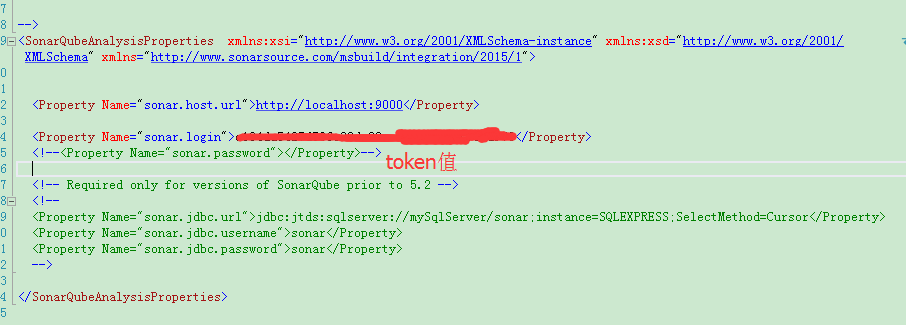
这里的token值可以在依次点击我的账号》安全》生成令牌


如果不生成令牌也可以配置输入账号和密码,如果有需要可以对下面的数据库进行配置。
接下来比较重要的一步,找到电脑中的MSBuild.exe,把所在目录添加到path变量中,这样操作后面方便在命令行中调用MSBuild。我这边在C:\Program Files (x86)\MSBuild\14.0\Bin\amd64目录下,添加方法如1中path的添加方法。
7、项目分析
cmd进入项目所在的根目录,依此执行以下三条命令。
MSBuild.SonarQube.Runner.exe begin /k:"projectKey" /n:"projectName" /v:"1.0"

MSBuild.exe /t:Rebuild

MSBuild.SonarQube.Runner.exe end
参数说明:
/key(简写k):对应projectKey即项目的唯一编码,如两套源代码使用同一个projectKey那扫描的结果将混在一起,所以一个项目需要有一个单独的projectKey
/name(简写n):对应projectName即项目的名称,为项目的一个显示的名称,建立使用完整的项目名称
/version(简写v):对应projectVersion即项目的版本,项目在不同的时期版本也是不一样的
三条命令分别是分析的前期准备,MSBuild编译,将报告上传给SonarQube。执行命令期间就是等待,必须等一条命令执行完成后在执行下一条命令。
命令执行成功后在http://localhost:9000查看分析结果。
8、Windows下重启sonar:
首先关闭SonarQube.bat窗口
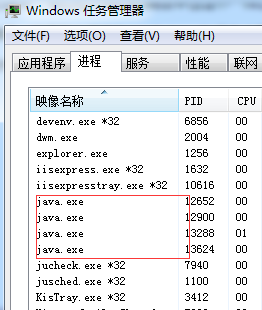
再Ctrl+Shift+Esc调出windows资源管理器
在进程中关闭所有Java.exe进程
然后重新运行StartSonar.bat文件
参考文献:
1、https://www.cnblogs.com/CoderAyu/p/9416376.html
2、https://www.cnblogs.com/luoqin520/p/6945304.html
3、https://www.cnblogs.com/7tiny/p/11269774.html
win7搭建本地SonarQube环境进行c#代码分析的更多相关文章
- JBOSS安装与配置搭建本地项目环境(方便前端开发调式)
JBOSS安装与配置搭建本地项目环境 什么是JBOSS? JBOSS是EJB的服务器,就像Tomcat是JSP服务器一样,就是服务器的一种. 环境搭建如下: 一:首先安装JDK,配置环境变量(PAT ...
- 利用Docker搭建本地https环境的完整步骤
利用Docker搭建本地https环境的完整步骤 这篇文章主要给大家介绍了关于如何利用Docker搭建本地https环境的完整步骤,文中通过示例代码将实现的步骤介绍的非常详细,对大家的学习或者工作具有 ...
- Win7搭建NodeJs开发环境
Win7搭建NodeJs开发环境以及HelloWorld展示—图解 Windows 7系统下搭建NodeJs开发环境(NodeJs+WebStrom)以及Hello World!展示,大体思路如下:第 ...
- 使用WampServer搭建本地PHP环境,绑定域名,配置伪静态
倡萌之前介绍过 USBWebserver 快速搭建本地PHP环境 ,推荐USBWebserver的原因在于它是绿色的,不需要安装,想使用就手动运行下即可.但是 USBWebserver 也有自身的弱点 ...
- 利用Docker Compose快速搭建本地测试环境
前言 Compose是一个定义和运行多个Docker应用的工具,用一个YAML(dockder-compose.yml)文件就能配置我们的应用.然后用一个简单命令就能启动所有的服务.Compose编排 ...
- MPC8313ERDB在Linux从NAND FLASH读取UBoot环境变量的代码分析
MPC8313ERDB在Linux从NAND FLASH读取UBoot环境变量的代码分析 Yao.GUET@2014-05-19 一.故事起因 由于文件系统的增大,已经大大的超出了8MB的NOR FL ...
- Win7搭建NodeJs开发环境以及HelloWorld展示—图解
Windows 7系统下搭建NodeJs开发环境(NodeJs+WebStrom)以及Hello World!展示,大体思路如下:第一步:安装NodeJs运行环境.第二步:安装WebStrom开发工具 ...
- sonarqube使用maven进行代码分析
修改setting.xml文件,增加并激活profile <profile> <id>sonar</id> <properties> <sonar ...
- 使用 phpstudy 搭建本地测试环境
最近在为另一个部门配置一个多语言的网站,因为之前他们已经做过 英文和中文两种语言,这次帮他们添加其它几种语言,从GitLab 上拉下来的代码,是php环境做的,需要在本地跑起来,做完测试通过后再一次性 ...
随机推荐
- ArchLinux 2019.11.01安装流程--安装基本系统
安装前的一些话 本文是参考官方文档ArchLinux的Installation guide(简体中文)加实际操作编写的. 有啥都好说,转载时请注明作者,这是基本素质,也是法律要求 安装是在虚拟机上进行 ...
- tinyriscv---一个从零开始写的极简、易懂的开源RISC-V处理器核
本项目实现的是一个微riscv处理器核(tinyriscv),用verilog语言编写,只求以最简单.最通俗易懂的方式实现riscv指令的功能,因此没有特意去对代码做任何的优化,因此你会看到里面写的代 ...
- Initialize a Property After Creating an Object创建对象后初始化属性 即如何设置对象的默认值(EF)
In this lesson, you will learn how to set the default value for a particular property of a business ...
- IDEA创建maven web工程
一.新建一个maven web工程 step1 File --> New --> Project step2 按下图步骤操作 step3 填写项目信息 step4 选择本地的maven安装 ...
- js清除定时器注意点
如何这篇文章所述:https://www.cnblogs.com/mmykdbc/p/7418575.html js多次调用创建定时器的函数,会使定时器速度越来越快,多次调用定时器的使用场景比如:监听 ...
- 升鲜宝V2.0_生鲜配送行业,对生鲜配送行业的思考及对系统流程开发的反思_升鲜宝生鲜配送系统_15382353715_余东升
升鲜宝V2.0_生鲜配送行业,对生鲜配送行业的思考及对系统流程开发的反思_升鲜宝生鲜配送系统_15382353715_余东升 -----生鲜配送行业现状及存在问题----- 1. 从业者整体素质偏低 ...
- ABP进阶教程10 - PDF导出中文乱码
点这里进入ABP进阶教程目录 问题描述 功能按钮 - 导出PDF,中文信息导出为乱码. 解决方案 导出PDF是通过pdfmake.js实现的. 检查发现是pdfmake引用的vfs_fonts.js字 ...
- pyhton【flask接口开发】
使用flask进行接口开发 语言:Python3 框架:flask 在进行开发前首先得安装flask,然后才能使用.安装可以直接使用pip命令进行安装:pip install flask. 使用fla ...
- docker镜像导入导出备份迁移
导出: docker save -o centos.tar centos:latest #将centos:latest镜像导出为centos.tar文件 导入: docker load -i cent ...
- python3.5.3rc1学习一
print ("Hello Pythoh3")print('我喜欢"香蕉"')print('we\'ar go to shoping.')print(" ...