
java实现图片验证码
一、验证码生成类
 package hbi.tech.utils;

 import javax.imageio.ImageIO;

 import java.awt.*;

 import java.awt.image.BufferedImage;

 import java.io.ByteArrayInputStream;

 import java.io.FileOutputStream;

 import java.io.IOException;

 import java.io.OutputStream;

 import java.util.Random;

 /**

  * 验证码生成器

  *

  */

 public class SCaptcha {

     // 图片的宽度。

     private int width = 120;

     // 图片的高度。

     private int height = 40;

     // 验证码字符个数

     private int codeCount = 4;

     // 验证码干扰线数

     private int lineCount = 50;

     // 验证码

     private String code = null;

     // 验证码图片Buffer

     private BufferedImage buffImg = null;

     private char[] codeSequence = { 'A', 'B', 'C', 'D', 'E', 'F', 'G', 'H', 'I', 'J', 'K', 'M', 'N', 'P', 'Q', 'R',

             'S', 'T', 'U', 'V', 'W', 'X', 'Y', 'Z', '2', '3', '4', '5', '6', '7', '8', '9' };

     // 生成随机数

     private Random random = new Random();

     public SCaptcha() {

         this.createCode();

     }

     /**

      *

      * @param width 图片宽

      * @param height 图片高

      */

     public SCaptcha(int width, int height) {

         this.width = width;

         this.height = height;

         this.createCode();

     }

     /**

      *

      * @param width 图片宽

      * @param height 图片高

      * @param codeCount 字符个数

      * @param lineCount 干扰线条数

      */

     public SCaptcha(int width, int height, int codeCount, int lineCount) {

         this.width = width;

         this.height = height;

         this.codeCount = codeCount;

         this.lineCount = lineCount;

         this.createCode();

     }

     public void createCode() {

         int codeX = 0;

         int fontHeight = 0;

         fontHeight = height - 5;// 字体的高度

         codeX = width / (codeCount + 3);// 每个字符的宽度

         // 图像buffer

         buffImg = new BufferedImage(width, height, BufferedImage.TYPE_INT_RGB);

         Graphics2D g = buffImg.createGraphics();

         // 将图像填充为白色

         g.setColor(Color.WHITE);

         g.fillRect(0, 0, width, height);

         // 创建字体

         ImgFontByte imgFont = new ImgFontByte();

         Font font = imgFont.getFont(fontHeight);

         g.setFont(font);

         StringBuffer randomCode = new StringBuffer();

         // 随机产生验证码字符

         for (int i = 0; i < codeCount; i++) {

             String strRand = String.valueOf(codeSequence[random.nextInt(codeSequence.length)]);

             // 设置字体颜色

             g.setColor(getRandomColor());

             // 设置字体位置

             g.drawString(strRand, (i + 1) * codeX, getRandomNumber(height / 2) + 25);

             randomCode.append(strRand);

         }

         code = randomCode.toString();

     }

     /** 获取随机颜色 */

     private Color getRandomColor() {

         int r = getRandomNumber(255);

         int g = getRandomNumber(255);

         int b = getRandomNumber(255);

         return new Color(r, g, b);

     }

     /** 获取随机数 */

     private int getRandomNumber(int number) {

         return random.nextInt(number);

     }

     public void write(String path) throws IOException {

         OutputStream sos = new FileOutputStream(path);

         this.write(sos);

     }

     public void write(OutputStream sos) throws IOException {

         ImageIO.write(buffImg, "png", sos);

         sos.close();

     }

     public BufferedImage getBuffImg() {

         return buffImg;

     }

     public String getCode() {

         return code;

     }

     /** 字体样式类 */

     class ImgFontByte {

         public Font getFont(int fontHeight) {

             try {

                 Font baseFont = Font.createFont(Font.HANGING_BASELINE, new ByteArrayInputStream(

                         hex2byte(getFontByteStr())));

                 return baseFont.deriveFont(Font.PLAIN, fontHeight);

             } catch (Exception e) {

                 return new Font("Arial", Font.PLAIN, fontHeight);

             }

         }

         private byte[] hex2byte(String str) {

             if (str == null)

                 return null;

             str = str.trim();

             int len = str.length();

             if (len == 0 || len % 2 == 1)

                 return null;

             byte[] b = new byte[len / 2];

             try {

                 for (int i = 0; i < str.length(); i += 2) {

                     b[i / 2] = (byte) Integer.decode("0x" + str.substring(i, i + 2)).intValue();

                 }

                 return b;

             } catch (Exception e) {

                 return null;

             }

         }

         // 字体文件的十六进制字符串

         private String getFontByteStr() {

             //防止报字符串长度过长错误,改为从配置文件读取

             return ReadFontByteProperties.getFontByteStr();

         }

     }

 }
二、读取字体文件类
 package hbi.tech.utils;

 import java.io.InputStream;

 import java.util.Properties;

 public class ReadFontByteProperties {

     static private String fontByteStr = null;

     static {

         loads();

     }

     synchronized static public void loads() {

         if (fontByteStr == null) {

             InputStream is = ReadFontByteProperties.class.getResourceAsStream("/fontByte.properties");

             Properties dbproperties = new Properties();

             try {

                 dbproperties.load(is);

                 fontByteStr = dbproperties.getProperty("fontByteStr").toString();

             } catch (Exception e) {

                 //System.err.println("不能读取属性文件. " + "请确保fontByte.properties在CLASSPATH指定的路径中");

             }

         }

     }

     public static String getFontByteStr() {

         if (fontByteStr == null)

             loads();

         return fontByteStr;

     }

 }
三、生成验证码接口
    /**

      * @author jiaqing.xu@hand-china.com

      * @date 2017/8/23

      * @description 生成图片验证码

      */

     @RequestMapping(value = "/userInfo/verification", method = {RequestMethod.POST, RequestMethod.GET})

     @ResponseBody

     public void verification(HttpServletRequest request, HttpServletResponse response, HttpSession session) throws IOException {

         // 设置响应的类型格式为图片格式

         response.setContentType("image/jpeg");

         // 禁止图像缓存。

         response.setHeader("Pragma", "no-cache");

         response.setHeader("Cache-Control", "no-cache");

         response.setDateHeader("Expires", 0);

         //实例生成验证码对象

         SCaptcha instance = new SCaptcha();

         //将验证码存入session

         session.setAttribute("verification", instance.getCode());

         //向页面输出验证码图片

         instance.write(response.getOutputStream());

     }
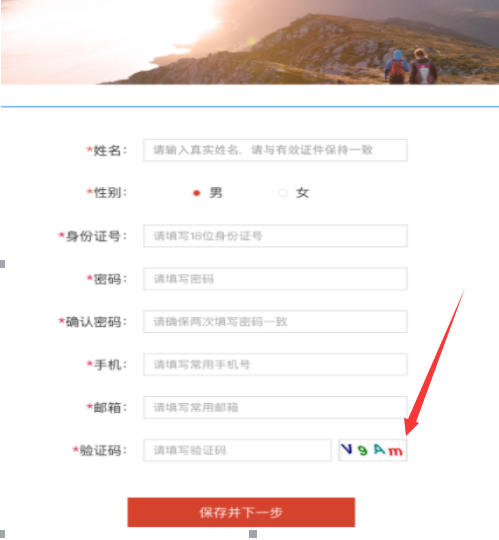
将生成的验证码图片存在session中,当用户登录时即可和用户输入的验证码的值进行判断,如果验证相同,则进行后续操作。
java实现图片验证码的更多相关文章
- 用Java实现图片验证码功能
一.什么是图片验证码? 可以参考下面这张图: 我们在一些网站注册的时候,经常需要填写以上图片的信息. 1.图片生成实体类: package com.hexianwei.graphic; import ...
- [Java] 识别图片验证码
现在大多数网站都采用了验证码来防止暴力破解或恶意提交.但验证码真的就很安全吗?真的就不能被机器识别?? 我先讲讲我是怎么实现站外提交留言到一个网站的程序. 这个网站的留言版大致如下: 我一看这种简单的 ...
- Java 生产图片验证码
import java.awt.Color;import java.awt.Font;import java.awt.Graphics;import java.awt.Graphics2D;impor ...
- 自己封装的一个java图片验证码
验证码生成器: package com.lz.Tools; import java.awt.Color; import java.awt.Font; import java.awt.Graphics; ...
- java分别通过httpclient和HttpURLConnection获取图片验证码内容
前面的文章,介绍了如何通过selenium+Tesseract-OCR来识别图片验证码,如果用接口来访问的话,再用selenium就闲的笨重,下面就介绍一下分别通过httpclient和HttpURL ...
- 图片验证码的JAVA工具类
我们平时开发时经常会遇到需要图片验证码,基础的验证码包括了数字.字母.甚至可能有汉字.下面我给出一个简单的工具类. package com..ankang.tony.util; import java ...
- 用Java制作一个简单的图片验证码
//Java实现简单验证码功能 package project; import java.awt.Color; import java.awt.Font;import java.awt.Graphic ...
- Java如何获取图片验证码保存
举例网站:https://my.1hai.cn/Login/?url=http://www.1hai.cn/ 一.场景:出于安全性考虑,越来越多的Web平台登录都会增加图形验证码(图片),或者短信验证 ...
- 怎样用Java自制优秀的图片验证码?这样!
Completely Automated Public Turing test to tell Computers and Humans Apart 全自动区分计算机和人类的图灵测试 简称CAPTCH ...
随机推荐
- 【Leetcode】【简单】【17. 整数反转】【JavaScript】
题目描述 7. 整数反转 给出一个 32 位的有符号整数,你需要将这个整数中每位上的数字进行反转. 示例 1: 输入: 123输出: 321 示例 2: 输入: -123输出: -321示例 3: 输 ...
- 前端H5与安卓和ios之间通信
在一些app场景中,经常看到app里面嵌套H5页面, 安卓和ios提供一个空壳子,方法两者互相调用.上一周就是写H5页面让安卓和ios调用使用,中间传参,接受参数.通过 window.wx 对象调用一 ...
- JAVA实现读取图片
话不读说 直接上代码 package cn.kgc.ssm.common; import java.io.*; /** * @author * @create 2019-08-15 9:36 **/ ...
- 知识图谱推理与实践 (2) -- 基于jena实现规则推理
本章,介绍 基于jena的规则引擎实现推理,并通过两个例子介绍如何coding实现. 规则引擎概述 jena包含了一个通用的规则推理机,可以在RDFS和OWL推理机使用,也可以单独使用. 推理机支持在 ...
- CCPC 网络赛
array 做法 比赛中的表现..... 已经无法言语形容了. 题意是,查询前缀中大于某个数字的 mex,在线. 一下把问题转化为偏序问题.... 带修主席树?????这下好,直接一箭穿心,武将被移除 ...
- 牛客小白赛4 A 三角形 数学
链接:https://www.nowcoder.com/acm/contest/134/A来源:牛客网 题目描述 铁子从森林里收集了n根木棍,她开始将它们按顺序的排成一排,从左到右依次为1到n,她回想 ...
- 51nod 1060 最复杂的数(数论,反素数)
题目链接:https://www.51nod.com/onlineJudge/questionCode.html#!problemId=1060 题解:可以去学习一下反素数. #include < ...
- kick start 2019 round D T3题解
---恢复内容开始--- 题目大意:共有N个房子,每个房子都有各自的坐标X[i],占据每个房子需要一定花费C[i].现在需要选择K个房子作为仓库,1个房子作为商店(与题目不同,概念一样),由于仓库到房 ...
- SpringBoot + JPA问题汇总
实体类有继承父类,但父类没有单独标明注解 异常表现 Caused by: org.hibernate.AnnotationException: No identifier specified for ...
- Docker版本与centos和ubuntu环境下docker安装介绍
# Docker版本与安装介绍 * Docker-CE 和 Docker-EE * Centos 上安装 Docker-CE * Ubuntu 上安装 Docker-CE ## Docker-CE和D ...