
网Js RSA加密,后端(Asp.Net)解码(非对称加解密)
前言
RSA加解密知识自行百度了解决一下
1、取得公钥与私钥方法
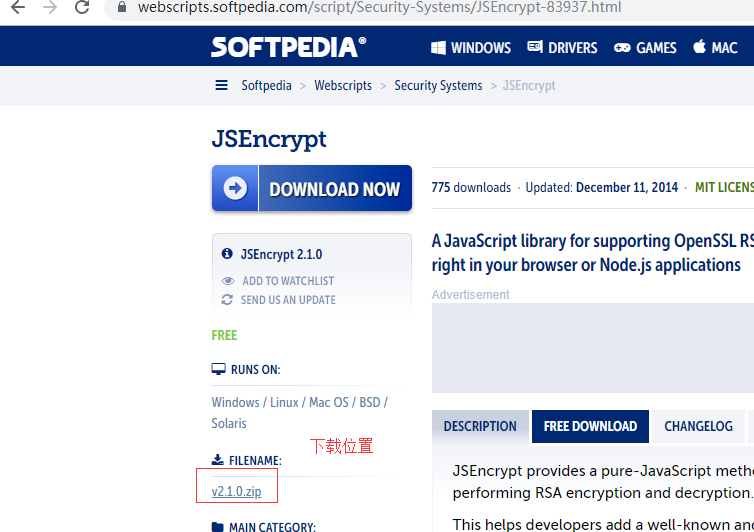
下载后将其发布成网站进入:http://127.0.0.1:3000/demo/index.html (各自服务器站口不一样自行)
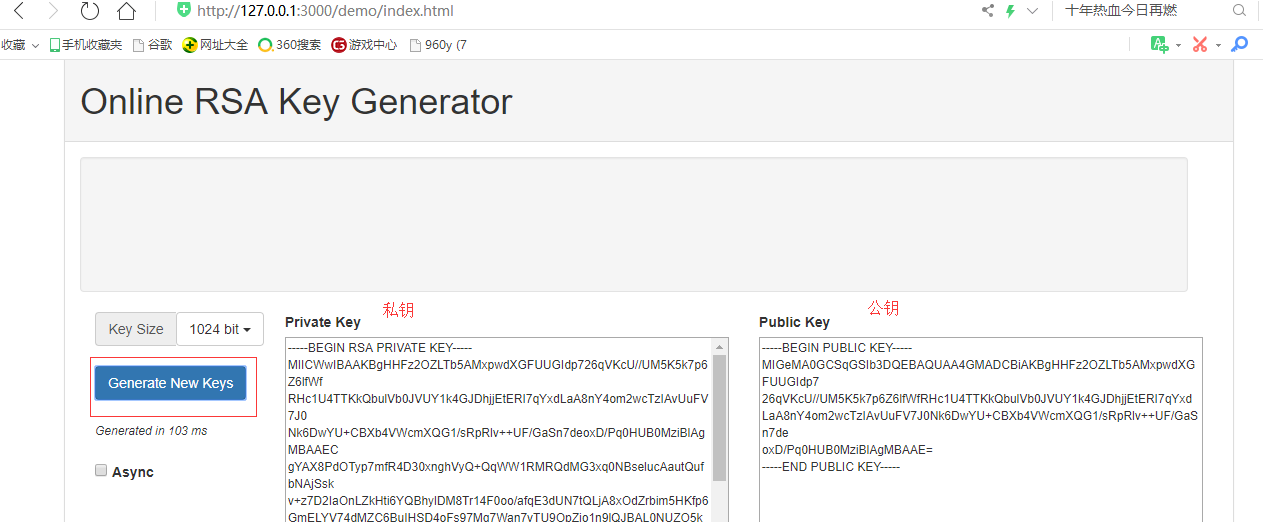
这样就得到一公钥和私钥
另一种生成公钥与私钥的方法如下:引用 https://blog.csdn.net/qq_39081974/article/details/81059022
======================================Begin======================================
1. OpenSSL官网
官方下载地址: https://www.openssl.org/source/
2. Windows安装方法
OpenSSL官网没有提供windows版本的安装包,可以选择其他开源平台提供的工具。例如 http://slproweb.com/products/Win32OpenSSL.html
以该工具为例,安装步骤和使用方法如下:
2.1 选择32位或者64位合适的版本下载,例如Win64OpenSSL_Light-1_0_2h.exe:
2.2 设置环境变量,例如工具安装在C:\OpenSSL-Win64,则将C:\OpenSSL-Win64\bin;复制到Path中
2.3 打开命令行程序cmd(以管理员身份运行),运行以下命令:
这里路径就是保存地址
利用 openssl 生成公钥私钥
生成公钥: openssl genrsa -out rsa_private_key.pem 1024
生成私钥: openssl rsa -in rsa_private_key.pem -pubout -out rsa_public_key.pem
======================================End=======================================
2、实践(引用:https://www.jb51.net/article/117127.htm)
参数传递的+号处理,在传输时会把+变成空格,不处理后端就报错了。
1、前端代码
|
1
2
3
4
5
6
7
8
9
10
11
12
13
14
15
16
17
18
19
20
21
22
23
24
25
26
27
28
29
30
31
32
33
34
35
36
37
38
39
40
|
<!DOCTYPE html><html><head> <meta name="viewport" content="width=device-width" /> <title>Login</title> <script src="jquery-1.10.2.min.js"></script> <script src="jsencrypt.min.js"></script> <script type="text/javascript"> $(function () { var encrypt = new JSEncrypt(); encrypt.setPublicKey($("#tra").val()); var data = encrypt.encrypt("123456789"); alert(data); $("#btn").click(function () { $.ajax({ url: '@Url.Action("Login")', data: "pwd=" + encodeURI(data).replace(/\+/g, '%2B'), //+号的处理:因为数据在网络上传输时,非字母数字字符都将被替换成百分号(%)后跟两位十六进制数,而base64编码在传输到后端的时候,+会变成空格,因此先替换掉。后端再替换回来 type: 'post', success: function (msg) { alert(msg); } }); }); }); </script></head><body> <div> <input type="button" id="btn" value="点我" /> <textarea id="tra" rows="15" cols="65"> MIGfMA0GCSqGSIb3DQEBAQUAA4GNADCBiQKBgQCa4KHNwDX44gGmmIAtRu4gjVYtGWZzcm4t+1wjUD4dn7fMLPvuK7ai4UrfDeEJE1RPwudJw+lJ6crql8wSIg7/DbTl G3ihsCT6dT9H5B9OoeR7K9VWUesaW/iyVL6HXiYOANabW14pvJATDmdq91Tfgp6P SQyvdfiRdV4r07crpQIDAQAB </textarea> <hr/> 注意+号的处理 </div></body></html> |
2、后端代码
|
1
2
3
4
5
6
7
8
9
10
11
12
13
14
15
16
17
18
19
20
21
22
23
24
25
26
27
28
29
30
31
32
33
34
35
36
37
38
39
40
41
42
43
44
45
46
47
48
49
50
51
52
53
54
55
56
57
58
59
60
61
62
63
64
65
66
67
68
69
70
71
72
73
74
75
76
77
78
79
80
81
82
83
84
85
86
87
88
89
90
91
92
93
94
95
96
97
98
99
100
|
public class IndexController : Controller{ public ActionResult Login() { return View(); } [HttpPost] public ActionResult Login(string pwd) { //密钥格式要生成pkcs#1格式的 而不是pkcs#8格式的 string privateKey = @"MIICWwIBAAKBgQCa4KHNwDX44gGmmIAtRu4gjVYtGWZzcm4t+1wjUD4dn7fMLPvuK7ai4UrfDeEJE1RPwudJw+lJ6crql8wSIg7/DbTlG3ihsCT6dT9H5B9OoeR7K9VWUesaW/iyVL6HXiYOANabW14pvJATDmdq91Tfgp6PSQyvdfiRdV4r07crpQIDAQABAoGABb+3gdb+qeG0b1CogVsT/7//UOaTzPk/FGneKQQTf4SsN+H7lVhTYTG9ARFCJyoWg8IXqmn2ljhywHPTWWD2RCZIn2sYT1sVkGb70EgHGQLBraFHElmw+DsVJ+nDfBCfMrJ1TYXlwigjRkaueaoGgG8LdR8XD+Xs5LersPLjZgECQQCguSB7C4wF6oSwEDmwNF8ffT5cQc1U2OIq6NBG8rafrjb7LsjhOd03pmY7i4LbW3Vvq4AhQpJEdF1Cvd+Sk/BBAkEA9rBhqnyumV09zFEomSX3zZu+bdhTzM4bJDfEa95swp1gANCVvF/tDCnlBf51EhCWdeGSpARPUkQnXrYfFUDiZQJAAZEshuaa6+fYeVr/JP+tucHf3MhrdxtSQTbZ6QcuzqnFMXfIT6HfzU4bCxOWKAthPsB+VFSw1mgIDMGLL4OvwQJAJlVyV9PYLezXVZCnBmVoBINXLCqZmxHMFey0kS6XKAbcjEPdgNBHPcSk2jGYb540Q00yRFqHGPmORKF4Yw0aIQJAd5JRtD3z2MgP/vPoKHJNHqY8bboVcmwqVAm6xCZoTCZzjNV1Cnsdf4wBV3LCDzYBy+xR4qYNUy5CFXN+8WzzAA=="; try { RSACryptoServiceProvider rsaCryptoServiceProvider = CreateRsaProviderFromPrivateKey(privateKey); //把+号,再替换回来 byte[] res = rsaCryptoServiceProvider.Decrypt(Convert.FromBase64String(pwd.Replace("%2B","+")), false); return Content(Encoding.UTF8.GetString(res)); } catch (Exception exception) { } return Content(""); } private RSACryptoServiceProvider CreateRsaProviderFromPrivateKey(string privateKey) { var privateKeyBits = System.Convert.FromBase64String(privateKey); var RSA = new RSACryptoServiceProvider(); var RSAparams = new RSAParameters(); using (BinaryReader binr = new BinaryReader(new MemoryStream(privateKeyBits))) { byte bt = 0; ushort twobytes = 0; twobytes = binr.ReadUInt16(); if (twobytes == 0x8130) binr.ReadByte(); else if (twobytes == 0x8230) binr.ReadInt16(); else throw new Exception("Unexpected value read binr.ReadUInt16()"); twobytes = binr.ReadUInt16(); if (twobytes != 0x0102) throw new Exception("Unexpected version"); bt = binr.ReadByte(); if (bt != 0x00) throw new Exception("Unexpected value read binr.ReadByte()"); RSAparams.Modulus = binr.ReadBytes(GetIntegerSize(binr)); RSAparams.Exponent = binr.ReadBytes(GetIntegerSize(binr)); RSAparams.D = binr.ReadBytes(GetIntegerSize(binr)); RSAparams.P = binr.ReadBytes(GetIntegerSize(binr)); RSAparams.Q = binr.ReadBytes(GetIntegerSize(binr)); RSAparams.DP = binr.ReadBytes(GetIntegerSize(binr)); RSAparams.DQ = binr.ReadBytes(GetIntegerSize(binr)); RSAparams.InverseQ = binr.ReadBytes(GetIntegerSize(binr)); } RSA.ImportParameters(RSAparams); return RSA; } private int GetIntegerSize(BinaryReader binr) { byte bt = 0; byte lowbyte = 0x00; byte highbyte = 0x00; int count = 0; bt = binr.ReadByte(); if (bt != 0x02) return 0; bt = binr.ReadByte(); if (bt == 0x81) count = binr.ReadByte(); else if (bt == 0x82) { highbyte = binr.ReadByte(); lowbyte = binr.ReadByte(); byte[] modint = { lowbyte, highbyte, 0x00, 0x00 }; count = BitConverter.ToInt32(modint, 0); } else { count = bt; } while (binr.ReadByte() == 0x00) { count -= 1; } binr.BaseStream.Seek(-1, SeekOrigin.Current); return count; }} |
测试源码在下面GitHub上有(可以给我留言)
https://github.com/xiaoruilin/EncryptionDecrypt
加密参数过长?https://www.jianshu.com/p/444011941cac
布署:
System.Security.Cryptography.CryptographicException: 系统找不到指定的文件。
在 System.Security.Cryptography.Utils.CreateProvHandle(CspParameters parameters, Boolean randomKeyContainer)
在 System.Security.Cryptography.RSACryptoServiceProvider.ImportParameters(RSAParameters parameters)
在 Utils.RSAHelper.CreateRsaProviderFromPrivateKey(String privateKey)
在 Yst.DataBase.SystemManage.Handler.Login.ValidateLogin()
IIS发布后报错配置:应用程序池-》对应网站有应用程序-》右键-》高级-》进程模式-》加载用户配置文件=True;

网Js RSA加密,后端(Asp.Net)解码(非对称加解密)的更多相关文章
- 非对称加解密 Asymmetric encryption 对称加密和非对称加密的区别
考虑这样一个问题:一切的装备文件都存储在 Git 长途库房,RAR密码破解装备文件中的一些信息又是比较灵敏的.所以,我们需求对这些灵敏信息进行加密处理.首要的加密方法分为两种:一种是同享密钥加 密(对 ...
- php rsa 非对称加解密类
<?php header("Content-Type: text/html;charset=utf-8"); /* 生成公钥.私钥对,私钥加密的内容能通过公钥解密(反过来亦可 ...
- 前端JS AES加密 后端PHP AES加解密
<!DOCTYPEhtml> <html> <head> <title>aes demo</title> </head> < ...
- 加解密算法二:非对称加解密及RSA算法的实现
加密和解密使用不同的密钥的一类加密算法.这类加密算法通常有两个密钥A和B,使用密钥A加密数据得到的密文,只有密钥B可以进行解密操作(即使密钥A也无法解密):相反,使用密钥B加密数据得到的密文,只有密钥 ...
- java 颁发公钥 私钥 php js RSA 加密解密整合
PHP rsa密钥生成 加密解密 - PHP开发 - CSDN博客 https://blog.csdn.net/duzhenxun/article/details/8879227 <?php c ...
- 使用OpenSSL生成RSA秘钥对并对文件加解密
生成RSA私钥 openssl genrsa -out rsa.key 1024 生成RSA公钥 openssl rsa -in rsa.key -pubout -out pub.key 创建明文文件 ...
- Java使用RSA加密解密及签名校验
该工具类中用到了BASE64,需要借助第三方类库:javabase64-1.3.1.jar注意:RSA加密明文最大长度117字节,解密要求密文最大长度为128字节,所以在加密和解密的过程中需要分块进行 ...
- java RSA加密解密--转载
原文地址:http://www.blogjava.net/icewee/archive/2012/05/19/378570.html 该工具类中用到了BASE64,需要借助第三方类库:javabase ...
- RSA加密异常
在利用RSA进行数据加密时,出现如下异常: Exception bytes at com.sun.crypto.provider.RSACipher.a(DashoA13*..) at com.sun ...
随机推荐
- saltstack--史上最细致安装攻略!亲测无坑
准备一台虚拟机node1: [root@linux-node1 pillar]# ifconfig ens33: flags=4163<UP,BROADCAST,RUNNING,MULTICAS ...
- python--各种锁机制归纳整理
Q:为什么要用锁?什么样的业务场景下需要用锁? 就拿之前的工单系统来说,当审批方式为角色组审批时,代表该角色组内任意一人审批即可,这时,该角色组内成员的系统上都是可以显示审批按钮,如果此时A审批员和B ...
- 持续集成(CI):API自动化+Jenkins定时构建
一.系统管理 1.管理监控配置 系统管理>>系统设置>>管理监控配置 2.设置接收测试报告的邮箱 系统管理>>系统设置>>配置Extended E-ma ...
- 一篇短文带您了解一下EasyCaching
前言 从2017年11月11号在Github创建EasyCaching这个仓库,到现在也已经将近一年半的时间了,基本都是在下班之后和假期在完善这个项目. 由于EasyCaching目前只有英文的文档托 ...
- 解决:perl: warning: Please check that your locale settings
问题: perl: warning: Setting locale failed. perl: warning: Please check that your locale settings: LAN ...
- Android Studio 提高开发效率的插件
好久没有更新博客了,最近搞个listview搞得半死不活的,心累~~ 今天带来的是Android Studio插件的整理,全是我已经安装使用的,写这篇博文的目的也是因为我怕我自己给忘记怎么用(尴尬) ...
- Python中的函数参数有冒号 声明后有-> 箭头
在python3.7 环境下 函数声明时能在参数后加冒号,如图: def f(ham: str, eggs: str = 'eggs') -> str : print("Annotat ...
- MySQL数据库的事务及存储引擎
一.关系型数据库与非关系型数据库 1.关系型数据库的特点: 1)数据以表格的形式出现 2)每行为各种记录名称 3)每列为记录名称所对应的数据域 4)许多的行和列组成一张表单 5)若干的表单组成数据库 ...
- JS基础语法---一元运算符
* ++ -- 都是运算符 * ++ 和 -- 可以分为:前+ 和后+ and 前- 和后- * 如果++在后面:如: num++ +10参与 ...
- laravel 数据库操作之 DB facade & 查询构造器 & Eloquent ORM
<?php namespace App\Http\Controllers; use App\Student; use Illuminate\Support\Facades\DB; class S ...