
BDFramework.Core 学习
x哥(懂的都懂)的框架, 拿点代码过来做注释. 想了解详情可以去他的github
https://github.com/yimengfan/BDFramework.Core
# Object files

# Libraries

# Shared objects (inc. Windows DLLs)
*.so.*
*.dylib

# Executables
*.exe
*.out
*.app
*.i*
*.x86_64
*.hex
/TestProject/Library
/TestProject/obj
/TestProject/Temp
/TestProject/UnityPackageManager
/TestProject/Assembly-CSharp.csproj
/TestProject/Assembly-CSharp-Editor.csproj
/TestProject/Assembly-CSharp-Editor-firstpass.csproj
/TestProject/TestProject.sln
/TestProject/.idea/.idea.TestProject/.idea/contentModel.xml
/TestProject/.idea/.idea.TestProject/.idea/indexLayout.xml
/TestProject/.idea/.idea.TestProject/.idea/modules.xml
/TestProject/.idea/.idea.TestProject/.idea/workspace.xml
/TestProject/.idea/.idea.TestProject/riderModule.iml
/TestProject/TestProject.sln.DotSettings.user
/TestProject/UpgradeLog.htm
/TestProject/Assets/Resource/.svn
/TestProject/Assets/Code/.svn
/TestProject/.sonarqube
/TestProject/TestProject.Editor.Plugins.csproj
/TestProject/TestProject.Editor.csproj
/TestProject/TestProject.csproj
/TestProject/.idea/.idea.TestProject/.idea/encodings.xml
/TestProject/.idea/.idea.TestProject/.idea/sonarIssues.xml
/TestProject/.idea/.idea.TestProject/.idea/vcs.xml
/TestProject/.vs/TestProject/v15/.suo
/TestProject/.vs/TestProject/v15/Server/sqlite3/db.lock
/TestProject/.vs/TestProject/v15/Server/sqlite3/storage.ide
/TestProject/.vs
/TestProject/.idea
/TestProject/.idea
/TestProject/.vs
/TestProject/UnityDLL
/TestProject/*.err
/TestProject/*.tmp
/TestProject/*.cmdline
/TestProject/Unity.PackageManagerUI.Editor.csproj
/TestProject/Unity.TextMeshPro.Editor.csproj
/TestProject/Unity.TextMeshPro.csproj
/TestProject/UnityEditor.StandardEvents.csproj
/TestProject/Assets/Plugins/Editor/JetBrains/JetBrains.Rider.Unity.Editor.Plugin.Repacked.dll
/TestProject/Assets/Plugins/Editor/JetBrains
TestProject/Assets/Code/Game/Editor.meta
TestProject/Assets/Code/Game/Editor/AnimtionImport.meta
TestProject/Assets/Code/Game/Editor/Data.meta
TestProject/Assets/Code/Game/Editor/HeroEdit.meta
TestProject/Assets/Code/Game/Editor/RouteTool.meta
TestProject/Assets/Code/Game/Editor/AnimtionImport/Editor.meta
TestProject/Assets/Code/Game/Editor/HeroEdit/Editor.meta
TestProject/Assets/Code/Game/Editor/HeroEdit/Table.meta
TestProject/Assets/Code/Game/Editor/HeroEdit/TableAttributes.meta
TestProject/Assets/Code/Game/Editor/RouteTool/Editor.meta
TestProject/Assets/Plugins/iOS.meta
/TestProject/Assets/StreamingAssets/Windows/Art
/TestProject/Assets/StreamingAssets/iOS/Art
/TestProject/rotorz.dotnet-exception-utils.csproj
/TestProject/rotorz.dotnet-type-utils.csproj
/TestProject/rotorz.unity3d-editor-menu.editor.csproj
/TestProject/rotorz.unity3d-package-utils.editor.csproj
/TestProject/rotorz.unity3d-reorderable-list.csproj
/TestProject/rotorz.unity3d-reorderable-list.editor.csproj
/TestProject/rotorz.unity3d-utils.csproj
/TestProject/rotorz.unity3d-utils.editor.csproj
/TestProject/Assembly-CSharp-firstpass.csproj
/TestProject/ProjectSettings/ProjectVersion.txt
/TestProject/Logs
/TestProject/Assets/Code/BDFramework/Tools/ILRBuild/build.sln.meta
/TestProject/Assets/Code/BDFramework/Tools/ILRBuild/build.sln
/TestProject/Assets/Plugins/Editor/JetBrains.meta
/TestProject/Assets/Code/BDFramework/Tools/ILRBuild/build.exe.meta
/TestProject/Assets/Plugins/Sirenix/Odin Inspector/Config/Resources.meta
/TestProject/Assets/Plugins/Sirenix/Odin Inspector/Config/Resources/Sirenix.meta
/TestProject/Assets/3rdPlugins/.svn
/TestProject/Assets/DebugUILine.cs
/TestProject/Assets/DebugUILine.cs.meta
/TestProject/Assets/DebugUILine.cs
/TestProject/Assets/StreamingAssets/Windows/hotfix/Assembly-CSharp.dll.mdb.meta
/TestProject/Assets/StreamingAssets/Windows/hotfix/Assembly-CSharp.dll.mdb
/TestProject/Assets/Resource/Effect/.svn
/TestProject/Assets/StreamingAssets/.svn
/TestProject/Assets/3rdPlugins/com.unity.textmeshpro@1.3.0/Tests.meta
/TestProject/Assets/3rdPlugins/com.unity.textmeshpro@1.3.0/Tests
参考 ignore
PosPlus 教程 https://www.bilibili.com/video/av23948137
资源目录(大致)
Resource(不是Resources) 资源目录
Effect 特效目录
Font 字体目录
handlers 协议目录
Img 图片目录
Model 模型目录
Resources 打进本地包
Runtime 运行时
Scene 场景目录
Shaders Shader目录
Table Excel表目录
TableEditor JSON表目录
导入流程
原始文件

sunwukong@ani.txt(UTF-8)
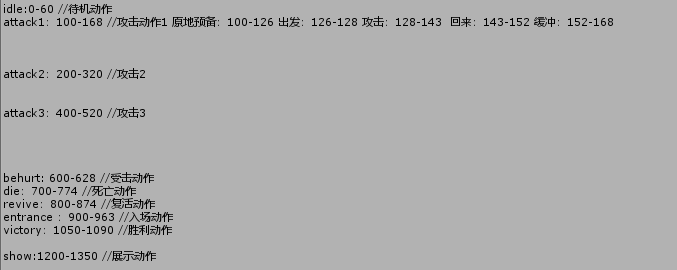
Ctrl+D 复制动画信息
打开 Animation 窗口
删除 动画 Position 信息
创建 Animator Controller
将动画拖进 Animator Controller
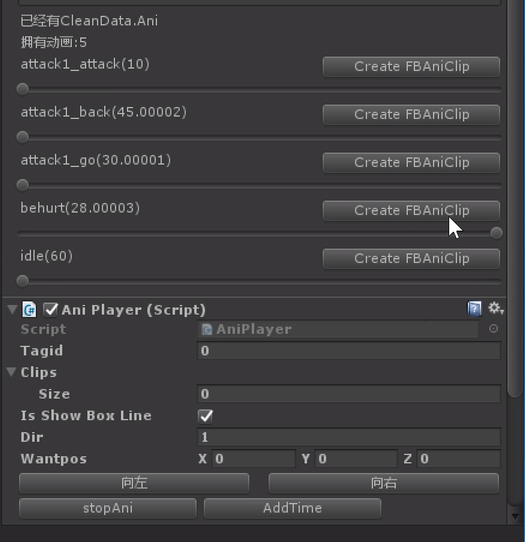
添加脚本

#region    FPS计算

    float fps;
    float deltaTime = 0.0f;
    float msec;
    Rect rect;
    GUIStyle style = new GUIStyle();

    void Start() {
        int w = Screen.width, h = Screen.height;
        rect = , , , h *  / );
        style.alignment = TextAnchor.UpperLeft;
        style.fontSize = h *  / ;
        style.normal.textColor = new Color(1.0f, 0.0f, 0f, 1.0f);
    }

    void Update() {
        deltaTime += (Time.deltaTime - deltaTime) * 0.1f;
    }

    void OnGUI() {
        msec = deltaTime * 1000.0f;
        fps = 1.0f / deltaTime;

        GUI.Label(rect, string.Format("{0:0.0} ms ({1:0.} fps)", msec, fps), style);
    }

    #endregion
FPS计算
    [UnityEditor.MenuItem()]
    static public void DeleteModelUnuseData()
    {
        var path = Application.dataPath + "/Resource/Runtime/Char";

        var fs = Directory.GetFiles(path, "*.prefab", SearchOption.AllDirectories);

        ;
        foreach (var f in fs)
        {
            i++;
            EditorUtility.DisplayProgressBar("处理模型", Path.GetFileName(f), i / fs.Length);
            //
            var absPath = "Assets" + f.Replace(Application.dataPath, "");
            var o = AssetDatabase.LoadMainAssetAtPath(absPath) as GameObject;
            //添加特殊点
            var p1 = o.transform.Find("EffectPoint");
            if (p1 == null)
            {
//                var op1= new GameObject("EffectPoint");
//                op1.transform.SetParent(o.transform,false);
                Debug.LogError("缺少节点 EffectPoint:" + absPath);
            }

            var p2 = o.transform.Find("AtkPoint");
            if (p2 == null)
            {
                p2 = o.transform.Find("Bip001/AtkPoint");
//                var op2= new GameObject("AtkPoint");
//                op2.transform.SetParent(o.transform,false);
                if (p2 == null)
                    Debug.LogError("缺少节点 AtkPoint:" + absPath);
            }

            var p3 = o.transform.Find("BehurtPoint");
            if (p3 == null)
            {
//                var op3= new GameObject("BehurtPoint");
//                op3.transform.SetParent(o.transform,false);
                Debug.LogError("缺少节点 BehurtPoint:" + absPath);
            }

            //添加特殊点
            var p4 = o.transform.Find("StaticPoint");
            if (p4 == null)
            {
//                var op1= new GameObject("EffectPoint");
//                op1.transform.SetParent(o.transform,false);
                Debug.LogError("缺少节点 StaticPoint:" + absPath);
            }

            var p5 = o.transform.Find("HeadPoint");
            if (p5 == null)
            {
//                var op1= new GameObject("EffectPoint");
//                op1.transform.SetParent(o.transform,false);
                Debug.LogError("缺少节点 HeadPoint:" + absPath);
            }
            else
            {
                p5.position = ,);
            }

            //删除镜头
            var cams = o.GetComponentsInChildren<Camera>();
            foreach (var c in cams)
            {
                GameObject.DestroyImmediate(c, true);
            }

            //删除animator
            var ani = o.GetComponent<Animator>();
            if (ani != null)
            {
                GameObject.DestroyImmediate(ani, true);
            }
        }

        EditorUtility.ClearProgressBar();
        AssetDatabase.SaveAssets();
        //
        AssetDatabase.Refresh();
    }
模型资源检测
    [MenuItem("Assets/自动创建角色", true)]
    static public bool CreateCharValidation()
    {
        string path = AssetDatabase.GetAssetPath(Selection.activeObject).ToLower();
        return path.EndsWith(".fbx");
    }

    [MenuItem("Assets/自动创建角色")]
    static public void CreateChar()
    {
        string path = AssetDatabase.GetAssetPath(Selection.activeObject);
        Object[] objs = AssetDatabase.LoadAllAssetsAtPath(path);
        string directory = Path.GetDirectoryName(path) + "/";
        Dictionary<string, AnimationClip> clipDict = CreateAnimClips(directory, objs);

        AnimatorController ac = CreateAnimController(directory, clipDict);
        Dictionary<string, Material> matDict = CreateMaterials(directory, objs);
        CreatePrefab(path, matDict, ac, clipDict);
    }

    private static Dictionary<string, AnimationClip> CreateAnimClips(string directory, Object[] objs)
    {
        Dictionary<string, AnimationClip> clipDict = new Dictionary<string, AnimationClip>();
        AnimationClip srcClip; //源AnimationClip
        AnimationClip newClip; //新AnimationClip
        string animationPath = "";
        foreach (Object o in objs)
        {
            if (o.GetType() == typeof(AnimationClip))
            {
                srcClip = o as AnimationClip;
                if (srcClip.name.Equals("__preview__Take 001")) continue;
                EditorUtility.DisplayProgressBar("复制动画文件", srcClip.name, 0.1f);
                newClip = new AnimationClip();
                newClip.name = srcClip.name;
                //防止动画命名出错
                if (newClip.name == "hit")
                {
                    newClip.name = "behurt";
                }

                animationPath = directory + srcClip.name + ".anim";
                if (File.Exists(animationPath))
                {
                    File.Delete(animationPath);
                }

                var setting = AnimationUtility.GetAnimationClipSettings(srcClip);
                if (srcClip.name == "idle")
                {
                    setting.loopTime = true;
                }

                AnimationUtility.SetAnimationClipSettings(newClip, setting); //设置新clip的AnimationClipSettings
                newClip.frameRate = srcClip.frameRate; //设置新clip的帧率
                EditorCurveBinding[] curveBindings = AnimationUtility.GetCurveBindings(srcClip); //获取clip的curveBinds
                ; i < curveBindings.Length; i++)
                {
                    AnimationUtility.SetEditorCurve(newClip, curveBindings[i],
                        AnimationUtility.GetEditorCurve(srcClip, curveBindings[i])); //设置新clip的curve
                }

                EditorUtility.DisplayProgressBar("复制动画文件", srcClip.name, 0.7f);
                AssetDatabase.CreateAsset(newClip,
                    animationPath); //AssetDatabase中的路径都是相对Asset的  如果指定路径已存在asset则会被删除,然后创建新的asset

                EditorUtility.DisplayProgressBar("复制动画文件", srcClip.name, 0.9f);
                clipDict.Add(newClip.name, newClip);
            }
        }

        EditorUtility.ClearProgressBar();
        AssetDatabase.SaveAssets(); //保存修改
        AssetDatabase.Refresh();
        return clipDict;
    }

    private static AnimatorController CreateAnimController(string directory, Dictionary<string, AnimationClip> clipDict)
    {
        //创建animationController文件,保存在Assets路径下
        AnimatorController animatorController =
            AnimatorController.CreateAnimatorControllerAtPath(directory + "New Animation Controller.controller");
        //得到它的Layer, 默认layer为base 你可以去拓展
        AnimatorControllerLayer layer = animatorController.layers[];
        AnimatorStateMachine sm = layer.stateMachine;

        foreach (KeyValuePair<string, AnimationClip> kv in clipDict)
        {
            //取出动画名子 添加到state里面
            AnimatorState state = sm.AddState(kv.Key);
            state.motion = kv.Value;
            //把state添加在layer里面
            sm.AddAnyStateTransition(state);
        }

        return animatorController;
    }

    private static Dictionary<string, Material> CreateMaterials(string directory, Object[] objs)
    {
        Dictionary<string, Material> dict = new Dictionary<string, Material>();
        string matPath = directory + "/Materials";
        if (Directory.Exists(matPath))
        {
            Directory.Delete(matPath, true);
            AssetDatabase.Refresh();
        }

        Directory.CreateDirectory(matPath);
        foreach (Object o in objs)
        {
            if (o.GetType() == typeof(Material))
            {
                var srcMat = o as Material;
                EditorUtility.DisplayProgressBar("复制材质球", srcMat.name, 0.1f);
                var newMat = new Material(srcMat);
                newMat.name = srcMat.name;
                EditorUtility.DisplayProgressBar("复制材质球", srcMat.name, 0.7f);
                string newPath = matPath + "/" + newMat.name + ".mat";
                AssetDatabase.CreateAsset(newMat, newPath);
                EditorUtility.DisplayProgressBar("复制材质球", srcMat.name, 0.9f);
                dict.Add(newMat.name, newMat);
            }
        }

        EditorUtility.ClearProgressBar();
        AssetDatabase.SaveAssets(); //保存修改
        AssetDatabase.Refresh();
        return dict;
    }

    private static void CreatePrefab(string path, Dictionary<string, Material> matDict,
        AnimatorController ac, Dictionary<string, AnimationClip> clipDict)
    {
        var charPath = Application.dataPath + "/Resource/Runtime/Char/";
        int count = Directory.GetFiles(charPath, "*.prefab", SearchOption.TopDirectoryOnly).Length;
        count++;

        var o = AssetDatabase.LoadMainAssetAtPath(path) as GameObject;
        GameObject go = GameObject.Instantiate(o);
        //1.设置prefab的name
        go.name = count >  ? count + " + count;
        //2,设置特殊点
        GameObject point = new GameObject("EffectPoint");
        point.transform.SetParent(go.transform, false);
        point = new GameObject("BehurtPoint");
        point.transform.SetParent(go.transform, false);
        point = new GameObject("StaticPoint");
        point.transform.SetParent(go.transform, false);
        point = new GameObject("AtkPoint");
        point.transform.SetParent(go.transform, false);
        point = new GameObject("HeadPoint");
        point.transform.position = ,);
        point.transform.SetParent(go.transform, false);
        //3.设置材质球
        Renderer[] renders = go.GetComponentsInChildren<Renderer>();
        foreach (var render in renders)
        {
            int cnt = render.sharedMaterials.Length;
            Material[] matArr = new Material[cnt];
            ; i < cnt; i++)
            {
                Material oldMat = render.sharedMaterials[i];
                Material newMatPath;
                if (matDict.TryGetValue(oldMat.name, out newMatPath))
                {
                    matArr[i] = newMatPath;
                }
                else
                {
                    //一般不会走进来
                    matArr[i] = null;
                }
            }

            render.sharedMaterials = matArr;
        }

        //4.animator controller 操作
        Animator animator = go.GetComponent<Animator>();
        if (animator == null)
        {
            animator = go.AddComponent<Animator>();
        }

        RuntimeAnimatorController runAnim =
            AssetDatabase.LoadAssetAtPath<RuntimeAnimatorController>(AssetDatabase.GetAssetPath(ac));
        animator.runtimeAnimatorController = runAnim;
        AniPlayer aniPlayer = go.gameObject.AddComponent<FB.PosePlus.AniPlayer>();
        animator.enabled = false;
        aniPlayer.Clips = null;
        foreach (var c in clipDict.Values)
        {
            CloneAni(animator, c, c.frameRate);
        }

        //5.创建 skill相关
        SkillPlayer_TBS skilltbs = go.GetComponent<SkillPlayer_TBS>();
        if (skilltbs == null)
        {
            skilltbs = go.AddComponent<SkillPlayer_TBS>();
        }

        G_Skill _s = new G_Skill();
        string directory = System.IO.Path.GetDirectoryName(path);
        string outpath = directory + "/" + skilltbs.name + ".Skills.txt";
        File.WriteAllText(outpath, JsonMapper.ToJson(_s));
        AssetDatabase.Refresh();
        var src = AssetDatabase.LoadAssetAtPath<TextAsset>(outpath);
        skilltbs.SkillText = src;
        AssetDatabase.SaveAssets();
        PrefabUtility.SaveAsPrefabAsset(go, "Assets/Resource/Runtime/Char/"+go.name+".prefab");
        GameObject.DestroyImmediate(go);
    }

    static void CloneAni(Animator target, AnimationClip clip, float fps)
    {
        var ani = target;

        //创建CleanData.Ani
        FB.PosePlus.AniClip _clip = ScriptableObject.CreateInstance<FB.PosePlus.AniClip>();
        _clip.boneinfo = new List<string>(); //也增加了每个动画中的boneinfo信息.

        //这里重新检查动画曲线,找出动画中涉及的Transform部分,更精确
        List<Transform> cdpath = new List<Transform>();
        AnimationClipCurveData[] curveDatas = AnimationUtility.GetAllCurves(clip, true);
        foreach (var dd in curveDatas)
        {
            Transform tran = ani.transform.Find(dd.path);
            if (cdpath.Contains(tran) == false)
            {
                _clip.boneinfo.Add(dd.path);
                cdpath.Add(tran);
            }
        }

        Debug.LogWarning("curve got path =" + cdpath.Count);

        string path = System.IO.Path.GetDirectoryName(AssetDatabase.GetAssetPath(clip.GetInstanceID()));
        _clip.name = clip.name;
        _clip.frames = new List<FB.PosePlus.Frame>();

        _clip.loop = clip.isLooping;
        float flen = (clip.length * fps);
        int framecount = (int) flen;
        if (flen - framecount > 0.0001) framecount++;
        //if (framecount < 1) framecount = 1;

        framecount += ;
        FB.PosePlus.Frame last = null;

        //ani.StartPlayback();
        //逐帧复制
        //ani.Play(_clip.name, 0, 0);
        ; i < framecount; i++)
        {
            ani.Play(_clip.name, , (i * 1.0f / fps) / clip.length);
            ani.Update();

            last = new FB.PosePlus.Frame(last, i, cdpath);
            _clip.frames.Add(last);
        }

        if (_clip.loop)
        {
            _clip.frames[].LinkLoop(last);
        }

        Debug.Log("FrameCount." + framecount);

        FB.PosePlus.AniPlayer con = ani.GetComponent<FB.PosePlus.AniPlayer>();

        List<FB.PosePlus.AniClip> clips = null;
        if (con.Clips != null)
        {
            clips = new List<FB.PosePlus.AniClip>(con.Clips);
        }
        else
        {
            clips = new List<FB.PosePlus.AniClip>();
        }

        foreach (var c in clips)
        {
            if (c.name == _clip.name + ".FBAni")
            {
                clips.Remove(c);
                break;
            }
        }

        //ani.StopPlayback();
        string outpath = path + "/" + clip.name + ".FBAni.asset";
        AssetDatabase.CreateAsset(_clip, outpath);
        var src = AssetDatabase.LoadAssetAtPath(outpath, typeof(FB.PosePlus.AniClip)) as FB.PosePlus.AniClip;

        //设置clip

        //FB.CleanData.AniController con = ani.GetComponent<FB.CleanData.AniController>();

        clips.Add(src);
        con.Clips = clips;
    }
自动创建角色
https://github.com/blueberryzzz/ReferenceFinder
BDFramework.Core 学习的更多相关文章
- EntityFramework Core 学习系列(一)Creating Model
EntityFramework Core 学习系列(一)Creating Model Getting Started 使用Command Line 来添加 Package dotnet add pa ...
- ASP.NET Core学习系列
.NET Core ASP.NET Core ASP.NET Core学习之一 入门简介 ASP.NET Core学习之二 菜鸟踩坑 ASP.NET Core学习之三 NLog日志 ASP.NET C ...
- Nancy in .Net Core学习笔记 - 初识Nancy
前言 去年11月份参加了青岛MVP线下活动,会上老MVP衣明志介绍了Nancy, 一直没有系统的学习一下,最近正好有空,就结合.NET Core学习总结了一下. 注: 本文中大部分内容都是对官网文档的 ...
- .NET CORE学习笔记系列(2)——依赖注入[7]: .NET Core DI框架[服务注册]
原文https://www.cnblogs.com/artech/p/net-core-di-07.html 包含服务注册信息的IServiceCollection对象最终被用来创建作为DI容器的IS ...
- .NET CORE学习笔记系列(2)——依赖注入[6]: .NET Core DI框架[编程体验]
原文https://www.cnblogs.com/artech/p/net-core-di-06.html 毫不夸张地说,整个ASP.NET Core框架是建立在一个依赖注入框架之上的,它在应用启动 ...
- .NET CORE学习笔记系列(2)——依赖注入[5]: 创建一个简易版的DI框架[下篇]
为了让读者朋友们能够对.NET Core DI框架的实现原理具有一个深刻而认识,我们采用与之类似的设计构架了一个名为Cat的DI框架.在上篇中我们介绍了Cat的基本编程模式,接下来我们就来聊聊Cat的 ...
- .NET CORE学习笔记系列(2)——依赖注入[4]: 创建一个简易版的DI框架[上篇]
原文https://www.cnblogs.com/artech/p/net-core-di-04.html 本系列文章旨在剖析.NET Core的依赖注入框架的实现原理,到目前为止我们通过三篇文章从 ...
- .NET CORE学习笔记系列(2)——依赖注入【3】依赖注入模式
原文:https://www.cnblogs.com/artech/p/net-core-di-03.html IoC主要体现了这样一种设计思想:通过将一组通用流程的控制权从应用转移到框架中以实现对流 ...
- .NET CORE学习笔记系列(2)——依赖注入【2】基于IoC的设计模式
原文:https://www.cnblogs.com/artech/p/net-core-di-02.html 正如我们在<控制反转>提到过的,很多人将IoC理解为一种“面向对象的设计模式 ...
随机推荐
- numpy中多维数组的绝对索引
这涉及到吧多维数组映射为一维数组. 对于3维数组,有公式: def MAP(x,y,z): return y_s * z_s * x + z_s * y + z 此公式可以推广到N维 测试代码:(两个 ...
- Mac下MongoDB配置与操作
1.环境配置 Xcode安装 2.下载安装包 官网地址是:MongoDB Download Center | MongoDB 3.解压文件, 将文件放置/usr/local 4.配置环境变量 open ...
- css样式的介绍
1.什么是css? 简单的来说css就是配合HTML的,HTML主要负责页面的结构,css就像一个美容师,主要负责页面的美化. 2.css的样式 css的样式有三种:行内样式 内部式 外部链接式 ...
- 百度开源的分布式唯一ID生成器UidGenerator,解决了时钟回拨问题
UidGenerator是百度开源的Java语言实现,基于Snowflake算法的唯一ID生成器.而且,它非常适合虚拟环境,比如:Docker.另外,它通过消费未来时间克服了雪花算法的并发限制.Uid ...
- LeetCode 599: 两个列表的最小索引总和 Minimum Index Sum of Two Lists
题目: 假设 Andy 和 Doris 想在晚餐时选择一家餐厅,并且他们都有一个表示最喜爱餐厅的列表,每个餐厅的名字用字符串表示. Suppose Andy and Doris want to cho ...
- Pycharm 疑难杂症
1. Pycharm报错:AttributeError: 'NoneType' object has no attribute 'get'的解决办法 https://blog.csdn.net/fre ...
- WCF全双工通信实例分享(wsDualHttpBinding、netTcpBinding两种实现方式)
最近在研究WCF通信,如果没有接触过的可以看我的前一篇文章:https://www.cnblogs.com/xiaomengshan/p/11159266.html 主要讲的最基础的basicHttp ...
- frigate_TUNNEL
#coding=utf-8 Result=open('result.txt',"w") FileTunnel = open('tunnel.txt').readlines() Ne ...
- 采用邻接矩阵表示图的深度优先搜索遍历(与深度优先搜索遍历连通图的递归算法仅仅是DFS的遍历方式变了)
//采用邻接矩阵表示图的深度优先搜索遍历(与深度优先搜索遍历连通图的递归算法仅仅是DFS的遍历方式变了) #include <iostream> using namespace std; ...
- Javase之集合泛型
集合泛型知识 泛型 是一种把类型明确工作推迟到创建对象或者调用方法的时候才明确的特殊类型. 也称参数化类型,把类型当成参数传递. 在jdk1.5中出现.一般来说经常在集合中使用. 格式 <数据类 ...