
微信小程序动画之弹出菜单
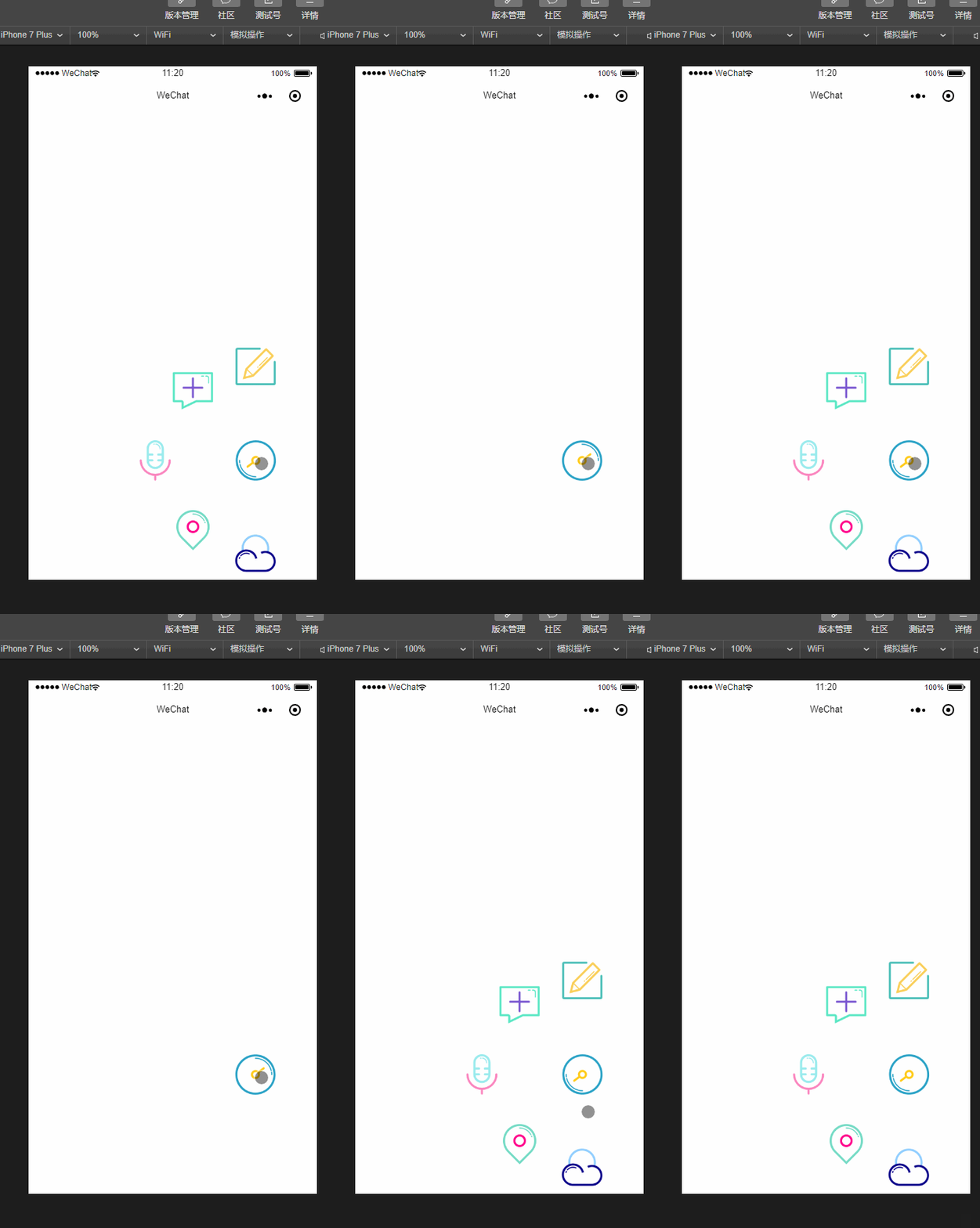
用微信小程序做了一个动画,效果如上图:
代码:
js:
Page({

  data: {

    isPopping: false,

    animPlus: {},

    animCollect: {},

    animTranspond: {},

    animInput: {},

    animCloud:{},

    aninWrite:{},

  },

  //点击弹出

  plus: function () {

    if (this.data.isPopping) {

      //缩回动画

      this.popp();

      this.setData({

        isPopping: false

      })

    } else if (!this.data.isPopping) {

      //弹出动画

      this.takeback();

      this.setData({

        isPopping: true

      })

    }

  },

  input: function () {

    console.log("input")

  },

  transpond: function () {

    console.log("transpond")

  },

  collect: function () {

    console.log("collect")

  },

  cloud:function(){

    console.log("cloud")

  },

  write: function () {

    console.log("cloud")

  },

  //弹出动画

  popp: function () {

    //plus顺时针旋转

    var animationPlus = wx.createAnimation({

      duration: 400,

      timingFunction: 'ease-out'

    })

    var animationcollect = wx.createAnimation({

      duration: 400,

      timingFunction: 'ease-out'

    })

    var animationTranspond = wx.createAnimation({

      duration: 400,

      timingFunction: 'ease-out'

    })

    var animationInput = wx.createAnimation({

      duration: 400,

      timingFunction: 'ease-out'

    })

    var animationCloud = wx.createAnimation({

      duration: 400,

      timingFunction: 'ease-out'

    })

    var animationWrite = wx.createAnimation({

      duration: 400,

      timingFunction: 'ease-out'

    })

    animationPlus.rotateZ(180).step();

    animationcollect.translate(-90, -100).rotateZ(180).opacity(1).step();

    animationTranspond.translate(-140, 0).rotateZ(180).opacity(1).step();

    animationInput.translate(-90, 100).rotateZ(180).opacity(1).step();

    animationCloud.translate(0, 135).rotateZ(180).opacity(1).step();

    animationWrite.translate(0, -135).rotateZ(180).opacity(1).step();

    this.setData({

      animPlus: animationPlus.export(),

      animCollect: animationcollect.export(),

      animTranspond: animationTranspond.export(),

      animInput: animationInput.export(),

      animCloud: animationCloud.export(),

      animWrite: animationWrite.export(),

    })

  },

  //收回动画

  takeback: function () {

    //plus逆时针旋转

    var animationPlus = wx.createAnimation({

      duration: 400,

      timingFunction: 'ease-out'

    })

    var animationcollect = wx.createAnimation({

      duration: 400,

      timingFunction: 'ease-out'

    })

    var animationTranspond = wx.createAnimation({

      duration: 400,

      timingFunction: 'ease-out'

    })

    var animationInput = wx.createAnimation({

      duration: 400,

      timingFunction: 'ease-out'

    })

    var animationCloud = wx.createAnimation({

      duration: 400,

      timingFunction: 'ease-out'

    })

    var animationWrite = wx.createAnimation({

      duration: 400,

      timingFunction: 'ease-out'

    })

    animationPlus.rotateZ(0).step();

    animationcollect.translate(0, 0).rotateZ(0).opacity(0).step();

    animationTranspond.translate(0, 0).rotateZ(0).opacity(0).step();

    animationInput.translate(0, 0).rotateZ(0).opacity(0).step();

    animationCloud.translate(0, 0).rotateZ(0).opacity(0).step();

    animationWrite.translate(0, 0).rotateZ(0).opacity(0).step();

    this.setData({

      animPlus: animationPlus.export(),

      animCollect: animationcollect.export(),

      animTranspond: animationTranspond.export(),

      animInput: animationInput.export(),

      animCloud: animationCloud.export(),

      animWrite: animationWrite.export(),

    })

  },

  onLoad: function (options) {

    // 生命周期函数--监听页面加载

  },

  onReady: function () {

    // 生命周期函数--监听页面初次渲染完成

  },

  onShow: function () {

    // 生命周期函数--监听页面显示

  },

  onHide: function () {

    // 生命周期函数--监听页面隐藏

  },

  onUnload: function () {

    // 生命周期函数--监听页面卸载

  },

  onPullDownRefresh: function () {

    // 页面相关事件处理函数--监听用户下拉动作

  },

  onReachBottom: function () {

    // 页面上拉触底事件的处理函数

  },

  onShareAppMessage: function () {

    // 用户点击右上角分享

    return {

      title: 'title', // 分享标题

      desc: 'desc', // 分享描述

      path: 'path' // 分享路径

    }

  }

})
wxml:
<view>

  <image src="../../image/1.png" class="img-style" animation="{{animWrite}}" bindtap="write"></image>

  <image src="../../image/4.png" class="img-style" animation="{{animCollect}}" bindtap="collect"></image>

  <image src="../../image/2.png" class="img-style" animation="{{animTranspond}}" bindtap="transpond"></image>

  <image src="../../image/3.png" class="img-style" animation="{{animInput}}" bindtap="input"></image>

  <image src="../../image/5.png" class="img-style" animation="{{animCloud}}" bindtap="cloud"></image>

  <image src="../../image/6.png" class="img-switch-style" animation="{{animPlus}}" bindtap="plus"></image>

</view>
wxss:
.img-switch-style {

  height: 120rpx;

  width: 120rpx;

  position: absolute;

  bottom: 250rpx;

  right: 100rpx;

  z-index: 100;

}

.img-style {

  height: 120rpx;

  width: 120rpx;

  position: absolute;

  bottom: 250rpx;

  right: 100rpx;

  opacity: 0;

}
微信小程序动画之弹出菜单的更多相关文章
- 微信小程序组件 自定义弹出框
<!-- 点击立即抢拼弹出框 --> <view class='add-rob' bindtap="setModalStatus" data-status=&qu ...
- 微信小程序日期定位弹出框遮挡问题
只需要用bindtap绑定一个点击后的操作(隐藏键盘): wx.hideKeyboard()
- 微信小程序之底部弹框预约插件
代码地址如下:http://www.demodashi.com/demo/13982.html 一.前期准备工作: 软件环境:微信开发者工具 官方下载地址:https://mp.weixin.qq.c ...
- 微信小程序动画:高度渐变,left渐变
今天在测试微信小程序动画的时候遇到了坑,需求是这样的点击时子元素从外部滑动回来,父元素的高度跟随子元素的高度改变. 实现子元素left为0并不复杂,但是改变父元素box的高度的时候却遇到了坑,因为是需 ...
- 微信小程序开发视频教程新鲜出炉
微信小程序开发公测了,可是对于新手来说,不同的框架不同的开发机制,如何快速适应呢?微信小程序开发视频教程新鲜出炉了,从零开始一步一步搭建微信小程序,每个章节都会涉及到不同的知识点,等教程学习完你不但掌 ...
- 微信小程序动画之圆形进度条
微信小程序动画之圆形进度条 上图: js: //获取应用实例 var app = getApp() var interval; var varName; var ctx = wx.createCanv ...
- 微信小程序动画实现(API,css)
微信小程序动画API实现 index.js clicktap:function(){ var Animation=wx.createAnimation({ duration: 2000, }) Ani ...
- win32进阶之路:程序托盘图标+右键弹出菜单
开场白 本次介绍两个非常棒且实用的技巧:程序托盘图标和右键弹出菜单,效果如下图. 程序托盘图标用了迅雷的图标,右键点击时候会弹出三个选项的菜单. 程序托盘图标设置 我会用尽可能清晰明了的步骤介绍方式 ...
- 微信小程序如何自动弹出提示微信授权?
我想在一进入页面的时候就进行判断提示并且弹出提示授权!请问该如何处理比较合理 wx.authorize({}) //可以通过 wx.getSetting 先查询一下用户是否授权了 "scop ...
随机推荐
- Flask 教程 第五章:用户登录
本文翻译自The Flask Mega-Tutorial Part V: User Logins 这是Flask Mega-Tutorial系列的第五部分,我将告诉你如何创建一个用户登录子系统. 你在 ...
- 阅读SQL基础教程
这两天阅读SQL基础教程,目标是把SQL语法吃透,会写一些笔记.
- This app has crashed because it attempted to access privacy-sensitive data without a usage description. The app's Info.plist must contain an NSPhotoLibraryAddUsageDescription key with a string value
iOS10 11之后遇到这种报错的小伙伴们请注意啦: 你会发现网上一大堆博客和论坛都是让你在 Info.plist 里面要涉及隐私数据时要添加一句“提示语”.于是打开 Info.plist,点击 + ...
- presentViewController底部弹框适配ipad
//适配ipad if ([alert respondsToSelector:@selector(popoverPresentationController)]) { alert.popoverPre ...
- 检测到无法识别的AP,请升级AP数据库
0x00 事件 原因是公司新增了两个 AP 设备 TL-AP1202i ,似乎是新的 AP 硬件版本比较高,导致 AC 无法识别,控制器 Web 页面给出 检测到无法识别的AP,请升级AP数据库! 的 ...
- bay——巡检RAC操作.txt
Oracle Cluster Software 包括下列组件:Event Management (EVM)Cluster Synchronization Services (CSS)Cluster R ...
- 关于xshell连接limux界面按上下左右方向键出现ABCD的问题
这个问题有两种可能: 1.一种是由于当前用户使用的shell是/bin/sh的原因.在添加用户的时候没有添加用户的指定shell类型,因此默认为/bin/sh. 可以用如下命令查看当前用户的shell ...
- CodeForces - 103B(思维+dfs找环)
题意 https://vjudge.net/problem/CodeForces-103B 很久很久以前的一天,一位美男子来到海边,海上狂风大作.美男子希望在海中找到美人鱼 ,但是很不幸他只找到了章鱼 ...
- Less(4)
1.先判断注入类型 (1)首先看到要求,要求传一个ID参数,并且要求是数字型的:?id=1 (2)再输入?id=1' 界面无变化 (3)再输入?id=1'' 界面还是无变化, (4)再输入?id=1 ...
- BZOJ2339/LG3214 「HNOI2011」 卡农 组合数学
问题描述 BZOJ2339 本题的一些心得 对于这种无序集合计数类问题,可以通过对方案数除以某个数的阶乘,使得无序化变为有序化. 设计DP方程时候,应该先有序的列出状态转移方程每一项的来源,并一项项推 ...