
CentOS7.3安装JIRA7.10
准备工作:下载相关安装包,上传到服务器/opt/apps目录下
链接:https://pan.baidu.com/s/15Y5Y3X6AX2ZokWkZKcRrQQ 密码:q0lw
1、安装数据库
yum install mariadb-server

systemctl start mariadb

创建jira数据库,并创建jira管理用户,命令如下:

MariaDB [(none)]> create database jira default character set utf8 collate utf8_bin;

Query OK,  row affected (0.00 sec)

MariaDB [(none)]> grant all on `jira`.* to 'jirauser'@'%' identified by 'shediao123';

Query OK,  rows affected (0.00 sec)
2、快速安装jira
[root@localhost apps]# ./atlassian-jira-software-7.10.-x64.bin

Unpacking JRE ...

Starting Installer ...

Sep ,  :: PM java.util.prefs.FileSystemPreferences$ run

INFO: Created system preferences directory in java.home.

This will install JIRA Software 7.10. on your computer.

OK [o, Enter], Cancel [c]

Choose the appropriate installation or upgrade option.

Please choose one of the following:

Express Install (use default settings) [], Custom Install (recommended for advanced users) [, Enter], Upgrade an existing JIRA installation []

Details on where JIRA Software will be installed and the settings that will be used.

Installation Directory: /opt/atlassian/jira

Home Directory: /var/atlassian/application-data/jira

HTTP Port:

RMI Port:

Install as service: Yes

Install [i, Enter], Exit [e]

i

Extracting files ...

Please wait a few moments while JIRA Software is configured.

Installation of JIRA Software 7.10. is complete

Start JIRA Software 7.10. now?

Yes [y, Enter], No [n]

y

Please wait a few moments while JIRA Software starts up.

Launching JIRA Software ...

Installation of JIRA Software 7.10. is complete

Your installation of JIRA Software 7.10. is now ready and can be accessed

via your browser.

JIRA Software 7.10. can be accessed at http://localhost:8080

Finishing installation ...

到此为止jira基本安装完毕,使用IP:8080浏览器访问测试,关闭防火墙和selinux
3、破解JIRA
[root@localhost apps]# cp atlassian-extras-3.2.jar /opt/atlassian/jira/atlassian-jira/WEB-INF/lib/

cp: overwrite ‘/opt/atlassian/jira/atlassian-jira/WEB-INF/lib/atlassian-extras-3.2.jar’? y

[root@localhost apps]# cp mysql-connector-java-5.1.-bin.jar /opt/atlassian/jira/atlassian-jira/WEB-INF/lib/

下边说几个常用命令及一些路径:

/opt/atlassian/jira jira的安装路径,其实说白了就是个tomcat,

/var/atlassian/application-data/jira 存放一些日志,缓存,插件,及数据库配置等

/opt/atlassian/jira/conf/server.xml 这里可以配置端口

tail -f /opt/atlassian/jira/logs/catalina.out 可以查看日志

所有配置都好了,现在重启jira

service jira stop

service jira start
JIRA管理脚本
[root@localhost apps]# ll /etc/init.d/

total

-rw-r--r--.  root root  Sep    functions

-rwxr-xr-x.  root root    Sep  : jira

-rwxr-xr-x.  root root   Sep    netconsole

-rwxr-xr-x.  root root   Sep    network

-rw-r--r--.  root root   Nov     README

[root@localhost apps]# cat /etc/init.d/jira

#!/bin/bash

# JIRA Linux service controller script

cd "/opt/atlassian/jira/bin"

case "$1" in

    start)

        ./start-jira.sh

        ;;

    stop)

        ./stop-jira.sh

        ;;

    *)

        echo "Usage: $0 {start|stop}"

        exit

        ;;

esac
一切正常了!ok登录上开始配置jira吧!
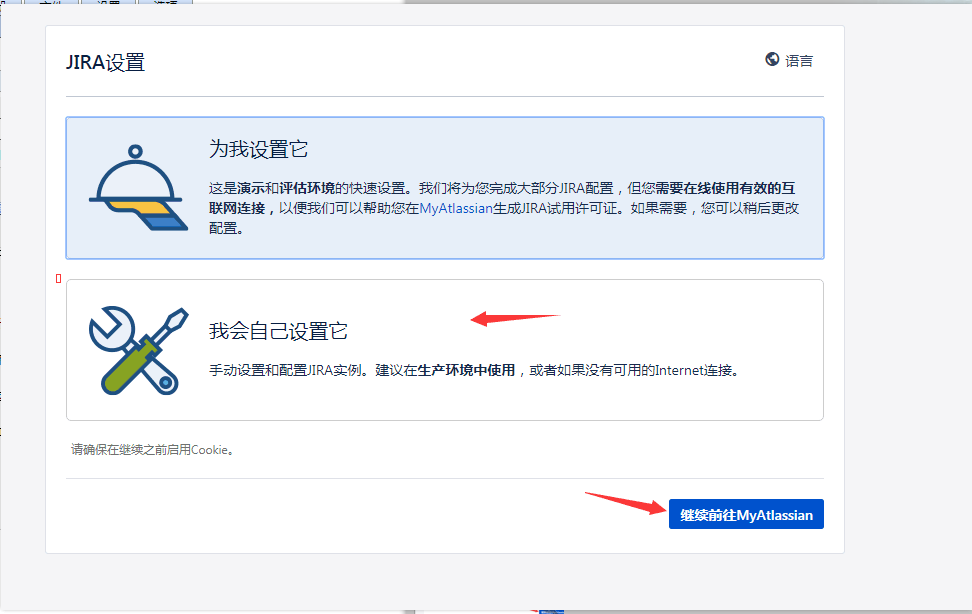
连接数据库,写入数据会有点慢


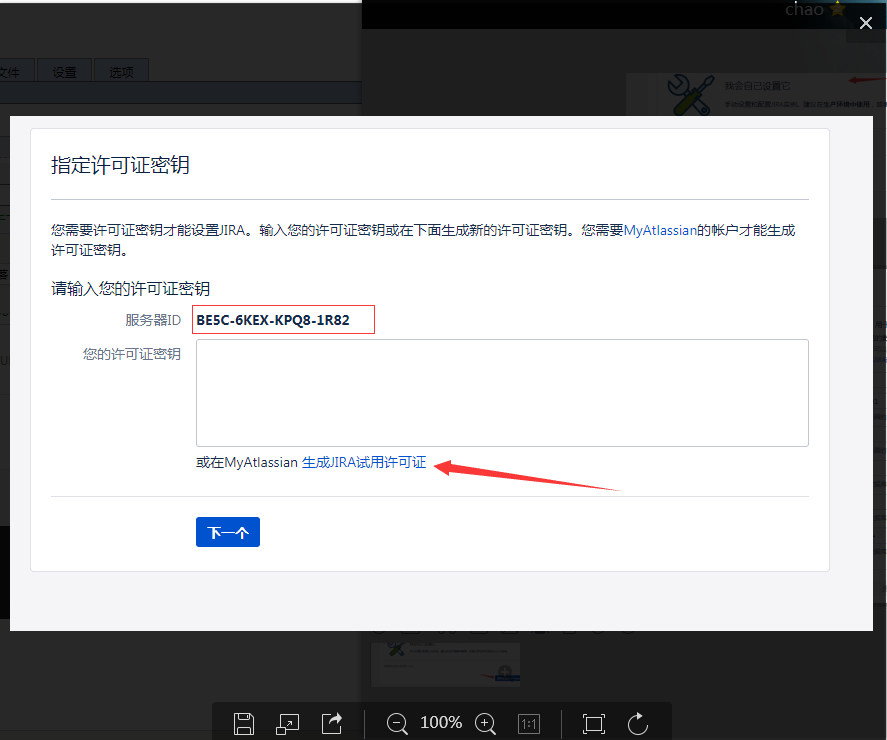
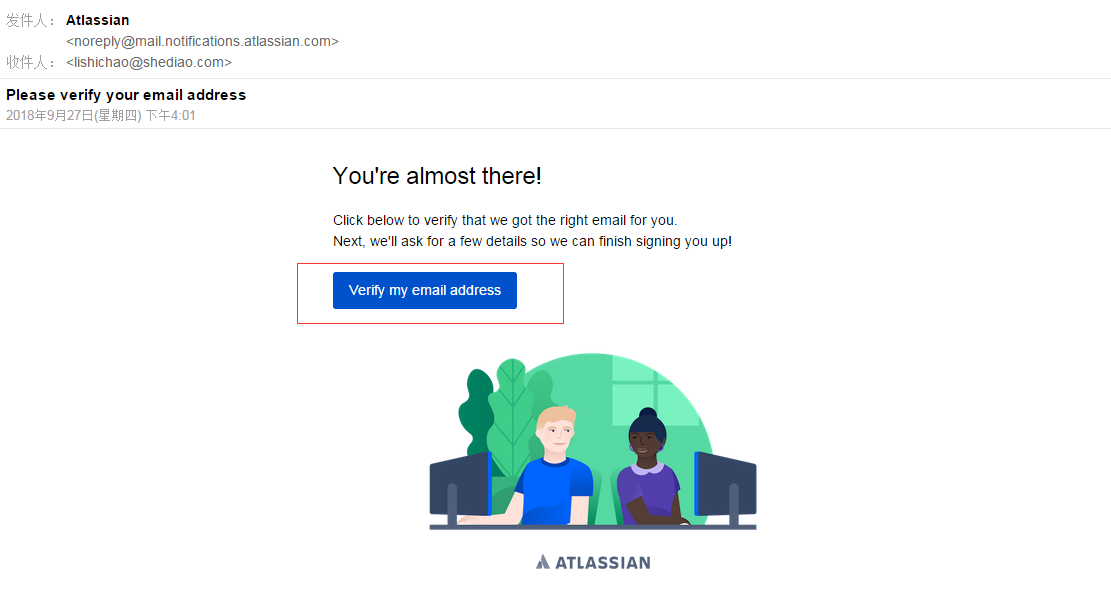
需要注册一个账户,注册后回收到一封邮件


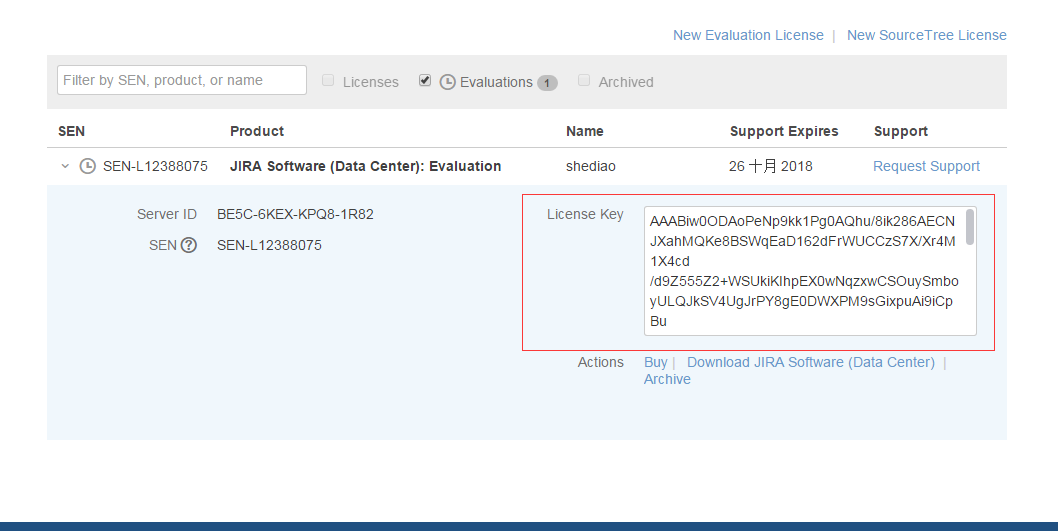
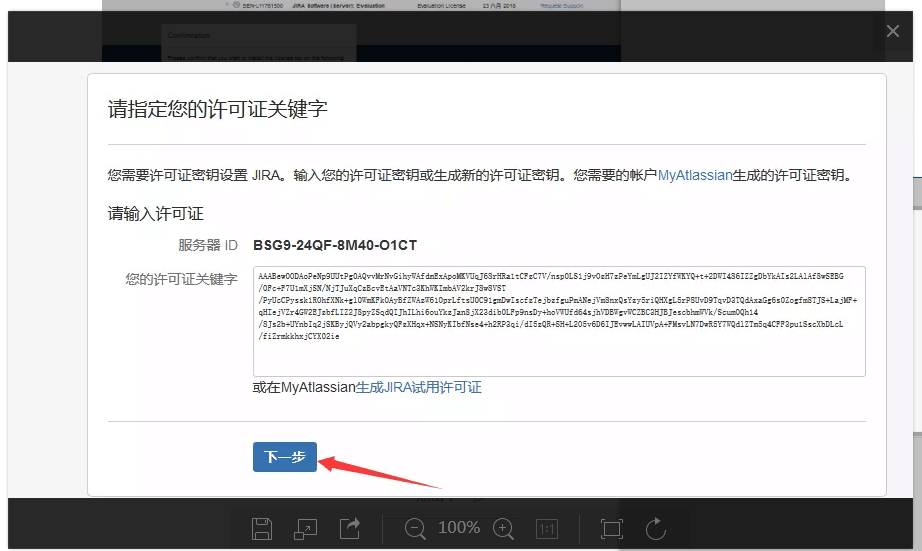
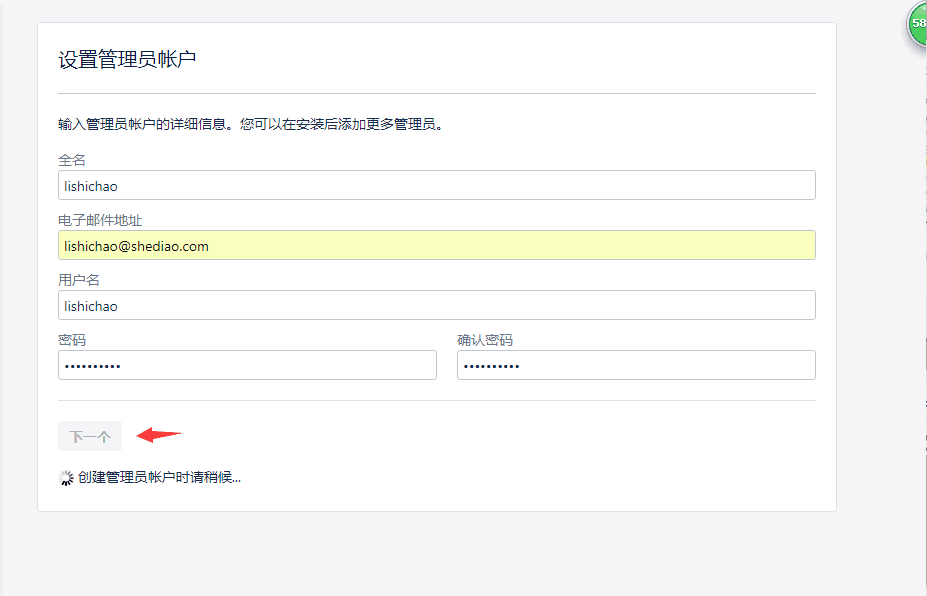
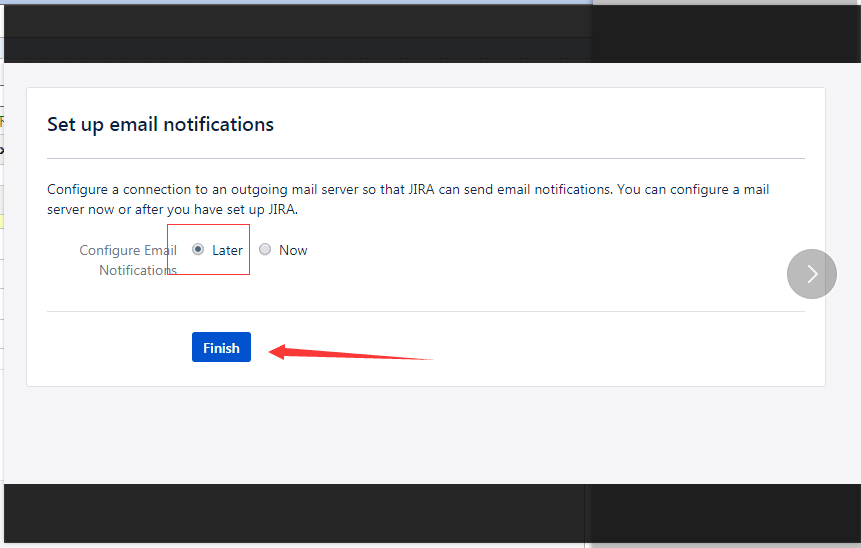


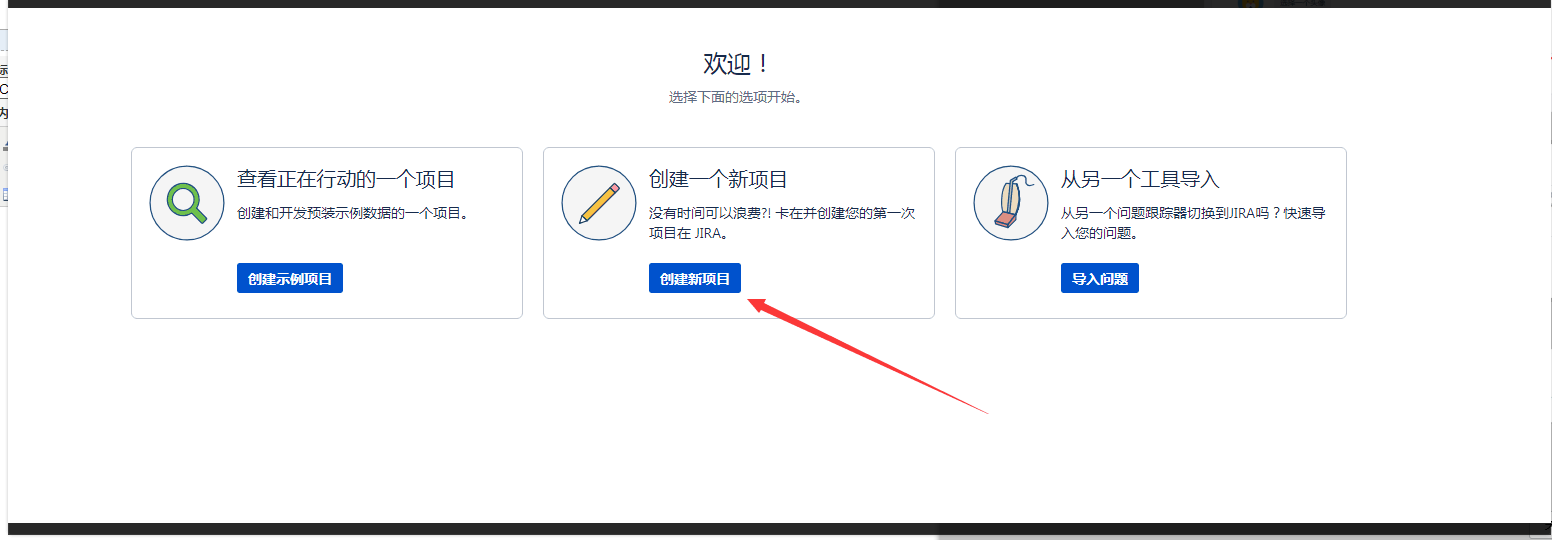
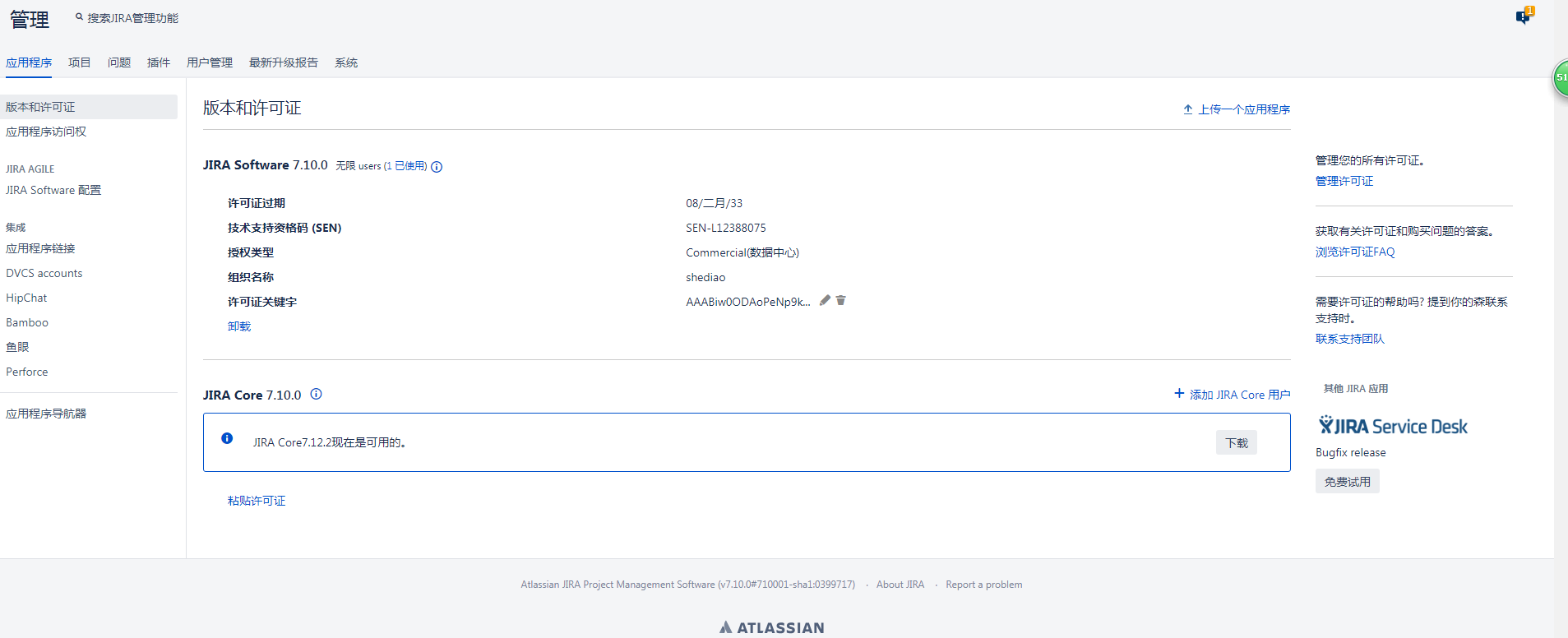
破解后显示过期日期到2033年2月8号
CentOS7.3安装JIRA7.10的更多相关文章
- CentOS7 编译安装 nginx-1.10.0
对于NGINX 支持epoll模型 epoll模型的优点 定义: epoll是Linux内核为处理大批句柄而作改进的poll,是Linux下多路复用IO接口select/poll的增强版本,它能显著的 ...
- Centos7下安装mono3.10.0
mono 3.10.0 正式发布:性能进一步改进,以前已经写过一篇 Centos 7.0 安装Mono 3.4 和Jexus 5.6.下面我们在CentOS 7上通过源码安装Mono 3.10, 需 ...
- CentOS7.2 安装nginx-1.10.3
nginx-1.10.3 下载nginx 检查是否安装了依赖库: [root@localhost ~]# rpm -q gcc gcc-4.8.5-11.el7.x86_64 [root@localh ...
- CentOS7下安装Mariadb 10.3.17
1. install lsb packagesudo yum install -y redhat-lsb 2.install net-tools packagesudo yum install -y ...
- CentOS7.X安装FastDFS-5.10
安装准备 yum install \ vim \ git \ gcc \ gcc-c++ \ wget \ make \ libtool \ automake \ autoconf \ -y \ 安装 ...
- Jira7.10.1在Windows环境下的安装和配置
jira安装的环境准备 1. jira7.10的运行是依赖java环境的,也就是说需要安装jdk并且要是1.8以上版本: Java -version 2. 还需要为jira创建对应的数据 ...
- Linux CentOS7下安装Zookeeper-3.4.10服务(最新)
Linux CentOS7下安装Zookeeper-3.4.10服务(最新) 2017年10月27日 01:25:26 极速-蜗牛 阅读数:1933 版权声明:本文为博主原创文章,未经博主允许不得 ...
- centos7.4安装rabbitmq服务(3.7.10版本)
一.需要安装erlang版本依赖,可以使用二进制安装方式,也可以通过rpm安装,但是安装的时候会提示需要erlang版本>=19.3,而且直接默认yum仓库中的版本较低.,为了节省时间,文章中直 ...
- 阿里云centos7.4安装并部署svn1.10.0版本(配置多仓库,加入开机自启动)
如何安装最新版本 1.10.0: 如果已安装旧版本,先卸载 yum remove subversion* 查看当前可安装的版本 yum list | grep subversion 可以去官网下载安装 ...
随机推荐
- 使用devcpp在windowXP上qt4.4.3安装与使用入门
1.安装前先安装devcpp,我下载的是devcpp-4.9.9.2_setup.exe2.安装qt4.4.3,下载的是qt-win-opensource-4.4.3-mingw.rar,解压后运行后 ...
- 从hadoop 要删除字符串匹配指定的任务
我们都知道,假设 hadoop job -list 获取当前正在执行的hadoop 任务,返回的结果例如以下: watermark/2/text/aHR0cDovL2Jsb2cuY3Nkbi5uZXQ ...
- Emgu-WPF学习使用-Rectangle识别
原文:Emgu-WPF学习使用-Rectangle识别 环境:Win8 64位 Vs2015 Emgu 版本:emgucv-windesktop 3.2.0.2682 示例图上部流程:原图->灰 ...
- WPF LayoutTransform -改变布局
LayoutTransform会影响布局,让grid显示分割线时候,可以看出 <Window x:Class="wpf180709.Window1" xmlns=" ...
- 关于阿里云centos7安装svn,客服端无法链接的问题
阿里云的centos7的版本中,通过yum安装了subversion之后,svn客服端无法链接svn服务器. 首先确定服务器的安全组策略中的3690端口是否打开 然后确定svnserve配置是否正确, ...
- 零元学Expression Blend 4 - Chapter 36 来玩捉迷藏吧!!!看看ScrollBar的Disabled与Hidden之差异
原文:零元学Expression Blend 4 - Chapter 36 来玩捉迷藏吧!!!看看ScrollBar的Disabled与Hidden之差异 本次要针对Disabled以及Hidden作 ...
- WPF应用程序嵌入第三方exe
把其它应用嵌入到C#窗口 源代码-CSDN下载 https://download.csdn.net/download/aiqinghee/10652732 WPF应用程序嵌入第三方exe - gao2 ...
- SQL SERVER中UPDLOCK ,READPAST使用
原文:SQL SERVER中UPDLOCK ,READPAST使用 SQL SERVER中中获取不重复数据: select top 1 * from orders with(UPDLOCK ,READ ...
- Windows下 Composer 安装 Thinkphp5 的记录.
首先安装Composer, 下载地址: https://www.phpcomposer.com/ Windows安装过程及其简单,请自行搜索解决. 接下来Win+R, 启动命令行窗口,以下所有操作都是 ...
- _stricmp, _wcsicmp, _mbsicmp, _stricmp_l, _wcsicmp_l, _mbsicmp_l 比较函数
https://msdn.microsoft.com/en-us/library/k59z8dwe.aspx