
GO 使用 动态链接库(共享链接库)进行编译 生成动态链接可执行文件
我们使用 go help buildmode 可以看到 go 可以以多种方式进行构建,默认使用静态链接库.
➜  src go help buildmode

The 'go build' and 'go install' commands take a -buildmode argument which

indicates which kind of object file is to be built. Currently supported values

are:

    -buildmode=archive

        Build the listed non-main packages into .a files. Packages named

        main are ignored.

    -buildmode=c-archive

        Build the listed main package, plus all packages it imports,

        into a C archive file. The only callable symbols will be those

        functions exported using a cgo //export comment. Requires

        exactly one main package to be listed.

    -buildmode=c-shared

        Build the listed main package, plus all packages it imports,

        into a C shared library. The only callable symbols will

        be those functions exported using a cgo //export comment.

        Requires exactly one main package to be listed.

    -buildmode=default

        Listed main packages are built into executables and listed

        non-main packages are built into .a files (the default

        behavior).

    -buildmode=shared

        Combine all the listed non-main packages into a single shared

        library that will be used when building with the -linkshared

        option. Packages named main are ignored.

    -buildmode=exe

        Build the listed main packages and everything they import into

        executables. Packages not named main are ignored.

    -buildmode=pie

        Build the listed main packages and everything they import into

        position independent executables (PIE). Packages not named

        main are ignored.

    -buildmode=plugin

        Build the listed main packages, plus all packages that they

        import, into a Go plugin. Packages not named main are ignored.
GO buildmode
在macos上我们使用shared 模式,但是显示不支持,我们换成linux平台进行实验:
➜  src go install -buildmode=shared yxpkg

-buildmode=shared not supported on darwin/amd64
创建libstd.so 库:
root@docker ~/go# go install -buildmode=shared std
创建yxpkg包的 so库:
root@docker ~/go# go install -buildmode=shared -linkshared yxpkg
编译 main.go 生成动态链接的可执行文件:
root@docker ~/g/src# go build -linkshared yaoxu.go
我们对比之前生成的静态链接的可执行文件:发现其可执行文件大小,相差很大;
root@docker ~/g/src# ll

total 1.9M

-rwxr-xr-x.  root root  22K Aug  : yaoxu*

-rw-r--r--.  root root    Aug  : yaoxu.go

drwxr-xr-x.  root root .0K Aug  : yxpkg/

-rwxr-xr-x.  root root 1.9M Aug  : yx_static*
我们分别使用ldd 查看两个文件:
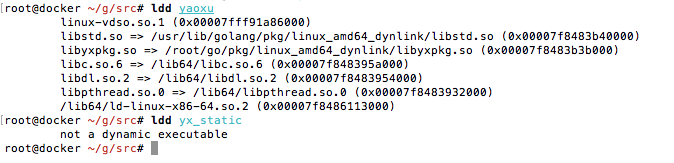
可见,两个文件一个是动态链接文件,一个是静态链接文件。
其中需要注意的是,go进行动态链接编译的时候,还是需要源代码文件辅助编译,我想主要是构建符号表的原因。
还有一些具体的细节,你可以配置自己的环境,自行进行测试;
编译后的工作区的目录结构如下:
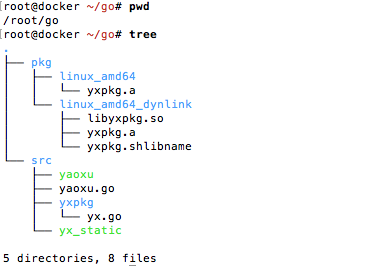
其中,yxpkg 是包,yaoxu.go文件中使用到了 yxpkg包中的函数内容;
工作区代码可以在如下连接中找到:https://github.com/yaowenxu/Workplace/tree/master/go
保持更新,如果对您有帮助,请关注 cnblogs.com/xuyaowen
GO 使用 动态链接库(共享链接库)进行编译 生成动态链接可执行文件的更多相关文章
- gcc/g++ 链接库的编译与链接
GCC编译步骤 gcc -E t1.c -o t1.i 预处理 gcc -S t1.i -o t1.s 转成汇编语言 gcc -c t1.s -o t1.o 转成机器码 gcc t1.o -o t1. ...
- 运维实践-最新Nginx二进制构建编译lua-nginx-module动态链接Lua脚本访问Redis数据库读取静态资源隐式展现
关注「WeiyiGeek」公众号 设为「特别关注」每天带你玩转网络安全运维.应用开发.物联网IOT学习! 希望各位看友[关注.点赞.评论.收藏.投币],助力每一个梦想. 本章目录 目录 0x0n 前言 ...
- Android导入第三方静态库.a编译成动态库.so
http://ikinglai.blog.51cto.com/6220785/1324985 在Android开发的时候,经常会使用到用c或c++编写的第三方的静态库.如果有源码的话,可以直接跟你自己 ...
- 静态库动态库的编译、链接, binutils工具集, 代码段\数据段\bss段解释
#1. 如何使用静态库 制作静态库 (1)gcc *.c -c -I../include得到o文件 (2) ar rcs libMyTest.a *.o 将所有.o文件打包为静态库,r将文件插入静态库 ...
- linux c静态链接库与动态链接库
库函数是我们编程的时候经常用到的,我们协作编程的时候可以将常用的函数封装成库供大家使用,这样能够提高大家的工作效率.对于库函数,它分为动态链接库和静态链接库.对于静态链接库我们必须是连接到可执行文件中 ...
- Linux下动态链接库和静态链接库
第一部分:编译过程 先了解一下linux下C代码的编译过程,C代码的编译,一般分成四个阶段,包括:预编译,编译,汇编和链接,这四个阶段的分工是 预处理过程,负责头文件展开,宏替换,条件编译的选择,删除 ...
- [拾零]C/C++_代码复用的实现_静态链接库_动态链接库_使用.def导出
1 静态链接库 1.1 创建静态链接库: 1.在VC6中创建项目:Win32 Static Library 2.在项目中创建两个文件:xxx.h 和 xxx.cpp 3.编译 1.2 使用静态链接库 ...
- C语言之链接库
链接库是windows的术语,但对于Linux来说,其概念是一样的.我们通常会把一些相似或相近功能的程序生成链接库,这样的好处是: 1)便于共享,开发软件时如需要相同功能时,不需要将大量重复的代码整合 ...
- VC++:创建,调用Win32静态链接库
概述 DLL(Dynamic Linkable Library)动态链接库,Dll可以看作一种仓库,仓库中包含了可以直接使用的变量,函数或类. 仓库的发展史经历了"无库" ---& ...
随机推荐
- Webpack 一些概念
目录 引子 Dependency Graph Runtime Manifest Module.Bundle.Chunk Bundle Splitting Code Splitting Tree Sha ...
- 让终端更好看--Ubuntu OhMyZsh配置指南
查看shell列表 cat /etc/shells 如果发现没有zsh就安装 安装zsh sudo apt install zsh 设置默认shell chsh -s $(which zsh) 重启主 ...
- IT兄弟连 HTML5教程 响应式布局实例
在学习Media Queries模块前,先通过一个响应式布局实例来了解一下响应式布局和Media Queries模块的简单应用.在本例中,使用HTML5的结构元素定义了5个盒子.当浏览器窗口尺寸不同时 ...
- 一文读懂分布式任务调度平台XXL-JOB
本文主要介绍分布式任务调度平台XXL-JOB(v2.1.0版本),包括功能特性.实现原理.优缺点.同类框架比较等 基本介绍 项目开发中,常常以下场景需要分布式任务调度: 同一服务多个实例的任务存在互斥 ...
- 系统 (一) Windows10安装Ubuntu子系统
前言 本文将基于 Windows10专业版 安装 Ubuntu子系统 1.控制面板 -> 程序 -> 选择启用或关闭Windows功能 -> 勾上 适用Linux的Windwos子系 ...
- 操作系统——输入输出(I/O)管理
目录 一.I/O 管理概述 1.1 I/O 控制方式 1.2 I/O 软件层次结构 二.I/O 核心子系统 2.1 I/O 调度概念 2.2高速缓存与缓冲区 2.3设备分配与回收 2.4假脱机技术(S ...
- 用python重新定义【2019十大网络流行语】
前言 本文的文字及图片来源于网络,仅供学习.交流使用,不具有任何商业用途,版权归原作者所有,如有问题请及时联系我们以作处理. 作者:朱小五 PS:如有需要Python学习资料的小伙伴可以加点击下方链接 ...
- Linux(一)
1.简单命令 1.1 ls指令 语法1:#ls [路径] 表示列出指定路径下的文件夹和文件的名字,如果路径没有指定则列出当前路径下的(lis ...
- Electron npm install 常见错误(Linux)
Linux版本 Ubuntu 12.04 (32bit) 安装Git sudo apt-get install git 生成ssh key #查看有没有sshkey cd ~/.ssh #生成 ssh ...
- JS 参考手册
JS 参考手册 JavaScript 对象 HTML DOM 对象