
C#开发BIMFACE系列27 服务端API之获取模型数据12:获取构件分类树
BIMFACE官方示例中,加载三维模型后,模型浏览器中左上角默认提供了“目录树”的功能,清晰地展示了模型的完整构成及上下级关系。

本篇介绍如何获取单个模型的构件分类树信息。
请求地址:POST https://api.bimface.com/data/v2/files/{fileId}/tree
说明:单模型构件分类树, treeType 接受两个值:default 和 customized,默认为 default。
v参数用来区别 treeType 为 default 时返回树的格式, customized总是返回格式2.0的构件树。
参数:

v参数用来区别 treeType 为 default 时返回树的格式, customized总是返回格式2.0的构件树。
当 treeType 为"customized"时,desiredHierarchy 表示了筛选树的层次,可选值有building,systemType,specialty,floor,category,family,familyType,如:desiredHierarchy=specialty,systemtype。
customizedNodeKeys:用来指定筛选树每个维度用id或者是name作为唯一标识, 如"floor":"id"。
请求 path(示例):https://api.bimface.com/data/v2/files/1211223382064960/tree?v=2.0
请求 header(示例):"Authorization: Bearer dc671840-bacc-4dc5-a134-97c1918d664b"
请求 body(示例):可以为空,不传递。
HTTP响应示例(200):
{

    "code": "success",

    "message": null,

    "data": [

        {

            "actualName": "1F",

            "data": null,

            "elementCount": ,

            "id": "",

            "items": [

                {

                    "actualName": "栏杆扶手",

                    "data": null,

                    "elementCount": ,

                    "id": "-2000126",

                    "items": [

                        {

                            "actualName": "栏杆扶手",

                            "data": null,

                            "elementCount": ,

                            "id": "",

                            "items": [

                                {

                                    "actualName": "栏杆",

                                    "data": null,

                                    "elementCount": ,

                                    "id": null,

                                    "items": [],

                                    "name": "栏杆",

                                    "type": "familyType"

                                }

                            ],

                            "name": "栏杆扶手",

                            "type": "family"

                        }

                    ],

                    "name": "栏杆扶手",

                    "type": "category"

                }

            ],

            "name": "1F",

            "type": "floor"

        }

    ]

}
返回的结果结构比较复杂,封装成对应的C#类如下:
/// <summary>

///  获取单个模型的构件分类树(2.0的默认分类树 floor, category, family, familyType)返回的结果类(默认模式)

/// </summary>

[Serializable]

public class SingleModelTree : GeneralResponse<List<TreeItem>>

{

}
调用的 TreeItem 类
[Serializable]

public class TreeItem

{

    /// <summary>

    ///  项的名称

    /// </summary>

    [JsonProperty("actualName")]

    public string ActualName { get; set; }

    [JsonProperty("data")]

    public string Data { get; set; }

    [JsonProperty("elementCount")]

    public int? ElementCount { get; set; }

    [JsonProperty("id")]

    public string Id { get; set; }

    [JsonProperty("items")]

    public TreeItem[] Items { get; set; }

    [JsonProperty("name")]

    public string Name { get; set; }

    /// <summary>

    ///  例如:familyType、family、category

    /// </summary>

    [JsonProperty("type")]

    public string Type { get; set; }

    /// <summary>返回表示当前对象的字符串。</summary>

    /// <returns>表示当前对象的字符串。</returns>

    public override string ToString()

    {

        return String.Format("[actualName={0}, data={1}, elementCount={2}, id={3}, items={4}, name={5}, type={6}]",

                             ActualName, Data, ElementCount, Id, Items.ToStringLine(), Name, Type);

    }

}
请注意 TreeItem 类中的 public TreeItem[] Items { get; set; } 属性,类型是该类本身。属于递归引用。
Newtonsoft.Json.dll 默认支持递归引用类的序列化与反序列化。
C#实现方法:
 /// <summary>

 ///  获取单个模型中构件的默认分类树

 /// </summary>

 /// <param name="accessToken">【必填】令牌</param>

 /// <param name="fileId">【必填】代表该单模型的文件ID</param>

 /// <param name="v">【非必填】用来区别treeType为default时返回树的格式</param>

 /// <param name="request">【非必填】其他过滤参数类对象</param>

 /// <returns></returns>

 public virtual SingleModelTree GetSingleModelTreeByDefault(string accessToken, long fileId, string v = "2.0", FileTreeRequestBody request = null)

 {

     //return GetSingleModelTree(accessToken, fileId, TreeType.Default, v, request);

     /* 单模型构件分类树,

       (1)treeType 接受两个值:default 和 customized,默认为 default。

       (2)v 参数用来区别 treeType 为 default 时返回树的格式, customized 总是返回格式2.0的构件树。

       (3)当 treeType 为"customized"时,FileTreeRequestBody 类的 desiredHierarchy 属性 表示了筛选树的层次,可选值有building,systemType,specialty,floor,category,family,familyType,

           如:desiredHierarchy=specialty,systemtype。

             customizedNodeKeys: 用来指定筛选树每个维度用id或者是name作为唯一标识, 如"floor":"id"

     */

     // POST https://api.bimface.com/data/v2/files/{fileId}/tree

     string url = string.Format(BimfaceConstants.API_HOST + "/data/v2/files/{0}/tree?treeType=default", fileId);

     if (!string.IsNullOrWhiteSpace(v))

     {

         url = url + "&v=" + v;

     }

     string data = string.Empty;

     if (request != null)

     {

         data = request.SerializeToJson();

     }

     BimFaceHttpHeaders headers = new BimFaceHttpHeaders();

     headers.AddOAuth2Header(accessToken);

     try

     {

         SingleModelTree response;

         HttpManager httpManager = new HttpManager(headers);

         HttpResult httpResult = httpManager.Post(url, data);

         if (httpResult.Status == HttpResult.STATUS_SUCCESS)

         {

             response = httpResult.Text.DeserializeJsonToObject<SingleModelTree>();

         }

         else

         {

             response = new SingleModelTree

             {

                 Message = httpResult.RefText

             };

         }

         return response;

     }

     catch (Exception ex)

     {

         throw new Exception("[获取单个模型中构件的默认分类树]发生异常!", ex);

     }

 }
其中调用到的 httpManager.Post() 方法,请参考《C# HTTP系列》
在BIMFACE的控制台中可以看到我们上传的文件列表,模型状态均为转换成功。

使用“A4.rvt”为例测试上述方法。
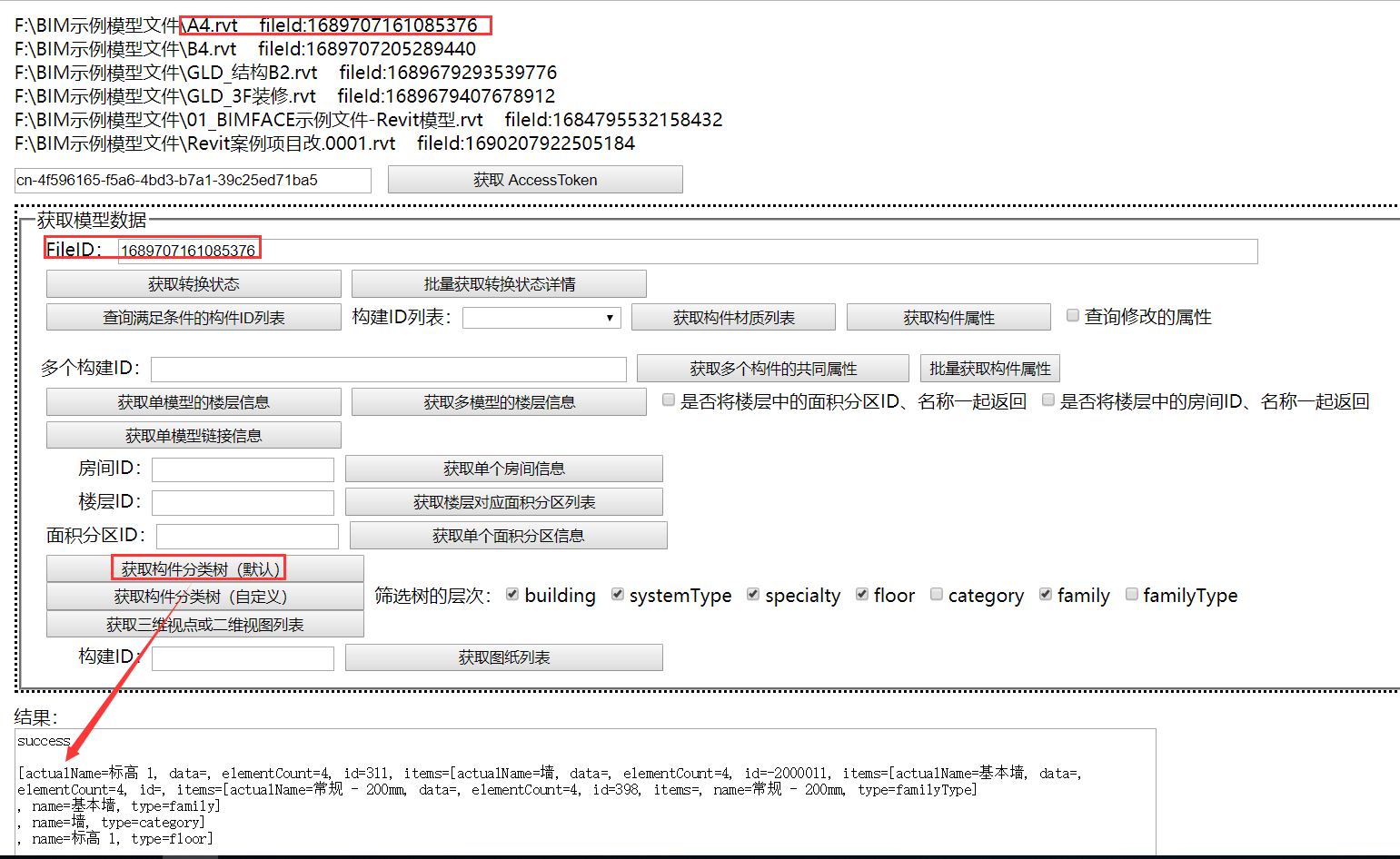
完整的分类树为
success

[

  {

    "actualName": "标高 1",

    "data": null,

    "elementCount": ,

    "id": "",

    "items": [

      {

        "actualName": "墙",

        "data": null,

        "elementCount": ,

        "id": "-2000011",

        "items": [

          {

            "actualName": "基本墙",

            "data": null,

            "elementCount": ,

            "id": "",

            "items": [

              {

                "actualName": "常规 - 200mm",

                "data": null,

                "elementCount": ,

                "id": "",

                "items": [],

                "name": "常规 - 200mm",

                "type": "familyType"

              }

            ],

            "name": "基本墙",

            "type": "family"

          }

        ],

        "name": "墙",

        "type": "category"

      }

    ],

    "name": "标高 1",

    "type": "floor"

  }

]
测试代码如下:
// 获取构件分类树(默认)

protected void btnGetSingleModelTreeByDefault_Click(object sender, EventArgs e)

{

    long fileId = txtFileID.Text.Trim().ToLong();

    FileConvertApi api = new FileConvertApi();

    SingleModelTree response = api.GetSingleModelTreeByDefault(txtAccessToken.Text, fileId);

    txtResult.Text = response.Code.ToString2()

                   + Environment.NewLine

                   + response.Message.ToString2()

                   + Environment.NewLine

                   + response.Data.ToStringLine();

}
请求 path(示例):https://api.bimface.com/data/v2/files/1211223382064960/tree?v=2.0&treeType=customized
请求 header(示例):"Authorization: Bearer dc671840-bacc-4dc5-a134-97c1918d664b"
请求 body(示例):
{

    "desiredHierarchy": [

        "category",

        "family"

    ],

    "customizedNodeKeys": {

        "category": "name"

    }

}
请求体不能为 NULL ,必须传递值。 否则请求失败,提示 system.error. customized tree request body is null
HTTP响应示例(200):
{

    "code": "success",

    "message": null,

    "data": {

        "items": [

            {

                "actualName": "专用设备",

                "data": null,

                "elementCount": ,

                "id": "-2001350",

                "items": [

                    {

                        "actualName": "投影仪-基于天花板 3D",

                        "data": null,

                        "elementCount": ,

                        "id": "",

                        "items": [

                        ],

                        "name": "投影仪-基于天花板 3D",

                        "type": "family"

                    },

                    {

                        "actualName": "投影屏幕-基于天花板 3D",

                        "data": null,

                        "elementCount": ,

                        "id": "",

                        "items": [

                        ],

                        "name": "投影屏幕-基于天花板 3D",

                        "type": "family"

                    }

                ],

                "name": "卫浴装置",

                "type": "category"

            }

        ],

        "root": "category"

    }

}
返回的结果结构比较复杂,封装成对应的C#类如下:
/// <summary>

///  获取单个模型的构件分类树(自定义树floor, category, family, familyType)返回的结果类

/// </summary>

[Serializable]

public class SingleModelTreeByCustomized : GeneralResponse<SingleModelTreeByCustomized>

{

    [JsonProperty("root")]

    public string Root { get; set; }

    [JsonProperty("items")]

    public TreeItem[] Items { get; set; }

    /// <summary>返回表示当前对象的字符串。</summary>

    /// <returns>表示当前对象的字符串。</returns>

    public override string ToString()

    {

        return String.Format("[root={0}, items={1}]",

                             Root, Items.ToStringLine());

    }

}
C#实现方法:
 /// <summary>

 ///  获取单个模型中构件的自定义分类树

 /// </summary>

 /// <param name="accessToken">【必填】令牌</param>

 /// <param name="fileId">【必填】代表该单模型的文件ID</param>

 /// <param name="v">【非必填】用来区别treeType为default时返回树的格式</param>

 /// <param name="request">【非必填】其他过滤参数类对象</param>

 /// <returns></returns>

 public virtual SingleModelTreeByCustomized GetSingleModelTreeByCustomized(string accessToken, long fileId, string v = "2.0", FileTreeRequestBody request = null)

 {

     //return GetSingleModelTree(accessToken, fileId, TreeType.Default, v, request);

     /* 单模型构件分类树,

       (1)treeType 接受两个值:default 和 customized,默认为 default。

       (2)v 参数用来区别 treeType 为 default 时返回树的格式, customized 总是返回格式2.0的构件树。

       (3)当 treeType 为"customized"时,FileTreeRequestBody 类的 desiredHierarchy 属性 表示了筛选树的层次,可选值有building,systemType,specialty,floor,category,family,familyType,

           如:desiredHierarchy=specialty,systemtype。

             customizedNodeKeys: 用来指定筛选树每个维度用id或者是name作为唯一标识, 如"floor":"id"

     */

     // POST https://api.bimface.com/data/v2/files/{fileId}/tree

     string url = string.Format(BimfaceConstants.API_HOST + "/data/v2/files/{0}/tree?treeType=customized", fileId);

     if (!string.IsNullOrWhiteSpace(v))

     {

         url = url + "&v=" + v;

     }

     string data = string.Empty;

     if (request != null)

     {

         data = request.SerializeToJson();

     }

     BimFaceHttpHeaders headers = new BimFaceHttpHeaders();

     headers.AddOAuth2Header(accessToken);

     try

     {

         SingleModelTreeByCustomized response;

         HttpManager httpManager = new HttpManager(headers);

         HttpResult httpResult = httpManager.Post(url, data);

         if (httpResult.Status == HttpResult.STATUS_SUCCESS)

         {

             response = httpResult.Text.DeserializeJsonToObject<SingleModelTreeByCustomized>();

         }

         else

         {

             response = new SingleModelTreeByCustomized

             {

                 Message = httpResult.RefText

             };

         }

         return response;

     }

     catch (Exception ex)

     {

         throw new Exception("[获取单个模型中构件的自定义分类树]发生异常!", ex);

     }

 }
测试:
同样使用“A4.rvt”为例测试上述方法。
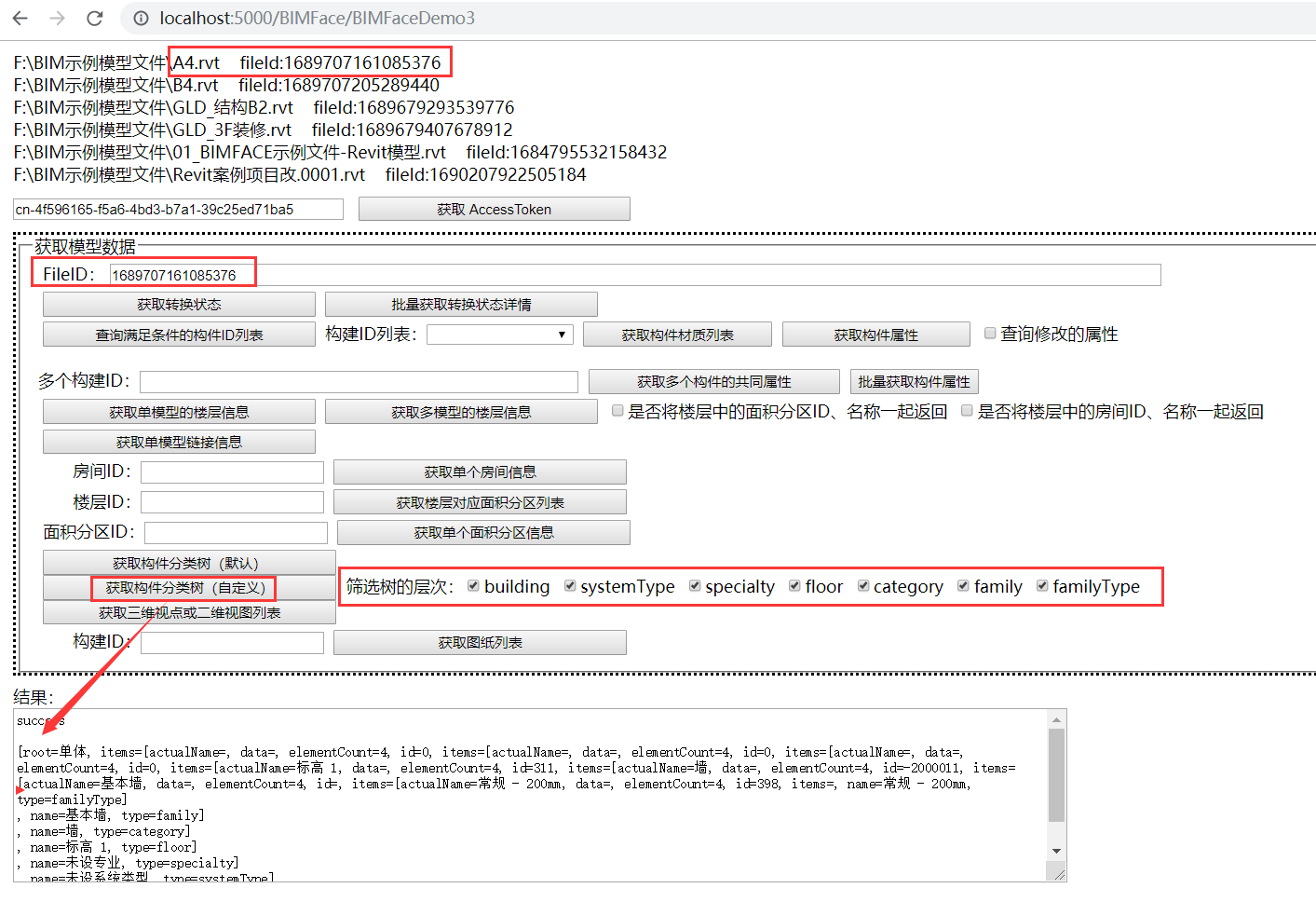
完整的分类树为
success

[root=单体,

 items=[actualName=,

        data=,

        elementCount=,

        id=,

        items=[actualName=,

               data=,

               elementCount=,

               id=,

               items=[actualName=,

                     data=,

                     elementCount=,

                     id=,

                     items=[actualName=标高 ,

                            data=,

                            elementCount=,

                            id=,

                            items=[actualName=墙,

                                   data=,

                                   elementCount=,

                                   id=-,

                                   items=[actualName=基本墙,

                                          data=,

                                          elementCount=,

                                          id=,

                                          items=[actualName=常规 - 200mm,

                                                 data=,

                                                 elementCount=,

                                                 id=,

                                                 items=,

                                                 name=常规 - 200mm,

                                                 type=familyType

                                                ],

                                          name=基本墙,

                                          type=family

                                         ],

                                   name=墙,

                                   type=category

                                  ],

                            name=标高 ,

                            type=floor

                           ],

                     name=未设专业,

                     type=specialty

                    ],

                name=未设系统类型,

                type=systemType

               ],

        name=未设单体,

        type=building

       ]

]
界面上的筛选树的层次是过滤条件,主要用于筛选 type 属性。
测试代码如下:
// 获取构件分类树(自定义)

protected void btnGetSingleModelTreeByCustomized_Click(object sender, EventArgs e)

{

    long fileId = txtFileID.Text.Trim().ToLong();

    List<string> lstDesiredHierarchy = new List<string>();

    if (chkTreeBuilding.Checked)

    {

        lstDesiredHierarchy.Add("building");

    }

    if (chkTreeSystemType.Checked)

    {

        lstDesiredHierarchy.Add("systemType");

    }

    if (chkTreeSpecialty.Checked)

    {

        lstDesiredHierarchy.Add("specialty");

    }

    if (chkTreeFloor.Checked)

    {

        lstDesiredHierarchy.Add("floor");

    }

    if (chkTreeCategory.Checked)

    {

        lstDesiredHierarchy.Add("category");

    }

    if (chkTreeFamily.Checked)

    {

        lstDesiredHierarchy.Add("family");

    }

    if (chkTreeFamilyType.Checked)

    {

        lstDesiredHierarchy.Add("familyType");

    }

    FileTreeRequestBody request = new FileTreeRequestBody();

    request.DesiredHierarchy = lstDesiredHierarchy.ToArray();// new[] { "building", "systemType", "specialty", "floor", "category", "family", "familyType" };

    request.CustomizedNodeKeys = new Dictionary<string, string> { { "category", "name" } };

    FileConvertApi api = new FileConvertApi();

    SingleModelTreeByCustomized response = api.GetSingleModelTreeByCustomized(txtAccessToken.Text, fileId, "2.0", request);

    txtResult.Text = response.Code.ToString2()

                   + Environment.NewLine

                   + response.Message.ToString2()

                   + Environment.NewLine

                   + response.Data;

}
C#开发BIMFACE系列27 服务端API之获取模型数据12:获取构件分类树的更多相关文章
- C#开发BIMFACE系列45 服务端API之创建离线数据包
BIMFACE二次开发系列目录 [已更新最新开发文章,点击查看详细] BIMFACE的常规应用方式有公有云与私有化部署两种方式,并且浏览模型或者图纸需要使用ViewToken,ViewToke ...
- C#开发BIMFACE系列46 服务端API之离线数据包下载及结构详解
BIMFACE二次开发系列目录 [已更新最新开发文章,点击查看详细] 在前一篇博客<C#开发BIMFACE系列45 服务端API之创建离线数据包>中通过调用接口成功的创建一个离线数 ...
- C#开发BIMFACE系列30 服务端API之模型对比1:发起模型对比
系列目录 [已更新最新开发文章,点击查看详细] 在实际项目中,由于需求变更经常需要对模型文件进行修改.为了便于用户了解模型在修改前后发生的变化,BIMFACE提供了模型在线对比功能,可以利用在 ...
- C#开发BIMFACE系列31 服务端API之模型对比2:获取模型对比状态
系列目录 [已更新最新开发文章,点击查看详细] 在上一篇<C#开发BIMFACE系列30 服务端API之模型对比1:发起模型对比>中发起了2个模型对比,由于模型对比是在BIMFAC ...
- C#开发BIMFACE系列32 服务端API之模型对比3:批量获取模型对比状态
系列目录 [已更新最新开发文章,点击查看详细] 在<C#开发BIMFACE系列31 服务端API之模型对比2:获取模型对比状态>中介绍了根据对比ID,获取一笔记录的对比状态.由于模 ...
- C#开发BIMFACE系列40 服务端API之模型集成
BIMFACE二次开发系列目录 [已更新最新开发文章,点击查看详细] 随着建筑信息化模型技术的发展,越来越多的人选择在云端浏览建筑模型.现阶段的云端模型浏览大多是基于文件级别,一次只可以浏览一 ...
- C#开发BIMFACE系列41 服务端API之模型对比
BIMFACE二次开发系列目录 [已更新最新开发文章,点击查看详细] 在建筑施工图审查系统中,设计单位提交设计完成的模型/图纸,审查专家审查模型/图纸.审查过程中如果发现不符合规范的地方,则流 ...
- C#开发BIMFACE系列42 服务端API之图纸对比
BIMFACE二次开发系列目录 [已更新最新开发文章,点击查看详细] 在我的前一篇博客<C#开发BIMFACE系列42 服务端API之图纸对比>中详细介绍了BIMFACE服务端接口 ...
- C#开发BIMFACE系列43 服务端API之图纸拆分
BIMFACE二次开发系列目录 [已更新最新开发文章,点击查看详细] 在上一篇博客<C#开发BIMFACE系列42 服务端API之图纸对比>的最后留了一个问题,在常规业务场景下,一 ...
随机推荐
- React 如何搭建脚手架
React 如何搭建脚手架 npm install -g create-react-app //安装 create-react-app react-demo // react-demo ...
- Python学习系列(四)Python 入门语法规则2
Python学习系列(四)Python 入门语法规则2 2017-4-3 09:18:04 编码和解码 Unicode.gbk,utf8之间的关系 2.对于py2.7, 如果utf8>gbk, ...
- sharding demo 读写分离 U (分库分表 & 不分库只分表)
application-sharding.yml sharding: jdbc: datasource: names: ds0,ds1,dsx,dsy ds0: type: com.zaxxer.hi ...
- 七天学会NodeJS——第一天
转载请注明出处:葡萄城官网,葡萄城为开发者提供专业的开发工具.解决方案和服务,赋能开发者.原文出处:http://nqdeng.github.io/7-days-nodejs Node.js 是一个能 ...
- 使用windows powershell ISE管理命令窗口,并集成git命令
写于2018-09-03(基于win10) 开启 win + s 输入 ise 操作 主要使用新建的power shell选项卡 将git集成到power shell中 安装准备 确定你的power ...
- python中下标和切片的使用
下标 所谓下标就是编号,就好比超市中存储柜的编号,通过这个编号就能找到相应的存储空间. Python中字符串,列表,元祖均支持下标索引. 例如: # 如果想取出部分字符,可使用下标 name=&quo ...
- vue中的虚拟DOM树
什么是虚拟DOM树?(Virtual DOM) 虚拟DOM树其实就是一个普通的js对象,它是用来描述一段HTML片段的 01 当页面渲染的时候Vue会创建一颗虚拟DOM树 02 ...
- python 列表的增删改查
列表 有序可变的,索引 作用:存储数据的,支持很多种数据类型 定义方式: lst = [1,"alex",True,('a','b')]增 append() # 追加 extend ...
- jmeter+Fiddler:通过Fiddler抓包生成jmeter脚本
Fiddler是目前最常用的抓包工具之一,它作为客户端和服务器端之间的代理,记录客户端和服务器之间的所有请求(http/https),可以针对特定的请求过滤,分析请求和响应的数据.设置断点.调试.修改 ...
- 纯 CSS 实现绘制各种三角形(各种角度)
一.前言 三角形实现原理:宽度width为0:height为0:(1)有一条横竖边(上下左右)的设置为border-方向:长度 solid red,这个画的就是底部的直线.其他边使用border-方向 ...