
小程序wepy2 模拟vant PasswordInput, NumberKeyboard 密码输入框控件
vant weapp小程序端控件目前是没有PasswordInput,NumberKeyboard的。实现效果:
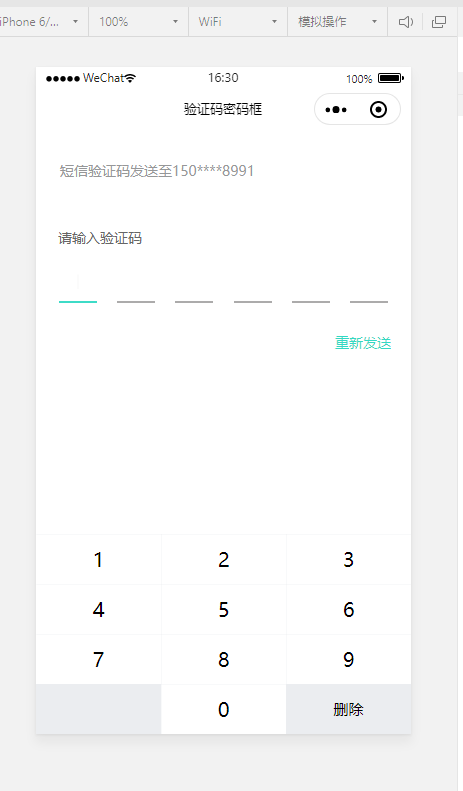
数字键盘组件代码(keyboard.wpy):
<template>

  <div class="keyboard">

    <div class="number-keyboard number-keyboard--default number-keyboard--safe-area-inset-bottom">

      <div class="number-keyboard__body">

        <i v-for="(item,index) of keys" :key="index" @click="keyTap(item)" class="hairline key" :class="{'key--gray':item.moreClass}">{{item.txt}}</i>

      </div>

    </div>

  </div>

</template>

<script>

import wepy from '@wepy/core';

wepy.component({

    data: {

        keys: [

            { txt: 1, key: 1},

            { txt: 2, key: 2},

            { txt: 3, key: 3},

            { txt: 4, key: 4},

            { txt: 5, key: 5},

            { txt: 6, key: 6},

            { txt: 7, key: 7},

            { txt: 8, key: 8},

            { txt: 9, key: 9},

            { txt: '', key: '', moreClass: 'key--gray key--extra' },

            { txt: 0, key: 0},

            { txt: '删除', key: 'del', moreClass: 'key--gray key--delete' }

        ]

    },

    methods: {

      keyTap(item){

        if(item.key=='del'){

          this.$emit('del',item);

        }else if(/\d/.test(item.key)){

          this.$emit('keyinput',item);

        }

      }

    },

    created() {}

});

</script>

<style lang="less" scoped>

.keyboard {

    position: fixed;

    bottom: 0;

    width: 100%;

    left: 0;

}

.number-keyboard__body {

    position: relative;

    box-sizing: border-box;

    .key {

        display: inline-block;

        width: 33.33333333%;

        height: 100rpx;

        font-size: 40rpx;

        font-style: normal;

        line-height: 100rpx;

        text-align: center;

        vertical-align: middle;

        // cursor: pointer;

        position: relative;

        // color:#777;

        outline: none;

        &.key--gray {

            background-color: #ebedf0;

            font-size: 30rpx;

        }

        &.key--active {

            background-color: #f2f3f5;

        }

    }

    .key::after {

        position: absolute;

        box-sizing: border-box;

        content: ' ';

        pointer-events: none;

        top: -50%;

        right: -50%;

        bottom: -50%;

        left: -50%;

        border: 0 solid #ebedf0;

        -webkit-transform: scale(0.5);

        transform: scale(0.5);

        border-width: 0.02667rem 0.02667rem 0 0;

    }

}

</style>
密码提示框组件代码(pswInput.wpy):
<template>

  <div class="inputRow">

    <div class="pwdItem" v-for="(item,index) of length" :key="index" :class="{'active':index==arrPsw.length}">

      <text class="txt">{{arrPsw[index]||""}}</text>

      <div class="pcursor" v-if="index==arrPsw.length"></div>

    </div>

  </div>

</template>

<script>

import wepy from '@wepy/core';

wepy.component({

    data: {

        arrPsw: []

    },

    props: {

        length: Number,

        val: String

    },

    methods: {},

    created() {},

    computed: {

        arrPsw() {

            return (this.val && this.val.length && this.val.split('')) || [];

        }

    }

});

</script>

<style lang="less" scoped>

@keyframes cflicker {

    0%{

        opacity: 0;

        height: 38%;

    }

    100%{

        opacity: 1;

        height: 40%;

    }

}

.inputRow {

    display: flex;

    justify-content: space-between;

    padding: 22rpx 46rpx 0 46rpx;

    .pwdItem {

        width: 76rpx;

        height: 76rpx;

        line-height: 66rpx;

        border-bottom: 4rpx solid #acabab;

        position: relative;

        &.active {

            border-bottom: 4rpx solid #3ddbc7;

        }

        .txt {

            font-size: 68rpx;

            color: #4b5161;

            vertical-align: top;

        }

        .pcursor {

            position: absolute;

            top: 50%;

            left: 50%;

            width: 2rpx;

            height: 40%;

            background-color: #323233;

            -webkit-transform: translate(-50%, -50%);

            transform: translate(-50%, -50%);

            animation: 1s cflicker infinite ease-in-out;

        }

    }

}

</style>
父组件调用:
<template>

  <div class="register-sms">

    <div class="header-tip">短信验证码发送至150****8991</div>

    <p class="input-title">请输入验证码</p>

    <div class="pswInput">

      <pswInput length="{{6}}" :val="params.smsCode"></pswInput>

    </div>

    <p class="regTip re-send" v-if="!codeLoading">

      <span @click="sendSMS">重新发送</span>

    </p>

    <p class="regTip timeNum" v-if="codeLoading">{{codeTime}}S</p>

    <keyboard @keyinput="onKeysInput" @del="onKeysDel"></keyboard>

  </div>

</template>

<script>

import wepy from '@wepy/core';

wepy.page({

    data: {

        params: {

            smsCode: '',

        },

        codeLoading: false, //验证码倒计时显示

        codeTime: 60, //验证码倒计时

        time1: null //清除定时器

    },

    methods: {

      onKeysInput(item){

        if(this.params.smsCode.length>5) return false;

        this.params.smsCode = this.params.smsCode + item.key;

        console.log(this.params.smsCode);

        if(this.params.smsCode.length===6){

          this.register();

        }

      },

      register(){

        console.log("register",this.params)

      },

      onKeysDel(item){

        let temp = this.params.smsCode.split('')||[];

        temp.pop();

        this.params.smsCode = temp.join("");

      }

    },

    created() {}

});

</script>

<config>

{

    navigationBarTitleText: '验证码密码框',

    usingComponents: {

      "pswInput":"../components/pswInput",

      "keyboard":"../components/keyboard",

    }

}

</config>

<style scoped lang="less">

input::-webkit-input-placeholder {

    color: #c2c2c2;

}

.register-sms {

    text-align: center;

    padding-top: 30px;

}

.header-tip {

    font-size: 28rpx;

    text-align: left;

    margin-left: 48rpx;

    color: #969798;

}

.input-title {

    font-size: 28rpx;

    color: #666;

    margin-top: 96rpx;

    margin-left: 44rpx;

    margin-bottom: 10rpx;

    text-align: left;

}

.van-password-input__security {

    .li {

        border-bottom: 4rpx solid #acbbab;

        color: #4b5161;

        font-size: 68rpx;

    }

}

.regTip {

    font-size: 28rpx;

    text-align: right;

    margin-top: 60rpx;

    margin-right: 40rpx;

    &.re-send {

        color: #32d9c3;

    }

    &.timeNum {

        color: #969798;

    }

}

.pswInput {

}

</style>
小程序wepy2 模拟vant PasswordInput, NumberKeyboard 密码输入框控件的更多相关文章
- 微信小程序实战:表单与选择控件的结合
先上代码. login.wxml <mp-toptips msg="{{error}}" type="error" show="{{error} ...
- 微信小程序搭建mpvue+vant+flyio
导语 上一篇文章微信小程序搭建mpvue+vant已经介绍了如何搭起mpvue项目及引入vant,本篇文章继续在它的基础上,引入flyio,并做一些封装,目的是为了在小程序发起请求. 这时读者会有些疑 ...
- 微信小程序搭建mpvue+vant
第一步:查看是否已经装了node.js $ node -v $ npm -v 正确姿势 没有装的话前往Node.js官网安装 第二步:安装cnpm $ npm install -g cnpm -- ...
- delphi 一个自动控制机的硅控板检测程序,用多线程和API,没有用控件,少做改动就能用 用485开发
一个自动控制机的硅控板检测程序,用多线程和API,没有用控件,少做改动就能用Unit CommThread; Interface Uses Windows, Classes, SysUtils, G ...
- SNF快速开发平台MVC-各种级联绑定方式,演示样例程序(包含表单和表格控件)
做了这么多项目,经常会使用到级联.联动的情况. 如:省.市.县.区.一级分类.二级分类.三级分类.仓库.货位. 方式:有表单需要做级联的,还是表格行上需要做级联操作的. 实现:实现方法也有很多种方式. ...
- WPF 从程序集中检索图片资源stream给Image控件使用
原文:WPF 从程序集中检索图片资源stream给Image控件使用 版权声明:本文为博主原创文章,未经博主允许不得转载. https://blog.csdn.net/nihang1234/artic ...
- WPF 程序如何跨窗口/跨进程设置控件焦点
原文:WPF 程序如何跨窗口/跨进程设置控件焦点 WPF 程序提供了 Focus 方法和 TraversalRequest 来在 WPF 焦点范围内转移焦点.但如果 WPF 窗口中嵌入了其他框架的 U ...
- 【小程序】模拟数据支持(mockjs配置模拟服务器接口数据)
utils目录 ①下载mockjs(地址)放置utils目录中 ②新建api.js :配置模拟数据以及后台接口,通过DEBUG=ture; //切换数据接口 配置如下: let API_HOST = ...
- wepy-cli 开发小程序如何使用vant组件
同样使用wepy-cli快速生成的小程序,目前可以使用组件: 直接通过 git 下载 Vant Weapp 源代码,并将dist目录拷贝到自己的项目中 git clone https://github ...
随机推荐
- tomcat启动时间5分钟左右org.apache.catalina.util.SessionIdGeneratorBase.createSecureRandom Creation of SecureRandom instance for session ID generation using [SHA1PRNG] took [342,445] milliseconds.
org.apache.catalina.util.SessionIdGeneratorBase.createSecureRandom Creation of SecureRandom instance ...
- axios Api介绍
1.Performing a GET request axios.get('/user?ID=12345') .then(function (response) { // handle success ...
- Redis 【常识与进阶】
Redis 简介 Redis 是完全开源免费的,遵守BSD协议,是一个高性能的key-value数据库. Redis 与其他 key - value 缓存产品有以下三个特点: Redis支持数据的持久 ...
- Django CBV加装饰器、Django中间件、auth模块
一. CBV加装饰器 在视图层中,基于函数的视图叫FBV(function base views),基于类的视图叫CBV(class base views).当需要用到装饰器时,例如之前的基于Cook ...
- navicat和pymysql
内容回顾 select distinct 字段1,字段2,...from 表名 where 分组之前的过滤条件 group by 分组条件 having 分组之后过滤条件 order by 排序字段1 ...
- 题解 P4325 【[COCI2006-2007#1] Modulo】
第\(1\)种方法 也是最暴力的一种 我们熟知,\(c++\)中的\(set\)可以既去重,有排序,这题,我们可以用set来搞,虽然我们不需要排序的功能,但毕竟方便,一共是\(10\)个数,所以暴力一 ...
- HTML5调用笔记本或手机摄像头
网上找了些文章测试了下,到现在为止还是很多浏览器不支持,所以也没有什么实用价值啊. 以下代码在笔记本电脑浏览器chrome25,irefox19上测试通过(FF需要在地址栏输入about:config ...
- 使用TensorFlow v2.0构建多层感知器
使用TensorFlow v2.0构建一个两层隐藏层完全连接的神经网络(多层感知器). 这个例子使用低级方法来更好地理解构建神经网络和训练过程背后的所有机制. 神经网络概述 MNIST 数据集概述 此 ...
- Thread---重排序
重排序 数据依赖性 如果两个操作访问同一个变量,且这两个操作中有一个为写操作,此时这两个操作之间就存在数据依赖性.数据依赖分下列三种类型: 名称 代码示例 说明 写后读 a = 1;b = a; 写一 ...
- 《 OO第一作业周期(前四周)总结 》
作为一名软件工程的大学生,很高兴能够以这样一种方式,实现对博客编写零的突破.专业课老师也介绍了编写博客给我们带来的帮助,听了以后,我感觉到了培养出写博客的习惯,是一件多么有意义的事! 话不多说,让我们 ...