
Vxlan L2
VXLAN(Virtual eXtensible LAN可扩展虚拟局域网)诞生了,基于IP网络之上,采用的是MAC in UDP技术
跨三层实现二层通信
总结为何需要Vxlan:
- 虚拟机规模受到网络规格的限制,大L2网络里,报文通过查询MAC地址转发,MAC表容量限制了虚拟机的数量。
- 网络隔离的限制,普通的vlan和VPN配置无法满足动态网络调整的需求,同时配置复杂
- 虚拟器搬迁受到限制,虚拟机启动后假如在业务不中断基础上将该虚拟机迁移到另外一台物理机上去,需要保持虚拟机的IP地址和MAC地址等参数保持不变,这就要求业务网络是一个二层的网络。
拓扑图:
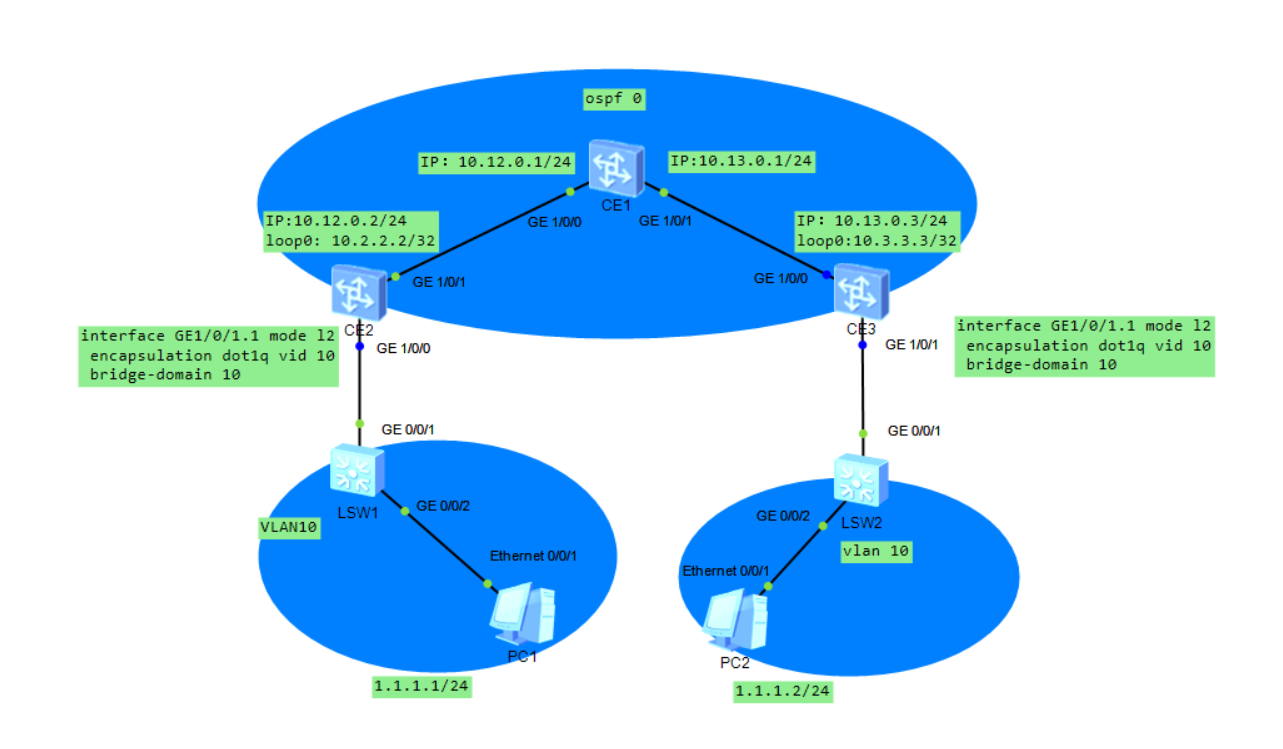
交换机配置:
CE1
 <HUAWEI>display cu

 <HUAWEI>display current-configuration

 !Software Version V800R013C00SPC560B560

 !Last configuration was updated at -- ::+: by SYSTEM automatic

 ally

 !Last configuration was saved at -- ::+:

 #

 sysname HUAWEI

 #

 device board  board-type CE-MPUB

 device board  board-type CE-LPUE

 #

 aaa

  #

  authentication-scheme default

  #

  authorization-scheme default

  #

  accounting-scheme default

  #

  domain default

  #

  domain default_admin

 #

 interface MEth0//

  undo shutdown

 #

 interface GE1//

  undo portswitch

  undo shutdown

  ip address 10.12.0.1 255.255.255.0

 #

 interface GE1//

  undo portswitch

  undo shutdown

  ip address 10.13.0.1 255.255.255.0

 #

 interface GE1//

  shutdown

 #

 interface GE1//

  shutdown

 #

 interface GE1//

  shutdown

 #

 interface GE1//

  shutdown

 #

 interface GE1//

  shutdown

 #

 interface GE1//

  shutdown

 #

 interface GE1//

  shutdown

 #

 interface GE1//

  shutdown

 #

 interface NULL0

 #

 ospf

  area 0.0.0.0

   network 10.12.0.0 0.0.0.255

   network 10.13.0.0 0.0.0.255

 #

 ssh authorization-type default aaa

 #

 user-interface con

 #

 vm-manager

 #

 return
CE2
 <HUAWEI>display current-configuration

 !Software Version V800R013C00SPC560B560

 !Last configuration was updated at -- ::+:

 !Last configuration was saved at -- ::+:

 #

 sysname HUAWEI

 #

 device board  board-type CE-MPUB

 device board  board-type CE-LPUE

 #

 vlan batch

 #

 bridge-domain

  vxlan vni

 #

 aaa

  #

  authentication-scheme default

  #

  authorization-scheme default

  #

  accounting-scheme default

  #

  domain default

  #

  domain default_admin

 #

 interface Vlanif10

  ip address 1.1.1.254 255.255.255.0

 #

 interface MEth0//

  undo shutdown

 #

 interface GE1//

  undo shutdown

  port link-type trunk

 #

 interface GE1//0.1 mode l2

  encapsulation dot1q vid

  bridge-domain

 #

 interface GE1//

  undo portswitch

  undo shutdown

  ip address 10.12.0.2 255.255.255.0

 #

 interface GE1//

  shutdown

 #

 interface GE1//

  shutdown

 #

 interface GE1//

  shutdown

 #

 interface GE1//

  shutdown

 #

 interface GE1//

  shutdown

 #

 interface GE1//

  shutdown

 #

 interface GE1//

  shutdown

 #

 interface GE1//

  shutdown

 #

 interface LoopBack0

  ip address 10.2.2.2 255.255.255.255

 #

 interface Nve1

  source 10.2.2.2

  vni  head-end peer-list 10.3.3.3

 #

 interface NULL0

 #

 ospf

  area 0.0.0.0

   network 10.2.2.2 0.0.0.0

   network 10.12.0.0 0.0.0.255

 #

 ssh authorization-type default aaa

 #

 user-interface con

 #

 vm-manager

 #

 return
CE3
 <HUAWEI>display current-configuration

 !Software Version V800R013C00SPC560B560

 !Last configuration was updated at -- ::+: by SYSTEM automatic

 ally

 !Last configuration was saved at -- ::+:

 #

 sysname HUAWEI

 #

 device board  board-type CE-MPUB

 device board  board-type CE-LPUE

 #

 vlan batch

 #

 bridge-domain

  vxlan vni

 #

 aaa

  #

  authentication-scheme default

  #

  authorization-scheme default

  #

  accounting-scheme default

  #

  domain default

  #

  domain default_admin

 #

 interface MEth0//

  undo shutdown

 #

 interface GE1//

  undo portswitch

  undo shutdown

  ip address 10.13.0.3 255.255.255.0

 #

 interface GE1//

  undo shutdown

  port link-type trunk

 #

 interface GE1//1.1 mode l2

  encapsulation dot1q vid

  bridge-domain

 #

 interface GE1//

  shutdown

 #

 interface GE1//

  shutdown

 #

 interface GE1//

  shutdown

 #

 interface GE1//

  shutdown

 #

 interface GE1//

  shutdown

 #

 interface GE1//

  shutdown

 #

 interface GE1//

  shutdown

 #

 interface GE1//

  shutdown

 #

 interface LoopBack0

  ip address 10.3.3.3 255.255.255.255

 #

 interface Nve1

  source 10.3.3.3

  vni  head-end peer-list 10.2.2.2

 #

 interface NULL0

 #

 ospf

  area 0.0.0.0

   network 10.3.3.3 0.0.0.0

   network 10.13.0.0 0.0.0.255

 #

 ssh authorization-type default aaa

 #

 user-interface con

 #

 vm-manager

 #

 return
LSW1
 #

 vlan batch

 #

 interface GigabitEthernet0//

  port link-type trunk

  port trunk allow-pass vlan

 #

 interface GigabitEthernet0//

  port link-type access

  port default vlan

 #
LSW2
 #

 vlan batch

 #

 interface GigabitEthernet0//

  port link-type trunk

  port trunk allow-pass vlan

 #

 interface GigabitEthernet0//

  port link-type access

  port default vlan
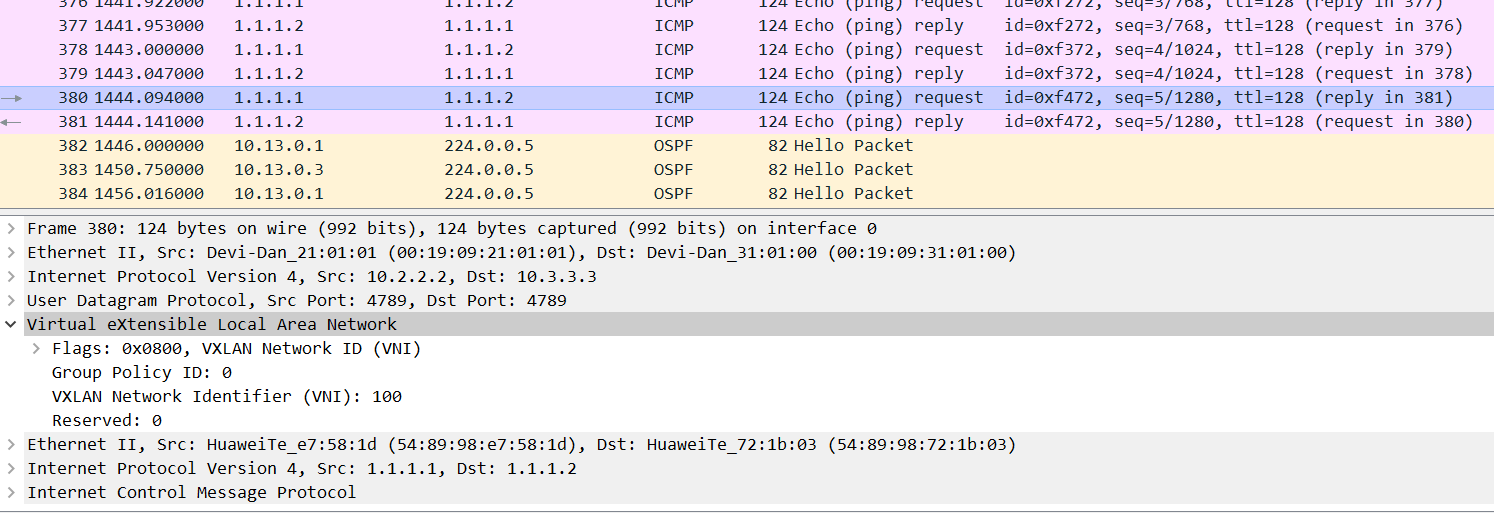
PC1 PING PC2 验证:

Vxlan L2的更多相关文章
- 解读Mirantis最新的Neutron性能测试
最近,mirantis的工程师发布了最新的基于Mitaka版本的Neutron性能测试结果.得出的结论是:Neutron现在的性能已经可以用生产环境了. 报告的三位作者都是OpenStack社区的活跃 ...
- VXLAN, 一种叠加在L3网络上的L2网络
这几天看了下RFC7348,顺便翻译了一下,根据自己理解做了注解 虚拟化及租户隔离 服务器虚拟化增加了对物理网络基础设施的需求,服务器有多个虚机,要求交换机支持更大的MAC地址表. 在数据中心场景下, ...
- 配置 L2 Population - 每天5分钟玩转 OpenStack(114)
前面我们学习了L2 Population 的原理,今天讨论如何在 Neutron 中配置和启用此特性. 目前 L2 Population 支持 VXLAN with Linux bridge 和 VX ...
- L2 Population 原理 - 每天5分钟玩转 OpenStack(113)
前面我们学习了 VXLAN,今天讨论跟 VXLAN 紧密相关的 L2 Population. L2 Population 是用来提高 VXLAN 网络 Scalability 的. 通常我们说某个系统 ...
- 部署 instance 到 VXLAN - 每天5分钟玩转 OpenStack(112)
上一节我们创建了 vxlan 100_net,今天将部署 instance 并分析网络的连通性. launch 新的 instance "cirros-vm1",网络选择 vxla ...
- VXLAN 概念(Part I) - 每天5分钟玩转 OpenStack(108)
除了前面讨论的 local, flat, vlan 这几类网络,OpenStack 还支持 vxlan 和 gre 这两种 overlay network. overlay network 是指建立在 ...
- Neutron 理解 (3): Open vSwitch + GRE/VxLAN 组网 [Netruon Open vSwitch + GRE/VxLAN Virutal Network]
学习 Neutron 系列文章: (1)Neutron 所实现的虚拟化网络 (2)Neutron OpenvSwitch + VLAN 虚拟网络 (3)Neutron OpenvSwitch + GR ...
- Neutron 理解 (4): Neutron OVS OpenFlow 流表 和 L2 Population [Netruon OVS OpenFlow tables + L2 Population]
学习 Neutron 系列文章: (1)Neutron 所实现的虚拟化网络 (2)Neutron OpenvSwitch + VLAN 虚拟网络 (3)Neutron OpenvSwitch + GR ...
- Neutron 理解(14):Neutron ML2 + Linux bridge + VxLAN 组网
学习 Neutron 系列文章: (1)Neutron 所实现的虚拟化网络 (2)Neutron OpenvSwitch + VLAN 虚拟网络 (3)Neutron OpenvSwitch + GR ...
随机推荐
- 推荐一款超实用的GitHub可视化代码树插件:Octotree
前言 大家在GitHub查看代码的时候,是不是会经常跳转搜索代码!过一段时间就不知道自己跑到哪里了!有了这款工具,妈妈再也不用担心我找不到代码位置了! 直接上效果图 插件名称 : octotree 作 ...
- MODIS系列之NDVI(MOD13Q1)三:.jdk文件配置+MRT安装
MRT(MODIS Reprojection Tool)简介: MODIS的全称为中分辨率成像光谱仪(Moderate-Resolution Imaging Spectroradiometer),是搭 ...
- Python之GUI编程(Tkinter))
不足之处,还请海涵,请指出不足.本人发布过的文章,会不断更改,力求减少错误信息. 一.重要放在开头:模块 如出现这种错误 ModuleNotFoundError: No module named 'n ...
- python3(三十八) serialize
""" """ __author__on__ = 'shaozhiqi 2019/9/24' # !/usr/bin/env python3 ...
- idea打包报错Cleaning up unclosed ZipFile for archive D:\m2\commons-beanutils\commons-beanutils\1.9.2\...
关于idea的打包报错:Cleaning up unclosed ZipFile for archive D:\m2\commons-beanutils\commons-beanutils\1.9.2 ...
- Win安装docker
Windows Docker 安装 win7.win8 系统 win7.win8 等需要利用 docker toolbox 来安装,国内可以使用阿里云的镜像来下载,下载地址:http://mirror ...
- .net批量更新(插入、修改、删除)数据库
思路: 1. 设置DataTable中每行的状态标识,即调用DataRow的方法setAdded().setModified().Delete() 2. 使用DataAdapter的Update(Da ...
- 技术债务(Technical debt)的产生原因及衡量解决
第一次发布代码,就好比借了一笔钱.只要通过不断重写来偿还债务,小额负债可以加速开发.但久未偿还债务会引发危险.复用马马虎虎的代码,类似于负债的利息.整个部门有可能因为松散的实现,不完全的面向对象的设计 ...
- 干货:python面对对象类继承简介
前言 文的文字及图片来源于网络,仅供学习.交流使用,不具有任何商业用途,版权归原作者所有,如有问题请及时联系我们以作处理. 作者:python视觉算法 PS:如有需要Python学习资料的小伙伴可以加 ...
- 用Python介绍了企业资产情况的数据爬取、分析与展示。
前言 文的文字及图片来源于网络,仅供学习.交流使用,不具有任何商业用途,版权归原作者所有,如有问题请及时联系我们以作处理. 作者:张耀杰 PS:如有需要Python学习资料的小伙伴可以加点击下方链接自 ...