
我的第一个jQuery插件开发(日期选择器,datePicker),功能还不完善,但用于学习参考已经足够了。
一、学习jQuery插件开发网上的帖子很多,插件开发的方式也有好几种,现在推荐一个帖子讲述的特别好,我也是这篇文张的基础上学习的。
参考:http://www.cnblogs.com/ajianbeyourself/p/5815689.html
参考:http://www.cnblogs.com/Wayou/p/jquery_plugin_tutorial.html
参考:http://www.sucaijiayuan.com/index.php?m=Download&catid=167&id=1160&f=download&k=0
源码地址Github:https://github.com/Spqin/myfirstjqueryplugin
二、本人学艺不精,插件是在前人的基础上学习完善,整个开发过程中进一步深入学习了很多js,jQuery的知识,这里简单列举。
$.proxy(),$.data(),$.on(),$.wrap(),$.closest()以及js的日期操作和日期格式化。
三、直接看一个插件的源码毕竟是痛苦的,因为你很难理解开发者的开发思路,你根本不知道从何入手开发,网上找了很久也没找到一篇带着新手一起学习插件开发的帖子,狠狠心阅读了一个日期插件的源码,不会的知识点就网上恶补,终于皇天不负有心人,还是略有成就,这里就把我学到的东西和大家分享一下,首先贴出源码,然后再带你一步步的解读我的开发过程。
学习开发jQuery插件是需要一些功底的,谈不上精通CSS、JS、jQuery至少别人写的代码能够阅读懂大概在说什么,这一点是很必要的。本人理解的jQuery插件其实就是使用js/jQuery技术来操作CSS样式,从而达到简单高效,使用方便。下面列出canlendar.js和canlendar.css的代码
1、canlendar.js
;(function($,window,document,undefined){
//日历的构造函数
var pluginName='timePicker';
var Plugin = $[pluginName] = function (element,options){
//转换this对象,函数中this指Canlendar本身
this.$element=element;
this.defaults={
namespace:'calendar',
lang:'zh',
rangeSeparator:'至',
dateFormat:'yyyy-MM-dd',
timeFormat:'hh:mm:ss',
firstDayOfWeek:0,
displayMode:'dropdown',
alwaysShow:false,
container:function(){
return '<div class="namespace-container"></div>';
},
inputWrapper: function() {
return '<div class="namespace-inputWrap"></div>';
},
wrapper: function() {
return '<div class="namespace-wrap"></div>';
},
content: function() {
var html='';
html+='<div class="namespace-content">';
html+='<div class="namespace-header">';
html+='<div class="namespace-prev"><</div>';
html+='<div class="namespace-caption"></div>';
html+='<div class="namespace-next">></div>';
html+='</div>';
html+='<div class="namespace-days"></div>';
html+='<div class="namespace-months"></div>';
html+='<div class="namespace-years"></div>';
html+='<div class="namespace-buttons">';
html+='<span class="namespace-currenttime">现在时间</span>';
html+='<span class="namespace-confirm">确定</span>';
html+='</div>';
html+='</div>';
return html;
}
};
this.options=$.extend({},this.defaults,options);
}
var $doc = $(document);
var $win = $(window);
var LABEL={};
Plugin.LABEL = LABEL;
Plugin.i18n = function(lang, label) {
LABEL[lang] = label;
};
Plugin.i18n('en', {
yearlabel: 'Yer',
days: ["Sunday", "Monday", "Tuesday", "Wednesday", "Thursday", "Friday", "Saturday"],
daysShort: ["Su", "Mo", "Tu", "We", "Th", "Fr", "Sa", "Su"],
months: ["January", "February", "March", "April", "May", "June", "July", "August", "September", "October", "November", "December"],
monthsShort: ["Jan", "Feb", "Mar", "Apr", "May", "Jun", "Jul", "Aug", "Sep", "Oct", "Nov", "Dec"],
buttons: ['Cancel', 'Save']
});
Plugin.i18n("zh", {
yearlabel: '年',
days: ["星期日", "星期一", "星期二", "星期三", "星期四", "星期五", "星期六"],
daysShort: ["日", "一", "二", "三", "四", "五", "六"],
months: ["一月", "二月", "三月", "四月", "五月", "六月", "七月", "八月", "九月", "十月", "十一月", "十二月"],
monthsShort: ["1月", "2月", "3月", "4月", "5月", "6月", "7月", "8月", "9月", "10月", "11月", "12月"],
caption_format: 'yyyy年m月dd日'
});
Plugin.prototype={
_initContainer:function(){
this.namespace=this.options.namespace;
this.$inputWrapper=this.$element.addClass(this.namespace+'-input').wrap(this.options.inputWrapper().replace(/namespace/g,this.namespace)).parent();
this.content=this.options.content().replace(/namespace/g,this.namespace);
this.$wrapper=$(this.content).wrap(this.options.wrapper().replace(/namespace/g,this.namespace)).parent();
this.$container=this.$inputWrapper.wrap(this.options.container().replace(/namespace/g,this.namespace)).parent();
this.$container.append(this.$wrapper);
this._position();
this._initSections();
this._initDate();
this.view='days';
this._manageViews();
this.showed=false;
this.pickerHide = false;
this._initShowHide(this.options.displayMode);
//this._show();
},
_position: function() {
var container_height = this.$container.height() || window.innerHeight,
calendar_height = this.$wrapper.outerHeight(),
calendar_width = this.$wrapper.outerWidth(),
input_top = this.$element.offset().top,
input_left = this.$element.offset().left,
input_height = this.$element.outerHeight(),
input_width = this.$element.outerWidth(),
winWidth = window.innerWidth,
winHeight = window.innerHeight,
scroll_left = this.$container.scrollLeft() || 0;
var left = input_left + scroll_left;
var top = input_top + input_height;
this.$wrapper.css({
"left": left,
"top": top
});
},
_initSections: function() {
this.calendars = this.$container.find('.' + this.namespace + '-content');
this.calendarPrevs = this.calendars.find('.' + this.namespace + '-prev');
this.calendarCaptions = this.calendars.find('.' + this.namespace + '-caption');
this.calendarNexts = this.calendars.find('.' + this.namespace + '-next');
this.daypickers = this.calendars.find('.' + this.namespace + '-days');
this.monthpickers = this.calendars.find('.' + this.namespace + '-months');
this.yearpickers = this.calendars.find('.' + this.namespace + '-years');
},
_initDate:function(){
var date = this.$element.val()==''?new Date():this._parseDate(this.$element.val(),this.options.dateFormat+(this.options.timeFormat==''?'':' ' + this.options.timeFormat));
this.date = {};
this.date.selectedDate = date;
this.date.selectedDate.setHours(0, 0, 0, 0);
this.date.selectedMonth = date.getMonth();
this.date.selectedYear = date.getFullYear();
this.date.selectedMonthDate = new Date(this.date.selectedYear, this.date.selectedMonth, 1, 0, 0, 0, 0);
this.date.selectedYearDate = new Date(this.date.selectedYear, 0, 1, 0, 0, 0, 0);
this.date.currentDate = new Date();
this.date.currentDate.setHours(0, 0, 0, 0);
this.date.currentMonth = date.getMonth();
this.date.currentYear = date.getFullYear();
},
_parseDate:function(dateStr,pattern){
return DateUtils.parse(dateStr,pattern);
},
_formatDate: function(date, pattern) {
var o = {
"M+": date.getMonth() + 1, //月份
"d+": date.getDate(), //日
"h+": date.getHours(), //小时
"m+": date.getMinutes(), //分
"s+": date.getSeconds(), //秒
"q+": Math.floor((date.getMonth() + 3) / 3), //季度
"S": date.getMilliseconds() //毫秒
};
if (/(y+)/.test(pattern)) {
pattern = pattern.replace(RegExp.$1, (date.getFullYear() + "").substr(4 - RegExp.$1.length));
}
for (var k in o){
if (new RegExp("(" + k + ")").test(pattern)){
pattern = pattern.replace(RegExp.$1, (RegExp.$1.length == 1) ? o[k] : ("00" + o[k]).substr(("" + o[k]).length));
}
}
return pattern;
},
_judgeStatus: function(type,status, currentDate, selectedDate) {
var untouch = status[0],
active = status[1];
active =(currentDate.toString()===selectedDate.toString());
untouch = !this._isSelectable(type, currentDate.getFullYear(), currentDate.getMonth(), currentDate.getDate());
return status = [untouch, active];
},
_isSelectable: function(type, y, m, d) {
var isSelectable = true,
min = this._parseDate(this.options.min, this.options.dateFormat),
max = this._parseDate(this.options.max, this.options.dateFormat);
var _minDate, _maxDate, _curr, _isDay;
switch (type) {
case 'years':
_minDate = new Date(y, 0, 1); //年度第一天
_maxDate = new Date(y + 1, 0, 0); //年度第二天
_curr = [_minDate, _maxDate];
_isDay = false;
break;
case 'months':
_minDate = new Date(y, m, 1); //月份第一天
_maxDate = new Date(y, m + 1, 0); //月份最后一天
_curr = [_minDate, _maxDate];
_isDay = false;
break;
case 'days':
_minDate = _maxDate = _curr = new Date(y, m, d);
_isDay = true;
break;
}
if (min && min > _maxDate) {
isSelectable = false;
}
if (max && max < _minDate) {
isSelectable = false;
}
return isSelectable;
},
_renderStatus: function(status) {
var untouch = status[0],
active = status[1],
className = '';
if (untouch === true) {
className = ' ' + this.namespace + '_untouchable';
}
if (active === true) {
className += ' ' + this.namespace + '_active';
}
return className;
},
_initShowHide: function(displayMode) {
//此处如果不使用带里,on内部中的this指向了this.$element,不能调用插件的_focus函数,使用代理,修改this指向Plugin
this.$element.on({
focus: $.proxy(this._focus, this),
blur: $.proxy(this._blur, this)
});
},
_focus: function() {
this._show();
},
_blur: function() {
if(!this.showed){
this._hide();
}
},
_show: function() {
var self = this;
this.view='days';
this.showed = true;
this.$wrapper.addClass(this.namespace + '-show');
this._position();
$doc.on('click', function(e) {
self._click.call(self, e);
});
this.$wrapper.on('mousedown', function(e) {
self._prevent(e);
});
},
_hide: function(){
this.$wrapper.removeClass(this.namespace + '-show');
},
_click: function(e) {
var $target = $(e.target);
var _targetDiv = $(e.target).closest('div');
var _targetSpan = $(e.target).closest('span');
console.log(_targetDiv);
//点击底部的:现在时间和确认按钮
if ($target.length === 1) {
//var i = _targetDiv.parents('.' + this.namespace + '-content').index();
switch ($target[0].className) {
case this.namespace + '-currenttime':
this.date.selectedDate= new Date();
this.date.selectedDate.setHours(0, 0, 0, 0);
this.date.currentDate=this.date.selectedDate;
this.date.currentMonth=this.date.selectedDate.getMonth();
this.date.currentYear=this.date.selectedDate.getFullYear();
//this.view='days';
this._manageViews();
this._setValue();
break;
case this.namespace + '-confirm':
this.showed=false;
this.$element.blur();
break;
}
}
//点击头部的元素(切换年月)
if (_targetDiv.parent('.' + this.namespace + '-header').length === 1) {
//var i = _targetDiv.parents('.' + this.namespace + '-content').index();
var className=_targetDiv[0].className;
if(className==this.namespace + '-caption'){
this._changeView('caption');
this._manageViews();
}else if(className==this.namespace + '-prev'){
this._prev();
}else if(className==this.namespace + '-next'){
this._next();
}
}
//点击具体的日期
if (_targetSpan.length === 1) {
if (!_targetSpan.hasClass(this.namespace + '_otherMonth') && !_targetSpan.hasClass(this.namespace + '_untouchable') && _targetSpan.parent('.' + this.namespace + '-head').length !== 1 &&_targetSpan.parent('.' + this.namespace + '-buttons').length !== 1) {
this._changeValue(_targetSpan);
this._changeView('content');
this._updateDate();
this._manageViews();
this._setValue();
}
}
e.preventDefault();
},
_prev: function(i, isTurning) {
this.touchflag = false;
var date = this.date.currentDate;
switch (this.view) {
case 'days':
var prevMonthDays;
date.setMonth(this.date.currentMonth - 1);
break;
case 'months':
date.setYear(this.date.currentYear - 1);
break;
case 'years':
date.setYear(this.date.currentYear - 12);
break;
}
this._updateDate();
this._manageViews();
},
_next:function(){
this.touchflag = false;
var date = this.date.currentDate;
switch (this.view) {
case 'days':
var prevMonthDays;
date.setMonth(this.date.currentMonth + 1);
break;
case 'months':
date.setYear(this.date.currentYear + 1);
break;
case 'years':
date.setYear(this.date.currentYear + 12);
break
}
this._updateDate();
this._manageViews();
},
_changeValue: function(target, i) {
var newVal = '',
newDate = '',
self = this;
switch (this.view) {
case 'years':
newVal = parseInt(target.text(), 10);
this.date.currentDate.setYear(newVal);
break;
case 'months':
newVal = Number(target.attr('class').match(/month\-([0-9]+)/)[1]);
this.date.currentDate.setMonth(newVal);
break;
case 'days':
newVal = parseInt(target.text(), 10);
newDate = new Date(this.date.currentYear, this.date.currentMonth, newVal, 0, 0, 0, 0);
this.date.selectedDate = newDate;
break;
}
},
_updateDate: function() {
this.date.currentDate.setDate(1);
this.date.currentDate.setHours(0, 0, 0, 0);
this.date.currentDay = this.date.currentDate.getDate();
this.date.currentMonth = this.date.currentDate.getMonth();
this.date.currentYear = this.date.currentDate.getFullYear();
this.date.currentMonthDate = new Date(this.date.currentYear, this.date.currentMonth, 1, 0, 0, 0, 0);
this.date.currentYearDate = new Date(this.date.currentYear, 0, 1, 0, 0, 0, 0);
},
_setValue: function() {
var formated = this._formatDate(this.date.selectedDate, this.options.dateFormat);
this.$element.val(formated);
this.oldValue = this.$element.val();
},
_changeView: function(type) {
if(type=='caption'){
if (this.view === 'days') {
this.view = 'months';
} else if (this.view === 'months') {
this.view = 'years';
}else if(this.view === 'years'){
this.view = 'days';
}
}else if(type=='content'){
if (this.view === 'years') {
this.view= 'months';
} else if (this.view === 'months') {
this.view = 'days';
}
}
},
_manageViews:function(){
switch (this.view) {
case 'days':
this._generateDays();
this.calendars.addClass(this.namespace + '_days').removeClass(this.namespace + '_months').removeClass(this.namespace + '_years');
break;
case 'months':
this._generateMonths();
this.calendars.addClass(this.namespace + '_months').removeClass(this.namespace + '_days').removeClass(this.namespace + '_years');
break;
case 'years':
this._generateYear();
this.calendars.addClass(this.namespace + '_years').removeClass(this.namespace + '_days').removeClass(this.namespace + '_months');
break;
}
},
_generateHeader: function(caption) {
this.calendarCaptions.html(caption);
},
_generateYear:function(){
this._generateHeader(this.date.currentYear - 7 + ' ' + this.options.rangeSeparator + ' ' + (this.date.currentYear + 4));
var year = this.date.currentYear,
html = '',
className,
content = 0,
dateArray = [],
isActive, isUntouch,
status = [];
html += '<div class="' + this.namespace + '-row">';
for (var m = 0; m < 12; m++) {
isActive = false;
isUntouch = false;
status = [isUntouch, isActive];
className = '';
content = year - 7 + m;
if (m > 0 && m % 3 === 0) {
html += '</div><div class="' + this.namespace + '-row">';
}
dateArray[m] = new Date(content, 0, 1, 0, 0, 0, 0);
status = this._judgeStatus('years',status, dateArray[m], this.date.selectedYearDate);
className += this._renderStatus(status);
html += '<span class="' + className + '">' + content + '</span>';
}
html += '</div>';
$('.'+this.namespace+'-content .'+this.namespace+'-years').html(html);
},
_generateMonths:function(){
this._generateHeader(this.date.currentYear+LABEL[this.options.lang].yearlabel);
var year = this.date.currentYear,
html = '',
className,
content = LABEL[this.options.lang].monthsShort,
dateArray = [],
isActive,
isUntouch,
status = [];
html += '<div class="' + this.namespace + '-row">';
for (var i = 0; i < 12; i++) {
isActive = false;
isUntouch = false;
status = [isUntouch, isActive];
className = '';
if (i > 0 && i % 3 === 0) {
html += '</div><div class="' + this.namespace + '-row">';
}
dateArray[i] = new Date(year, i, 1, 0, 0, 0, 0);
status = this._judgeStatus('months',status, dateArray[i], this.date.selectedMonthDate);
className += this._renderStatus(status);
html += '<span class="month-' + i + ' ' + className + '">' + content[i] + '</span>';
}
html += '</div>';
$('.'+this.namespace+'-content .'+this.namespace+'-months').html(html);
},
_generateDays:function(){
this._generateHeader(LABEL[this.options.lang].monthsShort[this.date.currentMonth]+this.date.currentYear+LABEL[this.options.lang].yearlabel);
var year = this.date.currentDate.getFullYear(); //当前年
var month = this.date.currentDate.getMonth(); //当前月(0-12)
var day;
var daysInPrevMonth = new Date(year, month, 0).getDate(); //上个月多少天
var daysInMonth = new Date(year, month + 1, 0).getDate(); //本月多少天
var firstDay = new Date(year, month, 1).getDay(); //本月第一天星期几
var daysFromPrevMonth = firstDay; //本月第一天和星期第一天的差值(默认星期第一天是星期日,值为0,判断本月第一天是否为日历的开始)
var dateArray = [];
daysFromPrevMonth = daysFromPrevMonth = 0 ? 7: daysFromPrevMonth;
LABEL
var html = '<div class="' + this.namespace + '-head">';
for (var i = 0; i < 7; i++) {
html += '<span>' + LABEL[this.options.lang].daysShort[i] + '</span>';
}
var isUntouch = false;
var isActive = false;
var status = [isUntouch, isActive];
html += '</div><div class="' + this.namespace + '-body"><div class="' + this.namespace + '-row">';
for (var j = 0; j < 42; j++) {
day = (j - daysFromPrevMonth + 1);
content = 0;
className = '';
if (j > 0 && j % 7 === 0) {
html += '</div><div class="' + this.namespace + '-row">';
}
if (j < daysFromPrevMonth) {
className = this.namespace + '_otherMonth';
content = (daysInPrevMonth - daysFromPrevMonth + j + 1);
dateArray[j] = new Date(year, month - 1, content, 0, 0, 0, 0);
} else if (j > (daysInMonth + daysFromPrevMonth - 1)) {
className = this.namespace + '_otherMonth';
content = (day - daysInMonth);
dateArray[j] = new Date(year, (month + 1), content, 0, 0, 0, 0);
} else {
dateArray[j] = new Date(year, month, day, 0, 0, 0, 0);
content = day;
}
status = this._judgeStatus('days',status, dateArray[j], this.date.selectedDate);
className += this._renderStatus(status);
html += '<span class="' + className + '">' + content + '</span>';
}
html += '</div></div>';
$('.'+this.namespace+'-content .'+this.namespace+'-days').html(html);
},
_prevent:function(e) {
if (e.preventDefault) {
e.preventDefault();
} else {
e.returnvalue = false;
}
}
}
$.fn[pluginName]=function(options){
this.each(function(index,item){
var plugin = new Plugin($(item), options);
plugin._initContainer();
});
}
})(jQuery,window,document);
2、canlendar.css
.calendar-container {

  display: inline-block;

  width:220px;

}

.calendar-content {

  display: inline-block;

  position: relative;

  vertical-align: middle;

  white-space: normal;

  width: 210px;

  height: 230px;

  background-color: white;

}

.calendar-content.calendar_days > .calendar-days {

  display: block;

}

.calendar-content.calendar_months .calendar-months {

  display: block;

}

.calendar-content.calendar_years .calendar-years {

  display: block;

}

.calendar-days,

.calendar-months,

.calendar-years {

  display: none;

}

.calendar-row,

.calendar-head {

  display: table;

  width: 100%;

}

.calendar-row > span,

.calendar-head > span {

  display: table-cell;

  text-align: center;

  vertical-align: middle;

}

.calendar-header {

  display: table;

  width: 100%;

  height: 10%;

}

.calendar-buttons > span{

  display: table-cell;

  text-align: center;

  vertical-align: middle;

  cursor: pointer;

}

.calendar-buttons {

  display: table;

  width: 100%;

  height: 10%;

  background-color: #f6f6f6;

}

.calendar-header > div {

  display: table-cell;

  height: 100%;

  text-align: center;

  vertical-align: middle;

  cursor: pointer;

}

.calendar-prev,

.calendar-next {

  width: 20%;

}

.calendar-caption {

  width: 60%;

}

.calendar-days,

.calendar-months,

.calendar-years {

  height: 80%;

}

.calendar-head {

  height: 13%;

}

.calendar-head span {

  cursor: default;

}

.calendar-body {

  height: 87%;

}

.calendar-body .calendar-row {

  height: 16.66666667%;

}

.calendar-body span {

  width: 14.28%;

  height: 100%;

  cursor: pointer;

}

.calendar-body span.calendar_otherMonth,

.calendar-body span.calendar_untouchable {

  cursor: default;

}

.calendar-months .calendar-row,

.calendar-years .calendar-row {

  height: 25%;

}

.calendar-months span,

.calendar-years span {

  height: 100%;

  width: 33.3%;

  cursor: pointer;

}

.calendar-months span.calendar_untouchable,

.calendar-years span.calendar_untouchable {

  cursor: default;

}

.calendar-hide {

  display: none !important;

}

.calendar-show {

  display: block !important;

}

.calendar-wrap {

  white-space: nowrap;

  display: none;

  position: absolute;

}

.calendar-wrap,

.calendar-wrap *:focus {

  outline: none;

}

.calendar-wrap * {

  -webkit-box-sizing: border-box;

  box-sizing: border-box;

}

.calendar-cover {

  position: fixed;

  top:;

  left:;

  width: 100%;

  height: 100%;

  background-color: black;

  opacity: 0.5;

  z-index:;

}

.calendar-input {

  border: 1px solid green;

}

.calendar-icon {

  background-color: gray;

  border: 1px solid green;

}

.calendar_active .calendar-input {

  border: 1px solid red;

}

.calendar_active .calendar-icon {

  border: 1px solid red;

}

.calendar-content {

  background-color: white;

  border: 1px solid #ebebeb;

  color: #777777;

  border-radius: 3px;

  font-family: 'Proxima Nova';

}

.calendar-content span {

  border: 1px dashed transparent;

}

.calendar-content span.calendar_active {

  background-color: #32b8e2 !important;

  color: white !important;

  border: 1px solid rgba(0, 0, 0, 0.15) !important;

  -webkit-box-shadow: 0 2px 5px rgba(0, 0, 0, 0.15) inset;

          box-shadow: 0 2px 5px rgba(0, 0, 0, 0.15) inset;

  text-shadow: 0 2px 1px rgba(0, 0, 0, 0.15);

}

.calendar-content span.calendar_otherMonth,

.calendar-content span.calendar_untouchable {

  color: #c8c8c8;

  background-color: inherit;

}

.calendar-content span.calendar_otherMonth:hover,

.calendar-content span.calendar_untouchable:hover,

.calendar-content span.calendar_otherMonth:active,

.calendar-content span.calendar_untouchable:active,

.calendar-content span.calendar_otherMonth.calendar_active,

.calendar-content span.calendar_untouchable.calendar_active {

  background-color: inherit;

  color: #c8c8c8;

}

.calendar-content span.calendar_focus {

  border: 1px solid rgba(0, 0, 0, 0.1);

  color: #32b8e2;

}

.calendar-header {

  border-bottom: 1px solid #ebebeb;

}

.calendar-prev,

.calendar-next {

  color: transparent;

  background-repeat: no-repeat;

  background-position: center;

}

.calendar-prev {

  background-image: url('calendar-prev.png');

}

.calendar-prev.calendar_blocked,

.calendar-prev.calendar_blocked:hover {

  background-image: none;

  cursor: auto;

}

.calendar-prev:hover {

  background-image: url('calendar-prev-hover.png');

}

.calendar-next {

  background-image: url('calendar-next.png');

}

.calendar-next:hover {

  background-image: url('calendar-next-hover.png');

}

.calendar-caption {

  color: #696969;

}

.calendar-caption:hover {

  color: #000000;

}

.calendar-head {

  background-color: #f6f6f6;

  padding-left: 6px;

  padding-right: 6px;

}

.calendar-head span {

  -webkit-box-shadow: inset 0 1px 0 #fbfbfb;

  box-shadow: inset 0 1px 0 #fbfbfb;

}

.calendar-body,

.calendar-months,

.calendar-years {

  padding: 6px;

}

.calendar-body span:hover,

.calendar-months span:hover,

.calendar-years span:hover {

  background-color: #e0f4fb;

}
上面的css文件中有图片的引用,这里说明一下,图片不是必须的,图片只是让日历看起来更美观一点,其实也没有好看多少,大家不必担心。
四、canlenddar.css文件的目的就是样式而已,插件中会写入一些class,html元素,涉及到的时候说明一下添加某一段样式是干什么的足以,css文件的内容不做详细的解读,下文只对canlenddar.js文件做详细说明。
1、插件开发的基础架子
首先要打好插件开发的基础架子,下面是我抽象出来jQuery插件开发的架子,具体为啥这么写文章开篇引用的帖子中有说明,这里不再赘述,主要讲一下别名pluginName的目的,在我们想要开发一个插件,但是插件的名称一时确定不下来,此时使用这样的格式书写岂不是很方便,避免后续要对插件名称进行更正的麻烦。这样写调用时也很方便,调用示例如下:
$(selector).pluginName({});
结合下文我把插件的名称定义为timePicker(随时根据你的喜欢进行更改),调用方式就该是这样的了 $(selector).timePicker();
;(function($,window,document,undefined){

    //日历的构造函数

    var pluginName='timePicker';

    var Plugin = $[pluginName]  = function (element,options){

        //转换this对象,函数中this指Canlendar本身

        this.$element=element;

        this.defaults={

            namespace:'calendar'

        };

        this.options=$.extend({},this.defaults,options);

    }

    $.fn[pluginName]=function(options){

        this.each(function(index,item){

            var plugin = new Plugin($(item), options);

            plugin._initContainer();

        });

    }

})(jQuery,window,document);
2、给插件定义默认的选项
给插件定义默认的选项设置,例如插件的域名、插件语言、日期输出格式等,调用时根据实际情况传入不的选项参数,结合默认选项设置和调用传入的选项参数得到最终的初始选项,进而初始化插件,下面列出本插件的默认设置,然后挑出几个重要的讲解。
    var Plugin = $[pluginName]  = function (element,options){

        //转换this对象,函数中this指Canlendar本身

        this.$element=element;

        this.defaults={

            namespace:'calendar',

            lang:'zh',

            rangeSeparator:'至',

            dateFormat:'yyyy-MM-dd',

            timeFormat:'hh:mm:ss',

            firstDayOfWeek:0,

            displayMode:'dropdown',

            alwaysShow:false,

            container:function(){

                return '<div class="namespace-container"></div>';

            },

            inputWrapper: function() {

                return '<div class="namespace-inputWrap"></div>';

            },

            wrapper: function() {

                return '<div class="namespace-wrap"></div>';

            },

            content: function() {

                var html='';

                html+='<div class="namespace-content">';

                html+='<div class="namespace-header">';

                html+='<div class="namespace-prev"><</div>';

                html+='<div class="namespace-caption"></div>';

                html+='<div class="namespace-next">></div>';

                html+='</div>';

                html+='<div class="namespace-days"></div>';

                html+='<div class="namespace-months"></div>';

                html+='<div class="namespace-years"></div>';

                html+='<div class="namespace-buttons">';

                html+='<span class="namespace-currenttime">现在时间</span>';

                html+='<span class="namespace-confirm">确定</span>';

                html+='</div>';

                html+='</div>';

                return html;

            }

        };

        this.options=$.extend({},this.defaults,options);

    }
2.1、namespace:插件的域名空间,简单说就是给自己的插件取一个个性化的class前缀,运行效果如下图所示
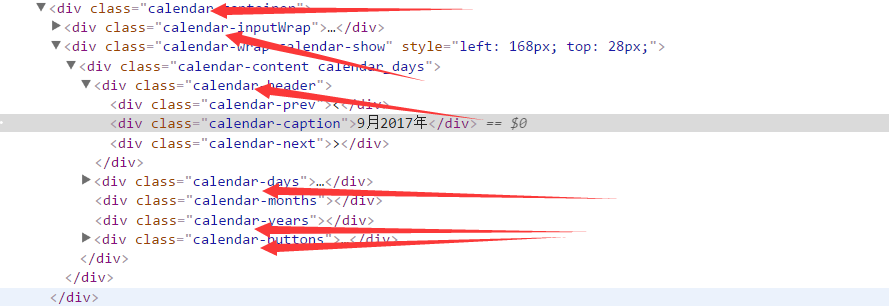
上述效果的代码如下:
this.$inputWrapper=this.$element.addClass(this.namespace+'-input').wrap(this.options.inputWrapper().replace(/namespace/g,this.namespace)).parent();

this.content=this.options.content().replace(/namespace/g,this.namespace);

this.$wrapper=$(this.content).wrap(this.options.wrapper().replace(/namespace/g,this.namespace)).parent();

this.$container=this.$inputWrapper.wrap(this.options.container().replace(/namespace/g,this.namespace)).parent();

this.$container.append(this.$wrapper);
2.2、lang:是语言类别,此插件目前支持两种语言,中文和英文,默认设置为中文。运行效果如下如
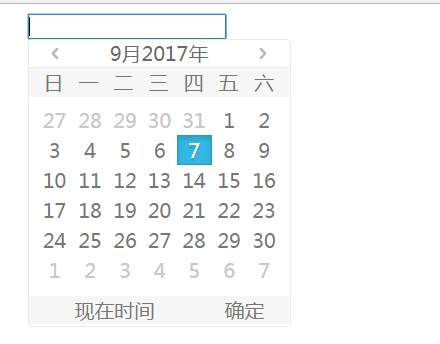
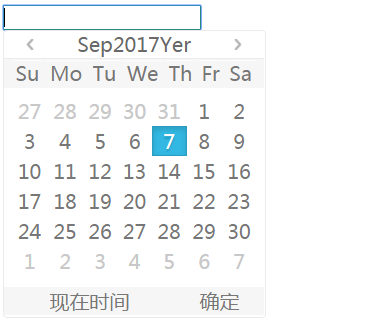
上述效果的代码如下,i18n(国际化),做编程的应该都明白
  var LABEL={};

    Plugin.LABEL = LABEL;

    Plugin.i18n = function(lang, label) {

        LABEL[lang] = label;

    };

  Plugin.i18n('en', {

        yearlabel: 'Yer',

        days: ["Sunday", "Monday", "Tuesday", "Wednesday", "Thursday", "Friday", "Saturday"],

        daysShort: ["Su", "Mo", "Tu", "We", "Th", "Fr", "Sa", "Su"],

        months: ["January", "February", "March", "April", "May", "June", "July", "August", "September", "October", "November", "December"],

        monthsShort: ["Jan", "Feb", "Mar", "Apr", "May", "Jun", "Jul", "Aug", "Sep", "Oct", "Nov", "Dec"],

        buttons: ['Cancel', 'Save']

    });

    Plugin.i18n("zh", {

        yearlabel: '年',

        days: ["星期日", "星期一", "星期二", "星期三", "星期四", "星期五", "星期六"],

        daysShort: ["日", "一", "二", "三", "四", "五", "六"],

        months: ["一月", "二月", "三月", "四月", "五月", "六月", "七月", "八月", "九月", "十月", "十一月", "十二月"],

        monthsShort: ["1月", "2月", "3月", "4月", "5月", "6月", "7月", "8月", "9月", "10月", "11月", "12月"],

        caption_format: 'yyyy年m月dd日'

    });
3、日历初始化
初始化方法可以调用其他的方法进行日历的初始状态渲染,例如下文会提到的位置方法、日期初始化方法、控制显隐性方法和渲染方法。初始化方法的代码如下:
    _initContainer:function(){

            this.namespace=this.options.namespace;

            this.$inputWrapper=this.$element.addClass(this.namespace+'-input').wrap(this.options.inputWrapper().replace(/namespace/g,this.namespace)).parent();

            this.content=this.options.content().replace(/namespace/g,this.namespace);

            this.$wrapper=$(this.content).wrap(this.options.wrapper().replace(/namespace/g,this.namespace)).parent();

            this.$container=this.$inputWrapper.wrap(this.options.container().replace(/namespace/g,this.namespace)).parent();

            this.$container.append(this.$wrapper);

            this._position();

            this._initSections();

            this._initDate();

            this.view='days';

            this._manageViews();

            this.showed=false;

            this.pickerHide = false;

            this._initShowHide(this.options.displayMode);

        }
3.1 日历的位置方法,位置方法会根据自己所点击的输入框位置和滚动条的状态自动计算日历应该所处的位置,日历的位置紧跟在输入框的下面,效果如下图
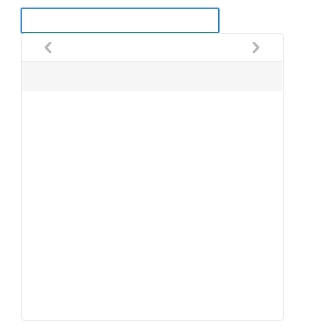
上述效果代码如下:
  _position: function() {

            var container_height = this.$container.height() || window.innerHeight,

                calendar_height = this.$wrapper.outerHeight(),

                calendar_width = this.$wrapper.outerWidth(),

                input_top = this.$element.offset().top,

                input_left = this.$element.offset().left,

                input_height = this.$element.outerHeight(),

                input_width = this.$element.outerWidth(),

                winWidth = window.innerWidth,

                winHeight = window.innerHeight,

                scroll_left = this.$container.scrollLeft() || 0;

            var left = input_left + scroll_left;

            var top = input_top + input_height;

            this.$wrapper.css({

                "left": left,

                "top": top

            });

        },
3.2 经过上述过程并不能看到日历的样子,因为日历没有数据,也就没有存在的意义了,下面讲解两个重要的方法:初始化日期和日历渲染方法。这两个方法同时讲解比较容易理解。
对于一个实际的日历来说,日期是可以通过点击从而改变月份和具体的某一天的选中状态,所以日历要有一个具体的日期值。对于日历的渲染你可能会问既然日期已经存在了直接渲染就是了,为什么还要分成两个方法呢,这里我会说明一下,我们的渲染不仅能渲染月份,同时支持月份选择和年份选择的渲染,故而把数值和渲染分成两个步骤了。运行效果如下图
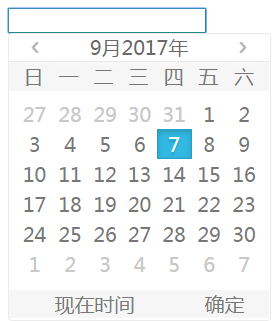
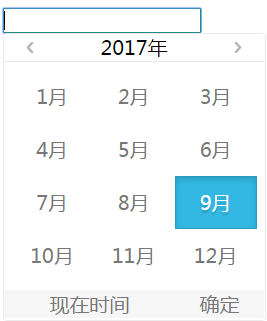
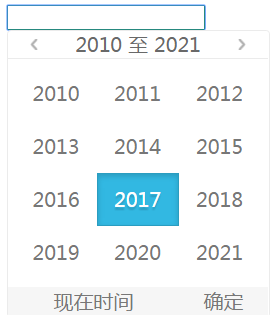
上述效果的代码如下:
3.2.1 头部内容存在变化,头部的代码如下
    _generateHeader: function(caption) {

            this.calendarCaptions.html(caption);

        },
3.2.2 年度渲染
_generateYear:function(){

            this._generateHeader(this.date.currentYear - 7 + ' ' + this.options.rangeSeparator + ' ' + (this.date.currentYear + 4));

            var year = this.date.currentYear,

            html = '',

            className,

            content = 0,

            dateArray = [],

            isActive, isUntouch,

            status = [];

            html += '<div class="' + this.namespace + '-row">';

            for (var m = 0; m < 12; m++) {

                isActive = false;

                isUntouch = false;

                status = [isUntouch, isActive];

                className = '';

                content = year - 7 + m;

                if (m > 0 && m % 3 === 0) {

                    html += '</div><div class="' + this.namespace + '-row">';

                }

                dateArray[m] = new Date(content, 0, 1, 0, 0, 0, 0);

                status = this._judgeStatus('years',status, dateArray[m], this.date.selectedYearDate);

                className += this._renderStatus(status);

                html += '<span class="' + className + '">' + content + '</span>';

            }

            html += '</div>';

            $('.'+this.namespace+'-content .'+this.namespace+'-years').html(html);

        },
3.2.3 月份渲染
_generateMonths:function(){

            this._generateHeader(this.date.currentYear+LABEL[this.options.lang].yearlabel);

            var year = this.date.currentYear,

                html = '',

                className,

                content = LABEL[this.options.lang].monthsShort,

                dateArray = [],

                isActive,

                isUntouch,

                status = [];

            html += '<div class="' + this.namespace + '-row">';

            for (var i = 0; i < 12; i++) {

                isActive = false;

                isUntouch = false;

                status = [isUntouch, isActive];

                className = '';

                if (i > 0 && i % 3 === 0) {

                    html += '</div><div class="' + this.namespace + '-row">';

                }

                dateArray[i] = new Date(year, i, 1, 0, 0, 0, 0);

                status = this._judgeStatus('months',status, dateArray[i], this.date.selectedMonthDate);

                className += this._renderStatus(status);

                html += '<span class="month-' + i + ' ' + className + '">' + content[i] + '</span>';

            }

            html += '</div>';

            $('.'+this.namespace+'-content .'+this.namespace+'-months').html(html);

        },
3.2.4 日期渲染
_generateYear:function(){

            this._generateHeader(this.date.currentYear - 7 + ' ' + this.options.rangeSeparator + ' ' + (this.date.currentYear + 4));

            var year = this.date.currentYear,

            html = '',

            className,

            content = 0,

            dateArray = [],

            isActive, isUntouch,

            status = [];

            html += '<div class="' + this.namespace + '-row">';

            for (var m = 0; m < 12; m++) {

                isActive = false;

                isUntouch = false;

                status = [isUntouch, isActive];

                className = '';

                content = year - 7 + m;

                if (m > 0 && m % 3 === 0) {

                    html += '</div><div class="' + this.namespace + '-row">';

                }

                dateArray[m] = new Date(content, 0, 1, 0, 0, 0, 0);

                status = this._judgeStatus('years',status, dateArray[m], this.date.selectedYearDate);

                className += this._renderStatus(status);

                html += '<span class="' + className + '">' + content + '</span>';

            }

            html += '</div>';

            $('.'+this.namespace+'-content .'+this.namespace+'-years').html(html);

        },
3.3.5 渲染控制器,就是用来判断该显示年度、月份还是日期的
 _manageViews:function(){

            switch (this.view) {

                case 'days':

                    this._generateDays();

                    this.calendars.addClass(this.namespace + '_days').removeClass(this.namespace + '_months').removeClass(this.namespace + '_years');

                    break;

                case 'months':

                    this._generateMonths();

                    this.calendars.addClass(this.namespace + '_months').removeClass(this.namespace + '_days').removeClass(this.namespace + '_years');

                    break;

                case 'years':

                    this._generateYear();

                    this.calendars.addClass(this.namespace + '_years').removeClass(this.namespace + '_days').removeClass(this.namespace + '_months');

                    break;

            }

        },
4、日历事件
经过上述过程我们的日历有个样子了,但是这并没有达到我们的目的,我们的日历要可以选择啊,因此我们日历要有点击事件。和事件有关的方法放在一起讲解,包括点解事件(_click:function(){}),对于我们的插件来说这是一个最重要的方法了,还有就是另外两个重要的切换事件(_pre:function(){}和_next:function(){})。
运行效果就是 点击具体某天、某月、某年、上个月、下个月、上一年、下一年。直接贴出这一部分的代码
 _click: function(e) {

            var $target = $(e.target);

            var _targetDiv = $(e.target).closest('div');

            var _targetSpan = $(e.target).closest('span');

            console.log(_targetDiv);

            //点击底部的:现在时间和确认按钮

            if ($target.length === 1) {

                 //var i = _targetDiv.parents('.' + this.namespace + '-content').index();

                 switch ($target[0].className) {

                    case this.namespace + '-currenttime':

                         this.date.selectedDate= new Date();

                         this.date.selectedDate.setHours(0, 0, 0, 0);

                         this.date.currentDate=this.date.selectedDate;

                         this.date.currentMonth=this.date.selectedDate.getMonth();

                         this.date.currentYear=this.date.selectedDate.getFullYear();

                         //this.view='days';

                        this._manageViews();

                        this._setValue();

                        break;

                    case this.namespace + '-confirm':

                        this.showed=false;

                        this.$element.blur();

                        break;

                 }

             }

            //点击头部的元素(切换年月)

            if (_targetDiv.parent('.' + this.namespace + '-header').length === 1) {

                //var i = _targetDiv.parents('.' + this.namespace + '-content').index();

                var className=_targetDiv[0].className;

                if(className==this.namespace + '-caption'){

                    this._changeView('caption');

                    this._manageViews();

                }else if(className==this.namespace + '-prev'){

                     this._prev();

                }else if(className==this.namespace + '-next'){

                     this._next();

                }

            }

            //点击具体的日期

            if (_targetSpan.length === 1) {

                if (!_targetSpan.hasClass(this.namespace + '_otherMonth') && !_targetSpan.hasClass(this.namespace + '_untouchable') && _targetSpan.parent('.' + this.namespace + '-head').length !== 1 &&_targetSpan.parent('.' + this.namespace + '-buttons').length !== 1) {

                    this._changeValue(_targetSpan);

                    this._changeView('content');

                    this._updateDate();

                    this._manageViews();

                    this._setValue();

                }

            }

            e.preventDefault();

        },

        _prev: function(i, isTurning) {

            this.touchflag = false;

            var date = this.date.currentDate;

            switch (this.view) {

                case 'days':

                    var prevMonthDays;

                    date.setMonth(this.date.currentMonth - 1);

                    break;

                case 'months':

                    date.setYear(this.date.currentYear - 1);

                    break;

                case 'years':

                    date.setYear(this.date.currentYear - 12);

                    break;

            }

            this._updateDate();

            this._manageViews();

        },

        _next:function(){

             this.touchflag = false;

             var date = this.date.currentDate;

             switch (this.view) {

                 case 'days':

                     var prevMonthDays;

                     date.setMonth(this.date.currentMonth + 1);

                     break;

                 case 'months':

                     date.setYear(this.date.currentYear + 1);

                     break;

                 case 'years':

                     date.setYear(this.date.currentYear + 12);

                     break

             }

             this._updateDate();

             this._manageViews();

        },
上述代码你会看到另外几个函数:_changeValue,_setValue,_updateDate,_changeView
_changeValue(更改值),_setValue(设置值),点击的时候数据发生变化,可能是日期变了,也可能是年度或者月份变了,所以这里会把_changeValue和_setValue分成两个方法。无论变的是哪一种,数据框显示的都是具体是某一天,所以存在一个更新日期的方法_updateDate ,数据更改了,日历的显示状态也得跟着改变_changeView,此方法判断要显示年度还是月份,告诉渲染控制器去渲染对应的html元素。
下面贴出这四个函数的代码
        _changeValue: function(target, i) {

            var newVal = '',

                newDate = '',

                self = this;

            switch (this.view) {

                case 'years':

                    newVal = parseInt(target.text(), 10);

                    this.date.currentDate.setYear(newVal);

                    break;

                case 'months':

                    newVal = Number(target.attr('class').match(/month\-([0-9]+)/)[1]);

                    this.date.currentDate.setMonth(newVal);

                    break;

                case 'days':

                    newVal = parseInt(target.text(), 10);

                    newDate = new Date(this.date.currentYear, this.date.currentMonth, newVal, 0, 0, 0, 0);

                    this.date.selectedDate = newDate;

                    break;

            }

        },

        _updateDate: function() {

            this.date.currentDate.setDate(1);

            this.date.currentDate.setHours(0, 0, 0, 0);

            this.date.currentDay = this.date.currentDate.getDate();

            this.date.currentMonth = this.date.currentDate.getMonth();

            this.date.currentYear = this.date.currentDate.getFullYear();

            this.date.currentMonthDate = new Date(this.date.currentYear, this.date.currentMonth, 1, 0, 0, 0, 0);

            this.date.currentYearDate = new Date(this.date.currentYear, 0, 1, 0, 0, 0, 0);

        },

        _setValue: function() {

                var formated = this._formatDate(this.date.selectedDate, this.options.dateFormat);

            this.$element.val(formated);

            this.oldValue = this.$element.val();

       },

        _changeView: function(type) {

            if(type=='caption'){

                if (this.view === 'days') {

                    this.view = 'months';

                 } else if (this.view === 'months') {

                    this.view = 'years';

                 }else if(this.view === 'years'){

                     this.view = 'days';

                 }

            }else if(type=='content'){

                 if (this.view === 'years') {

                     this.view= 'months';

                 } else if (this.view === 'months') {

                     this.view = 'days';

                 }

            }

        },
5、给日历元素绑定事件
到此,你可能感觉结束了,然而还有最重要的一步呢,那就是怎么给元素绑定事件,第4部分讲到的是日历的一些事件能做什么事,并没有说给什么元素绑定上事件。那么事件是什么时候绑定的呢,答案是在我们的日历显示的时候绑定的,因为不显示日历,绑定了事件,看不见元素你点击谁呢。这里还要说明一点上述提到的渲染和这里的显示是两个概念,渲染只是把html元素给渲染出来了,他们的样式可能是隐藏的状态,理解这一点很重要的。
既然是在显示的时候绑定事件,那么问题又来了什么时候调用显示函数呢,显然是当我们在输入框里点击一下的时候,或者说是输入框聚焦的时候调用。那么我们插件又多出了几个函数
_initShowHide:初始化显隐性,说白了是绑定聚焦和失去焦点的函数,此处用到了代理$.proxy(),代理的目的是改变上下文环境,输入框聚焦调用的是插件的聚焦函数:函数代码如下
_initShowHide: function(displayMode) {

            //此处如果不使用带里,on内部中的this指向了this.$element,不能调用插件的_focus函数,使用代理,修改this指向Plugin

            this.$element.on({

                focus: $.proxy(this._focus, this),

                blur: $.proxy(this._blur, this)

            });

        },
上述是插件最难的一点了,此处弄明白了,整个日历插件就没有难度了。下面贴出另外几个函数的代码,这几个函数顾名思义,这里只对_show:函数中的一些代码做一下说明。
  _focus: function() {

            this._show();

        },

        _blur: function() {

            if(!this.showed){

                this._hide();

            }

        },

        _show: function() {

            var self = this;

            this.view='days';

            this.showed = true;

            this.$wrapper.addClass(this.namespace + '-show');

            this._position();

            $doc.on('click', function(e) {

                self._click.call(self, e);

            });

            this.$wrapper.on('mousedown', function(e) {

                self._prevent(e);

            });

        },

        _hide: function(){

            this.$wrapper.removeClass(this.namespace + '-show');

        },
this.$wrapper.addClass(this.namespace + '-show');
插件的显隐性就是通过这一行代码实现的。
$doc.on('click', function(e) {
self._click.call(self, e);
});
日历元素的点击事件是通过这三行代码实现的
this.$wrapper.on('mousedown', function(e) {
self._prevent(e);
});
这三行代码是去鼠标点击的默认事件
到此日历的插件才真正的结束,这是我的第一个jQuery插件,又不要说明一下我还是新手,此文章只供参考学习,也欢迎批评指正。
我的第一个jQuery插件开发(日期选择器,datePicker),功能还不完善,但用于学习参考已经足够了。的更多相关文章
- jQuery cxCalendar 日期选择器
简介 cxCalendar 是基于 jQuery 的日期选择器插件. 它灵活自由,你可以自定义外观,日期的范围,返回的格式等. 版本: jQuery v1.7+ jQuery cxCalendar v ...
- jQuery UI 日期选择器(Datepicker)
设置JqueryUI DatePicker默认语言为中文 <!doctype html><html lang="en"> <head> < ...
- Android零基础入门第57节:日期选择器DatePicker和时间选择器TimePicker
原文:Android零基础入门第57节:日期选择器DatePicker和时间选择器TimePicker 在实际开发中,经常会遇见一些时间选择器.日期选择器.数字选择器等需求,那么从本期开始来学习And ...
- 原生js实现jquery库中选择器的功能(jquery库封装一)
今天是2017.1.1,新的一天,新的一年,新的一年里继续夯实基础知识,在工作中多些项目,多思考,多总结,前端是不断更新,在更新的过程中也是发现乐趣和挑战自我的过程,希望年轻的我和年轻的javascr ...
- ElementUI 日期选择器 datepicker 选择范围限制
在使用elementUI中日期选择器时,经常会遇到这样的需求——对可选择的时间范围有一定限制,比如我遇到的就是:只能选择今天以前的一年以内的日期. 查阅官方文档,我们发现它介绍的并不详细,下面我们就来 ...
- jquery写日期选择器
跟上我的脚步,让我们来领略代码的世界! 使用jquery做一个日期时间选择器,最好使用bootstrap弹窗 实现: (1)点击文本框弹出窗口: (2)弹窗里面显示日期时间选择下拉 (3)年份取当前年 ...
- jquery双日历日期选择器bootstrap-daterangepicker日历插件
这个插件既可以作为双日历也可以作为单日历插件(jquery的插件在jquery插件库中http://www.jq22.com/下载很方便,在CSDN下载真麻烦) 引用 <meta http-eq ...
- iview2.0 日期选择器DatePicker 所选时间格式不对
网上有很多解决方式,大部分都是加个@on-change事件.比如下图: 但是如果是编辑的时候,打开编辑页面,通过数据库返回时间显示出来是对的,但是不触发change事件,直接点保存的话,保存后还是少8 ...
- (网页)jQuery UI 实例 - 日期选择器(Datepicker)
默认功能 日期选择器(Datepicker)绑定到一个标准的表单 input 字段上.把焦点移到 input 上(点击或者使用 tab 键),在一个小的覆盖层上打开一个交互日历.选择一个日期,点击页面 ...
随机推荐
- B. Welfare State(RMQ问题的逆向考虑)
\(对于操作1,我们只关心最后一次操作.\) \(对于操作2,我们只关心值最大的一次操作.\) \(也就是说,我们记录每个居民最后一次被修改的位置\) \(然后它的最终答案就是从这个位置起,max(操 ...
- POJ3255(次最短路)
描述 求1到n的次最短路 开个\(dis[maxn][2]\)的储存距离的二维数组,0储存最短路,1储存次短路 初始化全为正无穷,\(dis[1][0]=0;\) 然后遍历更新时,先尝试更新最短路和次 ...
- centos系统克隆
首先保证虚拟机处于关机状态. 1.修改网卡信息 vi /etc/sysconfig/network-scripts/ifcfg-eth0 删除网卡信息HWADDR与UUID信息 修改IPADDR信息为 ...
- 用最基本的遍历来实现判断字符串 a 是否被包含在字符串 b 中,并返回第一次出现的位置(找不到返回 -1)
用最基本的遍历来实现判断字符串 a 是否被包含在字符串 b 中,并返回第一次出现的位置(找不到返回 -1) 例子: a='12';b='1234567'; // 返回 0 a='47';b='1234 ...
- hadoop中如何动态更新集群队列和容量
1.集群默认是FIFO容量调度器,有的时候不同的业务部门都需要使用hadoop集群,那么这时候就需要来设置容量调度器了,如何平衡各个部门的容量.合理利用资源? 首先配置调度器需要在修改两个配置文件,分 ...
- Coursera课程笔记----Write Professional Emails in English----Week 5
Culture Matters(Week 5) High/Low Context Communication High Context Communication The Middle East, A ...
- 【Hadoop离线基础总结】MapReduce倒排索引建立
MapReduce倒排索引建立 求某些单词在文章中出现多少次 有三个文档的内容,求hello,tom,jerry三个单词在其中各出现多少次 hello tom hello jerry hello to ...
- Docker知识点整理
目录 1. Docker简介 1.1 Docker是什么 1.2 在隔离的容器中运行软件 1.3 分发容器 2. Docker镜像 2.1 Docker镜像简介 2.2 Docker镜像常见操作 2. ...
- Flutter为什么使用Dart?
老孟导读:关于Flutter为什么使用Dart?这个话题,就像PHP是世界上最好的语言一样,争论从来没有停止过,有很多说法,比如: Google是为了推广Dart,Dart是亲儿子. Flutter团 ...
- [codeforces-543-D div1]树型DP
题意:给一棵树的边标上0或1,求以节点i为源点,其它点到i的唯一路径上的1的边数不超过1条的方案数,输出所有i的答案. 思路:令f[i]表示以节点i为源点,只考虑子树i时的方案数,ans[i]为最后答 ...