
Android学习笔记上下文菜单
布局文件main_activity.xml
<?xml version="1.0" encoding="utf-8"?>

<RelativeLayout xmlns:android="http://schemas.android.com/apk/res/android"

    xmlns:app="http://schemas.android.com/apk/res-auto"

    xmlns:tools="http://schemas.android.com/tools"

    android:layout_width="match_parent"

    android:layout_height="match_parent"

    tools:context=".MainActivity">

    <!--标题栏-->

    <ImageView

        android:id="@+id/img_title"

        android:layout_width="match_parent"

        android:layout_height="@dimen/title_height"

        android:scaleType="fitXY"

        android:src="@drawable/wei_top" />

    <!--头像-->

    <ImageView

        android:id="@+id/img_head"

        android:layout_width="@dimen/head"

        android:layout_height="@dimen/head"

        android:layout_below="@+id/img_title"

        android:src="@mipmap/tx3"/>

    <!--用户名-->

    <TextView

        android:id="@+id/username"

        android:layout_width="wrap_content"

        android:layout_height="wrap_content"

        android:layout_toRightOf="@+id/img_head"

        android:text="CSDN梦梦"

        android:textSize="@dimen/userNameSize"

        android:layout_marginLeft="@dimen/margin_headLeft"

        android:layout_below="@+id/img_title"

        android:textColor="@color/colorUsername"/>

    <!--内容-->

    <TextView

        android:id="@+id/content"

        android:layout_width="wrap_content"

        android:layout_height="wrap_content"

        android:text="@string/content"

        android:layout_below="@+id/username"

        android:layout_toRightOf="@+id/img_head"

        android:textColor="@color/colorContent"

        android:textSize="@dimen/content_textSize"

        android:layout_marginLeft="@dimen/margin_headLeft"/>

    <TextView

        android:id="@+id/time_tip"

        android:layout_width="wrap_content"

        android:layout_height="wrap_content"

        android:textSize="12sp"

        android:text="12小时前"

        android:layout_toRightOf="@+id/img_head"

        android:layout_marginLeft="@dimen/margin_headLeft"

        android:layout_marginTop="10dp"

        android:textColor="@android:color/darker_gray"

        android:layout_below="@id/content"/>

</RelativeLayout>
菜单文件menu.xml
<?xml version="1.0" encoding="utf-8"?>

<menu xmlns:android="http://schemas.android.com/apk/res/android">

    <item android:id="@+id/menu_copy" android:title="复制"></item>

    <item android:id="@+id/menu_collect" android:title="收藏"></item>

    <item android:id="@+id/menu_translate" android:title="翻译"></item>

    <item android:id="@+id/menu_report" android:title="举报"></item>

</menu>
MainActivity.java
package com.lzp.circleoffriend;

import androidx.annotation.NonNull;

import androidx.appcompat.app.AppCompatActivity;

import android.os.Bundle;

import android.view.ContextMenu;

import android.view.MenuInflater;

import android.view.MenuItem;

import android.view.View;

import android.widget.TextView;

import android.widget.Toast;

public class MainActivity extends AppCompatActivity {

    TextView content;

    @Override

    protected void onCreate(Bundle savedInstanceState) {

        super.onCreate(savedInstanceState);

        setContentView(R.layout.activity_main);

        //为文本框注册上下文菜单

        TextView content = findViewById(R.id.content);

        registerForContextMenu(content);

    }

    //重写onCreateContextMunu()方法,添加一个上下文菜单

    @Override

    public void onCreateContextMenu(ContextMenu menu, View v, ContextMenu.ContextMenuInfo menuInfo) {

        MenuInflater inflater = new MenuInflater(this);

        inflater.inflate(R.menu.menu,menu);

    }

    //重写onContextItemSelected,对每个菜单的选中事件做处理

    @Override

    public boolean onContextItemSelected(@NonNull MenuItem item) {

        switch (item.getItemId()){

            case R.id.menu_copy:

                Toast.makeText(MainActivity.this,

                        "已复制",Toast.LENGTH_SHORT).show();

                break;

            case R.id.menu_collect:

                Toast.makeText(MainActivity.this,

                        "已收藏",Toast.LENGTH_SHORT).show();

                break;

        }

        return super.onContextItemSelected(item);

    }

}
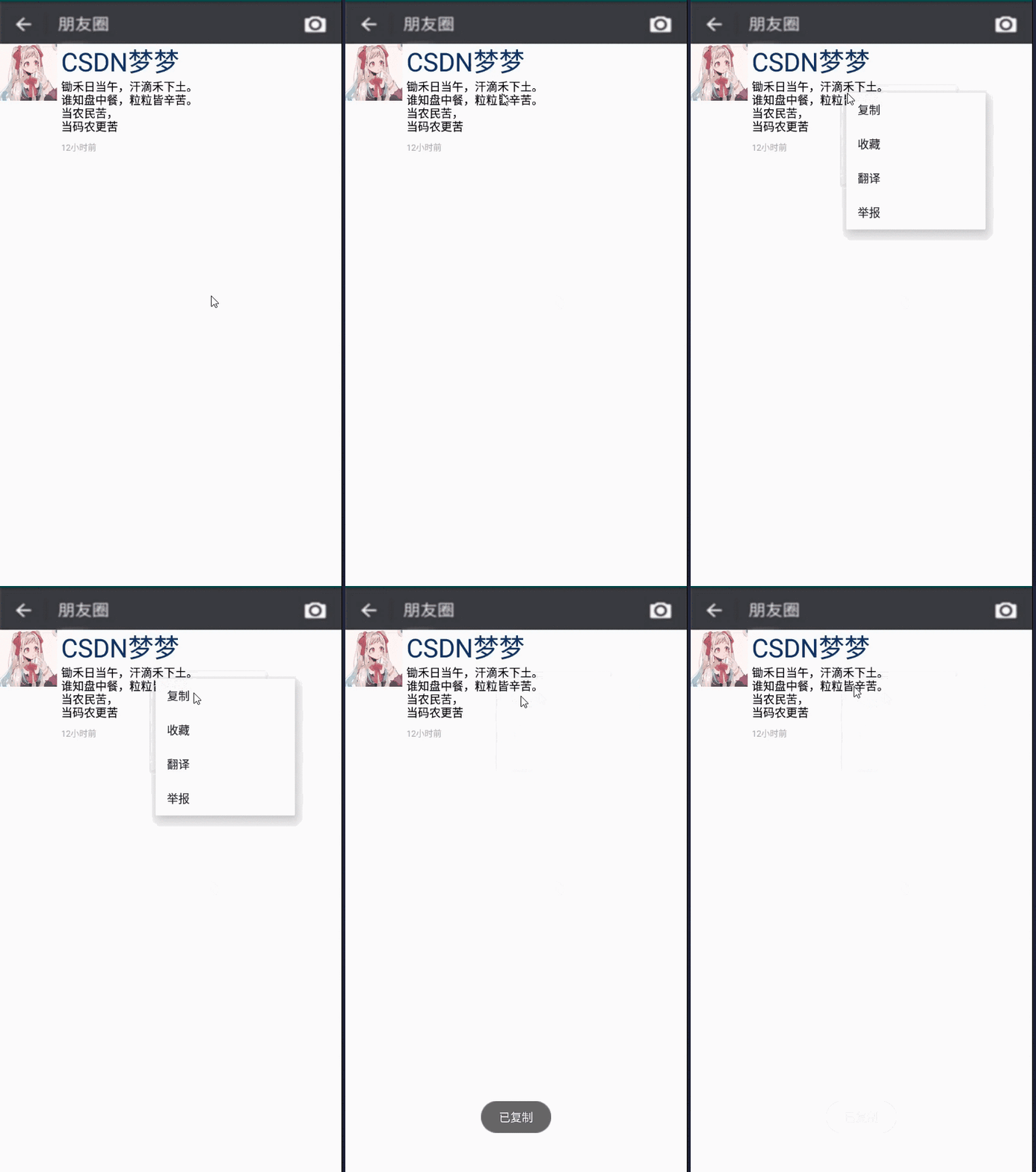
效果:
Android学习笔记上下文菜单的更多相关文章
- android学习笔记23——菜单
菜单在桌面应用程序中使用非常广泛,由于手机屏幕的制约,菜单在手机应用中减少不少. android应用中的菜单默认是不可见的,只有当用户单击手机上“Menu”键时,系统才会显示该应用关联的采用项. an ...
- Android学习笔记--Menu菜单的使用
实现选项菜单.上下文菜单,以及菜单内部的子菜单. 视图效果: MainActivity 选项菜单 选项菜单的子菜单 上下文菜单(按住按钮或者EditText弹出) 注意:上下文菜单如何弹出?在注册该菜 ...
- 【转】 Pro Android学习笔记(三五):Menu(6):XML方式 & PopUp菜单
目录(?)[-] 利用XML创建菜单 XML的有关属性 onClick事件 Pop-up菜单 利用XML创建菜单 在代码中对每个菜单项进行设置,繁琐且修改不灵活,不能适配多国语言的要求,可以利用资源进 ...
- 【转】 Pro Android学习笔记(三三):Menu(4):Alternative菜单
目录(?)[-] 什么是Alternative menu替代菜单 小例子说明 Alternative menu代码 关于Category和规范代码写法 关于flags 多个匹配的itemId等参数 什 ...
- Android学习笔记——Menu(二)
知识点: 这次将继续上一篇文章没有讲完的Menu的学习,上下文菜单(Context menu)和弹出菜单(Popup menu). 上下文菜单 上下文菜单提供对UI界面上的特定项或上下文框架的操作,就 ...
- Pro Android学习笔记 ActionBar(1):Home图标区
Pro Android学习笔记(四八):ActionBar(1):Home图标区 2013年03月10日 ⁄ 综合 ⁄ 共 3256字 ⁄ 字号 小 中 大 ⁄ 评论关闭 ActionBar在A ...
- 【转】 Pro Android学习笔记(五六):配置变化
目录(?)[-] Activity的destorycreate过程 Fragment的destorycreate过程 onSaveInstanceState saveFragmentInstanceS ...
- 【转】 Pro Android学习笔记(五二):ActionBar(5):list模式
可以在action bar中加入spinner的下来菜单,有关spinner,可以参考Pro Android学习笔记(二十):用户界面和控制(8):GridView和Spinner. list的样式和 ...
- 【转】Pro Android学习笔记(三十):Menu(1):了解Menu
目录(?)[-] 创建Menu MenuItem的属性itemId MenuItem的属性groupId MenuItem的属性orderId MenuItem的属性可选属性 Menu触发 onOpt ...
随机推荐
- 移动端在ios上以及微信浏览器上的兼容性
1.document.以及window.body在移动h5不能触发点击事件 解决方法:给body加上cursor: pointer;就可以有点击事件了. ios上默认的body是没有点击事件的: 接着 ...
- 学会使用Hdlbits网页版Verilog代码仿真验证平台
给大家推荐一款网页版的 Verilog代码编辑仿真验证平台,这个平台是国外的一家开源FPGA学习网站,通过“https://hdlbits.01xz.net/wiki/Main_Page” 地址链接进 ...
- 【JUC】如何理解线程池?第四种使用线程的方式
线程池的概念 线程池的主要工作的控制运行的线程的数量,处理过程种将任务放在队列,线程创建后再启动折现任务,如果线程数量超过了最大的数量,则超过部分的线程排队等待,直到其他线程执行完毕后,从队列种取出任 ...
- Java的字节流,字符流和缓冲流对比探究
目录 一.前言 二.字节操作和字符操作 三.两种方式的效率测试 3.1 测试代码 3.2 测试结果 3.3 结果分析 四.字节顺序endian 五.综合对比 六.总结 一.前言 所谓IO,也就是Inp ...
- 设计并测试Trapezium类 代码参考
#include <iostream> using namespace std; class Trapezium { private: int x1,y1,x2,y2,x3,y3,x4,y ...
- GNS3--cisco路由器NAT配置
一.基础 Cisco路由器配置中NAT的主要命令: 静态NAT: 1.指定NAT内部接口 在内网相应接口的接口配置模式下执行:ip nat inside 2.指定NAT外部接口 在外网相应接口的接口配 ...
- Linux(六)文件系统
个人博客网:https://wushaopei.github.io/ (你想要这里多有) 一.根目录内容 1.概述 Linux系统中只有一个文件系统,以“/”作为根目录,从根目录出发可以找到任何 ...
- (Java实现) 洛谷 P1025 数的划分
题目描述 将整数n分成k份,且每份不能为空,任意两个方案不相同(不考虑顺序). 例如:n=7,k=3,下面三种分法被认为是相同的. 1,1,5; 1,5,1; 5,1,1. 问有多少种不同的分法. 输 ...
- Java实现 蓝桥杯 算法训练 纪念品分组
问题描述 元旦快到了,校学生会让乐乐负责新年晚会的纪念品发放工作.为使得参加晚会的同学所获得的纪念品价值 相对均衡,他要把购来的纪念品根据价格进行分组,但每组最多只能包括两件纪念品,并且每组纪念品的价 ...
- Java实现 LeetCode 211 添加与搜索单词 - 数据结构设计
211. 添加与搜索单词 - 数据结构设计 设计一个支持以下两种操作的数据结构: void addWord(word) bool search(word) search(word) 可以搜索文字或正则 ...