
MinHook 如何对.NET底层的 Win32函数 进行拦截(上)
一:背景
1. 讲故事
在前面的系列中,我们聊过.NET外挂 harmony,他可以对.NET SDK方法进行拦截,这在.NET高级调试领域中非常重要,但这里也有一些遗憾,就是不能对SDK领域之外的函数进行拦截,比如 Win32 函数。。。
这篇我们就来解决这个问题,对,它就是 MinHook,当然我也调查了easyhook和detours,前者年久失修,后者是商业库,加上我的要求相对简单,使用极简版的 minhook 就够了,而且该项目在github上也是非常活跃的:https://github.com/TsudaKageyu/minhook
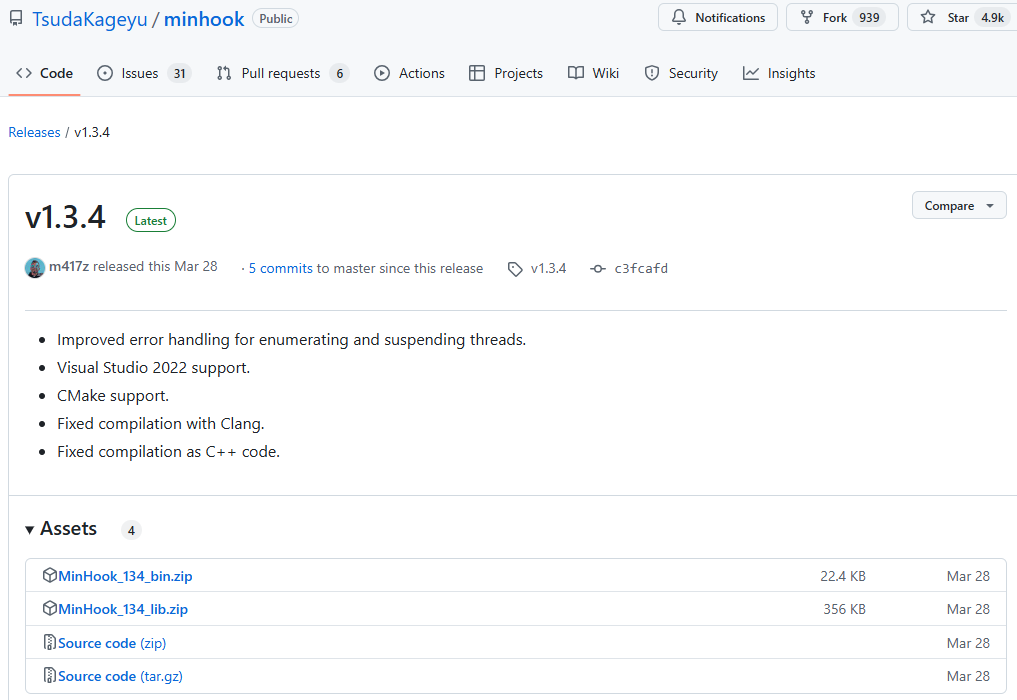
- 开箱即用,下载
MinHook_134_bin.zip即可。 - 多项目融合,下载
MinHook_134_lib.zip即可。
二:MinHook 案例演示
1. 开箱即用方式
观察 MinHook.h 头文件,会发现很多的 C 导出函数,如下所示:
#ifdef __cplusplus

extern "C" {

#endif

    // Initialize the MinHook library. You must call this function EXACTLY ONCE

    // at the beginning of your program.

    MH_STATUS WINAPI MH_Initialize(VOID);

    // Uninitialize the MinHook library. You must call this function EXACTLY

    // ONCE at the end of your program.

    MH_STATUS WINAPI MH_Uninitialize(VOID);

    ...

}
有了这些导出函数,就可以通过 C# 的 PInvoke 直接调用,这里就演示一个拦截 MessageBox 方法,完整代码如下:
using System;

using System.Diagnostics;

using System.Runtime.InteropServices;

namespace ConsoleApp2

{

    internal class Program

    {

        static void Main(string[] args)

        {

            // 安装钩子

            HookManager.InstallHook("user32.dll", "MessageBoxW",

                (IntPtr hWnd, string text, string caption, uint type) =>

                {

                    Console.WriteLine($"我已成功拦截到 MessageBox:内容 {text}, 标题: {caption}");

                    var original = Marshal.GetDelegateForFunctionPointer<HookManager.MessageBoxDelegate>(HookManager.OriginalFunction);

                    return original(hWnd, text, caption, type);

                });

            // 测试 MessageBox 调用(钩子会捕获这个)

            MessageBox(IntPtr.Zero, "This is a test", "Test", 0);

            // 卸载钩子

            HookManager.UninstallHook();

            Console.ReadLine();

        }

        [DllImport("user32.dll", CharSet = CharSet.Unicode)]

        private static extern int MessageBox(IntPtr hWnd, string text, string caption, uint type);

    }

    public static class HookManager

    {

        // 定义 MessageBox 的委托

        [UnmanagedFunctionPointer(CallingConvention.StdCall, CharSet = CharSet.Unicode)]

        public delegate int MessageBoxDelegate(IntPtr hWnd, string text, string caption, uint type);

        // 原始函数的指针

        public static IntPtr OriginalFunction = IntPtr.Zero;

        // 当前钩子的目标函数地址

        private static IntPtr _targetFunction = IntPtr.Zero;

        public static void InstallHook(string moduleName, string functionName, MessageBoxDelegate detourFunc)

        {

            // 1. 初始化 MinHook

            var status = MinHook.MH_Initialize();

            if (status != MinHook.MH_STATUS.MH_OK)

            {

                Console.WriteLine($"MH_Initialize failed: {status}");

                return;

            }

            // 2. 获取目标函数的地址

            _targetFunction = MinHook.GetProcAddress(MinHook.GetModuleHandle(moduleName), functionName);

            if (_targetFunction == IntPtr.Zero)

            {

                Console.WriteLine($"Failed to get {functionName} address");

                return;

            }

            // 3. 创建钩子

            var detourPtr = Marshal.GetFunctionPointerForDelegate(detourFunc);

            status = MinHook.MH_CreateHook(_targetFunction, detourPtr, out OriginalFunction);

            if (status != MinHook.MH_STATUS.MH_OK)

            {

                Console.WriteLine($"MH_CreateHook failed: {status}");

                return;

            }

            // 4. 启用钩子

            status = MinHook.MH_EnableHook(_targetFunction);

            if (status != MinHook.MH_STATUS.MH_OK)

            {

                Console.WriteLine($"MH_EnableHook failed: {status}");

                return;

            }

            Console.WriteLine($"{functionName} hook installed successfully");

        }

        public static void UninstallHook()

        {

            if (_targetFunction == IntPtr.Zero)

            {

                Console.WriteLine("No active hook to uninstall");

                return;

            }

            // 1. 禁用钩子

            var status = MinHook.MH_DisableHook(_targetFunction);

            if (status != MinHook.MH_STATUS.MH_OK)

            {

                Console.WriteLine($"MH_DisableHook failed: {status}");

            }

            // 2. 移除钩子

            status = MinHook.MH_RemoveHook(_targetFunction);

            if (status != MinHook.MH_STATUS.MH_OK)

            {

                Console.WriteLine($"MH_RemoveHook failed: {status}");

            }

            // 3. 卸载 MinHook

            status = MinHook.MH_Uninitialize();

            if (status != MinHook.MH_STATUS.MH_OK)

            {

                Console.WriteLine($"MH_Uninitialize failed: {status}");

            }

            _targetFunction = IntPtr.Zero;

            OriginalFunction = IntPtr.Zero;

            Console.WriteLine("Hook uninstalled successfully");

        }

    }

    public class MinHook

    {

        // MH_STATUS 枚举

        public enum MH_STATUS

        {

            MH_UNKNOWN = -1,

            MH_OK = 0,

            MH_ERROR_ALREADY_INITIALIZED,

            MH_ERROR_NOT_INITIALIZED,

            MH_ERROR_ALREADY_CREATED,

            MH_ERROR_NOT_CREATED,

            MH_ERROR_ENABLED,

            MH_ERROR_DISABLED,

            MH_ERROR_NOT_EXECUTABLE,

            MH_ERROR_UNSUPPORTED_FUNCTION,

            MH_ERROR_MEMORY_ALLOC,

            MH_ERROR_MEMORY_PROTECT,

            MH_ERROR_MODULE_NOT_FOUND,

            MH_ERROR_FUNCTION_NOT_FOUND

        }

        public IntPtr MH_ALL_HOOKS = IntPtr.Zero;

        // 导入 MinHook 函数

        [DllImport("MinHook.x86.dll", CallingConvention = CallingConvention.Cdecl)]

        public static extern MH_STATUS MH_Initialize();

        [DllImport("MinHook.x86.dll", CallingConvention = CallingConvention.Cdecl)]

        public static extern MH_STATUS MH_Uninitialize();

        [DllImport("MinHook.x86.dll", CallingConvention = CallingConvention.Cdecl)]

        public static extern MH_STATUS MH_CreateHook(IntPtr pTarget, IntPtr pDetour, out IntPtr ppOriginal);

        [DllImport("MinHook.x86.dll", CallingConvention = CallingConvention.Cdecl, CharSet = CharSet.Unicode)]

        public static extern MH_STATUS MH_CreateHookApi(string pszModule, string pszProcName, IntPtr pDetour, out IntPtr ppOriginal);

        [DllImport("MinHook.x86.dll", CallingConvention = CallingConvention.Cdecl)]

        public static extern MH_STATUS MH_RemoveHook(IntPtr pTarget);

        [DllImport("MinHook.x86.dll", CallingConvention = CallingConvention.Cdecl)]

        public static extern MH_STATUS MH_EnableHook(IntPtr pTarget);

        [DllImport("MinHook.x86.dll", CallingConvention = CallingConvention.Cdecl)]

        public static extern MH_STATUS MH_DisableHook(IntPtr pTarget);

        [DllImport("MinHook.x86.dll", CallingConvention = CallingConvention.Cdecl)]

        public static extern IntPtr MH_StatusToString(MH_STATUS status);

        [DllImport("kernel32.dll", CharSet = CharSet.Unicode, SetLastError = true)]

        public static extern IntPtr GetModuleHandle(string lpModuleName);

        [DllImport("kernel32.dll", CharSet = CharSet.Ansi, SetLastError = true)]

        public static extern IntPtr GetProcAddress(IntPtr hModule, string lpProcName);

    }

}
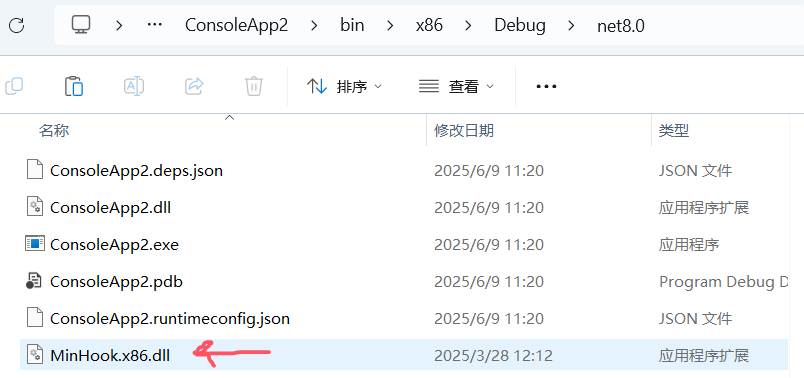
由于这个 C# 程序是 32bit 的,所以将 MinHook.x86.dll 拷贝到C#程序的当前目录。
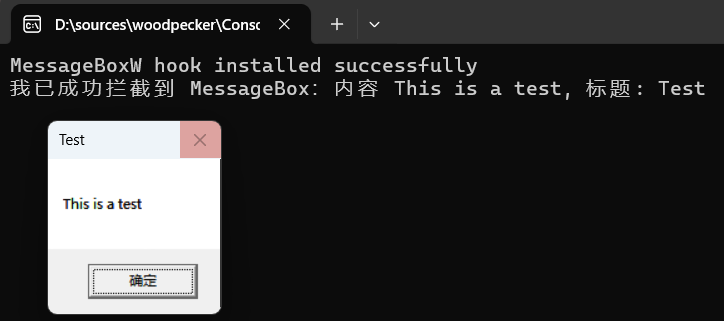
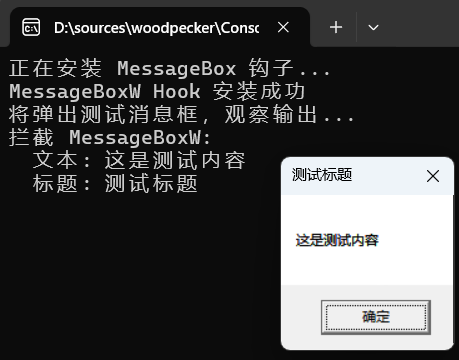
最后将程序运行起来,该有的都出现了。
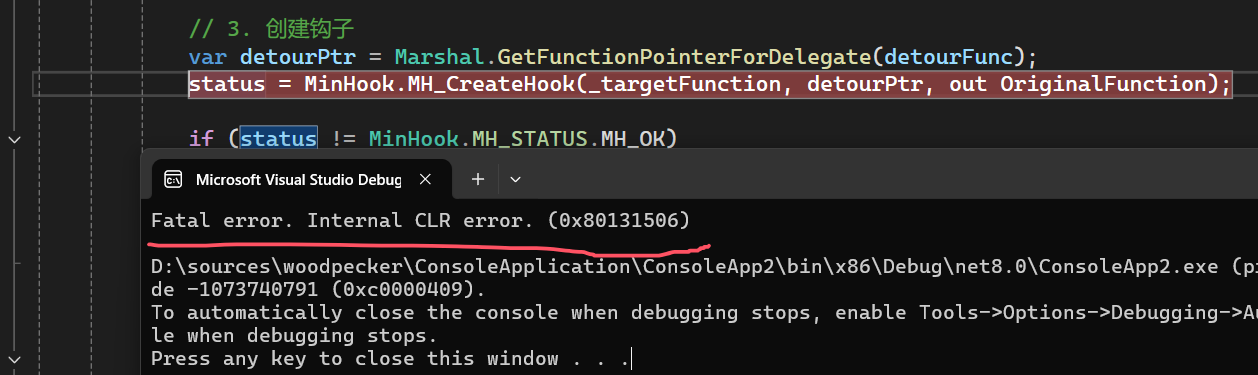
个人实践下来,我发现有两个小问题:
- 当你用 vs 单步调试的时候,走到
MH_CreateHook方法时会抛Fatal error. Internal CLR error. (0x80131506)CLR 内部错误,看起来VS调试器做了一些手脚,截图如下:
- 当你想在 InstallHook 中的 detourFunc 函数下断点,也不会被命中,截图如下:
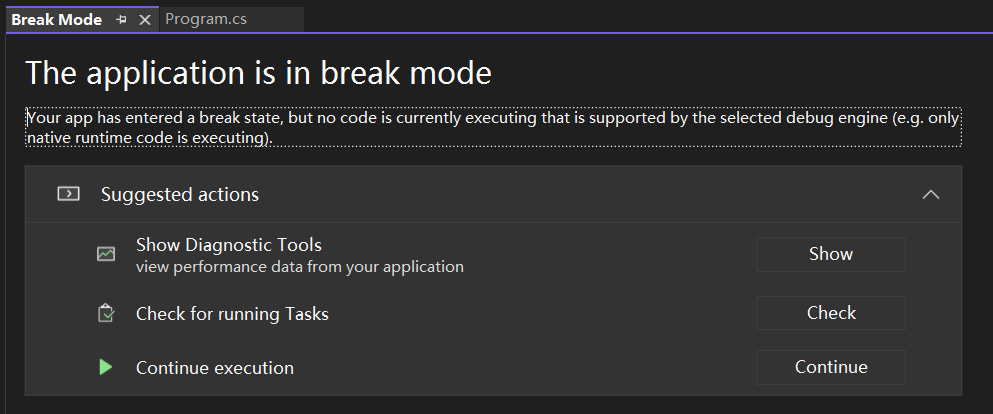
总的来说对VS调试有一点影响,但也不太大,还是可以接受的,毕竟用 C# 来调用轻车熟路,如果你熟悉 windbg 的话,用它是一点问题都没有。。。
2. 深度融合方式
用 C# 的 Pinvoke 调用 MinHook,总感觉少了那个味,如果用原汁原味的 C 调用 MinHook 那就相当完美了,在解决一些比较复杂注入非常有必要。
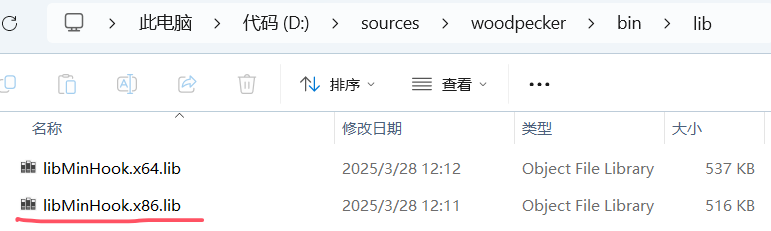
这里我采用 libMinHook.x86.lib 以静态链接的方式将当前的 ConsoleApplication2 和 MinHook 合二为一,截图如下:
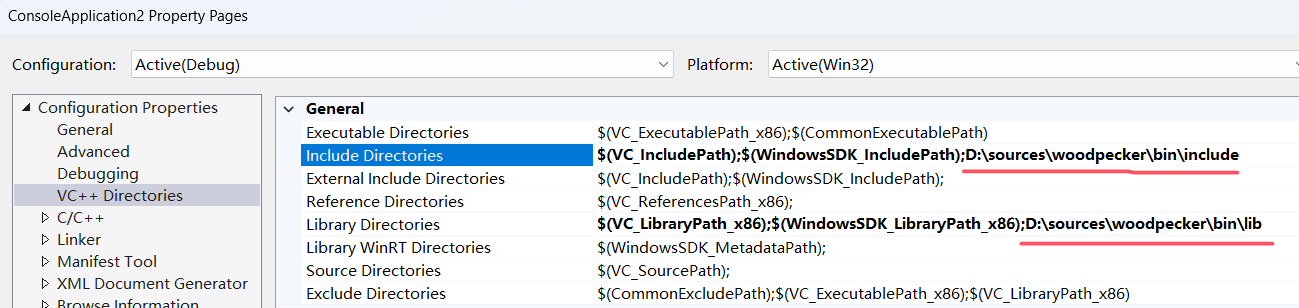
接下来做三点配置:
- 右键属性 配置下 头文件 和 dll库 搜索路径,截图如下:
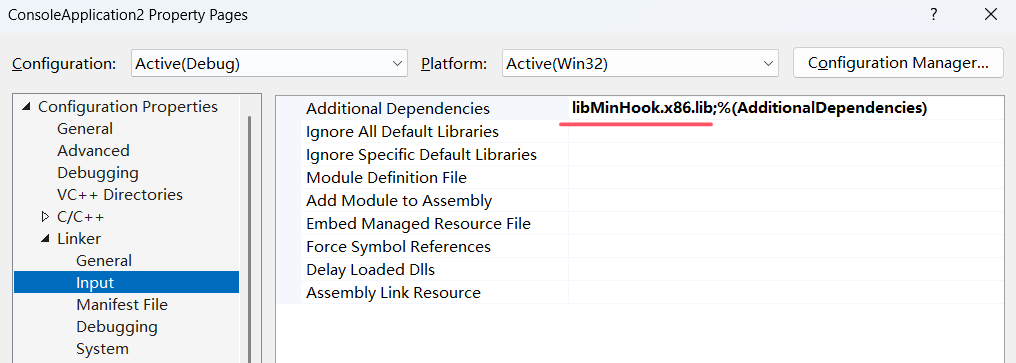
- 右键属性 配置下 依赖文件名,截图如下:
最后就是完整的 C 代码。
#include <windows.h>

#include <stdio.h>

#include <fcntl.h>

#include <io.h>

#include <MinHook.h>

typedef int (WINAPI* Real_MessageBoxW)(

	HWND hWnd,

	LPCWSTR lpText,

	LPCWSTR lpCaption,

	UINT uType

	);

Real_MessageBoxW fpMessageBoxW = NULL;

int WINAPI Hook_MessageBoxW(

	HWND hWnd,

	LPCWSTR lpText,

	LPCWSTR lpCaption,

	UINT uType)

{

	_setmode(_fileno(stdout), _O_U16TEXT);

	wprintf(L"拦截 MessageBoxW:\n");

	wprintf(L"  文本: %s\n", lpText);  // 移除 &,直接使用 lpText

	wprintf(L"  标题: %s\n", lpCaption);  // 移除 &,直接使用 lpCaption

	return fpMessageBoxW(

		hWnd,

		lpText,

		lpCaption,

		uType);

}

extern "C" __declspec(dllexport) void InstallHook()

{

	HMODULE hModule = GetModuleHandleW(L"user32.dll");

	Real_MessageBoxW pOrigMessageBoxW = (Real_MessageBoxW)GetProcAddress(hModule, "MessageBoxW");

	if (pOrigMessageBoxW == NULL) {

		printf("无法获取 MessageBoxW 地址\n");

		return;

	}

	if (MH_Initialize() != MH_OK) {

		printf("MinHook 初始化失败\n");

		return;

	}

	if (MH_CreateHook(pOrigMessageBoxW, &Hook_MessageBoxW, (void**)&fpMessageBoxW) != MH_OK) {

		printf("创建 Hook 失败\n");

		return;

	}

	if (MH_EnableHook(pOrigMessageBoxW) != MH_OK) {

		printf("启用 Hook 失败\n");

		return;

	}

	printf("MessageBoxW Hook 安装成功\n");

}

extern "C" __declspec(dllexport) void UninstallHook()

{

	MH_DisableHook(MH_ALL_HOOKS);

	MH_Uninitialize();

}
这是只对外公开了 InstallHook 和 UninstallHook 装卸载方法,最后就是高层的 C# 代码。
using System;

using System.Runtime.InteropServices;

namespace ConsoleApp1

{

    internal class Program

    {

        static void Main(string[] args)

        {

            Console.WriteLine("正在安装 MessageBox 钩子...");

            InstallHook();

            Console.WriteLine("将弹出测试消息框,观察输出...");

            // 弹出测试消息框(会被钩子拦截)

            MessageBoxW(IntPtr.Zero, "这是测试内容", "测试标题", 0);

            Console.WriteLine("按任意键退出并卸载钩子...");

            Console.ReadKey();

            UninstallHook();

            Console.WriteLine("钩子已卸载");

        }

        // 导入 user32.dll 的 MessageBoxW

        [DllImport("user32.dll", CharSet = CharSet.Unicode, CallingConvention = CallingConvention.Winapi)]

        public static extern int MessageBoxW(

            IntPtr hWnd,

            string lpText,

            string lpCaption,

            uint uType);

        // 导入DLL中的函数

        [DllImport("ConsoleApplication2.dll", CallingConvention = CallingConvention.Cdecl)]

        public static extern void InstallHook();

        [DllImport("ConsoleApplication2.dll", CallingConvention = CallingConvention.Cdecl)]

        public static extern void UninstallHook();

    }

}
在运行之前将 ConsoleApplication2 拷贝到 C# 程序的当前目录,直接运行 C# 项目即可。
三:总结
开箱和融合两种方式都有自己的用途,下一篇我们上一个很真实的场景,让大家体会下 win32 的注入对高级调试领域 的强大功效。

MinHook 如何对.NET底层的 Win32函数 进行拦截(上)的更多相关文章
- 在C#中调用Win32函数EnumWindows枚举所有窗口。
原文 http://www.cnblogs.com/mfm11111/archive/2009/06/30/1514322.html 开发旺旺群发软件,难点及重要技术点分析(一) 一. ...
- C# 互操作性入门系列(二):使用平台调用调用Win32 函数
好文章搬用工模式启动ing ..... { 文章中已经包含了原文链接 就不再次粘贴了 言明 改文章是一个系列,但只收录了2篇,原因是 够用了 } --------------------------- ...
- [转]C# 互操作性入门系列(二):使用平台调用调用Win32 函数
传送门 C#互操作系列文章: C# 互操作性入门系列(一):C#中互操作性介绍 C# 互操作性入门系列(二):使用平台调用调用Win32 函数 C# 互操作性入门系列(三):平台调用中的数据封送处理 ...
- javascript的onbeforeunload函数在IOS上运行
今天在做项目的时候,组长让我用iPad测试一下前面写的离线缓存,后退不刷新页面,发现在iPad上onbeforeunload函数在iPad上一带而过,不运行??? 无奈之下,发现原来在IOS上,有自己 ...
- 采用个hook技术对writefile函数进行拦截(2)
http://www.cnblogs.com/zhxfl/archive/2011/11/03/2233846.html 这个是笔者之前写过的WriteFile HOOK代码 必须补充对这几个函数的H ...
- C语言中的函数与数学上的函数很类似
函数,是C语言编程中一个很重要的概念,重要到个人认为可以与指针并驾齐驱.好多教材.老师.学习资源都会专门挑出一章来讲函数.我今天也来说说函数,只不过我是从数学课上的函数来引申到C语言中的函数. 先来说 ...
- __thiscalll C++底层识别成员函数
问题描述: class myClass { public: void SetNumber(int nNumber) { m_nInt = nNumber; } private: int m_nInt; ...
- C# 中使用win32函数 GetScrollInfo返回false 返回引用全是零的问题
最近做一个项目要获得ScrollBar的位置,因为.net找不到此类功能,只好用MFC中的函数了,GetScrollPos只返回listview顶部的位置,此时我找到了GetScrollInfo,觉得 ...
- Python底层库的函数中from __future__ import absolute_import的作用
在查看TensorFlow的底层优化器时候看到from __future__ import absolute_import 查找相关资料后发现 这个语句的意思是加入绝对引用的特征 直白的意思是,比如: ...
- C#使用Win32函数的一些类型转换
C#在访问Win 32 Api时需要处理C 结构与C#结构的映射,这在MSDN以及许多Blog上都可以找到参考的资料.Win 32 中有一些定义复杂的Struct,这些结构体拥有长度固定的数组或者一些 ...
随机推荐
- 介绍一个不知道怎么形容的小东西--Proxy
what's this? The Proxy object is used to define custom behavior for fundamental operations (e.g. pro ...
- eslint-plugin-vue配置中文翻译
eslint-plugin-vue配置中文翻译 由于 ellint 配置太多,很多小伙伴不知道其功能是什么,在此做个记录. //更详细的配置文档请参考:https://github.com/vuejs ...
- k8s v1.16.3,Unable to connect to the server: x509: certificate has expired or is not yet valid
前言 kubernetes 版本为 v1.16.3 使用 kubelet get node 后报错: x509: certificate has expired or is not yet valid ...
- Supervisor-进程守护工具
前言 Supervisor是用Python开发的一套通用的进程管理程序,能将一个普通的命令行进程变为后台daemon,并监控进程状态,异常退出时能自动重启.它是通过fork/exec的方式把这些被管理 ...
- phpstorm、goland常用快捷键
1) 文件操作相关的快捷键 快捷键 作用 Ctrl + E 打开最近浏览过的文件 Ctrl + N 快速打开某个 struct 结构体所在的文件 Ctrl + Shift + N 快速打开文件 Shi ...
- 【网络】Windows在局域网配置DNS服务器
[网络]Windows在局域网配置DNS服务器 零.需求 最近因为要搭建一个局域网视频聊天系统,需要用到HTTPS协议,HTTPS协议需要证书,证书需要用到域名,而且IP地址不太好记,就想着直接在聊天 ...
- 「硬核实战」回调函数到底是个啥?一文带你从原理到实战彻底掌握C/C++回调函数
大家好,我是小康. 网上讲回调函数的文章不少,但大多浅尝辄止.缺少系统性,更别提实战场景和踩坑指南了.作为一个在生产环境中与回调函数打了多年交道的开发者,今天我想分享一些真正实用的经验,带你揭开回调函 ...
- 不同数据库Oracle、PostgreSQL、Vertical、Mysql常用操作
不同数据库Oracle.PostgreSQL.Vertical.Mysql常用操作 授权语句用于管理数据库用户的权限,常见的授权语句如下: 1.授权用户对表的SELECT权限 GRANT SELECT ...
- C#关键字:in、out、ref、in T、out T、[In]、[Out]这些你都知道多少?
in.out 和 ref 关键字 首先我们来说in.out 和 ref ,在 C# 中,in.out 和 ref 是用于方法参数的引用传递.在引用传递过程中,形参和实参都是指向相同的引用地址. 名称 ...
- eolinker响应预处理:返回结果内循环读取同类数据,设置为变量
特别注意:需要使用全局变量或者预处理前务必阅读本链接https://www.cnblogs.com/becks/p/13713278.html 场景描述: 删除(清空)购物车接口,需要传入获取的每一项 ...