
Spring Cloud认知学习(三):网关Zuul、config使用
上一篇介绍一个新的组件Hystrix,Hystrix是一个熔断器,可以用于解决微服务调用中发送的服务熔断和服务降级问题。 Spring Cloud认知学习(四):熔断器Hystrix的使用
这一篇介绍一个新的组件Zuul,Zuul是网关组件,对Api请求进行了统一的接收,基于网关,我们可以对所有的请求来进行处理,进行日志记录,请求授权等操作。
zuul
- zuul可以作为微服务的网关,所谓网关,其实就是服务消费者通过网关来访问服务消费者,就好像网络环境中我们都是把请求丢给网关,网关再向外请求的。
- zuul是Netfilx OSS的一员,可以与其他的Netfilx OSS的兄弟,如Eureka,Ribbon,Hystrix很好的配合。
- 为了应对zuul的更新问题,spring 团队也自己开发了一个网关组件--Spring Cloud Gateway,但还是像我之前说的,学这个一方面是为了了解多种知识,一方面是为了避免需要接手zuul项目或者把zuul项目改造成gateway的却缺少zuul知识的问题,而且zuul还没凉不是吗
作用:
使用网关来隐藏了具体的服务的URL,外部调用API接口的时候都是使用网关的URL,避免了服务的敏感信息的泄露。
由于所有的请求都经过网关,所以可以在网关做身份认证和权限认证。
可以在网关做统一的日志记录。
可以在网关做统一的监控处理。
可以与eureka、ribbon等结合,可以实现对请求的负载均衡。
简单示例:
下面的代码可以参考zuul整合使用实验
0.创建模块
0.创建新模块spring-cloud-zuul-10001
1.导入依赖:
    <dependencies>

        <!--引入公共依赖包 start-->

        <dependency>

            <groupId>com.progor.study</groupId>

            <artifactId>spring-cloud-common-data</artifactId>

            <version>1.0-SNAPSHOT</version>

        </dependency>

        <!--引入公共依赖包 end-->

        <!--导入zuul-->

        <dependency>

            <groupId>org.springframework.cloud</groupId>

            <artifactId>spring-cloud-starter-netflix-zuul</artifactId>

        </dependency>

        <!--导入eureka-->

        <dependency>

            <groupId>org.springframework.cloud</groupId>

            <artifactId>spring-cloud-starter-netflix-eureka-client</artifactId>

        </dependency>

        <!--导入actuator-->

        <dependency>

            <groupId>org.springframework.boot</groupId>

            <artifactId>spring-boot-starter-actuator</artifactId>

        </dependency>

        <!--导入hystrix-->

        <dependency>

            <groupId>org.springframework.cloud</groupId>

            <artifactId>spring-cloud-starter-netflix-hystrix</artifactId>

        </dependency>

        <!--导入web相关-->

        <dependency>

            <groupId>org.springframework.boot</groupId>

            <artifactId>spring-boot-starter-jetty</artifactId>

        </dependency>

        <dependency>

            <groupId>org.springframework.boot</groupId>

            <artifactId>spring-boot-starter-web</artifactId>

        </dependency>

    </dependencies>
2.主程序增加注解:
@SpringBootApplication

@EnableZuulProxy

@EnableEurekaClient // 需要加eureka,因为他也需要拉取服务列表

public class SpringCloudZuul10001Application {

    public static void main(String[] args) {

        SpringApplication.run(SpringCloudZuul10001Application.class, args);

    }

}
3.配置application.yml:
server:

  port: 10001

spring:

  application:

    name: spring-cloud-zuul

# 为了负载均衡之类的和拉取服务之类的,也需要配置eureka

eureka:

  client:

    service-url:

      defaultZone: http://localhost:7001/eureka

  instance:

    instance-id: zuul-10001.com

    prefer-ip-address: true

# 配置zuul

zuul:

  routes: # 配置路由

    UserService.serviceId: USERSERIVE # 服务名

    UserService.path: /myuser/**  # 在本地用什么来映射,比如/user/list会映射成本地的/myuser/user/list
4.测试
启动spring-cloud-user-service-8001,spring-cloud-zuul-10001,spring-cloud-eureka-server-7001,
访问http://localhost:10001/myuser/user/list,你会发现与调用http://localhost:8001/user/list的效果一致,所以上面的配置成功了,我们通过zuul的10001作为一个网关调用到了8001的服务,那么以后的消费者都可以调用网关的接口来间接调用服务接口。
配置语法:
路由
zuul:

  routes: # 配置路由

    UserService.serviceId: USERSERIVE # serviceId用来服务名。UserService.前缀是用来分组映射的,可以是自定义的前缀。

    UserService.path: /myuser/**  # 在本地用什么来映射,比如/user/list会映射成本地的/myuser/user/list
也可以是:
zuul:

  routes: # 配置路由

    UserService:

      serviceId: USERSERIVE # 服务名

      path: /myuser/**  # 在本地用什么来映射,比如/user/list会映射成本地的/myuser/user/list

    MessageService:

      serviceId: MESSAGESERIVE # 服务名

      path: /mymsg/**  #
ignored-services:默认情况下,zuul会对能拉取到的服务都进行映像。在eureka有MessageService,但我们没有配置的时候,你访问http://localhost:10001/messageserive/msg/list也可以访问到MessageService,因为默认会采取http://ip:port/服务名来映射。如果你不需要默认映射,只采用你手动配置的映射,那么需要配置zuul.ignored-services = '*'。
prefix:用来指定一个全局的前缀,比如说上面的是/mymsg/** ,如果你配置了zuul.prefix=/api,那么你以后需要调用/api/mymsg/**才能访问到MESSAGESERIVE的接口。
# 配置zuul

zuul:

  prefix: /api

  routes: # 配置路由

    UserService:

      serviceId: USERSERIVE # 服务名

      path: /myuser/**  # 在本地用什么来映射,比如/user/list会映射成本地的/myuser/user/list

  ignored-services: '*'
Spring Cloud Config
作用:
- 在分布式部署中,肯定会有很多个服务端需要部署,理论上各种服务端可能需要采用不同的配置文件,所以对于多个服务端的配置文件分发也是个问题。
- Spring Cloud Config就是作为配置中心存在的,其他服务端可以从它这里拉取服务端所需的配置文件。
- 原理:Spring Cloud Config对外暴露Http API接口,Spring Cloud Config Client通过调用Config Server的Http接口来获取配置文件。
简单示例
Spring Cloud Config可以从很多地方拉取配置文件,本地远程都可以。由于从远程git拉取比较常见,所以这里举的例子是远程git的。【本地拉取的会在单章中演示。】
下面的代码可以参考:Spring Cloud Config配置中心使用实验
创建配置中心
1.创建模块spring-cloud-config-server-11000,这是作为配置服务中心的模块,就好像我们之前使用eureka的时候也要创建一个eureka-server。
2.给spring-cloud-config-server-11000模块导入依赖:
    <dependencies>

        <!--引入公共依赖包 start-->

        <dependency>

            <groupId>com.progor.study</groupId>

            <artifactId>spring-cloud-common-data</artifactId>

            <version>1.0-SNAPSHOT</version>

        </dependency>

        <!--引入公共依赖包 end-->

        <dependency>

            <groupId>org.springframework.cloud</groupId>

            <artifactId>spring-cloud-config-server</artifactId>

        </dependency>

    </dependencies>
3.修改spring-cloud-config-server-11000模块的application.yml:
server:

  port: 11000

spring:

  application:

    name:  spring-cloud-config-server

  cloud: # 配置spring cloud config

    config:

      server:

        git: # 使用git来拉取

          uri: https://github.com/alprogor/spring-cloud-config-test.git #GitHub上面的git仓库名字

          search-paths: messageservice

          # 如果你不指定search-paths,那么默认是在根目录查找的,那么你的config文件需要放在根目录
4.修改主程序类,增加@EnableConfigServer
@SpringBootApplication

@EnableConfigServer

public class SpringCloudConfigServer11000Application {

    public static void main(String[] args) {

        SpringApplication.run(SpringCloudConfigServer11000Application.class, args);

    }

}
5.在github上面创建一个仓库,在本地拉取这个仓库,创建一个文件夹messageservice,文件夹里面有一个spring-cloud-message-config-11000.yml,填入下面的代码只会,推送到github:
可以参考代码:spring-cloud-config-test
spring:

  profiles:

    active:

      - dev

---

spring:

  profiles: dev

  application:

      name: spring-cloud-message-service-config-dev

---

spring:

  profiles: test

  application:

    name: spring-cloud-message-service-config-test

server:

  port: 8006
6.启动spring-cloud-config-server-11000
访问http://localhost:11000/master/spring-cloud-message-config-11000.yml可以看到主分支上的配置文件。
访问http://localhost:11000/master/spring-cloud-message-config-11000-test.yml,可以看到test profile下的配置
如何拼接路径来访问配置文件,可以参考下图: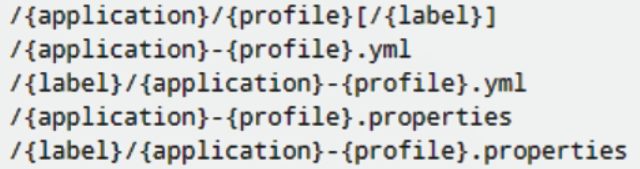
拉取配置
1.创建模块spring-cloud-message-service-config-8006:
2.导入依赖:
<dependencies>

        <!--引入公共依赖包 start-->

        <dependency>

            <groupId>com.progor.study</groupId>

            <artifactId>spring-cloud-common-data</artifactId>

            <version>1.0-SNAPSHOT</version>

        </dependency>

        <!--引入公共依赖包 end-->

        <!--引入web开发相关包 start-->

        <!--web 模块-->

        <dependency>

            <groupId>org.springframework.boot</groupId>

            <artifactId>spring-boot-starter-web</artifactId>

        </dependency>

        <!--jettey作为默认的服务器-->

        <dependency>

            <groupId>org.springframework.boot</groupId>

            <artifactId>spring-boot-starter-jetty</artifactId>

        </dependency>

        <dependency>

            <groupId>ch.qos.logback</groupId>

            <artifactId>logback-core</artifactId>

        </dependency>

        <!--引入web开发相关包 end-->

        <!--spring -cloud -config 场景包 -->

        <dependency>

            <groupId>org.springframework.cloud</groupId>

            <artifactId>spring-cloud-starter-config</artifactId>

        </dependency>

    </dependencies>
3.在模块spring-cloud-message-service-config-8006的resources下创建bootstrap.yml:
bootstrap.yml是一个优先级很高的配置文件,反正优先于application.yml,所以它可以用来拉取配置文件。
spring:

  cloud:

    config:

      name: spring-cloud-message-config-11000 #需要从github上读取的资源名称,注意没有yml后缀名

      profile: test   #本次访问的配置项

      label: master

      uri: http://localhost:11000
Spring Cloud认知学习(三):网关Zuul、config使用的更多相关文章
- spring cloud 2.x版本 Zuul路由网关教程
前言 本文采用Spring cloud本文为2.1.8RELEASE,version=Greenwich.SR3 本文基于前两篇文章eureka-server.eureka-client.eureka ...
- Spring Cloud 系列之 Netflix Zuul 服务网关
什么是 Zuul Zuul 是从设备和网站到应用程序后端的所有请求的前门.作为边缘服务应用程序,Zuul 旨在实现动态路由,监视,弹性和安全性.Zuul 包含了对请求的路由和过滤两个最主要的功能. Z ...
- Spring Cloud(三):服务提供与调用 Eureka【Finchley 版】
Spring Cloud(三):服务提供与调用 Eureka[Finchley 版] 发表于 2018-04-15 | 更新于 2018-05-07 | 上一篇文章我们介绍了 Eureka 服务 ...
- Spring Cloud (12) 服务网关-基础
通过前几篇介绍,已经可以构建一个简单的微服务架构了,如下图: 通过eureka实现服务注册中心以及服务注册发现,通过ribbon或feign实现服务的消费以及负载均衡,通过spring cloud c ...
- spring cloud: 使用consul来替换config server
上一篇提到了,eureka 2.x官方停止更新后,可以用consul来替代,如果采用consul的话,其实config server也没必要继续使用了,consul自带kv存储,完全可以取代confi ...
- Spring Cloud (13) 服务网关-路由配置
传统路由配置 所谓传统路由配置方式就是在不依赖于服务发现机制情况下,通过在配置文件中具体制定每个路由表达式与服务实例的映射关系来实现API网关对外部请求的路由.没有Eureka服务治理框架帮助的时候, ...
- Spring Cloud Gateway 服务网关快速上手
Spring Cloud Gateway 服务网关 API 主流网关有NGINX.ZUUL.Spring Cloud Gateway.Linkerd等:Spring Cloud Gateway构建于 ...
- 玩转Spring Cloud之API网关(zuul)
最近因为工作原因,一直没有空写文章,所以都是边忙项目,边利用空闲时间,周末时间学习总结,最终在下班回家后加班加点写完本篇文章,若有不足之处,还请谅解,谢谢! 本文内容导航: 一.网关的作用 二.网关与 ...
- 最全面的改造Zuul网关为Spring Cloud Gateway(包含Zuul核心实现和Spring Cloud Gateway核心实现)
前言: 最近开发了Zuul网关的实现和Spring Cloud Gateway实现,对比Spring Cloud Gateway发现后者性能好支持场景也丰富.在高并发或者复杂的分布式下,后者限流和自定 ...
- 【Spring Cloud学习之四】Zuul网关
环境 eclipse 4.7 jdk 1.8 Spring Boot 1.5.2 Spring Cloud 1.2 一.接口网关接口网关:拦截所有的请求,交由接口网关,然后接口网关进行转发,类似ngi ...
随机推荐
- 循环中拼接String不同方法性能耗时对比
对比背景 Java中最常用的拼接字符串方法就是 + 或 +=,使用上简单方便.但如果拼接数量比较大,例如在循环中拼接字符串,可能会有性能问题: 测试数据 循环100000次进行String拼接,对比+ ...
- 4G模组软件指南 | json数据处理深度学习篇
针对4G模组软件的json数据处理,我已做出如下示例分享给大家,以4G模组Air780E为例: 1.JSON介绍 JSON(JavaScriptObjectNotation)是一种轻量级的数据交换格式 ...
- 安装cnpm时报错
报错:npm WARN deprecated socks@1.1.10: If using 2.x branch, please upgrade to at least 2.1.6 to avoid ...
- nginx配置之Gzip压缩
Nginx开启Gzip压缩功能, 可以使网站的css.js .xml.html 文件在传输时进行压缩,提高访问速度, 进而优化Nginx性能! Web网站上的图片,视频等其它多媒体文件以及大文件,因 ...
- PythonDay5Advance
PythonDay5Advance 函数和模块 main函数要有,用户自己选择要做的功能,根据选择调用不同的函数 用户注册的信息需要使用一个文件存储,登录需要判断用户是否存在,密码是否正确 注册的时候 ...
- 题解:AT_abc382_c [ABC382C] Kaiten Sushi
题目传送门 思路 首先看一下数据范围. \(1 \leq N, M \leq 2 \times 10^5\) \(1 \leq A_i, B_i \leq 2 \times 10^5\) 这么大的数据 ...
- 在Python工具箱中,创建对应子工具集
目录 问题描述 实现方法 问题描述 在Pro中,新建自定义工具箱后,直接通过操作可以添加工具集. 但是新建python工具箱后,却没有新建的操作.因为python工具箱的对象定义,都是在脚本中定义的, ...
- OS之《内存管理》
程序装入方式 绝对装入:程序逻辑地址和物理地址是完全对应的.不现实 可重定位装入:装入的时候重新 计算内存地址.程序中的实际地址加上程序载入的起始地址:但是解决不了进程挂起 后重新唤醒的问题.唤醒的后 ...
- 【报错解决】【Vue】与后端交互时,http与https跨域问题
问题 xhr.js:220 Mixed Content: The page at 'https://xxx' was loaded over HTTPS, but requested an insec ...
- File and Code template
/** * @author muzhi.zhong * @author <a href="mailto:muzhi.z@xxx.cn">muzhi.z</a> ...