
shell脚本中的逻辑判断
shell脚本中也可以实现逻辑判断。
案例4:shell脚本中的逻辑判断
如果你学过C或者其他语言,相信你不会对if 陌生,在shell脚本中我们同样可以使用if逻辑判断。在shell中if判断的基本语法为:
1)不带else
if 判断语句; then
command
fi
#! /bin/bash

## author:Xiong Xuehao

## Use if in this script.

read -p "Please input a number: " a

if ((a<60));then

  echo "you didn't pass this test"

fi
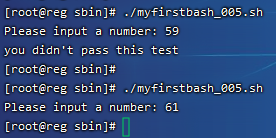
在if1.sh中出现了 ((a<60))这样的形式,这是shell脚本中特有的格式,用一个小括号或者不用都会报错,请记住这个格式,即可。执行结果为:
2)带有else
if 判断语句 ; then
command
else
command
fi
#! /bin/bash

## author:Xiong Xuehao

## Use if in this script.

read -p "Please input a number: " a

if ((a<60));then

  echo "you didn't pass this test"

else

  echo "you pass this test"

fi
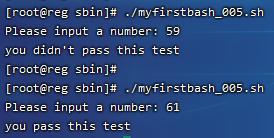
执行结果为:
3)带有elif
if 判断语句一 ; then
command
elif 判断语句二; then
command
else
command
fi
#! /bin/bash

## author:Xiong Xuehao

## Use if in this script.

read -p "Please input a number: " a

if ((a<60));then

  echo "you didn't pass this test"

elif ((a>=60)) && ((a<85));then

  echo "you pass this test"

else

  echo "Verry Good!"

fi
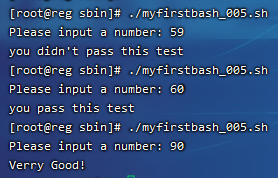
这里的 && 表示“并且”的意思,当然你也可以使用 || 表示“或者”,执行结果:
以上只是简单的介绍了if语句的结构。在判断数值大小除了可以用”(( ))”的形式外,还可以使用”[ ]” 注意方括号里面需要有空格。但是就不能使用>, < , = 这样的符号了,要使用 -lt (小于),-gt (大于),-le (小于等于),-ge (大于等于),-eq (等于),-ne (不等于)。
#! /bin/bash

## author:Xiong Xuehao

## Use if in this script.

read -p "Please input a number: " a

if [ $a -lt 60 ];then

  echo "$a lt than 60";

elif [ $a -ge 60 ] && [ $a -lt 85 ];then

  echo "you pass this test"

elif [ $a -eq 100 ];then

  echo "$a eq than 100. Very Good!"

elif [ $a -ne 0 ];then

  echo "$a ne than 100. Your Input error!"

elif [ $a -gt 100 ];then

  echo "$a gt than 100. Your Input error!"

else

  echo "Your Input error!"

fi
运行结果如图:

案例5:shell脚本中判断档案属性
shell 脚本中if还经常判断关于档案属性,比如判断是普通文件还是目录,判断文件是否有读写执行权限等。常用的也就几个选项:
-e :判断文件或目录是否存在
-d :判断是不是目录,并是否存在
-f :判断是否是普通文件,并存在
-r :判断文档是否有读权限
-w :判断是否有写权限
-x :判断是否可执行
使用if判断时,具体格式为: if [ -e filename ] ; then
#! /bin/bash

## author:Xiong Xuehao

## File properties.

read -p "Please input a file or directory: " a

###判断文件或目录是否存在

if [ -e $a ];then

  echo "$a The file or directory already exists."

else

  echo "$a The file or directory does not exist!"

fi

###判断文件或目录

if [ -d $a ];then

  echo "$a The path is a directory and already exists."

elif [ -f $a ];then

  echo "$a The path is a file and already exists."

else

  echo "$a I don't know!"

fi

###判断权限

if [ -r $a ];then

  echo "$a The document has read permission."

else

  echo "$a The document does not have read permission!"

fi

if [ -w $a ];then

  echo "$a The document has write permission."

else

  echo "$a The document does not have write permission!"

fi

if [ -x $a ];then

  echo "$a The document has execution permission."

else

  echo "$a The document does not have execution permission!"

fi
执行如图:

案例6:shell脚本中用case逻辑判断
在shell 脚本中,除了用if来判断逻辑外,还有一种常用的方式,那就是case了。具体格式为:
case 变量 in
value1)
command
;;
value2)
command
;;
value3)
command
;;
*)
command
;;
esac
上面的结构中,不限制value的个数,*则代表除了上面的value外的其他值。下面笔者写一个判断输入数值是奇数或者偶数的脚本。
#! /bin/bash

## author:Xiong Xuehao

## Use case in this script.

read -p "Please input a number: " n

###判断奇数或者偶数

a=$[$n % 2]

case $a in

1)

  echo "The remainder is $a. $n The num is odd."

  ;;

0)

  echo "The remainder is $a. $n The num is even."

  ;;

esac
输入任意一个自然数,除以2得余数 $a 的值或为1或为0,执行结果为:

case脚本常用于编写系统服务的启动脚本,例如/etc/init.d/iptables中就用到了,不妨去查看一下。
shell脚本中的逻辑判断的更多相关文章
- Shell脚本中的逻辑判断、文件目录属性判断、if的特殊用法、case判断
1.Shell脚本中的逻辑判断 格式1:if 条件 ; then 语句; fi格式2:if 条件; then 语句; else 语句; fi格式3:if …; then … ;elif …; then ...
- shell脚本中的逻辑判断、文件目录属性判断、if特殊用法、case判断
7月12日任务 20.5 shell脚本中的逻辑判断20.6 文件目录属性判断20.7 if特殊用法20.8/20.9 case判断 20.5 shell脚本中的逻辑判断 逻辑判断在shell中随处可 ...
- Linux centosVMware shell脚本中的逻辑判断、文件目录属性判断、if特殊用法、case判断
一.shell脚本中的逻辑判断 格式1:if 条件 ; then 语句; fi 格式2:if 条件; then 语句; else 语句; fi 格式3:if …; then … ;elif …; th ...
- shell脚本中的逻辑判断 文件目录属性判断 if特殊用法 case判断
case判断 • 格式 case 变量名 in value1) command ...
- shell脚本中常见的一些特殊符号和作用详解
这篇文章主要介绍了shell脚本中常见的一些特殊符号和它的作用详解,总结的很简洁,容易看懂,需要的朋友可以参考下 在编写Shell脚本时,我们需要会用到各种各样的特殊符号,通过这些特殊符号可以使我 ...
- shell脚本中的整数测试
shell脚本中的整数测试 author:headsen chen 2017-10-17 13:58:12 个人原创,转载请注明作者,出处,否则依法追究法律责任 1,test用法:tes ...
- shell脚本介绍、shell脚本结构和执行、date命令用法、shell脚本中的变量
7月11日任务 20.1 shell脚本介绍20.2 shell脚本结构和执行20.3 date命令用法20.4 shell脚本中的变量 20.1 shell脚本介绍 1.shell脚本语言是linu ...
- Linux centosVMware shell脚本介绍、shell脚本结构和执行、date命令用法、shell脚本中的变量
一. shell脚本介绍 shell是一种脚本语言 aming_linux blog.lishiming.net 可以使用逻辑判断.循环等语法 可以自定义函数 shell是系统命令的集合 shell脚 ...
- 详解Linux交互式shell脚本中创建对话框实例教程_linux服务器
本教程我们通过实现来讲讲Linux交互式shell脚本中创建各种各样对话框,对话框在Linux中可以友好的提示操作者,感兴趣的朋友可以参考学习一下. 当你在终端环境下安装新的软件时,你可以经常看到信息 ...
- shell脚本中的反引号使用 `
反引号是~的英文切换 在shell脚本中,反引号允许将shell命令的输出赋值给变量. test=`date` 这样shell会执行反引号中的命令.并将执行的结果赋值给变量tests.
随机推荐
- Mac终端zsh设置快捷键的两种方法
vim ~/.zshrc # 第一种 alias test_1='command' # 第二种 function test_2() { command }
- Quartz集群增强版_01.集群及缺火处理(ClusterMisfireHandler)
Quartz集群增强版_01.集群及缺火处理(ClusterMisfireHandler) 转载请著名出处 https://www.cnblogs.com/funnyzpc/p/18542452 主要 ...
- Air780E软件指南:UDP应用示例
一.UDP概述 UDP(用户数据报协议,UserDatagramProtocol)是一种无连接的.不可靠的传输层协议,主要用于实现网络中的快速通讯.以下是UDP通讯的主要特点: 1.1 无连接通讯: ...
- 低功耗4G模组:tcs3472颜色传感器示例
今天我们学习合宙低功耗4G模组Air780EP的LuatOS开发tcs3472示例,文末[阅读原文]获取最新资料1 一.简介 tcs3472颜色传感器能够读取照射到的物体的RGB三种数值,从而识别 ...
- 2023NOIP A层联测20 T3 点餐
2023NOIP A层联测20 点餐 题目很好,可惜考试没想到. 思路 可以按照 \(b\) 从小到大排序,固定选择个数 \(k\),枚举选择的盘子 \(x\) 的 \(b\) 最大,最优解肯定是贪心 ...
- QT6.8 编译 MSVC2022-64位MySQL驱动
QT6.8没有编译MySql驱动,也没有.pro的项目文件,只能自己想办法编译,网上找了很多方法,终于找到了可以成功编译的方法,下面将我的编译过程详细记录如下: [声明:本文为原创,未经允许,不得转载 ...
- java——棋牌类游戏五子棋(webwzq1.0)之三(Msg)
package msg; import java.io.ObjectInputStream; import java.net.DatagramSocket; /******************** ...
- 进程管理工具之PM2
Github地址 https://github.com/Unitech/pm2 官方文档 http://pm2.keymetrics.io/docs/usage/quick-start/ npm安装 ...
- Java 动态设置 JVM 参数的方法
Java虚拟机(JVM)在运行Java应用时,其性能调优和资源管理至关重要.虽然许多JVM参数在启动时通过命令行设置,但在应用运行期间动态调整某些参数也是可行的.通过动态设置JVM参数,开发者可以更有 ...
- DA14531芯片固件逆向系列(3)- BLE收包流程分析及漏洞挖掘思路分享
文章首发于 https://xz.aliyun.com/t/9194 前言 本文介绍定位和分析DA14531收包流程的方法,并提供简单的BLE协议漏洞挖掘思路. 定位收包函数 通过查看DA14531的 ...