
NetCore+Web客户端实现gRPC实时推送
之前出过websocket推送,sse推送,grpc的推送应该更具性价比,虽然前端要求复杂了一点点。下面快速的一步一步完成一个netcore服务端+web客户端的推送。
后端项目结构
GrpcRealtimePush/
├── Services/
│ └── ChatService.cs # gRPC服务实现
├── Protos/
│ └── chat.proto # Protocol Buffers定义
├── Program.cs # 服务启动配置
├── GrpcRealtimePush.csproj # 项目文件
└── appsettings.json # 配置文件
1.安装必要的grpc包
<Project Sdk="Microsoft.NET.Sdk.Web">

  <PropertyGroup>

    <TargetFramework>net9.0</TargetFramework>

    <Nullable>enable</Nullable>

    <ImplicitUsings>enable</ImplicitUsings>

  </PropertyGroup>

  <ItemGroup>

    <Protobuf Include="Protos\chat.proto" GrpcServices="Server" />

  </ItemGroup>

  <ItemGroup>

    <PackageReference Include="Grpc.AspNetCore" Version="2.64.0" />

    <PackageReference Include="Grpc.AspNetCore.Web" Version="2.64.0" />

  </ItemGroup>

</Project>
2.创建好proto文件
syntax = "proto3";

package chat;

option csharp_namespace = "GrpcRealtimePush";

// 服务定义

service ChatService {

  // 服务端流式推送方法

  rpc StartRealtimePush(RealtimePushRequest) returns (stream RealtimePushResponse);

}

// 请求消息

message RealtimePushRequest {

  string client_id = 1;    // 客户端ID

  int64 timestamp = 2;      // 时间戳

}

// 响应消息

message RealtimePushResponse {

  string data = 1;          // 推送数据

  int64 timestamp = 2;      // 时间戳

  string data_type = 3;     // 数据类型

}
proto文件定义就这样:
- **`service ChatService`**: 定义gRPC服务
- **`rpc StartRealtimePush`**: 服务端流式方法,返回 `stream`表示持续推送
- **`message`**: 定义请求和响应的数据结构
- **字段编号**: 1, 2, 3等是字段的唯一标识,用于序列化
3.实现上面的方法
using Grpc.Core;

namespace GrpcRealtimePush.Services;

public class ChatService : GrpcRealtimePush.ChatService.ChatServiceBase

{

    private readonly ILogger<ChatService> _logger;

    public ChatService(ILogger<ChatService> logger)

    {

        _logger = logger;

    }

    public override async Task StartRealtimePush(RealtimePushRequest request,

        IServerStreamWriter<RealtimePushResponse> responseStream, ServerCallContext context)

    {

        _logger.LogInformation(" 实时推送已启动! 客户端: {ClientId}", request.ClientId);

        try

        {

            // 开始连续数据推送

            var counter = 1;

            var random = new Random();

            var dataTypes = new[] { "系统状态", "用户活动", "数据更新", "通知消息", "性能指标" };

            _logger.LogInformation(" 开始连续数据推送循环...");

            while (!context.CancellationToken.IsCancellationRequested && counter <= 100)

            {

                // 模拟不同类型的实时数据

                var dataType = dataTypes[random.Next(dataTypes.Length)];

                var value = random.Next(1, 1000);

                var timestamp = DateTime.UtcNow;

                var response = new RealtimePushResponse

                {

                    Data = $"#{counter:D4} - 数值: {value} | 时间: {timestamp:HH:mm:ss.fff}",

                    Timestamp = DateTimeOffset.UtcNow.ToUnixTimeSeconds(),

                    DataType = dataType

                };

                await responseStream.WriteAsync(response);

                _logger.LogInformation(" 推送数据 #{Counter}: [{DataType}] = {Value} at {Time}",

                    counter, dataType, value, timestamp.ToString("HH:mm:ss.fff"));

                counter++;

                // 等待2秒后发送下一条数据

                await Task.Delay(2000, context.CancellationToken);

            }

            // 发送完成消息

            await responseStream.WriteAsync(new RealtimePushResponse

            {

                Data = "实时推送测试完成!",

                Timestamp = DateTimeOffset.UtcNow.ToUnixTimeSeconds(),

                DataType = "系统消息"

            });

        }

        catch (OperationCanceledException)

        {

            _logger.LogInformation("实时推送会话已取消,客户端: {ClientId}", request.ClientId);

        }

        catch (Exception ex)

        {

            _logger.LogError(ex, "实时推送会话出错: {Error}", ex.Message);

            // 尝试向客户端发送错误消息

            try

            {

                await responseStream.WriteAsync(new RealtimePushResponse

                {

                    Data = $"服务器错误: {ex.Message}",

                    Timestamp = DateTimeOffset.UtcNow.ToUnixTimeSeconds(),

                    DataType = "错误消息"

                });

            }

            catch (Exception sendError)

            {

                _logger.LogError(sendError, "发送错误消息失败");

            }

        }

        _logger.LogInformation("实时推送会话结束,客户端: {ClientId}", request.ClientId);

    }

}
4.Program文件
using GrpcRealtimePush.Services;

var builder = WebApplication.CreateBuilder(args);

// 添加gRPC服务

builder.Services.AddGrpc();

// 配置CORS策略,支持gRPC-Web

builder.Services.AddCors(options =>

{

    options.AddPolicy("AllowAll", policy =>

    {

        policy.AllowAnyOrigin()

              .AllowAnyMethod()

              .AllowAnyHeader()

              .WithExposedHeaders("Grpc-Status", "Grpc-Message", "Grpc-Encoding", "Grpc-Accept-Encoding", "Content-Type");

    });

});

var app = builder.Build();

// 配置HTTP请求管道

// 启用CORS

app.UseCors("AllowAll");

// 启用gRPC-Web中间件

app.UseGrpcWeb();

// 配置HTTPS重定向(gRPC-Web需要)

app.UseHttpsRedirection();

// 映射gRPC服务并启用gRPC-Web支持

app.MapGrpcService<ChatService>().EnableGrpcWeb();

app.MapGet("/", () => "Communication with gRPC endpoints must be made through a gRPC client. To learn how to create a client, visit: https://go.microsoft.com/fwlink/?linkid=2086909");

app.Run();
以上代码对于后端来说应该轻车熟路,后端服务就这样起来了。
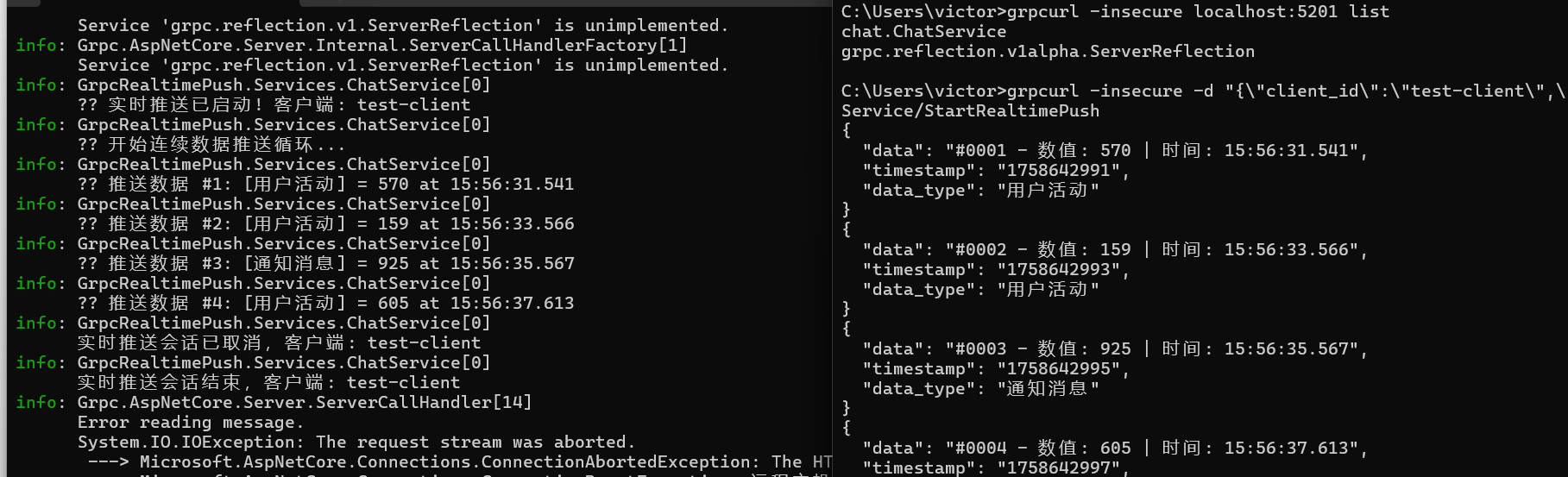
先测试一下后端服务是否正常,我这里有go环境,直接安装grpcurl工具。
# 安装grpcurl工具

go install github.com/fullstorydev/grpcurl/cmd/grpcurl@latest

# 测试服务

grpcurl -insecure localhost:5201 list
grpcurl -insecure -d "{\"client_id\":\"test-client\",\"timestamp\":1234567890}" localhost:5201 chat.ChatService/StartRealtimePush
下面就是完成前端代码了,这里使用js+html。
前端的结构如下:
client/
├── generated/ # 生成的代码
│ ├── chat_pb_browser.js # Protocol Buffers消息类
│ └── chat_grpc_web_pb_browser.js # gRPC服务客户端
├── grpc-web-shim.js # gRPC-Web兼容层
├── client.js # 主要业务逻辑
├── index.html # 用户界面
前端准备工作安装protoc和插件。protoc把后端的proto文件转成两个js文件,插件就是grpc链接需要的。
# 安装Protocol Buffers编译器

# Windows: 下载 https://github.com/protocolbuffers/protobuf/releases

# macOS: brew install protobuf

# Linux: apt-get install protobuf-compiler

# 验证安装

protoc --version

# 安装gRPC-Web插件

npm install -g grpc-web
核心转换代码脚本如下:
protoc -I=GrpcRealtimePush\Protos `

  --js_out=import_style=commonjs:client\generated `

  --grpc-web_out=import_style=commonjs,mode=grpcwebtext:client\generated `

  GrpcRealtimePush\Protos\chat.proto
执行了protoc后会生成下面2个js文件
1. `chat_pb_browser.js`
// Browser-compatible version of chat_pb.js

(function () {

    'use strict';

    // 确保命名空间存在

    if (!window.proto) window.proto = {};

    if (!window.proto.chat) window.proto.chat = {};

    // RealtimePushRequest类

    window.proto.chat.RealtimePushRequest = function (opt_data) {

        jspb.Message.initialize(this, opt_data, 0, -1, null, null);

    };

    // 继承jspb.Message

    if (jspb.Message) {

        window.proto.chat.RealtimePushRequest.prototype = Object.create(jspb.Message.prototype);

        window.proto.chat.RealtimePushRequest.prototype.constructor = window.proto.chat.RealtimePushRequest;

    }

    // RealtimePushRequest方法

    window.proto.chat.RealtimePushRequest.prototype.getClientId = function () {

        return jspb.Message.getFieldWithDefault(this, 1, "");

    };

    window.proto.chat.RealtimePushRequest.prototype.setClientId = function (value) {

        return jspb.Message.setProto3StringField(this, 1, value);

    };

    window.proto.chat.RealtimePushRequest.prototype.getTimestamp = function () {

        return jspb.Message.getFieldWithDefault(this, 2, 0);

    };

    window.proto.chat.RealtimePushRequest.prototype.setTimestamp = function (value) {

        return jspb.Message.setProto3IntField(this, 2, value);

    };

    // 序列化方法

    window.proto.chat.RealtimePushRequest.prototype.serializeBinary = function () {

        const writer = new jspb.BinaryWriter();

        window.proto.chat.RealtimePushRequest.serializeBinaryToWriter(this, writer);

        return writer.getResultBuffer();

    };

    window.proto.chat.RealtimePushRequest.serializeBinaryToWriter = function (message, writer) {

        const f = message.getClientId();

        if (f.length > 0) {

            writer.writeString(1, f);

        }

        const f2 = message.getTimestamp();

        if (f2 !== 0) {

            writer.writeInt64(2, f2);

        }

    };

    window.proto.chat.RealtimePushRequest.deserializeBinary = function (bytes) {

        const reader = new jspb.BinaryReader(bytes);

        const msg = new window.proto.chat.RealtimePushRequest();

        return window.proto.chat.RealtimePushRequest.deserializeBinaryFromReader(msg, reader);

    };

    window.proto.chat.RealtimePushRequest.deserializeBinaryFromReader = function (msg, reader) {

        while (reader.nextField()) {

            if (reader.isEndGroup()) {

                break;

            }

            const field = reader.getFieldNumber();

            switch (field) {

                case 1:

                    const value = reader.readString();

                    msg.setClientId(value);

                    break;

                case 2:

                    const value2 = reader.readInt64();

                    msg.setTimestamp(value2);

                    break;

                default:

                    reader.skipField();

                    break;

            }

        }

        return msg;

    };

    // RealtimePushResponse类

    window.proto.chat.RealtimePushResponse = function (opt_data) {

        jspb.Message.initialize(this, opt_data, 0, -1, null, null);

    };

    // 继承jspb.Message

    if (jspb.Message) {

        window.proto.chat.RealtimePushResponse.prototype = Object.create(jspb.Message.prototype);

        window.proto.chat.RealtimePushResponse.prototype.constructor = window.proto.chat.RealtimePushResponse;

    }

    // RealtimePushResponse方法

    window.proto.chat.RealtimePushResponse.prototype.getData = function () {

        return jspb.Message.getFieldWithDefault(this, 1, "");

    };

    window.proto.chat.RealtimePushResponse.prototype.setData = function (value) {

        return jspb.Message.setProto3StringField(this, 1, value);

    };

    window.proto.chat.RealtimePushResponse.prototype.getTimestamp = function () {

        return jspb.Message.getFieldWithDefault(this, 2, 0);

    };

    window.proto.chat.RealtimePushResponse.prototype.setTimestamp = function (value) {

        return jspb.Message.setProto3IntField(this, 2, value);

    };

    window.proto.chat.RealtimePushResponse.prototype.getDataType = function () {

        return jspb.Message.getFieldWithDefault(this, 3, "");

    };

    window.proto.chat.RealtimePushResponse.prototype.setDataType = function (value) {

        return jspb.Message.setProto3StringField(this, 3, value);

    };

    // 序列化方法

    window.proto.chat.RealtimePushResponse.prototype.serializeBinary = function () {

        const writer = new jspb.BinaryWriter();

        window.proto.chat.RealtimePushResponse.serializeBinaryToWriter(this, writer);

        return writer.getResultBuffer();

    };

    window.proto.chat.RealtimePushResponse.serializeBinaryToWriter = function (message, writer) {

        const f = message.getData();

        if (f.length > 0) {

            writer.writeString(1, f);

        }

        const f2 = message.getTimestamp();

        if (f2 !== 0) {

            writer.writeInt64(2, f2);

        }

        const f3 = message.getDataType();

        if (f3.length > 0) {

            writer.writeString(3, f3);

        }

    };

    window.proto.chat.RealtimePushResponse.deserializeBinary = function (bytes) {

        const reader = new jspb.BinaryReader(bytes);

        const msg = new window.proto.chat.RealtimePushResponse();

        return window.proto.chat.RealtimePushResponse.deserializeBinaryFromReader(msg, reader);

    };

    window.proto.chat.RealtimePushResponse.deserializeBinaryFromReader = function (msg, reader) {

        while (reader.nextField()) {

            if (reader.isEndGroup()) {

                break;

            }

            const field = reader.getFieldNumber();

            switch (field) {

                case 1:

                    const value = reader.readString();

                    msg.setData(value);

                    break;

                case 2:

                    const value2 = reader.readInt64();

                    msg.setTimestamp(value2);

                    break;

                case 3:

                    const value3 = reader.readString();

                    msg.setDataType(value3);

                    break;

                default:

                    reader.skipField();

                    break;

            }

        }

        return msg;

    };

    console.log('chat_pb_browser.js loaded successfully');

})();
2. `chat_grpc_web_pb_browser.js`
// Browser-compatible version of chat_grpc_web_pb.js

(function () {

    'use strict';

    // 确保命名空间存在

    if (!window.proto) window.proto = {};

    if (!window.proto.chat) window.proto.chat = {};

    // ChatServiceClient类

    window.proto.chat.ChatServiceClient = function (hostname, credentials, options) {

        if (!options) options = {};

        options['format'] = options['format'] || 'text';

        // 使用gRPC-Web基类

        window.grpc.web.GrpcWebClientBase.call(this, options);

        this.hostname_ = hostname;

        this.credentials_ = credentials;

        this.options_ = options;

    };

    // 继承基类

    if (window.grpc && window.grpc.web && window.grpc.web.GrpcWebClientBase) {

        window.proto.chat.ChatServiceClient.prototype = Object.create(window.grpc.web.GrpcWebClientBase.prototype);

        window.proto.chat.ChatServiceClient.prototype.constructor = window.proto.chat.ChatServiceClient;

    }

    // 方法描述符

    const methodDescriptor_StartRealtimePush = new window.grpc.web.MethodDescriptor(

        '/chat.ChatService/StartRealtimePush',

        window.grpc.web.MethodType.SERVER_STREAMING,

        window.proto.chat.RealtimePushRequest,

        window.proto.chat.RealtimePushResponse,

        function (request) {

            return request.serializeBinary();

        },

        function (bytes) {

            return window.proto.chat.RealtimePushResponse.deserializeBinary(bytes);

        }

    );

    // StartRealtimePush方法

    window.proto.chat.ChatServiceClient.prototype.startRealtimePush = function (request, metadata) {

        const url = this.hostname_ + '/chat.ChatService/StartRealtimePush';

        return this.serverStreaming(url, request, metadata || {}, methodDescriptor_StartRealtimePush);

    };

    console.log('chat_grpc_web_pb_browser.js loaded successfully');

})();
下面就需要创建连接层代码,该代码手动创建,有需要可以拷贝更改复用。
`grpc-web-shim.js`
// gRPC-Web compatibility shim
(function() {
'use strict'; // 创建grpc命名空间
if (typeof window.grpc === 'undefined') {
window.grpc = {};
} if (typeof window.grpc.web === 'undefined') {
window.grpc.web = {};
} // 方法类型枚举
window.grpc.web.MethodType = {
UNARY: 'unary',
SERVER_STREAMING: 'server_streaming',
CLIENT_STREAMING: 'client_streaming',
BIDIRECTIONAL_STREAMING: 'bidirectional_streaming'
}; // 方法描述符
window.grpc.web.MethodDescriptor = function(path, methodType, requestType, responseType, requestSerializeFn, responseDeserializeFn) {
this.path = path;
this.methodType = methodType;
this.requestType = requestType;
this.responseType = responseType;
this.requestSerializeFn = requestSerializeFn;
this.responseDeserializeFn = responseDeserializeFn;
}; // 基础客户端类
window.grpc.web.GrpcWebClientBase = function(options) {
this.options = options || {};
this.format = this.options.format || 'text';
}; // 服务端流式方法
window.grpc.web.GrpcWebClientBase.prototype.serverStreaming = function(url, request, metadata, methodDescriptor) {
const self = this; // 创建简单的事件发射器
const stream = {
listeners: {}, on: function(event, callback) {
if (!this.listeners[event]) {
this.listeners[event] = [];
}
this.listeners[event].push(callback);
}, emit: function(event, data) {
if (this.listeners[event]) {
this.listeners[event].forEach(callback => callback(data));
}
}
}; try {
// 序列化请求
const serializedRequest = methodDescriptor.requestSerializeFn(request); // 创建gRPC-Web帧
const frameHeader = new Uint8Array(5);
frameHeader[0] = 0; // 压缩标志 const messageLength = serializedRequest.length;
frameHeader[1] = (messageLength >>> 24) & 0xFF;
frameHeader[2] = (messageLength >>> 16) & 0xFF;
frameHeader[3] = (messageLength >>> 8) & 0xFF;
frameHeader[4] = messageLength & 0xFF; const framedMessage = new Uint8Array(5 + messageLength);
framedMessage.set(frameHeader, 0);
framedMessage.set(serializedRequest, 5); const base64Request = btoa(String.fromCharCode.apply(null, framedMessage)); const headers = {
'Content-Type': 'application/grpc-web-text',
'X-Grpc-Web': '1',
'Accept': 'application/grpc-web-text'
}; // 添加元数据
if (metadata) {
Object.keys(metadata).forEach(key => {
if (key.toLowerCase() !== 'content-type') {
headers[key] = metadata[key];
}
});
} const fetchOptions = {
method: 'POST',
headers: headers,
body: base64Request
}; fetch(url, fetchOptions)
.then(response => {
if (!response.ok) {
throw new Error(`HTTP ${response.status}: ${response.statusText}`);
} console.log('开始读取流式响应...'); // 使用ReadableStream读取gRPC-Web流式响应
const reader = response.body.getReader();
const decoder = new TextDecoder();
let buffer = '';
let messageCount = 0; function readStreamChunk() {
return reader.read().then(({ done, value }) => {
if (done) {
console.log(' 流读取完成,总共处理消息:', messageCount);
if (buffer.length > 0) {
console.log(' 处理流结束时的剩余缓冲区');
processStreamBuffer();
}
stream.emit('end');
return;
} // 将新数据添加到缓冲区
const chunk = decoder.decode(value, { stream: true });
buffer += chunk;
console.log(' 收到流数据块:', chunk.length, '字符,缓冲区总计:', buffer.length); // 处理缓冲区中的完整消息
processStreamBuffer(); // 继续读取
return readStreamChunk();
}).catch(error => {
console.error(' 流读取错误:', error);
stream.emit('error', error);
});
} function processStreamBuffer() {
console.log(' 处理缓冲区,长度:', buffer.length); while (buffer.length > 0) {
try {
// 查找完整的base64块
let messageBase64 = buffer; // 检查是否包含trailer标记
const trailerMarkers = ['gAAAA', 'gAAA', 'gAA', 'gA'];
let trailerIndex = -1; for (const marker of trailerMarkers) {
const index = messageBase64.indexOf(marker);
if (index > 0) {
trailerIndex = index;
break;
}
} if (trailerIndex > 0) {
messageBase64 = messageBase64.substring(0, trailerIndex);
console.log(' 在索引处找到trailer:', trailerIndex);
} // 清理base64字符串
const cleanBase64 = messageBase64.replace(/[^A-Za-z0-9+/=]/g, ''); // 确保base64字符串长度是4的倍数
let paddedBase64 = cleanBase64;
const padding = paddedBase64.length % 4;
if (padding > 0) {
paddedBase64 += '='.repeat(4 - padding);
} if (paddedBase64.length === 0) {
console.log(' 清理后base64为空');
buffer = '';
break;
} // 解码base64
const binaryString = atob(paddedBase64);
const responseBytes = new Uint8Array(binaryString.length);
for (let i = 0; i < binaryString.length; i++) {
responseBytes[i] = binaryString.charCodeAt(i);
} console.log(' 解码字节长度:', responseBytes.length); // 检查是否有足够的数据来读取gRPC帧头
if (responseBytes.length >= 5) {
const compressionFlag = responseBytes[0];
const frameMsgLength = (responseBytes[1] << 24) | (responseBytes[2] << 16) | (responseBytes[3] << 8) | responseBytes[4]; console.log(` 流帧: 压缩=${compressionFlag}, 长度=${frameMsgLength}, 总计=${responseBytes.length}`); // 检查是否有完整的消息数据
if (responseBytes.length >= 5 + frameMsgLength && frameMsgLength > 0) {
const messageBytes = responseBytes.slice(5, 5 + frameMsgLength); try {
const response = methodDescriptor.responseDeserializeFn(messageBytes);
messageCount++;
console.log(` 成功解析消息 #${messageCount},发射数据`);
stream.emit('data', response); // 处理完成后,移除已处理的数据
if (trailerIndex > 0) {
buffer = buffer.substring(trailerIndex);
console.log(' 移动缓冲区越过trailer,剩余长度:', buffer.length);
} else {
buffer = '';
console.log(' 完全清空缓冲区');
} } catch (deserializeError) {
console.error(' 反序列化错误:', deserializeError);
buffer = '';
break;
}
} else {
console.log(' 帧数据不完整或长度无效');
if (buffer.length < 200) {
break;
} else {
buffer = '';
break;
}
}
} else {
console.log(' 帧太短,等待更多数据');
break;
} } catch (parseError) {
console.error(' 处理流消息错误:', parseError);
buffer = '';
break;
}
} console.log(' 剩余缓冲区长度:', buffer.length);
} // 开始读取流
return readStreamChunk();
})
.catch(error => {
console.error('流获取错误:', error);
stream.emit('error', error);
}); } catch (error) {
setTimeout(() => stream.emit('error', error), 0);
} return stream;
}; console.log('gRPC-Web shim loaded successfully');
})();
下面就是简单的获取实时数据的业务逻辑了
`client.js`
// gRPC-Web Chat Client Implementation

class RealtimePushClient {

    constructor() {

        this.client = null;

        this.isConnected = false;

        this.serverUrl = 'https://localhost:5201';

        // 流式传输相关属性

        this.currentStream = null;

        this.streamMessageCount = 0;

        this.streamStartTime = null;

        this.initializeUI();

    }

    initializeUI() {

        const streamButton = document.getElementById('streamButton');

        const stopStreamButton = document.getElementById('stopStreamButton');

        const clearButton = document.getElementById('clearButton');

        streamButton.addEventListener('click', () => this.startStreamingChat());

        stopStreamButton.addEventListener('click', () => this.stopStreaming());

        clearButton.addEventListener('click', () => this.clearMessages());

        // 初始化连接状态

        this.updateConnectionStatus(false, '正在初始化...');

        // 页面加载时尝试连接

        this.connect();

    }

    connect() {

        try {

            // 初始化gRPC-Web客户端

            console.log('正在初始化实时推送客户端...');

            // 检查必要的依赖是否可用

            if (typeof jspb === 'undefined') {

                throw new Error('google-protobuf 库未加载');

            }

            if (typeof grpc === 'undefined' || !grpc.web) {

                console.warn('grpc-web 库未完全加载,等待重试...');

                setTimeout(() => this.connect(), 1000);

                return;

            }

            if (typeof proto === 'undefined' || !proto.chat || !proto.chat.ChatServiceClient) {

                throw new Error('gRPC 生成的客户端代码未加载');

            }

            // 创建gRPC-Web客户端

            this.client = new proto.chat.ChatServiceClient(this.serverUrl, null, {

                format: 'text',

                withCredentials: false

            });

            console.log('实时推送客户端创建成功');

            this.updateConnectionStatus(true, '已连接');

            this.addMessage('系统', ' 实时推送客户端已就绪', 'system');

        } catch (error) {

            console.error('连接初始化失败:', error);

            this.updateConnectionStatus(false, '初始化失败');

            this.addMessage('系统', '初始化失败: ' + this.getErrorMessage(error), 'error');

        }

    }

    startStreamingChat() {

        if (!this.isConnected) {

            this.addMessage('系统', '未连接到服务器,无法启动实时推送', 'error');

            return;

        }

        if (!this.client) {

            this.addMessage('系统', 'gRPC客户端未初始化', 'error');

            return;

        }

        // 检查是否已在流式传输

        if (this.currentStream) {

            this.addMessage('系统', '实时推送已在运行中', 'system');

            return;

        }

        try {

            // 创建实时推送请求

            const pushRequest = new proto.chat.RealtimePushRequest();

            pushRequest.setClientId('web-client-' + Date.now());

            pushRequest.setTimestamp(Math.floor(Date.now() / 1000));

            console.log('启动实时推送:', {

                clientId: pushRequest.getClientId(),

                timestamp: pushRequest.getTimestamp()

            });

            // 添加流式传输的元数据

            const metadata = {

                'x-user-agent': 'grpc-web-realtime-client'

            };

            // 开始流式传输

            const stream = this.client.startRealtimePush(pushRequest, metadata);

            if (!stream) {

                throw new Error('无法创建实时推送连接');

            }

            // 存储流引用

            this.currentStream = stream;

            this.streamMessageCount = 0;

            this.streamStartTime = Date.now();

            // 更新UI显示流式传输已激活

            this.updateStreamingUI(true);

            stream.on('data', (response) => {

                if (response && typeof response.getData === 'function') {

                    this.streamMessageCount++;

                    // 添加带有实时数据特殊样式的消息

                    this.addRealtimeMessage(

                        `[${response.getDataType()}] ${response.getData()}`,

                        this.streamMessageCount

                    );

                    // 更新统计信息

                    this.updateStreamStats();

                }

            });

            stream.on('error', (error) => {

                console.error('实时推送错误:', error);

                this.addMessage('系统', '实时推送错误: ' + this.getErrorMessage(error), 'error');

                this.stopStreaming();

            });

            stream.on('end', () => {

                console.log('实时推送结束');

                this.addMessage('系统', '实时推送已结束', 'system');

                this.stopStreaming();

            });

            this.addMessage('系统', ' 实时数据推送已启动', 'system');

        } catch (error) {

            console.error('启动实时推送失败:', error);

            this.addMessage('系统', '启动实时推送失败: ' + this.getErrorMessage(error), 'error');

        }

    }

    // 其他方法实现...

    updateConnectionStatus(connected, message = '') {

        const statusDiv = document.getElementById('status');

        const streamButton = document.getElementById('streamButton');

        this.isConnected = connected;

        if (connected) {

            statusDiv.textContent = '状态: 已连接' + (message ? ' - ' + message : '');

            statusDiv.className = 'status connected';

            streamButton.disabled = false;

        } else {

            statusDiv.textContent = '状态: 未连接' + (message ? ' - ' + message : '');

            statusDiv.className = 'status disconnected';

            streamButton.disabled = true;

        }

    }

    addMessage(sender, content, type) {

        const chatContainer = document.getElementById('chatContainer');

        const messageDiv = document.createElement('div');

        messageDiv.className = `message ${type}`;

        const timestamp = new Date().toLocaleTimeString();

        messageDiv.innerHTML = `

            <div><strong>${sender}</strong> <small>${timestamp}</small></div>

            <div>${content}</div>

        `;

        chatContainer.appendChild(messageDiv);

        chatContainer.scrollTop = chatContainer.scrollHeight;

    }

    addRealtimeMessage(content, count) {

        const chatContainer = document.getElementById('chatContainer');

        const messageDiv = document.createElement('div');

        messageDiv.className = 'message realtime';

        const timestamp = new Date().toLocaleTimeString();

        messageDiv.innerHTML = `

            <div class="realtime-header">

                <strong> 实时数据 #${count}</strong>

                <small>${timestamp}</small>

            </div>

            <div class="realtime-content">${content}</div>

        `;

        chatContainer.appendChild(messageDiv);

        chatContainer.scrollTop = chatContainer.scrollHeight;

        // 保持最后100条消息以防止内存问题

        const messages = chatContainer.querySelectorAll('.message');

        if (messages.length > 100) {

            for (let i = 0; i < messages.length - 100; i++) {

                messages[i].remove();

            }

        }

    }

    getErrorMessage(error) {

        if (!error) return '未知错误';

        // 处理gRPC-Web特定错误

        if (error.code !== undefined) {

            const grpcErrorCodes = {

                0: 'OK',

                1: 'CANCELLED - 操作被取消',

                2: 'UNKNOWN - 未知错误',

                3: 'INVALID_ARGUMENT - 无效参数',

                4: 'DEADLINE_EXCEEDED - 请求超时',

                5: 'NOT_FOUND - 未找到',

                6: 'ALREADY_EXISTS - 已存在',

                7: 'PERMISSION_DENIED - 权限被拒绝',

                8: 'RESOURCE_EXHAUSTED - 资源耗尽',

                9: 'FAILED_PRECONDITION - 前置条件失败',

                10: 'ABORTED - 操作被中止',

                11: 'OUT_OF_RANGE - 超出范围',

                12: 'UNIMPLEMENTED - 未实现',

                13: 'INTERNAL - 内部错误',

                14: 'UNAVAILABLE - 服务不可用',

                15: 'DATA_LOSS - 数据丢失',

                16: 'UNAUTHENTICATED - 未认证'

            };

            const codeDescription = grpcErrorCodes[error.code] || `未知错误代码: ${error.code}`;

            return `gRPC错误: ${codeDescription}`;

        }

        return error.message || error.toString();

    }

}

// 页面加载时初始化实时推送客户端

document.addEventListener('DOMContentLoaded', () => {

    window.realtimePushClient = new RealtimePushClient();

});
最后创建一个html界面
`index.html`
<!DOCTYPE html>

<html lang="zh-CN">

<head>

    <meta charset="UTF-8">

    <meta name="viewport" content="width=device-width, initial-scale=1.0">

    <title>gRPC-Web 实时数据推送</title>

    <style>

        body {

            font-family: Arial, sans-serif;

            max-width: 800px;

            margin: 0 auto;

            padding: 20px;

            background-color: #f5f5f5;

        }

        h1 {

            color: #333;

            text-align: center;

            margin-bottom: 30px;

        }

        .chat-container {

            border: 1px solid #ccc;

            height: 400px;

            overflow-y: auto;

            padding: 10px;

            margin-bottom: 20px;

            background-color: #fff;

            border-radius: 8px;

            box-shadow: 0 2px 4px rgba(0,0,0,0.1);

        }

        .message {

            margin-bottom: 10px;

            padding: 8px;

            border-radius: 5px;

            border-left: 4px solid #ddd;

        }

        .system {

            background-color: #fff3e0;

            border-left-color: #ff9800;

            text-align: center;

            font-style: italic;

        }

        .error {

            background-color: #ffebee;

            border-left-color: #f44336;

            color: #c62828;

            text-align: center;

        }

        .realtime {

            background-color: #e8f5e8;

            border-left-color: #4caf50;

            animation: fadeIn 0.3s ease-in;

        }

        .realtime-header {

            font-weight: bold;

            color: #2e7d32;

            margin-bottom: 5px;

        }

        .realtime-content {

            font-family: 'Courier New', monospace;

            font-size: 0.9em;

            color: #1b5e20;

        }

        .input-container {

            display: flex;

            gap: 10px;

            margin-top: 20px;

        }

        button {

            padding: 12px 24px;

            border: none;

            border-radius: 6px;

            cursor: pointer;

            font-size: 14px;

            font-weight: bold;

            transition: background-color 0.3s;

        }

        #streamButton {

            background-color: #4caf50;

            color: white;

        }

        #streamButton:hover:not(:disabled) {

            background-color: #388e3c;

        }

        #streamButton:disabled {

            background-color: #cccccc;

            cursor: not-allowed;

            opacity: 0.6;

        }

        #stopStreamButton {

            background-color: #f44336;

            color: white;

        }

        #stopStreamButton:hover {

            background-color: #d32f2f;

        }

        #clearButton {

            background-color: #757575;

            color: white;

        }

        #clearButton:hover {

            background-color: #616161;

        }

        .status {

            margin-bottom: 15px;

            padding: 10px;

            border-radius: 6px;

            font-weight: bold;

            text-align: center;

        }

        .connected {

            background-color: #c8e6c9;

            color: #2e7d32;

            border: 1px solid #4caf50;

        }

        .disconnected {

            background-color: #ffcdd2;

            color: #c62828;

            border: 1px solid #f44336;

        }

        .stream-stats {

            background-color: #f3e5f5;

            padding: 10px;

            margin: 10px 0;

            border-radius: 6px;

            font-size: 0.9em;

            color: #4a148c;

            border: 1px solid #9c27b0;

        }

        @keyframes fadeIn {

            from { opacity: 0; transform: translateY(-10px); }

            to { opacity: 1; transform: translateY(0); }

        }

    </style>

</head>

<body>

    <h1> gRPC-Web 实时数据推送系统</h1>

    <div id="status" class="status disconnected">

        状态: 未连接

    </div>

    <div id="chatContainer" class="chat-container">

        <div class="loading">正在初始化客户端...</div>

    </div>

    <div class="input-container">

        <button id="streamButton"> 启动实时推送</button>

        <button id="stopStreamButton" style="display: none;">⏹️ 停止推送</button>

        <button id="clearButton">️ 清空消息</button>

    </div>

    <!-- 引入依赖库 -->

    <script src="https://unpkg.com/google-protobuf@3.21.2/google-protobuf.js"></script>

    <!-- 本地gRPC-Web兼容层 -->

    <script src="./grpc-web-shim.js"></script>

    <!-- 浏览器兼容的gRPC-Web文件 -->

    <script src="./generated/chat_pb_browser.js"></script>

    <script src="./generated/chat_grpc_web_pb_browser.js"></script>

    <!-- 主要客户端脚本 -->

    <script src="./client.js"></script>

</body>

</html>
直接双击index.html,或者通过http.server启动服务就能愉快的接收推送的实时数据了
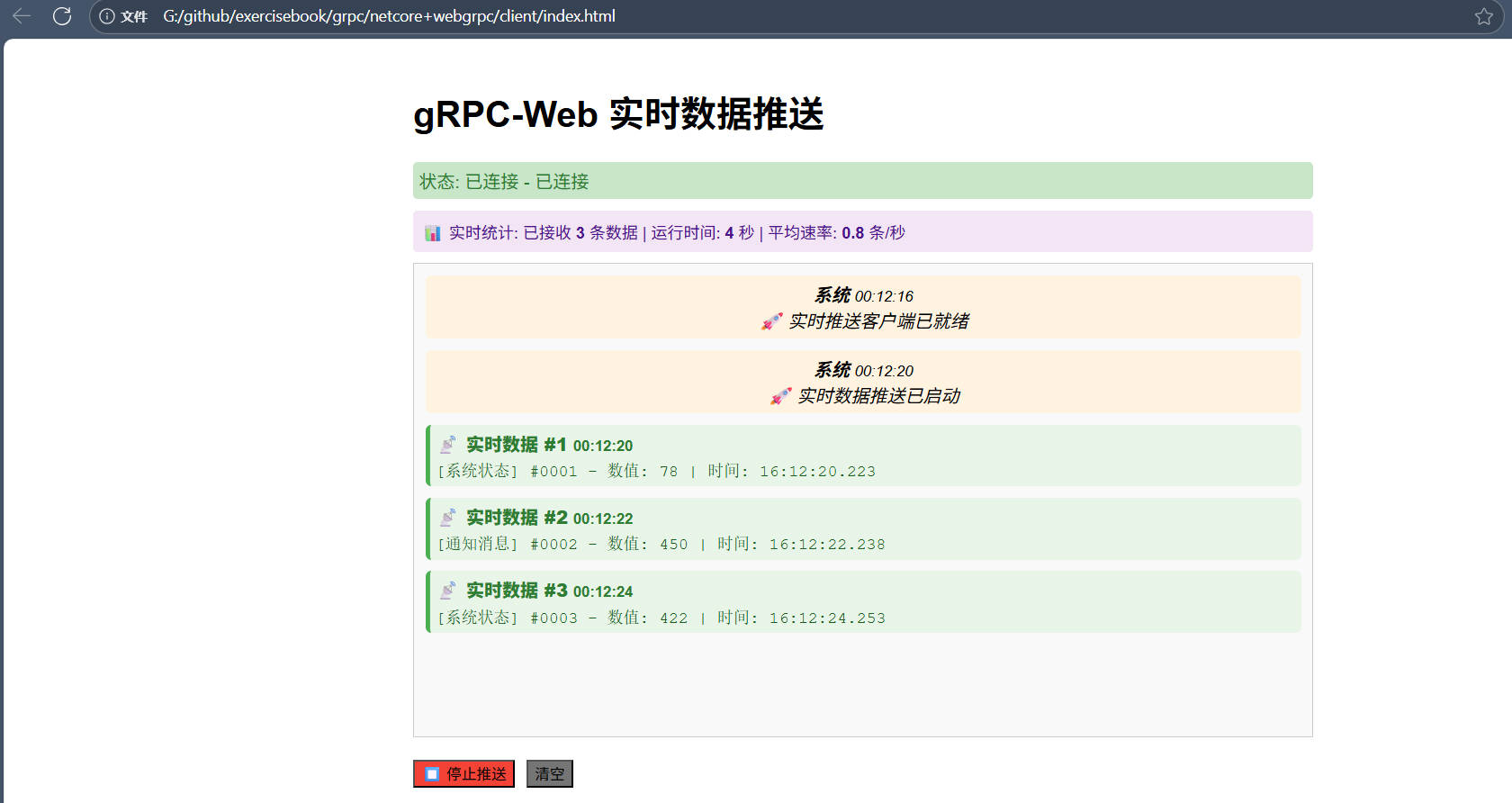
跟其他推送送相比,类型安全,性能高,压缩传输等等,但是前端支持相对没那么友好。
NetCore+Web客户端实现gRPC实时推送的更多相关文章
- Spring MVC 实现web Socket向前端实时推送数据
最近项目中用到了webSocket服务,由后台实时向所有的前端推送消息,前端暂时是不可以发消息给后端的,数据的来源是由具体的设备数据收集器收集起来,然后通过socket推送给后端,后端收到数据后,再将 ...
- GoEasy实现web实时推送过程中的自动补发功能
熟悉GoEasy推送的朋友都知道GoEasy推送实现web实时推送并且能够非常准确稳定地将信息推送到客户端.在后台功能中查看接收信息详情时,可有谁注意到有时候在发送记录里有一个红色的R标志?R又代表的 ...
- WEB 实时推送技术的总结
前言 随着 Web 的发展,用户对于 Web 的实时推送要求也越来越高 ,比如,工业运行监控.Web 在线通讯.即时报价系统.在线游戏等,都需要将后台发生的变化主动地.实时地传送到浏览器端,而不需要用 ...
- 基于HTTP协议之WEB消息实时推送技术原理及实现
很早就想写一些关于网页消息实时推送技术方面的文章,但是由于最近实在忙,没有时间去写文章.本文主要讲解基于 HTTP1.1 协议的 WEB 推送的技术原理及实现.本人曾经在工作的时候也有做过一些用到网页 ...
- 使用Nodejs实现实时推送MySQL数据库最新信息到客户端
下面我们要做的就是把MySQL这边一张表数据的更新实时的推送到客户端,比如MySQL这边表的数据abc变成123了,那使用程序就会把最新的123推送到每一个连接到服务器的客户端.如果服务器的连接的客户 ...
- 【原创】node+express+socket搭建一个实时推送应用
技术背景 Web领域的实时推送技术,也被称作Realtime技术.这种技术要达到的目的是让用户不需要刷新浏览器就可以获得实时更新. 应用场景: 监控系统:后台硬件热插拔.LED.温度.电压发生变化 即 ...
- HTML5 WebSocket 实时推送信息测试demo
测试一下HTML5的websocket功能,实现了客户端→服务器实时推送信息到客户端,包括推送图片: websocket实现MessageInbound类 onTextMessage()/onBina ...
- 关于 实时推送技术--WebSocket的 知识分享
今天学习了关于WebSocket的知识,觉得挺有用的,在这记录一下,也和大家分享一下!!有兴趣的可以看看哦 WebSocket简介 Web领域的实时推送技术,也被称作Realtime技术.这种技术要达 ...
- javascript跨域传递消息 / 服务器实时推送总结
参考文档,下面有转载[非常好的两篇文章]: http://www.cnblogs.com/loveis715/p/4592246.html [跨源的各种方法总结] http://kb.cnblogs. ...
- springboot搭建一个简单的websocket的实时推送应用
说一下实用springboot搭建一个简单的websocket 的实时推送应用 websocket是什么 WebSocket是一种在单个TCP连接上进行全双工通信的协议 我们以前用的http协议只能单 ...
随机推荐
- java基础——函数、数组、排序
函数的重载 函数的重载:在一个类中出现两个或者两个以上的同名函数,这个称作为函数的重载. 函数重载的作用: 同一个函数名可以出现了不同的函数,以应对不同个数或者不同数据类型的参数. 函数重载的要求: ...
- java基础(switch)
switch语句 # switch(表达式){ case 常量1:代码块1: break: case 常量2:代码块2: break: case 常量3:代码块3: break: default:以上 ...
- 解决Chrome打印对话框中没有布局设置横向问题
本文方法来源于stackoverflow: https://stackoverflow.com/questions/36322109/chrome-printing-website-missing-l ...
- Django+DRF 实战:自定义异常处理流程
一.DRF 异常处理流程 DRF 默认异常处理流程 DRF默认的异常处理流程如下: 当异常发生时,会自动调用rest_framework.views.exception_handler 函数来处理异常 ...
- SJGC 笔试 反思
1.考察text-align的属性值(不属于) 应该选择top 和 justify 好伤心 只选择了top 2. 考察 instanceof 和 null 和 NaN 但null返回obje ...
- Extraction of the Quad Layout of a Triangle Mesh Guided by Its Curve Skeleton 3.5小节精读
简介 将粗四边形映射到原网格 3.5 Coarse Quad Layout and Mapping 精读 \(Q\) 表示粗四边形网格 \(\mathcal{M}\) 表示原始的三角形网格 为了总结我 ...
- cuda 如何安装 18.04 ubuntu
简介 先安装好Nvdia 驱动 在安装cuda 安装方式 https://developer.nvidia.com/cuda-downloads?target_os=Linux&target_ ...
- 矩阵与 dp 与线性递推
矩阵的实质与线性代数有关,但用处并不大感兴趣的可以看看这里. 这里我们重点探讨矩阵乘法,\(n \times m\) 阶的矩阵 \(A\) 乘以 \(m \times k\) 阶的矩阵 \(B\) 得 ...
- iOS系统资源调度机制解析
在开发高性能iOS应用时,深入了解并合理利用iOS系统的资源调度机制至关重要.资源调度涉及到线程的创建与管理.任务的分配与执行.以及进程优先级的调整等多个方面.本文将重点介绍iOS系统中的核心资源调度 ...
- POLIR-Dialectics-lumination VS Abyss-Nietzsche's "Abyss and Mental Projection" and "The Statue of Liberty"
Nietzsche said: When you look into an abyss, the abyss look into you. Actually, there is a combinati ...