
IDEA运行tomcat8.5.35源代码
前提环境,安装和配置好java1.8+环境,maven,IDEA
1.下载Tomcat源代码:https://tomcat.apache.org/download-80.cgi#8.5.35
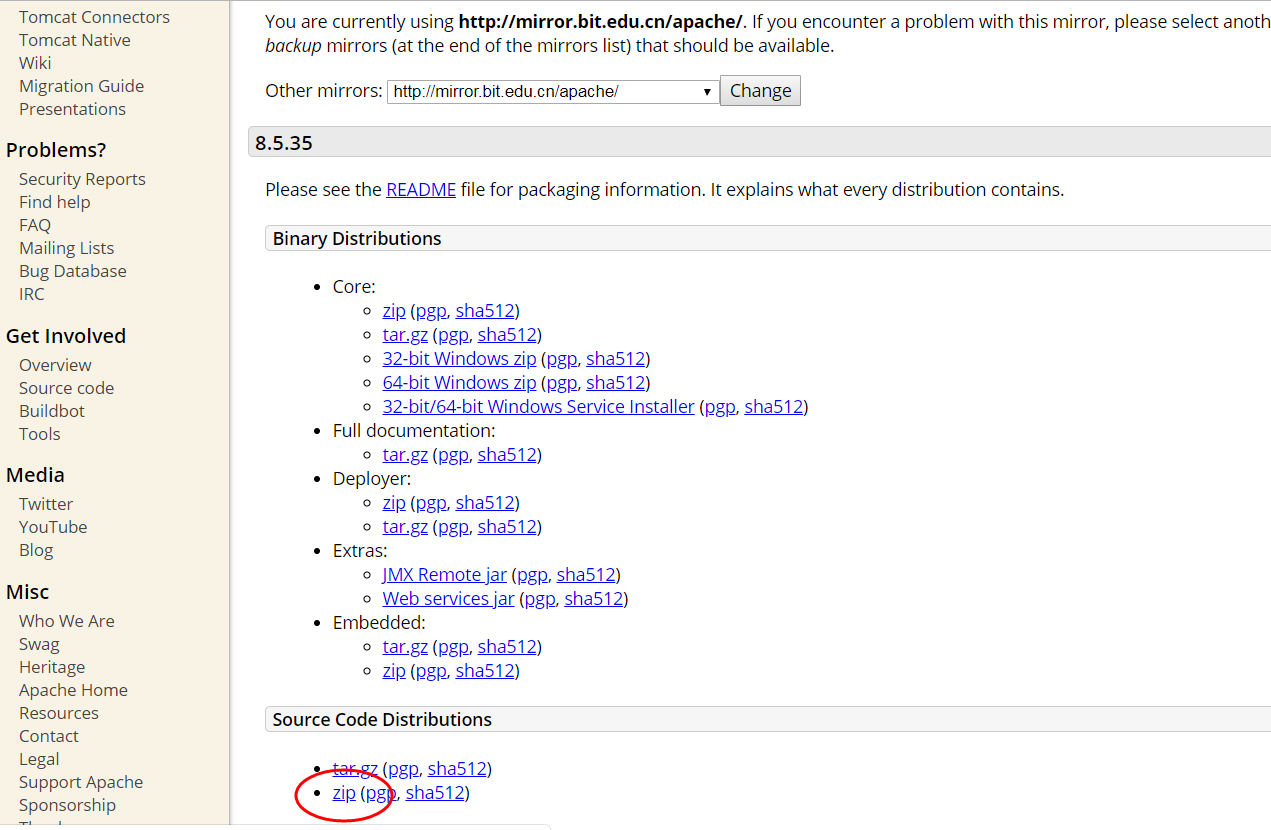
2.创建pom.xml
需要通过Maven组织文件,因此需要在apache-tomcat-8.5.35-src根目录下创建目录中新建catalina-home目录和pom.xml文件,如下,
<?xml version="1.0" encoding="UTF-8"?>

<project xmlns="http://maven.apache.org/POM/4.0.0"

         xmlns:xsi="http://www.w3.org/2001/XMLSchema-instance"

         xsi:schemaLocation="http://maven.apache.org/POM/4.0.0 http://maven.apache.org/xsd/maven-4.0.0.xsd">

    <modelVersion>4.0.0</modelVersion>

    <groupId>org.apache.tomcat</groupId>

    <artifactId>Tomcat8.5</artifactId>

    <name>Tomcat8.5</name>

    <version>8.5</version>

    <build>

        <finalName>Tomcat8.5</finalName>

        <sourceDirectory>java</sourceDirectory>

        <testSourceDirectory>test</testSourceDirectory>

        <resources>

            <resource>

                <directory>java</directory>

            </resource>

        </resources>

        <testResources>

           <testResource>

                <directory>test</directory>

           </testResource>

        </testResources>

        <plugins>

            <plugin>

                <groupId>org.apache.maven.plugins</groupId>

                <artifactId>maven-compiler-plugin</artifactId>

                <version>2.3</version>

                <configuration>

                    <encoding>UTF-8</encoding>

                    <source>1.8</source>

                    <target>1.8</target>

                </configuration>

            </plugin>

        </plugins>

    </build>

    <dependencies>

        <dependency>

            <groupId>junit</groupId>

            <artifactId>junit</artifactId>

            <version>4.12</version>

            <scope>test</scope>

        </dependency>

        <dependency>

            <groupId>org.easymock</groupId>

            <artifactId>easymock</artifactId>

            <version>3.4</version>

        </dependency>

        <dependency>

            <groupId>ant</groupId>

            <artifactId>ant</artifactId>

            <version>1.7.0</version>

        </dependency>

        <dependency>

            <groupId>wsdl4j</groupId>

            <artifactId>wsdl4j</artifactId>

            <version>1.6.2</version>

        </dependency>

        <dependency>

            <groupId>javax.xml</groupId>

            <artifactId>jaxrpc</artifactId>

            <version>1.1</version>

        </dependency>

        <dependency>

            <groupId>org.eclipse.jdt.core.compiler</groupId>

            <artifactId>ecj</artifactId>

            <version>4.5.1</version>

        </dependency>

    </dependencies>

</project>
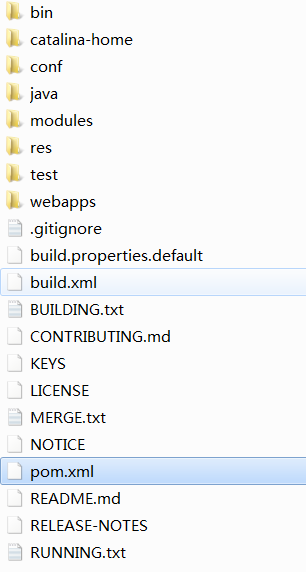
apache-tomcat-8.0.53-src目录中的conf和webapps文件夹复制到catalina-home目录中
三、配置IDEA运行项目
Main class设置为org.apache.catalina.startup.Bootstrap
添加VM options
-Dcatalina.home=catalina-home

-Dcatalina.base=catalina-home

-Djava.endorsed.dirs=catalina-home/endorsed

-Djava.io.tmpdir=catalina-home/temp

-Djava.util.logging.manager=org.apache.juli.ClassLoaderLogManager

-Djava.util.logging.config.file=catalina-home/conf/logging.properties
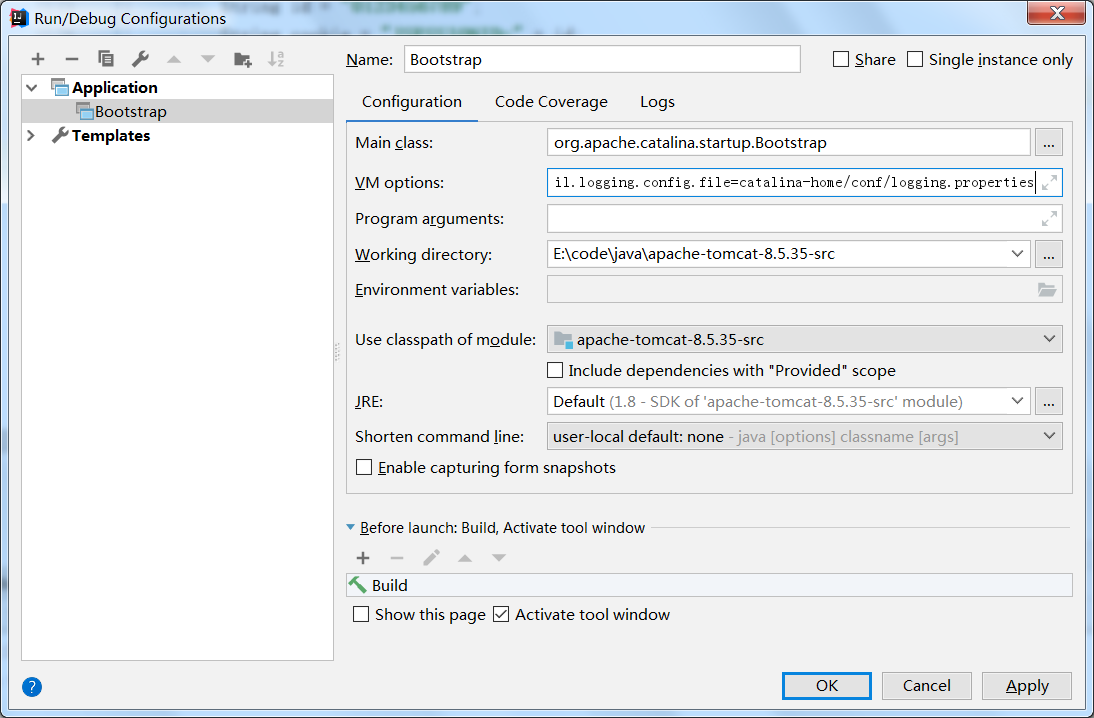
说明:如果编译build的时候出现Test测试代码报错,注释该代码即可。本文中的Tomcat源码util.TestCookieFilter类会报错,将其注释即可
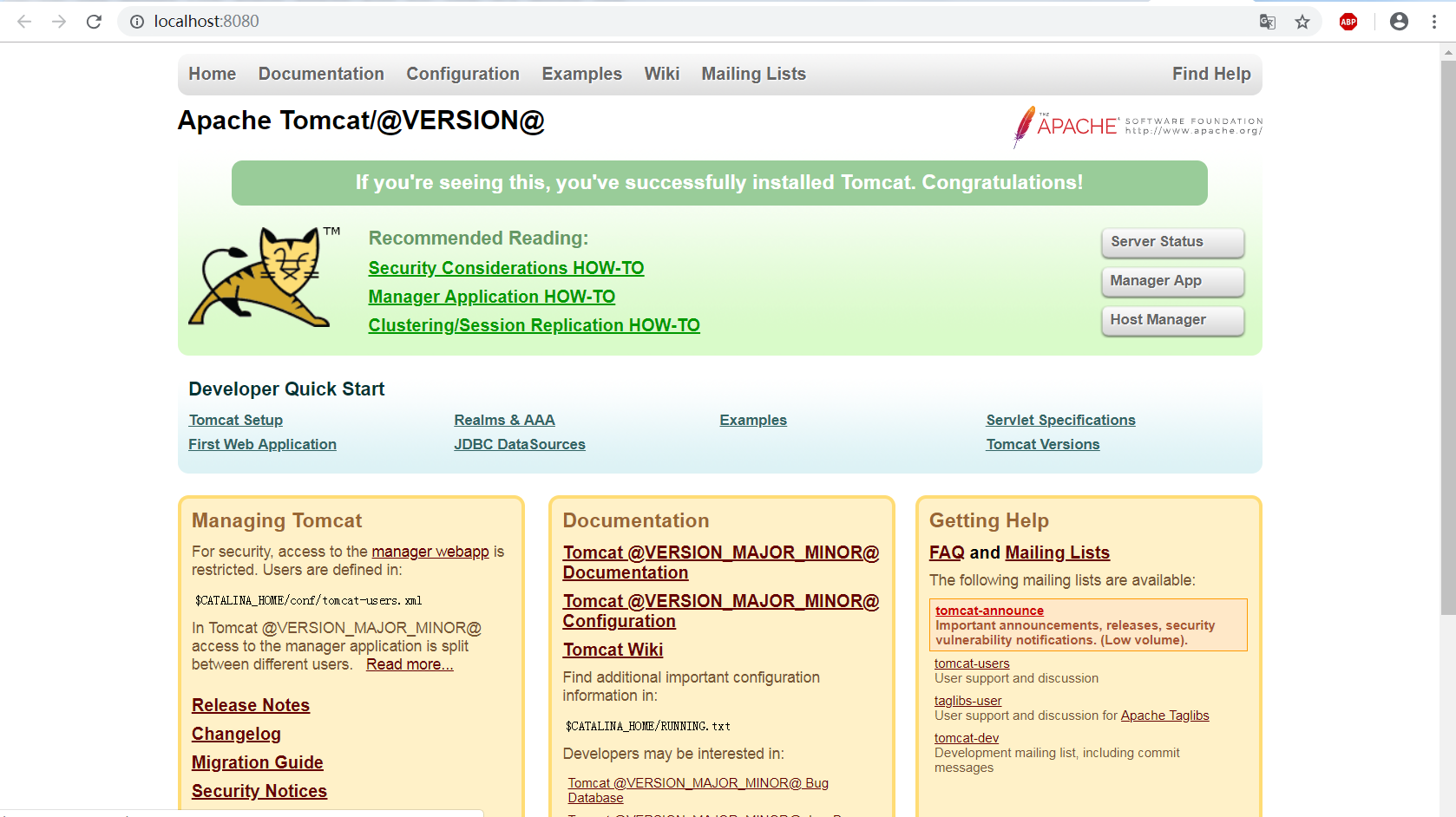
运行项目,访问http://localhost:8080,得到结果:
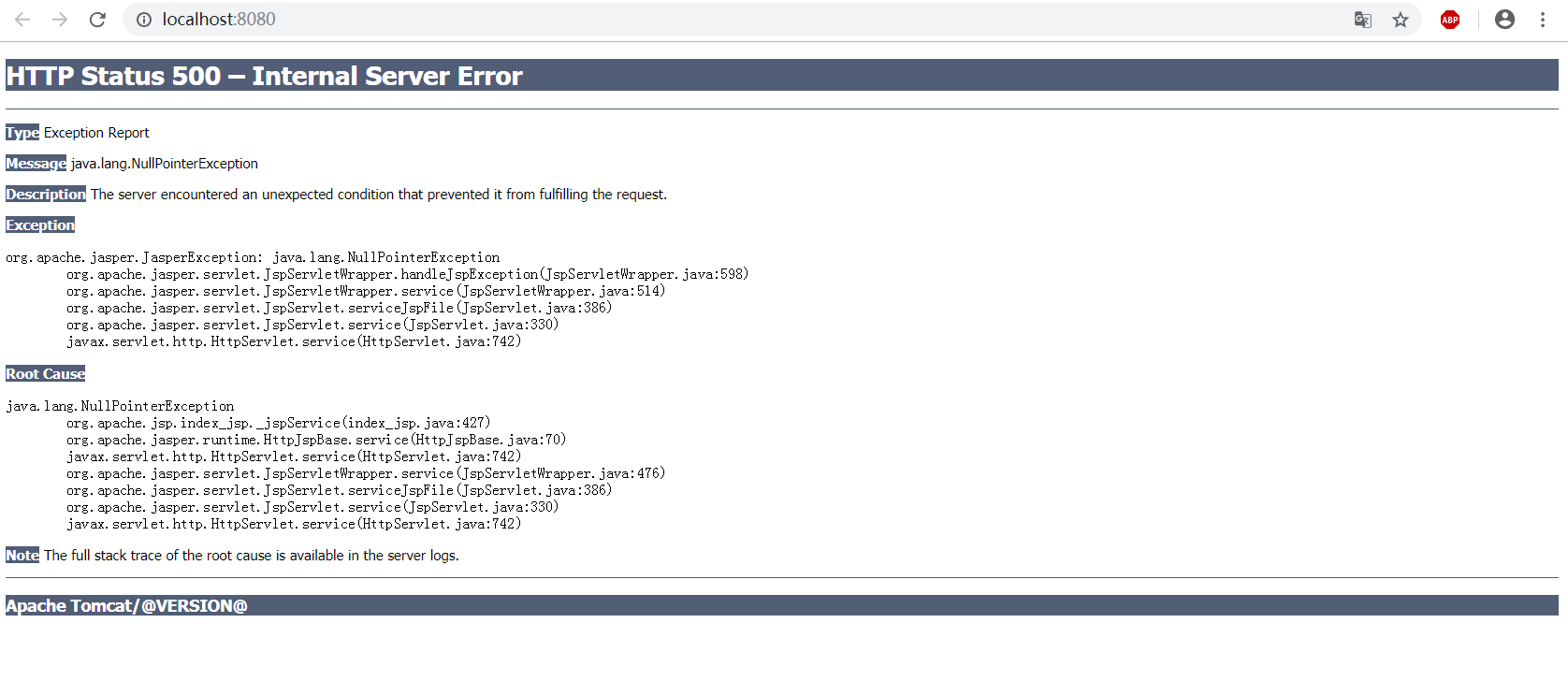
原因是我们直接启动org.apache.catalina.startup.Bootstrap的时候没有加载org.apache.jasper.servlet.JasperInitializer,从而无法编译JSP。解决办法是在tomcat的源码org.apache.catalina.startup.ContextConfig中的configureStart函数中手动将JSP解析器初始化:
protected synchronized void configureStart() {

        // Called from StandardContext.start()

        if (log.isDebugEnabled()) {

            log.debug(sm.getString("contextConfig.start"));

        }

        if (log.isDebugEnabled()) {

            log.debug(sm.getString("contextConfig.xmlSettings",

                    context.getName(),

                    Boolean.valueOf(context.getXmlValidation()),

                    Boolean.valueOf(context.getXmlNamespaceAware())));

        }

        webConfig();

        context.addServletContainerInitializer(new JasperInitializer(), null);

        if (!context.getIgnoreAnnotations()) {

            applicationAnnotationsConfig();

        }

        if (ok) {

            validateSecurityRoles();

        }

        // Configure an authenticator if we need one

        if (ok) {

            authenticatorConfig();

        }

        // Dump the contents of this pipeline if requested

        if (log.isDebugEnabled()) {

            log.debug("Pipeline Configuration:");

            Pipeline pipeline = context.getPipeline();

            Valve valves[] = null;

            if (pipeline != null) {

                valves = pipeline.getValves();

            }

            if (valves != null) {

                for (int i = 0; i < valves.length; i++) {

                    log.debug("  " + valves[i].getClass().getName());

                }

            }

            log.debug("======================");

        }

        // Make our application available if no problems were encountered

        if (ok) {

            context.setConfigured(true);

        } else {

            log.error(sm.getString("contextConfig.unavailable"));

            context.setConfigured(false);

        }

    }
修改完后,项目再启动,我们再在浏览器访问http://localhost:8080/ ,就可以看到我们所熟悉的经典欢迎页面了
IDEA运行tomcat8.5.35源代码的更多相关文章
- 【Spark Core】任务运行机制和Task源代码浅析1
引言 上一小节<TaskScheduler源代码与任务提交原理浅析2>介绍了Driver側将Stage进行划分.依据Executor闲置情况分发任务,终于通过DriverActor向exe ...
- CentOS7运行Tomcat8时启动慢,访问总是转圈,但是过一会又好了
我一开始遇到这个问题的时候也是懵逼的. 这叫什么问题... 描述一下,当输入命令启动tomcat之后,访问网站总是不能访问,但是5.6分钟之后又好了,有时候好,有时候不行. 遇到这样的问题运用以下的方 ...
- Tomcat7调试运行环境搭建与源代码分析入门
1. 需要准备好下面这些工具 JDK 1.6+ Maven 2或3 TortoiseSVN 1.7+ (从1.7开始”.svn”目录集中放在一处了,不再每个目录下都放一份) Eclipse 3.5+ ...
- centOS7.5上部署server jre1.8.0_192 tomcat-8.5.35 mysql-8.0.13
- Tomcat Stack-8.0.35 (OpenLogic CentOS7.2)
平台: CentOS 类型: 虚拟机镜像 软件包: apache2.4.20 mysql5.6.30 tomcat8.0.35 apache application server basic s ...
- 开启Tomcat APR运行模式,优化并发性能
Tomcat支持三种接收请求的处理方式:BIO.NIO.APR 1>.BIO模式:阻塞式I/O操作,表示Tomcat使用的是传统JavaI/O操作(即Java.io包及其子包).Tomcat7以 ...
- Python实现中文字幕雨+源代码
写在前面的一些P话: 最近浏览了很多关于用Python和Pygame实现代码雨的案例,发现很多都是没有深入讲解代码的整个实现过程,从0到1教会你制作中文文字雨. 然后在介绍的过程中,我也将深入介绍Py ...
- Android:基于Eclipse编译调试系统级应用源代码
一. 概要描述 在使用Eclipse导入android工程源代码以后,我们可以使用ddms调试和跟踪源代码. 本文讲述动态调试源代码和静态调试源代码的两种方法,避免build system. ...
- Centos6.8 安装tomcat8.5.11
1.下载 安装包 wget http://mirrors.aliyun.com/apache/tomcat/tomcat-8/v8.5.11/bin/apache-tomcat-8.5.11.tar. ...
随机推荐
- Python之路,第十篇:Python入门与基础10
python3 函数 函数(function) 什么是函数: 函数是可以重复执行的代码块,可以重复使用: 作用: 定义用户级的函数:实现了一个代码块的封装: 语法: def 函数名(参数列表): ...
- shell 脚本中将输出内容赋值给一个变量时的换行问题
for ((i=0; i<4; i++) do ....... done 如果使用 echo $a 输出变量,则变量中的 换行都会被忽略掉,所有内容输出到一行 而使用 echo "$a ...
- SFM学习记录(二)
分析生成文件 在.nvm.cmvs/00/下有:(也可能是其他数字) models/option-0000.ply:是生成的密集点云模型 txt:文件夹下(还没弄明白ν_v) visualize:保存 ...
- linux最常用的20个命令
玩过Linux的人都会知道,Linux中的命令的确是非常多,但是玩过Linux的人也从来不会因为Linux的命令如此之多而烦恼,因为我们只需要掌握我们最常用的命令就可以了.当然你也可以在使用时去找一下 ...
- Codeforces 766C:Mahmoud and a Message(DP)
题目链接:http://codeforces.com/problemset/problem/766/C 题意 有一个长度为n的字符串,第二行有26个数字,位置1~26对应为a~z的字母,数值表示该字母 ...
- [Educational Codeforces Round 55 (Rated for Div. 2)][C. Multi-Subject Competition]
https://codeforc.es/contest/1082/problem/C 题目大意:有m个类型,n个人,每个人有一个所属类型k和一个能力v,要求所选的类型的人个数相等并且使v总和最大(n, ...
- 《DSP using MATLAB》Problem 5.34
第1小题 代码: %% ++++++++++++++++++++++++++++++++++++++++++++++++++++++++++++++++++++++++++++++++++++++++ ...
- 《DSP using MATLAB》Problem 5.18
代码: %% ++++++++++++++++++++++++++++++++++++++++++++++++++++++++++++++++++++++++++++++++++++++++ %% O ...
- 针对IE9的CSS兼容
(自己亲自试过有用)针对IE9的CSS只需在相应CSS代码加入只有IE9识别的 \9\0.具体代码如下: .div{ background-color:#0f0\9\0;/* ie9 */ } 其他浏 ...
- SpringMVC(二)高级
高级参数绑定 1.1. 绑定数组 1.1.1. 需求 在商品列表页面选中多个商品,然后删除. 1.1.2. 需求分析 功能要求商品列表页面中的每个商品前有一个checkbok,选中多个商品后点击删除按 ...