
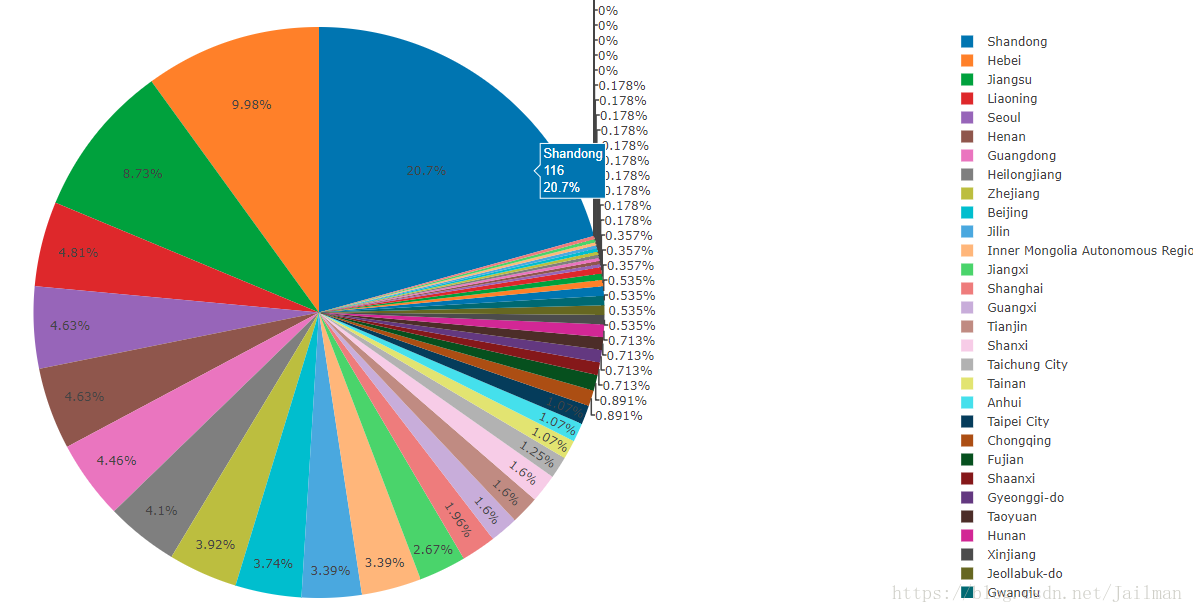
分析攻击IP来源地并画出饼图
此文中的API将台湾列为国家,非本人立场,台湾属于中国,台湾岛生活的人不一定!
上码:
#!/usr/bin/python

#coding=utf-8

'''

http://ip-api.com/json/ip

'''

import plotly

import plotly.plotly

import plotly.graph_objs as abcc

import plotly.plotly

class Piecharts:

    def __init__(self):

        print "饼图生成中"

    def makePiecharts(self,labels,values,filename):

        trace = abcc.Pie(labels = labels,values= values)

        plotly.offline.plot([trace],filename=filename)

import requests

import sys

try:

    iplist = sys.argv[1]

except:

    print "IP list not given or some other error!"

countrylist = {}

regionlist = {}

citylist = {}

with open(iplist) as f:

    for ip in f.readlines():

        if ip.strip() != '':

            url = 'http://ip-api.com/json/' + ip.strip()

            try:

                result = requests.get(url)

                jsontext = result.json()

            except:

                print "Error: Data not retrieved!"

                continue

            status = jsontext['status']

            if status == 'fail':

                print "%s failed!" % ip.strip()

                continue

            mline = jsontext['as']

            city = jsontext['city']

            country = jsontext['country']

            countryCode = jsontext['countryCode']

            isp = jsontext['isp']

            lat = jsontext['lat']

            lon = jsontext['lon']

            org = jsontext['org']

            query = jsontext['query']

            region = jsontext['region']

            regionName = jsontext['regionName']

            timezone = jsontext['timezone']

            zipcode = jsontext['zip']

            if not country in countrylist:

                countrylist[country] = 0

            else:

                countrylist[country] += 1

            if not regionName in regionlist:

                regionlist[regionName] = 0

            else:

                regionlist[regionName] += 1

            if not city in citylist:

                citylist[city] = 0

            else:

                citylist[city] += 1

            try:

                print ip.strip() + '--' + country + '--' + regionName

            except:

                print "Special character!"

    print countrylist

    #country

    labels = [i for i in countrylist]

    value = [countrylist[i] for i in countrylist]

    drive = Piecharts()

    drive.makePiecharts(labels,value,"country.html")

    #region

    labels = [i for i in regionlist]

    value = [regionlist[i] for i in regionlist]

    drive = Piecharts()

    drive.makePiecharts(labels,value,"region.html")

    #city

    labels = [i for i in citylist]

    value = [citylist[i] for i in citylist]

    drive = Piecharts()

    drive.makePiecharts(labels,value,"city.html")
gevent协程并发版
#!/usr/bin/python

# coding=utf-8

'''

http://ip-api.com/json/ip

'''

import plotly

import plotly.graph_objs as abcc

import plotly.plotly

class Piecharts:

    def __init__(self):

        print u'饼图生成中'

    def makePiecharts(self, labels, values, filename):

        trace = abcc.Pie(labels=labels, values=values)

        plotly.offline.plot([trace], filename=filename)

import requests

import sys

try:

    iplist = sys.argv[1]

except:

    print "IP list not given or some other error!"

countrylist = {}

regionlist = {}

citylist = {}

def locater(url):

    try:

        result = requests.get(url)

        jsontext = result.json()

    except:

        print "Error: Data not retrieved!"

        return

    status = jsontext['status']

    if status == 'fail':

        print "%s failed!" % ip.strip()

        return

    mline = jsontext['as']

    city = jsontext['city']

    country = jsontext['country']

    countryCode = jsontext['countryCode']

    isp = jsontext['isp']

    lat = jsontext['lat']

    lon = jsontext['lon']

    org = jsontext['org']

    query = jsontext['query']

    region = jsontext['region']

    regionName = jsontext['regionName']

    timezone = jsontext['timezone']

    zipcode = jsontext['zip']

    if not country in countrylist:

        countrylist[country] = 0

    else:

        countrylist[country] += 1

    if not regionName in regionlist:

        regionlist[regionName] = 0

    else:

        regionlist[regionName] += 1

    if not city in citylist:

        citylist[city] = 0

    else:

        citylist[city] += 1

    try:

        print ip.strip() + '--' + country + '--' + regionName

    except:

        print "Special character!"

from gevent import monkey

monkey.patch_socket()

from gevent import pool

import gevent

pool = pool.Pool(40)

glist = []

with open(iplist) as f:

    for ip in f.readlines():

        if ip.strip() != '':

            url = 'http://ip-api.com/json/' + ip.strip()

            glist.append(pool.spawn(locater, url))

    gevent.joinall(glist)

    # country

    labels = [i for i in countrylist]

    value = [countrylist[i] for i in countrylist]

    drive = Piecharts()

    drive.makePiecharts(labels, value, "country.html")

    # region

    labels = [i for i in regionlist]

    value = [regionlist[i] for i in regionlist]

    drive = Piecharts()

    drive.makePiecharts(labels, value, "region.html")

    # city

    labels = [i for i in citylist]

    value = [citylist[i] for i in citylist]

    drive = Piecharts()

    drive.makePiecharts(labels, value, "city.html")
饼图效果:
分析攻击IP来源地并画出饼图的更多相关文章
- 从BUG工具redmine上获取数据后借助python模块pycha 画出BUG分析类报表
整体代码比较冗长,但是很好读.写的方法全是按照BUG分类去写的.所以写死了,凑合看吧,画出饼图,树状图和生成对应的数据excel,希望大家举一反三能帮助自己分析BUG #__author__ = 'x ...
- 利用ggplot2画出各种漂亮图片详细教程
1.Why use ggplot2 ggplot2是我见过最human friendly的画图软件,这得益于Leland Wilkinson在他的著作<The Grammar of Graphi ...
- H5坦克大战之【画出坦克】
今天是个特殊的日子,圣诞节,也是周末,在这里先祝大家圣诞快乐!喜庆的日子,我们可以稍微放松一下,扯一扯昨天雷霆对战凯尔特人的比赛,这场比赛大威少又双叒叕拿下三双,而且是一个45+11+11的超级三双, ...
- 像画笔一样慢慢画出Path的三种方法(补充第四种)
今天大家在群里大家非常热闹的讨论像画笔一样慢慢画出Path的这种效果该如何实现. 北京-LGL 博客号@ligl007发起了这个话题.然后各路高手踊跃发表意见.最后雷叔 上海-雷蒙 博客号@雷蒙之星 ...
- 用css画出三角形
看到有面试题里会有问到如何用css画出三角形 众所周知好多图形都可以拆分成三角形,所以说会了画三角形就可以画出很多有意思的形状 画出三角形的原理是调整border(边框)的四个方向的宽度,线条样式以及 ...
- MATLAB 画出三个通信小区cell边界示意图
d=1000; %两个小区中心间距离的一半 rcell=2*d/sqrt(3); %小区半径 ncell=3; %小区个数 cellposition=zeros(ncell,2); %初始化小区中心位 ...
- 如何用css画出三角形
看到有面试题里会有问到如何用css画出三角形 众所周知好多图形都可以拆分成三角形,所以说会了画三角形就可以画出很多有意思的形状 画出三角形的原理是调整border(边框)的四个方向的宽度,线条样式以及 ...
- 用css画出三角形【转】
看到有面试题里会有问到如何用css画出三角形 众所周知好多图形都可以拆分成三角形,所以说会了画三角形就可以画出很多有意思的形状 画出三角形的原理是调整border(边框)的四个方向的宽度,线条样式以及 ...
- 由两点坐标如何画出直线 matlab
由两点坐标如何画出直线 方法1:利用直线方程 斜率加截距 方法2:数据拟合 %由两点坐标得数据拟合直线与画线 x = [,]; y = [,]; k = ((-)/(-));% 由两点坐标得到直线斜 ...
随机推荐
- 漏洞复现——bash远程解析命令执行漏洞
漏洞描述:Bash脚本在解析某些特殊字符串时出现逻辑错误导致可以执行后面的命令,在一些cgi脚本中,数据是通过环境变量来传递的,这样就会形成该漏洞 漏洞原理:bash通过以函数名作为环境变量名,以“( ...
- Mac重要目录
App最喜欢的几个目录 Mac和Windows操作系统有一个很大的不同,大部分App是没有安装程序的,一般下载下来就是一个dmg文件,解开之后直接将App拖到应用程序目录下就可以了,所以给人感觉卸载也 ...
- Intel daal数据预处理
https://software.intel.com/en-us/daal-programming-guide-datasource-featureextraction-py # file: data ...
- MongoDB,无模式文档型数据库简介
MongoDB的名字源自一个形容词humongous(巨大无比的),在向上扩展和快速处理大数据量方面,它会损失一些精度,在旧金山举行的MondoDB大会上,Merriman说:“你不适宜用它来处理复杂 ...
- python(3)之字符串
字符串常用操作如下: name="huang yuqing"print(name.count("h"))#计算包含字符的个数print(name.capital ...
- VMware 安装 centos,自定义分区
具体查看:https://jingyan.baidu.com/album/6525d4b1799149ac7d2e9483.html?picindex=11
- linux下find和grep命令详解
在linux下面工作,有些命令能够大大提高效率.本文就向大家介绍find.grep命令,他哥俩可以算是必会的linux命令,我几乎每天都要用到他们.本文结构如下: find命令 find命令的一般形式 ...
- java ArrayList 迭代器快速失败源码分析
先来看一个例子: @Test void test2() { ArrayList<String> list = new ArrayList<String>(); list.add ...
- linux内核initcall
include/linux/init.h #define pure_initcall(fn) __define_initcall(fn, 0) #define core_initcall(fn) __ ...
- JavaScript -基础- 函数与对象(三)Date对象
一.Date对象 1.创建方法 var date_obj=new Date(); alert(date_obj.toLocaleString()) var date_obj=new Date(&quo ...