
分析攻击IP来源地并画出饼图
此文中的API将台湾列为国家,非本人立场,台湾属于中国,台湾岛生活的人不一定!
上码:
#!/usr/bin/python

#coding=utf-8

'''

http://ip-api.com/json/ip

'''

import plotly

import plotly.plotly

import plotly.graph_objs as abcc

import plotly.plotly

class Piecharts:

    def __init__(self):

        print "饼图生成中"

    def makePiecharts(self,labels,values,filename):

        trace = abcc.Pie(labels = labels,values= values)

        plotly.offline.plot([trace],filename=filename)

import requests

import sys

try:

    iplist = sys.argv[1]

except:

    print "IP list not given or some other error!"

countrylist = {}

regionlist = {}

citylist = {}

with open(iplist) as f:

    for ip in f.readlines():

        if ip.strip() != '':

            url = 'http://ip-api.com/json/' + ip.strip()

            try:

                result = requests.get(url)

                jsontext = result.json()

            except:

                print "Error: Data not retrieved!"

                continue

            status = jsontext['status']

            if status == 'fail':

                print "%s failed!" % ip.strip()

                continue

            mline = jsontext['as']

            city = jsontext['city']

            country = jsontext['country']

            countryCode = jsontext['countryCode']

            isp = jsontext['isp']

            lat = jsontext['lat']

            lon = jsontext['lon']

            org = jsontext['org']

            query = jsontext['query']

            region = jsontext['region']

            regionName = jsontext['regionName']

            timezone = jsontext['timezone']

            zipcode = jsontext['zip']

            if not country in countrylist:

                countrylist[country] = 0

            else:

                countrylist[country] += 1

            if not regionName in regionlist:

                regionlist[regionName] = 0

            else:

                regionlist[regionName] += 1

            if not city in citylist:

                citylist[city] = 0

            else:

                citylist[city] += 1

            try:

                print ip.strip() + '--' + country + '--' + regionName

            except:

                print "Special character!"

    print countrylist

    #country

    labels = [i for i in countrylist]

    value = [countrylist[i] for i in countrylist]

    drive = Piecharts()

    drive.makePiecharts(labels,value,"country.html")

    #region

    labels = [i for i in regionlist]

    value = [regionlist[i] for i in regionlist]

    drive = Piecharts()

    drive.makePiecharts(labels,value,"region.html")

    #city

    labels = [i for i in citylist]

    value = [citylist[i] for i in citylist]

    drive = Piecharts()

    drive.makePiecharts(labels,value,"city.html")
gevent协程并发版
#!/usr/bin/python

# coding=utf-8

'''

http://ip-api.com/json/ip

'''

import plotly

import plotly.graph_objs as abcc

import plotly.plotly

class Piecharts:

    def __init__(self):

        print u'饼图生成中'

    def makePiecharts(self, labels, values, filename):

        trace = abcc.Pie(labels=labels, values=values)

        plotly.offline.plot([trace], filename=filename)

import requests

import sys

try:

    iplist = sys.argv[1]

except:

    print "IP list not given or some other error!"

countrylist = {}

regionlist = {}

citylist = {}

def locater(url):

    try:

        result = requests.get(url)

        jsontext = result.json()

    except:

        print "Error: Data not retrieved!"

        return

    status = jsontext['status']

    if status == 'fail':

        print "%s failed!" % ip.strip()

        return

    mline = jsontext['as']

    city = jsontext['city']

    country = jsontext['country']

    countryCode = jsontext['countryCode']

    isp = jsontext['isp']

    lat = jsontext['lat']

    lon = jsontext['lon']

    org = jsontext['org']

    query = jsontext['query']

    region = jsontext['region']

    regionName = jsontext['regionName']

    timezone = jsontext['timezone']

    zipcode = jsontext['zip']

    if not country in countrylist:

        countrylist[country] = 0

    else:

        countrylist[country] += 1

    if not regionName in regionlist:

        regionlist[regionName] = 0

    else:

        regionlist[regionName] += 1

    if not city in citylist:

        citylist[city] = 0

    else:

        citylist[city] += 1

    try:

        print ip.strip() + '--' + country + '--' + regionName

    except:

        print "Special character!"

from gevent import monkey

monkey.patch_socket()

from gevent import pool

import gevent

pool = pool.Pool(40)

glist = []

with open(iplist) as f:

    for ip in f.readlines():

        if ip.strip() != '':

            url = 'http://ip-api.com/json/' + ip.strip()

            glist.append(pool.spawn(locater, url))

    gevent.joinall(glist)

    # country

    labels = [i for i in countrylist]

    value = [countrylist[i] for i in countrylist]

    drive = Piecharts()

    drive.makePiecharts(labels, value, "country.html")

    # region

    labels = [i for i in regionlist]

    value = [regionlist[i] for i in regionlist]

    drive = Piecharts()

    drive.makePiecharts(labels, value, "region.html")

    # city

    labels = [i for i in citylist]

    value = [citylist[i] for i in citylist]

    drive = Piecharts()

    drive.makePiecharts(labels, value, "city.html")
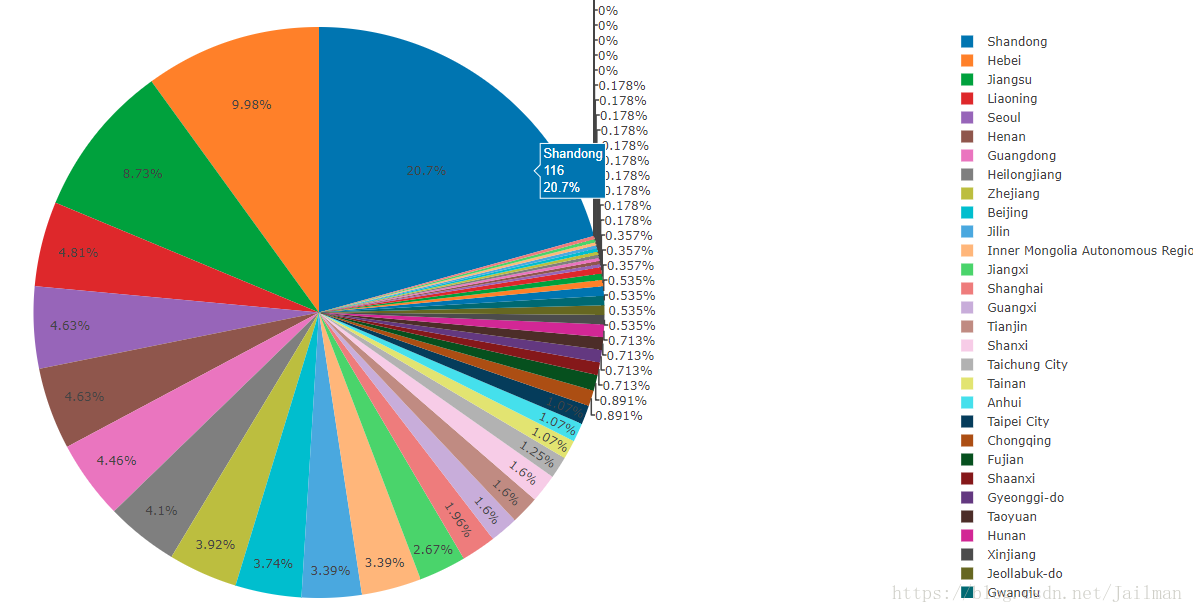
饼图效果:
分析攻击IP来源地并画出饼图的更多相关文章
- 从BUG工具redmine上获取数据后借助python模块pycha 画出BUG分析类报表
整体代码比较冗长,但是很好读.写的方法全是按照BUG分类去写的.所以写死了,凑合看吧,画出饼图,树状图和生成对应的数据excel,希望大家举一反三能帮助自己分析BUG #__author__ = 'x ...
- 利用ggplot2画出各种漂亮图片详细教程
1.Why use ggplot2 ggplot2是我见过最human friendly的画图软件,这得益于Leland Wilkinson在他的著作<The Grammar of Graphi ...
- H5坦克大战之【画出坦克】
今天是个特殊的日子,圣诞节,也是周末,在这里先祝大家圣诞快乐!喜庆的日子,我们可以稍微放松一下,扯一扯昨天雷霆对战凯尔特人的比赛,这场比赛大威少又双叒叕拿下三双,而且是一个45+11+11的超级三双, ...
- 像画笔一样慢慢画出Path的三种方法(补充第四种)
今天大家在群里大家非常热闹的讨论像画笔一样慢慢画出Path的这种效果该如何实现. 北京-LGL 博客号@ligl007发起了这个话题.然后各路高手踊跃发表意见.最后雷叔 上海-雷蒙 博客号@雷蒙之星 ...
- 用css画出三角形
看到有面试题里会有问到如何用css画出三角形 众所周知好多图形都可以拆分成三角形,所以说会了画三角形就可以画出很多有意思的形状 画出三角形的原理是调整border(边框)的四个方向的宽度,线条样式以及 ...
- MATLAB 画出三个通信小区cell边界示意图
d=1000; %两个小区中心间距离的一半 rcell=2*d/sqrt(3); %小区半径 ncell=3; %小区个数 cellposition=zeros(ncell,2); %初始化小区中心位 ...
- 如何用css画出三角形
看到有面试题里会有问到如何用css画出三角形 众所周知好多图形都可以拆分成三角形,所以说会了画三角形就可以画出很多有意思的形状 画出三角形的原理是调整border(边框)的四个方向的宽度,线条样式以及 ...
- 用css画出三角形【转】
看到有面试题里会有问到如何用css画出三角形 众所周知好多图形都可以拆分成三角形,所以说会了画三角形就可以画出很多有意思的形状 画出三角形的原理是调整border(边框)的四个方向的宽度,线条样式以及 ...
- 由两点坐标如何画出直线 matlab
由两点坐标如何画出直线 方法1:利用直线方程 斜率加截距 方法2:数据拟合 %由两点坐标得数据拟合直线与画线 x = [,]; y = [,]; k = ((-)/(-));% 由两点坐标得到直线斜 ...
随机推荐
- tmp目录自动清除和tmpwatch命令
习惯性的将一些临时文件放在tmp目录下,让其自然删除.同时,为了保证tmp目录不爆满,系统默认情况下每日会处理一次tmp目录文件,原理就是使用了tmpwatch.在系统最小安装情况下,这个功能是没有安 ...
- linux指令统计日志出现的次数
cat XXX.log|grep ''|grep '条件'| wc -l 单个条件统计 cat XXX.log|grep ''|grep '条件1'|grep '条件2'|grep '条件3' ...
- vue3.0 配置公共请求地址
正常请求接口: return request({ url: 'http://192.168.1.0/User/cancelUpgrade', method: 'get', params: data } ...
- php开启redis
看下自己phpinfo的信息 php 5.5以下的都有这些文件 到这个地方下载所需要的文件:https://github.com/nicolasff/phpredis/downloads 下载解压 ...
- 【LeetCode】二分查找
给一个升序数组,找到目标值在数组中的起始和结束位置,时间复杂度为 O(log n). e.g. 给定数组 [5, 7, 7, 8, 8, 10] 和目标值 8,返回 [3, 4].若目标值不在数组中, ...
- ActiveMQ consumer按顺序处理消息
http://activemq.apache.org/exclusive-consumer.html producer发送消息是有先后顺序的,这种顺序保持到了broker中.如果希望消息按顺序被消费掉 ...
- Linux查看某个命令属于哪个包
有时修我们需要某个命令但其没有安装,提供该命令的包名也与命令名相差很大直接查找命令名找不到包,如rexec. 此时我们就非常需要这样一个工具:可以根据最终的命令查找提供该命令的软件包. 类型 命令 说 ...
- vsftp的安装与配置
1.安装 直接使用yum安装,如果没有网络在其他机器使用yum先离线下载即可,vsftpd一般就自己不需要装其他依赖包 rpm -qa|grep vsftpd #查看是否安装 yum install ...
- python QMainWindow QWidget
from PyQt5 import QtWidgetsfrom untitled import Ui_MainWindowfrom PyQt5.QtWidgets import QFileDialog ...
- ssh三大框架整合
spring+struts2+hibernate 参考1:数据库为oracle http://takeme.iteye.com/blog/1678268 参考2:数据库为mysql http://bl ...