
Grafana的安裝(一)
Grafana的安裝
grafana是用于可视化大型测量数据的开源程序,他提供了强大和优雅的方式去创建、共享、浏览数据。dashboard中显示了你不同metric数据源中的数据
Granafa的安裝
1.windows下載地址:https://s3-us-west-2.amazonaws.com/grafana-releases/release/grafana-5.2.1.windows-amd64.zip (Granafa官網中提供的下載地址)
2.在本地解壓 grafana-5.2.1.windows-amd64.zip 文件,將解壓后的目錄中的 conf 文件夾中的 sample.ini 文件在當前目錄複製一份並且重新命名為 custom.ini
3.編輯custom.ini文件,將文件中的;去掉( 因為;表示注釋該語句)
編輯主要是去掉一些注釋信息。去掉了 【 Grafana Configuration Example】 【Server】 【Security 】三個模塊的注釋信息,更改結果如下:(沒做更改的信息配置文件沒複製下來)
##################### Grafana Configuration Example #####################

#

# Everything has defaults so you only need to uncomment things you want to

# change

# possible values : production, development

app_mode = production

# instance name, defaults to HOSTNAME environment variable value or hostname if HOSTNAME var is empty

instance_name = ${HOSTNAME}

#################################### Server ####################################

[server]

# Protocol (http, https, socket)

protocol = http

# The ip address to bind to, empty will bind to all interfaces

http_addr =127.0.0.1

# The http port  to use

http_port = 8888

# The public facing domain name used to access grafana from a browser

domain = localhost

# Redirect to correct domain if host header does not match domain

# Prevents DNS rebinding attacks

;enforce_domain = false

# The full public facing url you use in browser, used for redirects and emails

# If you use reverse proxy and sub path specify full url (with sub path)

root_url = http://localhost:8888

# Log web requests

router_logging = false

# the path relative working path

static_root_path = public

# enable gzip

enable_gzip = false

# https certs & key file

;cert_file =

;cert_key =

# Unix socket path

;socket =
#################################### Security ####################################
[security]
# default admin user, created on startup
admin_user = admin
# default admin password, can be changed before first start of grafana, or in profile settings
admin_password = admin
# used for signing
secret_key = SW2YcwTIb9zpOOhoPsMm
# Auto-login remember days
login_remember_days = 7
cookie_username = grafana_user
cookie_remember_name = grafana_remember
# disable gravatar profile images
disable_gravatar = false
# data source proxy whitelist (ip_or_domain:port separated by spaces)
data_source_proxy_whitelist =
# disable protection against brute force login attempts
disable_brute_force_login_protection = false
4.雙擊grafana安裝目錄下的 grafana-server.exe文件,啟動後台
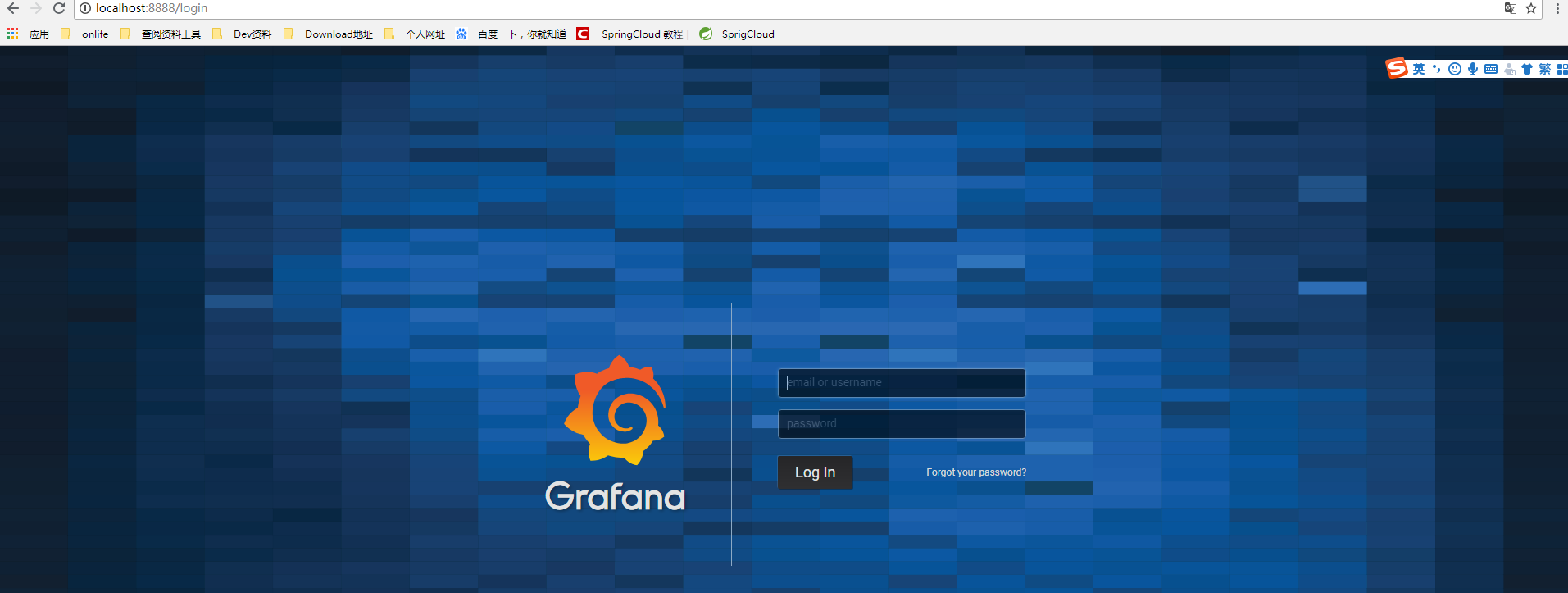
5.根據手寫的端口號以及配置日期訪問grafana : http://localhost:8888 進入如下頁面
登錄的用戶名和密碼主要是看 custom.ini配置文件中的 【user】模塊的配置,如果沒做更改那麼用戶名和密碼都是 admin.
Grafana的安裝(一)的更多相关文章
- 免安裝、免設定的 Hadoop 開發環境 - cloudera 的 QuickStart VM
cloudera 的 QuickStart VM,為一種免安裝.免設定 Linux 及 Hadoop,已幫你建好 CDH 5.x.Hadoop.Eclipse 的一個虛擬機環境.下載後解壓縮,可直接以 ...
- 安裝 14.04.1 Ubuntu 到 Lenovo thinkpad t460p
在 Lenovo Thinkpad T460p 安裝 ubuntu, BIOS 需要做一些設定, 沒設定的現象:不斷地停在 usb disk 設定 可以 使用 usb disk install 了!
- Ubuntu 安裝 嘸蝦米 輸入法
O S : 14.04.1-Ubuntu 加入fcitx開發團隊的repository: sudo add-apt-repository ppa:fcitx-team/nightly sudo apt ...
- Linux下安裝Oracle database內核參數設置
參考:1529864.1 ************************************************** RAM ...
- 從 Internet 安裝 Cygwin
從 Internet 安裝 Cygwin 如果您有高速的 Internet 連線, 可以考慮用這個方法, 否則不建議使用 執行 setup.exe Cygwin Setup 畫面, 按 Next. C ...
- [Xamarin] 取得所有已安裝軟體清單 (转帖)
最近會用到,簡單記錄一下,抓取所有該手機已經安裝的軟體清單 結果圖: 首先介紹一下Layout : \Resources\Layout\Main.axml <?xml version=&quo ...
- AppleDoc的安裝使用
前言,還是那句話,新手按照濤叔下面畫黃色的步驟順序執行就好了,不要問為什麼. 一.安裝(注意,濤叔事先已經下載了appledoc) 1.找到下載的appledoc目錄 $ cd /Users/libo ...
- MAC安裝CocoaPods
前言,鑒於很多人都比較趕時間,有人是為了去應付工作,有人是為了去找妹子,總之,不管你懂不懂,如果你只是想安裝一下,那麼你只需要按照濤叔下面畫黃色的命令複製粘貼到終端順序執行就好了. 一.安裝 1.Ru ...
- Oracle12c client安裝報錯[INS-20802] Oracle Net Configuration Assistant failed完美解決
Doc ID 2082662.1 1.錯誤碼 Installation Of Oracle Client 12.1.0.2.0 (32-bit) Fails With An Error Message ...
随机推荐
- C++之初体验
#include<iostream> using namespace std; int main() { cout<<" Hello imooc "< ...
- 解开lambda最强作用的神秘面纱
我们期待了很久lambda为java带来闭包的概念,但是如果我们不在集合中使用它的话,就损失了很大价值.现有接口迁移成为lambda风格的问题已经通过default methods解决了,在这篇文章将 ...
- sessionId的生成机制
目录 面试问道这个我居然不知道怎么回答,当然也是因为我确实没有研究过.下面就是百度了一篇文章后简单回答这个问题. 参考:http://www.cnblogs.com/sharpxiajun/p/339 ...
- 在线html编辑器
1.http://liveweave.com/ 2.有时间研究下这个. http://dabblet.com/gist/4034534 3.10个免费的在线编辑器. https://www.ev这个需 ...
- 优雅地记录Python程序日志1:logging模块简介
本文摘自:https://zhuanlan.zhihu.com/p/31893724 本篇涉及: logging模块的调用: 保存log日志为文件: 调整输入日志等级: 修改日志消息格式: 前言 在使 ...
- (转+整理)C# BinaryFormatter进行序列化与反序列化
序列化又称串行化,是.NET运行时环境用来支持用户定义类型的流化的机制.其目的是以某种存储形式使自定义对象持久化,或者将这种对象从一个地方传输到另一个地方. .NET框架提供了两种种串行化的方式:1. ...
- Effective java 系列之避免过度同步和不要使用原生态类型,优先考虑泛型
避免过度同步(67):在一个被同步的方法或代码块中,不要调用哪些被设计成被覆盖的方法或者是由客户端以函数对象的形式提供的方法(21). 有点拗口,书上提供的创建者与观察者模式,add方法太多,看得眼花 ...
- delphi 程 序从exe运行改成dll库
第一种方法: 具体步骤: 1.生成新的或着打开已经存在的工程文件(DPR)(Project1.dpr). 2.选择[View]—>[Project Manager],选中[ProjectGrou ...
- eclipse指定jdk路径
- 『计算机视觉』Mask-RCNN_推断网络其四:FPN和ROIAlign的耦合
一.模块概述 上节的最后,我们进行了如下操作获取了有限的proposal, # [IMAGES_PER_GPU, num_rois, (y1, x1, y2, x2)] # IMAGES_PER_GP ...