
Linux下php添加memcache扩展
很多时候我们都会遇到在已经安装的php中添加其它的扩展。
那我们应该怎么做呢?
这样做。(我们的nginx和php都是已经安装好了的,这里就不做赘述了)
首先,我们需要下载php的memcache扩展包。
wget http://pecl.php.net/get/memcache-2.2.6.tgz #下载
tar zxvf memcache-2.2.6.tgz #解压
cd memcache-2.2.6 #进入安装目录
/usr/local/fastphp/bin/phpize #用phpize生成configure配置文件
./configure --with-php-config=/usr/local/fastphp/bin/php-config #配置
make #编译
make install #安装
安装完成之后,出现下面的界面,记住以下路径,后面会用到。
/usr/local/fastphp/lib/php/extensions/no-debug-non-zts-20131226/ #memcache模块路径
3、配置php支持memcache
vi /usr/local/fastphp/etc/php.ini #编辑配置文件,在最后一行添加以下内容
extension=/usr/local/fastphp/lib/php/extensions/no-debug-non-zts-20131226/memcache.so
4、测试
vi /usr/local/nginx/html/test.php #编辑
<?php
phpinfo();
?>
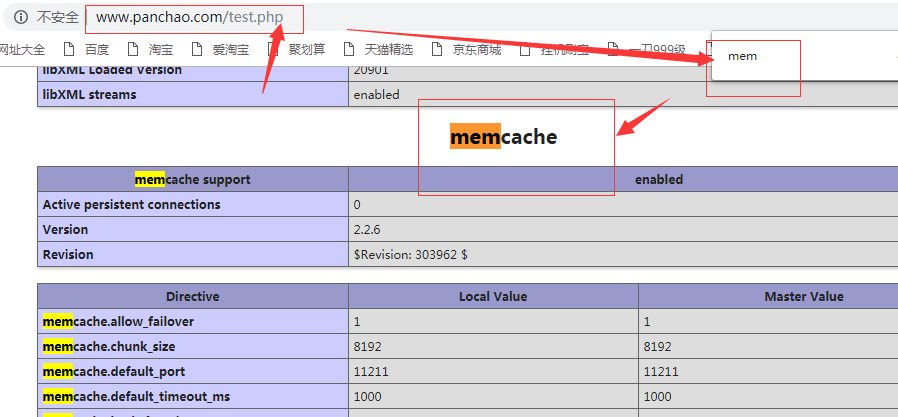
访问页面,如果出现以下效果则证明成功。
Linux下php添加memcache扩展的更多相关文章
- Linux下php安装memcache扩展
安装环境:CentOS 6.4 php扩展memcache的作用是为了支持memcached数据库缓存服务器,下面是安装方法. 1.下载 下载地址:http://pecl.php.net/packag ...
- linux下Redis与phpredis扩展安装
++++++++++++++++++++++++++++++++++++++++++++++linux下Redis与phpredis扩展安装++++++++++++++++++++++++++++++ ...
- Linux下php安装memcache
Linux下php安装memcache说明:php安装目录:/phpstudy/server/php/bin/phpphp.ini配置文件路径:/phpstudy/server/php/etc/php ...
- linux下永久添加静态路由
在linux下永久添加静态路由有两种方法: 添加路由的命令: 1,route add route add -net 192.56.76.0 netmask 255.255.255.0 dev eth0 ...
- linux上安装php7 memcache扩展 和 安装服务端memcached
linux上安装memcached不算太困难.唯一让本人感到困难的是 php7的memcache扩展安装.真的蛋疼! 先说安装服务端 memcached 1. 首先安装Libevent事件触发管理器. ...
- linux安装memcached及memcache扩展
一.安装libevent函数库 下载地址:http://libevent.org 默认被安装到:/usr/local/lib目录下 安装memcached之前需要先安装libevent函数库. 可以通 ...
- linux 下安装 php kafka 扩展
我们使用官方推荐 php kafka 扩展 phpkafka,由于该扩展是基于 librdkafka 开发,所以我们首先需要安装 librdkafka 下载地址:http://kafka.apache ...
- windows安装memcache并为php添加memcache扩展
第一步:安装包下载 1.4.5 版本之前用作为一个服务安装,1.4.5 版本之后用任务计划中启用一个普通进程来使用 具体内容如以下链接:http://www.runoob.com/memcached/ ...
- Linux下php安装Redis扩展
说明: 操作系统:CentOS php安装目录:/usr/local/php php.ini配置文件路径:/usr/local/php7/etc/php.ini Nginx安装目录:/usr/loca ...
随机推荐
- function module 之间调用
1: 在一个function group 中定义一个function module 2:在另外一个module中调用该module "调用其它function 要用 单引号 引着. 一个mo ...
- JAVA基础——时间Date类型转换
在java中有六大时间类,分别是: 1.java.util包下的Date类, 2.java.sql包下的Date类, 3.java.text包下的DateFormat类,(抽象类) 4.java.te ...
- k8s pv 的三种挂载模式
ReadWriteOnce:可读可写,只能被一个Node节点挂载 ReadWriteMany:可读可写,可以被多个Node节点挂载 ReadOnlyMany:只读,能被多个Node节点挂载
- 阿里云RDS备份在本地mysql快速还原
本地准备: ##安装和RDS相同的mysql版本,拿mysql5.6为例 http://www.cnblogs.com/37yan/p/7513605.html ##安装Xtrabackup 包 cd ...
- 【LeetCode每天一题】3Sum(三数之和)
Given an array nums of n integers, are there elements a, b, c in nums such that a + b + c = 0? Find ...
- android怎么抓取双向认证https的包
这里仅提供思路. 第一种方法: dex层面,可以直接用插日志方法,找到app使用的https库,这里以某app为例,使用okhttp, okhttp收发包相关代码: Request request = ...
- cocos2d-x JS 纯代码渲染Lable描边
/** * Enables shadow style and sets color, offset and blur radius styles. * @param {cc.Color} shadow ...
- 定义一个Rectangle类,该类提供getLength和getWidth方法。
import java.util.Comparator; /** * 定义一个Rectangle类,该类提供getLength和getWidth方法.利用图1-18中的findMax例程编写 * 一种 ...
- CSS笔记之Grid网格系统
Grid布局已经不是新鲜的技术了,但一直都是使用了Flex布局,如今需要了边学习边做些常用的笔记.首先grid和flex一样都不支持IE10以下的浏览器 基本布局: 一般是所有子元素都横向排列或者都纵 ...
- 笔记 : win8系统中的VM虚拟机的Ubuntu搭建samba服务
1. 环境准备 (此处使用root超级管理员帐户,执行命令时不用加sudo, 普通帐户需要前面加sudo): (1)安装好Ubutun虚拟系统后,Ubuntu 的软件源配置文件是 /etc/apt/ ...