
Shiro笔记(二)身份验证
Shiro笔记(二)身份验证
一、核心代码
 @Test

     public void helloWorldTest(){

         IniSecurityManagerFactory factory =

                 new IniSecurityManagerFactory("classpath:shiro-jdbc-realm.ini");

         SecurityManager manager = factory.getInstance();

        //全局设置,一次即可

         SecurityUtils.setSecurityManager(manager);

         Subject subject = SecurityUtils.getSubject();

         UsernamePasswordToken token =

                 new UsernamePasswordToken("Peter", "123");

         try{

                subject.login(token);

             }catch (AuthenticationException e){

                 e.printStackTrace();

             }

         Assert.assertEquals(true,subject.isAuthenticated());

         //退出登录

         subject.logout();
shiro.ini文件:
[users]

Peter=

Tom=
二、身份认证流程:
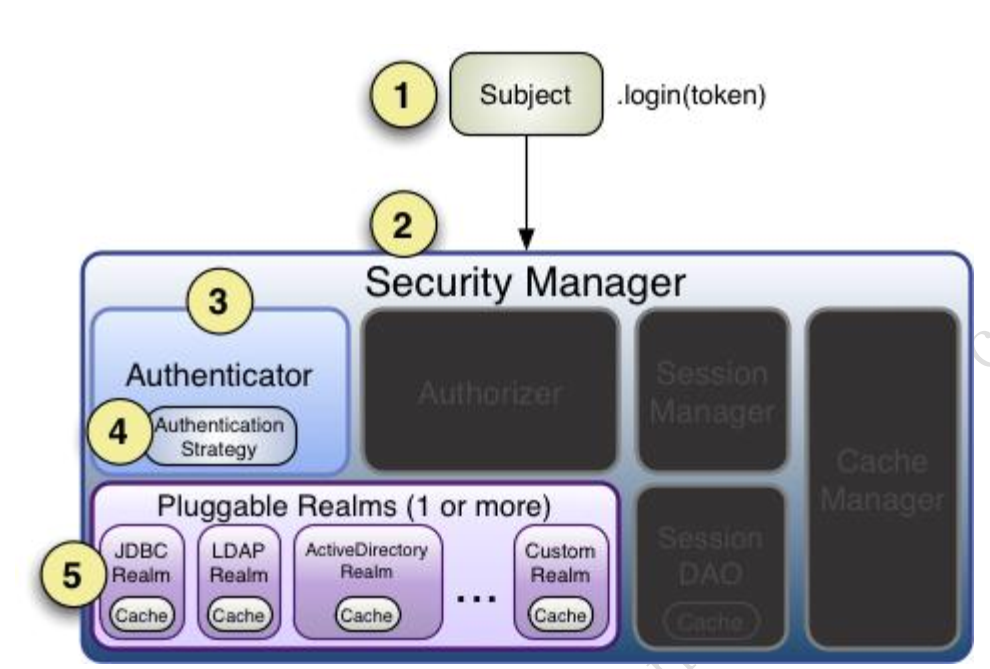
Authenticator 可能会委托给相应的 AuthenticationStrategy 进行多 Realm 身份验证,默认
ModularRealmAuthenticator 会调用 AuthenticationStrategy 进行多 Realm 身份验证;
Authenticator 会把相应的 token 传入 Realm,从 Realm 获取身份验证信息
三、Realm
Shiro 从从 Realm 获取安全数据(如用户、角色、权限)
Reaml接口:
 public interface Realm {

     //获得唯一的名字

     String getName();

     //判断此realm是否支持此token

     boolean supports(AuthenticationToken token);

     //获取token认证信息

     AuthenticationInfo getAuthenticationInfo(AuthenticationToken token) throws AuthenticationException;

 }
一)单Realm配置
 public class MyRealm implements Realm{

     public String getName() {

         return "myRealm";

     }

     public boolean supports(AuthenticationToken authenticationToken) {

         //仅支持UsernamePasswordToken类型

         return authenticationToken instanceof UsernamePasswordToken;

     }

     public AuthenticationInfo getAuthenticationInfo(AuthenticationToken token) throws AuthenticationException {

         //获取用户名

         String username= (String) token.getPrincipal();

         //获取密码

         String password=new String((char[]) token.getCredentials());

         if(!"Peter".equals(username)){

             throw new UnknownAccountException();

         }

         if(!"123".equals(password)){

             throw new IncorrectCredentialsException();

         }

         return new SimpleAuthenticationInfo(username,password,getName());

     }

 }
ini文件指定:
 myRealm=com.tang.shirotest.LoginLogoutTest

 securityManager.realms=$myRealm
二)JDBC Realm的使用
 [main]

 jdbcRealm=org.apache.shiro.realm.jdbc.JdbcRealm

 dataSource=com.alibaba.druid.pool.DruidDataSource

 dataSource.driverClassName=com.mysql.jdbc.Driver

 dataSource.url=jdbc:mysql://localhost:3306/shiro

 dataSource.username=root

 dataSource.password=jiapi1990

 jdbcRealm.dataSource=$dataSource

 securityManager.realms=$jdbcRealm
三)Authenticator及AuthenticationStrategy
Authenticator的职责是验证用户账号,接口为:
public interface Authenticator {

    AuthenticationInfo authenticate(AuthenticationToken var1) throws AuthenticationException;

}
SecurityManager 接口继承了 Authenticator,另外还有一个 ModularRealmAuthenticator 实现,
其委托给多个 Realm 进行验证,验证规则通过 AuthenticationStrategy 接口指定,默认提供
的实现:
FirstSuccessfulStrategy:只要有一个 Realm 验证成功即可,只返回第一个 Realm 身份验证
成功的认证信息,其他的忽略;
AtLeastOneSuccessfulStrategy:只要有一个 Realm 验证成功即可,和 FirstSuccessfulStrategy
不同,返回所有 Realm 身份验证成功的认证信息;
AllSuccessfulStrategy:所有 Realm 验证成功才算成功,且返回所有 Realm 身份验证成功的
认证信息,如果有一个失败就失败了
ModularRealmAuthenticator 默认使用 AtLeastOneSuccessfulStrategy 策略。
ini文件:
 #指定 securityManager 的 authenticator 实现

 authenticator=org.apache.shiro.authc.pam.ModularRealmAuthenticator

 securityManager.authenticator=$authenticator

 #指定 securityManager.authenticator 的 authenticationStrategy

 allSuccessfulStrategy=org.apache.shiro.authc.pam.AllSuccessfulStrategy

 securityManager.authenticator.authenticationStrategy=$allSuccessfulStrategy

 myRealm1=com.github.zhangkaitao.shiro.chapter2.realm.MyRealm1

 myRealm2=com.github.zhangkaitao.shiro.chapter2.realm.MyRealm2

 myRealm3=com.github.zhangkaitao.shiro.chapter2.realm.MyRealm3

 securityManager.realms=$myRealm1,$myRealm3
AuthenticationStrategy接口:
 public interface AuthenticationStrategy {

     //在所有 Realm 验证之前调用

     AuthenticationInfo beforeAllAttempts(Collection<? extends Realm> realms, AuthenticationToken token) throws AuthenticationException;

     //在每个 Realm 之前调用

     AuthenticationInfo beforeAttempt(Realm realm, AuthenticationToken token, AuthenticationInfo aggregate) throws AuthenticationException;

     //在每个 Realm 之后调用

     AuthenticationInfo afterAttempt(Realm realm, AuthenticationToken token, AuthenticationInfo singleRealmInfo, AuthenticationInfo aggregateInfo, Throwable t)

             throws AuthenticationException;

     ////在所有 Realm 之后调用

     AuthenticationInfo afterAllAttempts(AuthenticationToken token, AuthenticationInfo aggregate) throws AuthenticationException;

 }
自定义实现:
 public class AtLeastTwoAuthenticatorStrategy extends AbstractAuthenticationStrategy {

     @Override

     public AuthenticationInfo beforeAllAttempts(Collection<? extends Realm> realms, AuthenticationToken token) throws AuthenticationException {

         return new SimpleAuthenticationInfo();//返回一个权限的认证信息

     }

     @Override

     public AuthenticationInfo beforeAttempt(Realm realm, AuthenticationToken token, AuthenticationInfo aggregate) throws AuthenticationException {

         return aggregate;//返回之前合并的

     }

     @Override

     public AuthenticationInfo afterAttempt(Realm realm, AuthenticationToken token, AuthenticationInfo singleRealmInfo, AuthenticationInfo aggregateInfo, Throwable t) throws AuthenticationException {

         AuthenticationInfo info;

         if (singleRealmInfo == null) {

             info = aggregateInfo;

         } else {

             if (aggregateInfo == null) {

                 info = singleRealmInfo;

             } else {

                 info = merge(singleRealmInfo, aggregateInfo);

             }

         }

         return info;

     }

     @Override

     public AuthenticationInfo afterAllAttempts(AuthenticationToken token, AuthenticationInfo aggregate) throws AuthenticationException {

         if (aggregate == null || CollectionUtils.isEmpty(aggregate.getPrincipals()) || aggregate.getPrincipals().getRealmNames().size() < 2) {

             throw new AuthenticationException("Authentication token of type [" + token.getClass() + "] " +

                     "could not be authenticated by any configured realms.  Please ensure that at least two realm can " +

                     "authenticate these tokens.");

         }

         return aggregate;

     }

 }
Shiro笔记(二)身份验证的更多相关文章
- Shiro学习之身份验证
身份验证,即在应用中谁能证明他就是他本人.一般提供如他们的身份ID一些标识信息来表明他就是他本人,如提供身份证,用户名/密码来证明. 在shiro中,用户需要提供principals (身份)和cre ...
- Shiro:学习笔记(1)——身份验证
Shiro——学习笔记(1) 1.核心概念 1.Shiro不会自己去维护用户.维护权限:这些需要我们自己去设计/提供:然后通过相应的接口注入给Shiro.2.应用代码直接交互的对象是Subject,也 ...
- 【二】shiro入门 之 身份验证
大体步骤如下: 1.首先通过new IniSecurityManagerFactory 并指定一个ini 配置文件来创建一个SecurityManager工厂: 2.接着获取SecurityManag ...
- Shiro -- (二) 身份验证基本流程
简介: 在 shiro 中,用户需要提供 principals (身份)和 credentials(证明)给 shiro,从而应用能验证用户身份: principals:身份,即主体的标识属性,可以是 ...
- shiro 简单的身份验证 案例
Apache Shiro是Java的一个安全框架,Shiro可以帮助我们完成:认证.授权.加密.会话管理.与Web集成.缓存等. 简单的身份验证 项目目录: 首先,在shiro.ini里配置了用户名和 ...
- shiro系列二、身份验证和授权
一.身份验证 先来看看身份验证的流程 流程如下: 1.首先调用Subject.login(token)进行登录,其会自动委托给Security Manager,调用之前必须通过SecurityUtil ...
- 跟开涛老师学shiro -- 身份验证
身份验证,即在应用中谁能证明他就是他本人.一般提供如他们的身份ID一些标识信息来表明他就是他本人,如提供身份证,用户名/密码来证明. 在shiro中,用户需要提供principals (身份)和cre ...
- 第二章:shiro身份验证
身份验证,即在应用中谁能证明他就是他本人.一般提供如他们的身份ID一些标识信息来表明他就是他本人,如提供身份证,用户名/密码来证明. 在shiro中,用户需要提供principals (身份)和cre ...
- shiro身份验证
身份验证,即在应用中谁能证明他就是他本人.一般提供如他们的身份ID一些标识信息来表明他就是他本人,如提供身份证,用户名/密码来证明. 在shiro中,用户需要提供principals (身份)和cre ...
- 第二章 身份验证——《跟我学Shiro》
转发:https://www.iteye.com/blog/jinnianshilongnian-2019547 目录贴:跟我学Shiro目录贴 身份验证,即在应用中谁能证明他就是他本人.一般提供如他 ...
随机推荐
- driver: linux2.6 内核模块导出函数实例(EXPORT_SYMBOL) 【转】
转自:http://blog.chinaunix.net/uid-23381466-id-3837650.html 内核版本:2.6.38-11-generic 内核自己都大量利用内核符号表导出函数, ...
- 用python查看windows事件日志的方法(待后续研究)
#coding=utf8 import copy import ctypes from ctypes import byref, POINTER, cast, c_uint64, c_ulong, c ...
- python下的socket常用方法举例
python下的socket 1.简单的server和client端的socket代码 server.py: #!/usr/bin/env python #_*_ coding:utf-8 _*_ i ...
- appium运行报错java.net.SocketException: socket write error
这个错我调了 快两天一点头绪没有,脚本正常跑没问题,但是就是控制台输出信息报错,没法定位问题在哪.报错如图: 虽然这个报错不影响测试结果,但是本人有强迫症,一定要查出究竟: 我的尝试: 1.那天试验, ...
- Python源码学习(一)
考虑到性能的要求,我在工作中用的最多的是c/c++,然而,工作中又经常会有一些验证性的工作,这些工作对性能的要求并不高,反而对完成的效率要求更高,对于这样的工作,用一种开发效率高的语言是合理的想法,鉴 ...
- python之鸭子类型
python不支持多态,也不用支持多态,python是一种多态语言,崇尚鸭子类型. 在程序设计中,鸭子类型是动态类型的一种风格,不是由继承特定的类或实现特定的接口,而是当前的方法和属性的集合决定,鸭子 ...
- 保存 laravel model 而不更新 timestamps 的方法
$product = Product::find(1); $product->view_count += 1; $product->timestamps = false; $product ...
- 性能测试三十四:jvm内存结构(栈、堆、永久代)
Java内存管理机制 Java采用了自动管理内存的方式Java程序是运行在Jvm之中的Java的跨平台的基于Jvm的跨平台特性内存的分配和对象的创建是在Jvm中用户可以通过一系列参数来配置Jvm Jv ...
- 【C语言】 二叉树的基本运算
• 二叉树节点类型BTNode: typedef struct node { char data; struct node *lchild, *rchild; } BTNode; 创建二叉树 void ...
- phpstrom破解
lisence输入 2018/04/09 更新 license server:http://im.js.cn:8888 http://idea.iteblog.com/key.php 2018/0 ...