
Weblogic11g+Axis1.4 实现WebService服务
IDE:NetBeans8.0
项目结构:
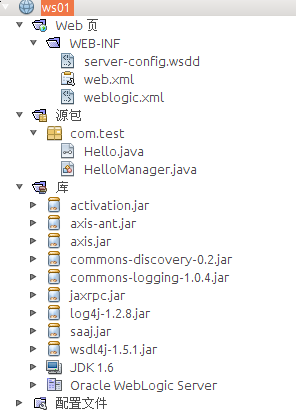
(1)新建接口Hello.java
package com.test;

/**

 * @author  y

 * @date    2015-9-5 7:51:29

 * @version 1.0

 * @desc

 */

public interface Hello {

    String sayHello(String name);

}
(2)新建实现类HelloManager.java
package com.test;

/**

 * @author  y

 * @date    2015-9-5 7:51:59

 * @version V1.0

 * @desc

 */

public class HelloManager implements Hello{

    public String sayHello(String name) {

        return "Hello,"+name;

    }

}
(3)配置web.xml
<?xml version="1.0" encoding="UTF-8"?>

<!DOCTYPE web-app PUBLIC "-//Sun Microsystems, Inc.//DTD Web

Application 2.3//EN" "http://java.sun.com/dtd/web-app_2_3.dtd">

<web-app>

    <listener>

        <listener-class>org.apache.axis.transport.http.AxisHTTPSessionListener</listener-class>

    </listener>

  <servlet>

    <servlet-name>AxisServlet</servlet-name>

    <display-name>Apache-Axis Servlet</display-name>

    <servlet-class>org.apache.axis.transport.http.AxisServlet</servlet-class>

  </servlet>

  <servlet>

    <servlet-name>AdminServlet</servlet-name>

    <display-name>Axis Admin Servlet</display-name>

    <servlet-class>org.apache.axis.transport.http.AdminServlet</servlet-class>

    <load-on-startup>100</load-on-startup>

  </servlet>

  <servlet-mapping>

    <servlet-name>AxisServlet</servlet-name>

    <url-pattern>/servlet/AxisServlet</url-pattern>

  </servlet-mapping>

  <servlet-mapping>

    <servlet-name>AxisServlet</servlet-name>

    <url-pattern>*.jws</url-pattern>

  </servlet-mapping>

  <servlet-mapping>

    <servlet-name>AxisServlet</servlet-name>

    <!--/services/*-->

    <url-pattern>/*</url-pattern>

  </servlet-mapping>

    <session-config>

        <!-- Default to 5 minute session timeouts -->

        <session-timeout>5</session-timeout>

    </session-config>

    <!-- currently the W3C havent settled on a media type for WSDL;

    http://www.w3.org/TR/2003/WD-wsdl12-20030303/#ietf-draft

    for now we go with the basic 'it's XML' response -->

  <mime-mapping>

    <extension>wsdl</extension>

     <mime-type>text/xml</mime-type>

  </mime-mapping>

  <mime-mapping>

    <extension>xsd</extension>

    <mime-type>text/xml</mime-type>

  </mime-mapping>

  <welcome-file-list id="WelcomeFileList">

    <welcome-file>index.jsp</welcome-file>

    <welcome-file>index.html</welcome-file>

    <welcome-file>index.jws</welcome-file>

  </welcome-file-list>

</web-app>
(4)新建server-config.wsdd
<?xml version="1.0" encoding="UTF-8"?>

<deployment xmlns="http://xml.apache.org/axis/wsdd/" xmlns:java="http://xml.apache.org/axis/wsdd/providers/java">

    <handler type="java:org.apache.axis.handlers.http.URLMapper" name="URLMapper"/>

    <service name="HelloManagerServices" provider="java:RPC">

        <parameter name="className" value="com.test.HelloManager"/>

        <parameter name="allowedMethods" value="*"/>

    </service>

    <transport name="http">

        <requestFlow>

            <handler type="URLMapper"/>

        </requestFlow>

    </transport>

</deployment>
成功部署之后访问:http://localhost:7001/ws01/HelloManagerServices?wsdl
<?xml version="1.0" encoding="UTF-8"?>

<wsdl:definitions targetNamespace="http://localhost:7001/ws01/HelloManagerServices" xmlns:apachesoap="http://xml.apache.org/xml-soap" xmlns:impl="http://localhost:7001/ws01/HelloManagerServices" xmlns:intf="http://localhost:7001/ws01/HelloManagerServices" xmlns:soapenc="http://schemas.xmlsoap.org/soap/encoding/" xmlns:wsdl="http://schemas.xmlsoap.org/wsdl/" xmlns:wsdlsoap="http://schemas.xmlsoap.org/wsdl/soap/" xmlns:xsd="http://www.w3.org/2001/XMLSchema">

<!--WSDL created by Apache Axis version: 1.4

Built on Apr 22, 2006 (06:55:48 PDT)-->

   <wsdl:message name="sayHelloRequest">

      <wsdl:part name="name" type="soapenc:string"/>

   </wsdl:message>

   <wsdl:message name="sayHelloResponse">

      <wsdl:part name="sayHelloReturn" type="soapenc:string"/>

   </wsdl:message>

   <wsdl:portType name="HelloManager">

      <wsdl:operation name="sayHello" parameterOrder="name">

         <wsdl:input message="impl:sayHelloRequest" name="sayHelloRequest"/>

         <wsdl:output message="impl:sayHelloResponse" name="sayHelloResponse"/>

      </wsdl:operation>

   </wsdl:portType>

   <wsdl:binding name="HelloManagerServicesSoapBinding" type="impl:HelloManager">

      <wsdlsoap:binding style="rpc" transport="http://schemas.xmlsoap.org/soap/http"/>

      <wsdl:operation name="sayHello">

         <wsdlsoap:operation soapAction=""/>

         <wsdl:input name="sayHelloRequest">

            <wsdlsoap:body encodingStyle="http://schemas.xmlsoap.org/soap/encoding/" namespace="http://test.com" use="encoded"/>

         </wsdl:input>

         <wsdl:output name="sayHelloResponse">

            <wsdlsoap:body encodingStyle="http://schemas.xmlsoap.org/soap/encoding/" namespace="http://localhost:7001/ws01/HelloManagerServices" use="encoded"/>

         </wsdl:output>

      </wsdl:operation>

   </wsdl:binding>

   <wsdl:service name="HelloManagerService">

      <wsdl:port binding="impl:HelloManagerServicesSoapBinding" name="HelloManagerServices">

         <wsdlsoap:address location="http://localhost:7001/ws01/HelloManagerServices"/>

      </wsdl:port>

   </wsdl:service>

</wsdl:definitions>
客户端测试:
public static void main(String[] args) throws Exception {

        String namespace="http://test.com";

        String method="sayHello";

        String wsdl="http://localhost:7001/ws01/HelloManagerServices";

        Object[] params={"yshyee"};

        String result = AxisInvokeJAXWSUtil.invoke(namespace, method, wsdl, params);

        System.out.println("=======result:"+result);

    }
AxisInvokeJAXWSUtil.java
public final class AxisInvokeJAXWSUtil {

    /**

     *

     * @param namespace

     * @param method

     * @param wsdl

     * @param params

     * @return

     * @throws Exception

     */

    public static String invoke(String namespace, String method, String wsdl, Object[] params) throws Exception{

        Object obj;

        Service service = new Service();

        Call call = (Call) service.createCall();

        call.setOperationName(new QName(namespace, method));

        call.setTargetEndpointAddress(wsdl);

        if (null != params) {

            int len = params.length;

            for (int i = 0; i < len; i++) {

                //动态设置参数,而且参数类为字符串类型

                call.addParameter("arg" + i, XMLType.XSD_STRING, ParameterMode.IN);

            }

            if (len > 0) {

                //设置返回值类型为字符串类型

                call.setReturnType(XMLType.XSD_STRING);

            }

        } else {

            params = new Object[]{};

        }

        obj = call.invoke(params);

        return obj == null ? "" : obj.toString();

    }

}
Weblogic11g+Axis1.4 实现WebService服务的更多相关文章
- axis1.4开发webservice服务端(快速入门)-基于jdk1.4
写在前面: 现在有很多开发webservice的方法以及框架,什么cxf等,但是这些在你编写服务类的时候都要用到注解这个功能.如果现在的jdk是1.4的,那么就不能使用注解这个功能了.所以这里可以用到 ...
- 基于axis1.4的webservice实例
1.准备工作: 概念:SOAP(简单对象访问协议).WSDL(web服务描述语言).XML(可扩展标记语言).axis(阿帕奇可扩展交互系统) (1) 下载axis1.4,将axis1.4中的 ...
- Axis1.4开发webservice个人笔记
Axis1.4开发webservice SOAP 是基于 XML 的简易协议,SOAP 即Simple Object Access Protocol(简单对象访问协议),可使应用程序在 HTTP 之上 ...
- 基于Axis1.4的webservice接口开发(接口调用)
基于Axis1.4的webservice接口开发(接口调用) 一.webservice接口代码参考上一篇博客: http://www.cnblogs.com/zhukunqiang/p/7125668 ...
- 基于Axis1.4的webservice接口开发(代码开发)
基于Axis1.4的webservice接口开发(代码开发) 一.开发环境: 我的开发环境是MyEclipse 2015+Apache-Tomcat-8.0.21. 二.代码开发: 1.新建一个Web ...
- 使用axis1.4生成webservice的客户端代码
webservice服务端: https://blog.csdn.net/ghsau/article/details/12714965 跟据WSDL文件地址生成客服端代码: 1.下载 axis1.4 ...
- 【Java EE 学习 80 下】【调用WebService服务的四种方式】【WebService中的注解】
不考虑第三方框架,如果只使用JDK提供的API,那么可以使用三种方式调用WebService服务:另外还可以使用Ajax调用WebService服务. 预备工作:开启WebService服务,使用jd ...
- WebService学习总结(四)——调用第三方提供的webService服务
http://www.cnblogs.com/xdp-gacl/p/4260627.html 互联网上面有很多的免费webService服务,我们可以调用这些免费的WebService服务,将一些其他 ...
- webservice服务的简单应用
本人目前刚接触到webservice服务,知道它是一个为外部提供接口的服务,下面大概讲一下webservice是如何应用的. 在此我只针对ASP.NET 讲一个是如何应用的: 1. 打开VS ,在WE ...
随机推荐
- dubbo(soa分布式)与cobar(mysql分布式)
http://www.jianshu.com/p/0dde591f21d0 (Dubbo编译不是个顺利的事) Cobar是提供关系型数据库(MySQL)分布式服务的中间件,它可以让传统的数据库得到良好 ...
- CreateFont具体解释
CFont * f; f = new CFont; f->CreateFont(10, // nHeight 0, // nWidth 0, // n ...
- Ext入门的第一个程序(1)
1.Ext是什么? extjs是集UI和ajax框架与一身的,界面又好看,又有很强的ajax交互功能,适合不会做漂亮页面的程序员用的,缺点就是太大了,要导入近800KB左右的js和css文件,这对于w ...
- Camera2Raw
This sample demonstrates how to use the Camera2 API to capture RAW camera buffers and save them as D ...
- Eclipse快捷键 10个最有用的快捷键(转)
Eclipse中10个最有用的快捷键组合 一个Eclipse骨灰级开发者总结了他认为最有用但又不太为人所知的快捷键组合.通过这些组合可以更加容易的浏览源代码,使得整体的开发效率和质量得到提升. ...
- HDU 3037(Lucas定理)
对于很大的组合数不能用C(n, m) = C(n - 1, m) + C(n-1, m -1)来求,这里就用到Lucas定理. 模板题: hdu3037:模板如下: #include <cstd ...
- AmazeUI 模态框封装
/** * 模态窗口 */ window.Modal = { tpls:{ alert:'<div class="am-modal am-modal-alert" tabin ...
- IIS 配置问题解决
无法识别的属性“targetFramework”.请注意属性名称区分大小写. 配置错误 说明: 在处理向该请求提供服务所需的配置文件时出错.请检查下面的特定错误详细信息并适当地修改配置文件. 分析器错 ...
- 知识点总结之HTML篇
1.标签语义化: ①.在不依赖样式的情况下,页面能够呈现清晰的结构. ②.如果使用者有视觉障碍,屏幕阅读器会完全根据你的标记来选择读取你的网页. ③.有利于搜索引擎依赖于标记来确定上下文和各个关键字的 ...
- Hive学习之二 《Hive的安装之自定义mysql数据库》
由于MySQL便于管理,在学习过程中,我选择MySQL. 一,配置元数据库. 1.安装MySQL,采用yum方式. ①yum install mysql-server,安装mysql服务端,安装服 ...