
[React Native] Basic iOS Routing -- NavigatorIOS
Inside the app component, we use NavigatiorIOS to render the compoent:
class githubnotetaker extends Component {

  render() {

    return (

      <NavigatorIOS

          style={styles.container}

          initialRoute={{

            title: 'Github note taker',

            component: Main

          }}

        />

    );

  }

}
This is like rouer. 'initialRoute': for the initial loading, it will loads 'Main' component by default.
Whole code for index.ios.js:
/**

 * Sample React Native App

 * https://github.com/facebook/react-native

 * @flow

 */

import React, { Component } from 'react';

import {

    AppRegistry,

    StyleSheet,

    Text,

    NavigatorIOS

} from 'react-native';

import Main from './App/components/main';

const styles = StyleSheet.create({

  container:{

    flex: 1,

    backgroundColor: '#111111'

  },

});

class githubnotetaker extends Component {

  render() {

    return (

      <NavigatorIOS

          style={styles.container}

          initialRoute={{

            title: 'Github note taker',

            component: Main

          }}

        />

    );

  }

}

AppRegistry.registerComponent('githubnotetaker', () => githubnotetaker);
Main component:
import React, { Component, PropTypes } from 'react';

import { View, Text, StyleSheet } from 'react-native';

var style = StyleSheet.create({

    mainContainer: {

        flex: 1,

        padding: 30,

        marginTop: 65,

        flexDirection: 'column',

        justifyContent: 'center',

        backgroundColor: '#48BBEC'

    },

    title: {

        marginBottom: 20,

        fontSize: 25,

        textAlign: 'center',

        color: '#fff'

    },

    searchInput: {

        height: 50,

        padding: 4,

        marginRight: 5,

        fontSize: 23,

        borderWidth: 1,

        borderColor: 'white',

        borderRadius: 8,

        color: 'white'

    },

    buttonText: {

        fontSize: 18,

        color: '#111',

        alignSelf: 'center'

    },

    button: {

        height: 45,

        flexDirection: 'row',

        backgroundColor:'white',

        borderColor:'white',

        borderWidth:1,

        borderRadius:8,

        marginBottom:10,

        alignSelf:'stretch',

        justifyContent:'center'

    }

});

export default class Main extends Component{

    render(){

       return (

           <View style={style.mainContainer}>

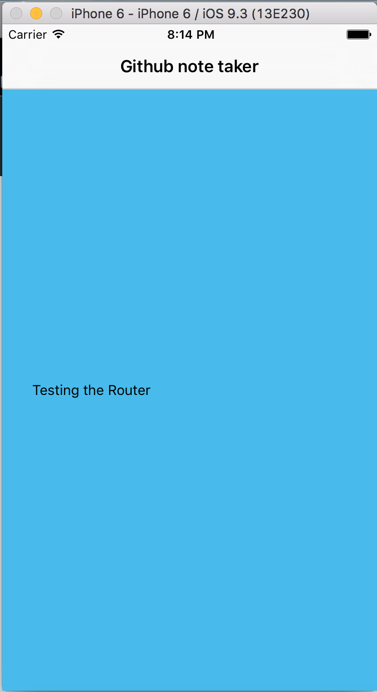
               <Text>Testing the Router</Text>

           </View>

       )

    }

}
We sue 'View', 'Text', 'StyleSheet' from react-native for rendering the content. And apply the styles.
[React Native] Basic iOS Routing -- NavigatorIOS的更多相关文章
- React Native & Android & iOS & APK
React Native & Android & iOS & APK https://play.google.com/apps/publish/signup/ $ 25 bui ...
- React Native & Android & iOS
React Native & Android & iOS React Native & Android & iOS https://facebook.github.io ...
- React Native之 Navigator与NavigatorIOS使用
前言 学习本系列内容需要具备一定 HTML 开发基础,没有基础的朋友可以先转至 HTML快速入门(一) 学习 本人接触 React Native 时间并不是特别长,所以对其中的内容和性质了解可能会有所 ...
- React Native视频播放(iOS)
网站链接:http://www.ncloud.hk/%E6%8A%80%E6%9C%AF%E5%88%86%E4%BA%AB/learn-react-native-video/ React Nativ ...
- React Native (二) ios打包到真机
每当在模拟器上完成了开发,都想到真机上试试,正好前段时候淘了一个imac. 这里就以打包rndemo到iphone为例,讲一下react ntive ios打包到真机的流程. 一.前置 1.有个iph ...
- React Native(十三)——ios键盘挡住textInput
渐入佳境 用React Native重构的项目也快接近尾声,剩下的就是适配ios的功能了.慢慢地也从中琢磨出了一点门道,于是就遇见了键盘遮挡textInput问题斑斑: 正常页面: android点击 ...
- react native进一步学习(NavigatorIOS 学习)
特别申明:本人代码不作为任何商业的用途,只是个人学习的一些心得,为了使得后来的更多的程序员少走一些弯路.*(如若侵犯你的版权还望见谅)*. 开发工具:WebStorm,xcode 1. rn的创建的时 ...
- React Native之iOS App打包
iOS打包步骤(一.二.三可不按照顺序) 步骤一: 选择iOS Device(以下两者选其中一个即可) 选择 Generic iOS Device (个人建议使用这个) 选择Generic iOS D ...
- React Native ios开发第一课
前言 本篇文章的作用在于帮助你快速上手使用React Native编写iOS应用.如果你现在还不太了解React Native是什么以及Facebook为什么要创建React Native,你可以先看 ...
随机推荐
- cocos2d-x for js 继承的写法
cocos2d-x for js中集成了两套继承写法,一套是JR的(jquery的作者),一套是google. 目前来说,cocos2d-x for js demo使用JR的写法----未完待续... ...
- VC++下封装ADO类以及使用方法
操作系统:windows 7软件环境:visual studio 2008 .Microsoft SQL 2005本次目的:介绍一个已经封装的ADO类,简单说明怎么导入使用 首先声明一下,这个封装的A ...
- 【Linux安全】文件或目录权限设置
实例演示: 要求:新建文件夹,名称为secure,要求改文件夹只能被创建者deadmin以及与deadmin同组用户进行读.写.执行的权限, 其他用户均只有读的权限. 查看 一下secure原本的权限 ...
- .NET程序内,访问私有或者保护成员的技巧
如果是C++,我们可以计算对象内成员的位置,然后偏移指针以访问类型的所有非公开成员.但是.NET对象完全受GC管理,地址根本无法得到,并且也无法通过指针调用方法. 当然... 这是一种很不值得推荐的技 ...
- breakpoints、lldb 和 chisel 的使用
http://www.cocoachina.com/ios/20150803/12805.html Breakpoints BreakPoint分类 breakpoint也是有分类的,我这里的文章内大 ...
- 【转】android JNI编程 一些技巧(整理)
原文网址:http://blog.csdn.net/linweig/article/details/5203716 本篇将介绍在JNI编程中如何传递参数和返回值. 首先要强调的是,native方法不但 ...
- 从头开始编写一个Orchard网上商店模块(4) - 创建ProductPart
原文地址:http://skywalkersoftwaredevelopment.net/blog/writing-an-orchard-webshop-module-from-scratch-par ...
- bzoj 1951 [Sdoi2010]古代猪文(数论知识)
[题目链接] http://www.lydsy.com/JudgeOnline/problem.php?id=1951 [思路] 一道优(e)秀(xin)的数论题. 首先我们要求的是(G^sigma{ ...
- Linux下platform设备以及platform设备和驱动注册的先后顺序
platform是Linux系统提供的一种管理设备的手段,所有SOC系统中集成的独立的外设控制器.挂接在SOC内存空间的外设等都属Platform设备.如ARM S3C6410处理器中,把内部集成的I ...
- Linux设备驱动中的异步通知与异步I/O
异步通知概念: 异步通知的意识是,一旦设备就绪,则主动通知应用程序,这样应用程序根本就不需要查询设备状态,这一点非常类似于硬件上的“中断”概念,比较准确的称谓是“信号驱动的异步IO”,信号是在软件层次 ...