
[React Native] Basic iOS Routing -- NavigatorIOS
Inside the app component, we use NavigatiorIOS to render the compoent:
class githubnotetaker extends Component {

  render() {

    return (

      <NavigatorIOS

          style={styles.container}

          initialRoute={{

            title: 'Github note taker',

            component: Main

          }}

        />

    );

  }

}
This is like rouer. 'initialRoute': for the initial loading, it will loads 'Main' component by default.
Whole code for index.ios.js:
/**

 * Sample React Native App

 * https://github.com/facebook/react-native

 * @flow

 */

import React, { Component } from 'react';

import {

    AppRegistry,

    StyleSheet,

    Text,

    NavigatorIOS

} from 'react-native';

import Main from './App/components/main';

const styles = StyleSheet.create({

  container:{

    flex: 1,

    backgroundColor: '#111111'

  },

});

class githubnotetaker extends Component {

  render() {

    return (

      <NavigatorIOS

          style={styles.container}

          initialRoute={{

            title: 'Github note taker',

            component: Main

          }}

        />

    );

  }

}

AppRegistry.registerComponent('githubnotetaker', () => githubnotetaker);
Main component:
import React, { Component, PropTypes } from 'react';

import { View, Text, StyleSheet } from 'react-native';

var style = StyleSheet.create({

    mainContainer: {

        flex: 1,

        padding: 30,

        marginTop: 65,

        flexDirection: 'column',

        justifyContent: 'center',

        backgroundColor: '#48BBEC'

    },

    title: {

        marginBottom: 20,

        fontSize: 25,

        textAlign: 'center',

        color: '#fff'

    },

    searchInput: {

        height: 50,

        padding: 4,

        marginRight: 5,

        fontSize: 23,

        borderWidth: 1,

        borderColor: 'white',

        borderRadius: 8,

        color: 'white'

    },

    buttonText: {

        fontSize: 18,

        color: '#111',

        alignSelf: 'center'

    },

    button: {

        height: 45,

        flexDirection: 'row',

        backgroundColor:'white',

        borderColor:'white',

        borderWidth:1,

        borderRadius:8,

        marginBottom:10,

        alignSelf:'stretch',

        justifyContent:'center'

    }

});

export default class Main extends Component{

    render(){

       return (

           <View style={style.mainContainer}>

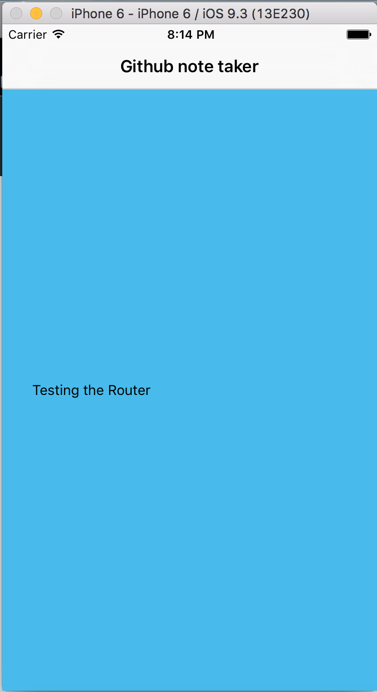
               <Text>Testing the Router</Text>

           </View>

       )

    }

}
We sue 'View', 'Text', 'StyleSheet' from react-native for rendering the content. And apply the styles.
[React Native] Basic iOS Routing -- NavigatorIOS的更多相关文章
- React Native & Android & iOS & APK
React Native & Android & iOS & APK https://play.google.com/apps/publish/signup/ $ 25 bui ...
- React Native & Android & iOS
React Native & Android & iOS React Native & Android & iOS https://facebook.github.io ...
- React Native之 Navigator与NavigatorIOS使用
前言 学习本系列内容需要具备一定 HTML 开发基础,没有基础的朋友可以先转至 HTML快速入门(一) 学习 本人接触 React Native 时间并不是特别长,所以对其中的内容和性质了解可能会有所 ...
- React Native视频播放(iOS)
网站链接:http://www.ncloud.hk/%E6%8A%80%E6%9C%AF%E5%88%86%E4%BA%AB/learn-react-native-video/ React Nativ ...
- React Native (二) ios打包到真机
每当在模拟器上完成了开发,都想到真机上试试,正好前段时候淘了一个imac. 这里就以打包rndemo到iphone为例,讲一下react ntive ios打包到真机的流程. 一.前置 1.有个iph ...
- React Native(十三)——ios键盘挡住textInput
渐入佳境 用React Native重构的项目也快接近尾声,剩下的就是适配ios的功能了.慢慢地也从中琢磨出了一点门道,于是就遇见了键盘遮挡textInput问题斑斑: 正常页面: android点击 ...
- react native进一步学习(NavigatorIOS 学习)
特别申明:本人代码不作为任何商业的用途,只是个人学习的一些心得,为了使得后来的更多的程序员少走一些弯路.*(如若侵犯你的版权还望见谅)*. 开发工具:WebStorm,xcode 1. rn的创建的时 ...
- React Native之iOS App打包
iOS打包步骤(一.二.三可不按照顺序) 步骤一: 选择iOS Device(以下两者选其中一个即可) 选择 Generic iOS Device (个人建议使用这个) 选择Generic iOS D ...
- React Native ios开发第一课
前言 本篇文章的作用在于帮助你快速上手使用React Native编写iOS应用.如果你现在还不太了解React Native是什么以及Facebook为什么要创建React Native,你可以先看 ...
随机推荐
- MyBatis 学习入门
mybatis 第一天 mybatis的基础知识 持久层的框架,对jdbc的封装 课程安排 第一天:基础知识(重点,内容量多) 最简单的jdbc程序 public class JdbcTest{ pu ...
- 忘记commit的一次教训
由于业务需求,已经上线的系统新增加了一些需求,其中一个需求是,从一个SQLSERVER数据库导入数据到生产的ORCLE数据库, 由于我的失误导致系统上线后 生产的Oracle数据没有导入成功,但是在本 ...
- Django单元测试(二)------测试工具
The test client test client是一个python类,来模拟一个简单的“哑”浏览器,允许你来测试你的view函数.你可以使用test client完成下列事情: 1.模拟&quo ...
- Objective-c Category(类别)
NSStringUtilities.h: #import <Foundation/Foundation.h> @interface NSString(Utilities) -(BOOL) ...
- 如何查看跟踪查看LINUX内核中的源码
我的博客:www.while0.com 最近看LINUX书籍时,根据书中代码找相应的函数或者结构定义相当吃力,根据网上资料按以下方法查找速度较快. 1.安装ctags 在源代码目录下运行 ctags ...
- 坑爹的UICollectionView
最近用UICoolectionView的时候遇到一个很DT的问题,我往VC里加12个视图,结果显示成这样(右边是期待的样子): 研究了一下午,终于发现了问题: @interface FpL ...
- file_operations结构体解析 1
注:学了这么长时间了,还没有好好看看 file_operations机构体,这其中还有很多的东西,当你学着学着的时候,就会用到这里面的一些系统调用对应的函数了,我在网上搜索之后,记录如下,一边将来查看 ...
- 利用if else 来计算车费
static void Main(string[] args) { while (true) { double ...
- bzoj1296
首先先预处理每行刷1~m次最多能正确涂出多少格 然后把每行涂色看做一个物品,当重量为j(这行涂了j次),价值为对应能正确涂出的格子数: 总重量为k,然后做分组背包即可 ..,..,..] of lon ...
- 【 D3.js 选择集与数据详解 — 4 】 enter和exit的处理方法以及处理模板
绑定数据之后,选择集分为三部分:update.enter.exit.这三部分的处理办法是什么呢?本文将讲解其处理方法,以及一个常用的处理模板. 1. enter的处理方法 如果没有足够的元素,那么处理 ...