
IOS网络编程:HTTP
IOS网络编程:HTTP
HTTP定义了一种在服务器和客户端之间传递数据的途径。
URL定义了一种唯一标示资源在网络中位置的途径。
REQUESTS 和 RESPONSES: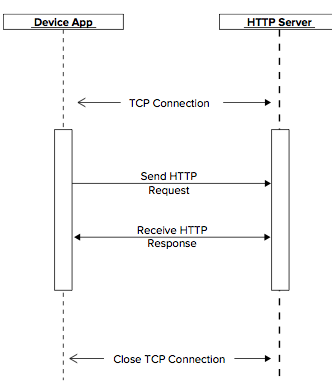
客户端先建立一个TCP连接,然后发送一个请求。服务器受到请求处理后发送一个响应向客户端传递数据。然后客户端可以继续发送请求或者关闭这个TCP连接。
HTTPS:
在TCP连接建立后,发送请求之前,需要建立一个一个SSL会话。
request方法和它们的用途
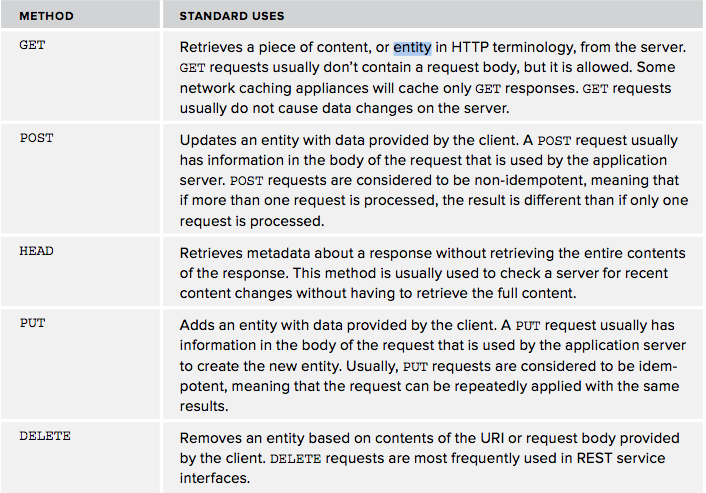
iOS的NSURLRequest和它的子类NSMutableURLRequest提供了建立HTTP请求的方法。
NSURLResponse 和 它的子类NSHTTPURLResponse 处理返回的数据。
URL:

Protocol包括HTTP、FTP和file。
URL编码:
NSString *urlString = @"http://myhost.com?query=This is a question";
NSString *encoded = [urlString stringByAddingPercentEscapesUsingEncoding:NSUTF8StringEncoding];
NSURL用来管理URL。
IOS HTTP APIS:
涉及到下面一些类:
NSURL, NSURLRequest, NSURLConnection, 和 NSURLResponse.
1、NSURL
NSURL可以定义本地文件和网络文件
NSURL *url = [NSURL urlWithString:@"http://www.google.com"];
NSData *data = [NSData dataWithContentsOfURL:url];
NSURL定义了很多访问器:

if (url.port == nil) {
  NSLog(@"Port is nil");

} else {

  NSLog(@"Port is not nil");

}
2、NSURLRequest
创建了NSURL后,就可以用NSURLRequest建立请求了:
NSURL *url = [NSURL URLWithString: @"https://gdata.youtube.com/feeds/api/standardfeeds/top_rated"];

if (url == nil) {

     NSLog(@"Invalid URL");

   return;

}

NSURLRequest *request = [NSURLRequest requestWithURL:url];

if (request == nil) {

  NSLog(@"Invalid Request");

    return;

}
NSMutableURLRequest是NSURLRequest 的子类,提供了改变请求的属性的方法:
NSURL *url = [NSURL urlWithString@"http://server.com/postme"];
NSMutableURLRequest *req = [NSMutableURLRequest requestWithURL:url];
[req setHTTPMethod:@"POST"];

[req setHTTPBody:[@"Post body" dataUsingEncoding:NSUTF8StringEncoding]];
如果你要发送一个图片或者视频,那么用需要用NSInputStream,它没有把数据全部加在到内存。
NSMutableURLRequest *request = [NSMutableURLRequest requestWithURL:url];

NSInputStream *inStream = [NSInputStream inputStreamWithFileAtPath:srcFilePath];

[request setHTTPBodyStream:inStream];

[request setHTTPMethod:@"POST"];
3、NSURLConnection
提供了初始化、开始、和取消一个连接。
4、NSURLResponse
发送同步请求:
- (NSArray *) doSyncRequest:(NSString *)urlString {

    // make the NSURL object from the string

    NSURL *url = [NSURL URLWithString:urlString];

    // Create the request object with a 30 second timeout and a cache policy to always retrieve the

    // feed regardless of cachability.

    NSURLRequest *request =

       [NSURLRequest requestWithURL:url

                        cachePolicy:NSURLRequestReloadIgnoringLocalAndRemoteCacheData

                    timeoutInterval:30.0];

    // Send the request and wait for a response

    NSHTTPURLResponse   *response;

    NSError             *error;

    NSData *data = [NSURLConnection sendSynchronousRequest:request

                                         returningResponse:&response

                                                     error:&error];

    // check for an error

    if (error != nil) {

        NSLog(@"Error on load = %@", [error localizedDescription]);

        return nil;

    }

    // check the HTTP status

    if ([response isKindOfClass:[NSHTTPURLResponse class]]) {

        NSHTTPURLResponse *httpResponse = (NSHTTPURLResponse *)response;

        if (httpResponse.statusCode != 200) {

            return nil;

        }

        NSLog(@"Headers: %@", [httpResponse allHeaderFields]);

    }

    // Parse the data returned into an NSDictionary

    NSDictionary *dictionary =

        [XMLReader dictionaryForXMLData:data

                                  error:&error];

    // Dump the dictionary to the log file

    NSLog(@"feed = %@", dictionary);

    NSArray *entries =[self getEntriesArray:dictionary];

    // return the list if items from the feed.

    return entries;

}
Queued Asynchronous Requests:
- (void) doQueuedRequest:(NSString *)urlString  delegate:(id)delegate {

    // make the NSURL object

    NSURL *url = [NSURL URLWithString:urlString];

    // create the request object with a no cache policy and a 30 second timeout.

    NSURLRequest *request = [NSURLRequest requestWithURL:url cachePolicy:NSURLRequestReloadIgnoringLocalAndRemoteCacheData timeoutInterval:30.0];

    // If the queue doesn't exist, create one.

    if (queue == nil) {

        queue = [[NSOperationQueue alloc] init];

    }

    // send the request and specify the code to execute when the request completes or fails.

    [NSURLConnection sendAsynchronousRequest:request

                                       queue:queue

                           completionHandler:^(NSURLResponse *response,

                                               NSData *data,

                                               NSError *error) {

            if (error != nil) {

               NSLog(@"Error on load = %@", [error localizedDescription]);

            } else {

                // check the HTTP status

                if ([response isKindOfClass:[NSHTTPURLResponse class]]) {

                    NSHTTPURLResponse *httpResponse = (NSHTTPURLResponse *)response;

                    if (httpResponse.statusCode != 200) {

                        return;

                    }

                    NSLog(@"Headers: %@", [httpResponse allHeaderFields]);

                }

                // parse the results and make a dictionary

                NSDictionary *dictionary =

                   [XMLReader dictionaryForXMLData:data

                                             error:&error];

                NSLog(@"feed = %@", dictionary);

                // get the dictionary entries.

                NSArray *entries =[self getEntriesArray:dictionary];

                // call the delegate

                if ([delegate respondsToSelector:@selector(setVideos:)]) {

                    [delegate performSelectorOnMainThread:@selector(setVideos:)

                                               withObject:entries

                                            waitUntilDone:YES];

                }

            }

    }];

}
Asynchronous Requests:
#import <Foundation/Foundation.h>

#define kDownloadComplete   @"downloadComplete"

@class DownloadProgressView;

@interface AsyncDownloader : NSObject <NSURLConnectionDelegate> {

    // The number of bytes that need to be downloaded

    long long   downloadSize;

    // the total amount downloaded thus far

    long long   totalDownloaded;

}

// A reference to the progress view to show the user how things are progressing

@property (assign) DownloadProgressView *progressView;

// The target MP4 file

@property (strong) NSString *targetFile;

// The original URL to download.  Due to redirects the actual content may come from another URL

@property (strong) NSString *srcURL;

// The open file to which the content is written

@property (strong) NSFileHandle *outputHandle;

// The name of the temp file to which the content is streamed. This file is moved to the target file when

// the download is complete

@property (strong) NSString *tempFile;

@property (strong) NSURLConnection *conn;

// instructs the class to start the download.

- (void) start;

@end
//

//  AsyncDownloader.m

//  VideoDownloader

//

//  Created by Jack Cox on 4/7/12.

//

//

#import "AsyncDownloader.h"

#import "DownloadProgressView.h"

@implementation AsyncDownloader

@synthesize targetFile;

@synthesize srcURL;

@synthesize outputHandle;

@synthesize tempFile;

@synthesize progressView;

@synthesize conn;

- (void) start {

    NSLog(@"Starting to download %@", srcURL);

    // create the URL

    NSURL *url = [NSURL URLWithString:srcURL];

    // Create the request

    NSURLRequest *request = [NSURLRequest requestWithURL:url];

    // create the connection with the target request and this class as the delegate

    self.conn =

         [NSURLConnection connectionWithRequest:request

                                       delegate:self];

    // start the connection

    [self.conn start];

}

/**

 * Creates a UUID to use as the temporary file name during the download

 */

- (NSString *)createUUID

{

    CFUUIDRef uuidRef = CFUUIDCreate(NULL);

    CFStringRef uuidStringRef = CFUUIDCreateString(NULL, uuidRef);

    CFRelease(uuidRef);

    NSString *uuid = [NSString stringWithString:(__bridge NSString *)

                      uuidStringRef];

    CFRelease(uuidStringRef);

    return uuid;

}

#pragma mark NSURLConnectionDelegate methods

/**

 * This delegate method is called when the NSURLConnection gets a 300 series response that indicates

 * that the request needs to be redirected.  It is implemented here to display any redirects that might

 * occur. This method is optional.  If omitted the client will follow all redirects.

 **/

- (NSURLRequest *)connection:(NSURLConnection *)connection

             willSendRequest:(NSURLRequest *)request

            redirectResponse:(NSURLResponse *)redirectResponse {

    // Dump debugging information

    NSLog(@"Redirect request for %@ redirecting to %@", srcURL, request.URL);

    NSLog(@"All headers = %@",

          [(NSHTTPURLResponse*) redirectResponse allHeaderFields]);

    // Follow the redirect

    return request;

}

/**

 * This delegate method is called when the NSURLConnection connects to the server.  It contains the

 * NSURLResponse object with the headers returned by the server.  This method may be called multiple times.

 * Therefore, it is important to reset the data on each call.  Do not assume that it is the first call

 * of this method.

 **/

- (void) connection:(NSURLConnection *)connection

 didReceiveResponse:(NSURLResponse *)response {

    NSLog(@"Received response from request to url %@", srcURL);

    NSHTTPURLResponse *httpResponse = (NSHTTPURLResponse *)response;

    NSLog(@"All headers = %@", [httpResponse allHeaderFields]);

    if (httpResponse.statusCode != 200) {// something went wrong, abort the whole thing

        // reset the download counts

        if (downloadSize != 0L) {

            [progressView addAmountToDownload:-downloadSize];

            [progressView addAmountDownloaded:-totalDownloaded];

        }

        [connection cancel];

        return;

    }

    NSFileManager *fm = [NSFileManager defaultManager];

    // If we have a temp file already, close it and delete it

    if (self.tempFile != nil) {

        [self.outputHandle closeFile];

        NSError *error;

        [fm removeItemAtPath:self.tempFile error:&error];

    }

    // remove any pre-existing target file

    NSError *error;

    [fm removeItemAtPath:targetFile error:&error];

    // get the temporary directory name and make a temp file name

    NSString *tempDir = NSTemporaryDirectory();

    self.tempFile = [tempDir stringByAppendingPathComponent:[self createUUID]];

    NSLog(@"Writing content to %@", self.tempFile);

    // create and open the temporary file

    [fm createFileAtPath:self.tempFile contents:nil attributes:nil];

    self.outputHandle = [NSFileHandle fileHandleForWritingAtPath:self.tempFile];

    // prime the download progress view

    NSString *contentLengthString = [[httpResponse allHeaderFields] objectForKey:@"Content-length"];

    // reset the download counts

    if (downloadSize != 0L) {

        [progressView addAmountToDownload:-downloadSize];

        [progressView addAmountDownloaded:-totalDownloaded];

    }

    downloadSize = [contentLengthString longLongValue];

    totalDownloaded = 0L;

    [progressView addAmountToDownload:downloadSize];

}

/**

 * This delegate method is called for each chunk of data received from the server.  The chunk size

 * is dependent on the network type and the server configuration.

 */

- (void)connection:(NSURLConnection *)connection

    didReceiveData:(NSData *)data {

    // figure out how many bytes in this chunk

    totalDownloaded+=[data length];

    // Uncomment if you want a packet by packet log of the bytes received.

    NSLog(@"Received %lld of %lld (%f%%) bytes of data for URL %@",

          totalDownloaded,

          downloadSize,

          ((double)totalDownloaded/(double)downloadSize)*100.0,

          srcURL);

    // inform the progress view that data is downloaded

    [progressView addAmountDownloaded:[data length]];

    // save the bytes received

    [self.outputHandle writeData:data];

}

/**

 * This delegate methodis called if the connection cannot be established to the server.

 * The error object will have a description of the error

 **/

- (void)connection:(NSURLConnection *)connection

  didFailWithError:(NSError *)error {

    NSLog(@"Load failed with error %@",

          [error localizedDescription]);

    NSFileManager *fm = [NSFileManager defaultManager];

    // If we have a temp file already, close it and delete it

    if (self.tempFile != nil) {

        [self.outputHandle closeFile];

        NSError *error;

        [fm removeItemAtPath:self.tempFile error:&error];

    }

    // reset the progress view

    if (downloadSize != 0L) {

        [progressView addAmountToDownload:-downloadSize];

        [progressView addAmountDownloaded:-totalDownloaded];

    }

}

/**

 * This delegate method is called when the data load is complete.  The delegate will be released

 * following this call

 **/

- (void)connectionDidFinishLoading:(NSURLConnection *)connection {

    // close the file

    [self.outputHandle closeFile];

    // Move the file to the target location

    NSFileManager *fm = [NSFileManager defaultManager];

    NSError *error;

    [fm moveItemAtPath:self.tempFile

                toPath:self.targetFile

                 error:&error];

    // Notify any concerned classes that the download is complete

    [[NSNotificationCenter defaultCenter]

     postNotificationName:kDownloadComplete

     object:nil

     userInfo:nil];

}

@end
IOS网络编程:HTTP的更多相关文章
- iOS网络编程模型
iOS网络编程层次结构也分为三层: Cocoa层:NSURL,Bonjour,Game Kit,WebKit Core Foundation层:基于 C 的 CFNetwork 和 CFNetServ ...
- IOS网络编程——第三方类库
IOS网络编程——第三方类库 目录 概述 ASIHttpRequest AFNetworking 其他 概述 ASIHttpRequest AFNetworking 其他
- iOS网络编程笔记——Socket编程
一.什么是Socket通信: Socket是网络上的两个程序,通过一个双向的通信连接,实现数据的交换.这个双向连路的一端称为socket.socket通常用来实现客户方和服务方的连接.socket是T ...
- 浅谈iOS网络编程之一入门
计算机网络,基本上可以抽象是端的通信.实际在通讯中会用到不同的设备,不同的硬件中,为了能友好的传输信息,那么建立一套规范就十分必要了.先来了解一些基本概念 了解网络中传输的都是二进制数据流. 2.了 ...
- iOS 网络编程:socket
@import url(http://i.cnblogs.com/Load.ashx?type=style&file=SyntaxHighlighter.css);@import url(/c ...
- iOS 网络编程模式总结
IOS 可以采用三类api 接口进行网络编程,根据抽象层次从低到高分别为socket方式.stream方式.url 方式. 一 .socket 方式 IOS 提供的socket 方式的网络编程接口为C ...
- ios网络编程(入门级别)-- 基础知识
在学习ios的过程中,停留在UI控件很长时间,现在正在逐步的接触当中!!!!!!在这个过程中,小编学到了一些关于网络编程知识,并且有感而发,在此分享一下: 关于网络请求的重要性我想不用多说了吧!!!对 ...
- iOS 网络编程(HTTP协议)
HTTP协议的概念HTTP协议,Hyper Text Transfer Protocol (超文本传输协议)是用于从万维网服务器传送超文本到本地浏览器的传输协议,HTTP是一个应用层协议,由请求和响应 ...
- 从socket开始讲IOS网络编程
home list tags talk user rss Mac&iOS Socket 大纲 一.Socket简介 二.BSD Socket编程准备 1.地址 2.端口 3.网络字节序 4.半 ...
随机推荐
- kafka consumer频繁reblance
转载请注明地址http://www.cnblogs.com/dongxiao-yang/p/5417956.html 结论与下文相同,kafka不同topic的consumer如果用的groupid名 ...
- bzoj4447 SCOI2015 小凸解密码 password
传送门:bzoj4447 题解: 调试简直恶心,不过调完发现其实还是挺好写的. 用\(\mathrm{set}\)维护一段\(0\)区间的左右端点,每次最多修改两个点,所以很好维护. 查询的时候在\( ...
- c#基础语言编程-多态
语言中的多态性是为了使程序有扩展性,为实现多态性,在程序中体现为接口.抽象类.父类.具体类. 接口就是一种规范,解决了多重继承的问题,类似一种规范,告诉我要做什么,具有什么能力,在接口中定义写行为属性 ...
- SDUT2608(Alice and Bob)
题目描述 Alice and Bob like playing games very much.Today, they introduce a new game. There is a polynom ...
- Android 微信SDK分享功能中的最全过程步骤分析
在前面有一章已经分析过怎么用官方的demo分享微信信息了,在这里我就不再多说,其中关于在自己应用分享说得很简单,本文作者也是经过一番折腾才弄成功,为了以后让大家都少走弯路,决定在这里从头到尾介绍怎么在 ...
- TOJ3660家庭关系(并查集+hash+图的连通性)
家庭关系 时间限制(普通/Java):1000MS/3000MS 运行内存限制:65536KByte 总提交: 38 测试通过: 9 描述 给定若干家庭成员之间的关系 ...
- [RxJS] Stream Processing With RxJS vs Array Higher-Order Functions
Higher order Array functions such as filter, map and reduce are great for functional programming, bu ...
- Swift 表视图动画教程: Drop-In Cards
http://www.raywenderlich.com/76024/swift-table-view-animations-tutorial-drop-cards 标准 table view 是一个 ...
- range() 函数创建并返回一个包含指定范围的元素的数组
语法 range(first,second,step) 参数 描述 first 必需.规定数组元素的最小值. second 必需.规定数组元素的最大值. step 可选.规定元素之间的步进制.默认是 ...
- 观察者模式在ng(Angular)中的应用
在这个前端框架满天飞的天下,angular MVVM 的模式确实火了一把,所以最近一直在学习ng,感悟颇多,填坑无数,今天终静下心来打算更新自己久未变动的博客,做一做总结. 1.在ng中的观察者模式: ...