
Spring REST
前面介绍过Spring的MVC结合不同的view显示不同的数据,如:结合json的 view显示json、结合xml的view显示xml文档。那么这些数据除了在WebBrowser中用JavaScript来调用以外,还可以用远程 服务器的Java程序、C#程序来调用。也就是说现在的程序不仅在BS中能调用,在CS中同样也能调用,不过你需要借助RestTemplate这个类来 完成。RestTemplate有点类似于一个WebService客户端请求的模版,可以调用http请求的WebService,并将结果转换成相应 的对象类型。至少你可以这样理解!
上一次博文介绍SpringMVC结合不同的View,显示不同的数据。http://www.cnblogs.com/hoojo/archive/2011/04/29/2032571.html
一、准备工作
1、 下载jar包
spring各版本jar下载地址:http://ebr.springsource.com/repository/app/library/detail?name=org.springframework.spring
相关的依赖包也可以在这里找到:http://ebr.springsource.com/repository/app/library
2、 需要jar包如下
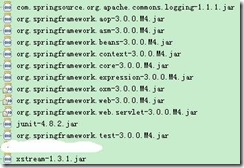
3、 当前工程的web.xml配置
<?xml version="1.0" encoding="UTF-8"?>

<web-app version="2.4"

    xmlns="http://java.sun.com/xml/ns/j2ee"

    xmlns:xsi="http://www.w3.org/2001/XMLSchema-instance"

    xsi:schemaLocation="http://java.sun.com/xml/ns/j2ee

    http://java.sun.com/xml/ns/j2ee/web-app_2_4.xsd">

    <!-- 配置Spring核心控制器 -->

    <servlet>

        <servlet-name>dispatcher</servlet-name>

        <servlet-class>org.springframework.web.servlet.DispatcherServlet</servlet-class>

        <init-param>

            <param-name>contextConfigLocation</param-name>

            <param-value>/WEB-INF/dispatcher.xml</param-value>

        </init-param>

        <load-on-startup>1</load-on-startup>

    </servlet>

    <servlet-mapping>

        <servlet-name>dispatcher</servlet-name>

        <url-pattern>*.do</url-pattern>

    </servlet-mapping>

    <welcome-file-list>

      <welcome-file>index.jsp</welcome-file>

    </welcome-file-list>

</web-app>
4、 WEB-INF中的dispatcher.xml配置
<?xml version="1.0" encoding="UTF-8"?>

<beans xmlns="http://www.springframework.org/schema/beans"

    xmlns:mvc="http://www.springframework.org/schema/mvc"

    xmlns:context="http://www.springframework.org/schema/context"

    xmlns:util="http://www.springframework.org/schema/util"

    xmlns:xsi="http://www.w3.org/2001/XMLSchema-instance"

    xsi:schemaLocation="http://www.springframework.org/schema/beans

    http://www.springframework.org/schema/beans/spring-beans-3.0.xsd

    http://www.springframework.org/schema/mvc

    http://www.springframework.org/schema/mvc/spring-mvc-3.0.xsd

    http://www.springframework.org/schema/context

    http://www.springframework.org/schema/context/spring-context-3.0.xsd

    http://www.springframework.org/schema/util

    http://www.springframework.org/schema/util/spring-util-3.0.xsd">

    <context:component-scan base-package="com.hoo.*">

        <!-- 忽略这个类 -->

        <context:exclude-filter type="assignable" expression="com.hoo.client.RESTClient"/>

    </context:component-scan>

    <!-- annotation的方法映射适配器 -->

    <bean id="handlerAdapter" class="org.springframework.web.servlet.mvc.annotation.AnnotationMethodHandlerAdapter"/>

    <!-- xml视图,XStreamMarshaller,可以转换任何形式的java对象 -->

    <bean name="xStreamMarshallingView" class="org.springframework.web.servlet.view.xml.MarshallingView">

        <property name="marshaller">

            <bean class="org.springframework.oxm.xstream.XStreamMarshaller">

                <!--  为了初始化XStreamMarshaller,这个类会把我们接口中得到结果以XML文档形式展现出来 -->

                <property name="autodetectAnnotations" value="true"/>

            </bean>

        </property>

    </bean>

    <!-- 视图解析器,根据视图的名称new ModelAndView(name),在配置文件查找对应的bean配置 -->

    <bean class="org.springframework.web.servlet.view.BeanNameViewResolver">

        <property name="order" value="3"/>

    </bean>

    <!--  annotation默认的方法映射适配器 -->

    <bean id="handlerMapping" class="org.springframework.web.servlet.mvc.annotation.DefaultAnnotationHandlerMapping">

        <property name="order" value="1" />

    </bean>

</beans>
5、 启动后,可以看到index.jsp 没有出现异常或错误。那么当前SpringMVC的配置就成功了。
二、REST控制器实现
REST控制器主要完成CRUD操作,也就是对于http中的post、get、put、delete。
还有其他的操作,如head、options、trace。
具体代码:
package com.hoo.controller;

import org.springframework.stereotype.Controller;

import org.springframework.web.bind.annotation.PathVariable;

import org.springframework.web.bind.annotation.RequestMapping;

import org.springframework.web.bind.annotation.RequestMethod;

import org.springframework.web.servlet.ModelAndView;

/**

 * <b>function:</b>SpringMVC REST示例

 * @author hoojo

 * @createDate 2011-6-9 上午11:34:08

 * @file RESTController.java

 * @package com.hoo.controller

 * @project SpringRestWS

 * @blog http://blog.csdn.net/IBM_hoojo

 * @email hoojo_@126.com

 * @version 1.0

 */

@RequestMapping("/restful")

@Controller

public class RESTController {

    @RequestMapping(value = "/show", method = RequestMethod.GET)

    public ModelAndView show() {

        System.out.println("show");

        ModelAndView model = new ModelAndView("xStreamMarshallingView");

        model.addObject("show method");

        return model;

    }

    @RequestMapping(value = "/get/{id}", method = RequestMethod.GET)

    public ModelAndView getUserById(@PathVariable String id) {

        System.out.println("getUserById-" + id);

        ModelAndView model = new ModelAndView("xStreamMarshallingView");

        model.addObject("getUserById method -" + id);

        return model;

    }

    @RequestMapping(value = "/add", method = RequestMethod.POST)

    public ModelAndView addUser(String user) {

        System.out.println("addUser-" + user);

        ModelAndView model = new ModelAndView("xStreamMarshallingView");

        model.addObject("addUser method -" + user);

        return model;

    }

    @RequestMapping(value = "/edit", method = RequestMethod.PUT)

    public ModelAndView editUser(String user) {

        System.out.println("editUser-" + user);

        ModelAndView model = new ModelAndView("xStreamMarshallingView");

        model.addObject("editUser method -" + user);

        return model;

    }

    @RequestMapping(value = "/remove/{id}", method = RequestMethod.DELETE)

    public ModelAndView removeUser(@PathVariable String id) {

        System.out.println("removeUser-" + id);

        ModelAndView model = new ModelAndView("xStreamMarshallingView");

        model.addObject("removeUser method -" + id);

        return model;

    }

}
上面的方法对应的http操作:
/show -> get 查询
/get/id -> get 查询
/add -> post 添加
/edit -> put 修改
/remove/id -> delete 删除
在这个方法中,就可以看到RESTful风格的url资源标识
@RequestMapping(value = "/get/{id}", method = RequestMethod.GET)

public ModelAndView getUserById(@PathVariable String id) {

    System.out.println("getUserById-" + id);

    ModelAndView model = new ModelAndView("xStreamMarshallingView");

    model.addObject("getUserById method -" + id);

    return model;

}
value=”/get/{id}”就是url中包含get,并且带有id参数的get请求,就会执行这个方法。这个url在请求的时候,会通过 Annotation的@PathVariable来将url中的id值设置到getUserById的参数中去。 ModelAndView返回的视图是xStreamMarshallingView是一个xml视图,执行当前请求后,会显示一篇xml文档。文档的内 容是添加到model中的值。
三、利用RestTemplate调用REST资源
代码如下:
package com.hoo.client;

import org.springframework.beans.factory.annotation.Autowired;

import org.springframework.stereotype.Component;

import org.springframework.web.client.RestTemplate;

/**

 * <b>function:</b>RestTemplate调用REST资源

 * @author hoojo

 * @createDate 2011-6-9 上午11:56:16

 * @file RESTClient.java

 * @package com.hoo.client

 * @project SpringRestWS

 * @blog http://blog.csdn.net/IBM_hoojo

 * @email hoojo_@126.com

 * @version 1.0

 */

@Component

public class RESTClient {

    @Autowired

    private RestTemplate template;

    private final static String url = "http://localhost:8080/SpringRestWS/restful/";

    public String show() {

        return template.getForObject(url + "show.do", String.class, new String[]{});

    }

    public String getUserById(String id) {

        return template.getForObject(url + "get/{id}.do", String.class, id);

    }

    public String addUser(String user) {

        return template.postForObject(url + "add.do?user={user}", null, String.class, user);

    }

    public String editUser(String user) {

        template.put(url + "edit.do?user={user}", null, user);

        return user;

    }

    public String removeUser(String id) {

        template.delete(url + "/remove/{id}.do", id);

        return id;

    }

}
RestTemplate的getForObject完成get请求、postForObject完成post请求、put对应的完成put请求、 delete完成delete请求;还有execute可以执行任何请求的方法,需要你设置RequestMethod来指定当前请求类型。
RestTemplate.getForObject(String url, Class<String> responseType, String... urlVariables)
参数url是http请求的地址,参数Class是请求响应返回后的数据的类型,最后一个参数是请求中需要设置的参数。
template.getForObject(url + "get/{id}.do", String.class, id);
如上面的参数是{id},返回的是一个string类型,设置的参数是id。最后执行该方法会返回一个String类型的结果。
下面建立一个测试类,完成对RESTClient的测试。代码如下:
package com.hoo.client;

import org.springframework.beans.factory.annotation.Autowired;

import org.springframework.test.context.ContextConfiguration;

import org.springframework.test.context.junit38.AbstractJUnit38SpringContextTests;

/**

 * <b>function:</b>RESTClient TEST

 * @author hoojo

 * @createDate 2011-6-9 下午03:50:21

 * @file RESTClientTest.java

 * @package com.hoo.client

 * @project SpringRestWS

 * @blog http://blog.csdn.net/IBM_hoojo

 * @email hoojo_@126.com

 * @version 1.0

 */

@ContextConfiguration("classpath:applicationContext-*.xml")

public class RESTClientTest extends AbstractJUnit38SpringContextTests {

    @Autowired

    private RESTClient client;

    public void testShow() {

        System.out.println(client.show());

    }

    public void testGetUserById() {

        System.out.println(client.getUserById("abc"));

    }

    public void testAddUser() {

        System.out.println(client.addUser("jack"));

    }

    public void testEditUser() {

        System.out.println(client.editUser("tom"));

    }

    public void testRemoveUser() {

        System.out.println(client.removeUser("aabb"));

    }

}
我们需要在src目录下添加applicationContext-beans.xml完成对restTemplate的配置。restTemplate需要配置MessageConvert将返回的xml文档进行转换,解析成JavaObject。
<?xml version="1.0" encoding="UTF-8"?>

<beans xmlns="http://www.springframework.org/schema/beans"

    xmlns:context="http://www.springframework.org/schema/context"

    xmlns:xsi="http://www.w3.org/2001/XMLSchema-instance"

    xsi:schemaLocation="http://www.springframework.org/schema/beans

    http://www.springframework.org/schema/beans/spring-beans-3.0.xsd

    http://www.springframework.org/schema/context

    http://www.springframework.org/schema/context/spring-context-3.0.xsd">

    <context:component-scan base-package="com.hoo.*"/>

    <bean id="restTemplate" class="org.springframework.web.client.RestTemplate">

        <property name="messageConverters">

            <list>

                <bean class="org.springframework.http.converter.xml.MarshallingHttpMessageConverter">

                    <property name="marshaller" ref="xStreamMarshaller"/>

                    <property name="unmarshaller" ref="xStreamMarshaller"/>

                </bean>

            </list>

        </property>

    </bean>

    <bean id="xStreamMarshaller" class="org.springframework.oxm.xstream.XStreamMarshaller">

        <property name="annotatedClasses">

            <array>

            </array>

        </property>

    </bean>

</beans>
上面配置了xStreamMarshaller是和RESTController中的ModelAndView的view对应的。因为那边是用 xStreamMarshaller进行编组的,所以RestTemplate这边也需要用它来解组。RestTemplate还指出其他的 MarshallingHttpMessageConverter;
Spring REST的更多相关文章
- 基于spring注解AOP的异常处理
一.前言 项目刚刚开发的时候,并没有做好充足的准备.开发到一定程度的时候才会想到还有一些问题没有解决.就比如今天我要说的一个问题:异常的处理.写程序的时候一般都会通过try...catch...fin ...
- 玩转spring boot——快速开始
开发环境: IED环境:Eclipse JDK版本:1.8 maven版本:3.3.9 一.创建一个spring boot的mcv web应用程序 打开Eclipse,新建Maven项目 选择quic ...
- Spring基于AOP的事务管理
Spring基于AOP的事务管理 事务 事务是一系列动作,这一系列动作综合在一起组成一个完整的工作单元,如果有任何一个动作执行失败,那么事务 ...
- [Spring]IoC容器之进击的注解
先啰嗦两句: 第一次在博客园使用markdown编辑,感觉渲染样式差强人意,还是github的样式比较顺眼. 概述 Spring2.5 引入了注解. 于是,一个问题产生了:使用注解方式注入 JavaB ...
- 学习AOP之透过Spring的Ioc理解Advisor
花了几天时间来学习Spring,突然明白一个问题,就是看书不能让人理解Spring,一方面要结合使用场景,另一方面要阅读源代码,这种方式理解起来事半功倍.那看书有什么用呢?主要还是扩展视野,毕竟书是别 ...
- 学习AOP之深入一点Spring Aop
上一篇<学习AOP之认识一下SpringAOP>中大体的了解了代理.动态代理及SpringAop的知识.因为写的篇幅长了点所以还是再写一篇吧.接下来开始深入一点Spring aop的一些实 ...
- 学习AOP之认识一下Spring AOP
心碎之事 要说知道AOP这个词倒是很久很久以前了,但是直到今天我也不敢说非常的理解它,其中的各种概念即抽象又太拗口. 在几次面试中都被问及AOP,但是真的没有答上来,或者都在面上,这给面试官的感觉就是 ...
- 为什么做java的web开发我们会使用struts2,springMVC和spring这样的框架?
今年我一直在思考web开发里的前后端分离的问题,到了现在也颇有点心得了,随着这个问题的深入,再加以现在公司很多web项目的控制层的技术框架由struts2迁移到springMVC,我突然有了一个新的疑 ...
- Spring之旅(2)
Spring简化Java的下一个理念:基于切面的声明式编程 3.应用切面 依赖注入的目的是让相互协作的组件保持松散耦合:而AOP编程允许你把遍布应用各处的功能分离出来形成可重用的组件. AOP面向切面 ...
- Spring之旅
Java使得以模块化构建复杂应用系统成为可能,它为Applet而来,但为组件化而留. Spring是一个开源的框架,最早由Rod Johnson创建.Spring是为了解决企业级应用开发的复杂性而创建 ...
随机推荐
- Shell变量之自定义变量、环境变量
1:环境变量 环境变量可以帮我们达到很多功能-包括家目录的变换啊.提示字符的显示啊.运行文件搜寻的路径啊等等的那么,既然环境变量有那么多的功能,问一下,目前我的 shell 环境中, 有 ...
- iOS开发中常用的手势---边缘手势
说明:以下方法是开发中使用的方法,有什么不对的或者好的方法,请多多指教! 此处的边缘手势是用来控制左侧抽屉视图的弹出以及收回. 添加手势 : 页面上有多个手势时需要遵循 UIGestureRecogn ...
- css动画结束后 js无法修改translated值 .
由于项目的需要,俺要做一些页面的转场动画. 即将是移动端,肯定是首先css动画了. 结果确发现,css动画中,如果设置animation-fill-mode: both;在动画结束后无法个性trans ...
- jquery mobile入门资料
由于项目中用到了,就去看了一下视频,然后进一步的找找资源,最后自己再总结一遍!(就是动手操作一遍,不论你感觉多简单,只有动手之后,你才有可能有收获) 当然如果你喜欢看文档可以到官网仔细研究,不过喜欢快 ...
- PHP in_array不兼容问题
做过日本的手机端,就因为in_array这个方法在我的环境下没有问题 结果到日本那边就是出问题,一直纠结的我啊,现在特贴出当初的兼容方法 function in_into($key,$array){ ...
- (转)php 获取今日、昨日、上周、本月的起始时间戳和结束时间戳的方法
php 获取今日.昨日.上周.本月的起始时间戳和结束时间戳的方法,主要使用到了 php 的时间函数 mktime. 下面首先还是直奔主题以示例说明如何使用 mktime 获取今日.昨日.上周.本月的起 ...
- MICROSOFT REPORT VIEWER 2012之无法加载相关的dll
使用VS 2012开发报表, 如果是使用的微软的报表控件的话,默认是使用的MICROSOFT REPORT VIEWER 2012,本地开发基本上没问题,但是一发布服务器,就会发现坑了,微软挖坑从来就 ...
- 寒假的ACM训练三(PC110107/UVa10196)
#include <iostream> #include <string.h> using namespace std; char qp[10][10]; int result ...
- WinSock 异步I/O模型 转载
如果你想在Windows平台上构建服务器应用,那么I/O模型是你必须考虑的.Windows操作系统提供了五种I/O模型,分别是: ■ 选择(select):■ 异步选择(WSAAsyncSelect) ...
- 【实习记】2014-08-24实习生无法映射磁盘替代方案rsync+非默认端口22设置
正职开发人员有两个电脑,一个办公网的,一个开发网的.通过samba服务在开发网机器上映射编译环境机的磁盘没有问题. 开发岗实习生使用虚拟机做跳板方式登录编译环境机.上面的方法不能用. 替代方法:rsy ...