
初试jQuery EasyUI
 jQuery EasyUI
jQuery EasyUI是一组基于jQuery的UI插件集合,而jQuery EasyUI的目标就是帮助web开发者更轻松的打造出功能丰富并且美观的UI界面。开发者不需要编写复杂的javascript,也不需要对css样式有深入的了解,开发者需要了解的只有一些简单的html标签。

jQuery EasyUI为我们提供了大多数UI控件的使用,如:accordion,combobox,menu,dialog,tabs,tree,window等等。
OK,下面就开始我们的初探之旅。
jQuery EasyUI---Accordion
手风琴效果,大家应该很熟悉。
基本代码:
<html xmlns="http://www.w3.org/1999/xhtml">

<head>

    <title>Accordion</title>

    <script src="../jquery-1.4.2.min.js" type="text/javascript"></script>

    <script src="../jquery.easyui.min.js" type="text/javascript"></script>

    <link href="../themes/default/easyui.css" rel="stylesheet" type="text/css" />

    <link href="../themes/icon.css" rel="stylesheet" type="text/css" />

    <script type="text/javascript"></script>

</head>

<body>

    <div style="overflow:auto;width:600px;height:300px;padding:10px;border:1px solid #ccc;">

        <div id="aa" class="easyui-accordion" fit="true" style="width:300px;height:200px;">

            <div title="Title1" style="overflow:auto;padding:10px;">

                <h3>Accordion1</h3>

            </div>

            <div title="Title2" style="padding:10px;">

                <h3>Accordion2</h3>

            </div>

            <div title="Title3">

                <h3>Accordion3</h3>

            </div>

        </div>

    </div>

</body>

</html>
代码非常简单,只需要简单的html就可以实现。这里最重要的就是首先要引用jquery-1.4.2.min.js和jquery.easyui.min.js。
效果:
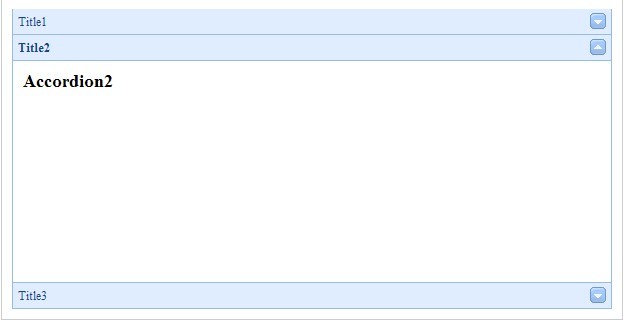
由于只是简单的html,所以我们可以通过js轻松的对Accordion进行操控,控制大小,位置等等。
jQuery EasyUI---DataGrid
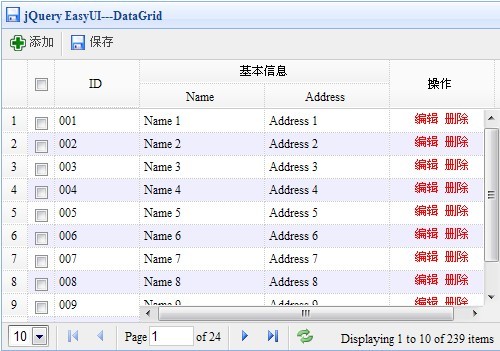
从名字就可以知道这是个数据的绑定和显示控件。
基本代码:
代码Code highlighting produced by Actipro CodeHighlighter (freeware)http://www.CodeHighlighter.com/--><html xmlns="http://www.w3.org/1999/xhtml">

<head>

    <title>DataGrid</title>

    <meta http-equiv="Content-Type" content="text/html; charset=UTF-8">

    <script src="../jquery-1.4.2.min.js" type="text/javascript"></script>

    <script src="../jquery.easyui.min.js" type="text/javascript"></script>

    <link href="../themes/default/easyui.css" rel="stylesheet" type="text/css" />

    <link href="../themes/icon.css" rel="stylesheet" type="text/css" />

    <script type="text/javascript">

        $(function() {

            $('#test').datagrid({

                title: 'jQuery EasyUI---DataGrid',

                iconCls: 'icon-save',

                width: 500,

                height: 350,

                nowrap: false,

                striped: true,

                url: '../Data/datagrid_data.json',

                sortName: 'ID',

                sortOrder: 'desc',

                idField: 'ID',

                frozenColumns: [[

                    { field: 'ck', checkbox: true },

                    { title: 'ID', field: 'ID', width: 80, sortable: true }

                ]],

                columns: [[

                    { title: '基本信息', colspan: 2 },

                    { field: 'opt', title: '操作', width: 100, align: 'center', rowspan: 2,

                        formatter: function(value, rec) {

                            return '<span style="color:red">编辑 删除</span>';

                        }

                    }

                ], [

                    { field: 'name', title: 'Name', width: 120 },

                    { field: 'addr', title: 'Address', width: 120, rowspan: 2, sortable: true }

                ]],

                pagination: true,

                rownumbers: true,

                singleSelect: false,

                toolbar: [{

                    text: '添加',

                    iconCls: 'icon-add',

                    handler: function() {

                    alert('添加数据')

                    }

                }, '-', {

                    text: '保存',

                    iconCls: 'icon-save',

                    handler: function() {

                    alert('保存数据')

                    }

                }]

                });

            });

    </script>

</head>

<body>

    <table id="test"></table>

</body>

</html>
这里我们从datagrid_data.json中获取数据,代码的编写风格同EXTIS十分相似。ExtJS开发实践
效果:
jQuery EasyUI---Dialog
网页窗体效果。
基本代码:
代码Code highlighting produced by Actipro CodeHighlighter (freeware)http://www.CodeHighlighter.com/--><html xmlns="http://www.w3.org/1999/xhtml">

<head>

    <title>Dialog</title>

    <script src="../jquery-1.4.2.min.js" type="text/javascript"></script>

    <script src="../jquery.easyui.min.js" type="text/javascript"></script>

    <link href="../themes/default/easyui.css" rel="stylesheet" type="text/css" />

    <link href="../themes/icon.css" rel="stylesheet" type="text/css" />

    <script>

        $(function(){

            $('#dd').dialog({

                toolbar:[{

                    text:'添加',

                    iconCls:'icon-add',

                    handler:function(){

                    alert('添加数据')

                    }

                },'-',{

                    text:'保存',

                    iconCls:'icon-save',

                    handler:function(){

                        alert('保存数据')

                    }

                }],

                buttons:[{

                    text:'提交',

                    iconCls:'icon-ok',

                    handler:function(){

                    alert('提交数据');

                    }

                },{

                    text:'取消',

                    handler:function(){

                    $('#dd').dialog('取消');

                    }

                }]

            });

        });

    </script>

</head>

<body>

    <div id="dd" style="padding:5px;width:400px;height:200px;">

        <p>jQuery EasyUI---Dialog</p>

    </div>

</body>

</html>
效果:

jQuery EasyUI---Tabs
无论是网站还是管理软件,我们越来越多的使用Tabs,EasyUI自然也进行了支持。
基本代码:
代码Code highlighting produced by Actipro CodeHighlighter (freeware)http://www.CodeHighlighter.com/--><html xmlns="http://www.w3.org/1999/xhtml">

<head>

    <title>Tabs</title>

    <script src="../jquery-1.4.2.min.js" type="text/javascript"></script>

    <script src="../jquery.easyui.min.js" type="text/javascript"></script>

    <link href="../themes/default/easyui.css" rel="stylesheet" type="text/css" />

    <link href="../themes/icon.css" rel="stylesheet" type="text/css" />

</head>

<body>

    <div id="tt" class="easyui-tabs" style="width:500px;height:250px;">

        <div title="Tab1" style="padding:20px;display:none;">

            <h1>Tab1 Content</h1>

        </div>

    <div title="Tab5" closable="true" style="padding:10px;display:none;">

            <div class="easyui-tabs" fit="true" plain="true" style="height:100px;width:300px;">

                <div title="Title1">Content 1</div>

                <div title="Title2">Content 2</div>

                <div title="Title3">Content 3</div>

            </div>

        </div>

    </div>

</body>

</html>
效果:

jQuery EasyUI---Messager
信息提示控件,可以很好的进行数据的提示,推荐。
基本代码:
代码Code highlighting produced by Actipro CodeHighlighter (freeware)http://www.CodeHighlighter.com/--><html xmlns="http://www.w3.org/1999/xhtml">

<head>

    <title>Messager</title>

    <script src="../jquery-1.4.2.min.js" type="text/javascript"></script>

    <script src="../jquery.easyui.min.js" type="text/javascript"></script>

    <link href="../themes/default/easyui.css" rel="stylesheet" type="text/css" />

    <link href="../themes/icon.css" rel="stylesheet" type="text/css" />

    <script>

        function show1() {

            $.messager.show({

                title: '提示信息1',

                msg: '信息1',

                showType: 'show'

            });

        }

        function show2() {

            $.messager.show({

                title: '提示信息2',

                msg: '信息5分钟后消失.',

                timeout: 5000,

                showType: 'slide'

            });

        }

        function show3() {

            $.messager.show({

                title: '渐进显示信息3',

                msg: '渐进显示信息3',

                timeout: 0,

                showType: 'fade'

            });

        }

    </script>

</head>

<body>

    <h1>信息提示</h1>

    <div>

        <a href="javascript:void(0)" onclick="show1()">显示</a> |

        <a href="#" onclick="show2()">滑动</a> |

        <a href="#" onclick="show3()">渐进显示</a> |

    </div>

</body>

</html>
效果:
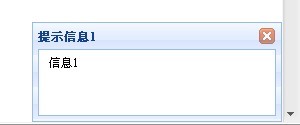 页面左下角信息提示
jQuery EasyUI---ValidateBox
数据验证控件,可以很好的对表单数据进行验证。
基本代码:
代码Code highlighting produced by Actipro CodeHighlighter (freeware)http://www.CodeHighlighter.com/--><html xmlns="http://www.w3.org/1999/xhtml">

<head>

    <title>ValidateBox</title>

    <script src="../jquery-1.4.2.min.js" type="text/javascript"></script>

    <script src="../jquery.easyui.min.js" type="text/javascript"></script>

    <link href="../themes/default/easyui.css" rel="stylesheet" type="text/css" />

    <link href="../themes/icon.css" rel="stylesheet" type="text/css" />

</head>

<body>

    <div>

    <table>

        <tr>

            <td>姓名:</td>

            <td><input class="easyui-validatebox" required="true" validType="length[1,3]"></td>

        </tr>

        <tr>

            <td>电子邮件:</td>

            <td><input class="easyui-validatebox" required="true" validType="email"></td>

        </tr>

        <tr>

            <td>URL:</td>

            <td><input class="easyui-validatebox" required="true" validType="url"></td>

        </tr>

        <tr>

            <td>说明:</td>

            <td><textarea class="easyui-validatebox" required="true" style="height:100px;"></textarea></td>

        </tr>

    </table>

    </div>

</body>

</html>
不需要写任何函数,只需对要验证的控件required="true" validType="url"就可以。
效果:

jQuery EasyUI---LayOut
页面布局,可以将整个页面划分成几个区域。类似ExtJS中的Border布局。
基本代码:
代码Code highlighting produced by Actipro CodeHighlighter (freeware)http://www.CodeHighlighter.com/--><html xmlns="http://www.w3.org/1999/xhtml">

<head>

    <title>LayOut</title>

    <script src="../jquery-1.4.2.min.js" type="text/javascript"></script>

    <script src="../jquery.easyui.min.js" type="text/javascript"></script>

    <link href="../themes/default/easyui.css" rel="stylesheet" type="text/css" />

    <link href="../themes/icon.css" rel="stylesheet" type="text/css" />

</head>

<body>

    <div class="easyui-layout" style="width:600px;height:400px;">

        <div region="north" border="false" style="overflow:hidden;height:60px;background:#A4BED4;">

            <h2>Border布局</h2>

        </div>

        <div region="south" split="true" style="height:50px;background:#efefef;">

        </div>

        <div region="east" icon="icon-reload" title="Menu2" split="true" style="width:180px;">

        </div>

        <div region="west" split="true" title="Menu1" style="width:100px;">

        </div>

        <div region="center" title="Main Form" style="background:#eee;">

        </div>

    </div>

</body>

</html>
效果:
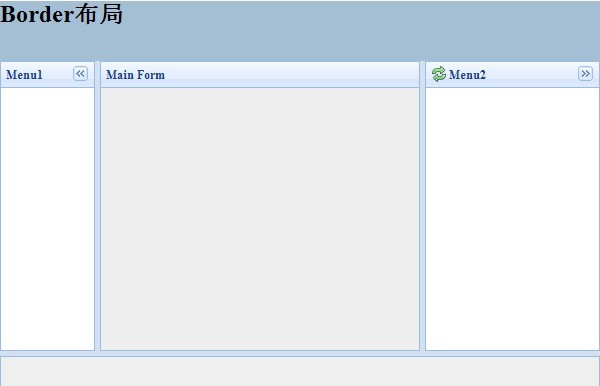
jQuery EasyUI---换肤
jQuery EasyUI使用了统一的CSS样式,在修改方面也很是方便:

如图所示,对于每一个控件,都有专有的CSS。相应对其修改就可以,只需简单的了解CSS即可。
小结:jQuery EasyUI的体验就到这里,还有一些控件这里没有介绍,比如:combobox,splitbutton等等。
官方网站:http://jquery-easyui.wikidot.com/start
下载地址:http://jquery-easyui.wikidot.com/download
本文代码:/Files/gaoweipeng/EasyUITest.rar
初试jQuery EasyUI的更多相关文章
- 套用JQuery EasyUI列表显示数据、分页、查询
声明,本博客从csdn搬到cnblogs博客园了,以前的csdn不再更新,朋友们可以到这儿来找我的文章,更多的文章会发表,谢谢关注! 有时候闲的无聊,看到extjs那么肥大,真想把自己的项目改了,最近 ...
- Jquery EasyUI 开发实录
有好几年没有用过EasyUI了,最近在外包做的一个项目中新增功能时,又用到了,本以为和按照以前那样用就可以了,可当我真正用的时候,发现许多地方不一样了,就连官网的文档都更新了,最突出的就是不知道什么时 ...
- jQuery UI与jQuery easyUI的冲突解决办法
jQuery UI与jQuery easyUI都是基于jQuery开发的.难免里面会有些方法名冲突! 因此对jQuery.easyui其中的两个方法名:resizable 和 draggable进行替 ...
- jquery easyui 动态绑定数据列
function doSearch2() { var strsql = $('#sssql').val(); $.ajax({ url: "../HttpHandler/DownloadHa ...
- jquery easyui使用(四)······添加,编辑,删除
前端: <div style="font-size: 25px; font-weight: 700; margin: 50px 0 10px 10px;"> 车辆登记 ...
- jquery easyui使用(二)······可折叠面板动态加载无效果
先上代码: <html xmlns="http://www.w3.org/1999/xhtml"> <head runat="server"& ...
- jquery easyui使用(一)······可折叠面板的布局,手风琴
<html xmlns="http://www.w3.org/1999/xhtml"> <head runat="server"> &l ...
- jquery easyui菜单树显示
目前做了一个easyui项目需要显示多级菜单,菜单配置到数据库中,因此每级菜单都需要到数据库中取,用了jQuery EasyUI方便多了. 效果体验:http://hovertree.com/texi ...
- 第 1 章 jQuery EasyUI 入门
学习要点: 1.什么是 jQuery EasyUI 2.学习 jQuery EasyUI 的条件 3.jQuery EasyUI 的功能和优势 4.其他的 UI 插件 5.是否兼容低版本 IE 6.下 ...
随机推荐
- hostname、uname、dmesg、fdisk
hostname uname fdisk -l
- ARCGIS 点抽稀的实现
点抽稀是制图综合的一部分,即在点数据点特别密集是,需要选取比较重要的点而舍去不要重的点,使得图面整洁. 一.基本原理 先把所有的点符号都设成透明.这样显示是没有点的.然后给这些点设置标注.标注方法很奇 ...
- Javascript substr方法在某些浏览器下行为出现BUG的补丁代码
主要思路是使用兼容性和稳定性都保持一致的substring方法重写/覆盖substr /** * String.substr() bug fix * @param start * @param len ...
- extjs6.0点击grid一行数据显示在一端的form中
<!DOCTYPE html> <html lang="en"> <head> <meta charset="UTF-8&quo ...
- 关于PreferenceActivity的使用和一些问题的解决(自己定义Title和取值)
android的Setting往往用PreferenceActivity来写的 我们在建立layout文件: <PreferenceScreen xmlns:android="http ...
- Mysql参数详解
1.配置参数 MySQL有两种途径途径了解其的配置参数,一个是MySQL交互模式下的命令SHOW VARIABLES,一个使用mysqladmin variables 查询. MySQL的配置参数分 ...
- Cocos2d-X中字符串的处理
CCString 用惯了NSString,你会严重高估自己处理字符串的能力.使用Cocos2d-X后只能用char*或者string来代替.诸如字符串的拼接,替换,查找都比NSString麻烦不少. ...
- pugixml
http://www.firedragonpzy.com.cn/index.php/archives/3227 有关cocos2d-x的xml文件读取问题
- JavaScript的DOM操作(一)
DOM:文档对象模型 --树模型文档:标签文档,对象:文档中每个元素对象,模型:抽象化的东西 一:window: 属性(值或者子对象):opener:打开当前窗口的源窗口,如果当前窗口是首次启动浏览器 ...
- 第五篇:web之前端之float的几种清除浮动方式
前端之float的几种清除浮动方式 前端之float的几种清除浮动方式 本节内容 1.float清除方式1 2.float清除方式2 3.float清除方式3 4.float清除方式4 1.flo ...