
006-shiro授权
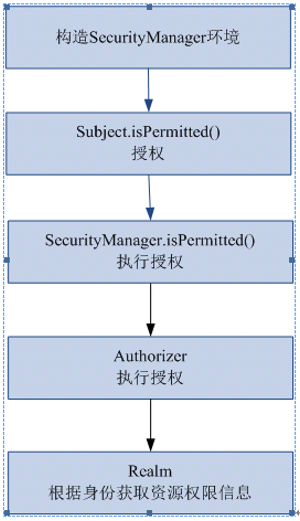
一、授权流程
二、三种授权方式
2.1、编程式:通过写if/else 授权代码块完成:
Subject subject = SecurityUtils.getSubject();

if(subject.hasRole(“admin”)) {

    //有权限

} else {

    //无权限

}
2.2、注解式:通过在执行的Java方法上放置相应的注解完成:
@RequiresRoles("admin")

public void hello() {

    //有权限

}
2.3、JSP/GSP 标签:在JSP/GSP 页面通过相应的标签完成:
<shiro:hasRole name="admin">

<!— 有权限—>

</shiro:hasRole>
三、建立权限配置
shiro-permission.ini里边的内容相当于在数据库
#用户

[users]

#用户zhang的密码是123,此用户具有role1和role2两个角色

zhang=,role1,role2

wang=,role2

#权限

[roles]

#角色role1对资源user拥有create、update权限

role1=user:create,user:update

#角色role2对资源user拥有create、delete权限

role2=user:create,user:delete

#角色role3对资源user拥有create权限

role3=user:create
权限标识符号规则【中间使用半角:分隔】:资源:操作:实例
user:create:01 表示对用户资源的01实例进行create操作。
user:create 表示对用户资源进行create操作,相当于user:create:*,对所有用户资源实例进行create操作。
user:*:01 表示对用户资源实例01进行所有操作。
四、代码开发
4.1、测试ini程序
// 角色授权、资源授权测试

    @Test

    public void testAuthorization() {

        // 创建SecurityManager工厂

        Factory<SecurityManager> factory = new IniSecurityManagerFactory("classpath:shiro-permission.ini");

        // 创建SecurityManager

        SecurityManager securityManager = factory.getInstance();

        // 将SecurityManager设置到系统运行环境,和spring后将SecurityManager配置spring容器中,一般单例管理

        SecurityUtils.setSecurityManager(securityManager);

        // 创建subject

        Subject subject = SecurityUtils.getSubject();

        // 创建token令牌

        UsernamePasswordToken token = new UsernamePasswordToken("zhangsan", "123");

        // 执行认证

        try {

            subject.login(token);

        } catch (AuthenticationException e) {

            // TODO Auto-generated catch block

            e.printStackTrace();

        }

        System.out.println("认证状态:" + subject.isAuthenticated());

        // 认证通过后执行授权

        // 基于角色的授权

        // hasRole传入角色标识

        boolean ishasRole = subject.hasRole("role1");

        System.out.println("单个角色判断" + ishasRole);

        // hasAllRoles是否拥有多个角色

        boolean hasAllRoles = subject.hasAllRoles(Arrays.asList("role1", "role2", "role3"));

        System.out.println("多个角色判断" + hasAllRoles);

        // 使用check方法进行授权,如果授权不通过会抛出异常

        // subject.checkRole("role13");

        // 基于资源的授权

        // isPermitted传入权限标识符

        boolean isPermitted = subject.isPermitted("user:create:1");

        System.out.println("单个权限判断" + isPermitted);

        boolean isPermittedAll = subject.isPermittedAll("user:create:1", "user:delete");

        System.out.println("多个权限判断" + isPermittedAll);

        // 使用check方法进行授权,如果授权不通过会抛出异常

        subject.checkPermission("items:create:1");

    }
4.2、自定义realm
上边的程序通过shiro-permission.ini对权限信息进行静态配置,实际开发中从数据库中获取权限数据。就需要自定义realm,由realm从数据库查询权限数据。
realm根据用户身份查询权限数据,将权限数据返回给authorizer(授权器)。
4.2.1、realm编写,结合上节完善写法
在原来自定义的realm中,修改doGetAuthorizationInfo方法。
package com.lhx.shiro.realm;

import java.util.ArrayList;

import java.util.List;

import org.apache.shiro.authc.AuthenticationException;

import org.apache.shiro.authc.AuthenticationInfo;

import org.apache.shiro.authc.AuthenticationToken;

import org.apache.shiro.authc.SimpleAuthenticationInfo;

import org.apache.shiro.authz.AuthorizationInfo;

import org.apache.shiro.authz.SimpleAuthorizationInfo;

import org.apache.shiro.realm.AuthorizingRealm;

import org.apache.shiro.subject.PrincipalCollection;

/**

 *

 * <p>

 * Title: CustomRealm

 * </p>

 * <p>

 * Description:自定义realm

 * </p>

 * @version 1.0

 */

public class CustomRealm extends AuthorizingRealm {

    // 设置realm的名称

    @Override

    public void setName(String name) {

        super.setName("customRealm");

    }

    // 用于认证

    @Override

    protected AuthenticationInfo doGetAuthenticationInfo(

            AuthenticationToken token) throws AuthenticationException {

        // token是用户输入的

        // 第一步从token中取出身份信息

        String userCode = (String) token.getPrincipal();

        // 第二步:根据用户输入的userCode从数据库查询

        // ....

        // 如果查询不到返回null

        //数据库中用户账号是zhangsansan

        /*if(!userCode.equals("zhangsansan")){//

            return null;

        }*/

        // 模拟从数据库查询到密码

        String password = "111111";

        // 如果查询到返回认证信息AuthenticationInfo

        SimpleAuthenticationInfo simpleAuthenticationInfo = new SimpleAuthenticationInfo(

                userCode, password, this.getName());

        return simpleAuthenticationInfo;

    }

    // 用于授权

    @Override

    protected AuthorizationInfo doGetAuthorizationInfo(

            PrincipalCollection principals) {

        //从 principals获取主身份信息

        //将getPrimaryPrincipal方法返回值转为真实身份类型(在上边的doGetAuthenticationInfo认证通过填充到SimpleAuthenticationInfo中身份类型),

        String userCode =  (String) principals.getPrimaryPrincipal();

        //根据身份信息获取权限信息

        //连接数据库...

        //模拟从数据库获取到数据

        List<String> permissions = new ArrayList<String>();

        permissions.add("user:create");//用户的创建

        permissions.add("items:add");//商品添加权限

        //....

        //查到权限数据,返回授权信息(要包括 上边的permissions)

        SimpleAuthorizationInfo simpleAuthorizationInfo = new SimpleAuthorizationInfo();

        //将上边查询到授权信息填充到simpleAuthorizationInfo对象中

        simpleAuthorizationInfo.addStringPermissions(permissions);

        return simpleAuthorizationInfo;

    }

}
4.2.2、在shiro-realm.ini中配置自定义的realm,将realm设置到securityManager中
[main]

#自定义 realm

customRealm=com.lhx.shiro.realm.CustomRealm

#\将realm设置到securityManager相当于spring中注入

securityManager.realms=$customRealm
4.2.3、测试程序
    // 自定义realm进行资源授权测试

    @Test

    public void testAuthorizationCustomRealm() {

        // 创建SecurityManager工厂

        Factory<SecurityManager> factory = new IniSecurityManagerFactory("classpath:shiro-realm.ini");

        // 创建SecurityManager

        SecurityManager securityManager = factory.getInstance();

        // 将SecurityManager设置到系统运行环境,和spring后将SecurityManager配置spring容器中,一般单例管理

        SecurityUtils.setSecurityManager(securityManager);

        // 创建subject

        Subject subject = SecurityUtils.getSubject();

        // 创建token令牌

        UsernamePasswordToken token = new UsernamePasswordToken("zhangsan", "111111");

        // 执行认证

        try {

            subject.login(token);

        } catch (AuthenticationException e) {

            // TODO Auto-generated catch block

            e.printStackTrace();

        }

        System.out.println("认证状态:" + subject.isAuthenticated());

        // 认证通过后执行授权

        // 基于资源的授权,调用isPermitted方法会调用CustomRealm从数据库查询正确权限数据

        // isPermitted传入权限标识符,判断user:create:1是否在CustomRealm查询到权限数据之内

        boolean isPermitted = subject.isPermitted("user:create:1");

        System.out.println("单个权限判断" + isPermitted);

        boolean isPermittedAll = subject.isPermittedAll("user:create:1", "user:create");

        System.out.println("多个权限判断" + isPermittedAll);

        // 使用check方法进行授权,如果授权不通过会抛出异常

        subject.checkPermission("items:add:1");

    }
4.3、授权流程
1、对subject进行授权,调用方法isPermitted("permission串")
2、SecurityManager执行授权,通过ModularRealmAuthorizer执行授权
3、ModularRealmAuthorizer执行realm(自定义的CustomRealm)从数据库查询权限数据
调用realm的授权方法:doGetAuthorizationInfo
4、realm从数据库查询权限数据,返回ModularRealmAuthorizer
5、ModularRealmAuthorizer调用PermissionResolver进行权限串比对
6、如果比对后,isPermitted中"permission串"在realm查询到权限数据中,说明用户访问permission串有权限,否则 没有权限,抛出异常。
小结:以上004-006即是shiro基础权限认证,后续将编写结合spring,cache等文章
006-shiro授权的更多相关文章
- Apache Shiro 使用手册(三)Shiro 授权
授权即访问控制,它将判断用户在应用程序中对资源是否拥有相应的访问权限. 如,判断一个用户有查看页面的权限,编辑数据的权限,拥有某一按钮的权限,以及是否拥有打印的权限等等. 一.授权的三要素 授权有着三 ...
- Apache shiro集群实现 (四)shiro授权(Authentication)--访问控制
Apache shiro集群实现 (一) shiro入门介绍 Apache shiro集群实现 (二) shiro 的INI配置 Apache shiro集群实现 (三)shiro身份认证(Shiro ...
- Shiro笔记(五)Shiro授权
Shiro授权 也叫访问控制,即在应用中控制谁能访问那些资源(如访问页面.编辑数据.页面操作等).在授权中需要了解几个关键对象:主体(subject).资源(resource).权限(Permissi ...
- Shiro授权管理
一.授权 授权,也叫访问控制,即在应用中控制谁能访问哪些资源(如访问页面/编辑数据/页面操作等).在授权中需了解的几个关键对象:主体(Subject).资源(Resource).权限(Permissi ...
- 转:JAVAWEB开发之权限管理(二)——shiro入门详解以及使用方法、shiro认证与shiro授权
原文地址:JAVAWEB开发之权限管理(二)——shiro入门详解以及使用方法.shiro认证与shiro授权 以下是部分内容,具体见原文. shiro介绍 什么是shiro shiro是Apache ...
- shiro授权-记调试过程
根据张开涛老师的shiro教程学习过程中 感觉shiro授权这块有点绕 调试了十几遍 大概有个思路 记录一下 1.单元测试入口 2.subject().isPermitted("+user ...
- frame shiro 授权及原理简述
shiro 授权模式 shiro采用的是rbac授权模式rbac,基于角色的权限管理,谁扮演什么角色,被允许做什么事情. shiro 授权流程 shiro 授权方式 1.编程式 通过写if/else授 ...
- Apache Shiro 使用手册(三)Shiro 授权(转发:http://kdboy.iteye.com/blog/1155450)
授权即访问控制,它将判断用户在应用程序中对资源是否拥有相应的访问权限. 如,判断一个用户有查看页面的权限,编辑数据的权限,拥有某一按钮的权限,以及是否拥有打印的权限等等. 一.授权的三要素 授权有着三 ...
- Shiro授权流程
1,授权中涉及的一些概念 [1]授权:访问控制,即在应用中认证用户能否访问的系统资源(如一个页面,一个按钮等). [2]资源:在Web应用中反应为用户可以访问的URL. ...
- shiro授权+注解式开发
shiro授权和注解式开发 1.shiro授权角色.权限 2.Shiro的注解式开发 ShiroUserMapper.xml <select id="getRolesByUserId& ...
随机推荐
- plsql 查询到别的用户下面的表
原因:勾选了"Allow multiple connections" 解决方法:打开"Tools"下面的"Perference",里面有个& ...
- 绕过云盾找真实IP-找真实IP-绕过CDN
目标站:www.chinaparkview.cn 云盾挡着了 查一下历史IP 查出3月9号的IP是103.249.104.114 当然查出来的不一定准确 修改本地host文件 PS:不要加http 然 ...
- root-me web server 10-20 writeup
File upload - double extensions文件上传--双扩展 Gallery v0.02 介绍 Your goal is to hack this photo galery by ...
- VMware虚拟机实用经验总结十一条
转:http://article.pchome.net/content-948404.html 1.VMware虚拟机实用经验之支持的Guest OS: VMWare支持如下Guest OS:MS-D ...
- GCD 莫比乌斯反演 给定整数N,求1<=x,y<=N且Gcd(x,y)为素数的 数对(x,y)有多少对.
/** 题目:GCD 链接:https://vjudge.net/contest/178455#problem/E 题意:给定整数N,求1<=x,y<=N且Gcd(x,y)为素数的 数对( ...
- Swift基础--ijkplayer编译
这篇与Swift基本上没有什么关系,只是之后会用到,这次编译是使用Mac编译IOS版本号的.以下是编译流程,最后是整个项目的下载地址.由于下载太慢了. 1.下载源代码 git clone https: ...
- Android控件——7种形式的Android Dialog使用举例(转载)
在Android开发中,我们经常会需要在Android界面上弹出一些对话框,比如询问用户或者让用户选择.这些功能我们叫它Android Dialog对话框,在我们使用Android的过程中,我归纳了一 ...
- nodejs操作图片方法
最近项目中用到nodejs做图片服务器,用户上传图片生成缩略图返回地址一系列操作. 原来一直用.net平台,所有都封装好了生成缩略图这种分分钟就解决了,遂度娘一番全是调用imagemagick和gra ...
- 第二百二十七节,jQuery EasyUI,ComboTree(树型下拉框)组件
jQuery EasyUI,ComboTree(树型下拉框)组件 学习要点: 1.加载方式 2.属性列表 3.方法列表 本节课重点了解EasyUI中ComboTree(树型下拉框)组件的使用方法,这个 ...
- 说明Oracle数据库逻辑备份和物理备份的方式。
说明Oracle数据库逻辑备份和物理备份的方式. 解答:Oracle备份包括逻辑备份和物理备份. 1).逻辑备份 数据库的逻辑备份包含读一个数据库记录集和将记录集写入文件. a.输出(Export)输 ...