
plsql基本操作 复制表 导出表 导出表结构 及其导入
上一片中介绍了安装instantclient +plsql取代庞大客户端的安装,这里说下plsql的基本操作
plsql操作界面图:

1、复制表
语句:create table IGIS_COPY as select * from IGIS_LOCATION
2、查询前5行数据
select * from IGIS_LOCATION where rownum < 6
注意:与sql server的top 5 不同,前5行数据只能使用where rownum < 6
导出查询出来的数据。注意是.sql文件
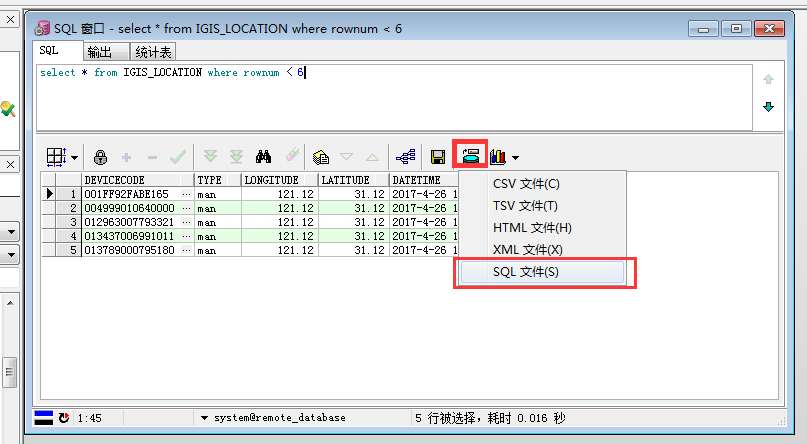
下面是用txt打开上面导出的.sql文件,其原理是是对数据库进行insert
下面的数据表是
IGIS_LOCATION_COPY,是我将上面的
IGIS_LOCATION备份了一份,进行操作
prompt Importing table IGIS_LOCATION_COPY...

set feedback off

set define off

insert into IGIS_LOCATION_COPY (DEVICECODE, TYPE, LONGITUDE, LATITUDE, DATETIME)

values ('001FF92FABE165', 'man', 121.12, 31.12, to_date('26-04-2017 14:29:05', 'dd-mm-yyyy hh24:mi:ss'));

insert into IGIS_LOCATION_COPY (DEVICECODE, TYPE, LONGITUDE, LATITUDE, DATETIME)

values ('004999010640000', 'man', 121.12, 31.12, to_date('26-04-2017 14:29:05', 'dd-mm-yyyy hh24:mi:ss'));

insert into IGIS_LOCATION_COPY (DEVICECODE, TYPE, LONGITUDE, LATITUDE, DATETIME)

values ('012963007793321', 'man', 121.12, 31.12, to_date('26-04-2017 14:29:05', 'dd-mm-yyyy hh24:mi:ss'));

insert into IGIS_LOCATION_COPY (DEVICECODE, TYPE, LONGITUDE, LATITUDE, DATETIME)

values ('013437006991011', 'man', 121.12, 31.12, to_date('26-04-2017 14:29:05', 'dd-mm-yyyy hh24:mi:ss'));

insert into IGIS_LOCATION_COPY (DEVICECODE, TYPE, LONGITUDE, LATITUDE, DATETIME)

values ('013789000795180', 'man', 121.12, 31.12, to_date('26-04-2017 14:29:05', 'dd-mm-yyyy hh24:mi:ss'));

prompt Done.
3、导出整个表
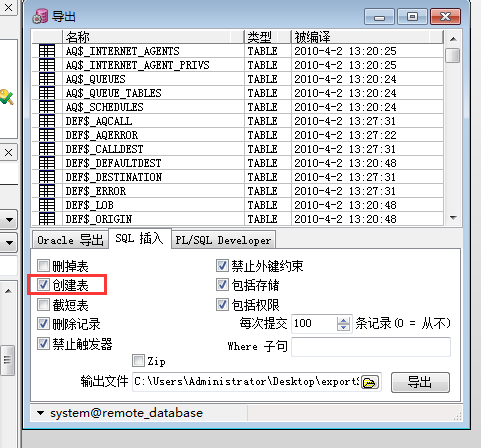
右击表,点导出数据(或者单击工具--导出表)
选择第二个“SQL插入”,注意要选上:创建表,否者导出的.sql文件没有表结构,无法使用下一步中的“导入表”方法导入。
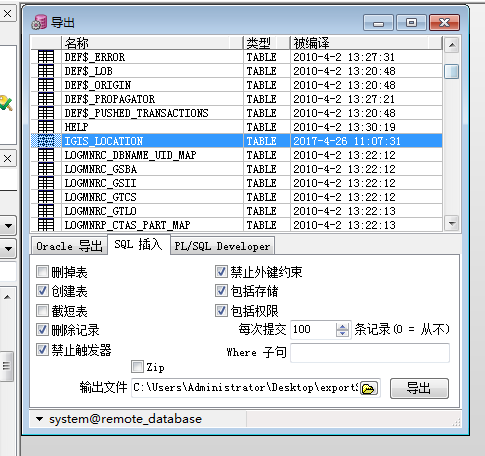
导出的.sql文件
prompt PL/SQL Developer import file

prompt Created on 2017年5月3日 by Administrator

set feedback off

set define off

prompt Creating IGIS_LOCATION_COPY...

create table IGIS_LOCATION_COPY

(

  devicecode VARCHAR2(50) not null,

  type       VARCHAR2(10) not null,

  longitude  NUMBER(10,2) not null,

  latitude   NUMBER(10,2) not null,

  datetime   DATE not null

)

tablespace SYSTEM

  pctfree 10

  pctused 40

  initrans 1

  maxtrans 255

  storage

  (

    initial 64K

    next 1M

    minextents 1

    maxextents unlimited

  );

prompt Disabling triggers for IGIS_LOCATION_COPY...

alter table IGIS_LOCATION_COPY disable all triggers;

prompt Deleting IGIS_LOCATION_COPY...

delete from IGIS_LOCATION_COPY;

commit;

prompt Loading IGIS_LOCATION_COPY...

insert into IGIS_LOCATION_COPY (devicecode, type, longitude, latitude, datetime)

values ('001FF92FABE165', 'man', 121.12, 31.12, to_date('26-04-2017 14:29:05', 'dd-mm-yyyy hh24:mi:ss'));

insert into IGIS_LOCATION_COPY (devicecode, type, longitude, latitude, datetime)

values ('004999010640000', 'man', 121.12, 31.12, to_date('26-04-2017 14:29:05', 'dd-mm-yyyy hh24:mi:ss'));

insert into IGIS_LOCATION_COPY (devicecode, type, longitude, latitude, datetime)

values ('012963007793321', 'man', 121.12, 31.12, to_date('26-04-2017 14:29:05', 'dd-mm-yyyy hh24:mi:ss'));

insert into IGIS_LOCATION_COPY (devicecode, type, longitude, latitude, datetime)

values ('013437006991011', 'man', 121.12, 31.12, to_date('26-04-2017 14:29:05', 'dd-mm-yyyy hh24:mi:ss'));

insert into IGIS_LOCATION_COPY (devicecode, type, longitude, latitude, datetime)

values ('013789000795180', 'man', 121.12, 31.12, to_date('26-04-2017 14:29:05', 'dd-mm-yyyy hh24:mi:ss'));

insert into IGIS_LOCATION_COPY (devicecode, type, longitude, latitude, datetime)

values ('014583569411', 'car', 121.12, 31.12, to_date('26-04-2017 14:29:05', 'dd-mm-yyyy hh24:mi:ss'));

insert into IGIS_LOCATION_COPY (devicecode, type, longitude, latitude, datetime)

values ('049955', 'man', 121.12, 31.12, to_date('26-04-2017 14:29:05', 'dd-mm-yyyy hh24:mi:ss'));

insert into IGIS_LOCATION_COPY (devicecode, type, longitude, latitude, datetime)

values ('050846', 'man', 121.12, 31.12, to_date('26-04-2017 14:29:05', 'dd-mm-yyyy hh24:mi:ss'));

insert into IGIS_LOCATION_COPY (devicecode, type, longitude, latitude, datetime)

values ('050853', 'man', 121.12, 31.12, to_date('26-04-2017 14:29:05', 'dd-mm-yyyy hh24:mi:ss'));

insert into IGIS_LOCATION_COPY (devicecode, type, longitude, latitude, datetime)

values ('050859', 'man', 121.12, 31.12, to_date('26-04-2017 14:29:05', 'dd-mm-yyyy hh24:mi:ss'));

commit;

prompt 10 records loaded

prompt Enabling triggers for IGIS_LOCATION_COPY...

alter table IGIS_LOCATION_COPY enable all triggers;

set feedback on

set define on

prompt Done.
4、导入整张表
单击 “工具”--“导入表”
SQL*Plus就是上一篇博文中介绍的下载了sqlplus,如果安装的时候没下载,参考上篇
http://www.cnblogs.com/lelehellow/p/6801800.html
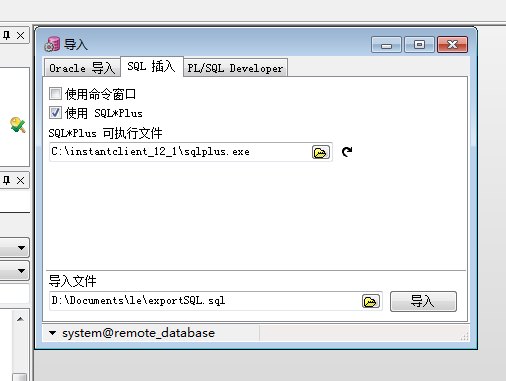
5、导出表结构
单击 “工具”--“导出用户对象”
记得选中表
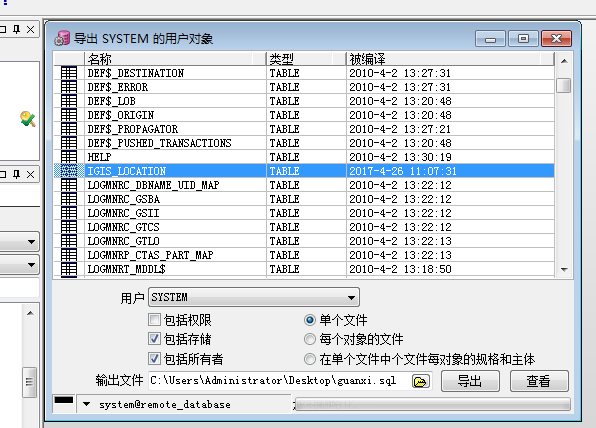
使用上一步中的“导入表”方法来导入这个.sql文件可以导入一张空表,表结构还是跟这张表一样的。
打开导出的用户对象 .sql文件,发现其实就是导出了创建表的sql语句。
----------------------------------------------------

-- Export file for user SYSTEM                    --

-- Created by Administrator on 2017-5-3, 13:09:02 --

----------------------------------------------------

set define off

spool guanxi.log

prompt

prompt Creating table IGIS_LOCATION_COPY

prompt =================================

prompt

create table SYSTEM.IGIS_LOCATION_COPY

(

  devicecode VARCHAR2(50) not null,

  type       VARCHAR2(10) not null,

  longitude  NUMBER(10,2) not null,

  latitude   NUMBER(10,2) not null,

  datetime   DATE not null

)

tablespace SYSTEM

  pctfree 10

  pctused 40

  initrans 1

  maxtrans 255

  storage

  (

    initial 64K

    next 1M

    minextents 1

    maxextents unlimited

  );

spool off
6、使用“导入表”功能来导入第二步中导出的前5行数据
使用“导入表”功能来导入第二步中导出的前5行数据(.sql文件),发现导入无效。而第三步和第五步中同样是.sql文件,使用“导入表”功能都可以导入。
对边上面的.sql文件发现,其原因在于第二步中导出的.sql文件中没有定义表结构,也就是没有创建表。将其中的insert语句复制到第五步中的表结构sql文件中,就可以实现导入表了。
这样导入的表也就是只有原表中前5行数据的表了。
处理后的.sql文件如下:
----------------------------------------------------

-- Export file for user SYSTEM                    --

-- Created by Administrator on 2017-5-3, 13:09:02 --

----------------------------------------------------

set define off

spool guanxi.log

prompt

prompt Creating table IGIS_LOCATION_COPY

prompt =================================

prompt

create table SYSTEM.IGIS_LOCATION_COPY

(

  devicecode VARCHAR2(50) not null,

  type       VARCHAR2(10) not null,

  longitude  NUMBER(10,2) not null,

  latitude   NUMBER(10,2) not null,

  datetime   DATE not null

)

tablespace SYSTEM

  pctfree 10

  pctused 40

  initrans 1

  maxtrans 255

  storage

  (

    initial 64K

    next 1M

    minextents 1

    maxextents unlimited

  );

insert into IGIS_LOCATION_COPY (DEVICECODE, TYPE, LONGITUDE, LATITUDE, DATETIME)

values ('001FF92FABE165', 'man', 121.12, 31.12, to_date('26-04-2017 14:29:05', 'dd-mm-yyyy hh24:mi:ss'));

insert into IGIS_LOCATION_COPY (DEVICECODE, TYPE, LONGITUDE, LATITUDE, DATETIME)

values ('004999010640000', 'man', 121.12, 31.12, to_date('26-04-2017 14:29:05', 'dd-mm-yyyy hh24:mi:ss'));

insert into IGIS_LOCATION_COPY (DEVICECODE, TYPE, LONGITUDE, LATITUDE, DATETIME)

values ('012963007793321', 'man', 121.12, 31.12, to_date('26-04-2017 14:29:05', 'dd-mm-yyyy hh24:mi:ss'));

insert into IGIS_LOCATION_COPY (DEVICECODE, TYPE, LONGITUDE, LATITUDE, DATETIME)

values ('013437006991011', 'man', 121.12, 31.12, to_date('26-04-2017 14:29:05', 'dd-mm-yyyy hh24:mi:ss'));

insert into IGIS_LOCATION_COPY (DEVICECODE, TYPE, LONGITUDE, LATITUDE, DATETIME)

values ('013789000795180', 'man', 121.12, 31.12, to_date('26-04-2017 14:29:05', 'dd-mm-yyyy hh24:mi:ss'));

spool off
7、注意:假如发现自己使用plsql导出的表无法导入,极可能是因为在导出表的时候没有选上“创建表”这一项。上一步中的介绍可猜测,在导出前5行数据的时候,默认的没有创建表。
挂两个外链,管理员请不要删我文,如违规可联系我自行修改删除,QQ:919497132
plsql基本操作 复制表 导出表 导出表结构 及其导入的更多相关文章
- sql developer Oracle 数据库 用户对象下表及表结构的导入导出
Oracle数据库表数据及结构的导入导出 导出的主机与即将导入到的目标主机的tablespace 及用户名需一直!!!!!
- Oracle中如何导出存储过程、函数、包和触发器的定义语句?如何导出表的结构?如何导出索引的创建语句?
Oracle中如何导出存储过程.函数.包和触发器的定义语句?如何导出表的结构?如何导出索引的创建语句? QQ群里有人问:如何导出一个用户下的存储过程? 麦苗答:方法有多种,可以使用DBMS_MET ...
- 小甲鱼PE详解之输入表(导出表)详解(PE详解09)
小甲鱼PE详解之输出表(导出表)详解(PE详解09) 当PE 文件被执行的时候,Windows 加载器将文件装入内存并将导入表(Export Table) 登记的动态链接库(一般是DLL 格式)文件一 ...
- 取PE文件的引入表和导出表
直接上代码(这里列出C++和Delphi的代码),Delphi代码中包含导入及导出文件和函数列表,PE结构可参阅资料,很多很详细,需要注意的是,本例中是映射到内存,不是通过PE装载器装入的,所以对于节 ...
- MySQL 复制表结构
200 ? "200px" : this.width)!important;} --> 介绍 有时候我们需要原封不动的复制一张表的表结构来生成一张新表,MYSQL提供了两种便 ...
- SQL复制表结构或表数据
需求: 软件开发过程中,一般会部署两个数据库:一个测试数据库提供给开发和测试过程使用:一个运维数据库提供上线使用.当需求变化需增加表时,会遇到数据库表结构或表数据同步的问题,这时就要复制表结构或表数据 ...
- ORCALE复制表结构
1.oracle 复制表结构 不要内容 create table 表1 as select * from 表2 where 1=2 2.oracle 复制表结构 要内容 create table 表1 ...
- mysql 复制表结构、表数据的方法
From: http://blog.163.com/yaoyingying681@126/blog/static/109463675201191173221759/ MySQL 添加列,修改列,删除列 ...
- mysql复制表结构及检查表、存储过程是否存在
mysql命令行复制表结构的方法: 1.只复制表结构到新表 CREATE TABLE 新表 SELECT * FROM 旧表 WHERE 1=2 或者 CREATE TABLE 新表 LIKE 旧表 ...
随机推荐
- libvirt-qemu-虚拟机设备热插拔
cpu热插拔 # virsh setvcpus $domain_name --count 4 --live (--config可写入配置文件永久保存) #前提条件和后续激活参考<libvirt- ...
- 如何修改Django中的日期和时间格式 DateTimeField
html页面从数据库中读出DateTimeField字段时,显示的时间格式和数据库中存放的格式不一致,比如数据库字段内容为2017-06-03 13:00:00,但是页面显示的却是Apr. 03, 2 ...
- 利用web workers实现多线程处理
利用web workers在后台线程中实现对数据库的增删改查操作,并在后台线程中生成页面上某个列表的完整的HTML代码,然后再前台脚本中直接将这段HTML代码输出到页面上! 利用web workers ...
- 利用canvas和RGraph作图
利用canvas可以直接在页面中绘制各种复杂的图形,其中引用到一个Rgraph的插件. Rgraph插件使用非常方便,只需几步就可以完成一个折线图.饼图.柱状图,或是其中两者图形的结合! (1) 引用 ...
- spring security采用基于简单加密 token 的方法实现的remember me功能
记住我功能,相信大家在一些网站已经用过,一些安全要求不高的都可以使用这个功能,方便快捷. spring security针对该功能有两种实现方式,一种是简单的使用加密来保证基于 cookie 的 to ...
- sublime使用记录之快速生成html5基本模板
sublime使用记录之快速生成html5基本模板 效果如图:
- Android -- listview的使用, Inflater打气筒创建View对象,三种数据Adapter
1. 代码示例,( 数据库来源上篇的数据) MainActivity.java public class MainActivity extends Activity { private ListVie ...
- Search in Rotated Sorted Array, 查找反转有序序列。利用二分查找的思想。反转序列。
问题描述:一个有序序列经过反转,得到一个新的序列,查找新序列的某个元素.12345->45123. 算法思想:利用二分查找的思想,都是把要找的目标元素限制在一个小范围的有序序列中.这个题和二分查 ...
- MSSQL复制表操作
1:复制表结构及数据到新表 select * into 目的数据库名.dbo.目的表名 from 原表名 select * into my0735home.dbo.infoMianTest from ...
- 入门教程:.NET开源OpenID Connect 和OAuth解决方案IdentityServer v3 创建简单的OAuth2.0服务器,客户端和API(三)
本教程的目的在于创造尽可能简单的identityserver安装作为一个oauth2授权服务器.这应该能够让你了解一些基本功能和配置选项(完整的源代码可以发现在这里).在后面的文档中会介绍更多的高级功 ...