
基于zepto的H5/移动端tab切换触摸拖动加载更多数据
以前实现移动端的滑动加载更多实现的方法是当滚动条快到页面底部时就自动加载更多的数据,在这方面很多人都用的是"西门的后花园"写的一个叫dropload的插件,这个插件用起来也很好,很感谢西门的后花园作者。我以前在项目中用的也是这个插件,后来我老大说能不能做成那种向上拖动才会加载更多的效果,不要这种滚动到底部就加载,于是我就使用了iscroll。
以下代码是加入了从数据库读取数据并判断数据全部加载完成的效果(事实是只模拟了从数据库读取数据,在使用时可将post请求的url和data换成你自己的就可以了),在本页的最后附上了模拟的代码可供下载查看。
<!DOCTYPE html>

<html>

<head>

<meta charset="UTF-8">

<meta name="viewport" content="width=device-width, initial-scale=1.0, maximum-scale=1.0, user-scalable=no">

<title>基于zepto的移动端/H5触摸拖动加载更多数据</title>

<style>

*{margin:0;padding:0;outline:0;-webkit-box-sizing:border-box;box-sizing:border-box;}

body{background:#f1f1f1;color:#666;}

li{list-style-type:none;}

a{text-decoration:none;color:#666;}

.tabsNav{overflow:hidden;padding:10px 15px;position:fixed;left:0;top:0;width:100%;z-index:2;background:#666;}

.tabsNav li{float:left;width:50%;text-align:center;height:30px;line-height:30px;font-size:14px;background:#f1f1f1;}

.tabsNav li.cur{background:#f00;color:#fff;}

.tabs_con{display:none;background:#fff;font-size:12px;}

.tabs_con li{height:40px;line-height:40px;border-bottom:1px solid #e9e9e9;padding-left:10px;}

#wrapper{position:absolute;z-index:1;top:45px;bottom:48px;width:100%;overflow:auto;}

#scroller{position:absolute;z-index:1;-webkit-tap-highlight-color:rgba(0,0,0,0);width:100%;}

#pullDown, #pullUp{height:40px;line-height:40px;font-size:12px;color:#888;text-align:center;}

#pullDown .pullDownIcon, #pullUp .pullUpIcon{position:absolute;margin:8px 0 0 30%;width:24px;height:24px;background:url(images/arrow.png) 0 0 no-repeat;

	-webkit-background-size:auto 100%;

	background-size:auto 100%;

	-webkit-transition-property:-webkit-transform;

	-webkit-transition-duration:250ms;

}

#pullDown .pullDownIcon{-webkit-transform:rotate(0deg) translateZ(0);}

#pullUp .pullUpIcon{-webkit-transform:rotate(-180deg) translateZ(0);}

#pullDown.flip .pullDownIcon{-webkit-transform:rotate(-180deg) translateZ(0);}

#pullUp.flip .pullUpIcon {-webkit-transform:rotate(0deg) translateZ(0);}

#pullDown.loading .pullDownIcon, #pullUp.loading .pullUpIcon{background-image: url(images/loader.png);background-size:100% auto;background-position:0 100%;

	-webkit-transform:rotate(0deg) translateZ(0);

	-webkit-transition-duration:0ms;

	-webkit-animation-name:loading;

	-webkit-animation-duration:2s;

	-webkit-animation-iteration-count:infinite;

	-webkit-animation-timing-function:linear;

}

@-webkit-keyframes loading {

	from{-webkit-transform:rotate(0deg) translateZ(0);}

	to{-webkit-transform:rotate(360deg) translateZ(0);}

}

</style>

</head>

<body>

<ul class="tabsNav">

	<li class="cur">公告</li>

	<li>消息</li>

</ul>

<div id="wrapper">

	<div id="scroller">

		<div class="pullDown" id="pullDown">

			<div class="pullDownIcon"></div><div class="pullDownLabel">下拉刷新</div>

		</div>

		<div class="tabs_con" style="display:block;">

			<ul></ul>

		</div>

		<div class="tabs_con">

			<ul></ul>

		</div>

		<div class="pullUp" id="pullUp">

			<div class="pullUpIcon"></div><div class="pullUpLabel">上拉加载更多</div>

		</div>

	</div>

</div>

<script src="js/zepto.min.js"></script>

<script src="js/iscroll.js"></script>

<script>

	var pageNoticeIndex = 1,    //当前页

		pageMsgIndex = 1,

        pageSize = 5,   //每页数量

        load1More = false,   //判断是否全部加载完毕

        load2More = false;

    //tab切换

	$('.tabsNav li').on('click',function(){

		var $this = $(this),

		    curIndex = $this.index();

		$this.addClass('cur').siblings('li').removeClass('cur');

		$('.tabs_con').eq(curIndex).css("display","block").siblings('.tabs_con').css("display","none");

		myScroll.scrollTo(0, 0);   //确保每次切换时scroll回到初始起点

		myScroll.refresh();        //每次切换时都要调用界面更新方法

		if(curIndex == 0){

			if(!load1More){

				$("#pullUp").html('<div class="pullUpIcon"></div><div class="pullUpLabel">上拉加载更多</div>');

			}else{

				$("#pullUp").html("已无更多数据");

			}

		}else if(curIndex == 1){

			if(!load2More){

				$("#pullUp").html('<div class="pullUpIcon"></div><div class="pullUpLabel">上拉加载更多</div>');

			}else{

				$("#pullUp").html("已无更多数据");

			}

		}

	});

	//公告

	pageNoitce(pageNoticeIndex, 0);    //初始化加载数据    第一个参数是当前页,第二个参数是当前选中的tab的索引

    function pageNoitce(pageIndex, curIndex) {

        var html = "";

        $.post(url, data, function (success) {

            if (success != null && success.status == 1) {

                for (var i = 0; i < success.data.length; i++) {

                    html += '<li><a href="#">'+success.data[i].Title + '</a></li>';

                }

                var pageCount = parseInt(success.page.totRecord);

                var page = Math.ceil(pageCount / pageSize);

                if (page == pageIndex) {

                    load1More = true;

                }

                $(".tabs_con").eq(curIndex).children("ul").append(html);

            }

        }, "json");

    }

    //消息

    pageMsg(pageMsgIndex, 1);

    function pageMsg(pageIndex, curIndex) {

    	var html = "";

        $.post(url, data, function (res) {

            if (res != null && res.status == 1) {

                for (var i = 0; i < res.data.length; i++) {

                    html += '<li><a href="#">' + res.data[i].Title + '</i></a></li>';

            	}

                var pageCount = parseInt(res.page.totRecord);

                var page = Math.ceil(pageCount / pageSize);

                if (page == pageIndex) {

                    load2More = true;

                }

                $(".tabs_con").eq(curIndex).children("ul").append(html);

            }

        },"json");

	}

	var myScroll;

	function pullDownAction () {

		setTimeout(function () {

			myScroll.refresh();

		}, 1000);

	}

	function pullUpAction () {

		setTimeout(function () {

			var curIndex = $(".cur").index();

			if(curIndex == 0){

				if(!load1More){

					pageNoticeIndex += 1;

	        		pageNoitce(pageNoticeIndex, curIndex);

				}else{

					$("#pullUp").html("已无更多数据");

				}

	        }else if(curIndex == 1){

	        	if(!load2More){

					pageMsgIndex += 1;

	        		pageMsg(pageMsgIndex, curIndex);

				}else{

					$("#pullUp").html("已无更多数据");

				}

	        }

			myScroll.refresh();

		}, 1000);

	}

	function loaded() {

		var pullDownEl = $('#pullDown'),

			pullDownHeight = pullDownEl.height(),

			pullUpEl = $('#pullUp'),

			pullUpHeight = pullUpEl.height(),

			pullDownLabel = $('.pullDownLabel'),

			pullUpLabel = $('.pullUpLabel');

		myScroll = new iScroll('wrapper', {

			topOffset: pullDownHeight - 5,

			onRefresh: function () {

				if (pullDownEl.hasClass('loading')) {

					pullDownEl.removeClass();

					pullDownLabel.html("下拉刷新");

				} else if (pullUpEl.hasClass('loading')) {

					pullUpEl.removeClass();

					pullUpLabel.html("上拉加载更多");

				}

			},

			onScrollMove: function () {

				if (this.y > 5 && !pullDownEl.hasClass('flip')) {

					pullDownEl.removeClass().addClass('flip');

					pullDownLabel.html("释放立即刷新");

					this.minScrollY = 0;

				} else if (this.y < 5 && pullDownEl.hasClass('flip')) {

					pullDownEl.removeClass();

					pullDownLabel.html("下拉刷新");

					this.minScrollY = -pullDownHeight;

				} else if (this.y < (this.maxScrollY - 5) && !pullUpEl.hasClass('flip')) {

					pullUpEl.removeClass().addClass('flip');

					pullUpLabel.html("释放加载更多");

					this.maxScrollY = this.maxScrollY;

				} else if (this.y > (this.maxScrollY + 5) && pullUpEl.hasClass('flip')) {

					pullUpEl.removeClass();

					pullUpLabel.html("上拉加载更多");

					this.maxScrollY = pullUpHeight;

				}

			},

			onScrollEnd: function () {

				if (pullDownEl.hasClass('flip')) {

					pullDownEl.removeClass().addClass('loading');

					pullDownLabel.html("加载中...");

					pullDownAction();

				} else if (pullUpEl.hasClass('flip')) {

					pullUpEl.removeClass().addClass('loading');

					pullUpLabel.html("加载中...");

					pullUpAction();

				}

			}

		});

	}

	document.addEventListener('touchmove', function (e) { e.preventDefault(); }, false);

	document.addEventListener('DOMContentLoaded', function () { setTimeout(loaded, 200); }, false);

</script>

</body>

</html>
效果如下图:
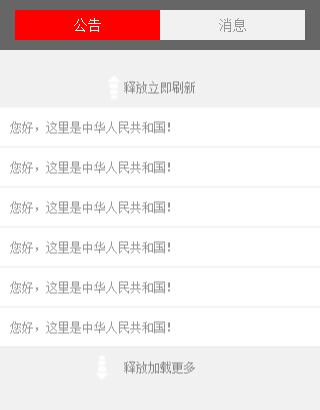
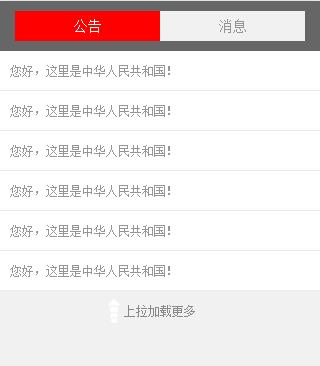
基于zepto的移动端/H5触摸拖动加载更多数据DEMO代码下载
基于zepto的H5/移动端tab切换触摸拖动加载更多数据的更多相关文章
- 移动端touch事件 || 上拉加载更多
前言: 说多了都是泪,在进行项目开发时,在上拉加载更多实现分页效果的问题上,由于当时开发任务紧急,所以就百度找了各种移动端的上拉下拉 实现加载更多的插件.然后就留下了个坑:上拉加载的时候会由于用户错误 ...
- 移动端下拉刷新、加载更多插件dropload.js(基于jQuery/Zepto)
移动端下拉刷新.加载更多插件dropload.js(基于jQuery/Zepto) 原文:http://www.grycheng.com/?p=1869 废话不多说,先让大家看一下案例效果: DEMO ...
- 移动端web页面上滑加载更多功能
背景介绍: 开发企业微信的一个应用,实现在企业微信中调用自己程序页面,页面加载多模块数据,向下滑加载更多,等等等等,一波三折 然后很早就成功了是这样实现的: html: <div id=&quo ...
- 页面上有tab,如何点击加载更多?
加载更多是一个很简单的东西.但是也有几点需要注意: 1.首先在你切换tab的时候,要么在调用这个函数的时候将这个的thispage设为1,要么在切换tab的时候将这个thispage设为1,当你将这个 ...
- 基于SwiperJs的H5/移动端下拉刷新上拉加载更多的效果
最早时,公司的H5项目中曾用过点击一个"加载更多"的DOM元素来实现分页的功能,后来又用过网上有人写的一个上拉加载更多的插件,那个插件是页面将要滚动到底部时就自动请求数据并插入到页 ...
- 基于SwiperJs的H5/移动端下拉刷新上拉加载更多
最早时,公司的H5项目中曾用过点击一个"加载更多"的DOM元素来实现分页的功能,后来又用过网上有人写的一个上拉加载更多的插件,那个插件是页面将要滚动到底部时就自动请求数据并插入到页 ...
- 移动端下拉刷新、加载更多插件dropload.js(基于jQuery/Zepto)[转]
使用方法 引用css和js <link rel="stylesheet" href="../dist/dropload.min.css"> < ...
- h5 实现页面上拉加载更多数据
您好,您的上拉加载更多的代码来喽: html:(style部分:html部分:js部分--js部分主要就是监控上拉,调接口) //上拉加载更多css <style> .wait-loadi ...
- H5页面基于iScroll.js插件实现下拉刷新,上拉加载更多
前言 在我之前的项目中,页面总是干巴巴的,用户的体验不是特别完美,我也是一直觉得把设计师给到的psd做出来就好,很少考虑用户的感受.我喜欢看不同的App,操作每个步骤,观赏每个能和我互动的交互设计效果 ...
随机推荐
- SWFUpload多图上传、C#后端跨域传文件带参数
前几天工作中用到了SWFUpload上传图片,涉及到跨域,因为前端无法实现跨域,所以只能把文件传到后端进行跨域请求,整理分享下. 效果图 前端 html部分 <!DOCTYPE html> ...
- QQ聊天界面模式切换
1.打开一个聊天窗口 2.按照图上步骤 3.模式 3-1气泡模式 3-2文本模式
- SQL 隐藏手机号中间四位
SELECT INSERT(mobile, 4, 4, '****')AS Mobile from Users ;
- React学习笔记-4-什么是生命周期
什么是声明周期?组件本质上就是状态机,输入确定,输出一定确定.如何理解这一点?react有两个特点,第一个就是去除了所有的手动dom操作,也就是使用jsx.第二个就是组件把状态和结果一一对应起来,从而 ...
- [转]程序员趣味读物:谈谈Unicode编码
from : http://pcedu.pconline.com.cn/empolder/gj/other/0505/616631_all.html#content_page_1 这是一篇程序员写给程 ...
- AI与PS
PS 提取边界的方法 http://jingyan.baidu.com/article/4665065864c41ff549e5f80d.html 镜面对称 http://jingyan.baidu. ...
- Adobe illustrator & Photoshop 处理图片
Adobe illustrator 置入,可以将多张图片放在一张纸 (一个sheet)里面. Adobe photoshop: 新建一个图层,然后置入,将图片导入,然后裁剪,最后另存为就可以得到最后的 ...
- 第五课 CSS3 and H5 知识点
概要:CSS3美化样式.自定义字体图标.滤镜设置.CSS3选择器.transform2D转换.新增表单控件.vaild表单验证.表单样式美化等. 属性选择器: E[attr]只使用属性名,但没有确定任 ...
- 获取json数据
通过异步获取json来展示数据表格,性能提高不少.实例如下: 前台: <!DOCTYPE html> <html xmlns="http://www.w3.org/1999 ...
- Python爬虫进阶二之PySpider框架安装配置
关于 首先,在此附上项目的地址,以及官方文档 PySpider 官方文档 安装 1. pip 首先确保你已经安装了pip,若没有安装,请参照 pip安装 2. phantomjs PhantomJS ...