
Servlet的5种方式实现表单提交(注册小功能)
Servlet的5种方式实现表单提交(注册小功能),后台获取表单数据
用servlet实现一个注册的小功能 ,后台获取数据。
注册页面:
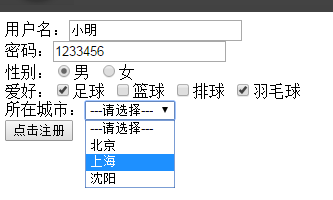
注册页面代码 :

<!DOCTYPE html>

<html>

<head>

<meta charset="UTF-8">

<title>Insert title here</title>

</head>

<body>

    <form action="/RequestDemo/RequestDemo3" method="post">

        用户名:<input type="text" name="userName"><br/>

        密码:<input type="text" name="pwd"><br/>

        性别:<input type="radio" name="sex" value="男" checked="checked">男

            <input type="radio" name="sex" value="女">女<br/>

        爱好:<input type="checkbox" name="hobby" value="足球">足球

            <input type="checkbox" name="hobby" value="篮球">篮球

            <input type="checkbox" name="hobby" value="排球">排球

            <input type="checkbox" name="hobby" value="羽毛球">羽毛球<br/>

        所在城市:<select name="city">

                 <option>---请选择---</option>

                 <option value="bj">北京</option>

                 <option value="sh">上海</option>

                 <option value="sy">沈阳</option>

               </select>

               <br/>

        <input type="submit" value="点击注册">

    </form>

</body>

</html>
人员实体类: 注意:人员实体类要与表单中的name一致,约定要优于编码
package com.chensi.bean;

//实体类中的字段要与表单中的字段一致,约定优于编码

public class User {

    private String userName;

    private String pwd;

    private String sex;

    private String[] hobby;

    private String city;

    public String getUserName() {

        return userName;

    }

    public void setUserName(String userName) {

        this.userName = userName;

    }

    public String getPwd() {

        return pwd;

    }

    public void setPwd(String pwd) {

        this.pwd = pwd;

    }

    public String getSex() {

        return sex;

    }

    public void setSex(String sex) {

        this.sex = sex;

    }

    public String[] getHobby() {

        return hobby;

    }

    public void setHobby(String[] hobby) {

        this.hobby = hobby;

    }

    public String getCity() {

        return city;

    }

    public void setCity(String city) {

        this.city = city;

    }

}
接收方法一: Servlet页面(后台接收数据方法一)
package com.chensi;

import java.io.IOException;

import java.util.Iterator;

import javax.servlet.ServletException;

import javax.servlet.annotation.WebServlet;

import javax.servlet.http.HttpServlet;

import javax.servlet.http.HttpServletRequest;

import javax.servlet.http.HttpServletResponse;

/**

 * Servlet 获得填写的表单数据

 */

@WebServlet("/RequestDemo3")

public class RequestDemo3 extends HttpServlet {

    private static final long serialVersionUID = 1L;

    protected void doGet(HttpServletRequest request, HttpServletResponse response) throws ServletException, IOException {

        request.setCharacterEncoding("UTF-8");

        //获取传过来的表单数据,根据表单中的name获取所填写的值

        String userName = request.getParameter("userName");

        String pwd = request.getParameter("pwd");

        String sex = request.getParameter("sex");

        String[] hobbys = request.getParameterValues("hobby");

        System.out.println(userName);

        System.out.println(pwd);

        System.out.println(sex);

        for (int i = 0; hobbys!=null&&i < hobbys.length; i++) {

            System.out.println(hobbys[i]+"\t");

        }

    }

    protected void doPost(HttpServletRequest request, HttpServletResponse response) throws ServletException, IOException {

        doGet(request, response);

    }

}
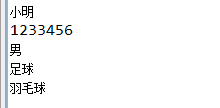
得到的数据:
接收方法二:
package com.chensi;

import java.io.IOException;

import java.util.Enumeration;

import java.util.Iterator;

import javax.servlet.ServletException;

import javax.servlet.annotation.WebServlet;

import javax.servlet.http.HttpServlet;

import javax.servlet.http.HttpServletRequest;

import javax.servlet.http.HttpServletResponse;

/**

 * Servlet 获得填写的表单数据

 */

@WebServlet("/RequestDemo3")

public class RequestDemo3 extends HttpServlet {

    private static final long serialVersionUID = 1L;

    protected void doGet(HttpServletRequest request, HttpServletResponse response) throws ServletException, IOException {

        request.setCharacterEncoding("UTF-8");

        //获取传过来的表单数据,根据表单中的name获取所填写的值

        Enumeration<String> names = request.getParameterNames();

        while (names.hasMoreElements()) {

            String strings = (String) names.nextElement();

            String[] parameterValues = request.getParameterValues(strings);

            for (int i = 0;parameterValues!=null&&i < parameterValues.length; i++) {

                System.out.println(strings+":"+parameterValues[i]+"\t");

            }

        }

    }

    protected void doPost(HttpServletRequest request, HttpServletResponse response) throws ServletException, IOException {

        doGet(request, response);

    }

}
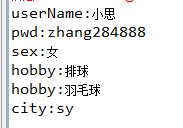
得到的数据:
接收方法三: 利用反射赋值给User
package com.chensi;

import java.beans.IntrospectionException;

import java.beans.PropertyDescriptor;

import java.io.IOException;

import java.lang.reflect.InvocationTargetException;

import java.lang.reflect.Method;

import java.util.Enumeration;

import java.util.Iterator;

import java.util.Map;

import javax.servlet.ServletException;

import javax.servlet.annotation.WebServlet;

import javax.servlet.http.HttpServlet;

import javax.servlet.http.HttpServletRequest;

import javax.servlet.http.HttpServletResponse;

import com.chensi.bean.User;

/**

 * Servlet 获得填写的表单数据

 */

@WebServlet("/RequestDemo3")

public class RequestDemo3 extends HttpServlet {

    private static final long serialVersionUID = 1L;

    protected void doGet(HttpServletRequest request, HttpServletResponse response) throws ServletException, IOException {

        request.setCharacterEncoding("UTF-8");

        //获取传过来的表单数据,根据表单中的name获取所填写的值

            try {

                User u = new User();

                System.out.println("数据封装之前: "+u);

                //获取到表单数据

                Map<String, String[]> map = request.getParameterMap();

                for(Map.Entry<String,String[]> m:map.entrySet()){

                    String name = m.getKey();

                    String[] value = m.getValue();

                    //创建一个属性描述器

                    PropertyDescriptor pd = new PropertyDescriptor(name, User.class);

                    //得到setter属性

                    Method setter = pd.getWriteMethod();

                    if(value.length==1){

                        setter.invoke(u, value[0]);

                    }else{

                        setter.invoke(u, (Object)value);

                    }

                }

                System.out.println("封装数据之后: "+u);

            } catch (IntrospectionException | IllegalAccessException | IllegalArgumentException | InvocationTargetException e) {

                e.printStackTrace();

            }

        }

    protected void doPost(HttpServletRequest request, HttpServletResponse response) throws ServletException, IOException {

        doGet(request, response);

    }

}
得到的结果:

接收方法四:使用apache 的 BeanUtils 工具来进行封装数据(ps:这个Benautils工具,Struts框架就是使用这个来获取表单数据的哦!)
package com.chensi;

import java.beans.IntrospectionException;

import java.beans.PropertyDescriptor;

import java.io.IOException;

import java.lang.reflect.InvocationTargetException;

import java.lang.reflect.Method;

import java.util.Enumeration;

import java.util.Iterator;

import java.util.Map;

import javax.servlet.ServletException;

import javax.servlet.annotation.WebServlet;

import javax.servlet.http.HttpServlet;

import javax.servlet.http.HttpServletRequest;

import javax.servlet.http.HttpServletResponse;

import org.apache.commons.beanutils.BeanUtils;

import com.chensi.bean.User;

/**

 * Servlet 获得填写的表单数据

 */

@WebServlet("/RequestDemo3")

public class RequestDemo3 extends HttpServlet {

    private static final long serialVersionUID = 1L;

    protected void doGet(HttpServletRequest request, HttpServletResponse response) throws ServletException, IOException {

        request.setCharacterEncoding("UTF-8");

        //获取传过来的表单数据,根据表单中的name获取所填写的值

        //方法四:使用beanUtil来封装User类

        User u = new User();

        System.out.println("没有使用BeanUtil封装之前:  "+u);

        try {

            BeanUtils.populate(u, request.getParameterMap());

            System.out.println("使用BeanUtils封装之后:  "+u);

        } catch (IllegalAccessException | InvocationTargetException e) {

            e.printStackTrace();

        }

        }

    protected void doPost(HttpServletRequest request, HttpServletResponse response) throws ServletException, IOException {

        doGet(request, response);

    }

}
得到的结果:

接收方法 方式五: 使用inputStream流来进行接收(一般字符串啥的不用这个方法,一般是文件上传下载时候才会使用这种方法)因为接收到的字符串各种乱码,编码问题解决不好
package com.chensi;

import java.beans.IntrospectionException;

import java.beans.PropertyDescriptor;

import java.io.IOException;

import java.lang.reflect.InvocationTargetException;

import java.lang.reflect.Method;

import java.util.Enumeration;

import java.util.Iterator;

import java.util.Map;

import javax.servlet.ServletException;

import javax.servlet.ServletInputStream;

import javax.servlet.annotation.WebServlet;

import javax.servlet.http.HttpServlet;

import javax.servlet.http.HttpServletRequest;

import javax.servlet.http.HttpServletResponse;

import org.apache.commons.beanutils.BeanUtils;

import com.chensi.bean.User;

/**

 * Servlet 获得填写的表单数据

 */

@WebServlet("/RequestDemo3")

public class RequestDemo3 extends HttpServlet {

    private static final long serialVersionUID = 1L;

    protected void doGet(HttpServletRequest request, HttpServletResponse response) throws ServletException, IOException {

        request.setCharacterEncoding("UTF-8");

        //获取传过来的表单数据,根据表单中的name获取所填写的值

        response.setContentType("text/html;charset=UTF-8");

        //获取表单数据

        ServletInputStream sis = request.getInputStream();

        int len = 0;

        byte[] b = new byte[1024];

        while((len=sis.read(b))!=-1){

            System.out.println(new String(b, 0, len, "UTF-8"));

        }

        sis.close();

    }

    protected void doPost(HttpServletRequest request, HttpServletResponse response) throws ServletException, IOException {

        doGet(request, response);

    }

}
得到的结果:(各种乱码 。。。。)

Servlet的5种方式实现表单提交(注册小功能)的更多相关文章
- Servlet的5种方式实现表单提交(注册小功能),后台获取表单数据
用servlet实现一个注册的小功能 ,后台获取数据. 注册页面: 注册页面代码 : <!DOCTYPE html> <html> <head> <meta ...
- Servlet的5种方式实现表单提交
http://www.cnblogs.com/zhanghaoliang/p/5622900.html
- C# Winform利用POST传值方式模拟表单提交数据(Winform与网页交互)
其原理是,利用winfrom模拟表单提交数据.将要提交的參数提交给网页,网页运行代码.得到数据.然后Winform程序将网页的全部源码读取下来.这样就达到windows应用程序和web应用程序之间传參 ...
- servlet文件上传2——复合表单提交(数据获取和文件上传)
上传文件时表单enctype属性必须要更改为<enctype='multipart/form-data'>:采用post提交表单,元素需要有name属性: 利用第三方jar包(common ...
- JS表单提交的几种方式
第一种方式 : 表单提交,在 form 标签中增加 onsubmit 事件来判断表单是否提交成功 <script type="text/javascript"> fun ...
- 话说Form标签的target属性-----无刷新表单提交
国庆前(2013)无聊,就在铁道部的12306上“逛”了下下. PS:原来之所以叫12306,是因为其客服号码是12306,好吧,我很无知…… 首先是被“逛”的页面:票价查询. 之所以去逛,是因为一直 ...
- 表单提交数据格式form data
前言: 最近遇到的最多的问题就是表单提交数据格式问题了. 常见的三种表单提交数据格式,分别举例说明:(项目是vue的框架) 1.application/x-www-form-urlencoded 提交 ...
- 2017-01-11小程序form表单提交
小程序form表单提交 1.小程序相对于之前的WEB+PHP建站来说,个人理解为只是将web放到了微信端,用小程序固定的格式前前端进行布局.事件触发和数据的输送和读取,服务器端可以用任何后端语言写,但 ...
- 才趟过的一个坑,css造成的Validform表单提交按钮点击无效
最近入手的一个项目,在开发的过程中,遇到了一个以前没遇到过的问题,废了半天的功夫才弄懂原因,留下足迹,警醒后人,下面开始讲故事啦! 在一个昏天暗地的上午,我一个人照常坐在办公室安静的工作中!项目编码已 ...
随机推荐
- 我上线的android版app
把自己开发的几个小的app上线了,在自己的博客中推广一下吧: 聊天兔子: 下载地址:http://android.myapp.com/myapp/detail.htm?apkName=com.fuly ...
- Executor线程池框架
Executor线程池框架 new Thread()的缺点 每次new Thread()耗费性能 调用new Thread()创建的线程缺乏管理,被称为野线程,而且可以无限制创建,之间相互竞争,会导致 ...
- PAT——1064. 朋友数(set用法)
如果两个整数各位数字的和是一样的,则被称为是“朋友数”,而那个公共的和就是它们的“朋友证号”.例如123和51就是朋友数,因为1+2+3 = 5+1 = 6,而6就是它们的朋友证号.给定一些整数,要求 ...
- 【题解】洛谷P4281 [AHOI2008] 紧急集合(求三个点LCA)
洛谷P4281:https://www.luogu.org/problemnew/show/P4281 思路 答案所在的点必定是三个人所在点之间路径上的一点 本蒟蒻一开始的想法是:先求出2个点之间的L ...
- MVC身份验证Attribute简易版
public class MemberValidationAttribute : AuthorizeAttribute { protected override bool AuthorizeCore( ...
- 一点一点看JDK源码(六)java.util.LinkedList前篇之链表概要
一点一点看JDK源码(六)java.util.LinkedList前篇之链表概要 liuyuhang原创,未经允许禁止转载 本文举例使用的是JDK8的API 目录:一点一点看JDK源码(〇) 1.什么 ...
- .Net core 使用Swagger
接触到项目的时候,用了很久的Swagger,发现Swagger真的非常好用,不但方便了调试Web Api,还生成了Api 文档,真是非常的好用啊. 然后我想搞懂到底如何使用Swagger,所以自己建了 ...
- 在Java中用正则表达式判断一个字符串是否是数字的方法
package chengyujia; import java.util.regex.Pattern; public class NumberUtil { /** * 判断一个字符串是否是数字. * ...
- CRT7.3.1版本安装步骤
工具: Setup.exe安装程序 keygen.exe注册机 zwt.nfo 查看电脑信息(主要看自己电脑是x86还x64版本) 安装步骤(所有程序尽量以管理员身份启动) 1.安装SecureCRT ...
- 异常笔记:运行hdfs copyFromLocal 上传文件报错
把本地文件系统,复制到dfs文件系统时报错的错 [hadoop@localhost ~]$ hdfs dfs -copyFromLocal /home/hadoop/mk.txt /xg_test/ ...