
FTP-Server
1.目录:
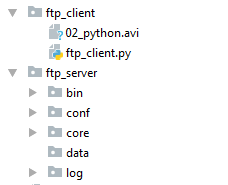
2. ftp_client.py
import socket,os,json

client=socket.socket()

client.connect(('localhost',9999))

class FtpClient(object):

    def __init__(self):

        self.client = socket.socket()

    def help(self):

        msg='''

        ls

        pwd

        cd../..

        get filename

        put filename

        '''

        print(msg)

    def connect(self,ip,port):

        self.client.connect((ip,port))

    def interactive(self):

        while True:

            cmd=input(">>:").strip()

            if len(cmd)==0:continue

            cmd_str=cmd.split()[0]

            if hasattr(self,'cmd_%s'%cmd_str):

                func=getattr(self,'cmd_%s'%cmd_str)

                func(cmd)

            else:

                self.help()

    def cmd_put(self,*args):

        cmd_split=args[0].split()

        if len(cmd_split)>1:

            filename=cmd_split[1]

            if os.path.isfile(filename):

                filesize=os.stat(filename).st_size

                msg_dic={

                    'action':'put',

                    'filename':filename,

                    'size':filesize,

                    'overridden':True

                }

                self.client.send(json.dumps(msg_dic).encode())

                server_response=self.client.recv(1024)

                f=open(filename,'rb')

                for line in f:

                    self.client.send(line)

                else:

                    print('file upload successfully..')

                    f.close()

            else:

                print(filename,"is not exist")

    def cmd_get(self):

        pass

ftp=FtpClient()

ftp.connect('localhost',9999)

ftp.interactive()
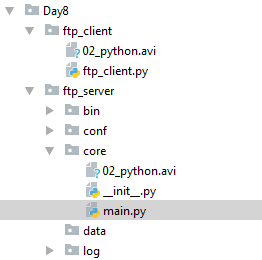
3. Day8->ftp_server -> core ->main.py
import socketserver

import os,json

class MyTCPHandler(socketserver.BaseRequestHandler): #自己写的请求处理类,每个客户端的请求过来,都会实例它。MyTCPHandler

    def put(self,*args): #接收客户端文件

        cmd_dic=args[0]

        filename=cmd_dic['filename']

        filesize=cmd_dic['size']

        if os.path.isfile(filename):

            f=open(filename+'.new','wb')

        else:

            f=open(filename,'wb')

        self.request.send(b'200 ok')

        received_size=0

        while received_size<filesize:

            data=self.request.recv(1024)

            f.write(data)

            received_size=received_size+len(data)

        else:

            print('file uploaded successfully')

    def handle(self): #重写handle()

        while True:

            try:

                self.data = self.request.recv(1024).strip()

                print("{} wrote:".format(self.client_address[0])) #打印客户端的IP地址

                print(self.data)

                cmd_dic=json.loads(self.data.decode())

                action=cmd_dic['action']

                if hasattr(self,action):

                    func=getattr(self,action)

                    func(cmd_dic)

                self.request.sendall(self.data.upper()) #变成大写,传回给客户端。

            except ConnectionResetError as e:

                print('Error is: ',e) #客户端断开时抛出的异常

                break

if __name__ == "__main__":

    HOST, PORT = "localhost", 9999

    server = socketserver.ThreadingTCPServer((HOST, PORT), MyTCPHandler)

    server.serve_forever()
4.运行:实现从客户端到服务器端上传一个视频文件
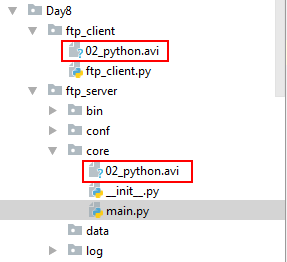
客户端运行:
>>:put 02_python.avi

file upload successfully..

>>:
服务器端运行结果:
127.0.0.1 wrote:

b'{"overridden": true, "filename": "02_python.avi", "action": "put", "size": 68601364}'

file uploaded successfully
FTP-Server的更多相关文章
- Guidance of Set up FTP Server
Step 1. Create a FTP folder in your C disk, named "FTPReport"(an example) Step 2. Install ...
- How to set up an FTP server on Ubuntu 14.04
How to set up an FTP server on Ubuntu 14.04 Setting up a fully-functional and highly secure FTP serv ...
- 多线程查询FTP Server上的文件
情形是这样的,最近做一个自动化的项目,当batch跑成功了,FTP Server上会有特定的生成文件.但是不确定是什么时候会有,大概是batch跑完了5分钟之内吧,所以在脚本里设置检查点的时候,需要每 ...
- NAT后面的FTP SERVER终极篇
原文引用:http://blog.chinaunix.net/uid-20592805-id-1918661.html 如果对于被动模式还有不同的意见,我们可以再看下这篇文章: http://ww ...
- Setup FTP Server On CentOS, RHEL, Scientific Linux 6.5/6.4/6.3
setsebool allow_ftpd_full_access onsetsebool -P ftp_home_dir on vsftpd (Very Secure File Transport P ...
- mac osx 10.9 ftp server端口
开启 FTP Serversudo -s launchctl load -w /System/Library/LaunchDaemons/ftp.plist 关闭 FTP Serversudo -s ...
- ftp server来源分析20140602
ftp server学习位和源代码分析片 记录自己的第一个开源的分析过程: 从源代码:野狐灯(我接下来的几篇文章是从源头:野狐灯,每个以下哪项不是他们设置.) 20140602 Ftp的源码目录例如 ...
- centos 安装FTP server详情(转)
centos 安装FTP server详情 分类: linux 2013-12-27 16:45 227人阅读 评论(0) 收藏 举报 我们这里以安装vsftpd 服务器端为例子: 1.进入到cent ...
- C#从基于FTPS的FTP server下载数据 (FtpWebRequest 的使用)SSL 加密
FTPS,亦或是FTPES, 是FTP协议的一种扩展,用于对TLS和SSL协议的支持. 本文讲述了如何从一个基于FTPS的Server中下载数据的实例. 任何地方,如有纰漏,欢迎诸位道友指教. ...
- setup FTP server on CentOS 7
Setup FTP Server on CentOS 7 Install vsftpd vsftpd (Very Secure File Transport Protocol Daemon) is a ...
随机推荐
- 北京Uber优步司机奖励政策(3月12日~3月13日)
滴快车单单2.5倍,注册地址:http://www.udache.com/ 如何注册Uber司机(全国版最新最详细注册流程)/月入2万/不用抢单:http://www.cnblogs.com/mfry ...
- Java: 数组、列表和集合的互相转换
1. Array 转 List String[] city = {"Nanjing","Shanghai","Beijing"}; List ...
- SSH项目中的困惑之一
1.request.getContextPath()详解 <%=request.getContextPath()%>是为了解决相对路径的问题,可返回站点的根路径. 但不用也可以,比如< ...
- Spring ApplicationContext 简介
ApplicationContext是对BeanFactory的扩展,实现BeanFactory的所有功能,并添加了事件传播,国际化,资源文件处理等. configure locations:(C ...
- python中的迭代器与生成器
迭代器 迭代器的引入 假如我现在有一个列表l=['a','b','c','d','e'],我想取列表中的内容,那么有几种方式? 1.通过索引取值 ,如了l[0],l[1] 2.通过for循环取值 fo ...
- [Clr via C#读书笔记]Cp8方法
Cp8方法 构造器 作用就是初始化所有成员字段:.ctor:派生类和基类都有自己的构造函数.默认有一个无参数的构造函数,值字段初始化为0,引用字段初始化为null:可以有多个构造器: 值类型的初始化其 ...
- MyBatis 注解配置及动态SQL
一.注解配置 目前MyBatis支持注解配置,用注解方式来替代映射文件,但是注解配置还是有点不完善,在开发中使用比较少,大部分的企业还是在用映射文件来进行配置.不完善的地方体现在于当数据表中的字段 ...
- 关于智能指针类型shared_ptr的计数问题
一.关键 每个shared_ptr所指向的对象都有一个引用计数,它记录了有多少个shared_ptr指向自己 shared_ptr的析构函数:递减它所指向的对象的引用计数,如果引用计数变为0,就会销毁 ...
- 动态规划——最长上升子序列LIS及模板
LIS定义 一个数的序列bi,当b1 < b2 < … < bS的时候,我们称这个序列是上升的.对于给定的一个序列(a1, a2, …, aN),我们可以得到一些上升的子序列(ai1 ...
- 团队Beta阶段事后分析
团队Beta阶段事后分析 设想和目标 我们的软件要解决什么问题?是否定义得很清楚?是否对典型用户和典型场景有清晰的描述? 我们的软件要解决用户的休闲娱乐问题,为用户提供好玩的模拟经营类的游戏,游戏主题 ...