
【原创】【ViewFlow+GridView】Parameter must be a descendant of this view问题分析
关于ViewFlow和GridView嵌套导致Parameter must be a descendant of this view问题的解决方案
【关于ViewFlow】
一、功能描述
二、复现场景
2.1 复现环境
2.2 复现步骤
三、Crash Stack Info
 java.lang.IllegalArgumentException: parameter must be a descendant of this view

     at android.view.ViewGroup.offsetRectBetweenParentAndChild(ViewGroup.java:4295)

     at android.view.ViewGroup.offsetDescendantRectToMyCoords(ViewGroup.java:4232)

     at android.view.ViewRootImpl.scrollToRectOrFocus(ViewRootImpl.java:2440)

     at android.view.ViewRootImpl.draw(ViewRootImpl.java:2096)

     at android.view.ViewRootImpl.performDraw(ViewRootImpl.java:2045)

     at android.view.ViewRootImpl.performTraversals(ViewRootImpl.java:1854)

     at android.view.ViewRootImpl.doTraversal(ViewRootImpl.java:989)

     at android.view.ViewRootImpl$TraversalRunnable.run(ViewRootImpl.java:4351)

     at android.view.Choreographer$CallbackRecord.run(Choreographer.java:749)

     at android.view.Choreographer.doCallbacks(Choreographer.java:562)

     at android.view.Choreographer.doFrame(Choreographer.java:532)

     at android.view.Choreographer$FrameDisplayEventReceiver.run(Choreographer.java:735)

     at android.os.Handler.handleCallback(Handler.java:725)

     at android.os.Handler.dispatchMessage(Handler.java:92)

     at android.os.Looper.loop(Looper.java:137)

     at android.app.ActivityThread.main(ActivityThread.java:5041)

     at java.lang.reflect.Method.invokeNative(Native Method)

     at java.lang.reflect.Method.invoke(Method.java:511)

     at com.android.internal.os.ZygoteInit$MethodAndArgsCaller.run(ZygoteInit.java:793)

     at com.android.internal.os.ZygoteInit.main(ZygoteInit.java:560)

     at dalvik.system.NativeStart.main(Native Method)
四、问题分析
4.1 异常描述
     /**

      * Helper method that offsets a rect either from parent to descendant or

      * descendant to parent.

      */

     void offsetRectBetweenParentAndChild(View descendant, Rect rect,

             boolean offsetFromChildToParent, boolean clipToBounds) {

         // already in the same coord system :)

         if (descendant == this) {

             return;

         }

         ViewParent theParent = descendant.mParent;

         // search and offset up to the parent

         while ((theParent != null)

                 && (theParent instanceof View)

                 && (theParent != this)) {

             if (offsetFromChildToParent) {

                 rect.offset(descendant.mLeft - descendant.mScrollX,

                         descendant.mTop - descendant.mScrollY);

                 if (clipToBounds) {

                     View p = (View) theParent;

                     rect.intersect(0, 0, p.mRight - p.mLeft, p.mBottom - p.mTop);

                 }

             } else {

                 if (clipToBounds) {

                     View p = (View) theParent;

                     rect.intersect(0, 0, p.mRight - p.mLeft, p.mBottom - p.mTop);

                 }

                 rect.offset(descendant.mScrollX - descendant.mLeft,

                         descendant.mScrollY - descendant.mTop);

             }

             descendant = (View) theParent;

             theParent = descendant.mParent;

         }

         // now that we are up to this view, need to offset one more time

         // to get into our coordinate space

         if (theParent == this) {

             if (offsetFromChildToParent) {

                 rect.offset(descendant.mLeft - descendant.mScrollX,

                         descendant.mTop - descendant.mScrollY);

             } else {

                 rect.offset(descendant.mScrollX - descendant.mLeft,

                         descendant.mScrollY - descendant.mTop);

             }

         } else {

             throw new IllegalArgumentException("parameter must be a descendant of this view");

         }

     }
在方法最后可以看到该异常。那么该异常到底表示什么意思呢?若想知道答案,我们需要从该方法的实现入手。
4.2 原因探究
4.2.1 异常条件
 ViewParent theParent = descendant.mParent;

 // search and offset up to the parent

 while ((theParent != null)

         && (theParent instanceof View)

         && (theParent != this)) {
当Descendant View的Parent为null、非View实例、当前View时,会跳出循环进入最后的判断。排除当前View,就只剩下两个原因:null和非View实例。
4.2.2 View内Parent的赋值入口
     /**

      * The parent this view is attached to.

      * {@hide}

      *

      * @see #getParent()

      */

     protected ViewParent mParent;
赋值:
     /*

      * Caller is responsible for calling requestLayout if necessary.

      * (This allows addViewInLayout to not request a new layout.)

      */

     void assignParent(ViewParent parent) {

         if (mParent == null) {

             mParent = parent;

         } else if (parent == null) {

             mParent = null;

         } else {

             throw new RuntimeException("view " + this + " being added, but"

                     + " it already has a parent");

         }

     }
透过上述代码,我们可以猜测mParent的赋值方式有两种:直接赋值和调用assignParent方法赋值。
4.2.3 ViewGroup为Descendant指定Parent
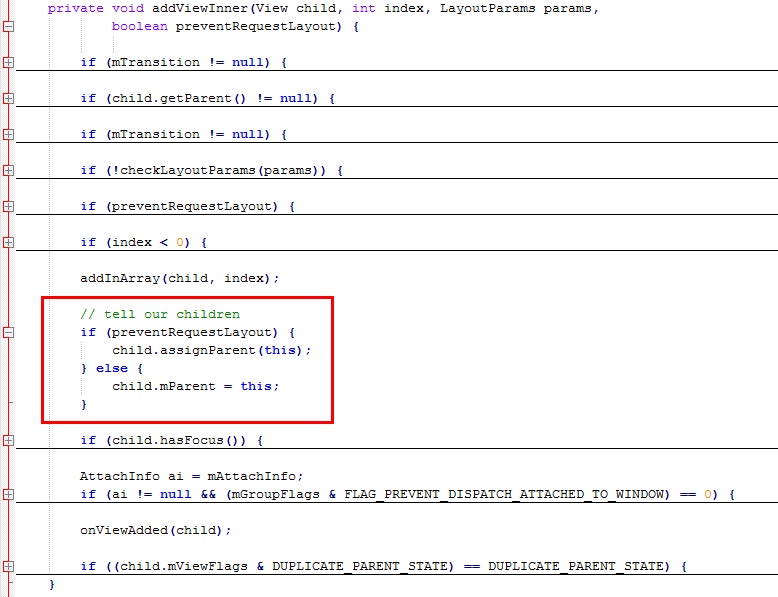

4.2.4 ViewGroup如何移除Descendant
- removeFromArray(int index)------------------移除指定位置的Child
- removeFromArray(int start, int count)-------移除指定位置开始的count个Child
- removeAllViewsInLayout()---------------------移除所有Child
- detachAllViewsFromParent--------------------把所有Child从Parent中分离
4.3 原因深究
4.3.1 ViewGroup为何使用被移除的Descendant
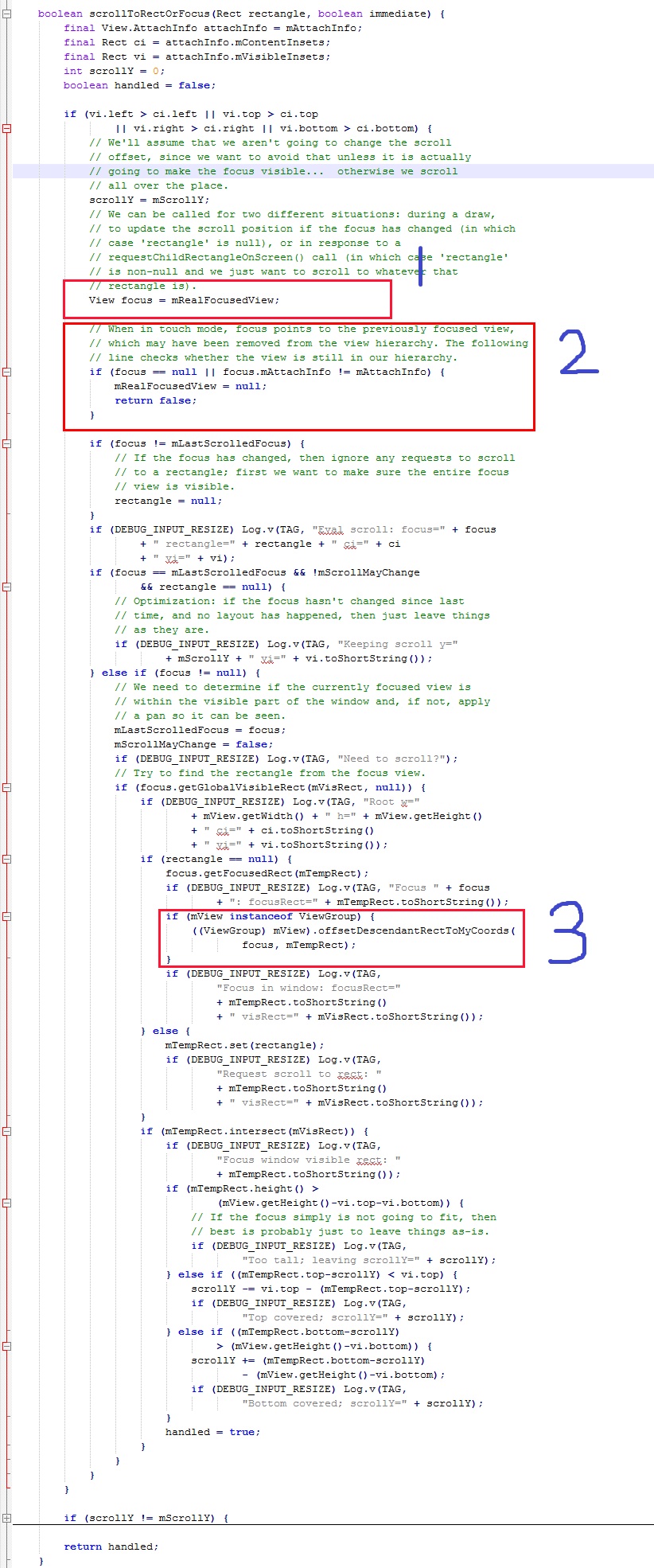

4.3.2 Focused View为什么会被移除
      protected void recycleView(View v) {

          if (v == null)

              return ;

         mRecycledViews.add(v);

         detachViewFromParent(v);

     }
该方法是把ViewFlow的Child移除,并回收到循环利用列表。注意最后一行,调用了detachViewFromParent(View v)方法,代码如下:
     /**

      * Detaches a view from its parent. Detaching a view should be temporary and followed

      * either by a call to {@link #attachViewToParent(View, int, android.view.ViewGroup.LayoutParams)}

      * or a call to {@link #removeDetachedView(View, boolean)}. When a view is detached,

      * its parent is null and cannot be retrieved by a call to {@link #getChildAt(int)}.

      *

      * @param child the child to detach

      *

      * @see #detachViewFromParent(int)

      * @see #detachViewsFromParent(int, int)

      * @see #detachAllViewsFromParent()

      * @see #attachViewToParent(View, int, android.view.ViewGroup.LayoutParams)

      * @see #removeDetachedView(View, boolean)

      */

     protected void detachViewFromParent(View child) {

         removeFromArray(indexOfChild(child));

     }
很明显,直接调用了removeFromArray(int index)方法,正是在4.2.4节中指出的第一个方法,而该方法已经在本节开头被确定为真凶!
五、解决方案
5.1 普通方案与文艺方案
 protected void recycleView(View v) {

     if (v == null)

         return;

     // 方法一:普通方案,已验证可行

     // 如果被移除的View恰好是ViewFlow内当前焦点所在View

     // 则清除焦点(clearChildFocus方法在清除焦点的同时

     // 也把ViewGroup内保存的Focused View引用清除)

     if (v == findFocus()) {

         clearChildFocus(v);

     }

     // 方法二:文艺方案,请自行验证!

     // 下面这个方法也是把View的焦点清除,但是其是否起作用

     // 这里不讲,请读者自行验证、比较。

     // v.clearFocus();

     mRecycledViews.add(v);

     detachViewFromParent(v);

 }
注意代码内的注释。
 /**

 * {@inheritDoc}

 */

 public void clearChildFocus(View child) {

     if (DBG) {

         System.out.println(this + " clearChildFocus()");

     }

     mFocused = null;

     if (mParent != null) {

         mParent.clearChildFocus(this);

     }

 }
View.clearFocus():
 /**

 * Called when this view wants to give up focus. This will cause

 * {@link #onFocusChanged(boolean, int, android.graphics.Rect)} to be called.

 */

 public void clearFocus() {

     if (DBG) {

         System.out.println(this + " clearFocus()");

     }

     if ((mPrivateFlags & FOCUSED) != 0) {

         mPrivateFlags &= ~FOCUSED;

         if (mParent != null) {

             mParent.clearChildFocus(this);

         }

         onFocusChanged(false, 0, null);

         refreshDrawableState();

     }

 }
当然,解决问题方法不止一种!
5.2 2B方案
 /**

 * {@inheritDoc}

 */

 public void requestChildFocus(View child, View focused) {

     if (DBG) {

         System.out.println(this + " requestChildFocus()");

     }

     if (getDescendantFocusability() == FOCUS_BLOCK_DESCENDANTS) {

         return;

     }

     // Unfocus us, if necessary

     super.unFocus();

     // We had a previous notion of who had focus. Clear it.

     if (mFocused != child) {

         if (mFocused != null) {

             mFocused.unFocus();

         }

         mFocused = child;

     }

     if (mParent != null) {

         mParent.requestChildFocus(this, focused);

     }

 }
注意第二个判断条件:如果ViewGroup当前的焦点传递策略是不向下传递,则不指定Focused View。So,下面该如何做,你懂的!整个世界清静了~【原创】【ViewFlow+GridView】Parameter must be a descendant of this view问题分析的更多相关文章
- GridView事件DataBinding,DataBound,RowCreated,RowDataBound区别及执行顺序分析
严格的说,DataBinding,DataBound并不是GridView特有的事件,其他的控件诸如ListBox等也有DataBinding,DataBound事件. DataBinding事件MS ...
- 【原创】C++11:左值和右值(深度分析)
——原创,引用请附带博客地址 2019-12-06 23:42:18 这篇文章分析的还是不行,先暂时放在这以后再更新. 本篇比较长,需要耐心阅读 以一个实际问题开始分析 class Sub{} Sub ...
- 【原创】Linux中断子系统(一)-中断控制器及驱动分析
背景 Read the fucking source code! --By 鲁迅 A picture is worth a thousand words. --By 高尔基 说明: Kernel版本: ...
- 收藏的技术文章链接(ubuntu,python,android等)
我的收藏 他山之石,可以攻玉 转载请注明出处:https://ahangchen.gitbooks.io/windy-afternoon/content/ 开发过程中收藏在Chrome书签栏里的技术文 ...
- ListView中多个EditText设置焦点 多次点击异常报错
08-17 18:23:09.825: ERROR/AndroidRuntime(1608): FATAL EXCEPTION: main 08-17 18:23:09.825: ERROR/Andr ...
- EditText的焦点问题
问题说明: activity中有个三级菜单,三个ListView嵌套,最后一层ListView的item中有EditText控件.要求EditText不仅能手动输入,还能点击加减进行改变.EditTe ...
- Android ViewFlow的一个例子
完成这个例子的步骤: 1.下载ViewFlow的源码,然后将类ViewFlow放在自己的工程的src的某个包下. 2.下载的源码里有2个工程view flow,viewflow-example.将vi ...
- Pytorch中Module,Parameter和Buffer的区别
下文都将torch.nn简写成nn Module: 就是我们常用的torch.nn.Module类,你定义的所有网络结构都必须继承这个类. Buffer: buffer和parameter相对,就是指 ...
- Android GridView 通过seletor 设置状态和默认状态
Android中可以通过selector控制GridView Item 的状态,而省去使用代码控制 GridView View Selector Xml文件 <?xml version=&quo ...
随机推荐
- android Service Activity交互之传递复杂数据类型的远程服务
远程服务往往不只是传递java基本数据类型.这时需要注意android的一些限制和规定: android支持String和CharSequence 如果需要在aidl中使用其他aidl接口类型,需要i ...
- shell if判断的种类
if [ $# != 1 ] ; then echo "USAGE: $0 TABNAME" echo " e.g.: $0 CDR_CALL_20040701" ...
- ostream类重载的operator<<()函数
ostream类重载了operator<<()以识别不同的类型,如: int short long unsigned int unsigned short unsigned long f ...
- 这个好像、也许、或许、大概、应该、Maybe真的可以算是传说中的Spring.Net了吧
这个好像.也许.或许.大概.应该.Maybe真的可以算是传说中的Spring.Net了吧 ...
- hibernate.cfg.xml 配置(摘录)
配置文件中映射元素详解 对象关系的映射是用一个XML文档来说明的.映射文档可以使用工具来生成,如XDoclet,Middlegen和AndroMDA等.下面从一个映射的例子开始讲解映射元素,映射文件的 ...
- Window.document对象(2)
四.操作样式 首先利用元素的ID找到该元素,存于一个变量中: var a = document.getElementById("id"): 然后可以对该元素的属性进行操作: a.s ...
- discuz之搭建
本篇将介绍IIS+MySQL+DiscuzX3.1+UCenter1.6+Asp.Net+PHP的部署 大部分都是搬运过来的,当然我会注明搬运地点 搭建 首先说明本机基本信息 系统========== ...
- bzoj 2743 树状数组离线查询
我们按照询问的右端点排序,然后对于每一个位置,记录同颜色 上一个出现的位置,每次将上上位置出现的+1,上次出现的-1,然后 用树状数组维护就好了 /************************** ...
- HDU1005Number Sequence(找规律)
Number Sequence Time Limit: 2000/1000 MS (Java/Others) Memory Limit: 65536/32768 K (Java/Others)T ...
- jetty启动报错Unsupported major.minor version 51.0
主要是JDK版本的问题,需要将Eclipse的Jdk版本设置为1.7的才可以,编译级别也设置为1.7,然后删除maven项目路径,D:\WORK\workspace\xxx\target下的所有文件, ...