
【原创】【ViewFlow+GridView】Parameter must be a descendant of this view问题分析
关于ViewFlow和GridView嵌套导致Parameter must be a descendant of this view问题的解决方案
【关于ViewFlow】
一、功能描述
二、复现场景
2.1 复现环境
2.2 复现步骤
三、Crash Stack Info
 java.lang.IllegalArgumentException: parameter must be a descendant of this view

     at android.view.ViewGroup.offsetRectBetweenParentAndChild(ViewGroup.java:4295)

     at android.view.ViewGroup.offsetDescendantRectToMyCoords(ViewGroup.java:4232)

     at android.view.ViewRootImpl.scrollToRectOrFocus(ViewRootImpl.java:2440)

     at android.view.ViewRootImpl.draw(ViewRootImpl.java:2096)

     at android.view.ViewRootImpl.performDraw(ViewRootImpl.java:2045)

     at android.view.ViewRootImpl.performTraversals(ViewRootImpl.java:1854)

     at android.view.ViewRootImpl.doTraversal(ViewRootImpl.java:989)

     at android.view.ViewRootImpl$TraversalRunnable.run(ViewRootImpl.java:4351)

     at android.view.Choreographer$CallbackRecord.run(Choreographer.java:749)

     at android.view.Choreographer.doCallbacks(Choreographer.java:562)

     at android.view.Choreographer.doFrame(Choreographer.java:532)

     at android.view.Choreographer$FrameDisplayEventReceiver.run(Choreographer.java:735)

     at android.os.Handler.handleCallback(Handler.java:725)

     at android.os.Handler.dispatchMessage(Handler.java:92)

     at android.os.Looper.loop(Looper.java:137)

     at android.app.ActivityThread.main(ActivityThread.java:5041)

     at java.lang.reflect.Method.invokeNative(Native Method)

     at java.lang.reflect.Method.invoke(Method.java:511)

     at com.android.internal.os.ZygoteInit$MethodAndArgsCaller.run(ZygoteInit.java:793)

     at com.android.internal.os.ZygoteInit.main(ZygoteInit.java:560)

     at dalvik.system.NativeStart.main(Native Method)
四、问题分析
4.1 异常描述
     /**

      * Helper method that offsets a rect either from parent to descendant or

      * descendant to parent.

      */

     void offsetRectBetweenParentAndChild(View descendant, Rect rect,

             boolean offsetFromChildToParent, boolean clipToBounds) {

         // already in the same coord system :)

         if (descendant == this) {

             return;

         }

         ViewParent theParent = descendant.mParent;

         // search and offset up to the parent

         while ((theParent != null)

                 && (theParent instanceof View)

                 && (theParent != this)) {

             if (offsetFromChildToParent) {

                 rect.offset(descendant.mLeft - descendant.mScrollX,

                         descendant.mTop - descendant.mScrollY);

                 if (clipToBounds) {

                     View p = (View) theParent;

                     rect.intersect(0, 0, p.mRight - p.mLeft, p.mBottom - p.mTop);

                 }

             } else {

                 if (clipToBounds) {

                     View p = (View) theParent;

                     rect.intersect(0, 0, p.mRight - p.mLeft, p.mBottom - p.mTop);

                 }

                 rect.offset(descendant.mScrollX - descendant.mLeft,

                         descendant.mScrollY - descendant.mTop);

             }

             descendant = (View) theParent;

             theParent = descendant.mParent;

         }

         // now that we are up to this view, need to offset one more time

         // to get into our coordinate space

         if (theParent == this) {

             if (offsetFromChildToParent) {

                 rect.offset(descendant.mLeft - descendant.mScrollX,

                         descendant.mTop - descendant.mScrollY);

             } else {

                 rect.offset(descendant.mScrollX - descendant.mLeft,

                         descendant.mScrollY - descendant.mTop);

             }

         } else {

             throw new IllegalArgumentException("parameter must be a descendant of this view");

         }

     }
在方法最后可以看到该异常。那么该异常到底表示什么意思呢?若想知道答案,我们需要从该方法的实现入手。
4.2 原因探究
4.2.1 异常条件
 ViewParent theParent = descendant.mParent;

 // search and offset up to the parent

 while ((theParent != null)

         && (theParent instanceof View)

         && (theParent != this)) {
当Descendant View的Parent为null、非View实例、当前View时,会跳出循环进入最后的判断。排除当前View,就只剩下两个原因:null和非View实例。
4.2.2 View内Parent的赋值入口
     /**

      * The parent this view is attached to.

      * {@hide}

      *

      * @see #getParent()

      */

     protected ViewParent mParent;
赋值:
     /*

      * Caller is responsible for calling requestLayout if necessary.

      * (This allows addViewInLayout to not request a new layout.)

      */

     void assignParent(ViewParent parent) {

         if (mParent == null) {

             mParent = parent;

         } else if (parent == null) {

             mParent = null;

         } else {

             throw new RuntimeException("view " + this + " being added, but"

                     + " it already has a parent");

         }

     }
透过上述代码,我们可以猜测mParent的赋值方式有两种:直接赋值和调用assignParent方法赋值。
4.2.3 ViewGroup为Descendant指定Parent
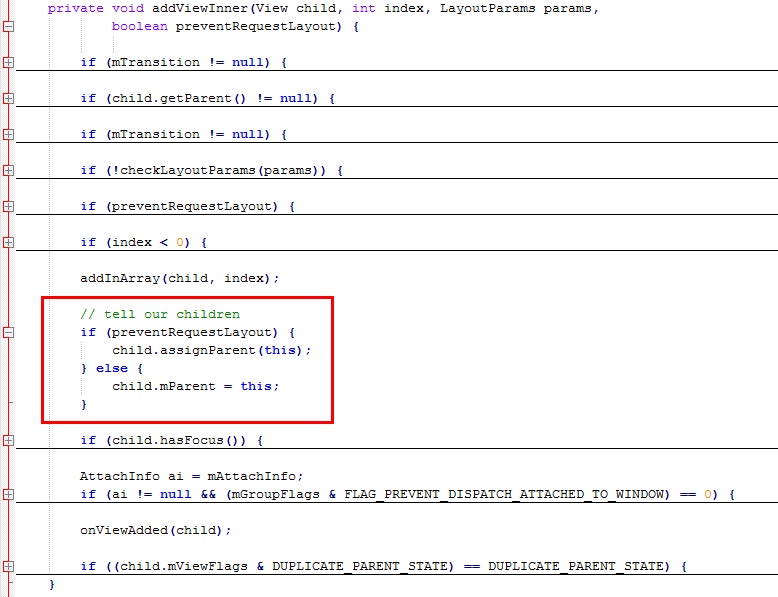

4.2.4 ViewGroup如何移除Descendant
- removeFromArray(int index)------------------移除指定位置的Child
- removeFromArray(int start, int count)-------移除指定位置开始的count个Child
- removeAllViewsInLayout()---------------------移除所有Child
- detachAllViewsFromParent--------------------把所有Child从Parent中分离
4.3 原因深究
4.3.1 ViewGroup为何使用被移除的Descendant
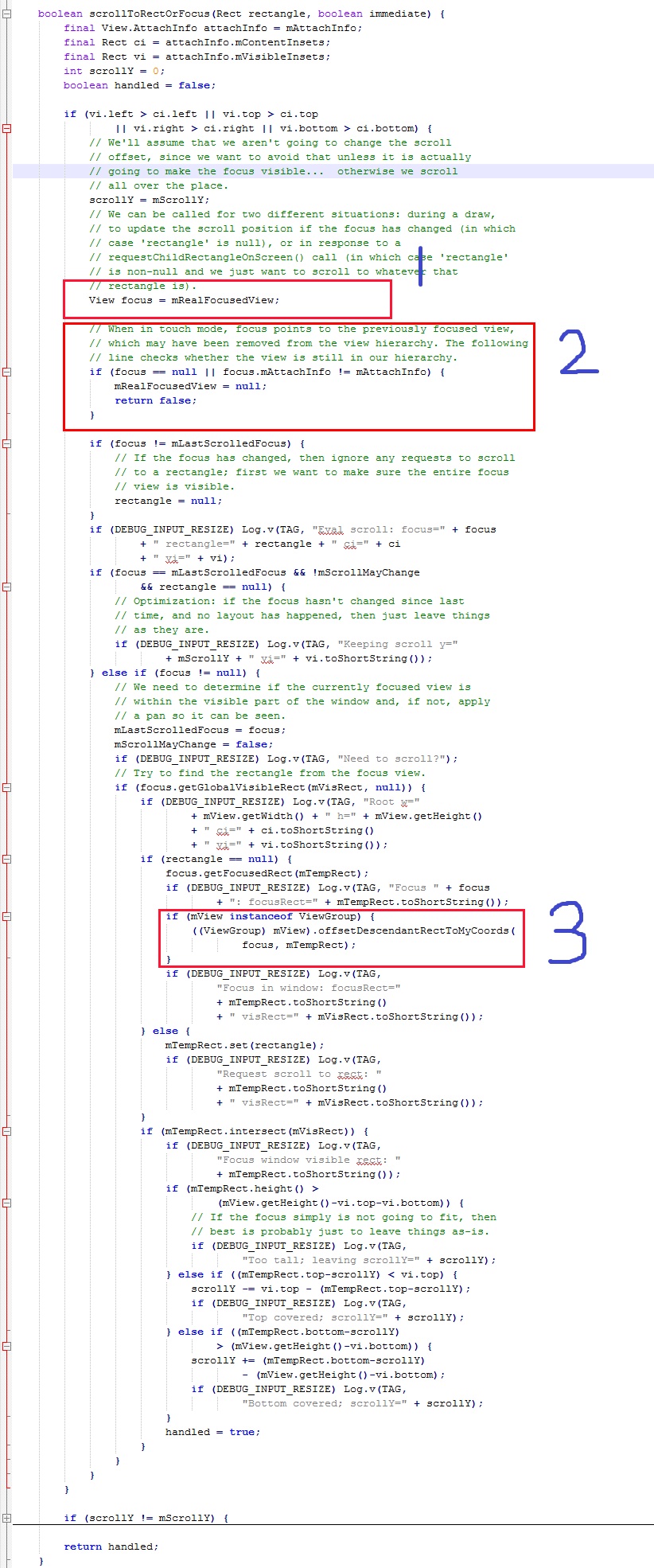

4.3.2 Focused View为什么会被移除
      protected void recycleView(View v) {

          if (v == null)

              return ;

         mRecycledViews.add(v);

         detachViewFromParent(v);

     }
该方法是把ViewFlow的Child移除,并回收到循环利用列表。注意最后一行,调用了detachViewFromParent(View v)方法,代码如下:
     /**

      * Detaches a view from its parent. Detaching a view should be temporary and followed

      * either by a call to {@link #attachViewToParent(View, int, android.view.ViewGroup.LayoutParams)}

      * or a call to {@link #removeDetachedView(View, boolean)}. When a view is detached,

      * its parent is null and cannot be retrieved by a call to {@link #getChildAt(int)}.

      *

      * @param child the child to detach

      *

      * @see #detachViewFromParent(int)

      * @see #detachViewsFromParent(int, int)

      * @see #detachAllViewsFromParent()

      * @see #attachViewToParent(View, int, android.view.ViewGroup.LayoutParams)

      * @see #removeDetachedView(View, boolean)

      */

     protected void detachViewFromParent(View child) {

         removeFromArray(indexOfChild(child));

     }
很明显,直接调用了removeFromArray(int index)方法,正是在4.2.4节中指出的第一个方法,而该方法已经在本节开头被确定为真凶!
五、解决方案
5.1 普通方案与文艺方案
 protected void recycleView(View v) {

     if (v == null)

         return;

     // 方法一:普通方案,已验证可行

     // 如果被移除的View恰好是ViewFlow内当前焦点所在View

     // 则清除焦点(clearChildFocus方法在清除焦点的同时

     // 也把ViewGroup内保存的Focused View引用清除)

     if (v == findFocus()) {

         clearChildFocus(v);

     }

     // 方法二:文艺方案,请自行验证!

     // 下面这个方法也是把View的焦点清除,但是其是否起作用

     // 这里不讲,请读者自行验证、比较。

     // v.clearFocus();

     mRecycledViews.add(v);

     detachViewFromParent(v);

 }
注意代码内的注释。
 /**

 * {@inheritDoc}

 */

 public void clearChildFocus(View child) {

     if (DBG) {

         System.out.println(this + " clearChildFocus()");

     }

     mFocused = null;

     if (mParent != null) {

         mParent.clearChildFocus(this);

     }

 }
View.clearFocus():
 /**

 * Called when this view wants to give up focus. This will cause

 * {@link #onFocusChanged(boolean, int, android.graphics.Rect)} to be called.

 */

 public void clearFocus() {

     if (DBG) {

         System.out.println(this + " clearFocus()");

     }

     if ((mPrivateFlags & FOCUSED) != 0) {

         mPrivateFlags &= ~FOCUSED;

         if (mParent != null) {

             mParent.clearChildFocus(this);

         }

         onFocusChanged(false, 0, null);

         refreshDrawableState();

     }

 }
当然,解决问题方法不止一种!
5.2 2B方案
 /**

 * {@inheritDoc}

 */

 public void requestChildFocus(View child, View focused) {

     if (DBG) {

         System.out.println(this + " requestChildFocus()");

     }

     if (getDescendantFocusability() == FOCUS_BLOCK_DESCENDANTS) {

         return;

     }

     // Unfocus us, if necessary

     super.unFocus();

     // We had a previous notion of who had focus. Clear it.

     if (mFocused != child) {

         if (mFocused != null) {

             mFocused.unFocus();

         }

         mFocused = child;

     }

     if (mParent != null) {

         mParent.requestChildFocus(this, focused);

     }

 }
注意第二个判断条件:如果ViewGroup当前的焦点传递策略是不向下传递,则不指定Focused View。So,下面该如何做,你懂的!整个世界清静了~【原创】【ViewFlow+GridView】Parameter must be a descendant of this view问题分析的更多相关文章
- GridView事件DataBinding,DataBound,RowCreated,RowDataBound区别及执行顺序分析
严格的说,DataBinding,DataBound并不是GridView特有的事件,其他的控件诸如ListBox等也有DataBinding,DataBound事件. DataBinding事件MS ...
- 【原创】C++11:左值和右值(深度分析)
——原创,引用请附带博客地址 2019-12-06 23:42:18 这篇文章分析的还是不行,先暂时放在这以后再更新. 本篇比较长,需要耐心阅读 以一个实际问题开始分析 class Sub{} Sub ...
- 【原创】Linux中断子系统(一)-中断控制器及驱动分析
背景 Read the fucking source code! --By 鲁迅 A picture is worth a thousand words. --By 高尔基 说明: Kernel版本: ...
- 收藏的技术文章链接(ubuntu,python,android等)
我的收藏 他山之石,可以攻玉 转载请注明出处:https://ahangchen.gitbooks.io/windy-afternoon/content/ 开发过程中收藏在Chrome书签栏里的技术文 ...
- ListView中多个EditText设置焦点 多次点击异常报错
08-17 18:23:09.825: ERROR/AndroidRuntime(1608): FATAL EXCEPTION: main 08-17 18:23:09.825: ERROR/Andr ...
- EditText的焦点问题
问题说明: activity中有个三级菜单,三个ListView嵌套,最后一层ListView的item中有EditText控件.要求EditText不仅能手动输入,还能点击加减进行改变.EditTe ...
- Android ViewFlow的一个例子
完成这个例子的步骤: 1.下载ViewFlow的源码,然后将类ViewFlow放在自己的工程的src的某个包下. 2.下载的源码里有2个工程view flow,viewflow-example.将vi ...
- Pytorch中Module,Parameter和Buffer的区别
下文都将torch.nn简写成nn Module: 就是我们常用的torch.nn.Module类,你定义的所有网络结构都必须继承这个类. Buffer: buffer和parameter相对,就是指 ...
- Android GridView 通过seletor 设置状态和默认状态
Android中可以通过selector控制GridView Item 的状态,而省去使用代码控制 GridView View Selector Xml文件 <?xml version=&quo ...
随机推荐
- 寻找idea...
域名:tianhuangdilao.com 天荒地老 现在闲置,寻求好的idea...
- 如何在Win10下设置图片的浏览方式为windows照片查看器
小编前些天刚装好了win10,一阵心奋啊,今天刚打开一个图片,却发现图片的默认打开方式是window应用商店的app, 这让我觉得特别不舒服,没有之前windows自带的照片查看器好用,后来我本想进入 ...
- android开发 根据Uri获取真实路径
Uri uri = data.getData(); String[] proj = { MediaStore.Images.Media.DATA }; Cursor actualimagecursor ...
- 自己学习编程时间比较短,现在把一下自己以前刚刚接触C++时的程序上传一下,有空可以看看
键盘输入十个数,找出最大值和最小值. #include<iostream.h>void main (){int a[10];int i,t,max,min;cout<<&quo ...
- 【BZOJ】【3991】【SDOI2015】寻宝游戏
dfs序 我哭啊……这题在考试的时候(我不是山东的,CH大法吼)没想出来……只写了50分的暴力QAQ 而且苦逼的写的比正解还长……我骗点分容易吗QAQ 骗分做法: 1.$n,m\leq 1000$: ...
- JSP页面动态联动
效果如图: 页面用法: body部分: 注意:控制层Controller中:
- Orchard中文学习视频录制完成
Orchard学习视频已登录百度传课: http://www.chuanke.com/3027295-124882.html http://pan.baidu.com/s/13zc0u 1.orcha ...
- web项目首页提示404
我也是服了,估计是项目有问题,只能找jsp,找不到html和htm.把list中多余的都删掉,只保留index.jsp <welcome-file-list> <welcome-fi ...
- 查看windows系统热键占用情况
有时候我们经常用一些软件中的快捷键,但是会发现快捷键设置的很正确,但是就是不起作用.这就是因为这些快捷键被系统或者其他软件占用了. 那么这时我们怎么知道是哪个软件占用了呢?这确实是个纠结的问题,还好大 ...
- HDOJ 1050 Moving Tables
Moving Tables Time Limit: 2000/1000 MS (Java/Others) Memory Limit: 65536/32768 K (Java/Others)Tot ...