
Creating Dynamic LOV in Oracle D2k Forms
Dynamic Lov is a good idea for the form where too many Lov requirement is there with different record groups. In this blog you will learn create dynamic Lov step by step.
See also:
http://www.foxinfotech.in/2015/01/populate-list-with-recordgroup-in-oracle-forms.html
http://www.foxinfotech.in/2013/04/adding-value-combolist-runtime-oforms.html
http://www.foxinfotech.in/2013/03/when-validate-item-trigger-oracle-forms.html
http://www.foxinfotech.in/2012/11/creating-list-item-in-oracle-d2k_9366.html
Step-1 Create a Single Lov (you can give any name)
1. Click on form builder navigator Lovs node and then click on Add button. Select create lov manually option from the window.
Step-2 Create Record Group (you can give any name)
2. Click on form builder navigator Record Groups and then click on Add button and set the properties and query as displayed in below image.

Step-3 Create Parameters
3. Click on Parameter node and then click on Add button and create 4 Char type Parameters as displayed below:
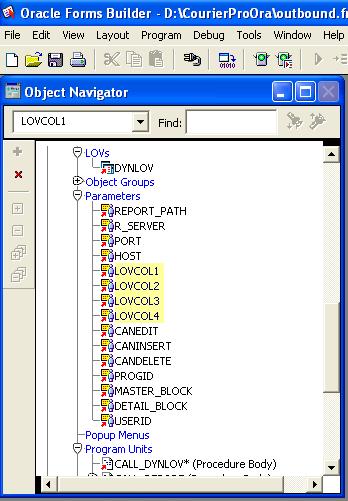

Step-5 Set Lov Column Mapping Properties
5. Set the Lov's Column Mapping Properties with the parameters as show below:
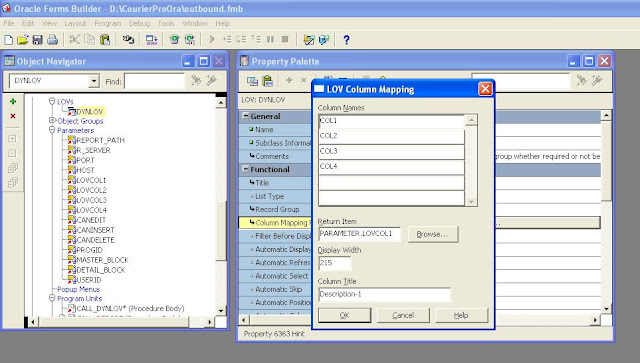
Step-6 Create a procedure to populate lov
PROCEDURE call_dynlov (IGroupName in Varchar2)
IS
blov boolean;
begin
:parameter.lovcol1 := null;
:parameter.lovcol2 := null;
:parameter.lovcol3 := Null;
:parameter.lovcol4 := Null;
set_lov_property('dynlov', group_name, IgroupName);
set_lov_property('dynlov', position, (get_application_property(display_width)-600)/2,
(get_application_property(display_height)-250)/2-50);
blov := show_lov('dynlov');
if not blov then
message('Value not choosen.');
end if;
end;
Finally Call to this Lov with the following code:
DECLARE
rg_name VARCHAR2(40) := 'YrGroup';
rg_id RecordGroup;
errcode NUMBER;
BEGIN
rg_id := Find_Group( rg_name );
--- Create group with 4 column because we already set the lov property for 4 cols, these 3 and 4 cols will --- be not mapped to any fields
if not id_null(rg_id) then
delete_group(rg_id);
end if;
rg_id :=
Create_Group_From_Query( rg_name, 'select main_menu_name col1, sub_menu_name col2, ''3'' col3, ''4'' col4 from
fox_main_menu a, fox_sub_menu b
where a.main_menu_code = b.main_menu_code order by 1,2');
--- call the procedure
call_dynlov(rg_name);
if :parameter.lovcol1 is not null then
--- if lov selected and parameter 1 value is not null then map to field
:fox_user_prog.mmn := :parameter.lovcol1;
:Fox_user_prog.smn := :parameter.lovcol2;
end if;
END;
See also: Oracle Forms Recipes
Like us to get notifications for free source code in future, thanks.
Dynamic LOV in Oracle Forms
Reviewed by Joseph on
Feb 10
Rating:
5
Creating Dynamic LOV in Oracle D2k Forms的更多相关文章
- Creating Timer in Oracle D2k / Forms 6i and Displaying a Clock
Creating Timer in Oracle D2k / Forms 6i and Displaying a Clock This is about timer in D2k An externa ...
- Using GET_APPLICATION_PROPERTY in Oracle D2k Forms
Using GET_APPLICATION_PROPERTY in Oracle D2k Forms DescriptionReturns information about the current ...
- DISPLAY_ITEM built-in in Oracle D2k Forms
DISPLAY_ITEM built-in in Oracle D2k Forms DescriptionMaintained for backward compatibility only. For ...
- Refresh / Updating a form screen in Oracle D2k Forms 6i
Refresh / Updating a form screen in Oracle D2k Forms 6i ProblemYou want to show number of records pr ...
- CHECKBOX_CHECKED built-in in Oracle D2k Forms
CHECKBOX_CHECKED built-in in Oracle D2k Forms DescriptionA call to the CHECKBOX_CHECKED function ret ...
- Creating List Item in Oracle D2k
Special Tips for List Items in Oracle D2k In this section, I shall discuss some special tips and tec ...
- How To Tune or Test PLSQL Code Performance in Oracle D2k Forms
You can test or tune your program unit performance in Oracle forms with Ora_Prof package.Suppose you ...
- Reading Csv Files with Text_io in Oracle D2k Forms
Below is the example to read and import comma delimited csv file in oracle forms with D2k_Delimited_ ...
- Creating Object Library OLB in Oracle D2k Form
With following steps you can create Object Library (OLB) in Oracle D2k Forms.Step - 1Create a form i ...
随机推荐
- OpenStack 计算节点关机,虚拟机状态解决办法
检查服务正常化 1 nova-manage service list 发现很多nova服务没有启动. 全部启动,直到nova-manage service list所有服务都是:)而不是XXX. 虚拟 ...
- js操作记录
让checkbox全选 $("#checkall").click(function(){ $("input[name='checklist']").prop(& ...
- 获取url中的参数\+发送ajax请求根路径|+获取复选框的值
//获取url中的参数function getUrlParam(name) { var reg = new RegExp("(^|&)" + name + "=( ...
- iOS的通知Notification
这里是不同的对象之间的通知, 不是本地通知. 一开始玩, 很挠头, 后来发现原来只是对象init的过程出了问题. 首先, 新建一个简单的单controller的工程. 然后打开它的ViewContro ...
- C# 探索c#之Async、Await剖析
探索c#之Async.Await剖析 作者:蘑菇先生 出处:http://mushroom.cnblogs.com/
- MyBatis的Dao层注入SqlSession
有点坑爹,以前没用过Mybatis,最近才用,而且一直用Mybatis推荐的接口映射的方式,但是今天有人告诉我接口方式用得少,大多还是采用从配置文件里面读sql的方式,当然接口也是类似的,都是利用ma ...
- DE1-SOC开发板上搭建NIOS II处理器运行UCOS II
DE1-SOC开发板上搭建NIOS II处理器运行UCOS II 今天在DE1-SOC的开发板上搭建NIOS II软核运行了UCOS II,整个开发过程比较繁琐,稍微有一步做的不对,就会导致整个过 ...
- RAC例子
我个人非常推崇ReactiveCocoa,它就像中国的太极,太极生两仪,两仪生四象,四象生八卦,八卦生万物.ReactiveCocoa是一个高度抽象的编程框架,它真的很抽象,初看你不知道它是要干嘛的, ...
- Linux下Date命令的用法
转自http://blog.chinaunix.net/uid-8223172-id-2511672.html linux下date的用法比较复杂,但是也用的比较多,尤其是shell里面.现总结一下自 ...
- [Ogre][地形]OgreTerrain分析以及使用
Ogre 1.7.2中的地形教程 ○读者可以对照着Ogre1.7.2中的terrain.h源码进行阅读加深理解,蓝色部分均为源码 ○去除了一些具体场景比如添加mesh,设置setAmbientLigh ...